-
-
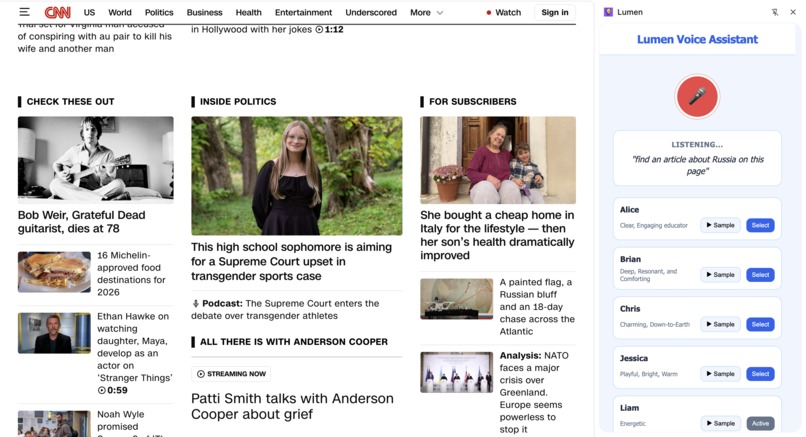
Finding articles online (Produced an audio prompt with the article title and its location)
-
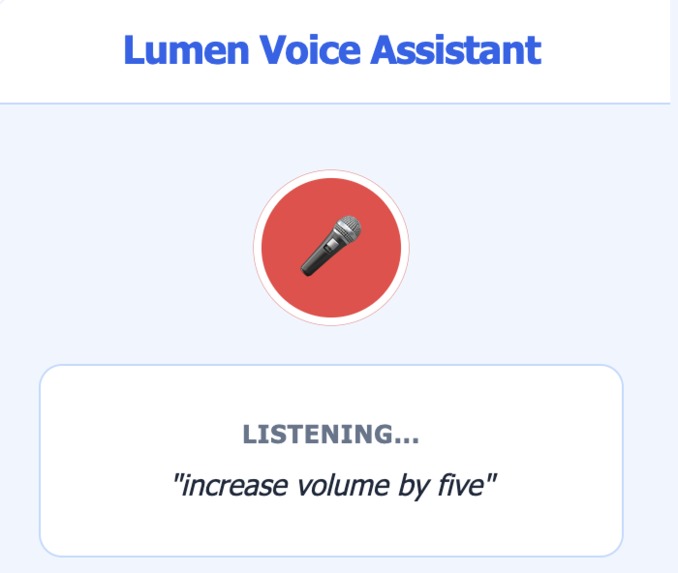
Interacting with videos to increase volume
Inspiration
I spent my last reading week with my grandparents and noticed how unintuitive some of the tech features that I often take for granted are. In fact, one of my grandparents had so much trouble with the web that he simply gave up and refused to use it for anything, including communicating with family. This extension aims to help those with less tech experience navigate the web more easily so that no one is excluded from the internet.
What it does
An all-in-one voice assistant, we have basic accessibility features like zooming, searching, scrolling, clicking links, and adjusting the volume that are purely voice-activated.
But more importantly, our AI assistant can process any command the user has and assist to the best of their ability. Currently, this includes locating buttons, summarizing text, and helping with the Daily Crossword!
For example, some pages have quite small search bars that are tucked away in the top corner, making them difficult to locate for those with poorer eyesight. By simply asking "Where is the search bar?", our extension can find the search bar on the page, draw the user's attention to it with a bright red circle, and create a voice command that explains where to find it. This feature can also be used to locate certain articles on a new site, products on Amazon, and many more.
How we built it
Lumen uses Google's WebKit speech recognition to convert the user's microphone into actionable text. By sending this text to Gemini 2.0 flash through the OpenRouter API, Lumen extracts what the request is and handles it by directly modifying the page's HTML. If the user request requires a voice response instructing the user how to proceed, Gemini produces a concise script, then Lumen sends that script to the ElevenLabs API, and plays the resulting audio.
Challenges we ran into
We initially wanted our extension to fit in a small pop-up, which required us to continuously attempt to work around Google's security features. This includes the Chrome extension closing on every new tab clicked, which shuts off the microphone. We attempted to run the microphone in an offscreen html file to get around this, but Google's WebKit speech recognition is not able to run in offscreen scripts. We attempted to fix this by sending the raw audio (encoded) back to our content scripts to be processed there, but this was very inconsistent as the data would frequently corrupt. Because of this, we decided on using a sidebar Chrome extension so that we can record continuously. Although this comes with the tradeoff of taking up more screen space, we thought it was paramount for our target audience of non-tech-savvy people that we minimize the number of button presses possible, which meant that pressing a button before every request was not feasible.
Another challenge was developing the system to produce red circles to highlight areas. This is because we had to develop a coordinate system for the browser window, but this was often offset by the pixel coordinates from the screenshot that was given to Gemini. As such, clicking links and red circles were both very inaccurate at the start, so we needed to determine an appropriate adjustment factor so that it would work as intended.
Accomplishments that we're proud of
For all of our team members, this was our first design hackathon. We are both incredibly proud of the idea that we were able to come up with, as we believe it has the potential to be truly useful for a specific subset of people.
We're also proud of the way we were able to implement AI in a way that is simple and hopefully non-threatening towards our target audience of elderly people, who can often be wary of new technology. We are both incredibly happy that in only 24 hours, we were able to create a fully-working agent that we can continue to use with our own families after the hackathon is over.
What we learned
We both learned a lot about web development, Chrome extensions, and how annoying Google's security restrictions can be(Even if they are necessary).
What's next for Lumen
In the future, we would like to continue developing Lumen to transition it from being a sidebar extension into a pop-up that takes up less screen space. We would also like to continue adding more features to our agent so that eventually, Lumen can be fully used to navigate the web. This includes, but is not limited to, generating bookmarks, improving the accuracy of link clicking, and closing tabs. Additionally, we would also like to make this publicly available once we are finished so that anyone can use Lumen.
Built With
- elevenlabs
- gemini
- html/css
- javascript
- openrouter


Log in or sign up for Devpost to join the conversation.