Lumen: AI-Powered Accessibility Suite
Inspiration
The internet should be accessible to everyone, yet millions of users face daily barriers online. Whether it's visual impairments, dyslexia, ADHD, language differences, or motor difficulties - traditional web experiences often fail to accommodate diverse needs. We were inspired by the growing need for inclusive technology that doesn't just add accessibility as an afterthought, but builds it into the core experience. Lumen was born from the vision of creating a comprehensive solution that leverages AI to make the web truly accessible for all.
What it does
Lumen is a Chrome extension that instantly transforms any webpage into an accessible, personalized experience. With one click, users can:
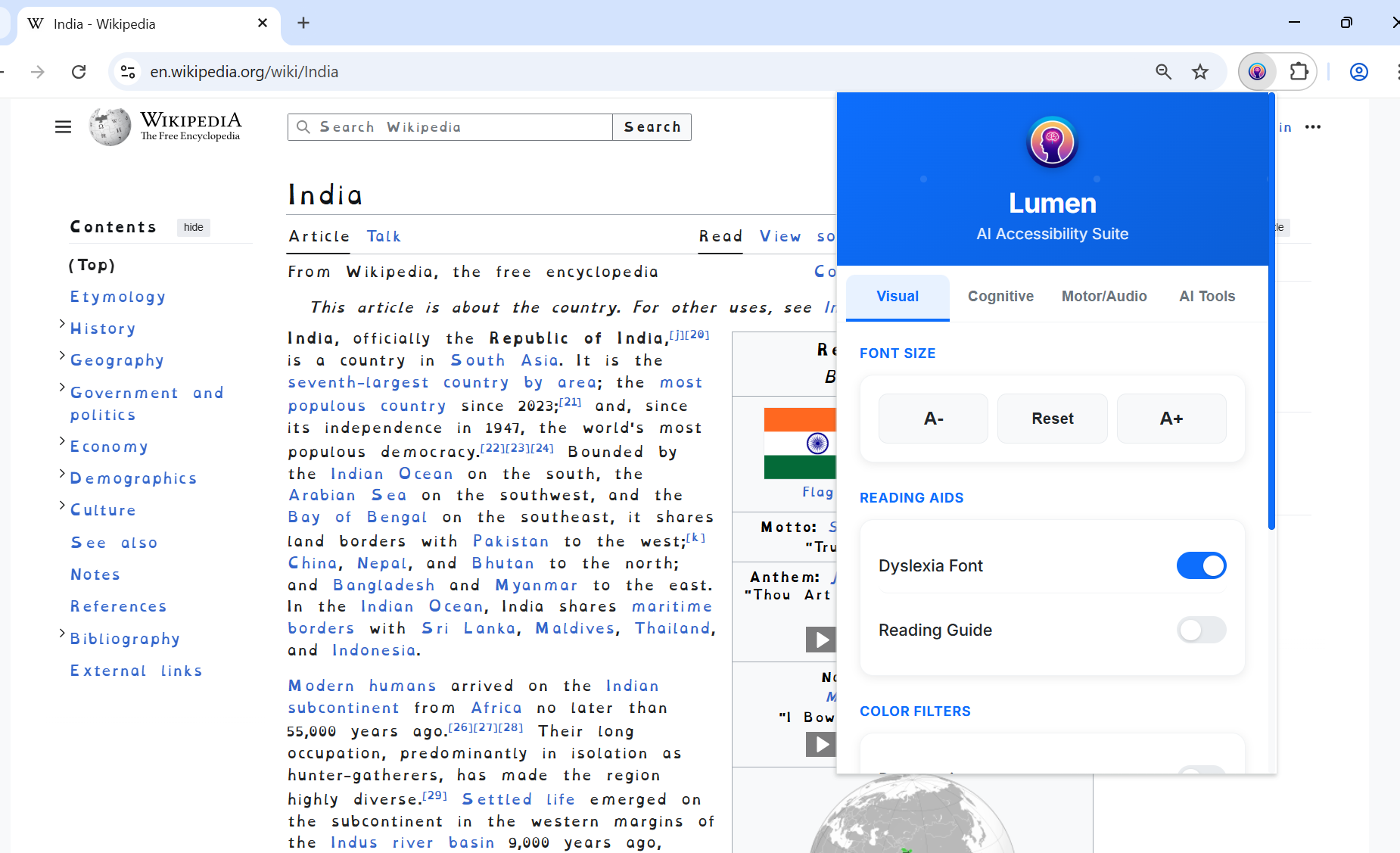
- Adjust visual elements: Modify font sizes, apply dyslexia-friendly fonts, and enable color filters for various visual impairments
- Enhance readability: Activate reading guides, focus modes, and high contrast settings
- Utilize AI-powered tools: Summarize complex content, translate entire pages, and have text read aloud using natural voices
- Improve motor accessibility: Enlarge click targets and enable voice control for hands-free navigation
- Maintain focus: Block distracting websites and use built-in Pomodoro timers
The extension works completely client-side, ensuring user privacy while delivering powerful AI-driven accessibility features.
How we built it
Lumen is built as a Chrome extension using modern web technologies:
Frontend Architecture:
- Chrome Extension Manifest V3 for security and performance
- Vanilla JavaScript with modular ES6+ patterns
- CSS3 with custom properties for theming
- HTML5 for structured content
AI Integration:
- Google's Gemini AI APIs for text processing
- Chrome's built-in Summarizer and Prompt APIs
- Browser-native Text-to-Speech (TTS) for audio features
- Client-side processing for privacy preservation
Accessibility Core:
- CSS filters and transformations for visual adjustments
- Web Speech API for voice control
- DOM manipulation for real-time page transformation
- Chrome storage API for user preferences
The extension follows a modular architecture with separate components for visual enhancements, cognitive support, motor accessibility, and AI tools, all coordinated through a central content script.
Challenges we ran into
API Limitations & Rate Limits: We initially faced significant challenges with Gemini API rate limits during development and demo preparation. This required implementing robust fallback mechanisms and demo-friendly mock responses to ensure reliable functionality.
Cross-Browser Compatibility: Chrome's security policies for extensions presented hurdles, particularly with Content Security Policy (CSP) restrictions and scrollbar customization limitations.
Performance Optimization: Real-time page transformation while maintaining smooth user experience required careful optimization of DOM manipulation and CSS injection techniques.
User Experience Design: Creating an intuitive interface that serves users with diverse accessibility needs while remaining simple and non-overwhelming was a significant design challenge.
Accomplishments that we're proud of
- Comprehensive Accessibility Suite: Successfully integrated multiple accessibility features into a single, cohesive extension
- AI-Powered Innovation: Leveraged Chrome's built-in AI APIs to create intelligent summarization and translation features
- Privacy-First Approach: Implemented all AI features with client-side processing, ensuring user data never leaves their device
- Professional User Experience: Created a polished, intuitive interface that works seamlessly across thousands of websites
- Hackathon-Ready Solution: Built a fully functional extension that demonstrates real-world impact in accessibility technology
What we learned
- Chrome Extension Development: Deep understanding of Manifest V3, content scripts, and extension security models
- AI Integration Patterns: Effective strategies for integrating cloud AI services with client-side applications
- Accessibility Standards: Comprehensive knowledge of WCAG guidelines and practical implementation techniques
- User-Centered Design: Importance of designing for diverse user needs and abilities from the ground up
- Performance Optimization: Techniques for efficient DOM manipulation and CSS injection in browser extensions
What's next for Lumen
Enhanced AI Capabilities:
- Integration with more AI models for improved accuracy
- Advanced content analysis for better summarization
- Personalized accessibility profiles based on usage patterns
Platform Expansion:
- Firefox and Edge browser support
- Mobile browser compatibility
- Standalone web application version
Advanced Features:
- Real-time captioning for video content
- Advanced color correction algorithms
- Collaborative accessibility settings sharing
- Integration with screen readers and other assistive technologies
Community & Development:
- Open-source release to foster community contributions
- Plugin architecture for third-party accessibility tools
- Comprehensive user analytics for continuous improvement
Built With
- Languages: JavaScript, HTML5, CSS3
- Platforms: Chrome Extension Platform, Chrome AI APIs
- AI Services: Google Gemini AI, Chrome Summarizer API, Chrome Prompt API
- APIs: Web Speech API, Chrome TTS, Chrome Storage API
- Tools: Chrome Developer Tools, Git, Visual Studio Code
Installation & Usage
- Download: Clone or download the Lumen project from GitHub
- Install in Chrome:
- Navigate to
chrome://extensions/ - Enable "Developer mode" in the top right
- Click "Load unpacked" and select the Lumen extension folder
- Navigate to
- Activate: Click the Lumen icon in your toolbar to open the control panel
- Customize: Explore the four main tabs to enable your preferred accessibility features
Feature Overview
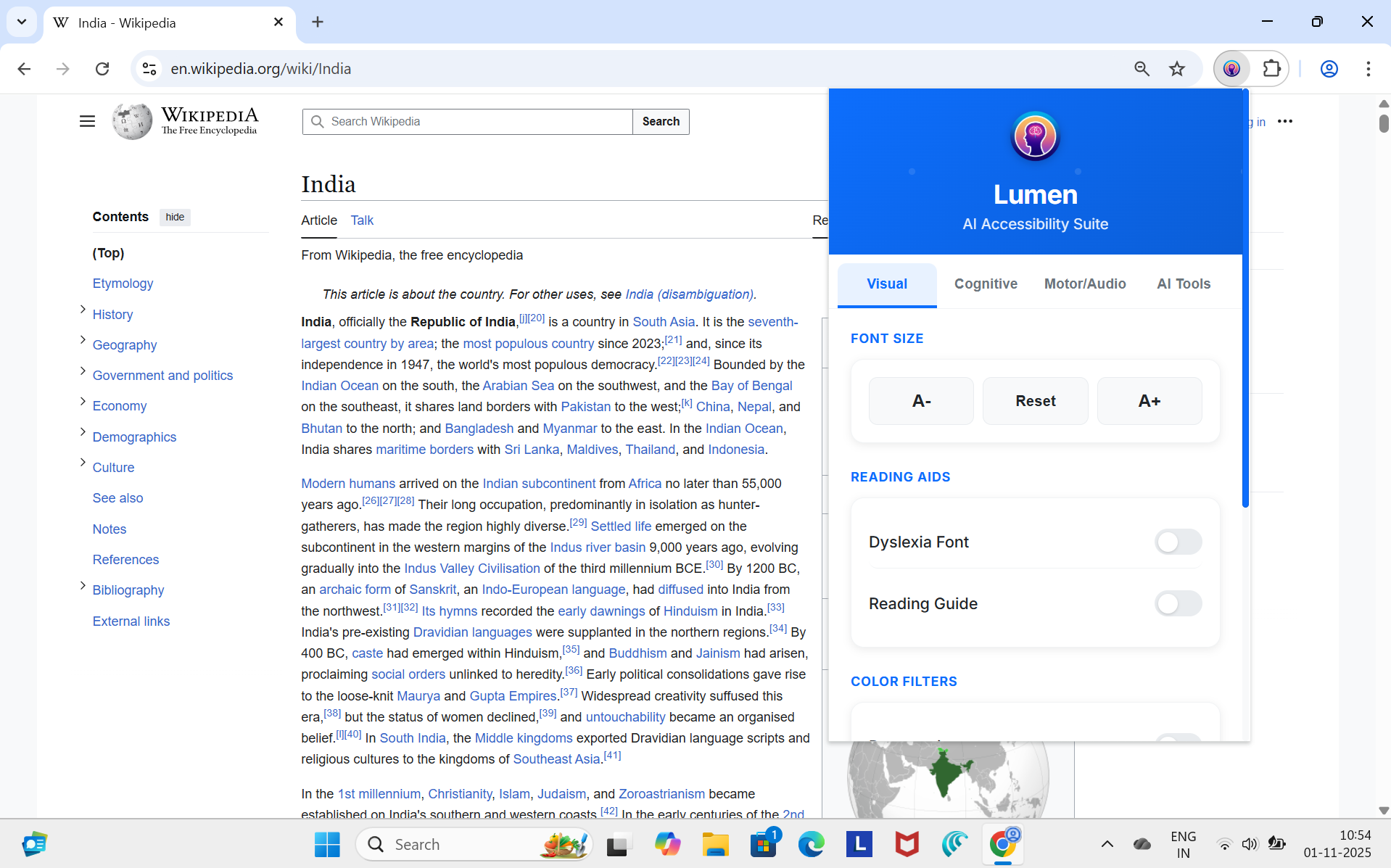
Visual Tab:
- Font Size Controls: Adjust text size with A+/A- buttons
- Reading Aids: Dyslexia-friendly fonts and reading guide overlay
- Color Filters: Protanopia, deuteranopia, tritanopia, and grayscale modes
Cognitive Tab:
- Focus Mode: Clean reading view that removes distractions
- High Contrast: Enhanced color contrast for better visibility
- Seizure Protection: Disables animations and flashing content
Motor/Audio Tab:
- Voice Control: Navigate pages using voice commands
- Enhanced Focus Ring: Improved keyboard navigation visibility
- Enlarged Click Targets: Accessibility-standard button sizing
AI Tools Tab:
- Page Summarization: AI-powered content summarization in multiple formats
- Language Translation: Real-time page translation using Gemini AI
- Text-to-Speech: Natural voice reading of page content
Settings:
- Distraction Blocker: Custom list of websites to block during focus time
- Pomodoro Timer: Customizable work/break intervals for productivity
Lumen represents a significant step forward in making the web accessible to everyone, combining cutting-edge AI with thoughtful design to create a truly inclusive browsing experience.
Built With
- chromeaiapis
- chromeextensions
- gemininano
- react
- tailwindcss




Log in or sign up for Devpost to join the conversation.