-
-
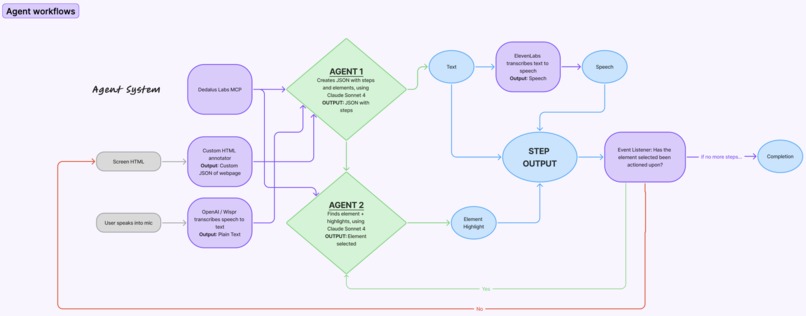
Pipeline
Inspiration
We’ve all been there: helping a parent or grandparent unmute on Zoom, find the “Share Screen” button, or open an email attachment. Small tech tasks that take seconds for us can feel impossible for older adults, creating frustration and dependence. We wanted to change that. Lume was born from the idea of a patient, tech-savvy helper--like a grandkid who’s always available--that can listen, see, and guide seniors through technology with confidence.
What it does
Lume is a voice-activated, on-screen tutor that shows seniors exactly where to click. It listens to natural questions (“How do I join a Zoom meeting?”), uses AI to understand what’s on their screen, and then visually highlights the correct buttons step by step--while speaking instructions aloud.
How we built it
Lume runs on a multi-agent architecture that connects speech, perception, and visual guidance through an intelligent feedback loop.
Voice Input & Transcription The user speaks naturally (“How do I join a Zoom meeting?”). We use OpenAI’s Whisper/Wispr model to transcribe audio into text in real time.
Perception Layer (Screen Understanding) A custom HTML annotator parses the webpage’s DOM and converts it into a structured JSON representation of all visible elements — buttons, labels, and text. This data, along with the user’s transcribed request, is passed into our Dedalus Labs MCP server, which acts as the orchestrator between all agents.
Agent 1: Planner Using Claude Sonnet 4, this agent interprets the user’s intent and generates a JSON plan of sequential steps with interactive elements (e.g., “Locate Login → Enter Email → Click Join”).
Agent 2: Visual Executor Another Claude Sonnet 4 agent identifies the exact on-screen elements matching each step and triggers dynamic highlights around the correct buttons, allowing users to follow along visually.
Step Output & Voice Guidance Each step is read aloud via ElevenLabs Text-to-Speech, providing calm, human-like spoken instructions while the interface highlights the next clickable area.
Event Listener & Feedback Loop Lume continuously monitors the screen--when a highlighted element is actioned upon (ie. clicked, typing, etc.), it moves to the next instruction until the full workflow (like logging in or joining a call) is completed.
Challenges we ran into
- Designing the agent architecture and deciding how each agent feeds into the next
- Getting prompt engineering right to produce clear, natural steps tied to interactive elements
- Syncing real-time visual highlights with spoken instructions
- Keeping latency low across multiple model calls and screen updates
Accomplishments that we're proud of
- Built a functional multi-agent system with real-time interaction
- Engineered agents that coordinate smoothly across inputs
- Applied serious prompt engineering for clear, natural steps
- Made it flexible enough to work on any website
- Designed an interface easy for even non-tech-savvy users
What we learned
- Accessibility is emotional--confidence and reassurance matter as much as usability
- Prompt engineering is as much design as it is logic
- Real-time coordination between vision, voice, and interaction takes precise orchestration
What's next for Lume - Your tech-savvy guide.
- Expand beyond browsers to desktop apps and smart displays
- Continue refining accessibility features: clearer voices, simplified visuals, personalized pacing.
- Add multi-language voice support so seniors can get guidance in their native language


Log in or sign up for Devpost to join the conversation.