-
-
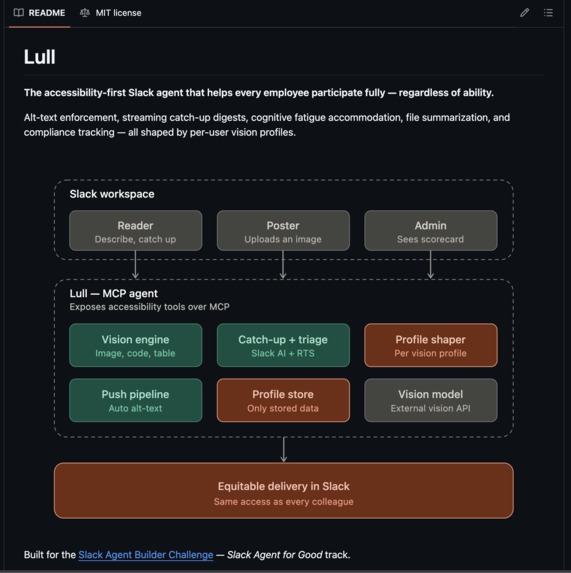
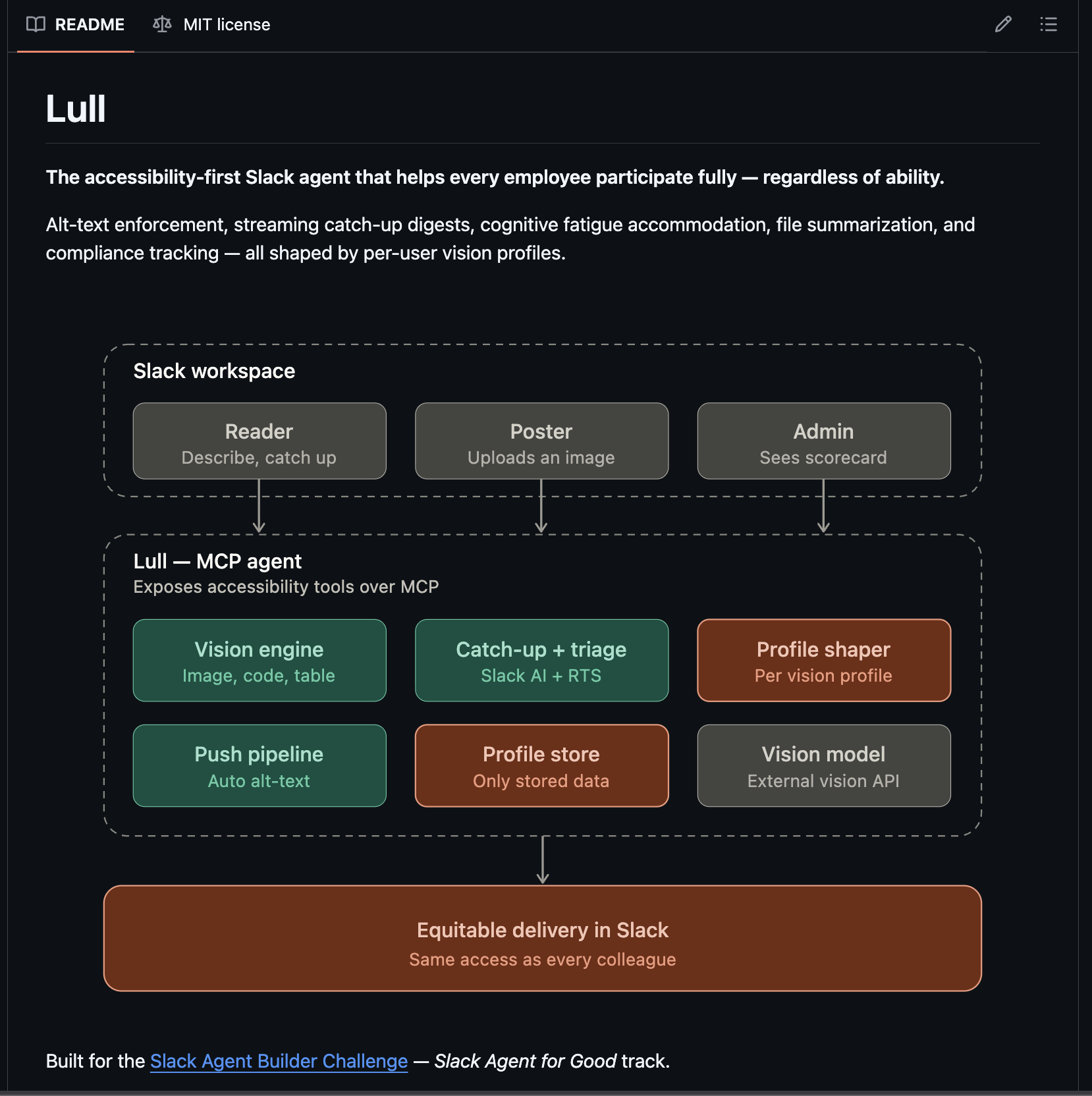
Lull Agent MCP Workspace Breakdown
-
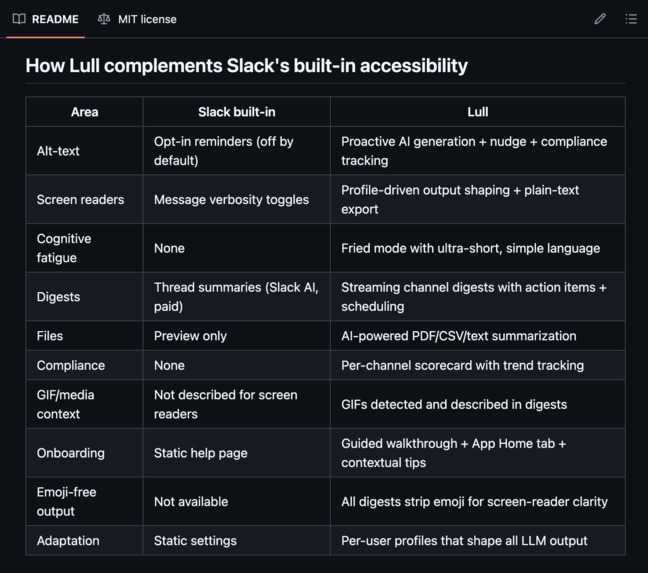
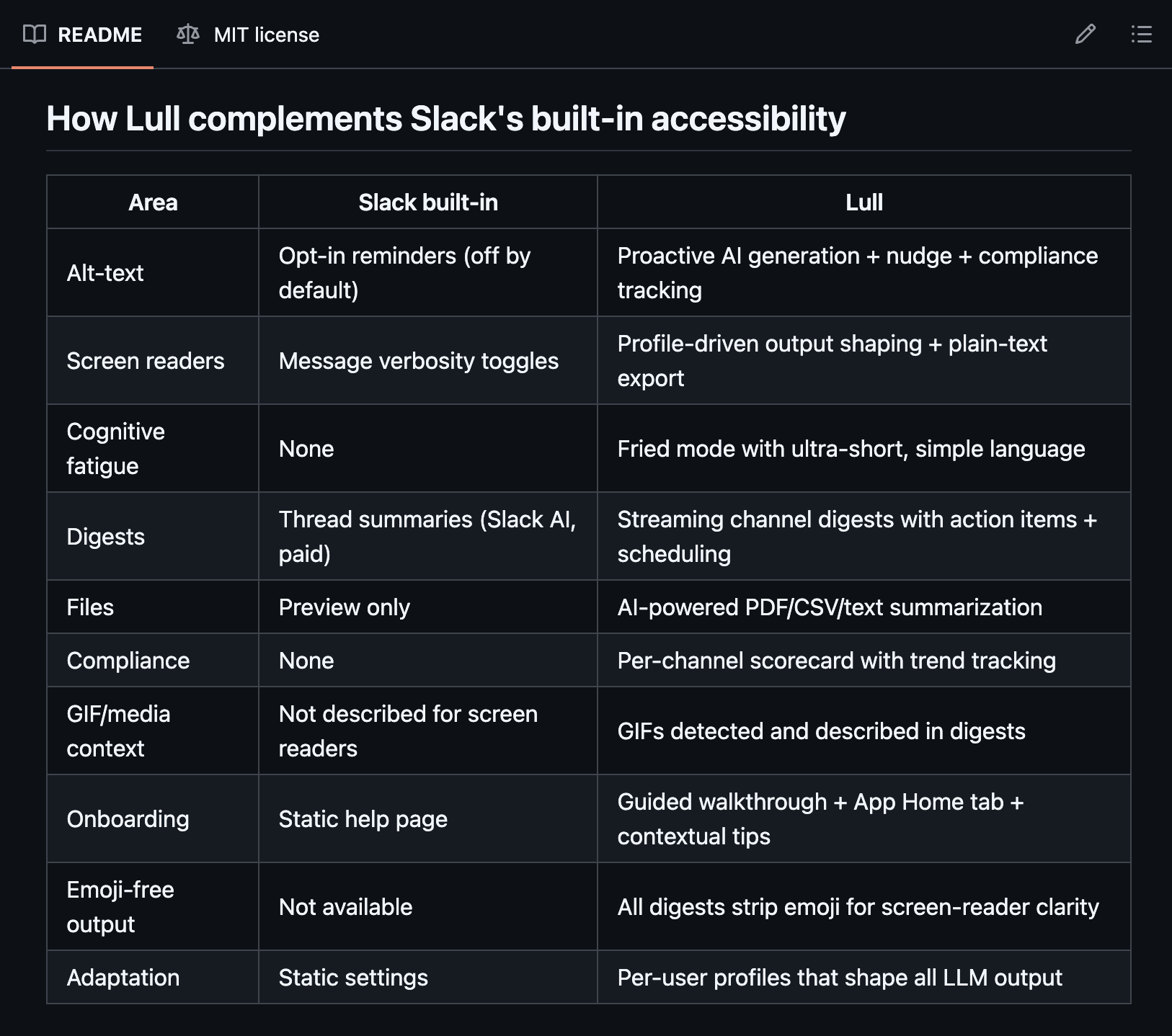
How Lull and Slack work Together
-
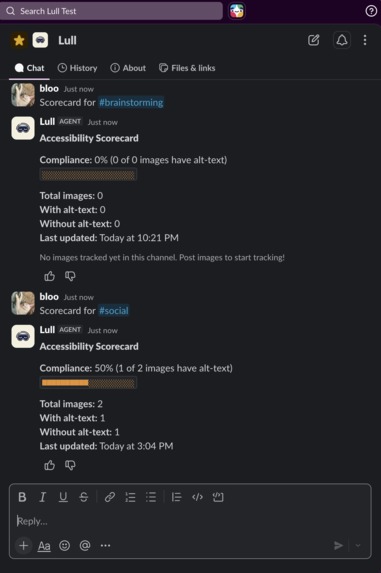
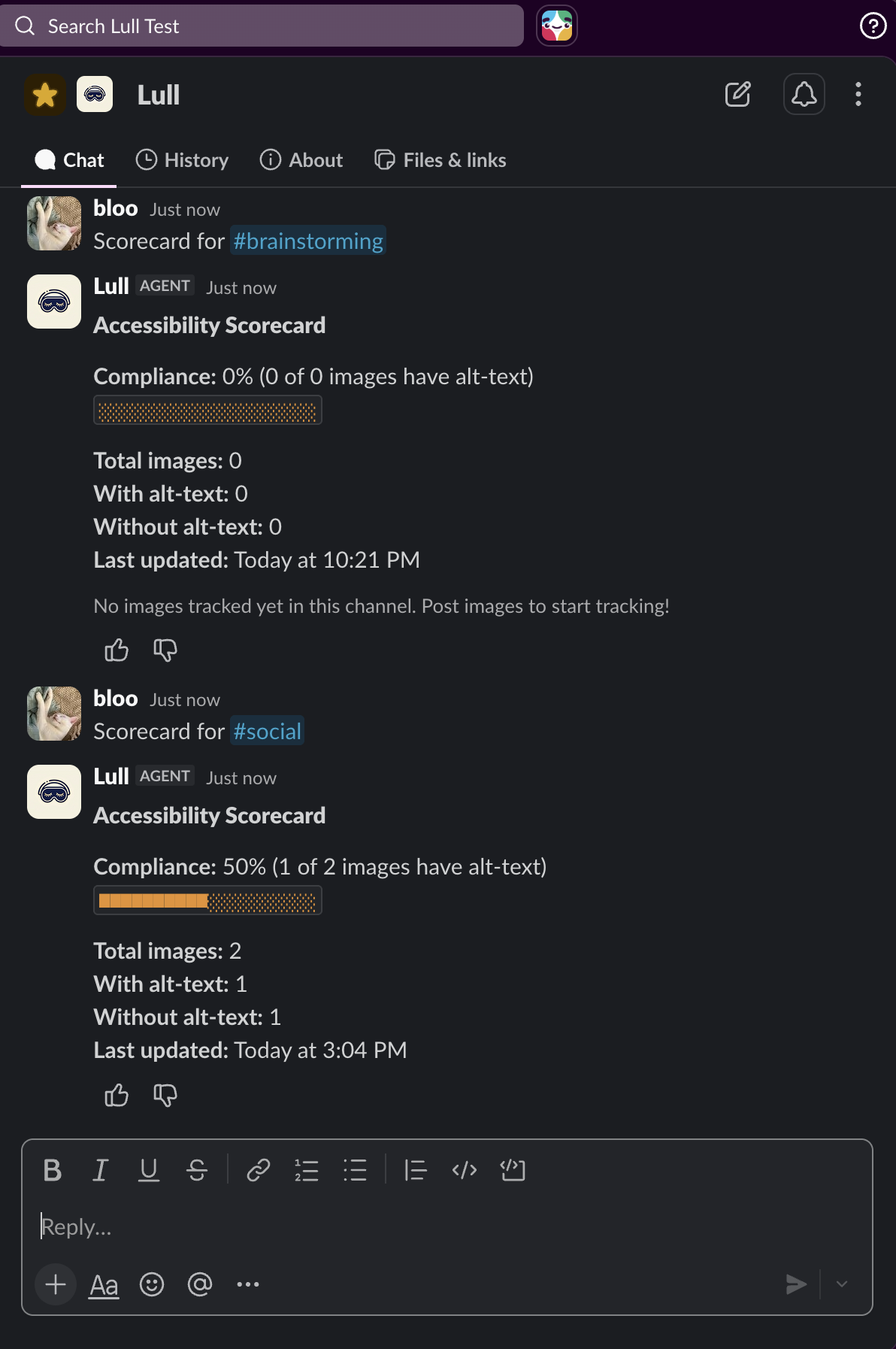
Compliance Scorecards for ADA Accessibility
-
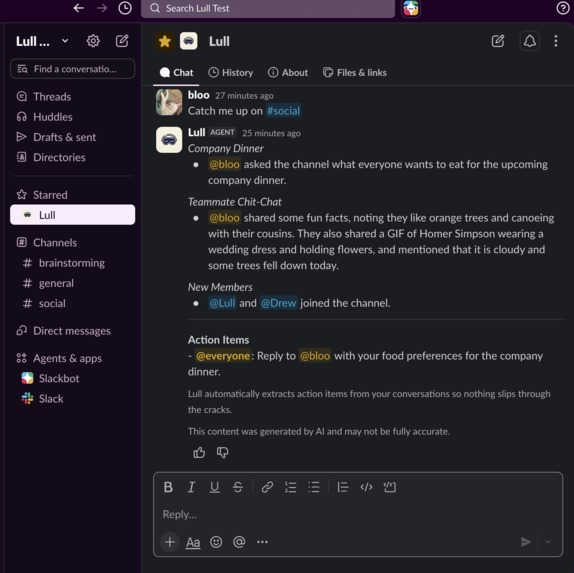
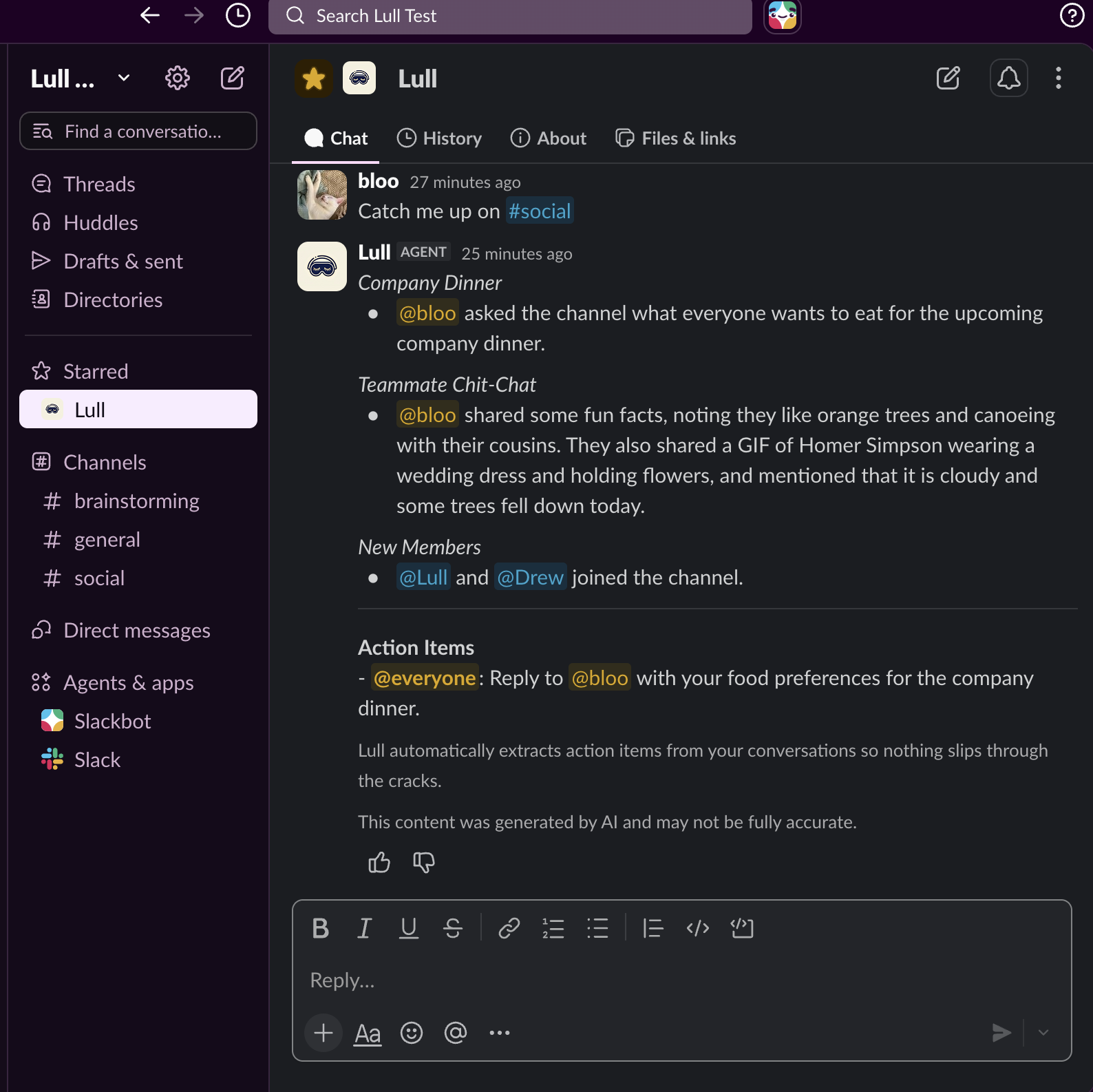
Lull Catch Up Screen-Reader Friendly Breakdwon
-
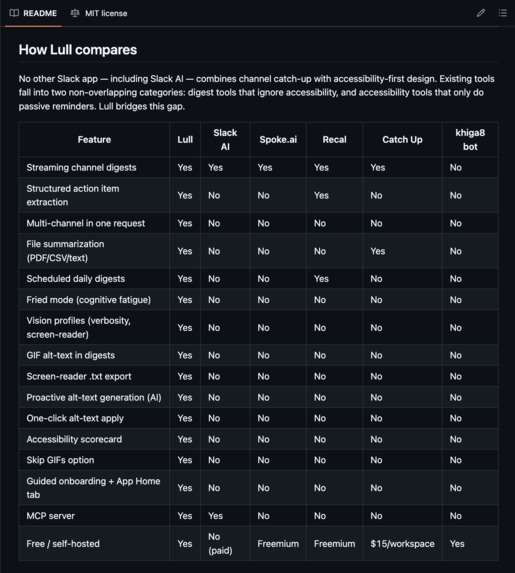
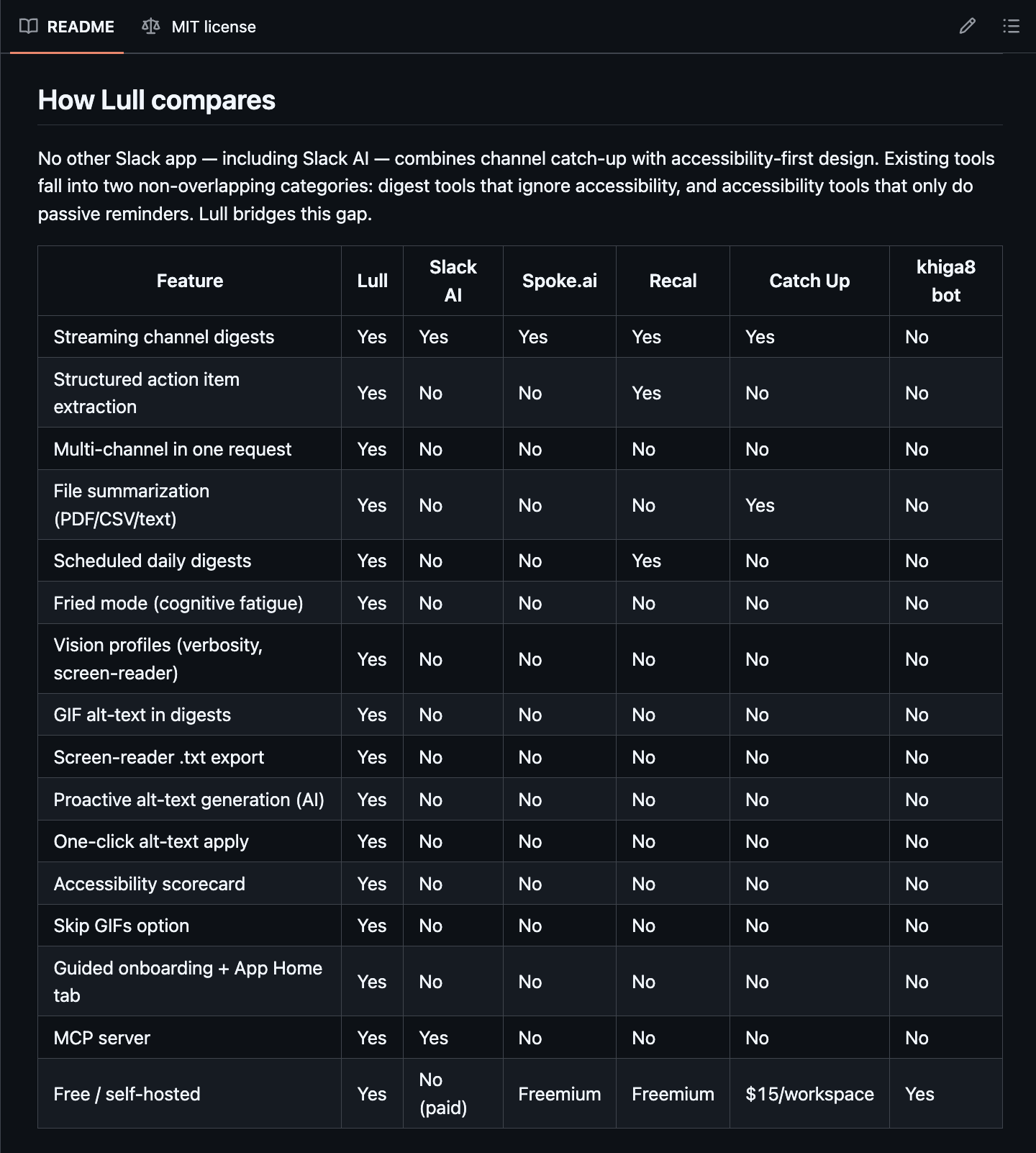
Lull comparison to other Slack Apps
-
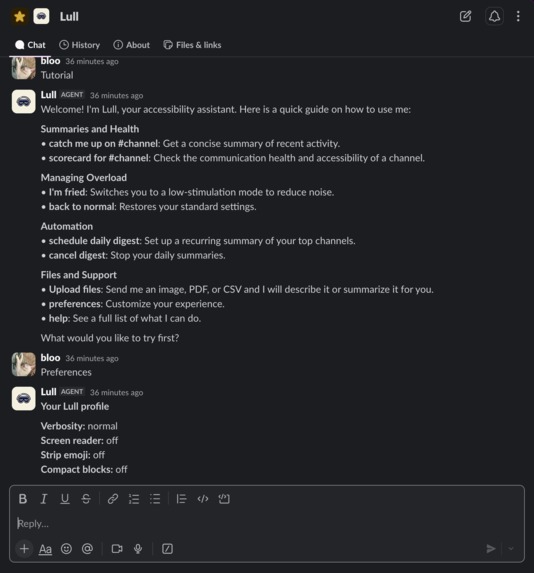
Lull Custom Features List
-
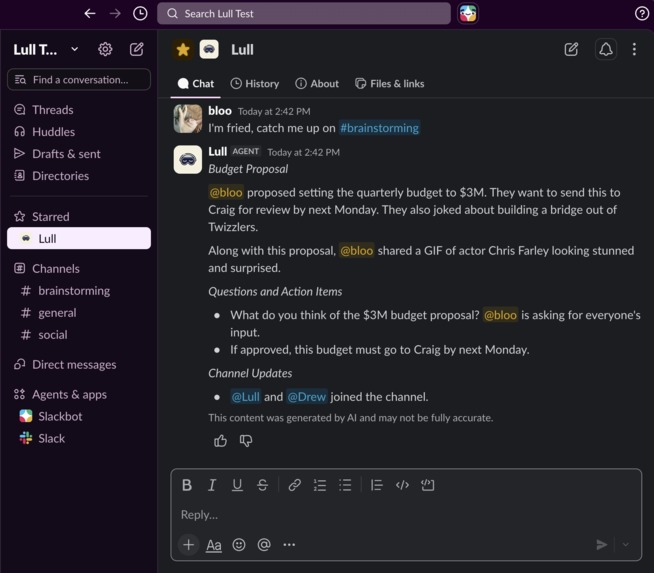
Lull Computer-Vision Gif/Image Reading Capability in Summary
Inspiration
I lost my vision to a stroke a few years ago, and had to adjust from being a non-stop worker on Capitol Hill, avid competitive gamer, marathon runner, computer user… to coming back online to an inaccessible internet. Unfortunately, there's few options for the blind and visually impaired online. Especially in long-form forums, and multi-channel communication platform communities like Slack!
Slack is where work happens, but it doesn't happen equally. The moments that inspired Lull are small and constant: a blind engineer hits an unlabeled screenshot and has to ask a colleague what it shows. A developer with chronic migraines opens Slack after lunch to 200 unread messages and physically can't process them. A project manager with ADHD scrolls #general three times and still misses the action item with their name on it. None of these are dramatic failures. They're daily, small trip hazards, most coworkers never see; and they quietly decide who gets to participate fully at work.
In the U.S., the DOJ's 2024 ADA Title II rule establishes WCAG 2.1 Level AA as the standard, and every unlabeled image in Slack is a potential Success Criterion 1.1.1 gap; and it became obvious this tool needed to exist, as the ADA Compliance regulatory Deadlines were recently extended for 1 year
Digest tools (Slack AI, Spoke.ai, Recal, Catch Up) summarize channels but treat accessibility as an afterthought; no screen-reader-shaped output, no fatigue accommodation, no compliance tracking. Accessibility tools, meanwhile, stop at passive alt-text reminders.
We named it Lull because that's the feeling we wanted to create: a moment of calm inside the noise.
What it does
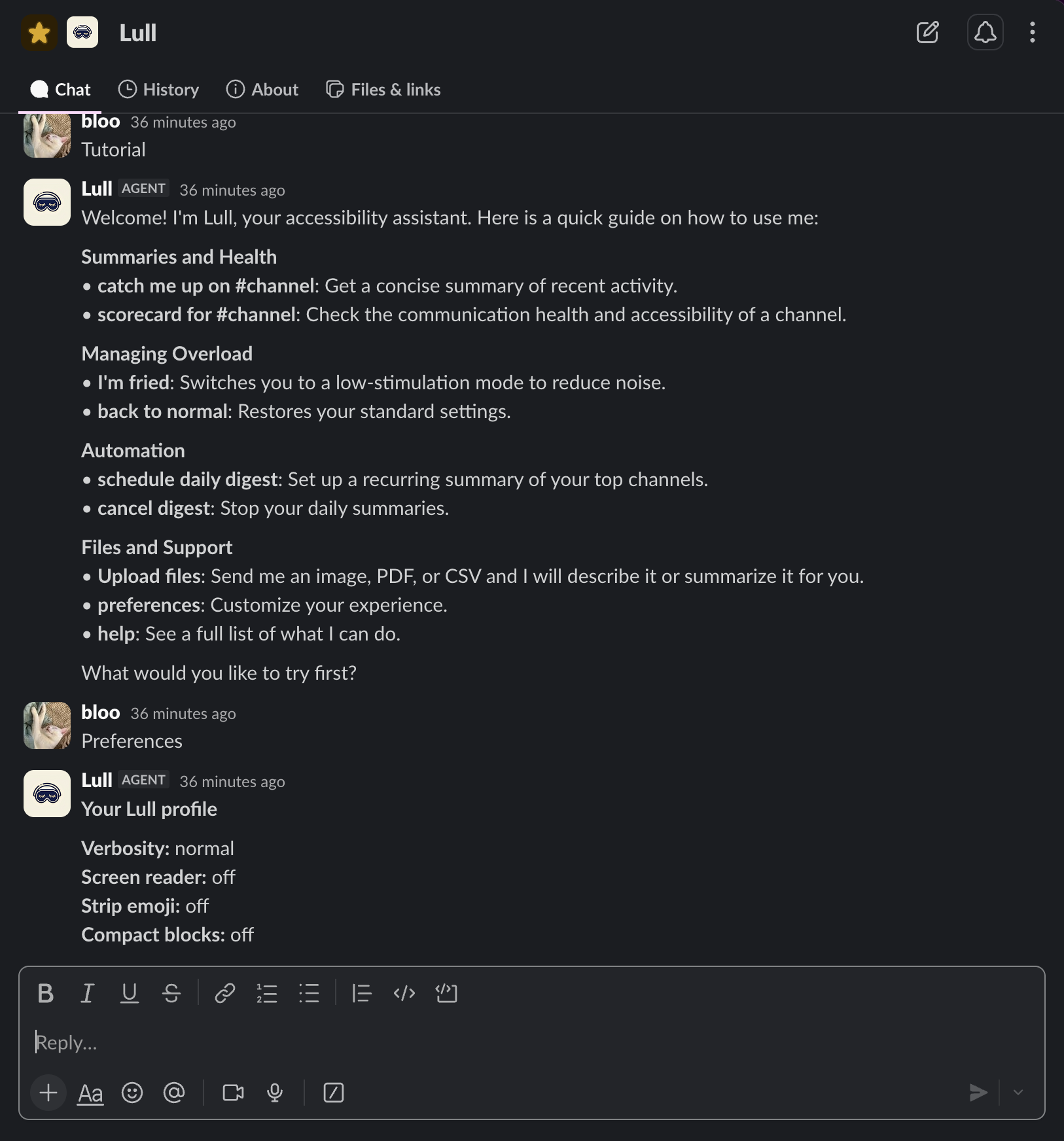
Lull is an accessibility-first Slack agent that shapes every response around a per-user vision profile; verbosity, screen-reader mode, emoji stripping, fatigue state; so the same request gets a different answer depending on who's asking and how they're doing today.
In practice:
- Alt-text guardian: When someone posts an image without alt-text, Lull generates a description with Gemini Vision and nudges the poster to apply it in one click, with WCAG context explaining why it matters.
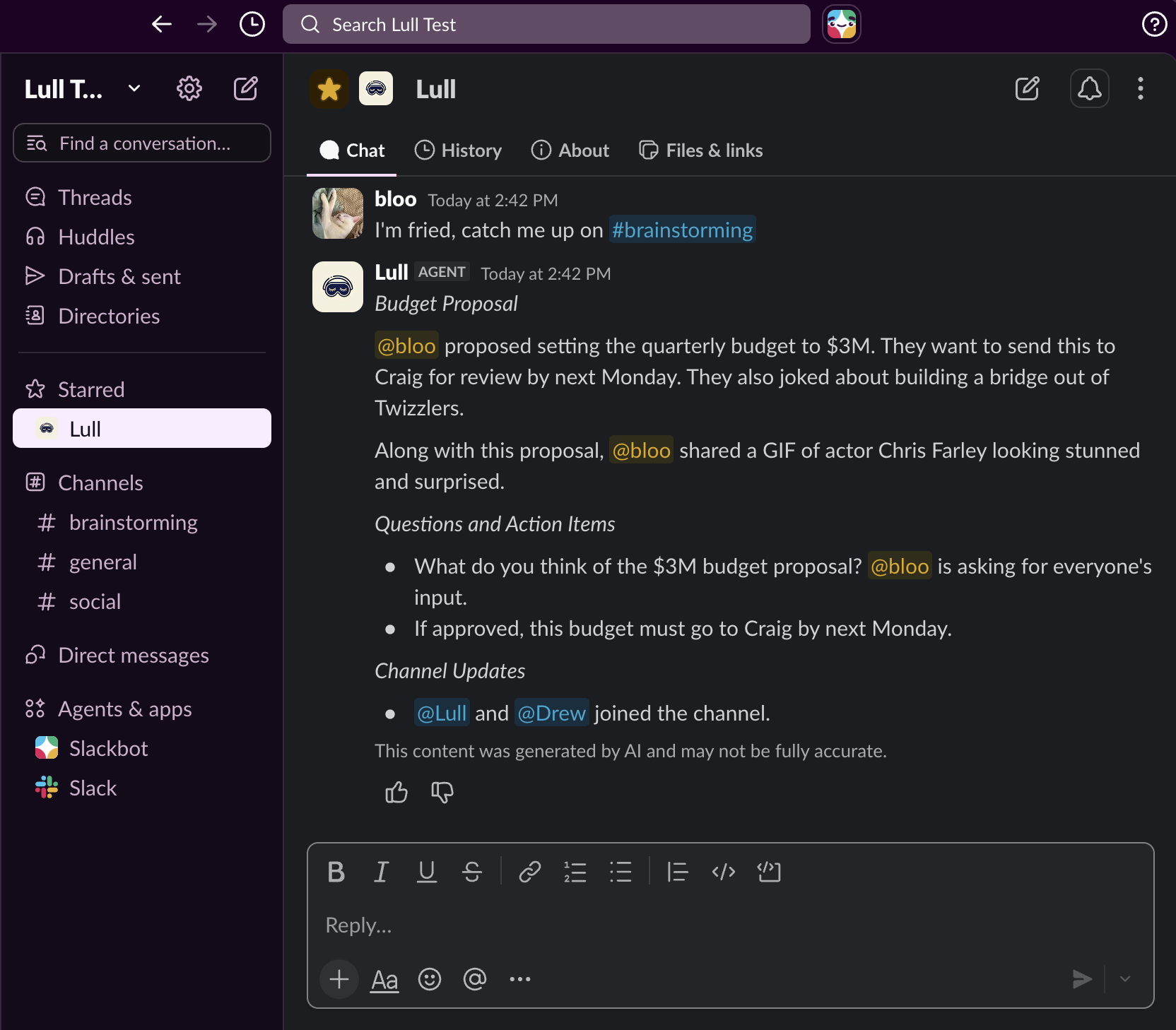
- Streaming catch-up digests: "Catch me up on #general" streams a structured summary with action items pulled into their own section. It handles multiple channels in one request, supports "skip gifs" for photosensitive users, and can run automatically on a daily schedule.
- Fried mode: Say "I'm fried" and everything Lull produces becomes ultra-short and simple: 3–5 plain-language bullets, no jargon, no headings. Built for migraine days and cognitive overload.
- On-demand descriptions and file summaries: Right-click any image → "Describe this image," or DM Lull a PDF, CSV, or text file for an accessible summary.
- Accessibility scorecard: Per-channel alt-text compliance tracking with an automatic baseline scan the moment Lull joins a channel, giving accessibility and compliance officers auditable data instead of vibes.
- MCP server: Five tools (describe_image, catch_up, get_scorecard, plus profile tools) so external agents can use Lull's accessibility capabilities too.
GIFs get described in digests ("responded with a GIF of Homer Simpson looking surprised") so blind users don't miss the social texture of a channel. Digests export as plain .txt for screen readers. Onboarding is a guided walkthrough with an App Home tab and contextual tips: no commands to memorize.
How we built it
Lull is a TypeScript Slack Bolt (v4.7+) app running in Socket Mode on Slack's new agent framework (agent_view). We leaned hard on the newest Slack AI surface: chat.startStream / appendStream / stopStream for word-by-word digest delivery with rotating status, assistant.threads.* for thread titles and suggested prompts that update as users navigate channels (app_context_changed), native feedback_buttons for quality tracking, and the Real-Time Search API (assistant.search.context) with a graceful fallback to conversations.history when action tokens aren't available.
Generation runs on Google Gemini: gemini-3.5-flash for chat, streaming, and vision, with automatic failover to gemini-3-flash-preview on 503s. A lightweight intent router classifies natural-language requests (catch-up, scheduling, scorecards, fried mode) so the whole interface stays conversational. The alt-text guardian is a small state machine (pending → nudged → compliant/dismissed) backed by SQLite in WAL mode, which also stores vision profiles (7-day TTL) and digest schedules; but never message content, which is processed in real time and discarded.
The architectural decision we're happiest with: profiles don't post-process output, they compose the system prompt. Screen-reader mode, verbosity, emoji stripping, and fried mode all flow through one prompt-construction layer, so every feature inherits every accommodation automatically.
Around the LLM sits a defense security layer: per-user sliding-window rate limiting, SSRF prevention with HTTPS-only host allowlists (Slack CDN, GIPHY, Tenor), input sanitization, output validation with prompt-leak and PII redaction, and a token-redacting logger. A background worker delivers scheduled digests, an MCP server runs over stdio, and Vitest, ESLint, and Prettier.
Challenges we ran into
Slack's GIF payloads. GIPHY and Tenor bury their alt-text in nested attachment blocks that vary by provider and message shape. Reliably extracting "a GIF of Homer Simpson looking surprised" from that structure took real spelunking and a dedicated extraction path in our search layer.
Fried mode is a design problem, not a truncation problem. Shorter output isn't automatically simpler output. We iterated on what "ultra-short, simple language" actually means until it held up on days when reading is genuinely hard.
Handling the pdf/doc summarization gets into a lot of PII management handling. Model fallback, stream lifecycle handling, and output sanitization all exist because of this, but it's definitely something we have to think through constantly, re: authorizations, etc.
We also ran in to issues with API Token alottment with Gemini's free API tier, and getting 503 log issues in the terminal output from Gemini's busy models, while Lull was "thinking" in the Slack UI.
Accomplishments that we're proud of
We're proud to help our friends, coworkers with vision impairments, migraines, ADHD, sensory processing conditions, etc. Lull is, as far as we can tell, the only Slack app that bridges channel intelligence and accessibility; every existing tool does one or the other. We built a real security layer around the LLM rather than bolting it on later, and exposed everything through MCP so other agents can compose with it. And it's free and self-hostable, because accessibility tooling behind a paywall defeats the point. As a blind user of Slack, I'm constantly losing context, and sort of feeling "not part of the joke" so to speak. As people, and remote employees especially, we've lost a world of context, so we need to make Slack more equitable and accessible experience. Happy to be part of that, no matter the hurdles and troubleshooting!
What we learned
Accessibility isn't a mode: it's a distribution. A blind engineer, a migraine sufferer, and someone with ADHD need almost opposite things from the same digest, which is why per-user profiles beat any single "accessible mode." We learned that platform constraints are design material: Slack's permission model forced the guardian into a nudge-and-apply flow that ended up more respectful than silent enforcement would have been. Technically, we went deep on Slack's newest agent surface: streaming, RTS, App Home, assistant threads, and on what it takes to run an LLM responsibly: sanitize inputs, validate outputs, redact everything, and assume both the model and the network will fail. And we learned the regulatory landscape cold: WCAG 2.1 AA, Success Criterion 1.1.1, the ADA Title II timelines. because the compliance story is arriving faster than most workplaces realize.
What's next for Lull
Near term: time-zone-aware digest scheduling (it's UTC-only today), more file types (DOCX, PPTX, XLSX), thread- and DM-level catch-up alongside channels, and richer profiles: dyslexia-friendly formatting, adjustable plain-language levels, and reading-order preferences. We also want to close the loop on Slack's native feedback buttons, using ratings to tune digest quality per profile.
Bigger picture: a workspace-level compliance dashboard with exportable audit reports for accessibility officers, text-to-speech digest delivery for a fully non-visual experience, and a Slack Marketplace listing with OAuth multi-workspace install. And because Lull already speaks MCP, we want to grow it into an accessibility layer other agents can build on, so any assistant in a workspace, not just ours, can describe an image or reshape its output for the person actually reading it.
Built With
- computer-vision
- gemini
- javascript
- mcp
- slack
- slack-agent
- typescript


Log in or sign up for Devpost to join the conversation.