

What Luchin does
Luchin shows you what you can't see. And then the first small step. Action = change.
Behind these three sentences is a cascade. Each step is the precondition for the next:
- Luchin shows you what you can't see. Not what you are doing wrong, but an assumption in your own words that you took for a fact.
- A new option becomes visible. Once you can see the assumption, you can see where you could act differently.
- The first small step. Small enough to actually do. Only doing changes something.
The analysis, the card, the podcast and the PDF all come from one source: the situation you describe, in your own words.
How the Einstellung-Breaker gets there
Why I built it: I think in structures and flows. The Einstellung-Breaker works the way I work: it starts from your own words, looks at the structure behind them and follows what runs through everything.
Luchin looks at situations from the outside and shows what you might not notice from the inside. Its Einstellung-Breaker is an analysis method in four steps that runs on an AI language model. It works with the structure of what you wrote:
- Two passes read your text independently of each other.
- A third pass looks for what runs through both.
- A synthesis offers three competing explanations, and each one has to include evidence against it.
- Your own sentences are quoted back. Each assumption is sorted into one of six levels (necessity, regulation, incentive, reputation, convention, tradition), so you can see which ones could change, and you get concrete next steps.
The analysis takes about six minutes. While it runs, you wait inside a 3D world that your phone's GPU renders live.
Who it is for
Adults who keep ending up in the same situation, for example in a relationship, at work or in the family, and who want to look at it from the outside. Luchin is not therapy and not a crisis service. The app says: "This is not a replacement for a doctor, therapist, or counselor. If you're going through a really tough time, please reach out to someone who can help."
What a tester said
I asked several very personal questions that I had been going around in circles with for months and years. Usually apps like this give you a stock line like "talk about it" or "you need to take better care of yourself". Here it was completely different. It was the first time I really felt understood. Not judged, not put in a box. It was detailed, very respectfully worded and looked at the question from all sides, including sides I would never have thought of myself.
Christine, kindergarten teacher, Luchin tester (translated from German)
What you do in the app
- Write or dictate your situation.
- Wait about six minutes inside the live 3D world. You can put the app away, but do not close it.
- A card with a short metaphor for your situation appears, to keep and to share.
- Optional: a podcast in which two AI voices talk your analysis through.
- Read the full analysis, also as a PDF.
Luchin is available in 9 languages, including Arabic (right to left). The analysis comes in the language of the app.
How it makes money
Free to download, no subscription. Each analysis is a one-time in-app purchase: 1, 5 or 10 analyses. Podcasts are bought separately, one per episode. You can hold up to 10 analyses at a time and run up to 10 per month. Purchases run through RevenueCat and Samsung In-App Purchase. In the US, 1 analysis costs USD 4.90, 5 analyses cost USD 21.90, 10 analyses cost USD 40.90, and a podcast costs USD 2.99. In the euro countries the same amounts apply in euros. Our server adds credits only after RevenueCat confirms the store purchase. The app cannot create credits on its own.
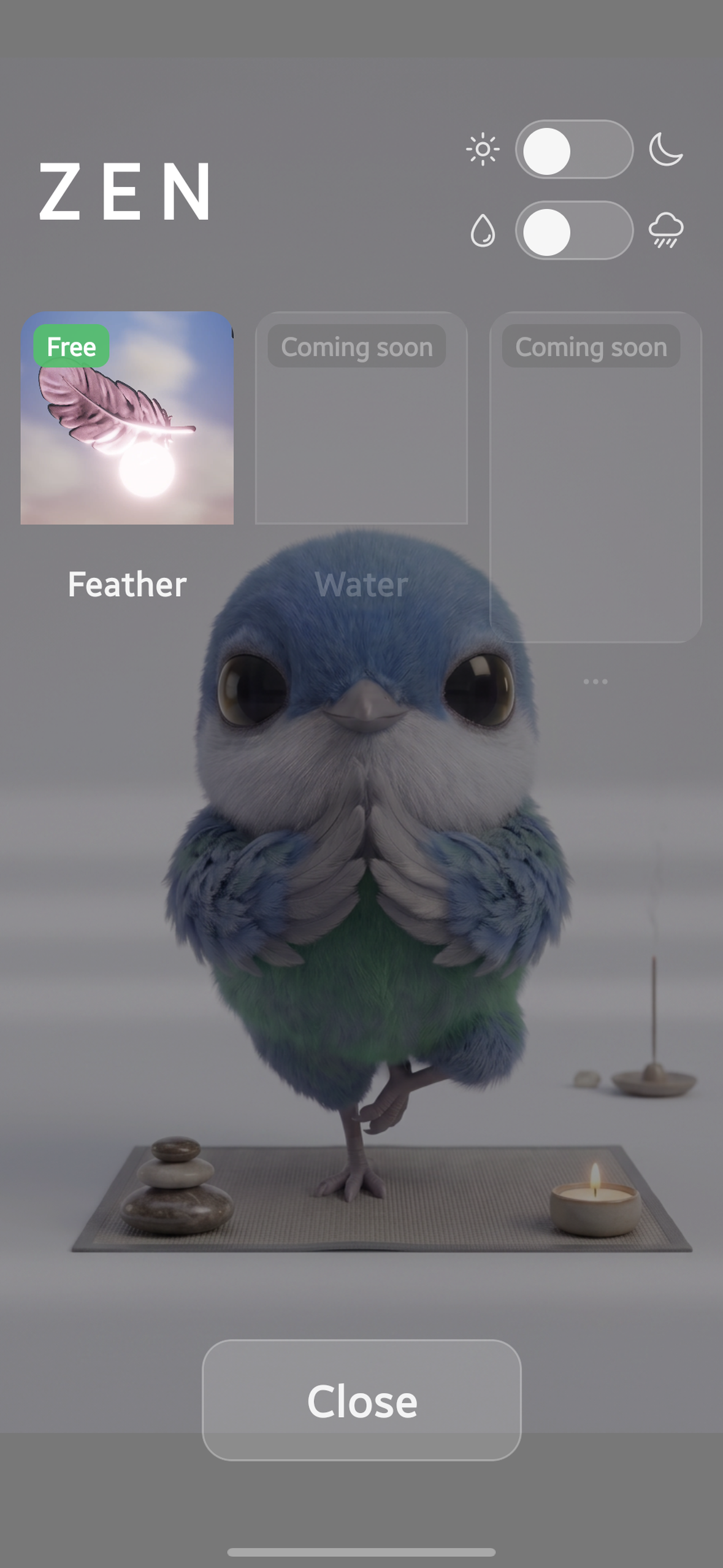
The Zen area gives people a reason to come back without an analysis: the feather scene is free, and more Zen scenes are planned as one-time purchases through RevenueCat.
Why Luchin fits the categories
RevenueCat Design Award
We wanted the moment you look at your situation to feel like a place you visit. So Luchin runs inside a world that the phone's GPU renders live: the sky, clouds, sun rays and weather are computed while you use the app. A single weather value changes the sky, the fill light, the bloom, how wet the materials look, and the rain, all at the same time. When it rains, 30,000 GPU-simulated drops fall with sizes from a Marshall-Palmer distribution and fall speeds from an approximation of the Gunn-Kinzer curve. They land on a floating, rotating feather without re-rendering the feather every frame. Wet surfaces are based on Lagarde's approach: darker, smoother, with a thin clear coat.
Details worth noticing:
- Haptic feedback on the buttons and on the weather switch.
- Tilting the phone moves the glitter on your card and on the feather.
- The bird's wing flap has its own sound.
- A Zen scene with a floating feather and music.
- The sky follows the time of day from morning to evening, and a night sky mode shows the stars.
- The buttons on the input screen are glass, built from our research into Apple's Liquid Glass (the WWDC25 session "Meet Liquid Glass", the Human Interface Guidelines, published analyses): they bend and blur the live world behind them, brighten over dark backgrounds and dim over bright ones, catch light and shadow on their edges, split apart and flow back together like drops, and their highlight follows the tilt of your phone. In the lighter of the two effect tiers they are frosted instead.
- The windows are clay: Apple's continuous-corner shape, a soft outer shadow and two inner shadows. When you pick a button, a beam flashes, a small clay orb drops in with gravity, lands with squash and stretch and a haptic bump, and becomes the input window. The glass is rendered inside the 3D frame, the clay by Skia on top, and one timeline drives both.
- The bird is animated with classic animation principles: two breaths every eight seconds, quick head turns with anticipation and overshoot, and blinks that start with the head turns, the right eye one frame after the left. Tap it on the input screen, and it ducks with a start, then tilts its head and blinks.
- When an analysis is done, the feather burns into embers, and your card dissolves into golden particles that fly into the archive.
- The weather switch and the night sky also work in the Zen scene.
To see the rain, turn on the weather switch on the input screen. On phones with less GPU power, the weather effects, rain, sun rays and post-processing are turned off.
RevenueCat Peace Prize
Who benefits: adults who keep ending up in the same situation, in 9 languages including Arabic, Turkish and Russian.
What changes for them: they see their own sentences quoted back, which assumption they treated as a fact, sorted from necessity to tradition, and small next steps.
Safety: before every analysis, the AI model checks whether the situation calls for a crisis service, a therapist, a lawyer or a doctor. If it does, the analysis shows a notice with that recommendation.
Early evidence: my business partner Manuela, co-owner and not a developer, compared Luchin with published expert answers to two real letters. The English letter comes from Philippa Perry's "Ask Philippa" column; Manuela compared Luchin with Perry's answer and with a ChatGPT answer, with the help of ChatGPT 5.6. The German letter comes from the family column of the Austrian newspaper DER STANDARD, answered by a psychiatrist and psychotherapist and by a family counselor; here she worked with the help of GLM. This is not an independent study.
Feasibility: an analysis takes about six minutes and is sold per analysis instead of a subscription. There is no usage data yet.
Best App for Galaxy
Samsung features: purchases run through Samsung In-App Purchase via RevenueCat.
Device performance: Luchin reads Android's thermal headroom every 10 seconds and slows the render rate as the headroom shrinks, and it requests sustained performance mode.
Device-specific hardware: at startup Luchin reads the GPU and picks one of two effect tiers. It was developed on a 2017 laptop and tested on a Galaxy S23 Ultra (Snapdragon, Adreno 740). Galaxy devices with Xclipse GPUs are excluded, because their graphics drivers do not run Luchin's live 3D world reliably.
Foldables and multi-window: not supported yet. Luchin is a portrait phone app.
At submission, Luchin is available only on the Galaxy Store.
Update, October 17, 2026: Luchin is now also on Google Play: https://play.google.com/store/apps/details?id=com.luchin.app
How we built it
Luchin is a React Native app (0.83, Expo SDK 55) whose screen is a live 3D world. Three.js r185 renders the world with its WebGPU renderer and TSL shaders, into a WebGPU canvas of React Native Skia 2.6. Skia's Graphite backend also draws the app's 2D interface. React Native Skia's documentation describes Graphite as "an experimental preview"; Luchin uses it in production on Android. The Graphite binaries for Android come from React Native Skia's GitHub releases and are checked with SHA-256 during install, and Luchin patches the C++ layers of React Native Skia and react-native-wgpu as well as three.js. Our 3D canvas started from William Candillon's FiberCanvas example for React Native WebGPU, and the lens optics of our glass buttons from his Liquid Glass example in React Native Skia. Thank you.
Nine GPU compute systems drive the world: clouds, sky, god rays, stars, rain with 30,000 drops, glitter on the card and on the feather, embers when the feather burns, and a stream of 30,000 golden particles that carries your card into the archive.
The three main screens are places in one 3D world. One canvas stays mounted, a swipe is read on the UI thread with Reanimated and Gesture Handler and moves a camera, and the navigation follows only after the camera has settled. The glass buttons are computed in the same WebGPU frame as the world: the scene is rendered into a texture, and each button refracts and blurs it. A Skia backdrop filter only sees its own canvas, so the glass had to move into the 3D pass, where the frame of the world exists as a texture. Shadows use our own filter with hardware depth compare, which three.js switches off for Android browsers; in React Native that check does not apply. The ground shadow is computed in post-processing, without a ground mesh.
Purchases run through RevenueCat with Samsung In-App Purchase. The analysis runs on AWS Lambda and DynamoDB with Claude Opus 4.6 on Amazon Bedrock, the podcast with Claude Sonnet 4.6 and ElevenLabs. The Einstellung-Breaker started as an AI agent in our own development work; in the app it runs as a fixed analysis in four steps. Built by a two-person company from Austria, on a 2017 laptop with 6 GB of RAM, with Claude Code.
Challenges
The hardest part was the GPU path on Android. At first, Three.js rendered the scene, but it never appeared on the screen. It appeared once Three.js drew into React Native Skia's own WebGPU canvas, and getting there took the patches in the C++ layers.
Honest notes
- An analysis takes about six minutes.
- During the analysis you can put the app away, but do not close it. Closing it before the result appears loses that analysis.
- Luchin is not a replacement for therapy or counseling.
- At most 10 analyses per month and account, and at most 10 in your balance.
- At launch, the Galaxy Store offers Luchin in 18 euro countries and the USA.
- On less powerful GPUs, the weather effects, rain, sun rays and post-processing are turned off.
- Portrait phone app. Foldables and tablets are excluded for now.
- Not supported: phones with Samsung Xclipse GPUs and Google Pixel phones with PowerVR GPUs. Their graphics drivers do not run Luchin's live 3D world reliably: on a Galaxy S24 with Exynos 2400 the app froze and crashed, and on a Pixel 11 Pro the scene stayed empty except for the bird on its branch. Luchin runs on Galaxy phones with Adreno and Mali GPUs. Because the Galaxy Store lists all regional versions of a model as one entry, the Snapdragon versions of the Galaxy S22, S22+, S22 Ultra, S23 FE, S24, S24+, S26 and S26+ are excluded as well.
- There is no usage data yet.
Built With
- amazon-bedrock
- amazon-dynamodb
- android
- aws-lambda
- claude
- claude-code
- elevenlabs
- expo.io
- react-native
- react-native-skia
- revenuecat
- samsung-in-app-purchase
- three.js
- typescript
- webgpu


Log in or sign up for Devpost to join the conversation.