Inspiration
I've always believed that the best way to learn math and science is through animated visual explanations — watching abstract concepts come alive through motion and color. But what if you didn't have to search for the right video? What if you could just ask, and a custom animated explainer would be generated for you in real time?
That's what inspired Lucent: a personal AI tutor that not only talks to you naturally via voice but also generates animated educational videos on the fly, using ManimGL — a powerful mathematical animation engine.
The Gemini Live API made this possible — real-time, interruptible voice conversation combined with the creative power of generative AI.
What it does
- Talk naturally — Lucent uses the Gemini Live API for real-time voice conversation. Ask it to teach you anything about math, physics, or computer science.
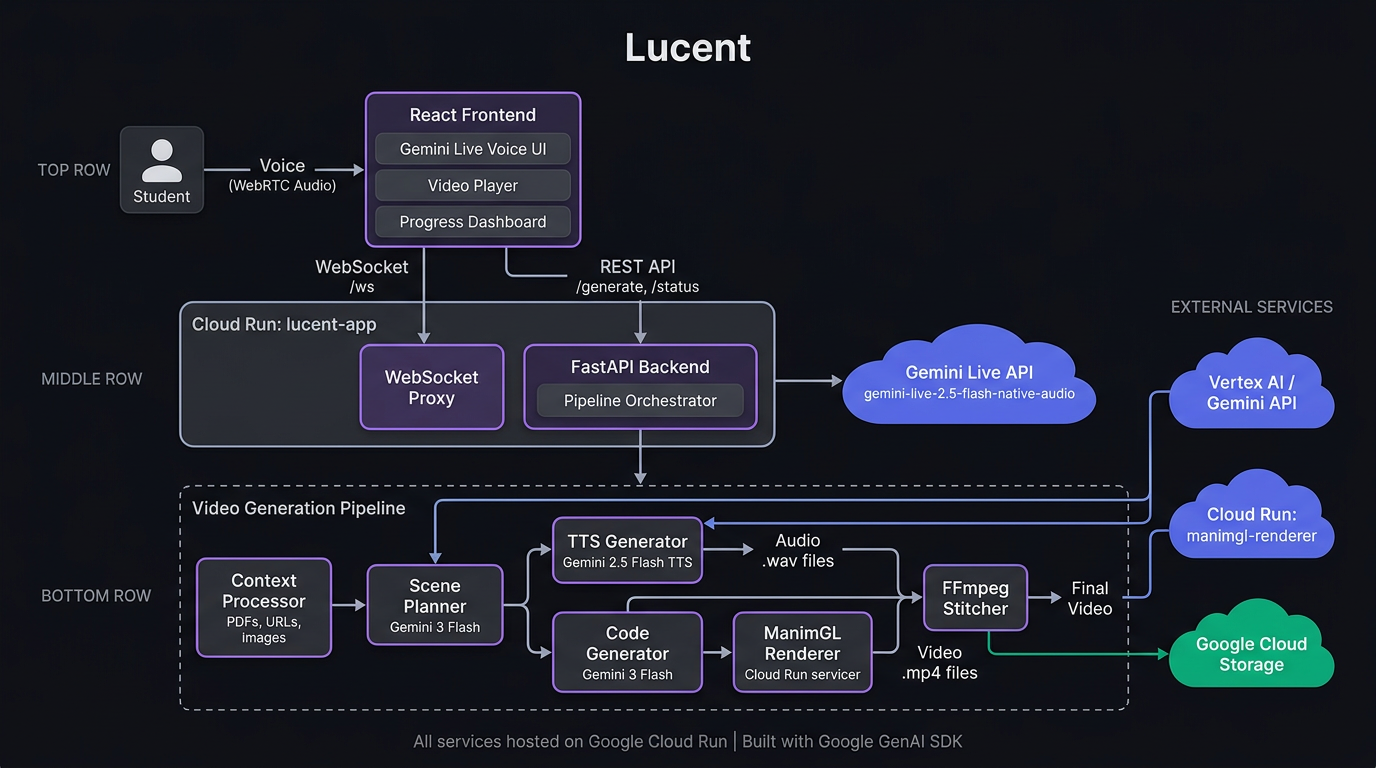
- Generates animated videos — A multi-agent pipeline plans scenes, writes ManimGL animation code, renders on Cloud Run, generates narration via Gemini TTS, and stitches everything into a polished video — all automatically.
- Interactive learning — Pause the video at any point to ask a follow-up question. Lucent sees the current frame (via screenshots sent to Gemini) and answers in context, then resumes.
- Multiple formats — YouTube landscape (16:9), YouTube Shorts/TikTok/Reels (9:16), Instagram square (1:1), or quick 15-second doubt-clearers.
How I built it
The system is a multi-agent pipeline running entirely on Google Cloud:
- Gemini Live API (
gemini-live-2.5-flash-native-audio) powers the real-time voice interface, proxied through a WebSocket endpoint embedded in the FastAPI backend. - Scene Planner uses
gemini-3-flash-previewvia Vertex AI to break a topic into animated scenes with narration scripts, timing, and animation direction. - Code Generator uses
gemini-3-flash-previewto write ManimGL Python code for each scene, guided by a comprehensive API reference built from the ManimGL source and 200+ curated golden examples. - ManimGL Renderer runs on a separate Cloud Run service with headless OpenGL (EGL), rendering animations at configurable resolutions.
- TTS uses
gemini-2.5-flash-ttsto generate natural narration audio. - FFmpeg handles audio/video synchronization (freezing last frame if narration is longer, padding silence if animation is longer) and final stitching.
- The entire per-scene pipeline (codegen → render → error recovery) runs in parallel using ThreadPoolExecutor for speed.
- Final artifacts are persisted to Google Cloud Storage so they survive Cloud Run container recycling.
The frontend is a React 19 + Vite + Tailwind CSS SPA with a voice visualizer, cumulative progress bar, and integrated video player.
Challenges I faced
- ManimGL API surface: ManimGL has many undocumented behaviors. I had to build a comprehensive API reference from the source code and create extensive anti-pattern rules in the prompts to ensure the generated code actually renders correctly.
- Headless rendering on Cloud Run: Getting ManimGL to render with EGL/OpenGL in a containerized environment without a display required careful Docker configuration with Xvfb and EGL libraries.
- Audio/video synchronization: Narration and animation durations don't always match. I implemented bidirectional sync — FFmpeg freezes the last video frame when audio is longer, and pads silence when animation is longer.
- Cloud Run container recycling: Cloud Run can restart containers at any time, losing all local files. I added GCS persistence for final artifacts and frontend retry logic to handle transient 404s.
- Aspect ratio for portrait/square videos: ManimGL's config parser uses
literal_evalon YAML values, so resolution had to be passed as a quoted Python tuple string — a subtle bug that took time to diagnose.
What I learned
- The Gemini Live API is incredibly powerful for building natural conversational interfaces — the ability to be interrupted mid-sentence makes the interaction feel genuinely human.
- Prompt engineering for code generation requires far more than just "write code" — the quality of the system prompt (API reference, anti-patterns, golden examples, style hints) determines whether the output actually renders.
- Parallelizing per-scene pipelines (codegen + render + retry) dramatically reduces end-to-end latency, especially when Cloud Run auto-scales renderer instances.
Built With
- docker
- fastapi
- ffmpeg
- gemini-api
- gemini-live-api
- gemini-tts
- genai
- google-cloud
- google-cloud-build
- google-cloud-run
- google-container-registry
- javascript
- manimgl
- python
- react
- tailwind-css
- vertex-ai
- vite
- websockets


Log in or sign up for Devpost to join the conversation.