Low-Cap Exchange Trade Bot
Screenshots
| Dashboard | Trading & Analytics | Coin Details |
|---|---|---|
 |
 |
 |
Feature highlights
- Multi-exchange normalization – Nestex, Klingex, and Cexius share the same exchange registry/throttled clients so every balance, ticker, and trade appears in the same format.
- Training-first insights – The dashboard receives
pair_summary,exchange_summary, andinsight_historyalong with analytics/slippage snapshots so you can compare algorithm fit, exchange coverage, and insight volume without extra APIs. - Dashboard + controls – Balanced graphs (slippage, mid-price, P&L), trading lists, exchange coverage, audit log, and training controls (pause/resume/mode switch) visualize ongoing cycles, while the settings panel lets you save API keys and pair selections per exchange.
- Coin-level balance drilldown – A dedicated Balances page lists every positive token per exchange; clicking a token opens a modal with coin-scoped training insights, ghost-vs-real comparisons, recent trades, analytics, and pair-level settings.
- Pluggable algorithms + evaluator – Strategies under
backend/algorithms/emit normalized results,AlgorithmEvaluatorscores them per pair, and training collects insights over every selected market to tune the next cycle. - Safety + persistence – Settings are persisted to
system.db, training snapshots/analytics go totrading.db, and Docker compose with named volumes keeps data between restarts while the logs/changelog capture every update.
Support the project
This project is done in my spare time and will be available for free, so donating and supporting the project will help me finish and polish it to a working and stable point.
* BTC: bc1qkmzc6d49fl0edyeynezwlrfqv486nmk6p5pmta
* ETH/ERC-20: 0xC13D012CdAae7978CAa0Ef5B1E30ac6e65e6b17F
* LTC: ltc1q0ahxru7nwgey64agffr7x89swekj7sz8stqc6x
* SOL: HB2o6q6vsW5796U5y7NxNqA7vYZW1vuQjpAHDo7FAMG8
* XRP: rUW7Q64vR4PwDM3F27etd6ipxK8MtuxsFs
To help me test the current implementation with the ordexnetwork, you can help by donating tokens that will be used for testing and refining the system.
* OXC: oxc1q3psft0hvlslddyp8ktr3s737req7q8hrl0rkly
* OXG: oxg1q34apjkn2yc6rsvuua98432ctqdrjh9hdkhpx0t
Local development with Docker
- Install Docker and Docker Compose (or use the Docker CLI with Compose support).
- Start the stack with persistent data:
bash docker compose up --build - The backend server will listen on
http://localhost:8000and serve both:/→ the frontend dashboard (which polls/api/status)./api/status→ the lightweight HTTP API that reports snapshots, analytics, risk events, and audit logs.
- Internally the Nestex client hits both the public (
/api/cg/tickers,/api/cg/orderbook) and private (/api/v2/balances,/api/v2/trades,/api/v2/placelimitorder, etc.) APIs so balances, orderbooks, and markets reflect the real exchange (seedocs/backend.mdfor details). The service also registers additional exchange clients (Nestex and Cexius today) so the dashboard can normalize every balance, ticker, and trade without per-exchange branching. Training resumes automatically once any configured exchange has valid credentials; execution must still be enabled deliberately via the UI mode switch.
Data persistence
- The Compose file mounts a named volume into
/app/data, sosystem.dbandtrading.dbpersist between restarts. - The
/app/datadirectory is created inside the container, and the named volume stores the actual files. You can inspect them by pausing the containers and runningdocker compose run --rm app ls /app/data.
Credentials & data collection
- The service refuses to start trading until a valid API key/secret pair exists in
system.db. By setting theNESTEX_API_KEYandNESTEX_API_SECRETenvironment variables, the service seeds the credentials automatically before persisting settings. - Once credentials are present, the dashboard can be used to monitor status, and you can use
scripts/run_training.sh/scripts/run_execution.sh(outside of Docker) or extend the Compose stack with additional services for training/execution workers.
Containers & scripts
scripts/run_training.shandscripts/run_execution.shwrappython -m backend.servicewith the respective mode.scripts/run_server.shlaunches the same HTTP status server thatdocker composeruns inside the container.
Dashboard improvements
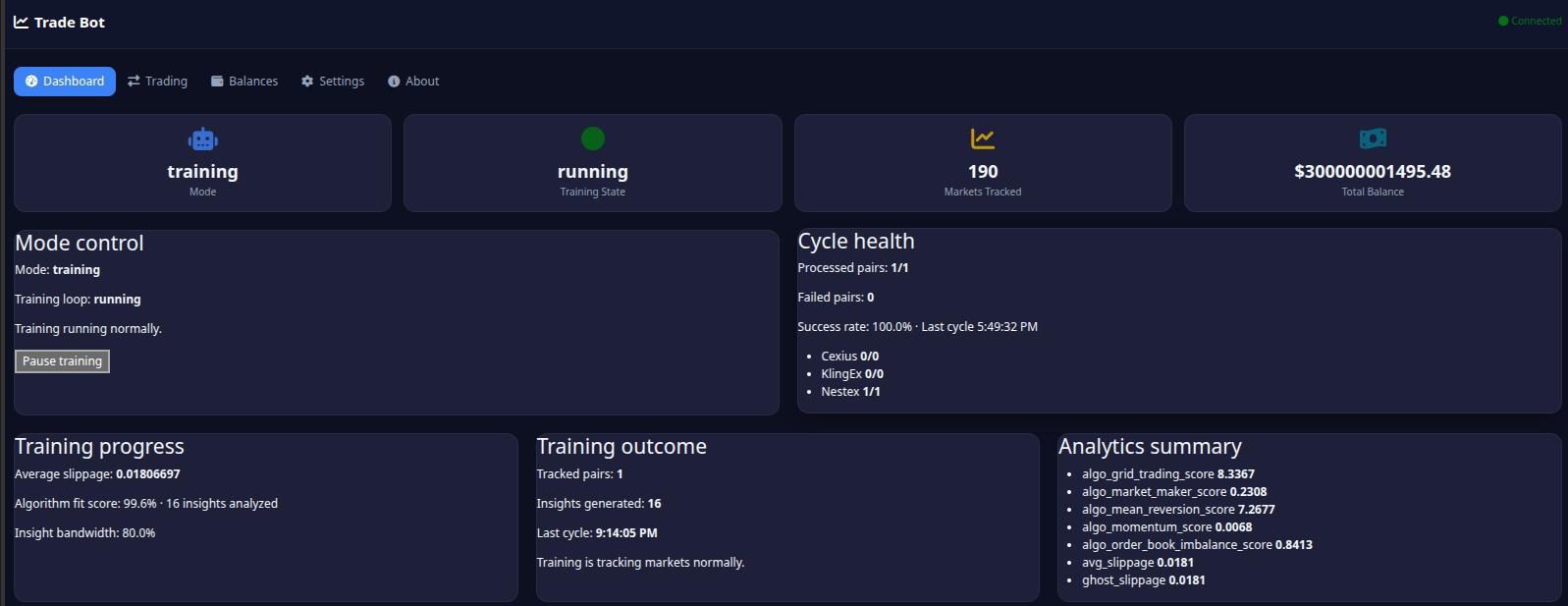
- The dashboard now surfaces background jobs, average slippage progress, and available markets, letting you verify that the Nestex client is polling the markets you care about.
- Settings support entering API keys/secrets plus selecting which markets to include; the dashboard picks up those selections via the
/api/settingsendpoint and refreshes the status API automatically. - Settings now include dedicated controls for pair budget/drawdown limits, data retention, training/execution intervals, and circuit-breaker thresholds so risk controls can be adjusted from the UI without editing files.
- Execution mode now has a live-order safety toggle (disabled by default); when disabled the backend still runs planning/risk checks but skips actual exchange order placement.
- A lightweight
/ws/pricesrequest is now handled by the server with a placeholder JSON response so the frontend no longer logs repeated 404s; the dashboard keeps polling/api/statusfor data. /ws/prices?stream=1now serves Server-Sent Events (SSE) with status snapshots so UI panels can consume live updates; plain/ws/pricesstill returns JSON metadata for compatibility.- The dashboard now presents training cards, analytics bars, and P&L summaries so you can compare ghost trades with live fills, and the settings panel exposes exchange toggles plus a training/execution mode switch that flips the backend state.
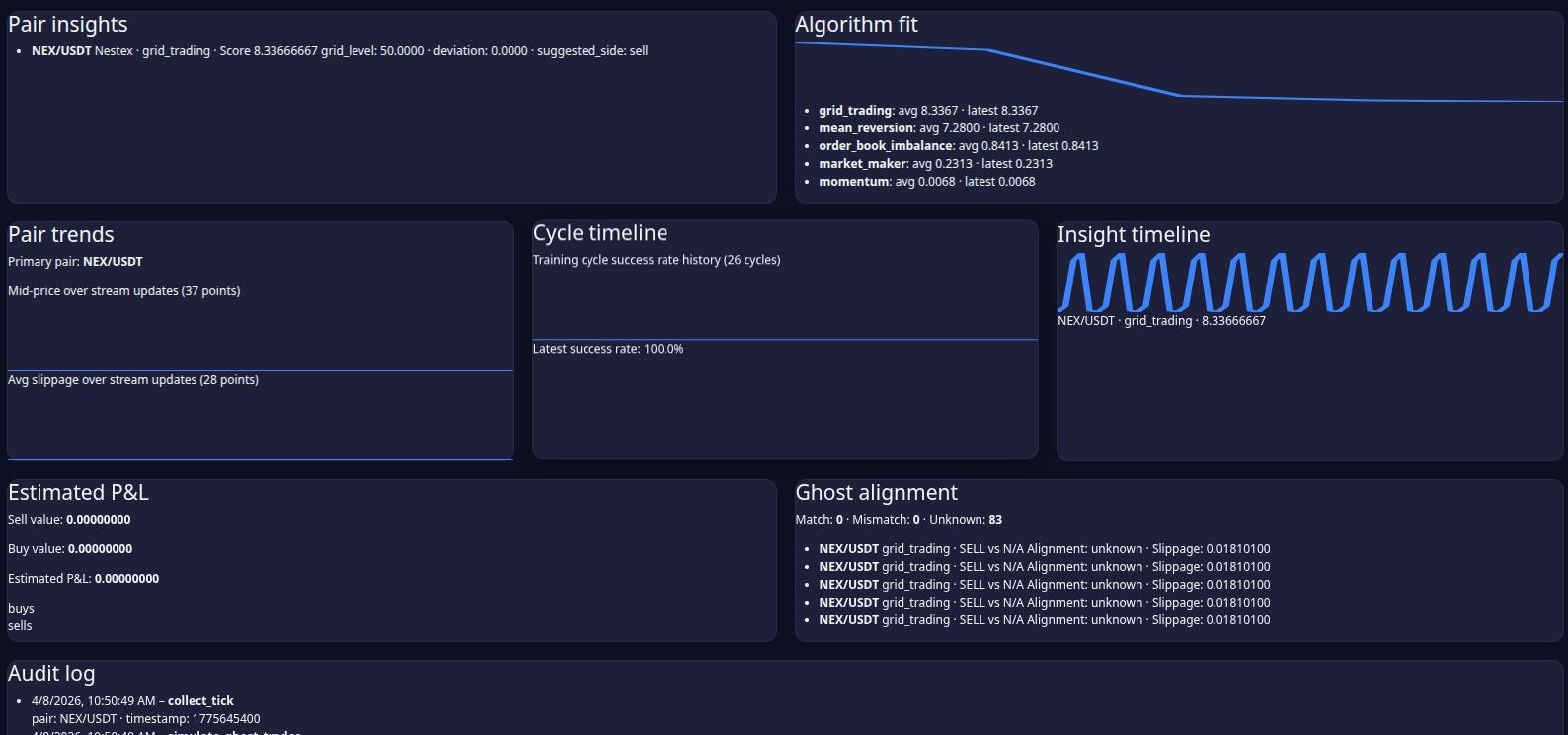
- Exchange coverage and pair insight cards now highlight which exchanges are active, the algorithms leading each pair, and provide an insight timeline sparkline so you can visually compare how every market is contributing to the training loop.
- The dashboard now keeps stream-fed history for pair mid-price, slippage, and cycle-success timelines so training health can be monitored across updates without waiting on manual refreshes.
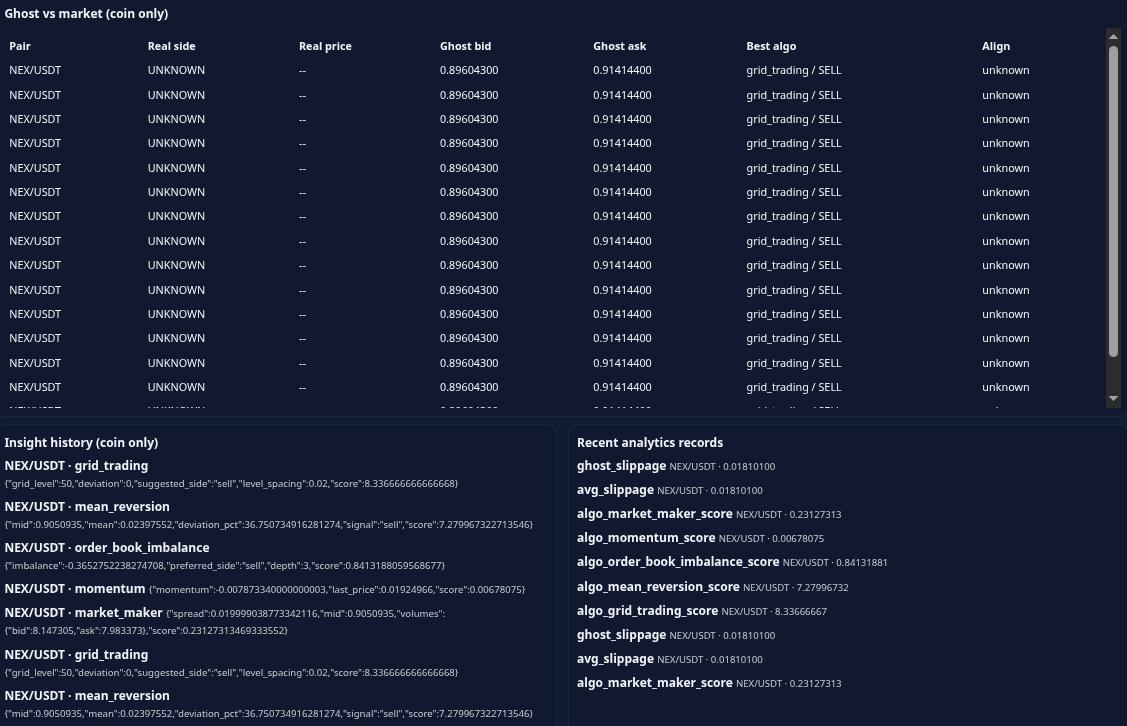
- Trading panels now include a ghost-vs-market review table that shows recent exchange trade sides/prices, best algorithm suggestions, and alignment status so training quality is visible per pair.
- Training snapshots now surface
pair_summary,exchange_summary, and an insight timeline via/api/status, letting you surface per-pair algorithm fit, exchange coverage, and longevity data in the UI without extra endpoints. - The onboarding experience now lists every registered exchange (Nestex, Cexius, etc.) with normalized dropdowns so you can save credentials for each provider, and training keeps collecting data from any exchange that has valid keys while ignoring disabled ones.
- Algorithm insights now include a scoreboard card with the strongest signal per pair plus job/training status cards split into a dedicated row so you can see which strategy is leading in every training session.
- The dashboard now also includes a dedicated mode-control card (with a training pause/resume button), sparkline charts for mid-price and slippage trends, and job summaries that truncate large pair lists so the UI highlights the status of every configured exchange without overflowing the layout.
- Recent trades now live beside the balance snapshot while the audit log stretches across the full width below the analytics blocks for better readability.
- KlingEx joins Nestex and Cexius inside the normalized exchange registry so the dashboard can collect tickers, snapshots, and balances from every authenticated provider the same way; connection failures are logged and the service keeps running so training doesn't stop when KlingEx is temporarily unreachable.
- Training now catches per-pair errors inside the background loop and emits
training_pair_erroractions so other pairs keep collecting data even if one pair fails temporarily. - The UI now includes a dedicated Balances page where each positive token is clickable for a coin-specific modal showing exchange+coin details, algorithm/training history, ghost-trade alignment, and pair-selection settings for that coin.
- Balances now show locked amounts separately (e.g., for training collateral) with a lock icon.
- The coin details modal now displays exchange orderbook and tradebook data for the selected pair.
- Use the pair navigation arrows in the coin modal to cycle between multiple trading pairs for the same token.
- Algorithm scoring now weights trade signals (buy/sell/hold) higher than raw metrics for better signal detection.
- The dashboard includes balance history sparkline charts and algorithm fit visualizations.
Testing
python3 -m pytestruns both unit tests for the exchange abstraction and the lightweight status/e2e integration that spins up the HTTP handler with stubbed connections.tests/test_e2e_stream_settings.pycovers SSE streaming and end-to-end/api/settingsmode/pair workflows without touching live exchange state.- Tests are designed to avoid persisting data to
data/system.dbordata/trading.db; stubbed connections and in-memory data ensure your databases are untouched while verifying balances, pair normalization, and the/api/statuscontract. tests/test_algorithms.pyensures every pluggable strategy described indocs/algorithm_plan.mdemits measurable insights using mock snapshots/trades so you can experiment with new heuristics without touching real exchanges.tests/test_training_manager.pyvalidates that the training snapshot includes pair/exchange summaries and highlights the best algorithm per pair for the frontend to render insight cards.
Workflow checklist
- After building/running the container, inspect logs via
docker compose logs --tail 20to confirm the Nestex client started without errors and migrations completed. - Keep settings, migration, and audit documentation current before committing.
- Commit changes with descriptive messages such as
feat: integrate Nestex APIs and docker stackso future you can read what was done.
Adding new exchanges
To add a new exchange:
- Create
backend/exchanges/<exchange>.pyimplementingExchangeClientfrombackend/exchanges/base.py - Implement required methods:
fetch_orderbook,fetch_balances,fetch_tickers,execute_order,cancel_order - Register the exchange in the module using
register_exchange()frombackend/api_client - Add tests in
tests/test_exchange_manager.pyusing theDummyClientpattern
Adding new algorithms
To add a new trading algorithm:
- Create a new class in
backend/algorithms/strategies.pyextendingAlgorithm - Implement the
analyze(context)method returning signal/metrics dict - Decorate with
@register_algorithm - Add tests in
tests/test_algorithms.py
Available algorithm types include: market making, momentum, mean reversion, grid trading, volume spike, arbitrage, breakout, and adaptive RL.
Built With
- css
- dockerfile
- html
- javascript
- python
- shell

Log in or sign up for Devpost to join the conversation.