-
-
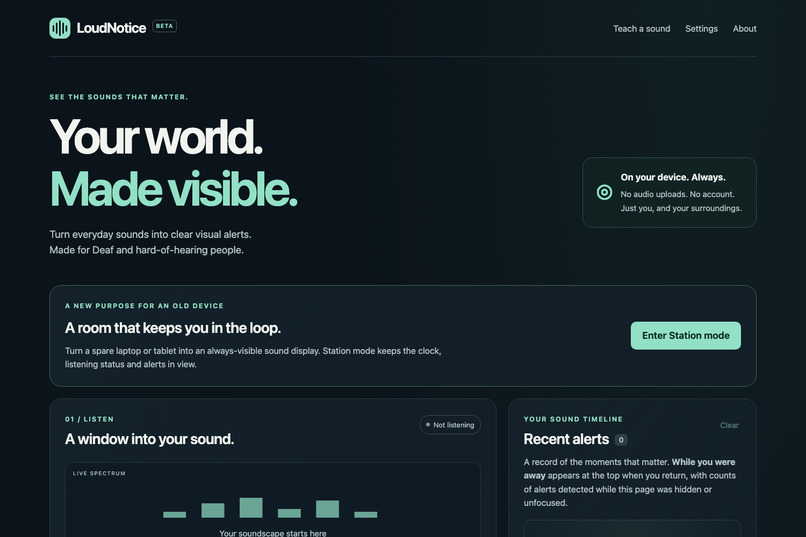
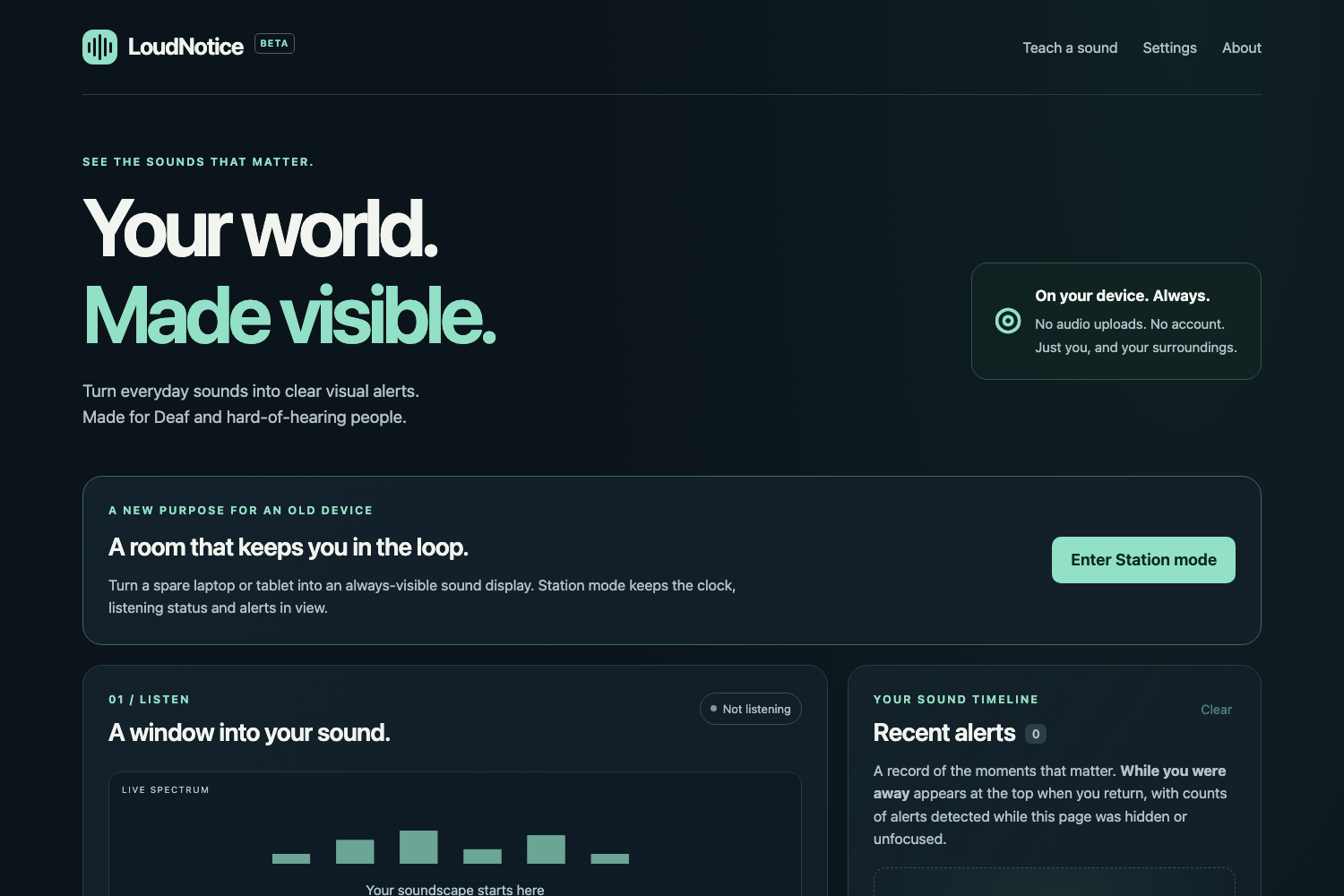
The LoudNotice dashboard (home screen).
-
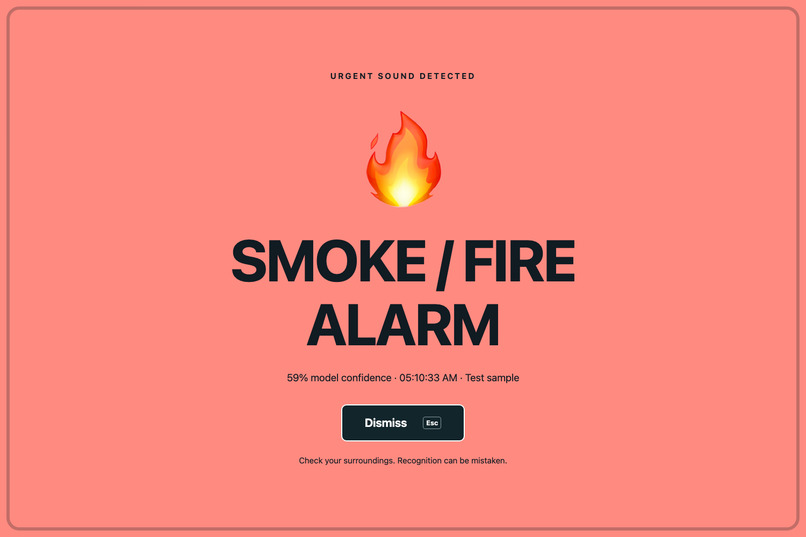
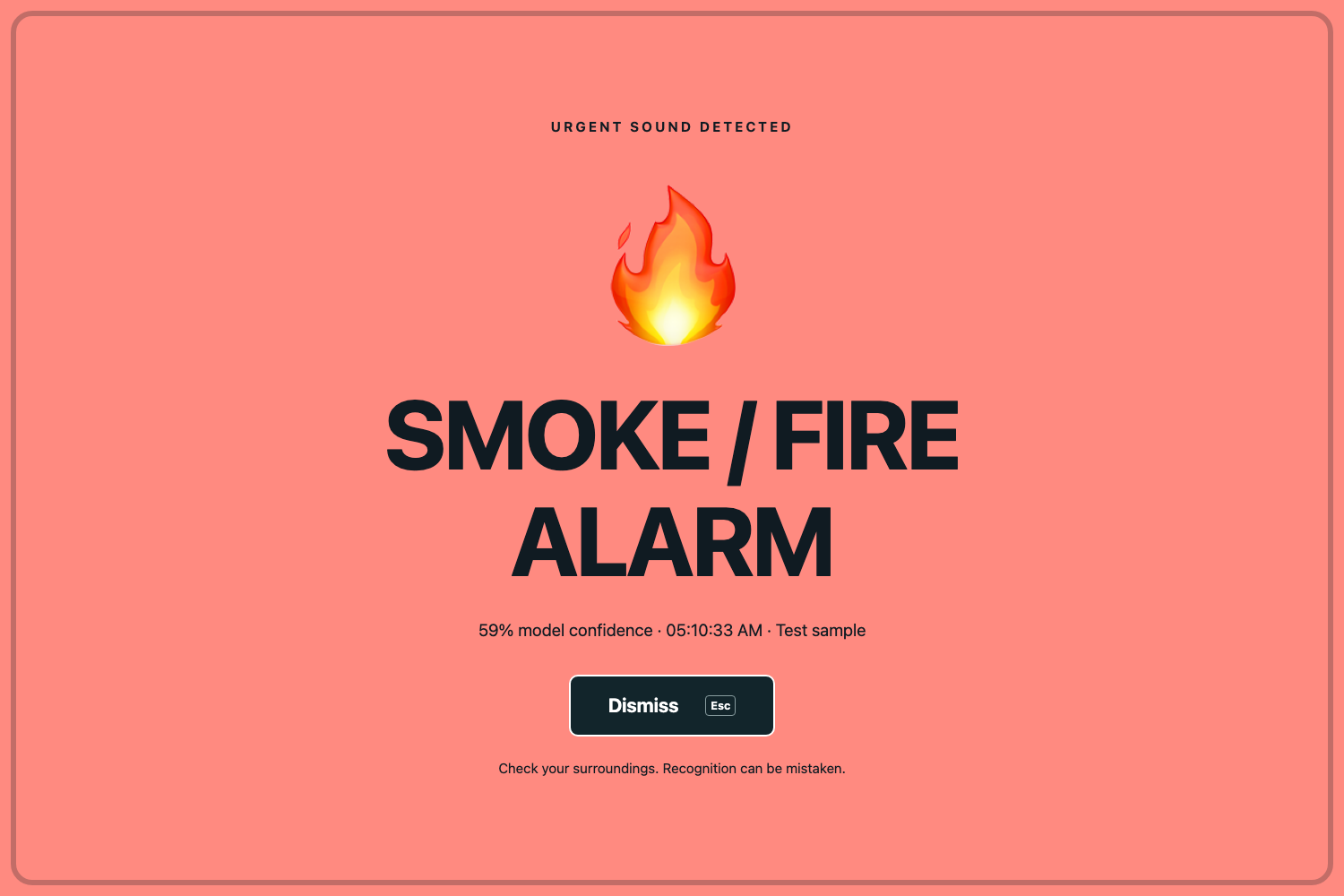
The full-screen alert for the smoke-alarm sample, with an icon, a name and a color.
-
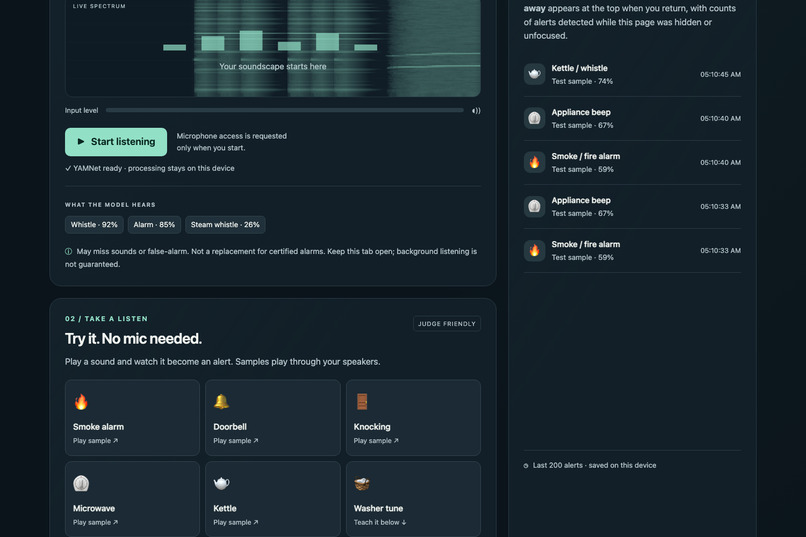
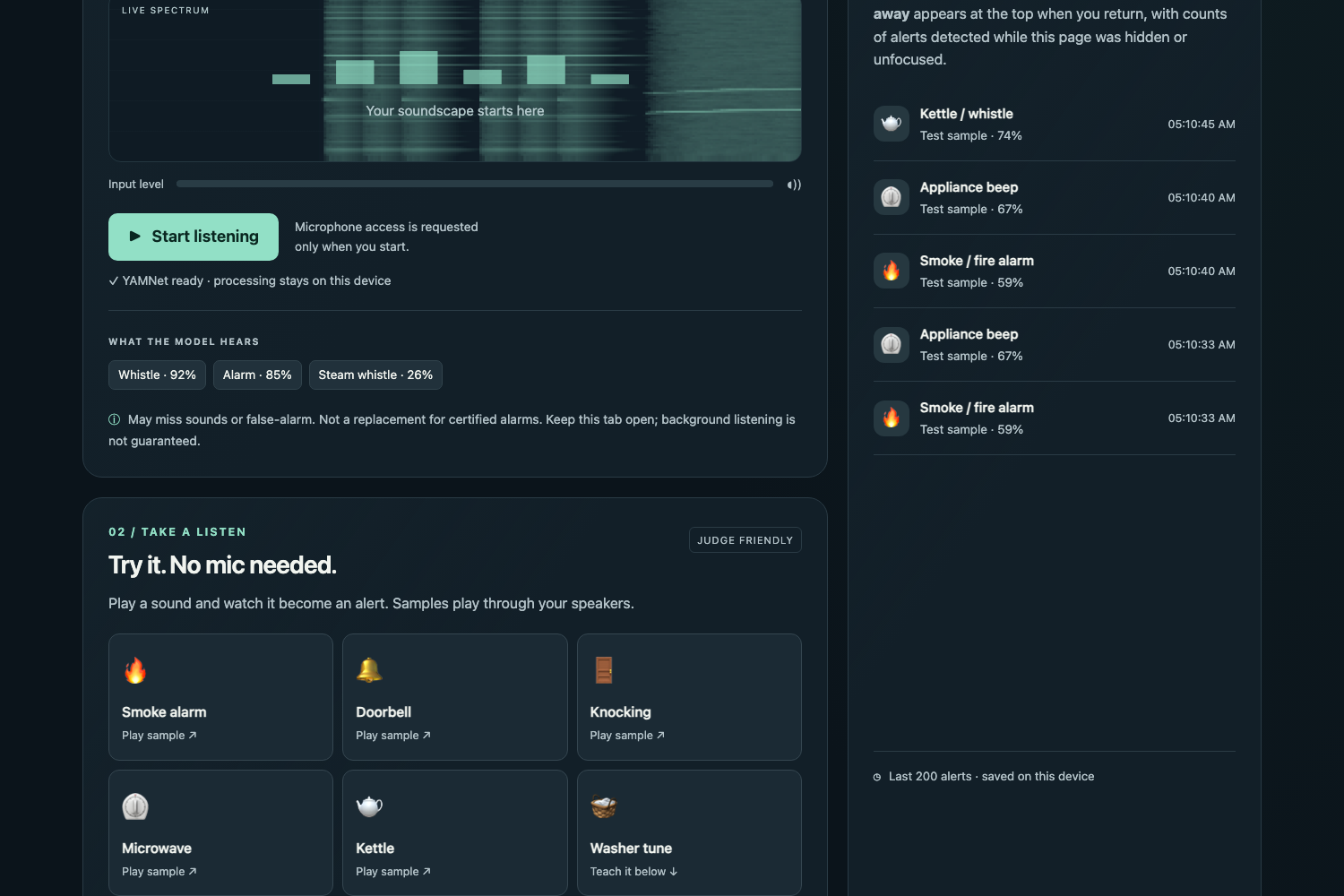
The built-in sample sounds and the timeline of recorded alerts (synthesized test sounds).
-
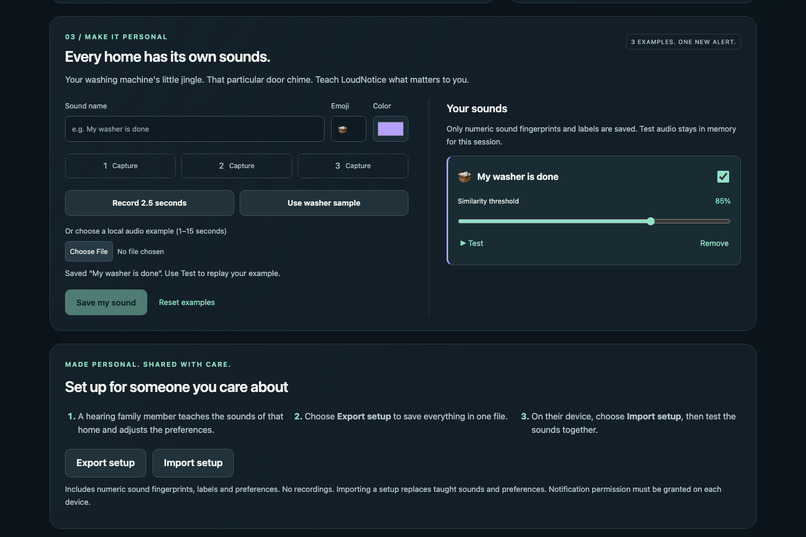
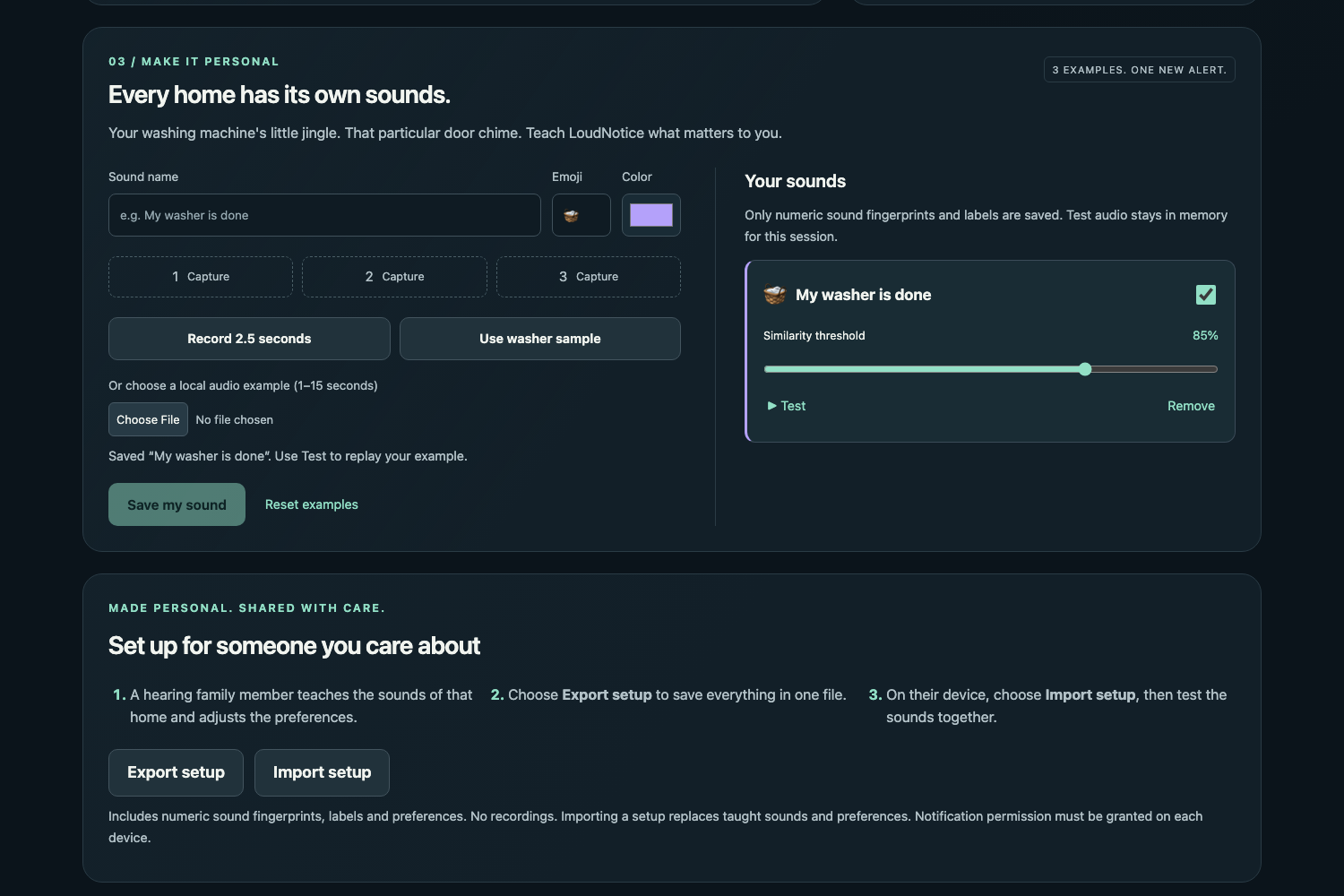
Teaching a household sound from three examples, and exporting the setup as one audio-free file.
-
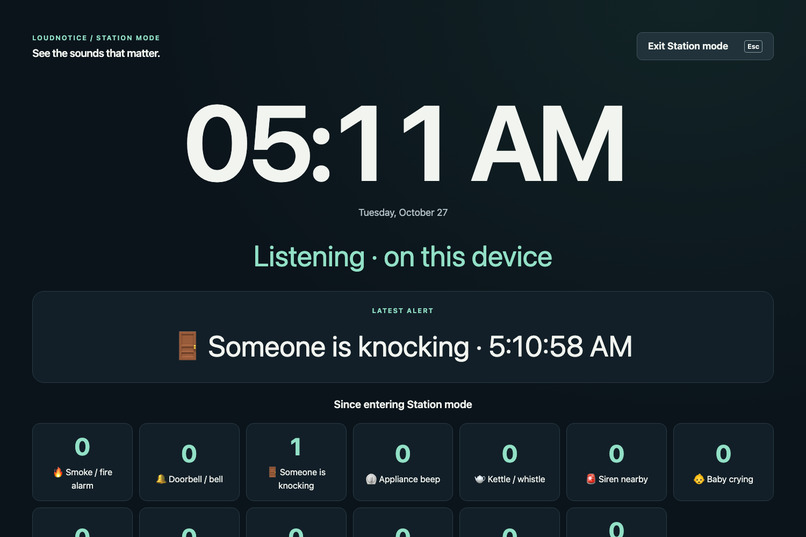
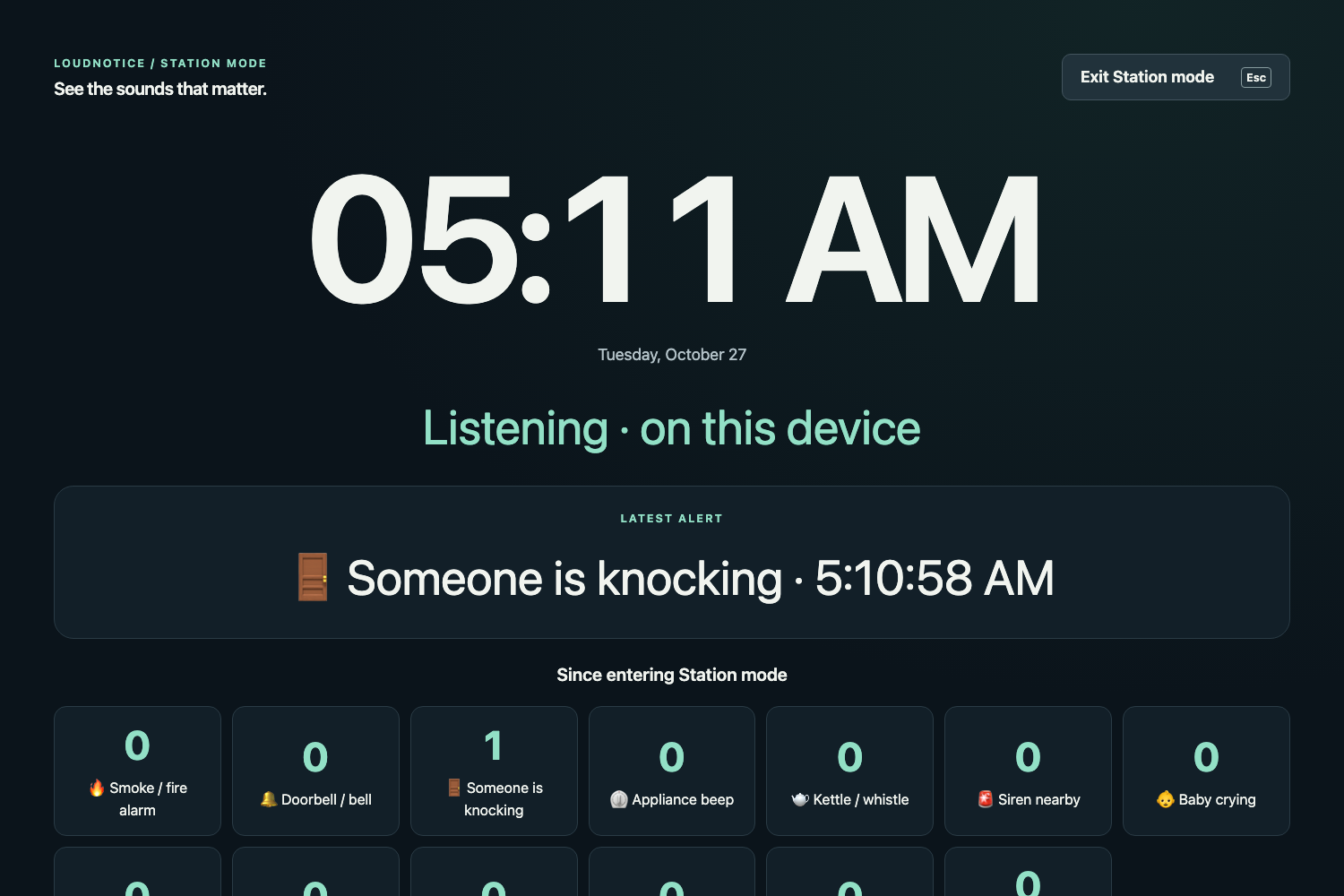
Station mode: a spare screen showing the clock, listening status, the latest alert and counts.
Inspiration
Many everyday sounds carry information: a smoke alarm, a doorbell, a knock, a kettle, an appliance finishing, a baby crying. Deaf and hard-of-hearing people may not notice these sounds, and some of them (smoke alarms, sirens, breaking glass, a crying baby) are urgent.
Phones already offer sound recognition at the operating-system level (see "Related work" below for an honest comparison). LoudNotice explores a different set of trade-offs: a plain browser tab on any modern device with a microphone, including a laptop or an old tablet kept in one room, with no account or install, with audio kept on the device, and with source code anyone can read. It also asks a practical question: what if a hearing family member could prepare the whole setup in advance and hand it over as one file?
Why this matters to me: I don't have hearing loss, but when I'm wearing earphones or headphones and absorbed in content, concentrating on something else, or enjoying videos or music at a high volume, I miss important machine sounds and even people calling out to me. That is why this project felt meaningful to me.
What it does
LoudNotice listens through the microphone and turns recognized sounds into a full-screen visual alert: a large icon, a name and a color, with optional vibration and optional system notifications.
- Listen. The browser captures mono microphone audio (echo cancellation, noise suppression and automatic gain control turned off). One-second windows are classified every half second by Google's YAMNet model, which runs locally through MediaPipe Tasks Audio. The dashboard shows the top three raw labels, the input level and a live spectrum.
- Twelve built-in sound groups. Smoke/fire alarm, doorbell, knock, appliance beep, kettle/whistle, siren, baby crying, dog barking, glass breaking, phone ringing, running water and clapping. A group's score is the maximum of its matching YAMNet labels. A group fires when one window is at least 0.10 above its sensitivity-adjusted threshold, or when two of the last three windows reach the threshold. Each group has a six-second cooldown. When several groups match, the timeline records all of them and the overlay favors urgency, then score.
- Alert screen. A full-screen overlay with icon, text and color (never color alone). Urgent alerts have a slow border pulse; with reduced-motion preferences the border is static. Dismiss with the button or Esc.
- Timeline and "While you were away". The last 200 alerts are kept locally with time, group, score and source (microphone, sample, or taught). A banner at the top of the page summarizes counts per group for alerts actually detected while the page was hidden or unfocused. This is not continuous background listening: a suspended page cannot detect sounds.
- Try without a microphone. Five sample buttons (Smoke alarm, Kettle, Knocking, Microwave, Doorbell) play synthesized test sounds audibly through the same capture, windowing and recognition pipeline as the microphone. A sample's name never chooses an alert.
- Teach a sound. Give a name, an icon and a color, then provide three examples (record three 2.5-second microphone examples, or choose local audio files of 1-15 seconds). Each example becomes 553 numbers: the 521 YAMNet category scores plus a 32-band frequency profile, normalized and weighted equally. The prototype is the average of the three examples. Recognition uses cosine similarity (default threshold 85%, adjustable per sound), a margin of at least 0.03 over the second-best taught sound, and a six-second cooldown. Up to 50 taught sounds can be saved. Only numbers are stored, never audio.
- Set up for someone you care about. A hearing family member teaches the home's sounds and adjusts the enabled groups, sensitivity, vibration and other preferences, chooses Export setup, and sends the single
loudnotice-setup.jsonfile. On the recipient's device, Import setup validates the whole file before changing anything. The file contains no recordings or audio samples and no alert history. - Station mode. Turns a spare laptop or tablet into an at-a-glance display: a large clock, listening status, the latest alert, and counts for every built-in and taught sound group. It requests fullscreen and a screen wake lock where the browser allows, and falls back gracefully (viewport fill, a status message) where it does not. Esc or Exit Station mode leaves it.
How we built it
- A static site with no build step, no backend and no account: plain HTML, CSS and ES modules (vanilla JavaScript). It runs from GitHub Pages and from
python3 -m http.server. - Classification uses Google's YAMNet (Apache-2.0) through
@mediapipe/[email protected], running in the browser with all 521 category scores requested. The only external requests are the pinned MediaPipe library and wasm runtime from cdn.jsdelivr.net and theyamnet.tflitemodel from storage.googleapis.com. There are no analytics, secrets, paid APIs, remote audio services, service workers or push services. - Audio input uses an AudioWorklet with a ScriptProcessor fallback. Model inference runs on the main thread, so older devices may show delays.
- Code layout:
index.htmlandstyles.css;js/app.js(controls),js/station.js(Station mode),js/setup.js(setup validation),js/audio.jsandjs/capture-worklet.js(input),js/classifier.jsandjs/spectrum.js(features),js/groups.jsandjs/custom.js(recognition),js/alerts.js(alerts, history, away summaries) andjs/storage.js(reading data saved under the earlier app name). tools/synth_sounds.pygenerates the test sounds insounds/(CC0).tests/smoke_test.pyis a Python Playwright script. It starts its own local server and drives headless Chromium with the real pinned YAMNet model; model inference is never mocked. It checks the five built-in samples, teaching and recognizing the washer jingle (and not confusing it with the microwave), Station mode entry and exit, handled Fullscreen / Wake Lock failures, setup export and import, saved data after reload, the external-request allowlist and uncaught browser errors.- Latest result: on 2026-10-27, headless Chromium through Python Playwright with the real pinned YAMNet model, 16 of 16 checks passed. The fixtures are synthesized, so this shows that the pipeline works, not real-room accuracy.
Challenges we ran into
- A generic label and a specific label for the same sound. YAMNet can give a whistling kettle a high generic "Alarm" score, which made the smoke-alarm group fire on a kettle. We changed the smoke group to yield when it matched only through that generic label and a sound-specific label (kettle, siren, phone or doorbell) explains the sound at least as well. We checked the fix by running the same kettle sample under the same conditions before and after the change. We deliberately did not apply the same yielding to appliance beeps, because real smoke alarms often score "Beep" and a missed alarm is worse than a false one.
- A generic alert landing on top of a taught sound. After we taught the washer jingle, the generic "Appliance beep" alert appeared over the taught sound. We fixed this so the taught sound is no longer shadowed. A related effect remains: the smoke-alarm sample can still add an extra "Appliance beep" entry to the history (the smoke test recorded smoke, appliance, smoke, appliance for that sample).
- Faster response versus more false alarms. Letting every built-in group fire from a single window clearly above its threshold helps brief sounds such as a knock, but it may also increase false alarms. We have not measured that trade-off in real rooms.
- What synthesized sounds can and cannot show. The test sounds are synthesized, and the taught-sound test teaches the same file three times. That demonstrates the pipeline, not generalization to a real home. The taught washer sample scored a similarity of 0.887 against the default 0.85 threshold in the smoke test, which says nothing about real washing machines.
- A test that waited the wrong way. One early failure was in the test script's timing, not in the app. We fixed how the script waits for results so that the checks report the app's behavior.
- Station mode depends on the browser. In the headless test run the screen wake lock could not be enabled, and the app reports this in a status line instead of failing. On real devices the browser or operating system may still release a lock, and a closed lid, a locked screen or a suspended tab stops listening.
- A quiet knock slipped through. The first synthesized knock scored about 0.33 for "Knock" in single windows, which did not satisfy the two-of-three-windows rule. We made the knock fixture longer (two groups of three knocks) and let any group alert on one strong window (threshold + 0.10).
Accomplishments that we're proud of
- A working browser prototype of the whole flow with no server: listen, recognize, show a large visual alert, keep a local timeline, and keep a Station mode display running.
- Teaching a household sound from three examples while storing only numbers, and handing a complete setup (taught sounds plus preferences) to another device as one audio-free JSON file that is validated before it changes anything.
- A reproducible check: 16 of 16 smoke-test checks passed on 2026-10-27 with the real model, including a check that only the pinned MediaPipe and YAMNet hosts are contacted and that no uncaught errors occur.
- Fixing the kettle-as-smoke-alarm false alarm and the generic alert shadowing a taught sound, and checking the kettle fix by running the same sample under the same conditions before and after.
- A no-microphone demo mode, so a reviewer can try the whole flow with no microphone permission.
- Everything is public: application code under MIT, test sounds under CC0.
We have no measured detection rate, delay or battery figure to report.
What we learned
- A pretrained general-purpose sound classifier gives useful labels, but generic and specific labels overlap. Handling that overlap (the kettle versus the smoke alarm) matters as much as the threshold itself, and the cost of a missed alarm and of a false alarm is not symmetric.
- Taught sounds need to be tested against built-in groups, not only against each other: a generic built-in alert can shadow a taught one.
- A synthesized test passing shows the pipeline works. It does not show that the system works in a real room, so we separate the two in the text and in the README.
- Separating a failing test from a failing app: one failure came from the test script's timing.
- A static page can process audio privately on the device; no server is needed. But a browser tab depends on browser APIs (wake lock, fullscreen, background behavior) that vary by device.
What's next
These are possible next steps, not features of this submission.
- Test knock detection, the other fixtures and real household sounds at realistic distances and noise levels on the intended device, and measure false-alarm and miss rates.
- Get feedback on the alerts and on the family setup flow from Deaf and hard-of-hearing users.
- Check screen-reader announcements, keyboard focus, large text zoom and narrow screens on real devices.
How AI tools were used and what the human author did
NextSpark Hacks allows AI tools if their use is explained. LoudNotice was built by one student working heavily with AI tools. To keep the line between AI output and human work clear:
- Ideas: two AI models (Anthropic's Claude Fable 5.1 and OpenAI's Codex) proposed project ideas from the public hackathon description only. The ideas were compared against the judging criteria and whether a convincing demo could be recorded. The human author chose LoudNotice from the compared options.
- Code: most of the application code and the test script were written by OpenAI Codex (GPT-6 Astra) from a written brief (
docs/BRIEF.md). Anthropic's Claude Code wrote the brief and the sound synthesis script, ran the browser tests, and found and fixed bugs (a kettle raising a false smoke alarm, a taught sound being shadowed by the generic beep alert, a test timing issue). Notes from the build are indocs/ai-build-notes/. - Writing and review: the README and this Devpost text were drafted with Claude and checked against the hackathon rules by other AI models (OpenAI Codex, DeepSeek, Cursor Composer and Mistral).
- Video: recorded automatically with Playwright; the narration is synthesized speech (Kokoro-82M), not a human voice.
- Pre-existing work used: YAMNet and MediaPipe Tasks Audio (Google, Apache-2.0) and Kokoro-82M (Apache-2.0) are existing models and libraries, not our work.
- The human author: decided to enter, pushed to finish and submit within the last day, chose LoudNotice, decided that the repository could be made public by the AI, wrote the personal note in Inspiration, and pressed the final buttons to publish the demo video on YouTube, register for the hackathon and submit the project on Devpost (the AI prepared each of those steps). The human author did not write the code by hand.
Honest limitations and simulated parts
- Not a medical or safety device. LoudNotice is a prototype, not a medical device, not a certified alarm and not a replacement for real smoke alarms, fire alarms or other safety devices or for existing accessibility aids. It may miss sounds and it may raise false alarms.
- The sounds in the tests and in the video are synthesized. The sample sounds were generated by
tools/synth_sounds.py(CC0); they are not recordings of real doorbells, kettles, smoke alarms, microwaves or washing machines. In the demo video the sounds are these synthesized sounds, played through the app's sample buttons or, in the Station mode scene, fed into Chromium as a fake microphone input. The video was recorded automatically with Playwright, with English narration synthesized by Kokoro-82M and with subtitles. - No real-world accuracy has been measured. We have not measured false-positive or false-negative rates, delay or battery use in real rooms or on real devices. Noise, distance, microphones and similar sounds affect results. YAMNet confidence and taught-sound similarity are different, uncalibrated scores. The 16 of 16 smoke-test result shows that the pipeline works on synthesized fixtures.
- Teaching is demonstrated with a synthesized sample. In the smoke test the washer is taught from the same sample file three times. Real teaching with three distinct recordings has not been evaluated.
- A simple matching method. Taught sounds are matched by cosine similarity on a 553-number fingerprint. It can confuse similar sounds or fail in noisy rooms.
- Keep the page open and visible. Continuous background listening is not guaranteed: background tabs, locked screens, a closed lid and operating-system power controls can pause processing, and a suspended page cannot detect sounds. Station mode asks for a screen wake lock, but the browser may refuse or release it.
- Needs internet on first load. The page downloads the pinned MediaPipe runtime and the YAMNet model from two public hosts. Offline availability is not guaranteed. Audio itself is never uploaded.
- Older devices may be slow, because model inference runs on the main thread.
- Notifications: an imported setup's notification preference does not grant browser permission; permission is separate on each device.
- Incomplete: the items under "What's next" are not part of this submission. Real-room accuracy has not been measured.
Related work
Phones already have similar built-in features: iPhone Sound Recognition can also learn a custom alarm, appliance or doorbell (iOS 16 and later), and Android's Sound Notifications with Google's Live Transcribe & Notification app can add custom sounds. These are built into the operating system or shipped as apps, and they are likely to be more polished and better integrated than a web page. Other hackathon projects have explored the same idea. LoudNotice's angle is that it runs in any modern browser, including on a laptop or an old tablet kept in one room (Station mode), needs no account or install, keeps audio on the device, lets a hearing family member prepare and hand over the whole setup as one file, and is open source. It is a prototype, not a replacement for those tools.
The project was first called SoundSense. We renamed it LoudNotice because several existing projects already use the name SoundSense. Data saved under the earlier name can still be read on the same origin.
Credits
- YAMNet (Google, Apache-2.0): AudioSet sound classification model. LoudNotice loads the MediaPipe-hosted
yamnet.tfliteat runtime and does not redistribute it. - MediaPipe Tasks Audio
@mediapipe/[email protected](Google, Apache-2.0): in-browser audio classification runtime, loaded from cdn.jsdelivr.net. - Kokoro-82M (Apache-2.0), voice
af_heart: synthesized narration of the demo video. No music. - Test sounds: original sounds generated by
tools/synth_sounds.py, no third-party recordings; CC0 1.0. - Application code: MIT license. Model and runtime licenses are separate.
- AI assistance: Claude and Claude Code (Anthropic), Codex (OpenAI), and review by other AI models; see the AI section above.
- Existing features referred to for comparison: Apple Sound Recognition (iPhone, iOS 16 and later), Android Sound Notifications, Google Live Transcribe & Notification.
- Made during the NextSpark Hacks 2026 submission period (October 22-27, 2026).
Built With
- audioworklet
- css3
- es-modules
- fullscreen-api
- getusermedia
- github
- html5
- javascript
- kokoro-82m
- localstorage
- mediapipe
- mediapipe-tasks-audio
- playwright
- python
- screen-wake-lock-api
- tensorflow-lite
- web-audio-api
- webassembly
- yamnet

Log in or sign up for Devpost to join the conversation.