-
-
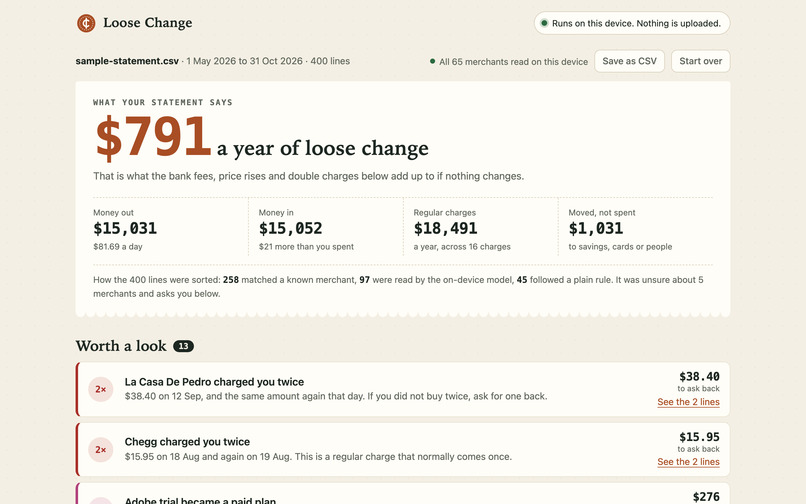
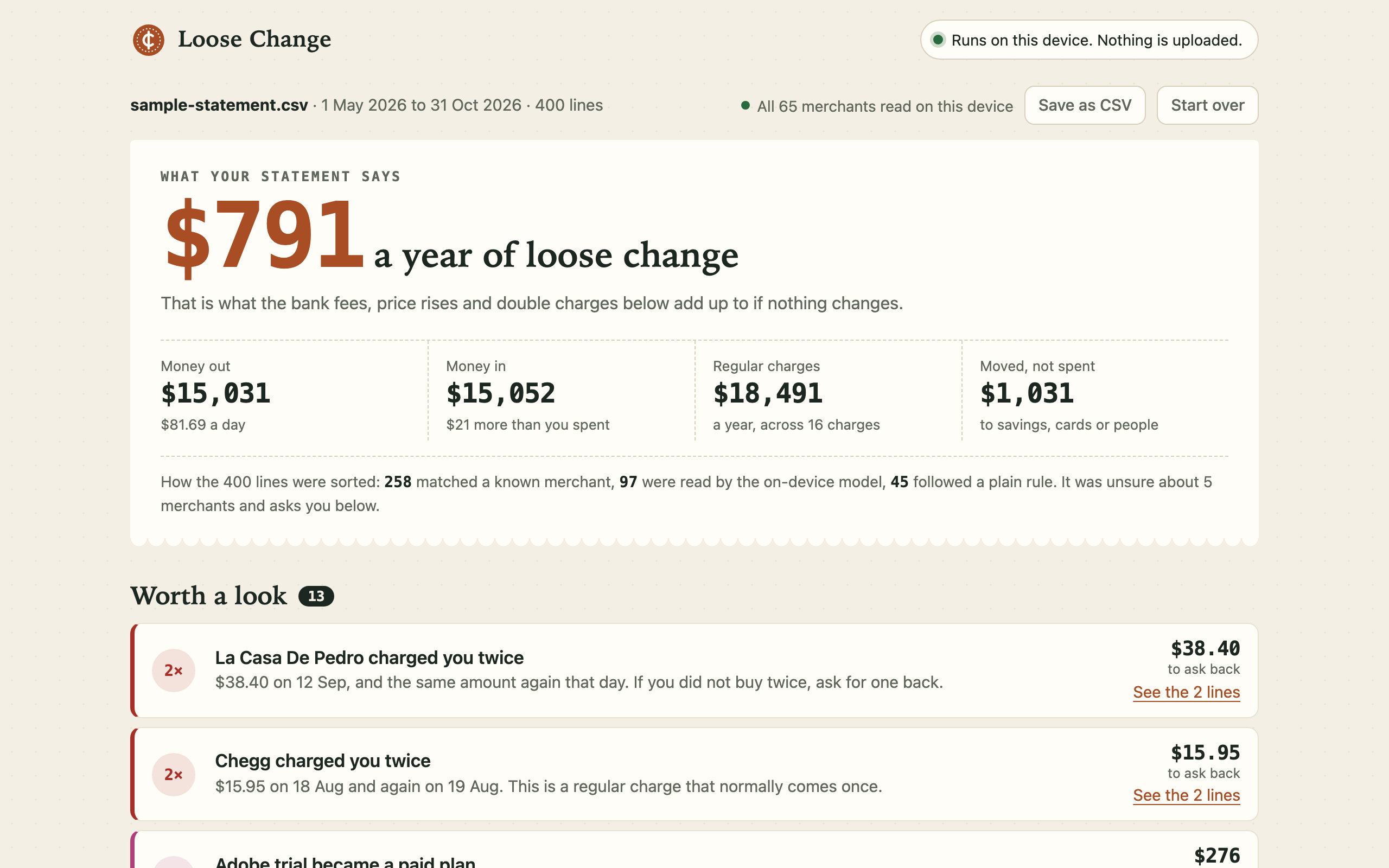
$791 a year of loose change found in the sample statement, with how each line was sorted.
-
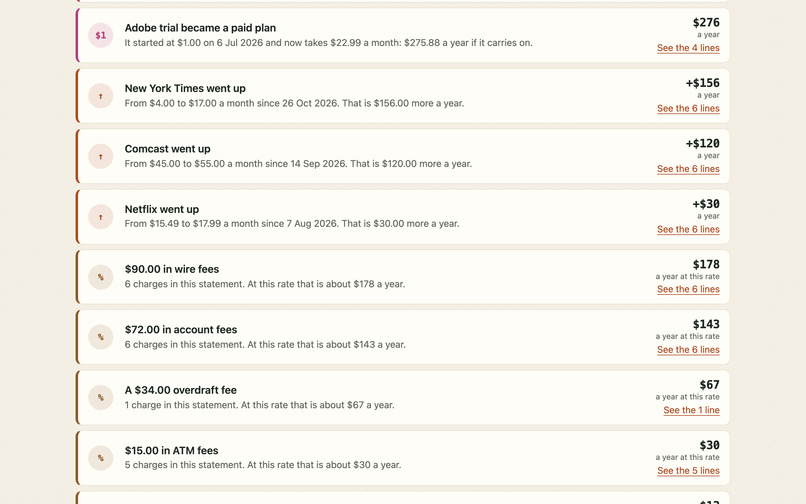
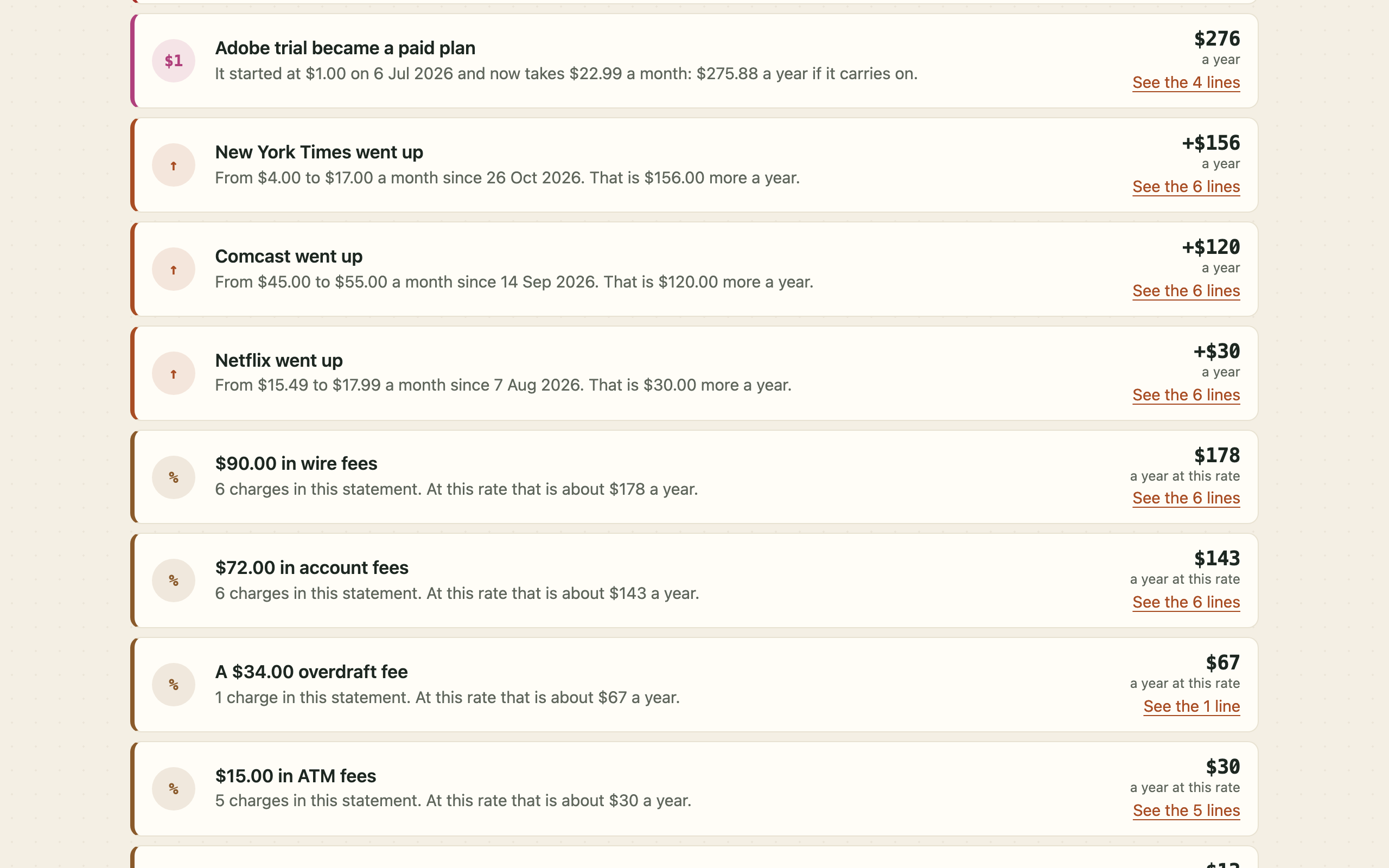
Alerts, each with the exact lines behind it: a $1 trial that became paid, price rises, bank fees.
-
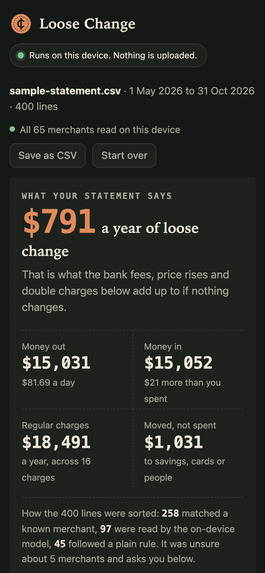
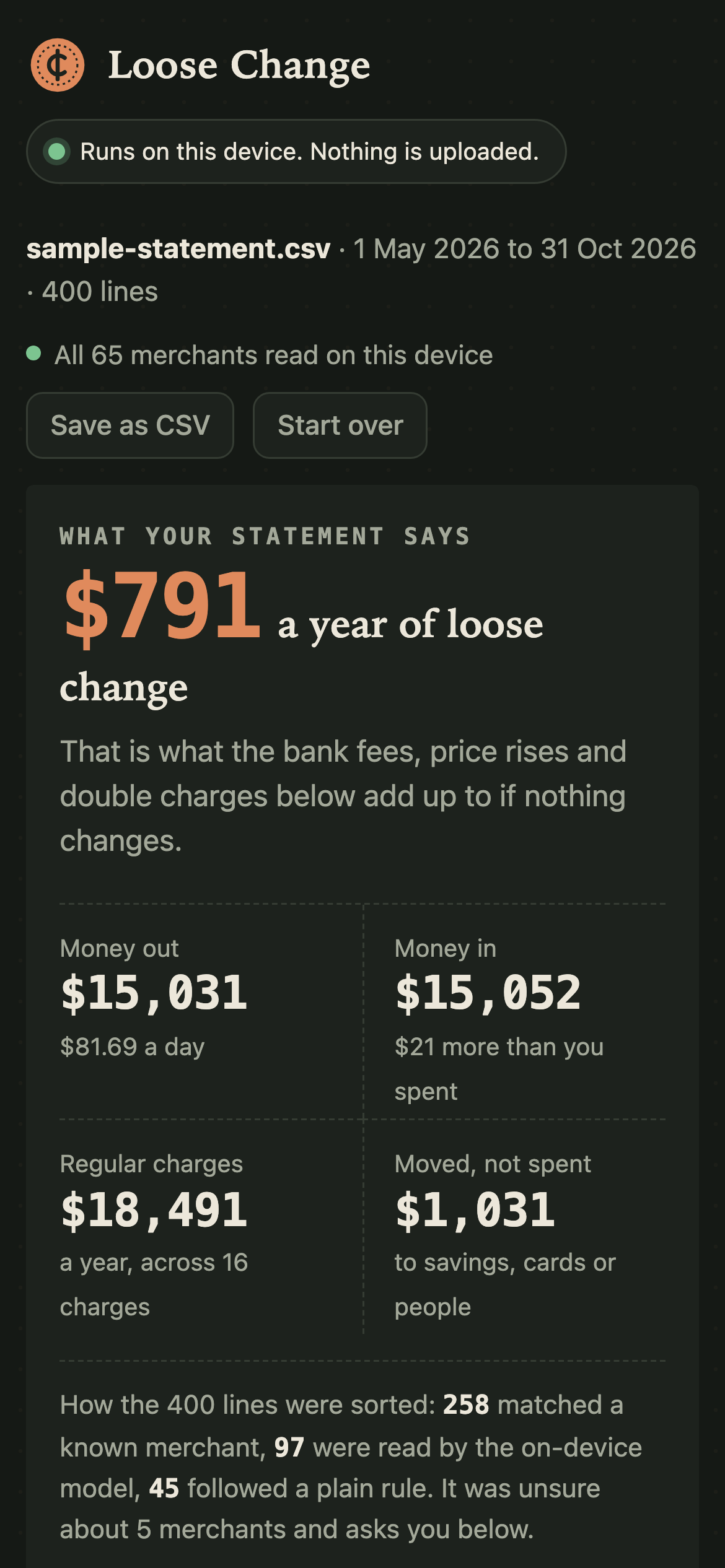
The same on a phone in dark mode.
-
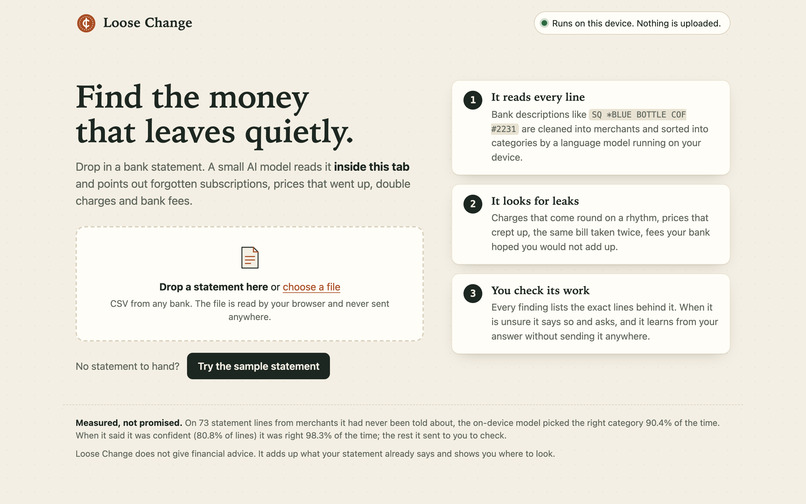
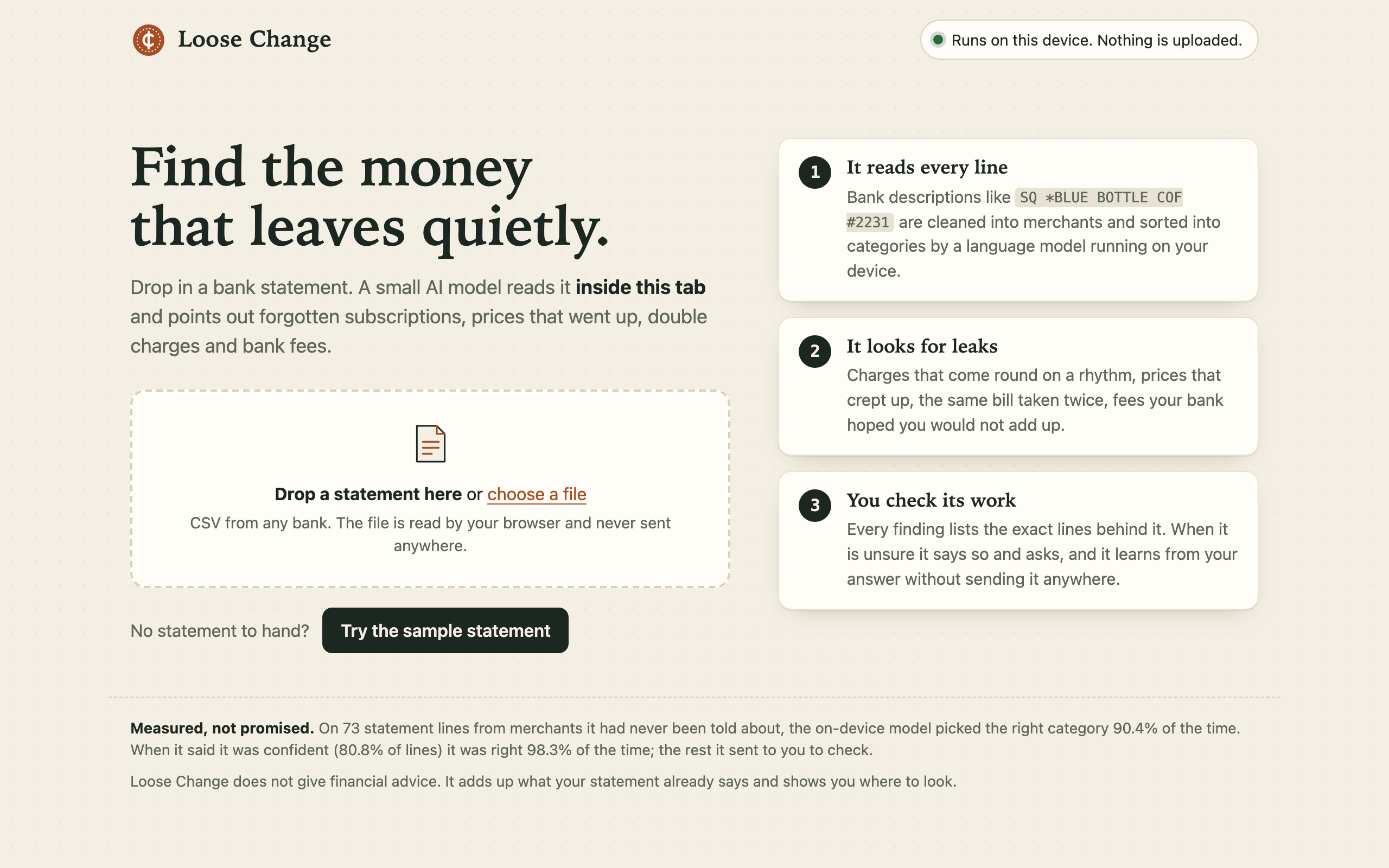
The start page: drop in a CSV from any bank, or try the invented sample statement.
-
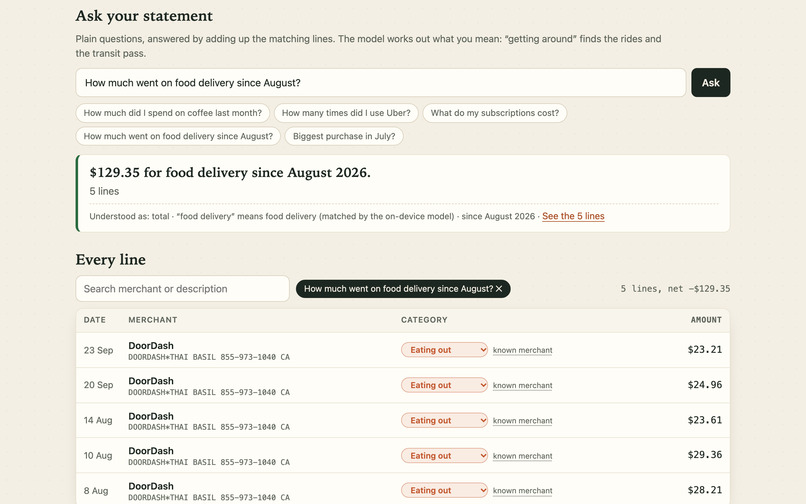
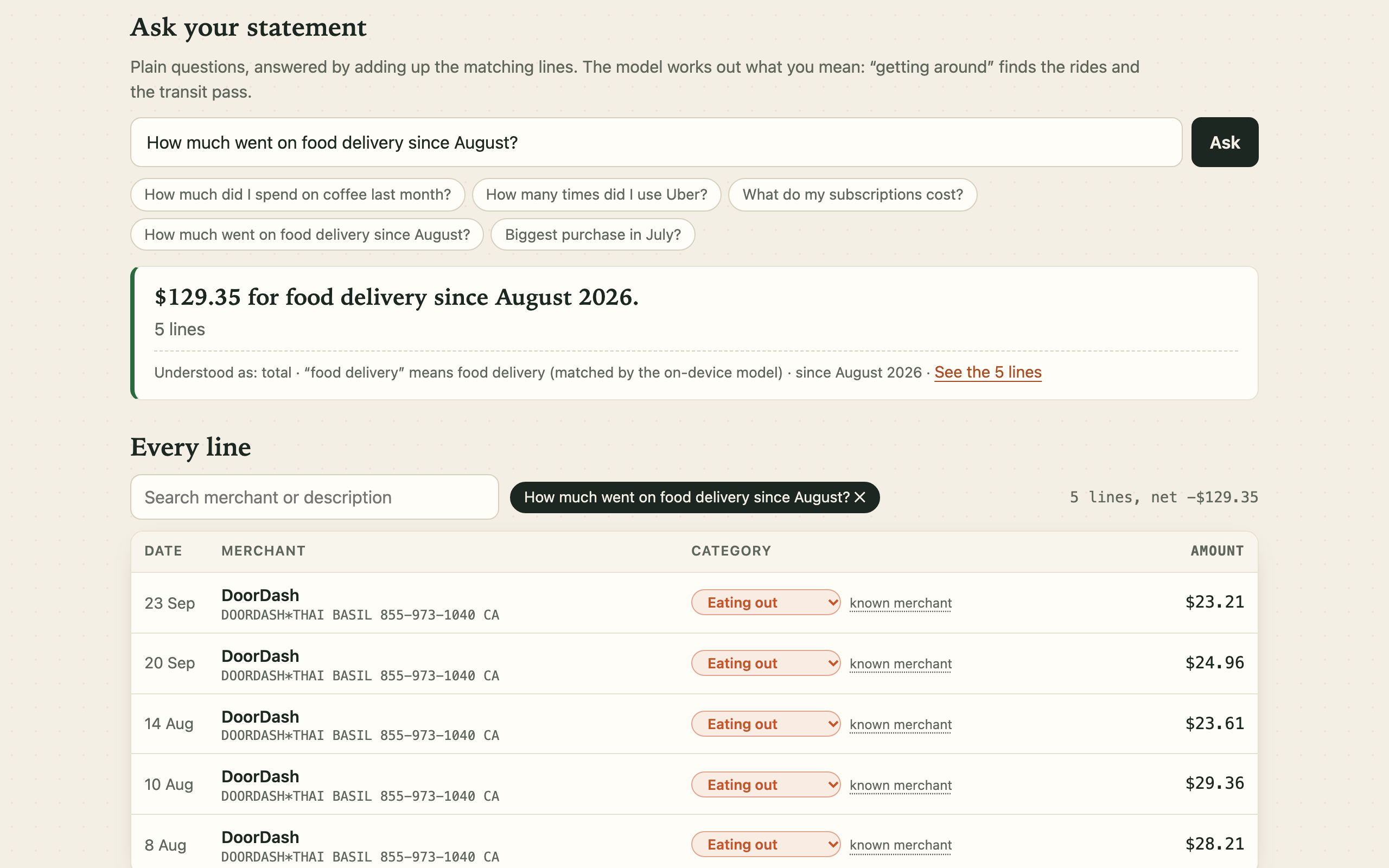
A plain question, matched to the right lines by meaning and then added up.
-
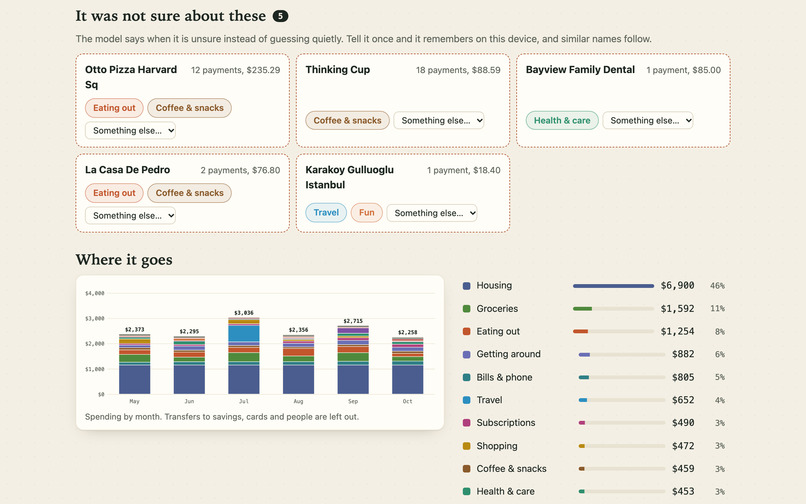
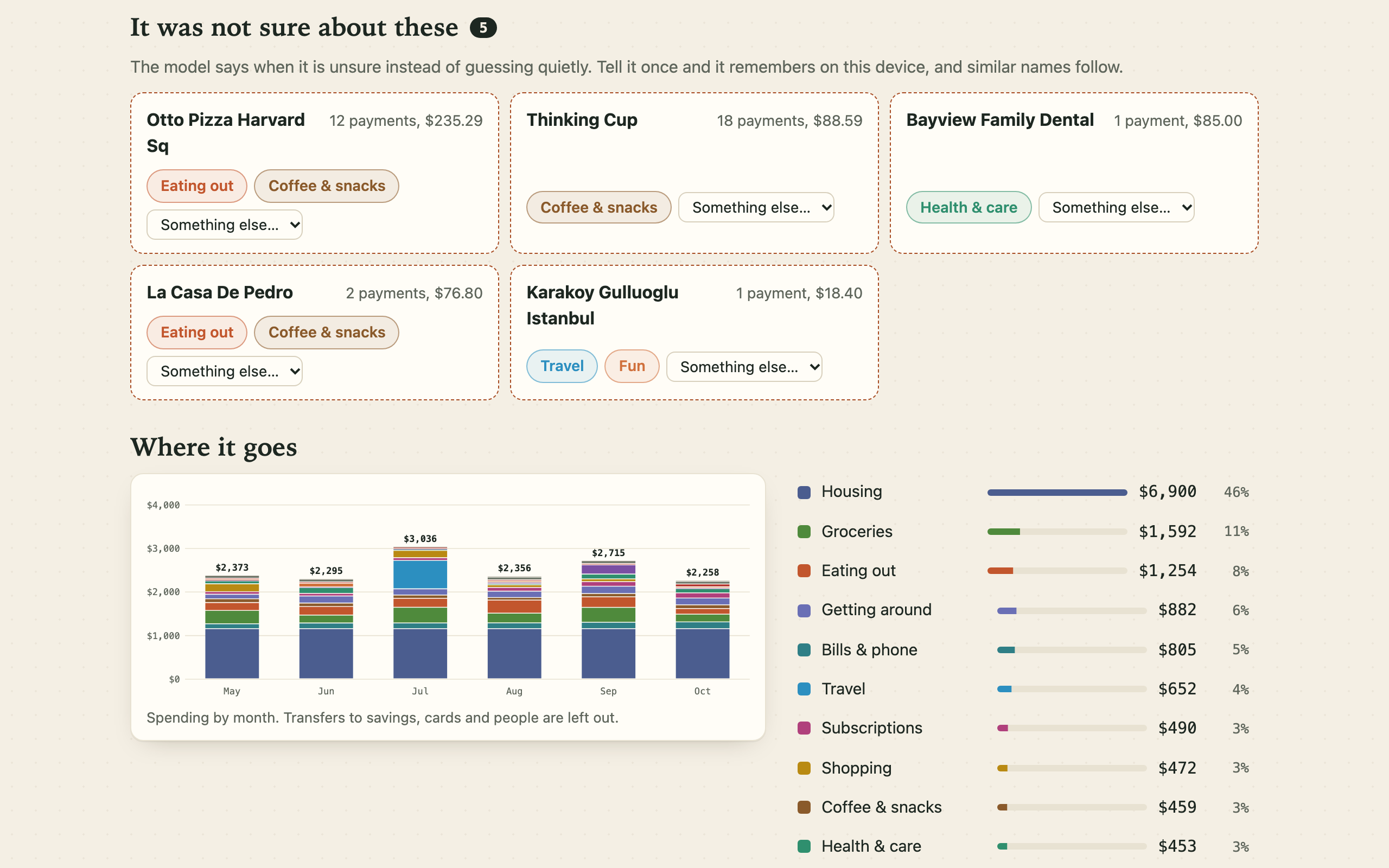
The merchants the model was unsure about, asked instead of guessed, and spending by month.
-
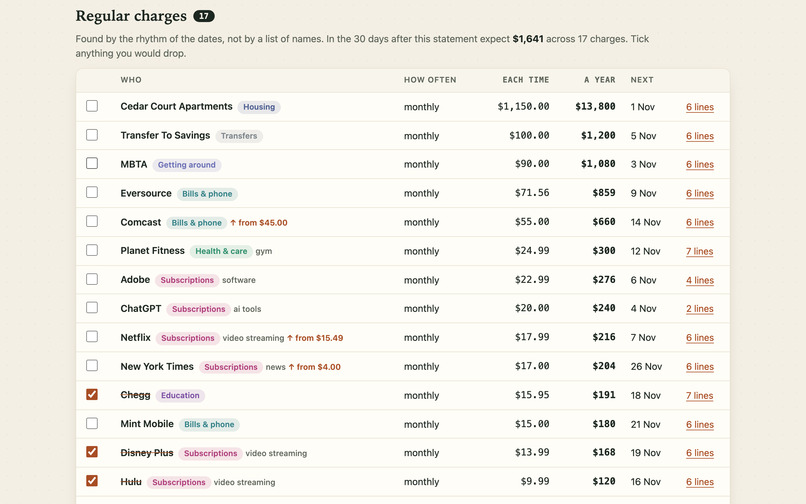
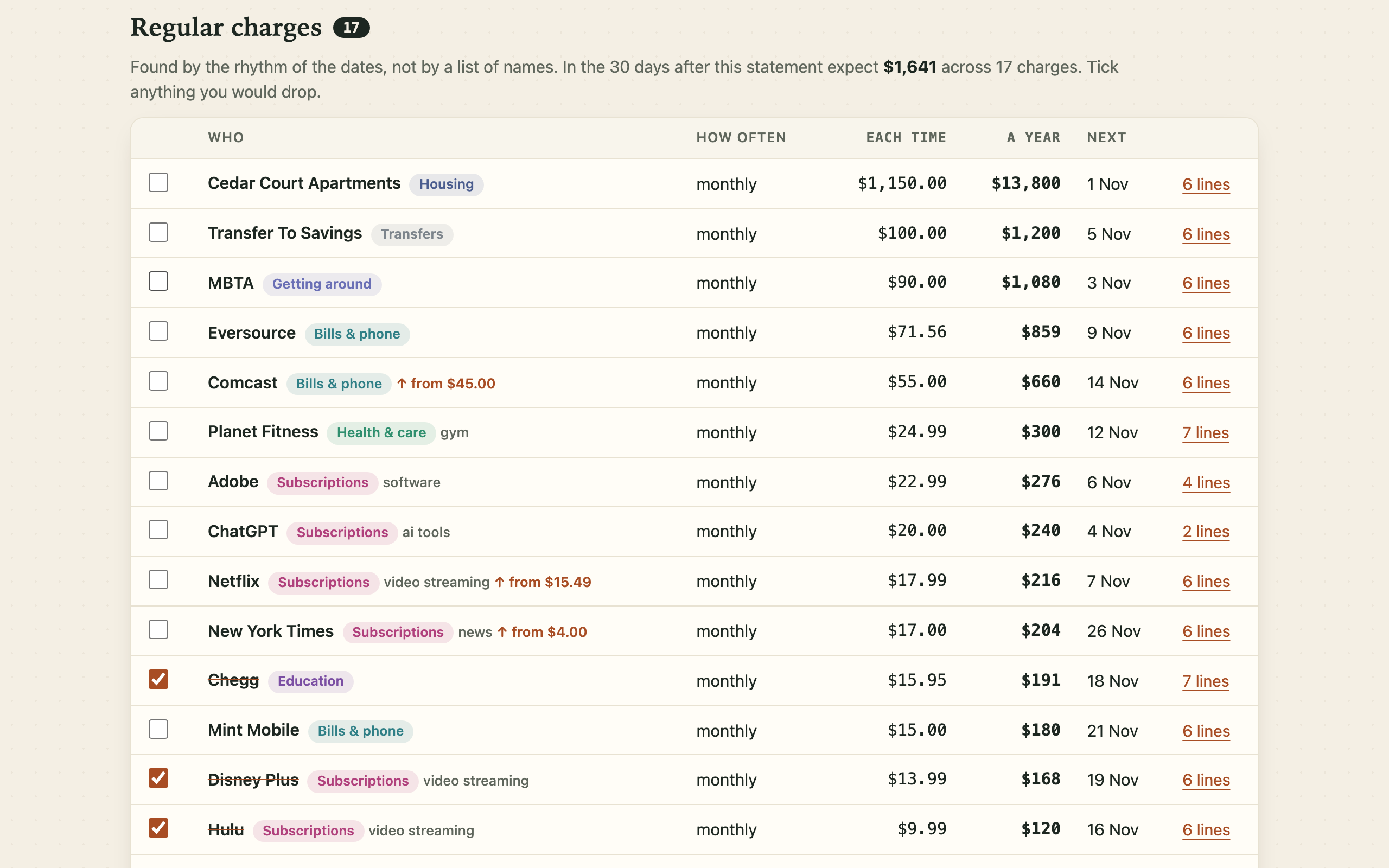
Regular charges found by the rhythm of their dates. Tick what you would drop to see what comes back.
-
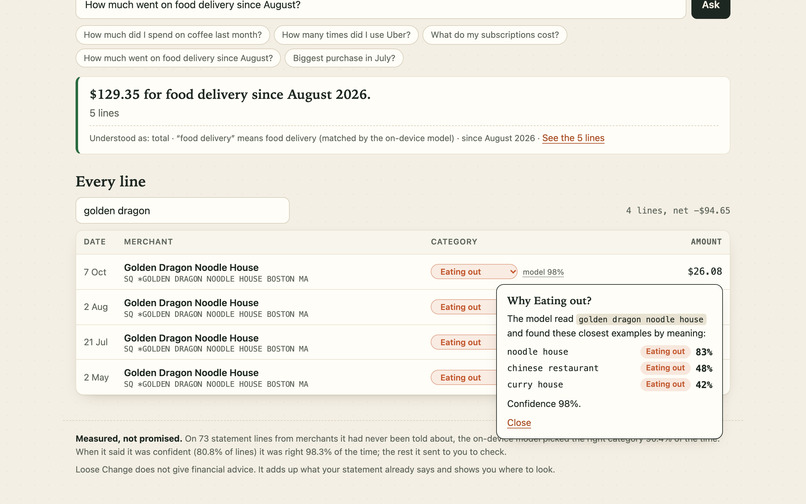
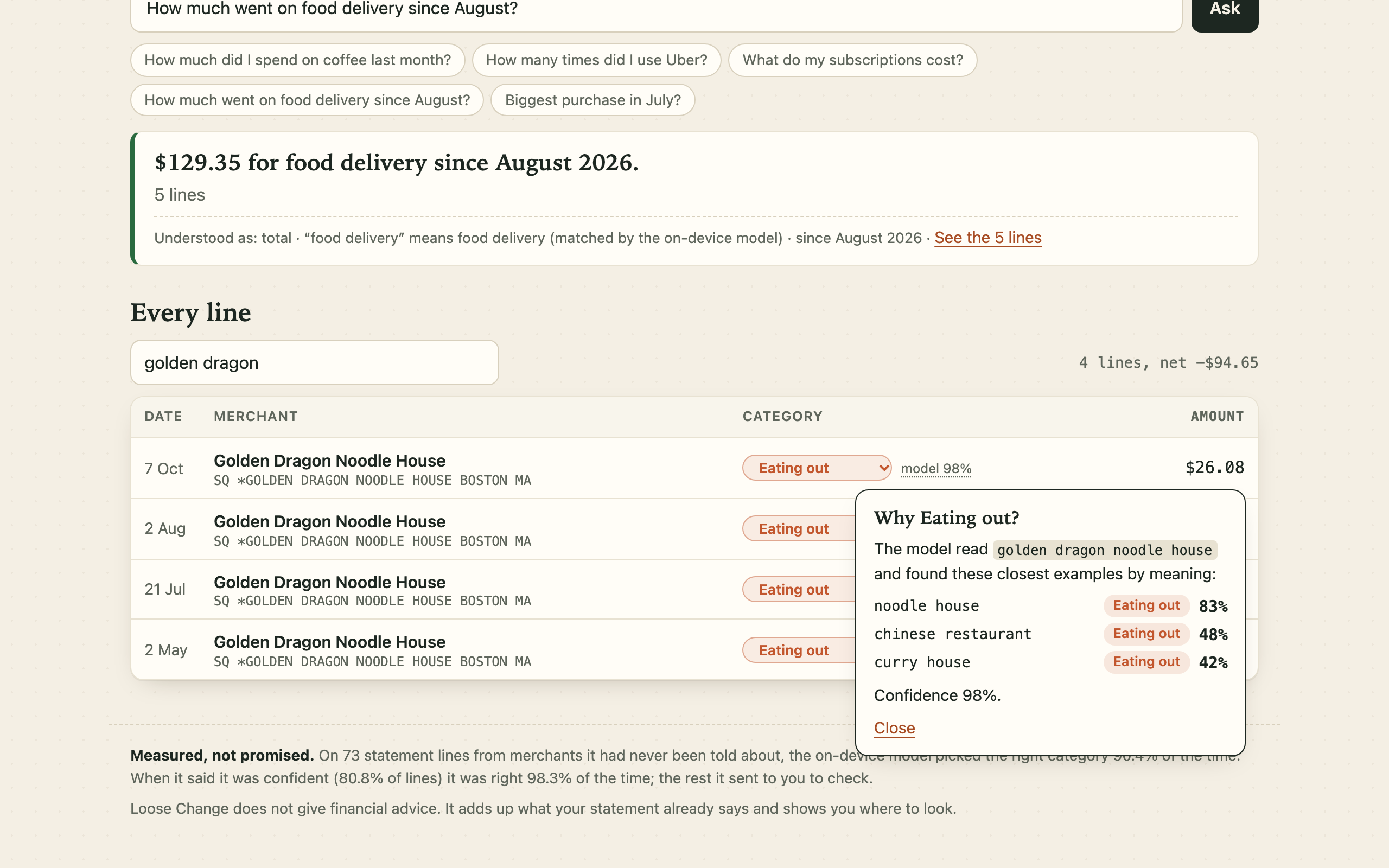
Every category explains itself: the nearest examples the on-device model found.
Overview
Loose Change is a web app. You drop in a bank statement (a CSV export from any bank) and it shows you what is quietly costing you money: subscriptions you forgot, prices that went up, charges taken twice, and bank fees added up over a year. On the sample statement it finds $791 a year.
The AI model runs on your device. The statement is never uploaded, and the page is built so that it cannot be: it carries a browser rule that refuses every connection to another server.
To try it, open the demo link and press "Try the sample statement". No account or key is needed.
The problem, and who it is for
Small leaks are easy to miss because each one is small. A streaming price goes up by $2.50. A $1 trial turns into $22.99 a month. The bank takes $12 a month for an account that could be free. A wire fee comes off every transfer from home. None of them looks like much on its own line; over a year they add up to real money, and for students on a tight budget, international students especially, that money matters.
Tools that find these leaks exist, but they ask you to hand over your bank login or upload your statements to a company. Many people, sensibly, will not do that. So the people who would gain most from a second pair of eyes on their statement do not get one.
Loose Change is for anyone with a bank account who would like to know where the money goes without trusting a stranger with the answer. I study finance and business analytics, and this is the tool I wanted to exist.
What it does
- Reads any bank's CSV. It works out which column is the date, the description and the amount, and copes with debit and credit columns, day-first dates, decimal commas and card statements that list purchases as positive numbers.
- Sorts every line into a category. A line such as
POS DEBIT 0412 SQ *BLUE BOTTLE COF OAKLAND CA #2231becomes "Blue Bottle Cof, Coffee & snacks". - Finds regular charges by rhythm, not from a list of names: anything that comes round weekly, monthly, quarterly or yearly at a steady price. It shows the yearly cost of each and when the next one is due. Tick the ones you would drop and it adds up what comes back.
- Raises alerts, each with the exact lines behind it: charged twice, price went up, a trial that became a paid plan, several subscriptions doing the same job, and every kind of bank fee as a yearly figure.
- Asks when it is unsure. Lines it is not confident about are put in front of you. Correct one and it remembers, on your device, and merchants with similar names follow.
- Answers plain questions. "How much went on food delivery since August?" is matched to the right lines by meaning and then simply added up.
- Explains itself. Every category has a "why": the known merchant it matched, the rule that fired, or the nearest examples the model found and how close they were.
AI implementation
- Model: all-MiniLM-L6-v2, a sentence-embedding model (384 dimensions, 8-bit quantised, 23 MB), run in the browser with transformers.js on ONNX Runtime Web (WebAssembly), inside a Web Worker so the page never freezes.
- Classification: about 930 labelled examples (merchant names, and short descriptions of kinds of place such as "espresso bar" or "property management") are embedded once at build time. In the browser, each unfamiliar merchant is embedded and compared with them. The six nearest examples vote, with squared weights so that one close neighbour outweighs several loose ones, and a brand name that merely looks similar counts for less than a description that is close in meaning. The vote becomes a confidence figure.
- Few-shot learning on the device: a correction from the user is stored as one more example with its own vector, so teaching "Thinking Cup is a coffee shop" also moves merchants with close names. Nothing is retrained and nothing leaves the browser.
- Semantic questions: the subject of a question is embedded with the same model and matched to a category, a kind of subscription, or the nearest merchants in the statement.
- Not everything is AI, on purpose: known merchants are matched word for word, bank fees and cash withdrawals by plain rules, and regular charges and price rises by date and amount arithmetic. The model is used where meaning is needed and nowhere else, which keeps it fast and makes every result checkable.
Responsible use
- Private by construction. A Content Security Policy with
connect-src 'self'makes the browser refuse outside connections. The model, its runtime and the example vectors are served with the page: no API, no key, no account. The app works with the network switched off, and the automated checks prove it by doing exactly that. - Honest about uncertainty. Low-confidence lines are flagged and sent to the user instead of being guessed quietly.
- Measured, with the numbers shown in the app. On a held-out list of 73 statement lines from merchants the model had never been told about, it picked the right category 90.4% of the time. When it said it was confident (80.8% of lines) it was right 98.3% of the time. On the list used while tuning it scores 98.2%, which I report separately because that number flatters it. The lists are small, so these are indications, not guarantees.
- No advice. It adds up what the statement already says and shows where to look. What to cancel is the user's decision.
- Nothing is kept. The statement lives in the tab's memory only. Corrections are stored in the browser and can be forgotten with one click.
How I built it
TypeScript with no framework and no server: the whole app is static files, hosted on GitHub Pages. esbuild bundles it. The core (CSV import, name cleaning, classifier, rhythm detection, alerts, question parsing) is plain TypeScript that runs the same in the browser and in Node, which let me test it properly:
- 23 unit tests cover the importer, the cleaner, the rules, rhythm detection, every alert planted in the sample statement, and the question parser.
- 13 end-to-end scenarios drive a real browser: the sample statement, teaching and remembering, a card statement with positive purchases, a file that is not a statement, hostile text in a description, 6,000 lines, phone width, dark mode, keyboard use, saving the result, and the whole flow with the network off. All 13 also pass against the live site.
- An accuracy script scores the classifier on two hand-labelled lists.
I built it with help from Claude Code, an AI coding assistant. The sample statement is invented.
Challenges
- Bank descriptions are a mess. Terminal numbers, payment processors (
SQ *,TST*), phone numbers, city and state all surround the merchant, and long names are cut short. The cleaner went through many rounds. One bug only showed up on the held-out list: it was throwing away the most useful word in "TRUE VALUE HARDWARE 3391 OH". - Look-alike names. At first "Mubi" (a film service) was filed under Shopping because it looks like "Muji". Descriptions of kinds of place turned out to be more trustworthy neighbours than brand names, so they now carry more weight, and a name like that is now sent to the user to check.
- Fees that are not bank fees. "Planet Fitness annual fee" and "exam fee" are not bank charges. The fee rule now needs the wording banks use, and a known merchant always wins.
- Habits against subscriptions. Coffee three times a week has a rhythm too. Everyday categories only count as a regular charge when the amount is the same to the cent.
- Running a model under a strict security policy. The WebAssembly runtime had to be served from the page's own address and limited to one thread, because plain static hosts do not send the headers that threads need.
What I learned
A small model used carefully can do a lot. A 23 MB embedding model with about nine hundred good examples sorts unfamiliar merchants about nine times in ten, tells you when it is not sure, and never needs to see your data on a server. I also learned to keep two test lists, one to tune on and one to be honest with.
What's next
Reading PDF statements, example sets for more countries and languages, an optional offline install, and a yearly "leak report" you can keep.
What I tested and what changed
The first version sorted merchants with one list of examples and scored 91.5% on my test lines. Reading the misses showed three causes: a rule that treated any "fee" as a bank fee (so a gym's annual fee was filed under Bank fees), brand names that merely looked alike pulling merchants the wrong way, and long example phrases that blurred the meaning. I narrowed the fee rule, gave descriptions more weight than look-alike brands, and split the phrases into short ones. The score on that list went to 98.2%. Because I had tuned on it, I wrote a second list the classifier had never seen: 90.4%, with every confident answer but one correct. That second number is the one shown in the app.
Tools used
TypeScript, transformers.js, ONNX Runtime Web, the all-MiniLM-L6-v2 model (Apache-2.0), esbuild, Node's test runner, Playwright, GitHub Pages, and Claude Code as an AI coding assistant. The project was started on 16 November 2026.
Where it is entered
Loose Change was built in November 2026 and is entered in several student hackathons that run over the same weeks. The full list is on this page under "Submitted to".
Built With
- all-minilm-l6-v2
- esbuild
- node.js
- onnx-runtime-web
- playwright
- transformers.js
- typescript
- web-workers
- webassembly
