Inspiration
We're living in a time where technology is moving faster than ever. What used to take development teams months to build can now be done in hours. But while technology is becoming easier to create, is it becoming easier for everyone to use?
As more essential parts of our lives move online, from banking and shopping to healthcare appointments and government services, we're unintentionally leaving millions of people behind.
And one group feels this more than most: older adults.
Imagine your parent trying to refill a prescription online. The website has changed, the buttons have moved, and they're unsure what to click next.
So they call you.
You walk them through it over the phone. A few days later, it happens again. Maybe it's paying a bill, booking an appointment, or signing into an account. For many families, becoming their parents' personal tech support has become part of everyday life.
The problem isn't that older adults can't learn technology. It's that technology rarely teaches them in a way that works for them.
Research supports this. Nielsen Norman Group's 2013 study found that adults aged 65 and older completed 55.3% of web tasks, compared with 74.5% for adults aged 21–55. Pew Research Center found that 77% of adults aged 65 and older would need someone to walk them through learning a new device.
Traditional solutions offer lengthy tutorials, videos, or generic instructions. But when someone is stuck on a specific button, they don't need a 20-minute video. They need someone to show them exactly what to do next.
That's why we built Nori.
We wanted to turn the knowledge of someone you trust into reusable, personalized guidance, helping older adults navigate the internet independently without having to call someone every time they get stuck.
Because technology should bring people together, not leave them behind.
What it does
Nori is an intelligent, interactive browser companion that helps older adults navigate the internet independently, confidently, and safely.
Teach once, repeat independently.
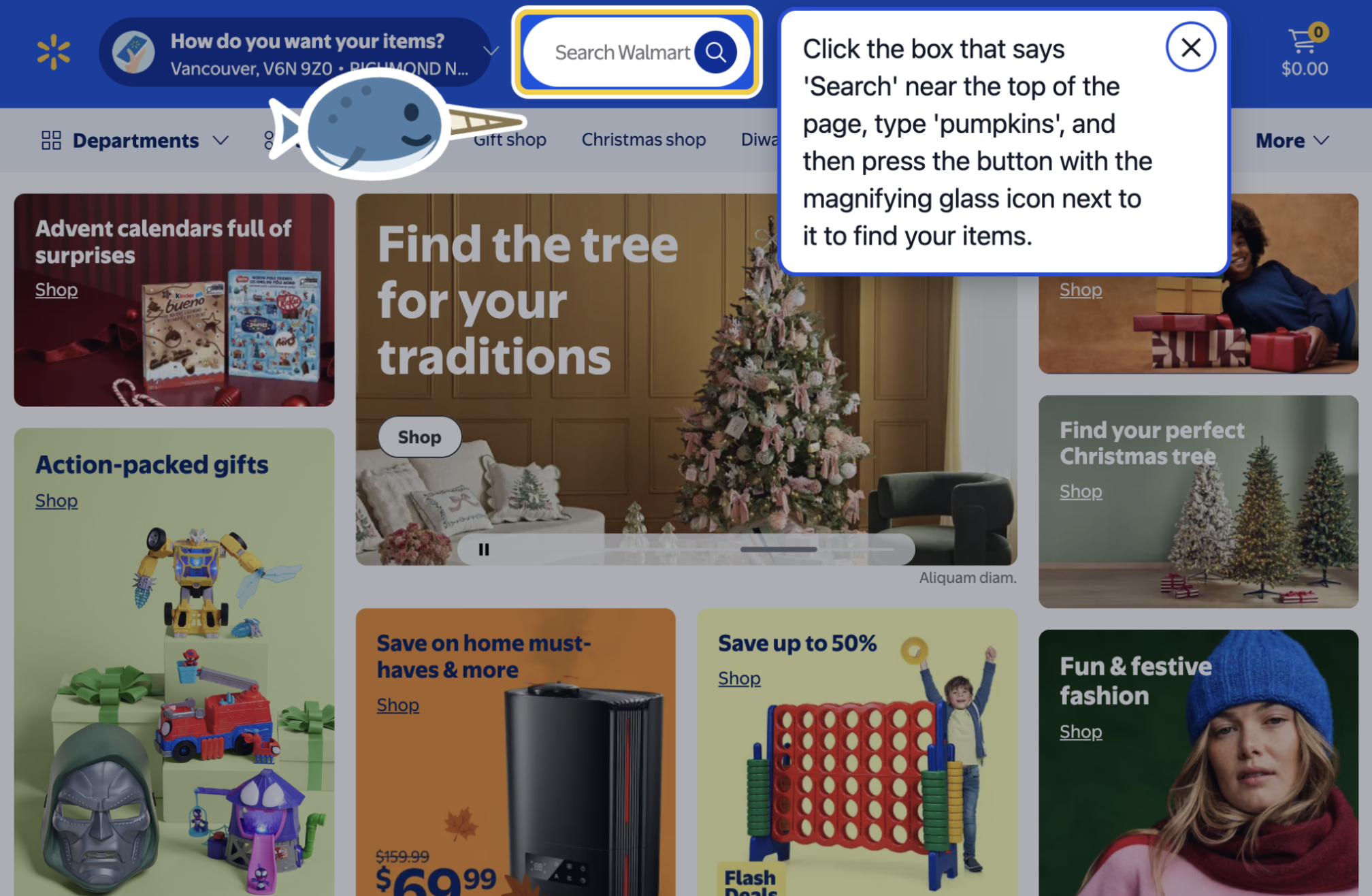
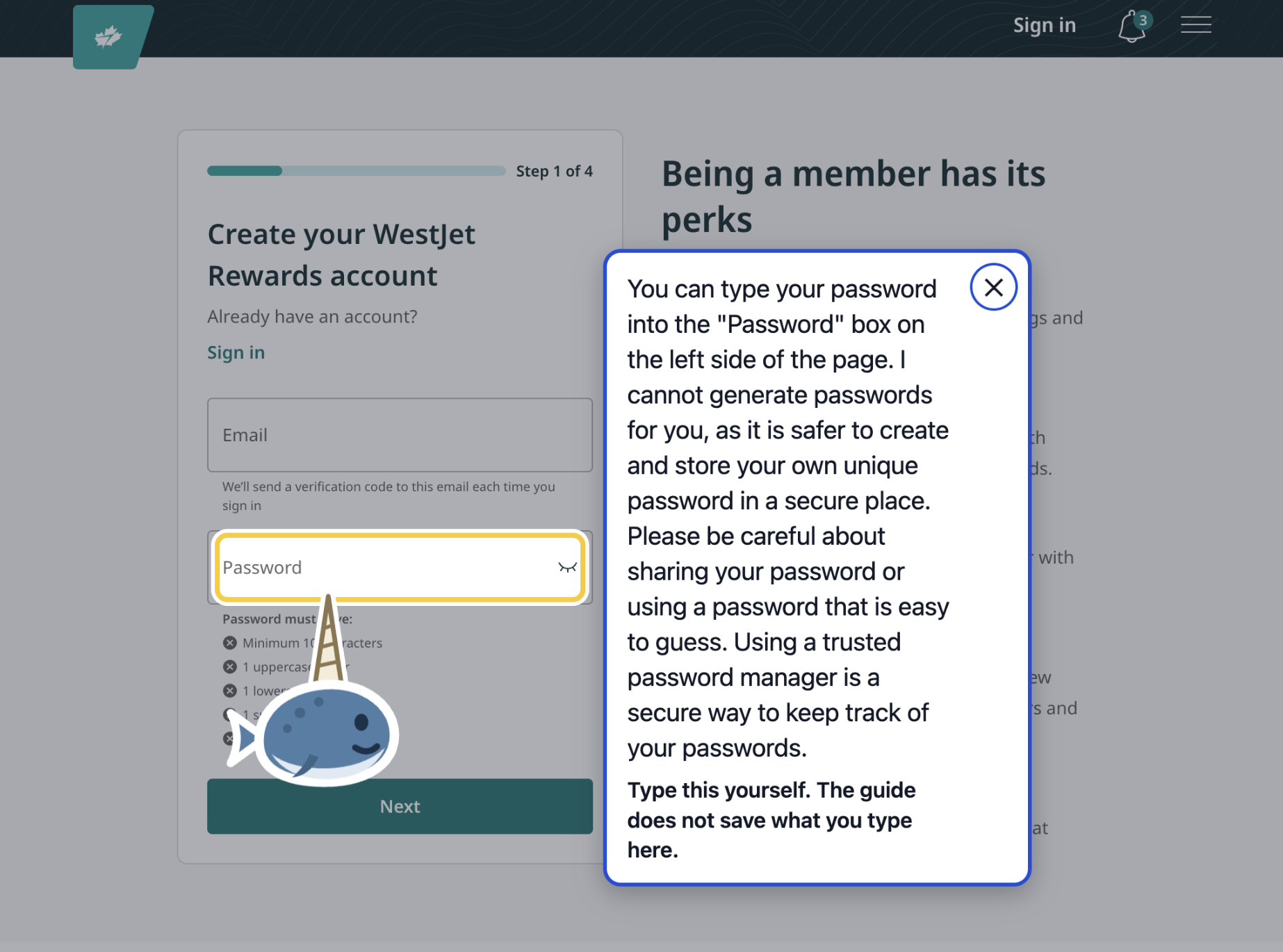
A family member opens Nori and records themselves completing a task, such as refilling a prescription online. Nori remembers the sequence of buttons and actions, but never records what someone types. Password and payment fields are marked "type this yourself".
Later, their parent can simply open Nori and say, "I need to refill my prescription."
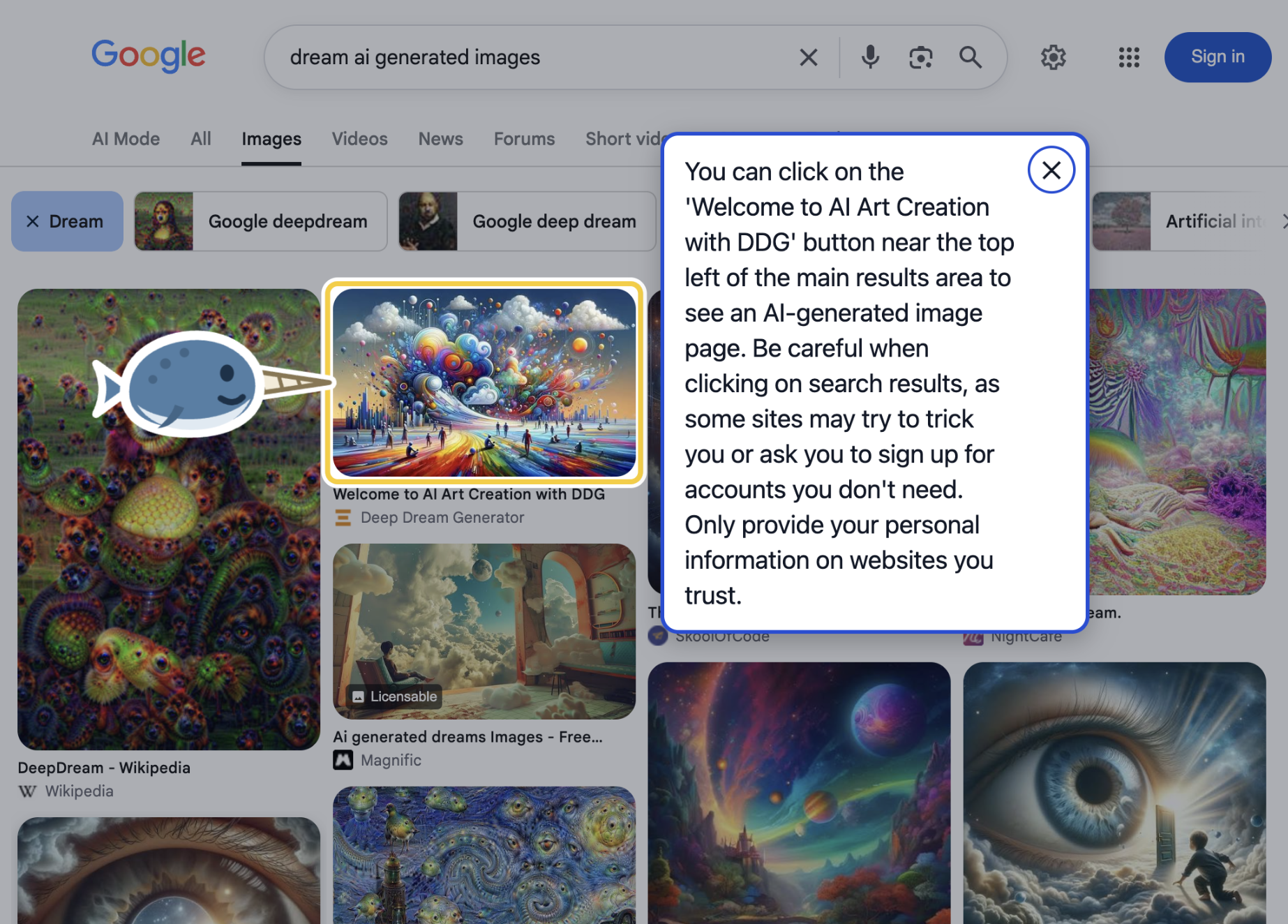
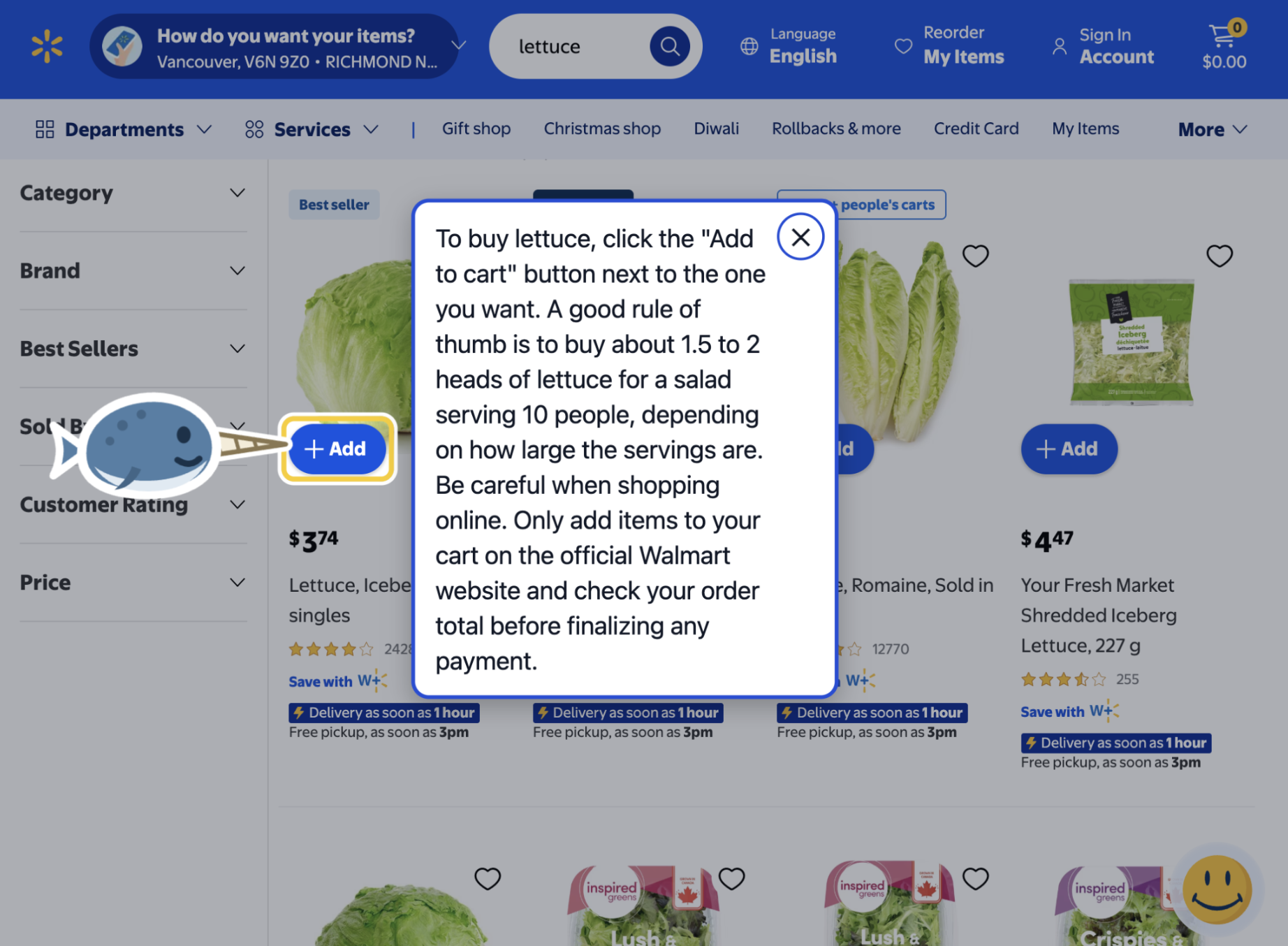
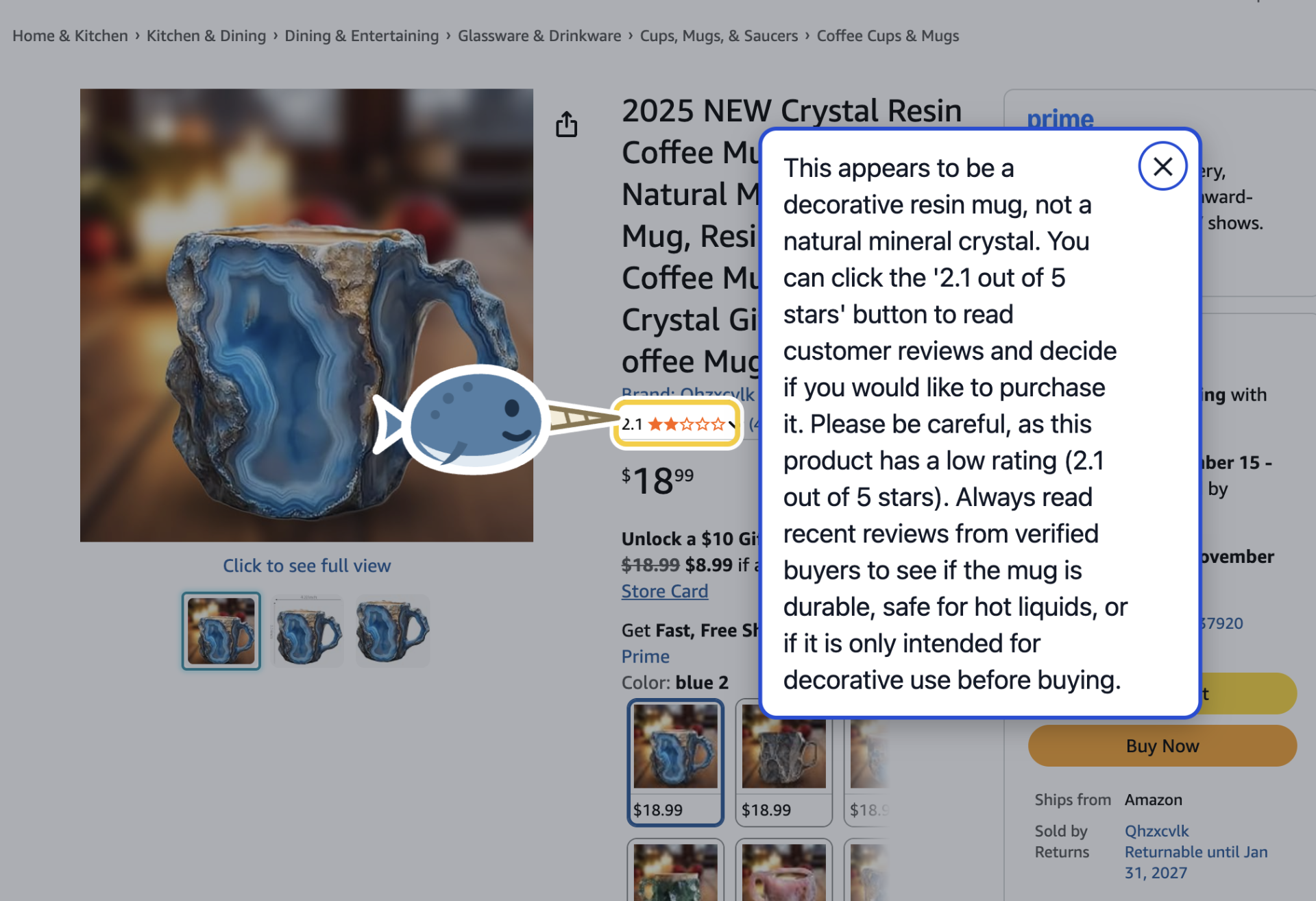
A friendly little narwhal appears on the screen, swims to the correct button, and points at it with its horn. A voice explains what to do next. When the person clicks, Nori automatically guides them to the next step.
Users can speak naturally to Nori using commands like:
"Say that again." "Next." "Go back." "Stop." More than just replaying instructions.
Websites change, and people don't always know what to do next. With Gemini, users can ask questions like "Where do I sign in?" or "How do I pay?"
Gemini analyzes the current webpage, identifies the relevant button or field, and directs Nori where to point. When payment is involved, Nori reminds users to check that they're on a trusted website before entering card details.
Accessibility means being there when someone needs help.
Nori supports Spanish voice interaction. We demonstrated this by opening a phishing email and asking, "¿Es este correo una estafa?" Nori analyzed the page and explained the warning signs aloud in Spanish.
If someone gets stuck, they can say "I'm stuck". Nori asks permission to contact their trusted family member, then sends an email explaining which task they were completing and where they stopped. It can also offer to contact their helper after repeated missed clicks.
A small Nori floats along the bottom of every webpage, making help accessible whenever it's needed.
It's not another chatbot that simply tells you what to do. It's an interactive tutor that shows you exactly where to go, one step at a time.
How we built it
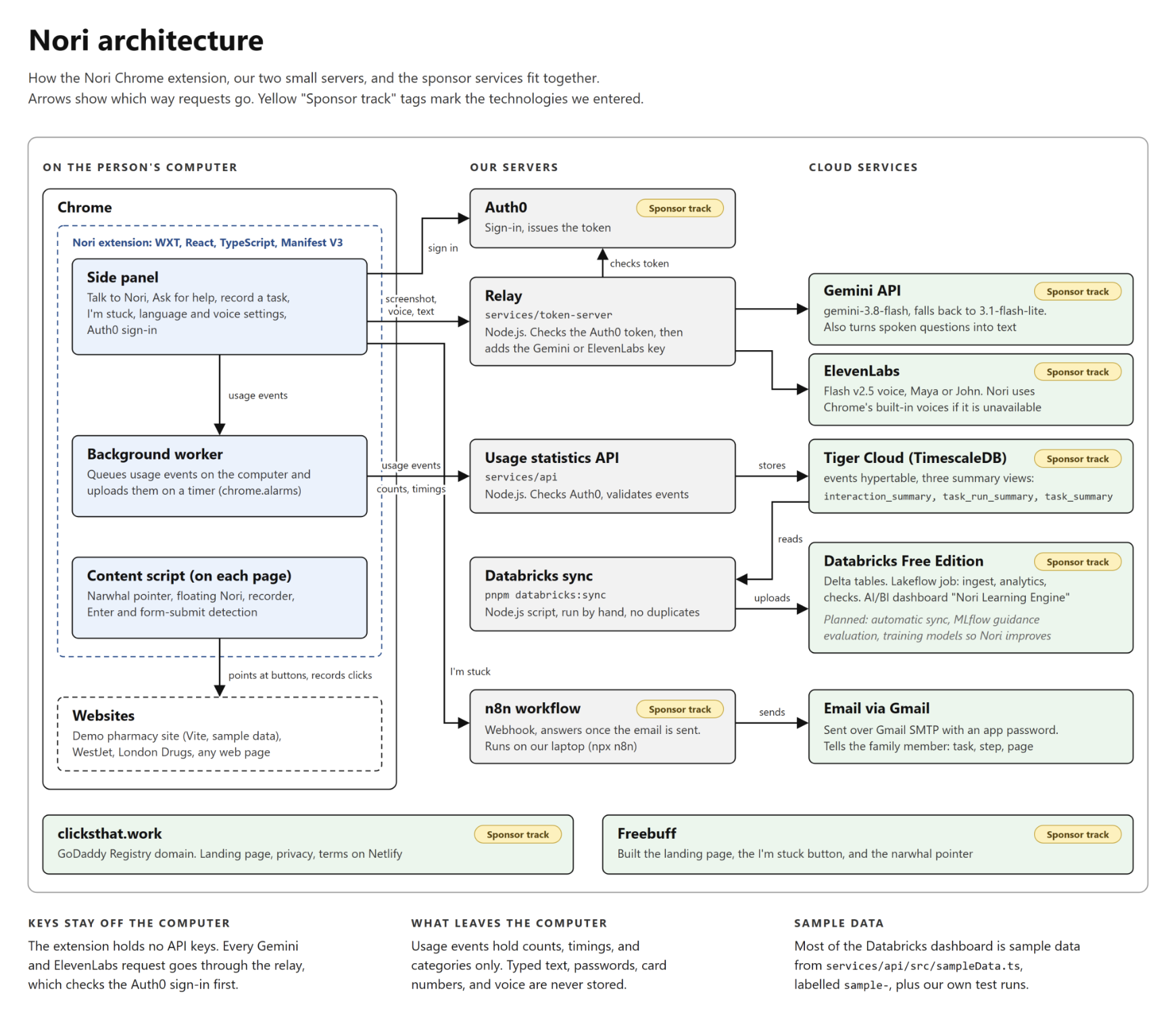
Nori is a Chrome extension (Manifest V3) built with WXT, React, and TypeScript in a pnpm workspace. The recorder saves several ways to find each button (test id, label, and text), so a step still works when the page shifts. We built a mock pharmacy website with sample data to demo on, and recorded tasks on real sites (WestJet and London Drugs) to test with.
How we used Gemini Gemini decides what to do when a recording is not enough. For "Ask the guide", the extension sends Gemini a screenshot and a numbered list of the page's buttons and fields (whether each field is empty, never its contents). Gemini answers the question and names the element to point at, and the pointer moves there: asked "How do I pay?" on the refill page, it pointed at the Pay button and added a warning about entering card details. Gemini also hears spoken questions from a recording (no Live API needed) and picks the action for "Talk to Nori": start a task, next, back, say it again, stop, a question, or "I'm stuck". When the main model is busy, Nori gives each attempt 20 seconds, retries once, and then switches to a lighter model (gemini-3.1-flash-lite).
How we used ElevenLabs ElevenLabs gives Nori its voice. Gemini writes what Nori says; ElevenLabs reads steps, warnings, and answers aloud in English and Spanish with Flash v2.5, in a voice the person picks (Maya or John). Requests go through our relay, so the ElevenLabs key never ships in the extension. Clips are cached, so "say that again" costs no credits, and Chrome's own voices take over if ElevenLabs is unavailable. Together with Gemini, this makes Nori a voice conversation: the person says what they need, Gemini decides the action, and ElevenLabs answers out loud while the pointer moves.
How we used Auth0 An extension's files can be unpacked by anyone who installs it, so a Gemini key inside the extension can be copied and spent. We moved every key off the extension. The person signs in once with Auth0 (through chrome.identity.launchWebAuthFlow), and the extension sends the Auth0 token to our relay (services/token-server). The relay checks the token with Auth0 and only then adds the Gemini or ElevenLabs key and forwards the request. We checked a production build: no file in it contains a key. The usage statistics API requires the same sign-in: a request without a token gets a 401 answer, so data only comes from signed-in Nori users.
How we used n8n "I'm stuck" calls an n8n webhook. The workflow emails the helper with the task name, the step number, and the page, and only answers the extension once the email has gone, so Nori says "Message sent" only when it was sent. Nori also offers this after three missed clicks on the same step, and always asks first. The workflow is in backend-config/n8n/Im_Stuck.json.
How we used Tiger Data The extension records small usage events: which step, how long it took, retries, and which Gemini model answered. It never records typed text, questions, voice, or page content. Events queue on the computer and upload to our API (services/api), which stores them in a TimescaleDB hypertable on Tiger Cloud. Three SQL views (interaction_summary, task_run_summary, task_summary) show which steps people struggle with. The person can turn this off with "Share usage statistics".
How we used Databricks A sync script copies the TigerData events and views into Databricks Free Edition. A Lakeflow job then ingests them into Delta tables, builds "struggle hotspots" (steps with the most retries and time), task outcomes, Gemini response times, and a ranked list of improvement suggestions, logs a guidance evaluation to MLflow, and fills an AI/BI dashboard. Most of the data on the dashboard is sample data: our own test runs this weekend gave about 230 events from six task runs, too few to compare, so a script (services/api/src/sampleData.ts) added 2,020 generated events (77 task runs and 75 questions on six made-up tasks). Every sample event is labelled (extension version 0.0.0-sample, task IDs starting sample-, example.org pages) and can be removed with one command. From the combined data, the job ranked 30 improvement suggestions.
How we used Freebuff We used Freebuff to build three separate parts of the project, each from a single prompt in its own session and commit: the landing page, the "I'm stuck" button that alerts a family member through n8n, and the guide character that points at each step. Each prompt included our writing and accessibility rules, and Freebuff followed them: the landing page quotes our research figures exactly with their sources, and the "I'm stuck" button only says a message was sent when the alert service answered. All three worked from the first prompt with no hand edits, in about 20 minutes in total. Freebuff also checked its own work: while testing the landing page it found and fixed a colour-contrast bug we had not asked about, and for the character it tried and rejected two pointer shapes before settling on the final one. The prompts, commits, and screenshots are in docs/submission/Freebuff_Log.md.
How we used GoDaddy Registry Our domain is clicksthat.work: Nori's job is to find the click that works. It hosts the landing page, privacy policy, terms of use, and a contact form, on Netlify.
Challenges we ran into
We planned to use the Gemini Live API for voice, but our key could see 26 models and none were Live models, so the connection closed every time. We switched to recording the spoken question and sending the audio to Gemini, which works with the standard API.
Gemini sometimes answered "503: high demand" or took over 20 seconds. Each attempt now has a 20 second limit, a busy model gets one retry, and then Nori switches to a lighter model and remembers which model was slow.
On Wikipedia, opening the side panel makes the window narrow, and the page moves "Log in" into a closed menu. Nori could not point at a hidden link. Now it points at the button that opens the menu, then moves to the link once the menu opens.
Sites like WestJet split a verification code into one box per digit, so a four-digit code became four recorded steps. The digits are never saved, only which box was filled, but four steps for one code is more than a person should have to follow.
Pressing Enter in a form submits it without a click on its button, so Nori waited for a click that never came. Now a form submission counts as pressing its submit button, and Nori moves on to the next page's first step.
Chrome often does not show the microphone prompt inside a side panel. We added a permission tab that opens once, and a "Tap here, then speak" prompt when Nori is opened from the floating narwhal.
Accomplishments that we're proud of
A recorded refill task plays from start to finish on the demo site, with Nori moving to each next step on its own when the person clicks. We also recorded and played tasks on WestJet and London Drugs.
Usage statistics flow from the extension to TigerData and on to Databricks without recording anything a person types, says, or sees: only counts, timings, and categories.
No API key ships in the extension. Every Gemini and ElevenLabs request goes through a relay that checks an Auth0 sign-in.
The "I'm stuck" email reaches a real Gmail inbox, and Nori only says it was sent once n8n confirms it.
What we learned
We learned how Chrome Manifest V3 splits an extension into a side panel, a content script, and a background worker, and how messages pass between them. We learned that the Gemini Live API is limited by key, and that short-lived Gemini tokens only exist for Live, which is why we built a relay. We learned how to verify Auth0 tokens on our own server, and how to move data from Tiger Cloud into Databricks with a repeatable sync that does not create duplicates.
From the research, we learned that older adults prefer a person's step-by-step help over video tutorials, which is why Nori replays a family member's own recording instead of generic instructions.
What's next for nori
Built, and not yet tested:
Questions and answers in Telugu and Mandarin Chinese, and recorded steps translated into Spanish, Telugu, or Mandarin Chinese. Gemini translates and ElevenLabs speaks them (Chrome's voice for Telugu). We have tested English, and spoken questions in Spanish. Finding a button again after a website changes: when a step's saved details no longer match, Gemini looks at the page and picks the new element. Our demo site has a "redesigned site" switch for this. Warnings during playback before risky steps, and plain-language versions of recorded steps. Planned, not built:
Sending a recorded task from the family member's computer to the older adult's computer. Today a recording stays on the computer it was made on. A family dashboard showing which tasks were finished and where someone got stuck. Merging one-character boxes, such as a verification code split into four, into a single "type your code" step marked "type this yourself". Using the Databricks struggle hotspots to change how Nori guides: slowing down and adding an explanation on steps that many people miss. Testing with older adults. We have not tested Nori with anyone over 65 yet.
Built With
- auth0
- chrome
- databricks
- elevenlabs
- freebuff
- gemini
- mlflow
- n8n
- netlify
- node.js
- postgresql
- react
- tiger-cloud
- timescaledb
- typescript
- vite
- wxt


