-
-
Build Week thumbnail
-
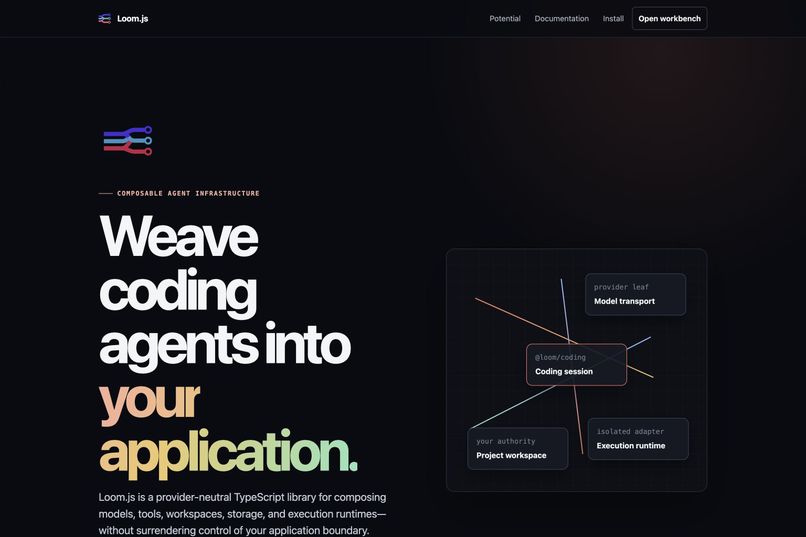
Landing page and architecture
-
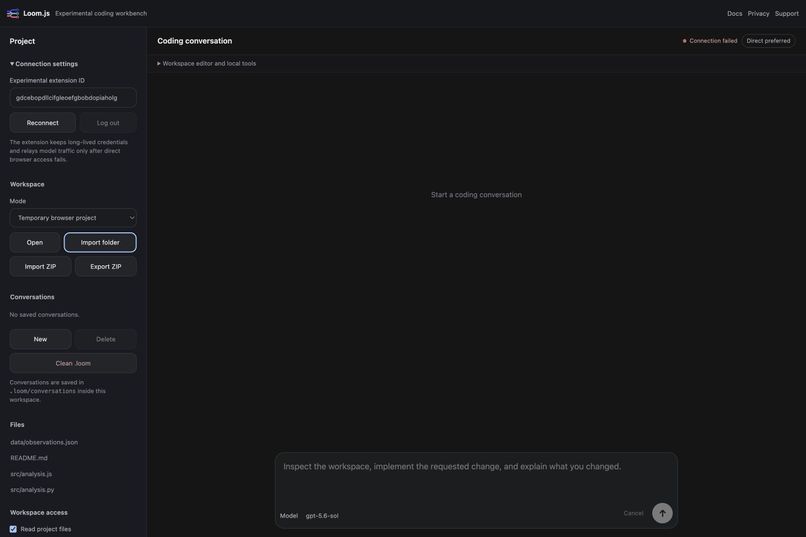
Browser workbench with imported project
-
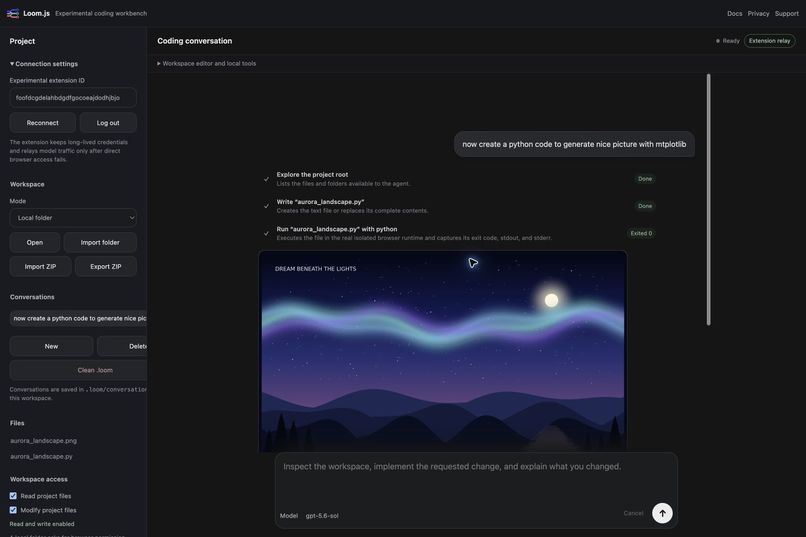
GPT-5.6-sol/Codex editing files and executing Python
-
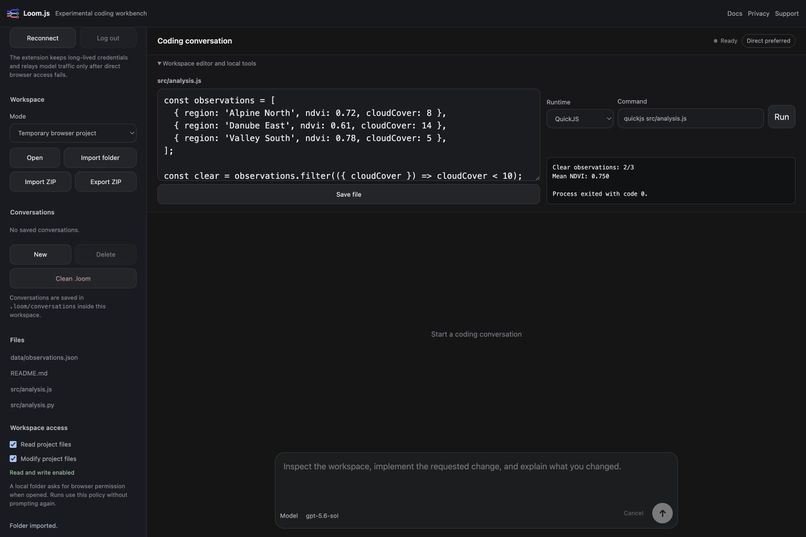
QuickJS execution with real output
-
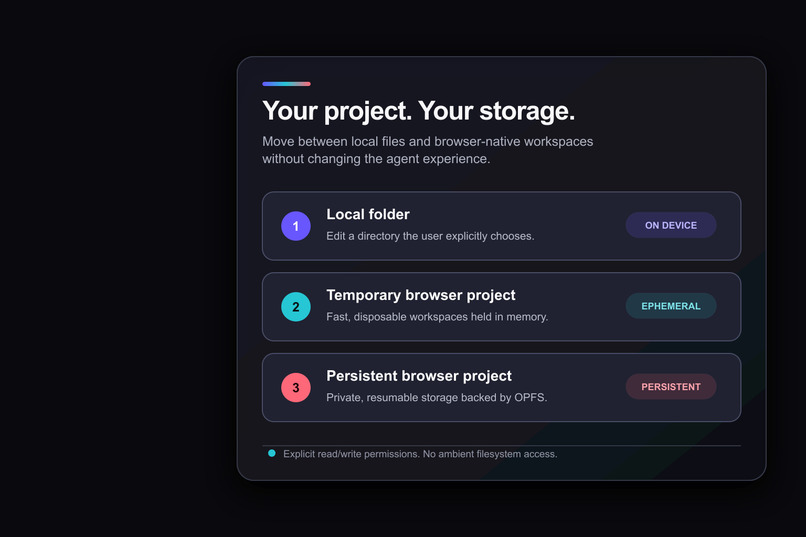
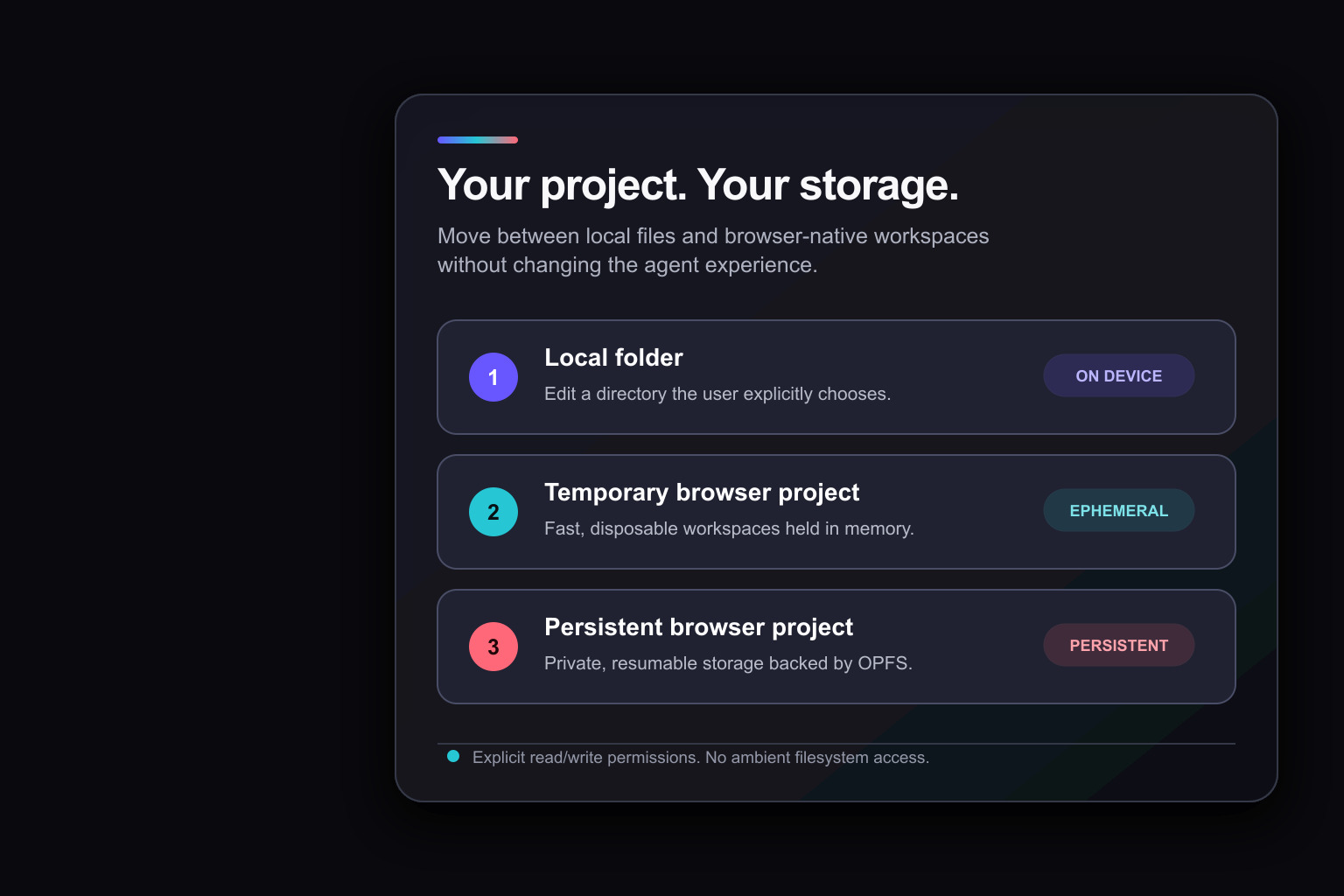
Workspace modes overview
-
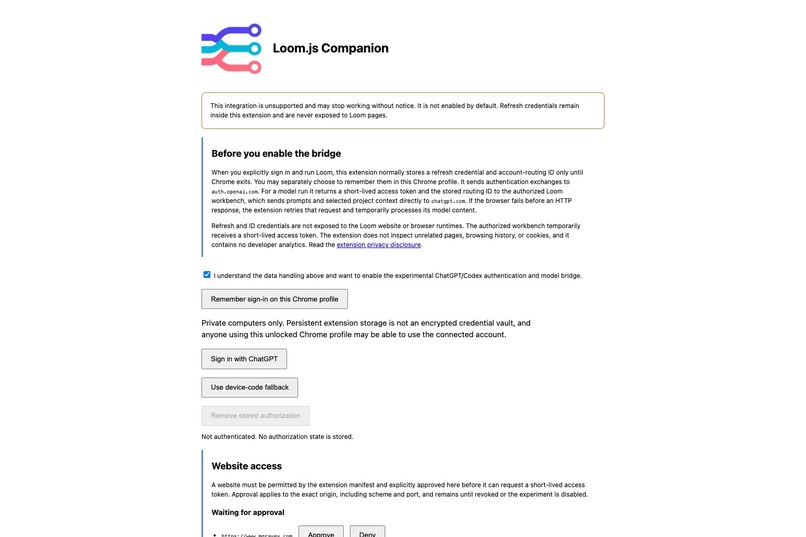
Chrome companion origin approval
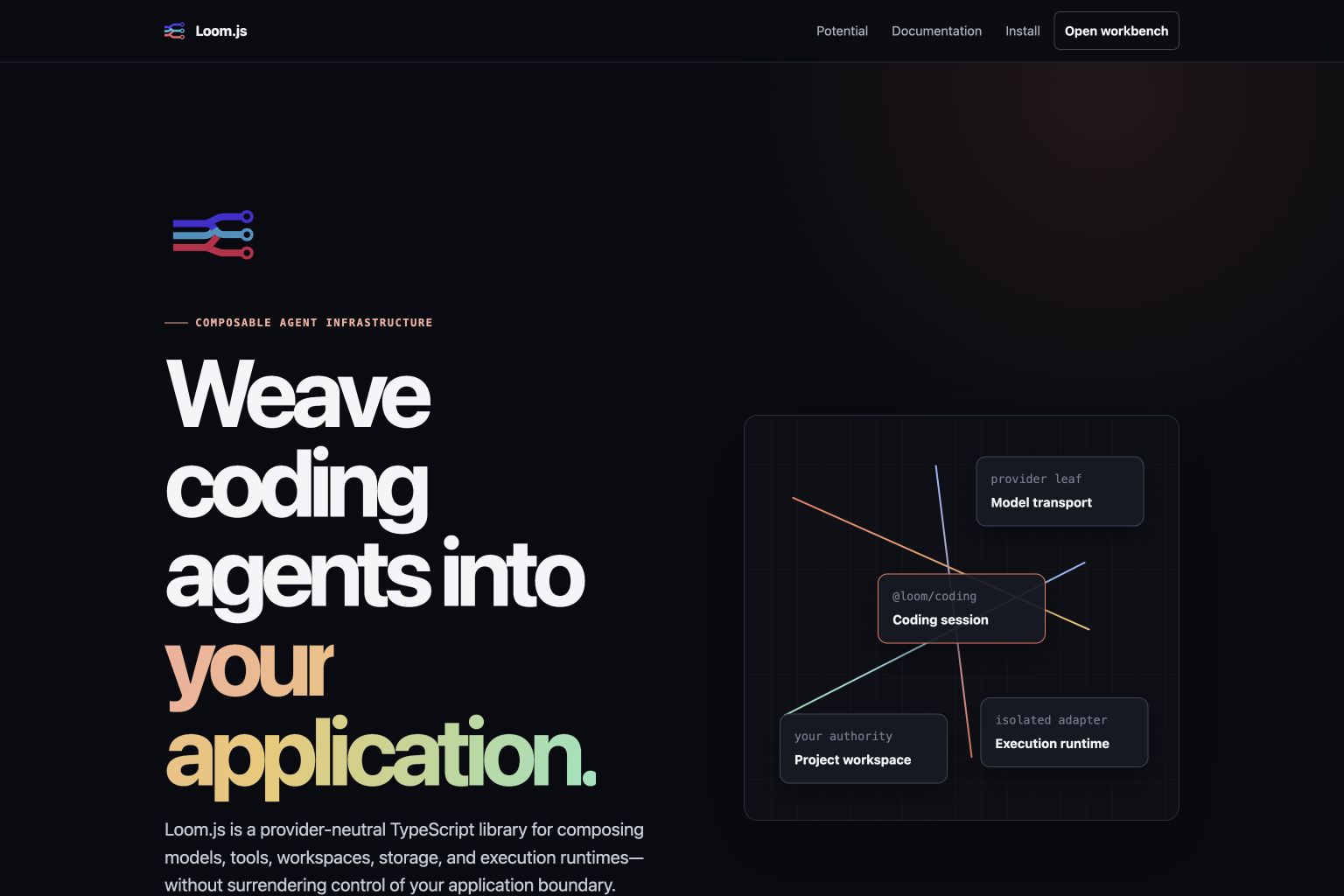
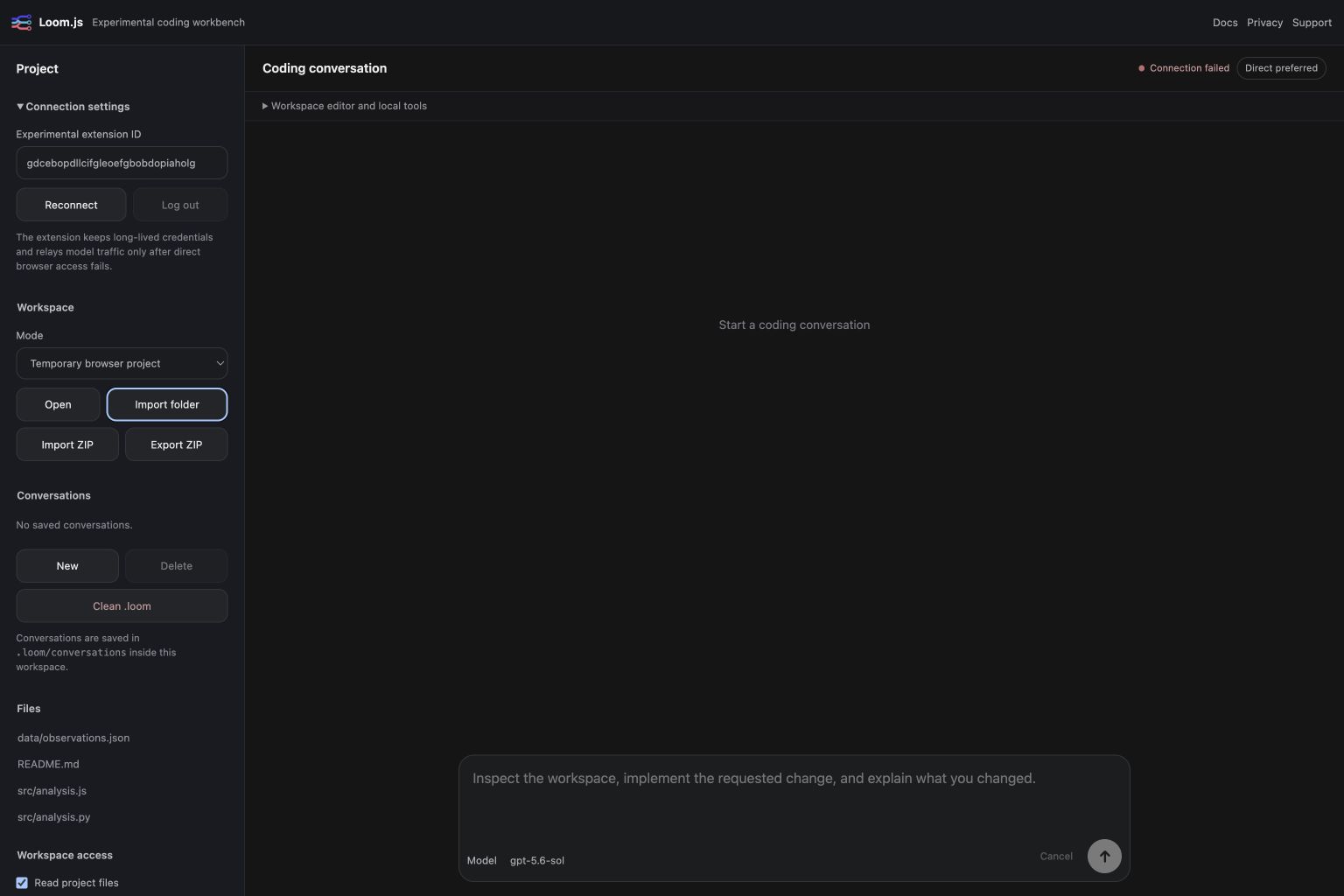
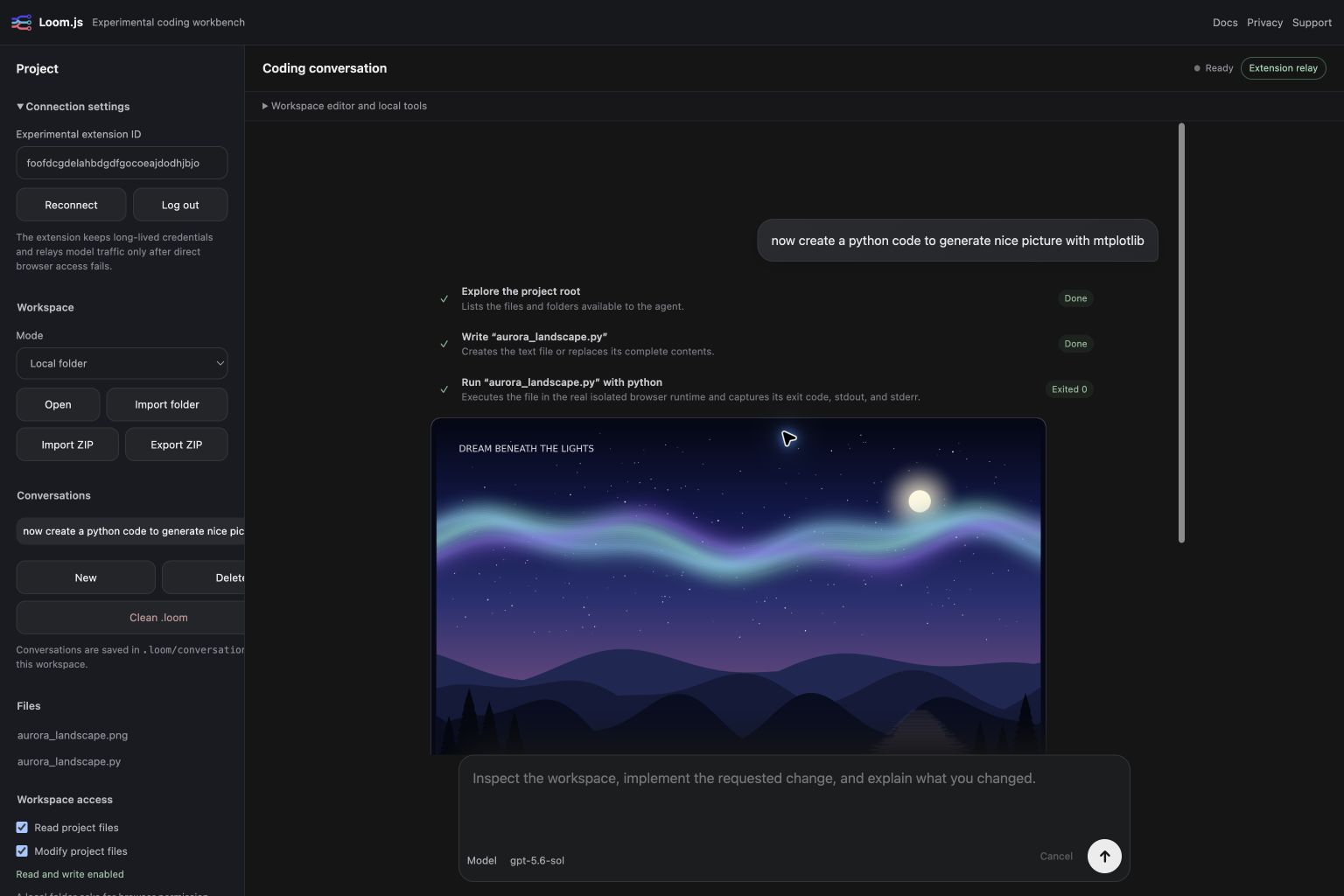
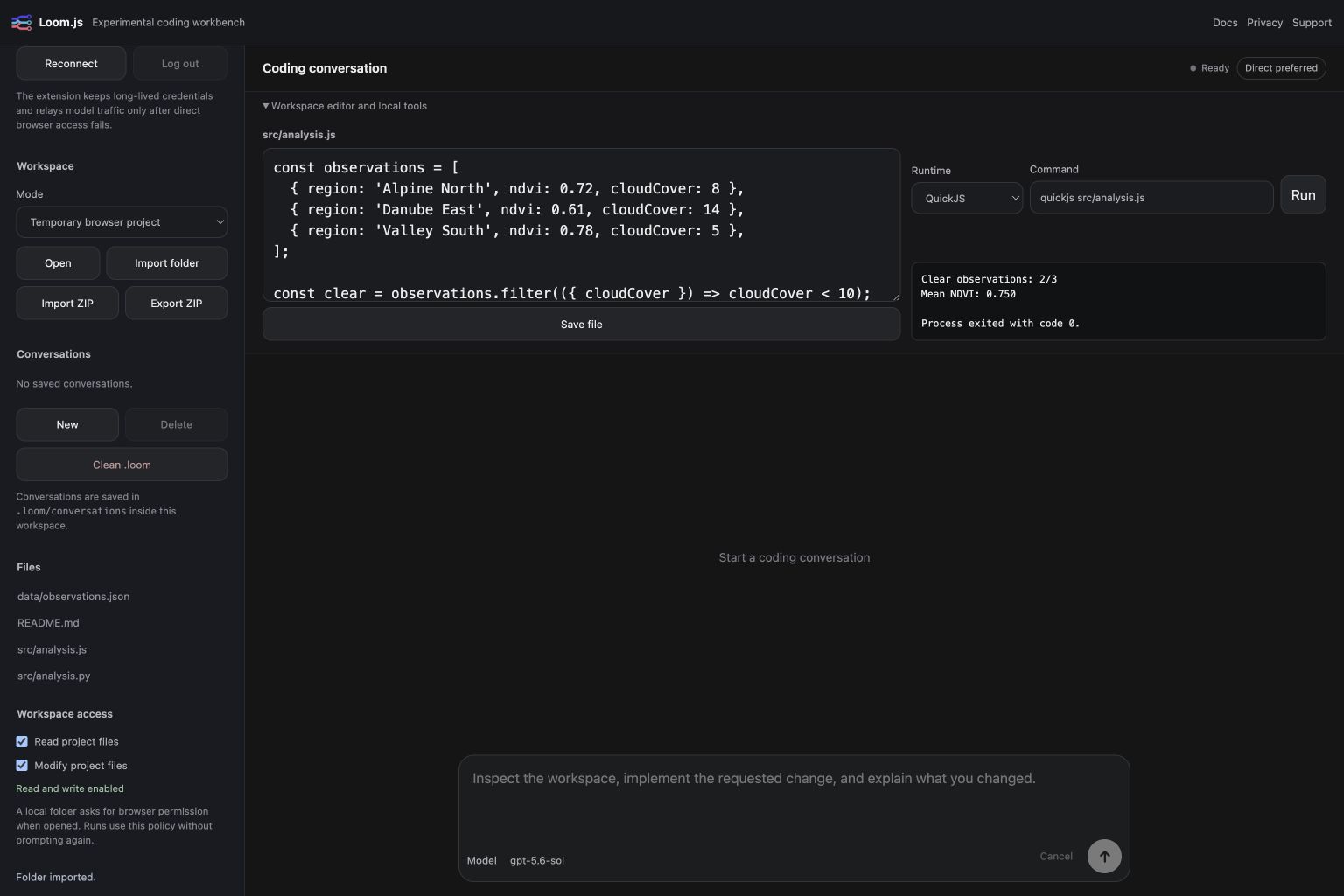

Loom.js
One runtime. Any AI provider. ChatGPT is first.
Loom.js is a provider-neutral JavaScript runtime for building capable AI agents inside browser applications.
The architecture is designed to support different models, authentication systems, tools, workspaces, and execution engines without rebuilding the application around each provider.
Today, ChatGPT is the first complete working integration.
Through an experimental Codex-compatible Chrome companion, users can connect with their ChatGPT account, open a real project, ask an agent to modify it, and execute the result in JavaScript, Node.js, or Python—all from the browser and without pasting a Platform API key into the webpage.
Inspiration
Loom.js grew out of a very practical frustration while developing EarthEngine Studio, an experimental environment for remote-sensing analysis that is still under development.
My current workflow works, but it is painfully indirect:
- Ask Codex to modify the Git repository.
- Review and commit the changes.
- Push them to the remote repository.
- reload the updated code in the webpage.
- Run the analysis.
- Inspect the result.
- Return to Codex and repeat the entire loop.
Codex and the application are solving the same problem, but they live on opposite sides of a slow bridge. Codex understands the source files but cannot directly experience the running application. EarthEngine Studio understands the current analysis, datasets, interface, and results but cannot communicate those capabilities directly to Codex.
That led to a simple question:
Why keep sending code back and forth when Codex could live inside the webpage?
If the agent runs as part of EarthEngine Studio, the application can expose its own capabilities directly: open an analysis, inspect available data, modify code, run a process, examine its output, fix an error, and continue—all without requiring a commit, push, deployment, and reload for every experiment.
The agent would no longer need to infer the application through repository files or remotely operate it through browser automation. EarthEngine Studio could describe its tools directly, and remain responsible for what the agent is allowed to access and change.
I initially considered building this as an EarthEngine Studio feature. But the underlying problem was much more general.
Most coding agents live in a CLI, desktop application, or cloud environment. When they need to interact with a running website, they require another bridge: browser automation, an MCP server, an extension, or a custom integration.
Loom.js reverses that relationship.
Instead of making an external agent control the application from outside, the application hosts the agent runtime and exposes its capabilities as native, schema-described tools.
A remote-sensing application could expose datasets, simulations, maps, and analysis operations. A design tool could expose its canvas. A CMS could expose its documents and publishing workflow. Each website would define its own capabilities and keep control of their authority.
The current Loom.js workbench demonstrates the architecture through coding. It can open a user-selected folder, modify real files, manage resumable conversations, install compatible packages, and execute JavaScript, Node.js, or Python. But file editing is the demonstrator—not the limit of the library.
Projects can also remain entirely inside the browser using memory or OPFS. Code can execute through QuickJS, WebContainers, or Pyodide without requiring a cloud-hosted workspace. When local files are needed, the user explicitly chooses which directory to connect.
ChatGPT and Codex are the first working integration because they provide the clearest demonstration of this workflow. The longer-term vision is broader:
Move the agent into the application, remove the unnecessary round trips, and let the website become the agent’s native environment.
When Loom.js returns to EarthEngine Studio, the goal is to replace a slow edit–commit–push–reload loop with a direct conversation inside the analysis itself.
What it does
Loom.js consists of two deliberately separate parts: the reusable library and a working demonstrator.
The Loom.js library
The library provides the building blocks for browser-native AI agents:
- A provider-neutral plugin runtime with validated dependencies, deterministic startup, lifecycle management, configuration, events, and isolated sessions.
- Streamed agent conversations with model tools, cancellation, follow-up turns, and resumable conversations.
- Text and binary project workspaces backed by memory, OPFS, user-selected local folders, or custom adapters.
- Validated folder and ZIP import/export with protections against unsafe paths and unbounded archives.
- Browser execution adapters for JavaScript with QuickJS, Node.js with WebContainers, and Python with Pyodide.
- Application-defined tools with JSON input/output schemas and explicit caller permissions.
- A documented adapter for the OpenAI Platform Responses API, while leaving credentials and secure transport under application control.
The library does not require the included workbench, Chrome extension, ChatGPT authentication experiment, or any specific user interface. Applications can compose only the capabilities they need and supply different model, workspace, storage, authentication, and execution adapters.
The demonstrator
The included browser workbench shows what can be built with the library.
It combines streamed agent conversations, project workspaces, resumable sessions, application-defined tools, and browser code execution in a chat-first coding environment. Projects can be temporary, persist inside the browser, or connect to a user-selected local folder.
Agent-created files can be inspected, executed, exported, and reopened in later conversations. The agent can run JavaScript, Node.js, or Python and return real output instead of merely predicting what the code would do.
A separate experimental Chrome companion demonstrates ChatGPT/Codex-compatible authentication and model access. This extension belongs to the demonstrator—not the Loom.js library—and can be removed or replaced without changing the underlying runtime.
The demonstrator uses coding to prove the architecture, but Loom.js is not limited to coding. Any website can register its own capabilities and place an agent directly inside its existing application.
How I built it
I built Loom.js in close collaboration with Codex, using GPT-5.6-sol throughout the project.
Codex was not used only to generate an initial prototype. It worked against the real repository across architecture, implementation, testing, debugging, documentation, deployment, and visual production. I reviewed the decisions, tested the results, and continued refining each part through long-running Codex sessions.
Loom.js is implemented as a strict TypeScript and pnpm monorepo. Each major responsibility lives in a separate package:
- Core handles composition, lifecycle, capability registration, sessions, configuration, and dependency ordering.
- Agent packages translate streamed model output into conversation events and validated tool calls.
- Workspace packages provide bounded access to project files without giving agents unrestricted access to the host filesystem.
- Execution packages expose QuickJS, WebContainers, and Pyodide through one browser-runtime contract.
- Browser packages provide IndexedDB, OPFS, and File System Access integrations explicitly.
- Model adapters remain leaf plugins so provider-specific protocols never leak into Core.
GPT-5.6-sol and Codex helped design and enforce these boundaries, implement the packages, trace dependency problems, write focused tests, debug browser and extension behavior, and turn architectural ideas into a working vertical slice.
Execution environments receive project snapshots and command arguments—not browser cookies, credentials, arbitrary request headers, or unrestricted host access. After execution, permitted changes are synchronized back into the selected workspace.
The same collaboration extended beyond the runtime itself. Codex helped build the browser workbench, experimental Chrome companion, authentication flow, GitHub Pages deployment, Chrome Store packaging, onboarding documentation, submission media, and branding pipeline.
Even the animated Loom.js identity was developed with GPT-5.6-sol in Codex: from the three-thread visual direction to the After Effects builder, closed ribbon paths, animation timing, Lottie-compatible constraints, browser integration, and reduced-motion fallback.
The repository uses strict TypeScript checks, architectural import rules, Vitest coverage gates, Playwright tests in real Chromium, synthetic authentication fixtures, deterministic packaging, and GitHub Actions deployment. Codex repeatedly ran these real acceptance checks and fixed failures in the actual project rather than producing code that only looked correct in isolation.
In short, Loom.js was not simply generated by GPT-5.6-sol.
It was iteratively architected, implemented, tested, debugged, documented, animated, and shipped with it.
Challenges
Keeping provider neutrality real
It is easy to describe a project as provider-neutral while quietly allowing one provider’s assumptions to spread through every shared type.
The challenge was making neutrality structural rather than aspirational. Loom Core understands capabilities, contracts, sessions, and lifecycle—it does not understand OpenAI, ChatGPT, Chrome, OAuth, or any particular model protocol.
Provider-specific behavior remains in replaceable leaf adapters. This required strict dependency rules and occasionally more work than taking a convenient shortcut, but it means a new provider should be an integration rather than a rewrite.
Bringing an agent into the browser safely
Moving the agent into the webpage removes several external bridges, but it also makes authority boundaries extremely important.
Model output, imported folders, ZIP archives, extension messages, package registries, and generated code must all be treated as untrusted. I had to make workspace authority explicit, reject unsafe paths, limit archive resources, validate tool inputs, distinguish read access from write access, and keep long-lived credentials outside project files and execution runtimes.
The objective was not to claim that browser execution eliminates every risk. It was to ensure that each capability is visible, limited, and owned by the application exposing it.
Unifying three very different execution engines
QuickJS, WebContainers, and Pyodide can all execute code in the browser, but they behave very differently.
They have different startup costs, package ecosystems, persistence models, hosting requirements, and cancellation limitations. The challenge was finding a useful shared runtime contract without pretending those differences do not exist.
WebContainers require cross-origin isolation headers and cannot load ordinary native Node.js addons. Pyodide supports pure-Python or compatible WASM packages. QuickJS is lightweight and isolated, but it is not a complete browser or Node.js environment.
Loom.js exposes one consistent execution workflow while keeping these constraints visible.
Making every workspace mode behave consistently
The demonstrator supports disposable memory projects, persistent OPFS projects, and user-selected local folders.
All three modes needed consistent behavior for text and binary files, exact patches, imports, exports, conversations, generated figures, and execution results. Runtime changes had to synchronize back safely, while read-only runs had to execute from copied snapshots and reliably discard every modification.
Making a temporary browser project feel like the same application as a real local folder turned out to be one of the least visible—but most important—parts of the project.
Making it look like an actual product
Design is not my strongest skill—which gave Codex and GPT-5.6-sol an unusually generous margin for improvement.
The visual work included the three-thread Loom.js identity, the animated Lottie logo, the browser workbench, responsive layouts, interaction states, documentation pages, and submission media.
Turning my rough ideas into a consistent visual language required almost as much iteration as parts of the runtime. Fortunately, when you start with my design abilities, there is really only one direction to go: up. :)
What I learned
I already had significant experience with web technologies and Chrome extension development, but I had never realized how far the browser’s native project capabilities had progressed.
The biggest surprise was the File System Access API. A webpage can work directly with a directory selected by the user, while the browser remains responsible for permission and scope. Loom.js can therefore operate on a real local project without uploading it to a cloud workspace or giving the application unrestricted access to the computer.
I had also worked with QuickJS and, especially, Pyodide before—but only for narrow, predefined use cases. Loom.js required treating them as general execution environments for code written during an unpredictable agent conversation.
That changed the problem completely.
The runtime needed to capture real stdout and errors, synchronize modified files, handle cancellation, install compatible packages, enforce output limits, and return useful results to the next model turn. Pyodide also needed to detect open Matplotlib figures, render them through a non-interactive backend, save them as PNG artifacts, and display them directly inside the conversation.
I learned that putting an agent inside the browser is not mainly about calling a model. It is about coordinating permissions, workspaces, tools, execution engines, persistence, and user control.
The most important architectural lesson was that composability depends less on dependency injection itself and more on clear ownership of authority.
A model should not automatically receive everything the webpage can access. An execution runtime should not inherit browser credentials. A plugin should not depend on implementation details owned by another layer.
The browser is capable of hosting much more of an AI development workflow than I expected—but its security model and the limitations of each execution backend must remain visible.
Finally, provider neutrality is only credible when the provider integration is removable, testable, and kept at the edge of the system. Still working on this :)
But in summary i learn a lot about security, and workarounds XD
What I’m proud of
Loom.js did not begin as an abstract architecture exercise. The idea came from a real need in one of my other projects: I wanted to place a capable coding agent directly inside a web application, with access to the application’s own tools and projects, without depending on an external CLI or browser-control bridge.
Instead of solving that need once inside a single application, I decided to extract the underlying problem and build a reusable runtime.
In a surprisingly short time, Loom.js grew into a working vertical slice with:
- Replaceable models, tools, workspaces, storage, and execution engines.
- Resumable browser coding sessions.
- Temporary, browser-persistent, and user-selected local projects.
- Safe binary workspaces and validated ZIP transfer.
- Real JavaScript, Node.js, and Python execution.
- Package installation and Matplotlib figure rendering.
- A ChatGPT/Codex-compatible experimental demonstration.
- A polished browser workbench, animated identity, and onboarding site.
- Strong automated tests that do not require live credentials.
- Security boundaries documented alongside the implementation.
I am proud not only of how much I built, but of how quickly the project moved from an idea into something coherent, tested, and usable.
Most importantly, I am now confident that Loom.js can return to the project that inspired it—not as an experimental feature glued onto one application, but as a reusable foundation capable of delivering the experience I originally imagined.
What started as “I need this for another project” became “I can now bring this to any project.”
What’s next
ChatGPT is the first working integration, not the final destination.
The first priority is to add more model and transport adapters. Users should be able to choose the provider that fits their application—or switch providers without the need for developers to rebuilding their tools, workspaces, execution engines, etc.
The second priority is to bring Loom.js back to the project that inspired it: EarthEngine Studio.
That will be the first demonstration beyond the coding workbench. Instead of asking Codex to modify the repository, commit, push, reload the webpage, run an analysis, and repeat, I want the agent to operate directly inside the remote-sensing environment.
EarthEngine Studio should be able to expose its own datasets, analysis operations, code, maps, and results as native tools. The agent could modify an analysis, execute it, inspect the output, respond to errors, and iterate without leaving the application.
Alongside that integration, I plan to improve the reusable Loom.js packages, expand multi-browser testing, improve production hosting for WebContainers, and extract more execution policy from the demonstrator into the library. (when I would have credit leftover)
The long-term goal is simple:
Build the agent experience once. Connect it to any AI provider. Embed it in any web application.
Loom.js began as the missing connection between Codex and EarthEngine Studio. What comes next is closing that loop.
Built With
- adobe-after-effects
- an-idea-that-got-out-of-hand
- chrome
- codex
- css3
- file-system-access-api
- github
- github-actions
- gpt-5.6-sol
- html5
- indexeddb
- javascript
- lottie
- manifest-v3
- node.js
- openai-responses-api
- opfs
- playwright
- pnpm
- pyodide
- quickjs
- typescript
- vitest
- webassembly
- webcontainers

Log in or sign up for Devpost to join the conversation.