-
-
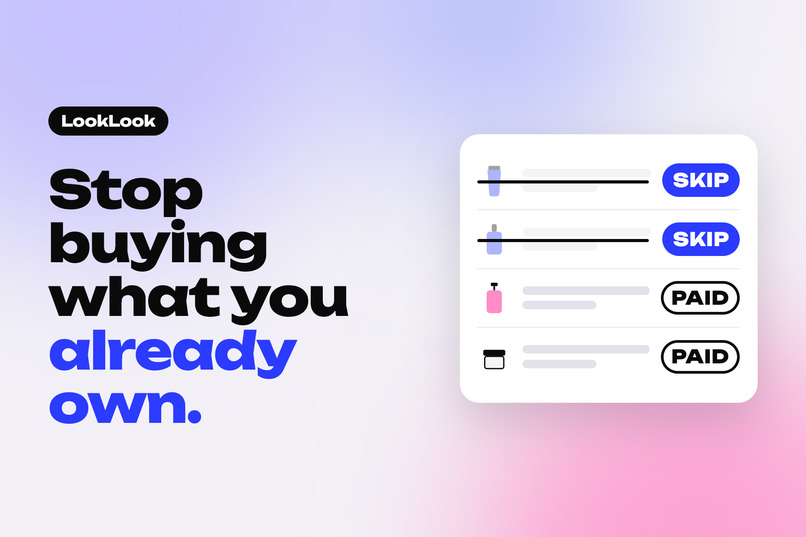
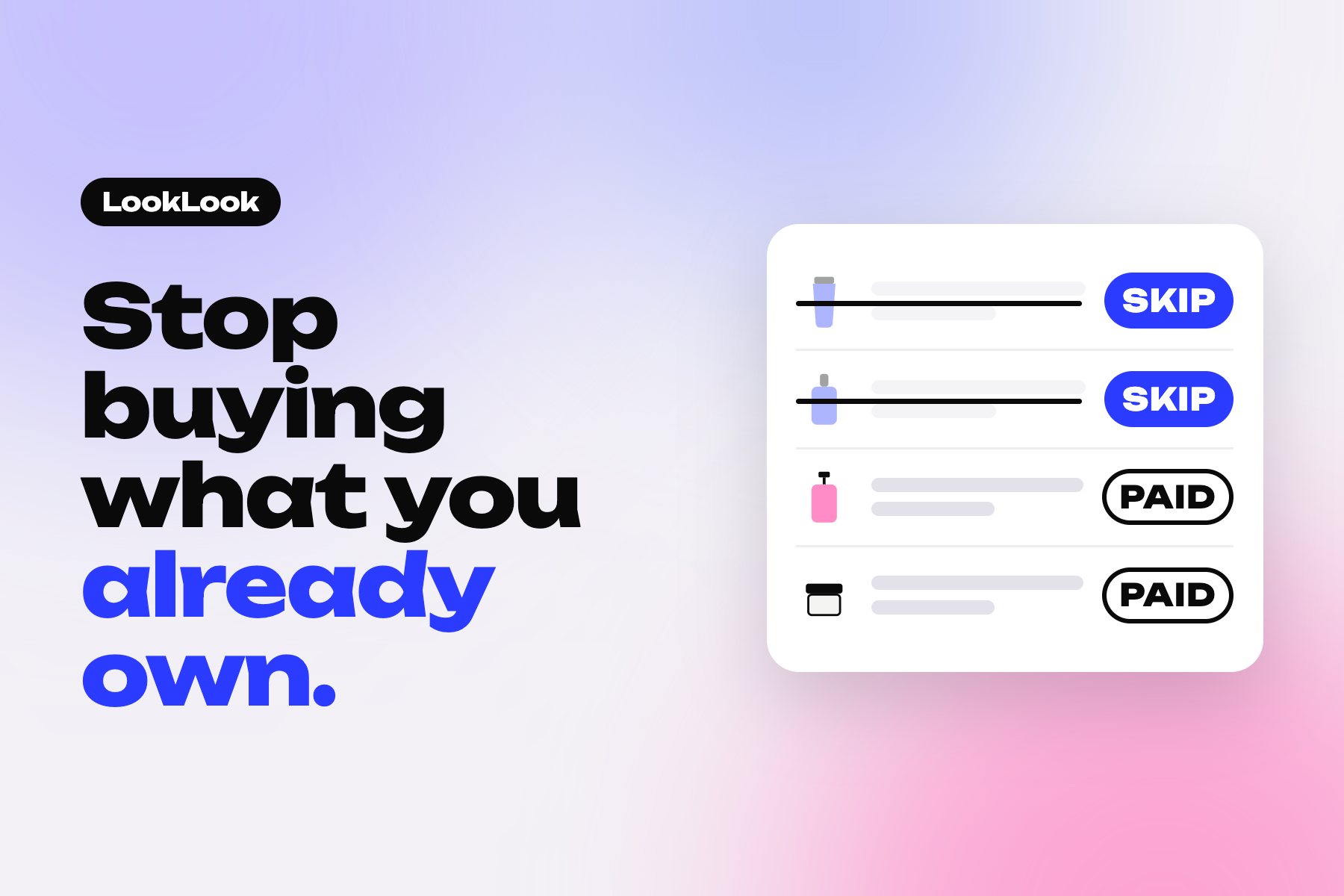
LookLook checks your saved posts against what you already own. One PayPal yes pays for the rest, each item as its own PayPal order.
-
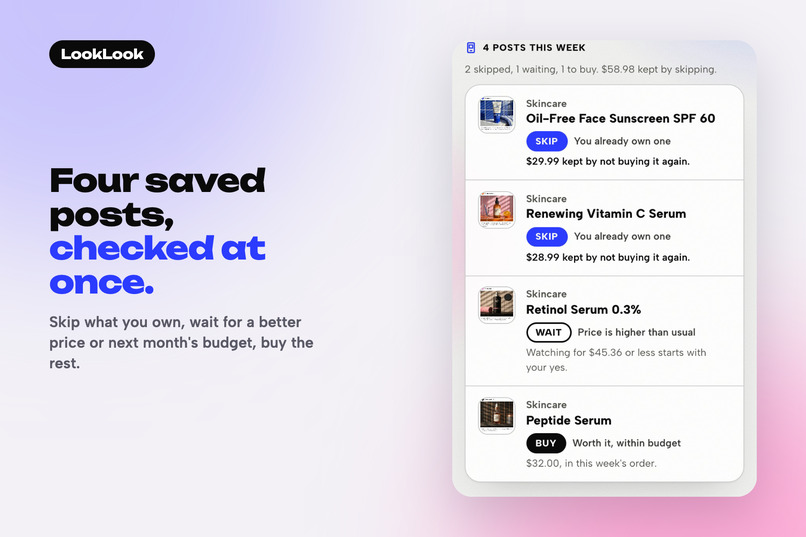
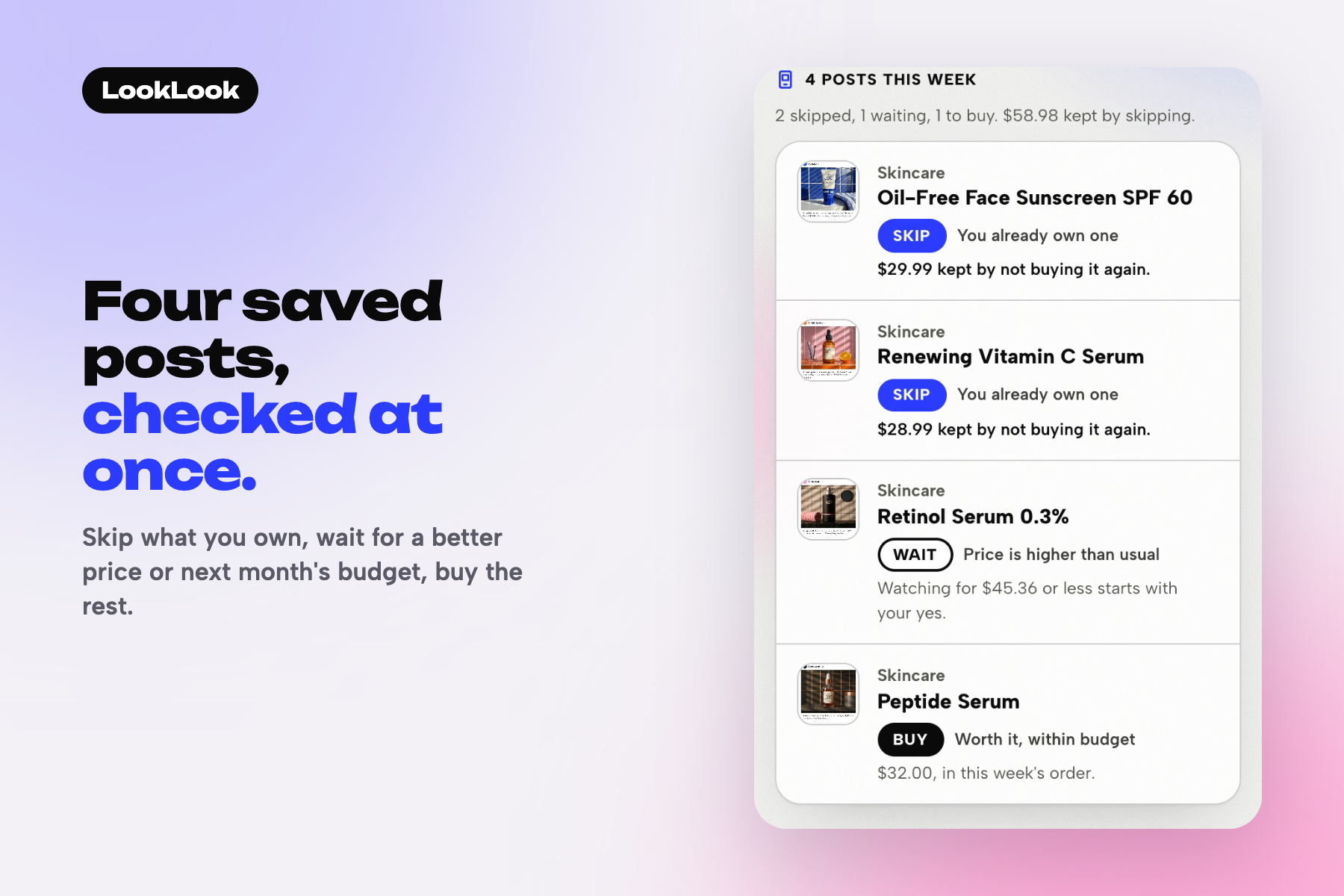
The sample week: 2 posts you already own are skipped, 1 waits for a lower price, 1 is bought. $58.98 kept by skipping.
-
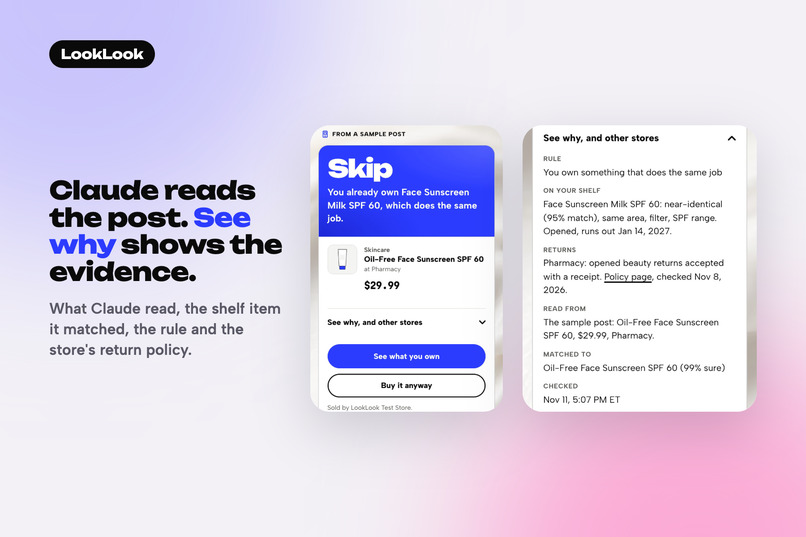
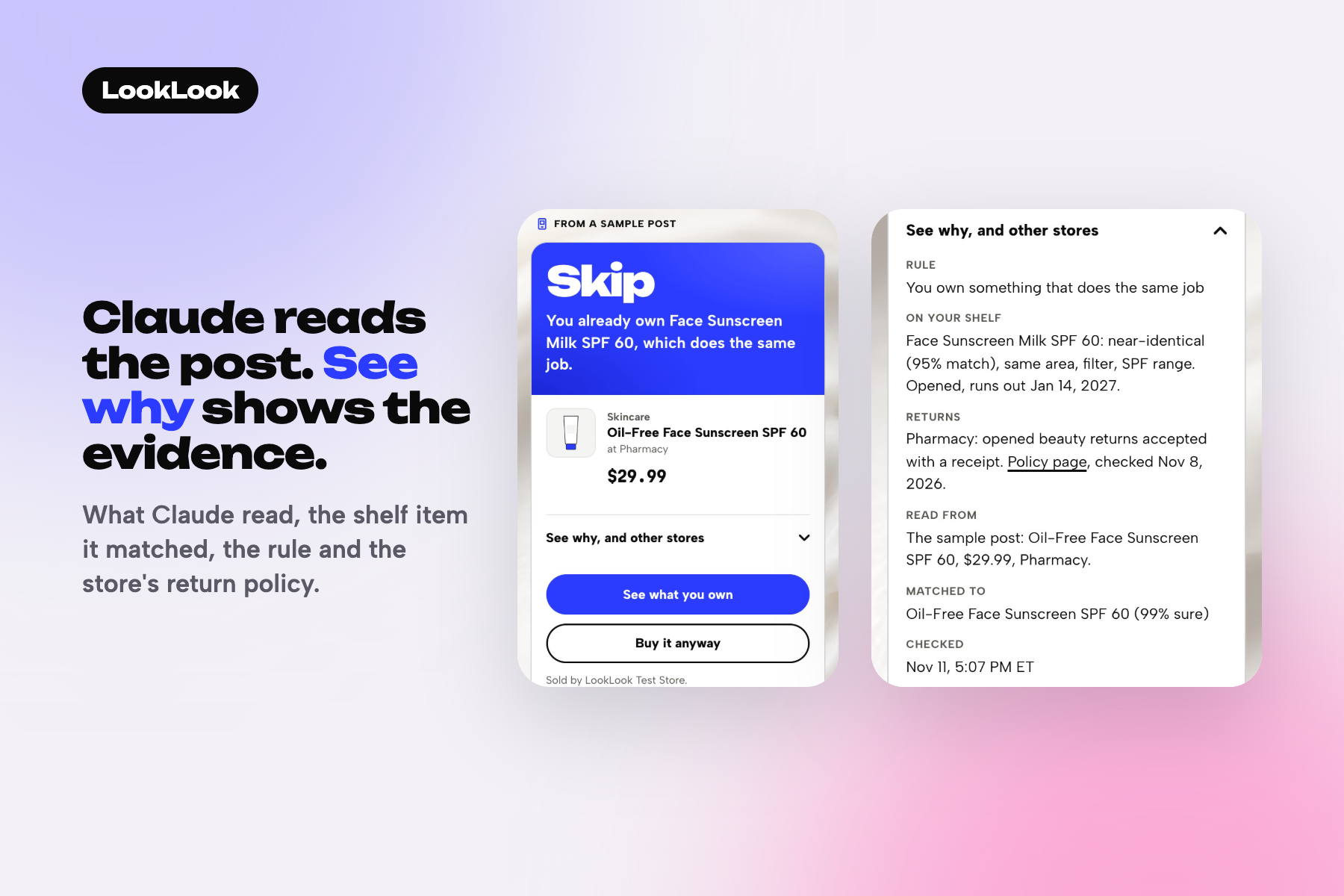
Claude reads the post into product fields. See why shows the shelf item it matched (95% match) and the store's return policy.
-
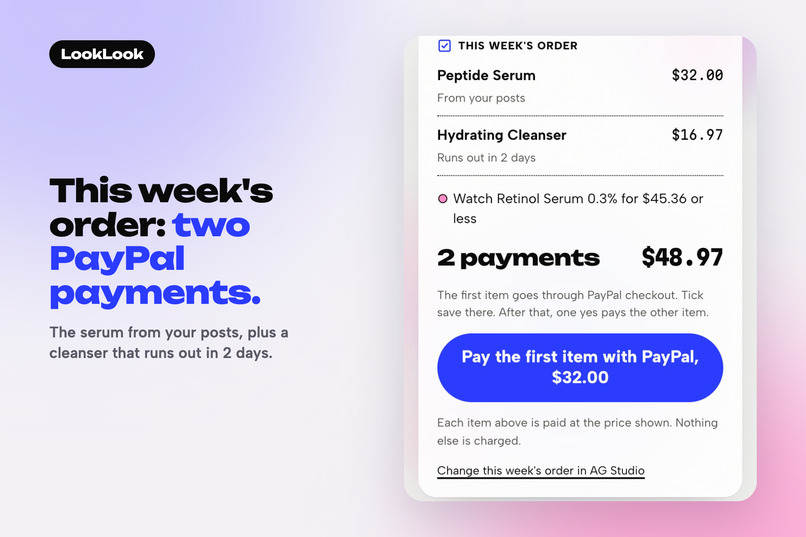
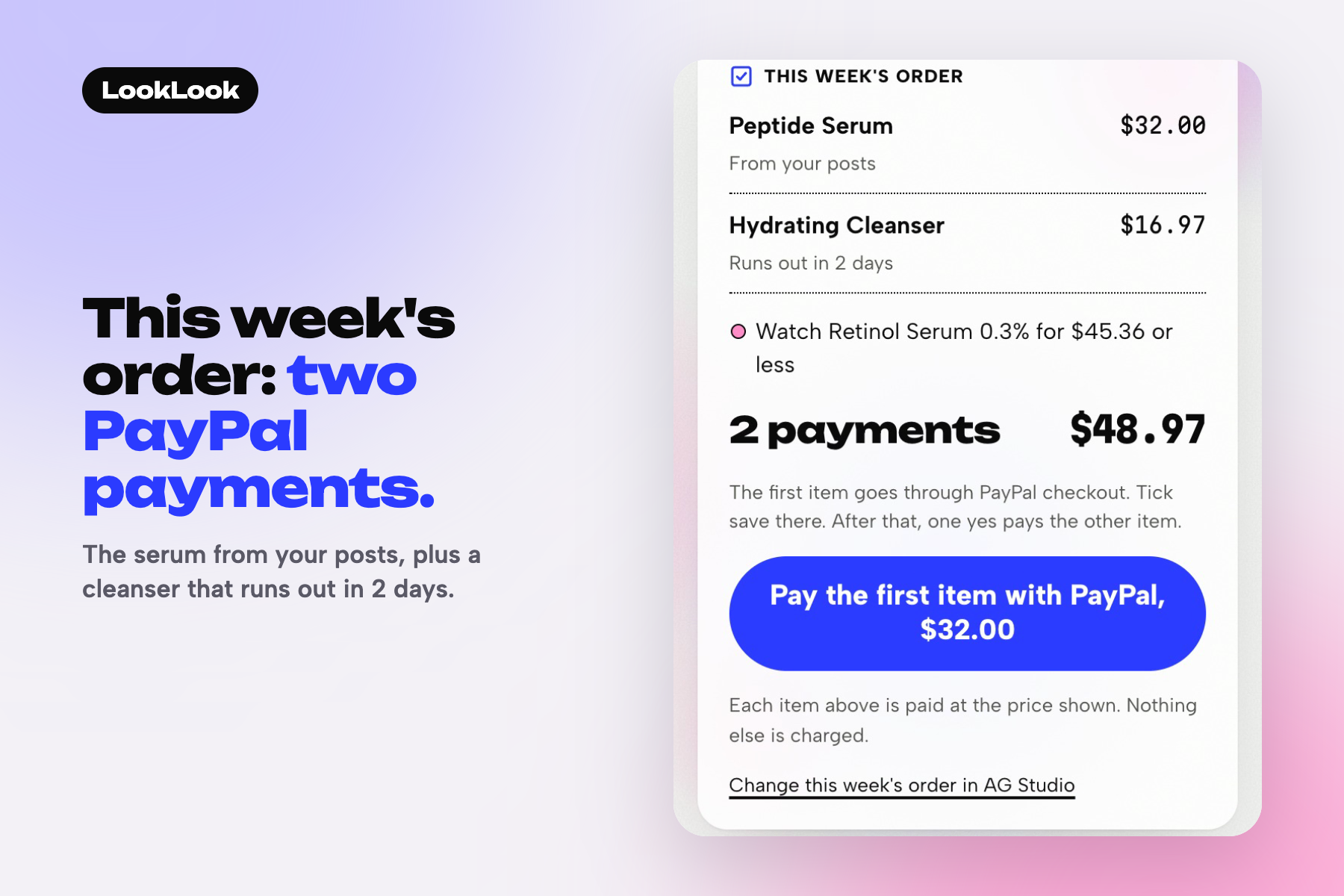
This week's order: the serum from the posts and a cleanser that runs out in 2 days. Two PayPal payments, $48.97 in all.
-
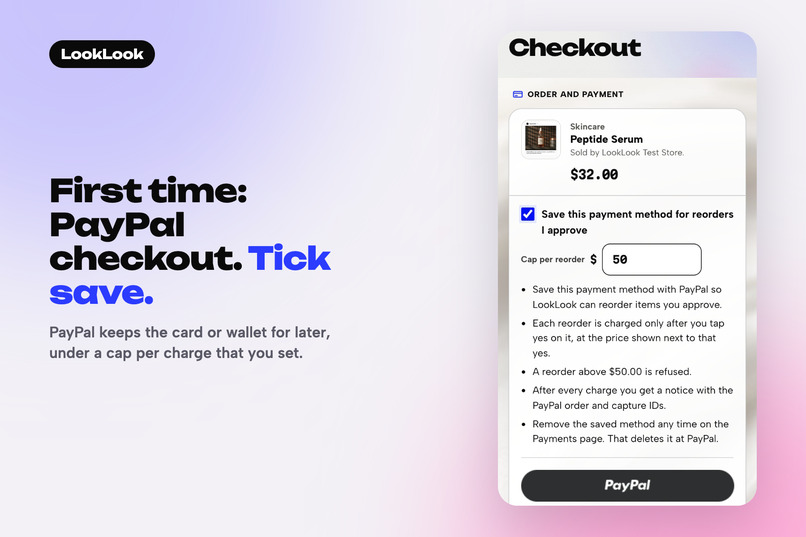
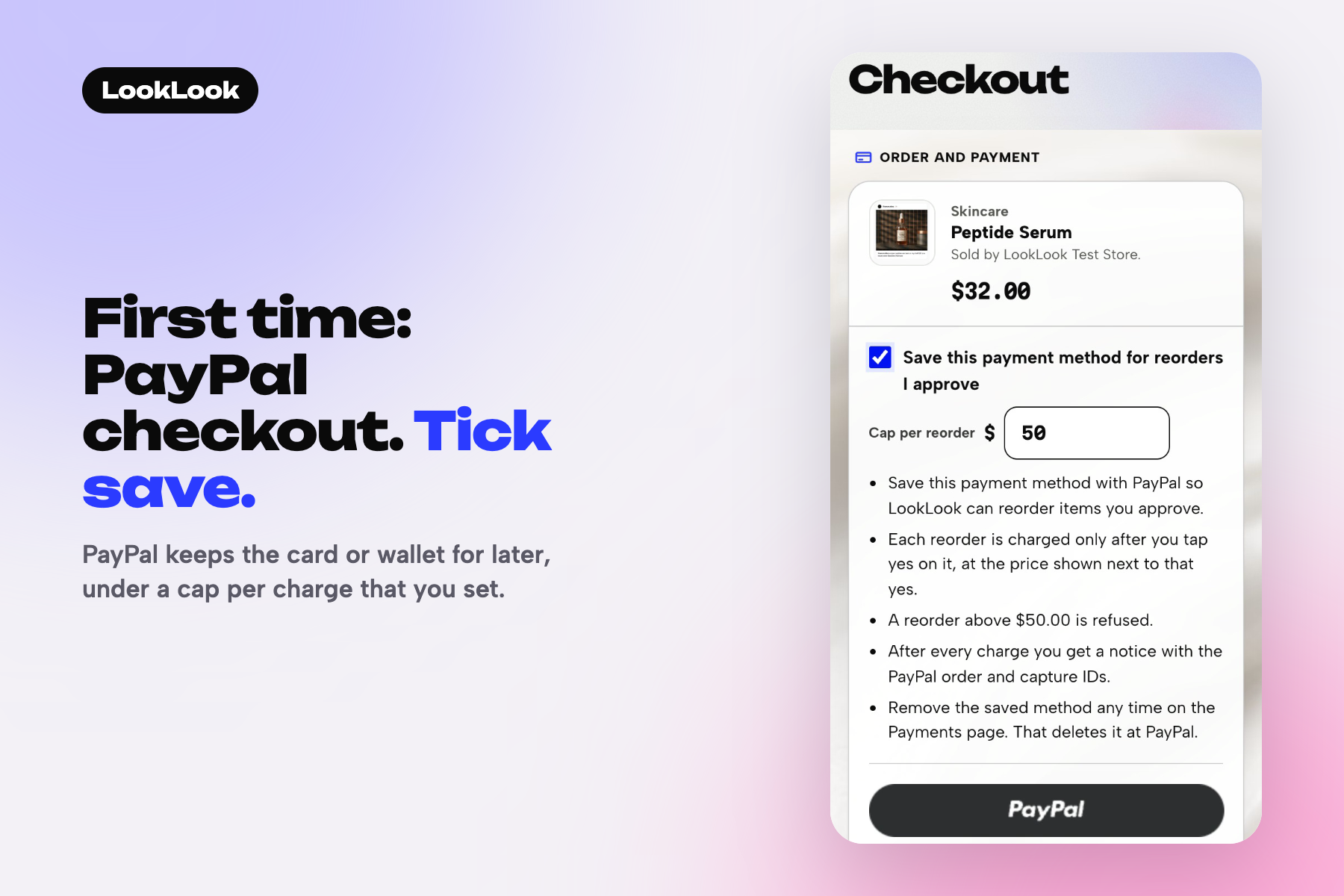
The first item opens PayPal checkout. Ticking save stores the method with PayPal Vault, with a $50 cap on each later charge.
-
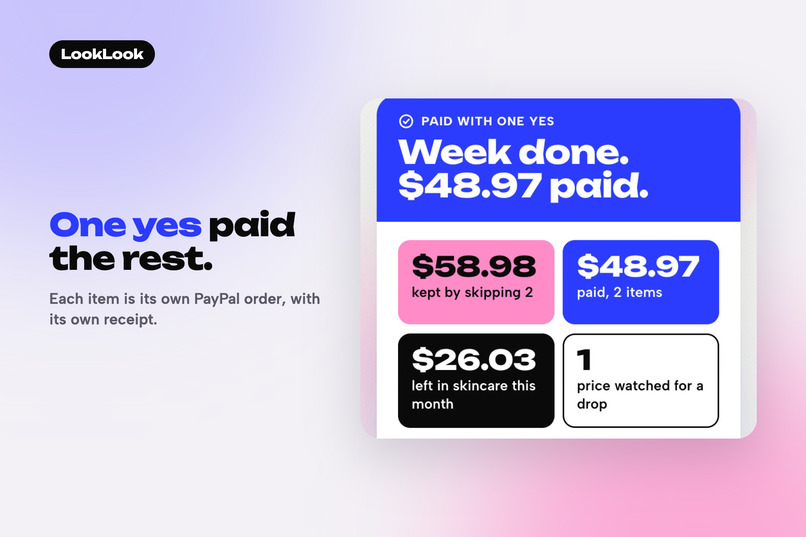
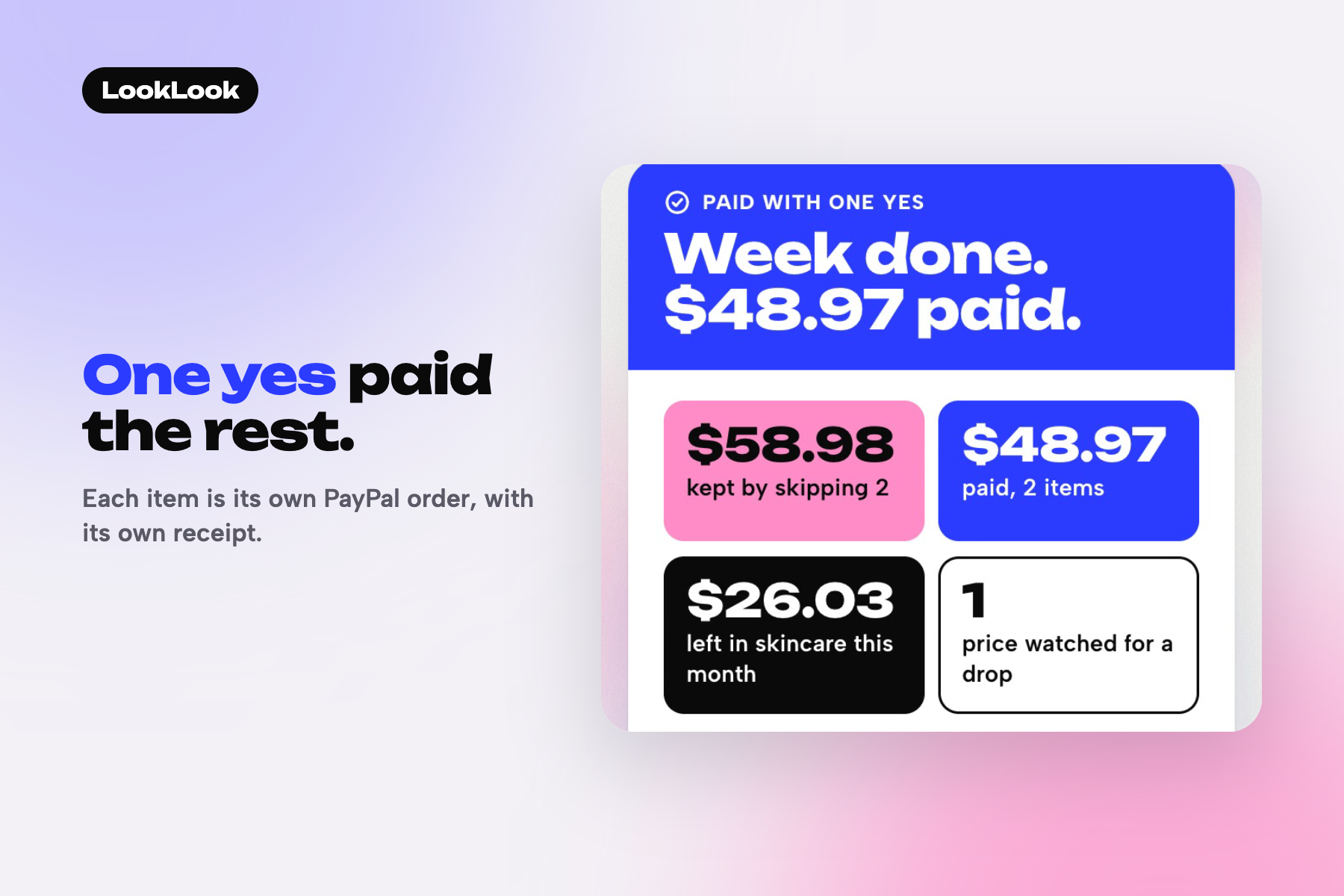
Back on the week, one yes charged the cleanser to the saved method. Each item has its own PayPal order id and receipt.
-
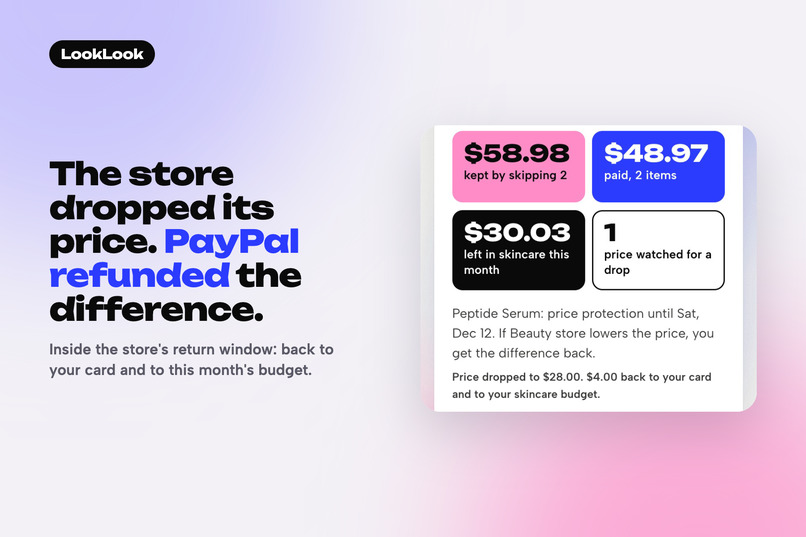
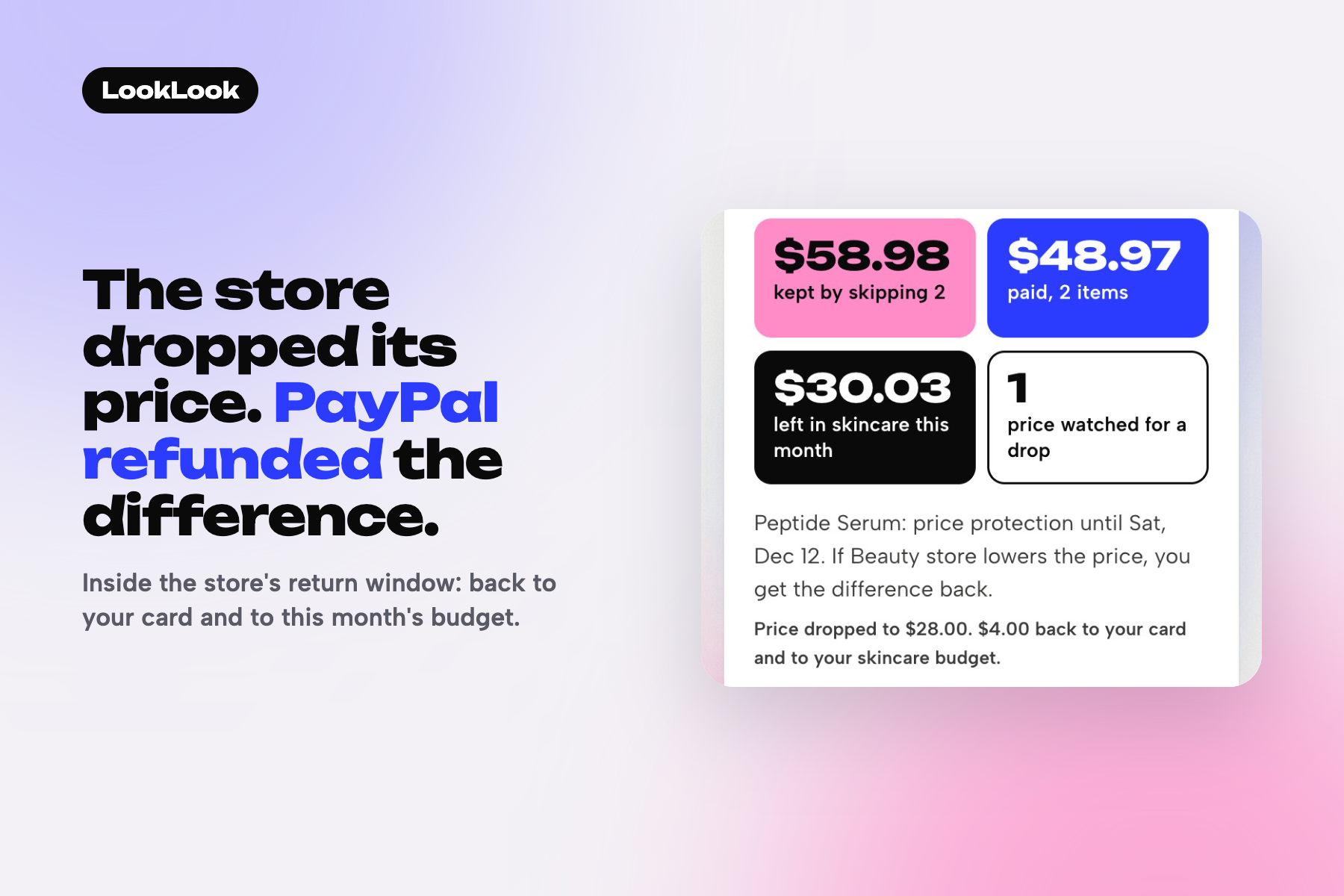
A test price drop to $28 inside the store's return window: a real $4.00 partial PayPal refund, back to the card and the budget.
-
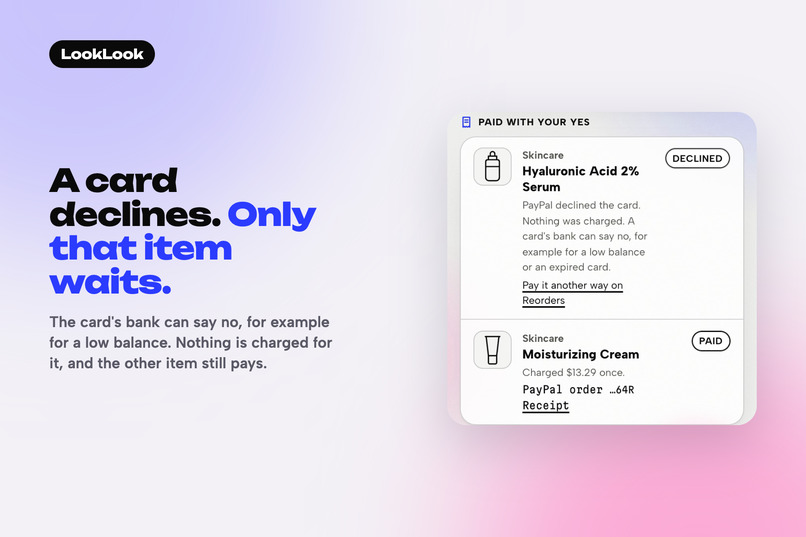
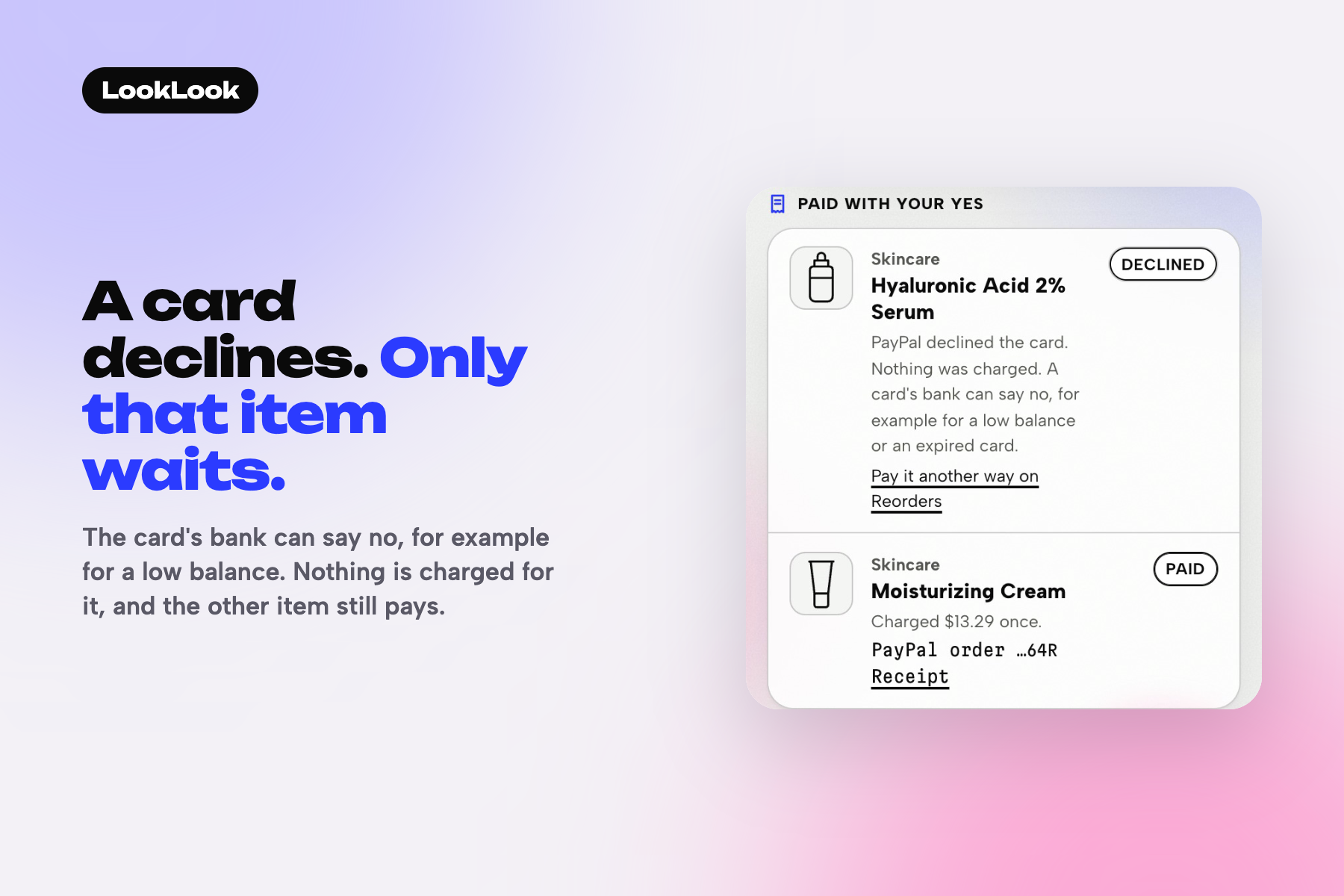
A test switch makes one item's card decline. Nothing is charged for it, and the other item is paid as its own order.
-
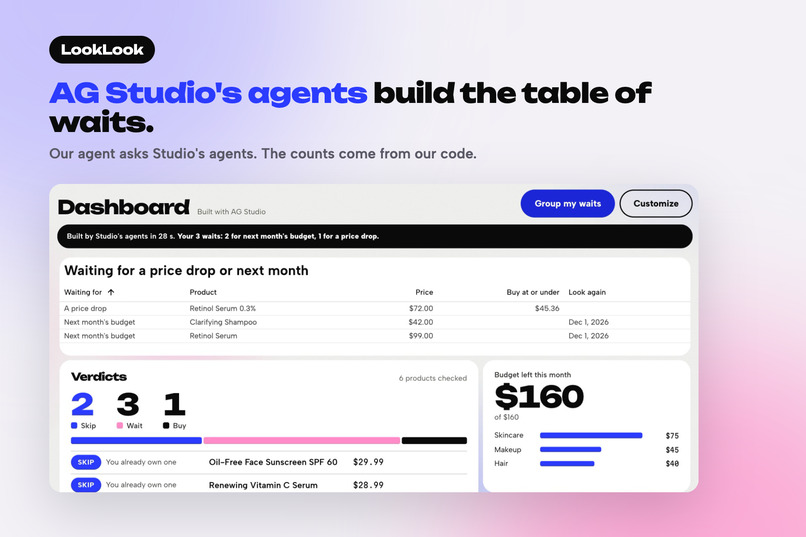
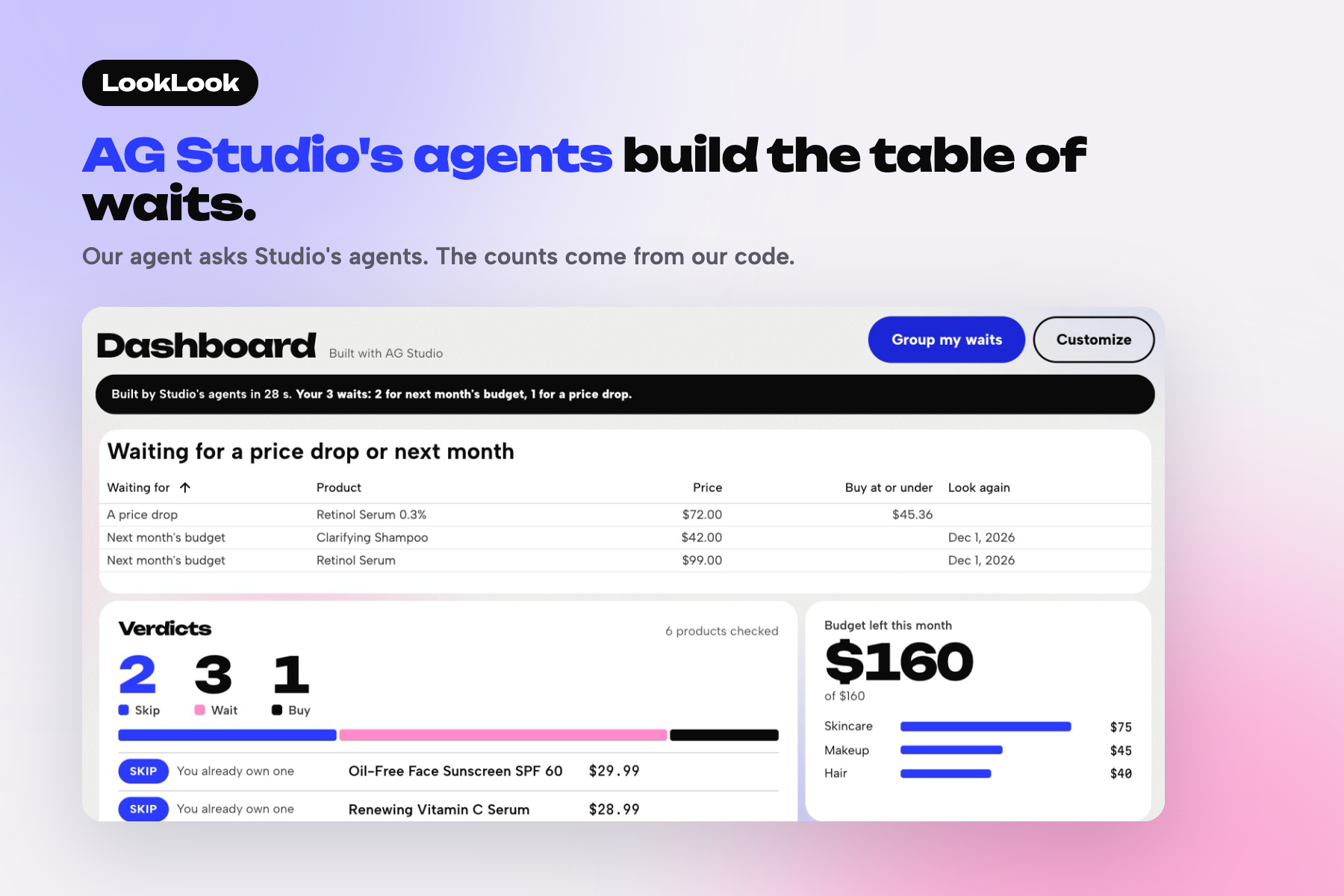
Group my waits: our agent asks AG Studio's agents to build this table, 28 s on this run. 2 wait for next month, 1 for a lower price.
-
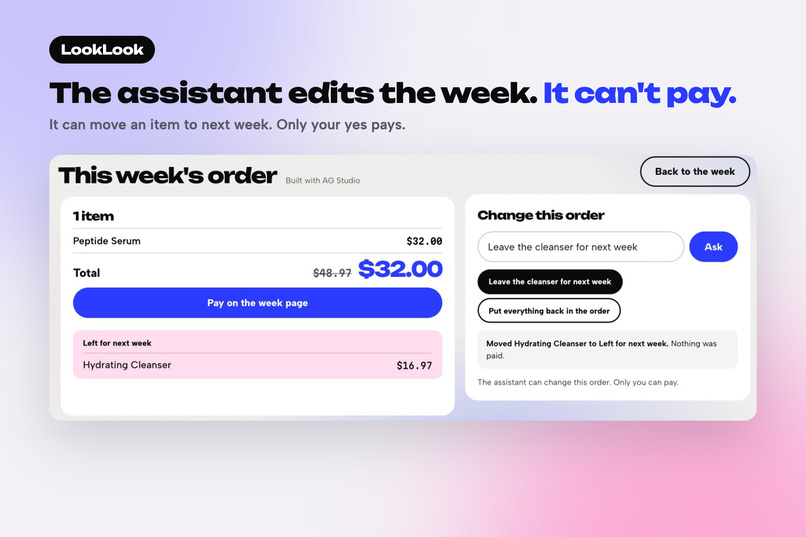
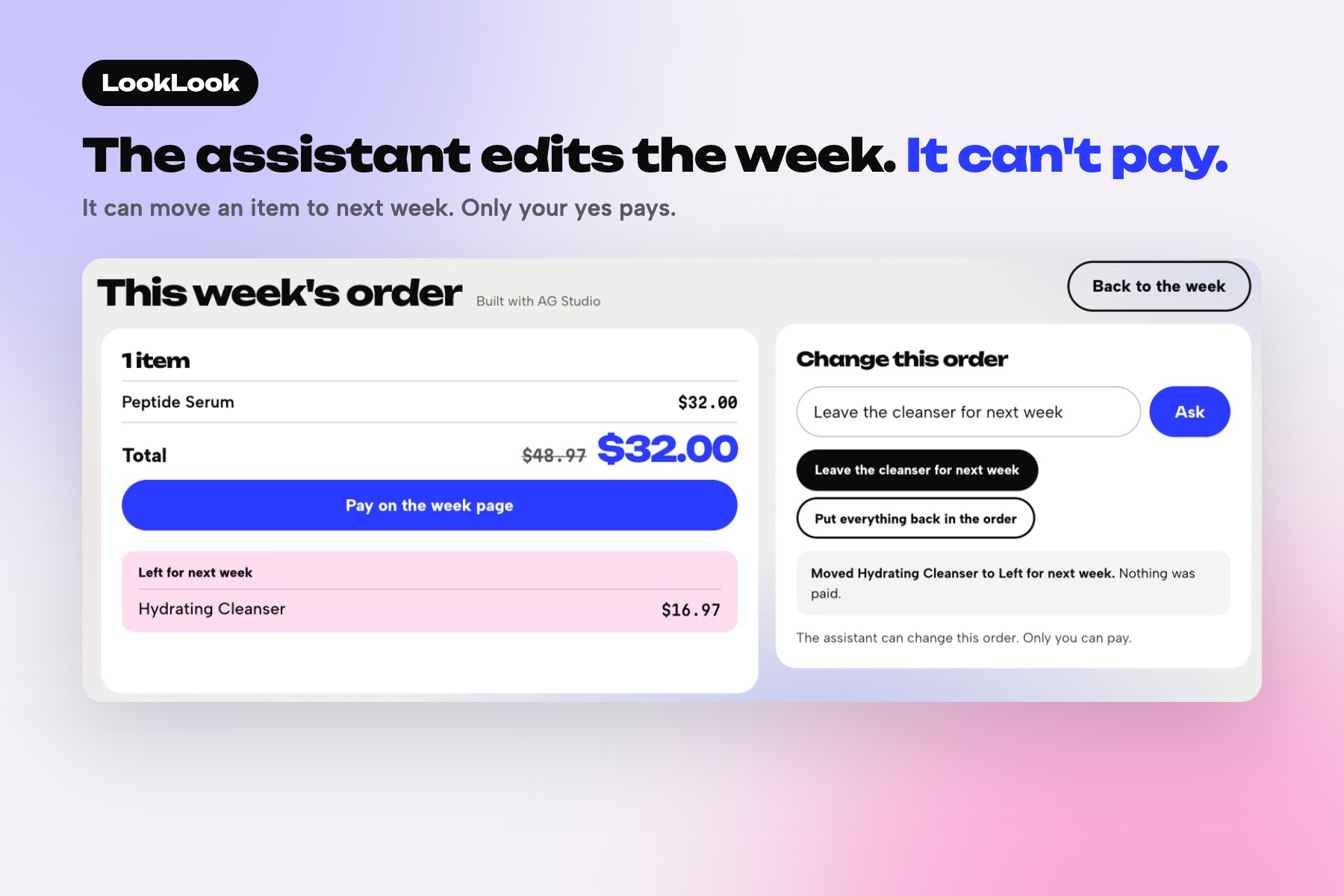
Asked to leave the cleanser for next week, the Studio assistant took it off: $48.97 became $32.00. It has no tool that pays.
-
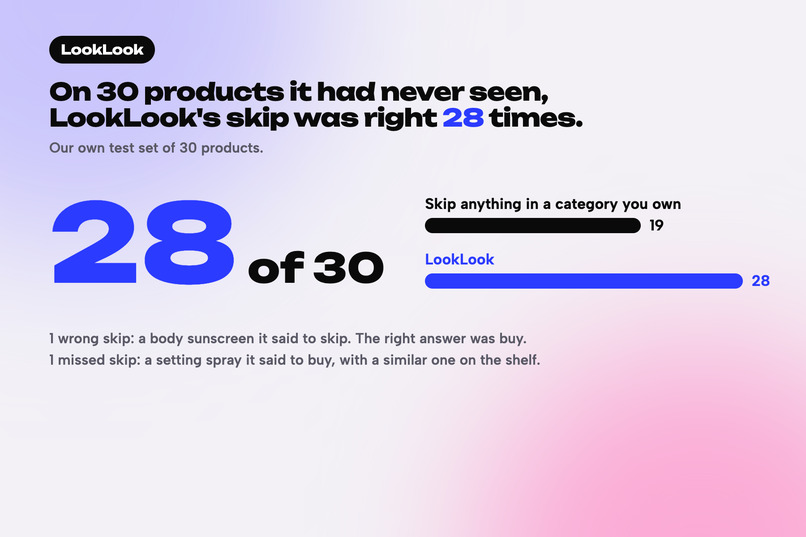
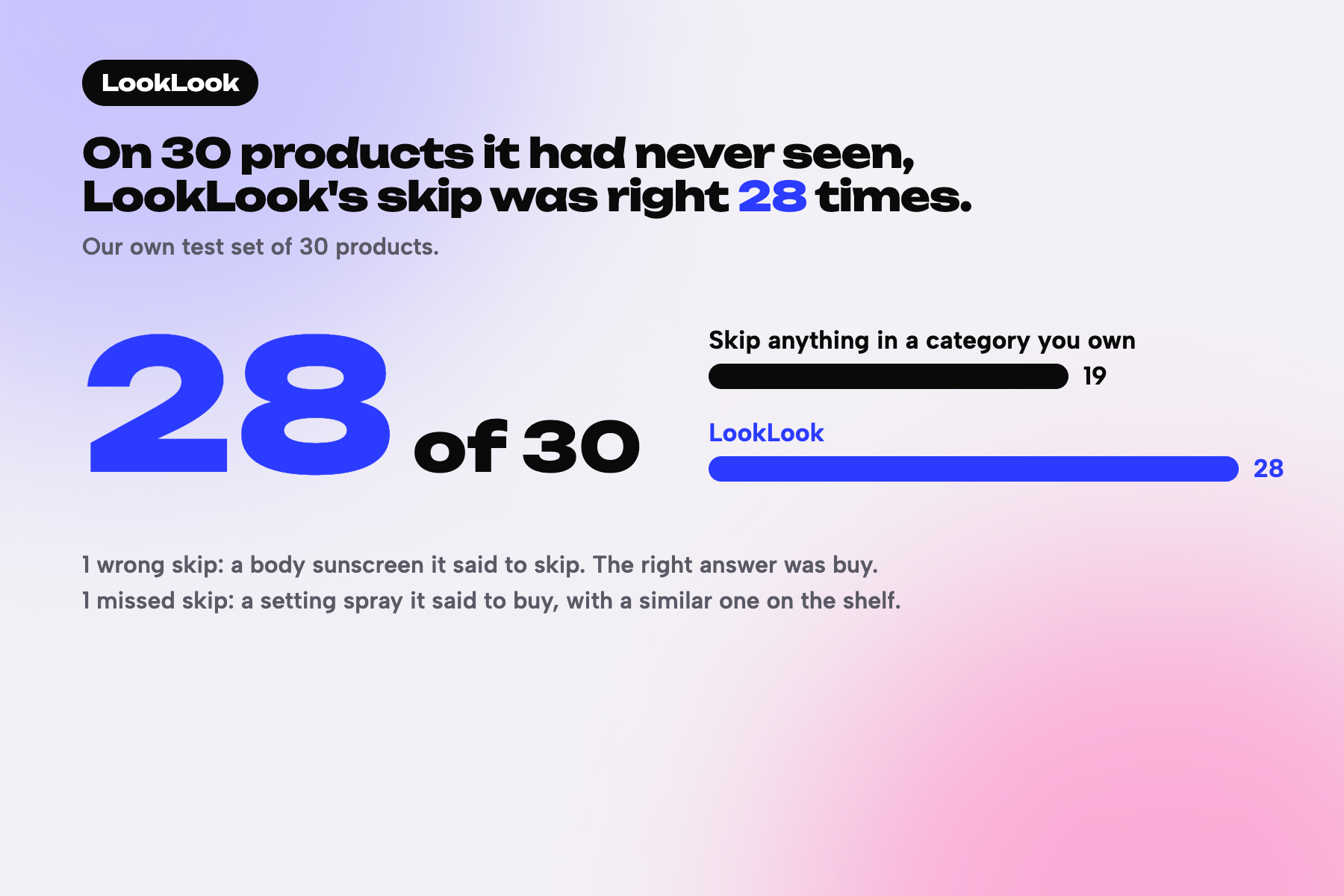
The wrong skip and the missed skip are on the plate. All 7 misses, with expected answers, are on the app's Accuracy test page.
-
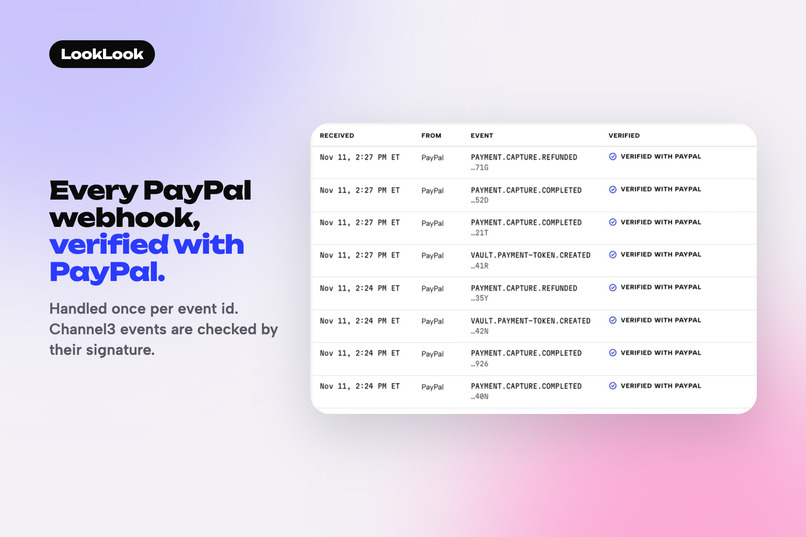
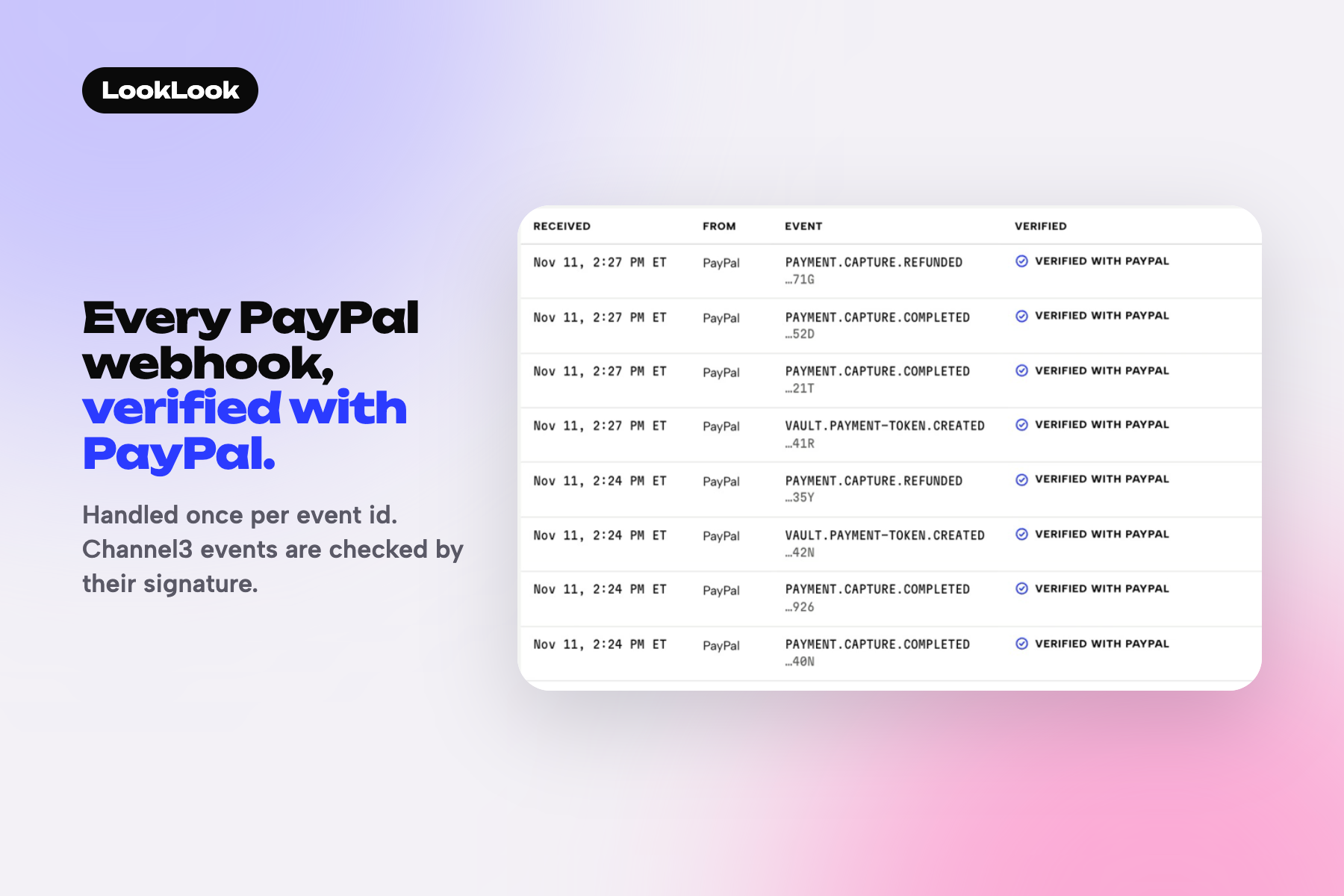
The live webhook log: each PayPal delivery is verified with PayPal's verify-webhook-signature call and handled once.
-
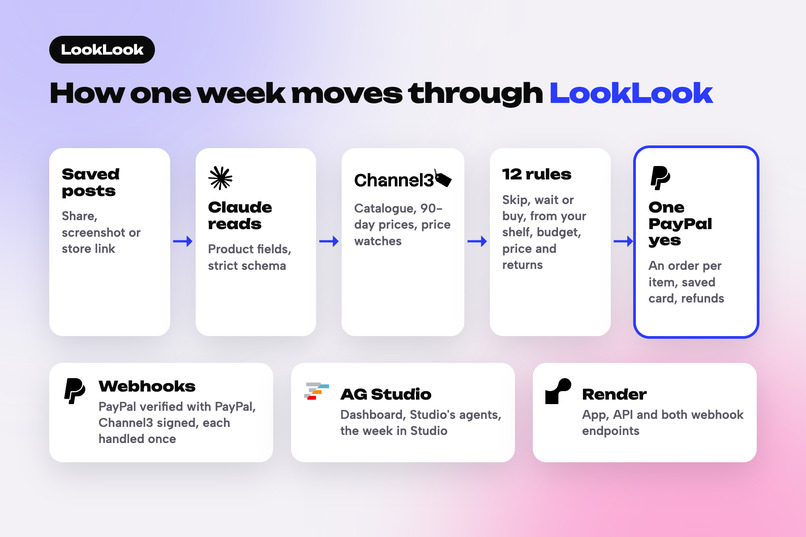
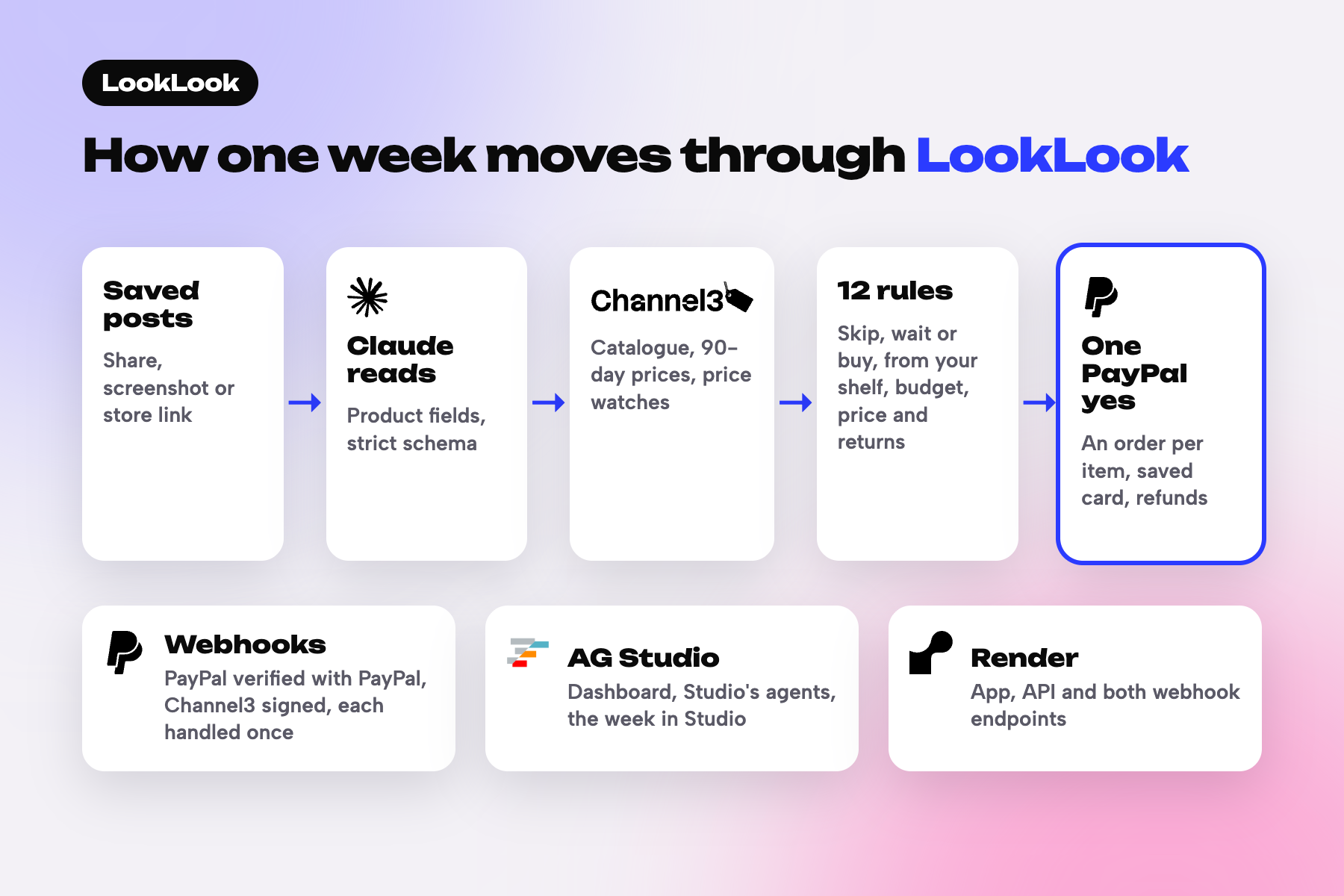
A saved post goes to Claude and Channel3, 12 rules decide, one PayPal yes pays each item. Webhooks confirm, AG Studio shows the week.
Inspiration
Most people don't want AI buying on its own: they'd lose control over what they buy, how much they buy, and the cap on their budget. Only 5% of US Black Friday and Cyber Monday shoppers would let AI complete an approved purchase (YouGov, reported by CNET). But I think when an agent gives people the option to spend less and save money, they use it more. Buy now, pay later is a good comparison: people who start using it keep buying more for months (NBER working paper 30508). LookLook shows the saving when you decide and charges nothing without your yes.
So LookLook checks the posts you saved this week before you buy anything. Its first question is whether you already own one. What's left to buy, you pay for with one PayPal yes.
What it does
Hand LookLook the posts you saved this week. Claude reads each one, and code checks it against what you already own, your budget, the price history and the store's return policy, then says skip, wait or buy, with the reason. What's left goes on this week's order, and one PayPal yes pays each item as its own order: a later price drop is refunded, a declined card stops only its own item, and nothing is charged without your yes.
- Hand it your week. Share posts to LookLook from your phone, upload a screenshot, paste a store link, or load the sample week. Claude reads each post into the product's fields, and Channel3 finds it in its catalogue. A weak or tied match asks you to confirm instead of guessing.
- Each post gets skip, wait or buy. LookLook checks what you already own, this month's budget for the category, the 90-day price history and whether the store takes the item back once opened. Every answer has a one-line reason, and See why shows the evidence: the item on your shelf, the price band, the store's cited return rule. A wait says what it is waiting for: a lower price (a Channel3 price watch at the target), next month's budget, or the one you own running low.
- This week's order, one yes. This week's buys, plus any staple that is running out, go on this week's order. The first time, PayPal checkout opens. Tick save and PayPal keeps your card or wallet for later. Back on the week, one yes pays the rest with that saved method. Each item is its own PayPal order, charged at the price you saw. If a price moved, nothing is charged and the order is shown again. Tap yes twice and you're charged once.
- After the yes, it keeps looking. If the store lowers its price while it would still take the item back opened, PayPal refunds the difference to your card, and it goes back into that month's budget. A price change can only refund. It never charges.
- When a card declines. Only that item waits, and nothing is charged for it. The other items are still paid. PayPal answers INSTRUMENT_DECLINED, and the item waits for a new yes with another card or PayPal account.
- Your week in AG Studio. The dashboard is an AG Studio workspace built from our own custom widgets: checks, Reorders, shelf and budgets together, and a reorder you can pay from inside it. Group my waits sends our own agent to Studio's built-in lead agent, and Studio's agents build a grid of what each wait is waiting for. In the Studio week, ask in words ("Leave the cleanser for next week") and this week's order changes. The assistant can edit it, but it has no tool that pays. Only your yes on the order you see pays.
- Check it yourself. The Webhook events page lists the latest 100 PayPal and Channel3 webhooks and whether each was verified. The accuracy test page lists every miss.
Where Claude meets PayPal
- Claude reads each post into the product's fields, words the reason, and in the Studio week works out which item your words mean. Claude never pays. Through PayPal's Agent Toolkit it can only read what PayPal recorded (get_order, get_refund). A charge needs your yes.
- The Studio assistant can edit this week's order, leaving an item for next week or putting it back, but it has no tool that pays.
- A charge happens only on a yes to that exact order. Every edit gives the order a new fingerprint, and a yes given for an older version charges nothing.
What PayPal does in LookLook
Each row starts with its tag in Built with. The README's Built with table adds the file behind each one.
| Tag | PayPal feature | What it does for the shopper | Where to see it |
|---|---|---|---|
| PayPal JS SDK | Buttons and Card Fields | The first checkout, with PayPal or a card. | This week (/week), the first item |
| PayPal JS SDK v6 | One-time payment session and Card Fields | The same first checkout on JS SDK v6, saving the method during the purchase. The v5 checkout stays the default. | /checkout/<id>?sdk=v6 |
| PayPal Vault | Vault v3, save during purchase | When the shopper ticks the save box, Vault keeps the card or PayPal account under a short customer id. | The first checkout, then Payments (/payments) |
| PayPal Orders API | Orders v2 | Creates and captures each item as its own PayPal order. Success is read from the capture status, because a declined card can still return a completed order. | This week (/week), each receipt |
| PayPal Orders API, PayPal Vault | Charges on the saved method | Every later item is the shopper's own yes (customer-initiated, usage: SUBSEQUENT), under a cap per charge the shopper sets. |
This week (/week), Reorders (/rebuys) |
| PayPal Orders API | PayPal-Request-Id |
One id per shopper, item, cycle and saved method, so a repeated yes is charged once. | This week (/week): tap yes twice, pay once |
| PayPal | Refunds | A partial refund on the capture when the store's price drops inside its return window, or a full refund from the receipt. | A receipt, and Try a price drop on the finished week |
| PayPal Webhooks | Webhooks + verify-webhook-signature | Every delivery is verified with PayPal and handled once. It confirms receipts, refunds and removed methods. | Webhook events (/events) |
| PayPal | Negative testing | A labelled test switch makes the next charge decline, so the decline path can be seen on purpose. | Reorders (/rebuys) |
| PayPal Vault | Payment token delete | Removing a saved method deletes it at PayPal, checked until PayPal no longer has it. | Payments (/payments) |
| PayPal Agent Toolkit | get_order, get_refund (read-only) |
The Studio week assistant reads what PayPal recorded for a paid item, so it can answer "Did PayPal take the payment?" from PayPal's own record. No tool creates, pays or refunds. | Studio week (/studio/week), after paying |
How we built it
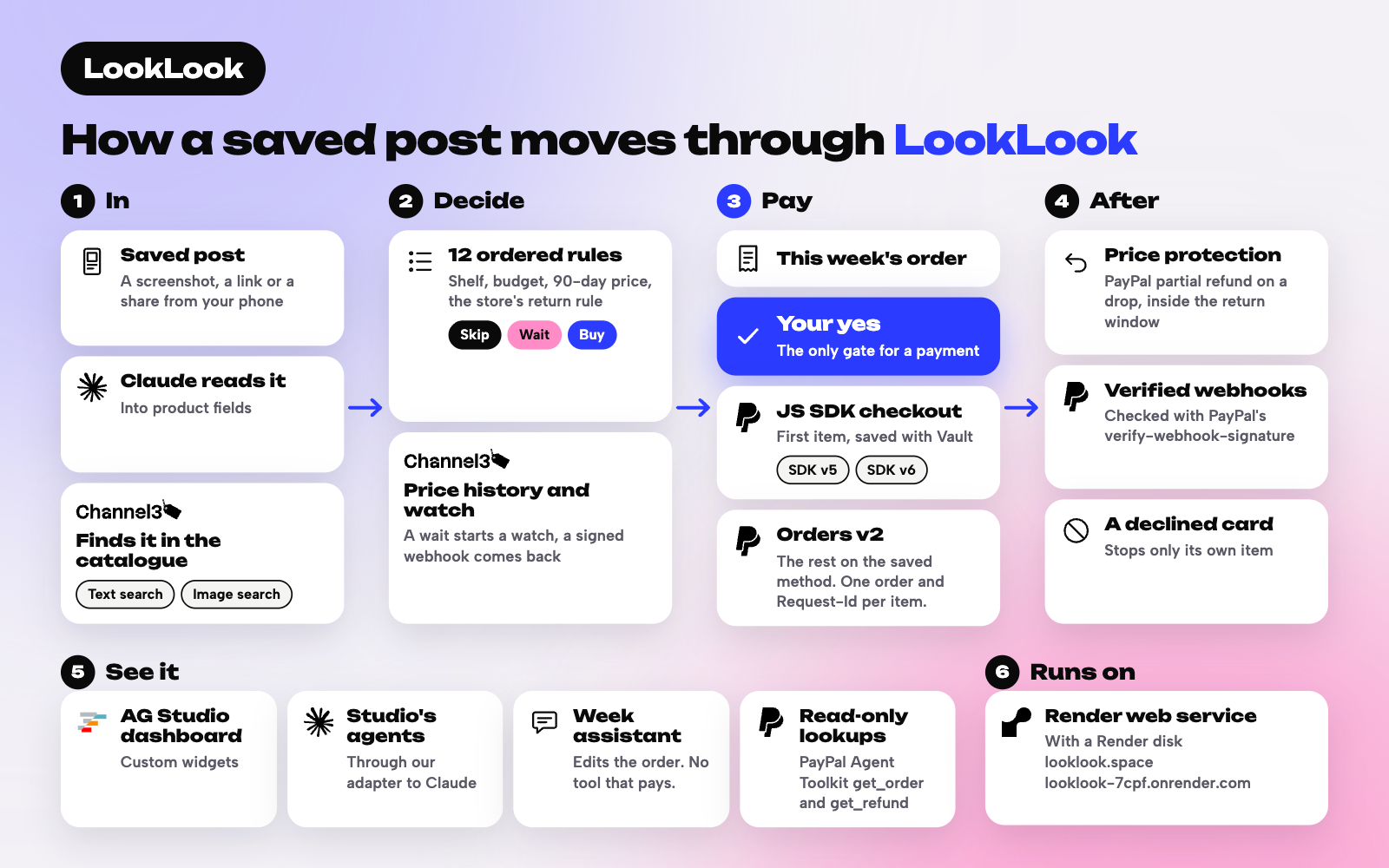
In words, in the order a post moves:
- In. A screenshot goes to Claude (
claude-sonnet-5-5), which reads the product's brand, name, price, store and key attributes under a strict JSON schema. A pasted link goes to Channel3's URL lookup. Channel3's image search also looks at an uploaded screenshot, and only settles a match the name left unsure. - Match. Channel3 search finds the catalogue product. Our code scores the match and asks you to confirm a weak or tied one.
- Decide. Twelve ordered rules read those fields: shelf similarity, run-out dates, the store's cited opened-return rule, the budget left and the cleaned 90-day Channel3 price band. Anything unresolved lands on ask or wait, never buy. Claude then words the one-line reason.
- Watch. A wait for a lower price starts a Channel3 product subscription. Channel3's signed webhook turns a drop to the target into an approval card, and after a purchase the same store's price drives price protection.
- Pay. The PayPal JS SDK handles the first checkout. Orders v2 captures it and Vault v3 saves the method. One yes then charges each remaining item on the saved method, each as its own order with its own
PayPal-Request-Id. - Confirm and refund. PayPal webhooks are verified with PayPal's verify-webhook-signature and handled once per event id. A price drop inside the return window becomes a partial refund on that item's capture.
- See it. The dashboard is an AG Studio workspace with our custom widgets, our theme params (so charts the agents add use the app's colours) and an AI harness: our own primary agent beside Studio's five built-in agents. Each agent runs on Studio's Direct LLM Runner with our adapter, which sends every turn through our
/api/llmroute to Claude.
One Render web service runs the app, the API and both webhook endpoints, with its data on a Render disk.
AG Studio, Channel3, Render, Claude and the rest
| Tag | Its job in LookLook | Where to see it |
|---|---|---|
| AG Studio | The dashboard, built from our custom widgets: the verdict widget pays a due reorder on the saved method from inside it and updates the shelf in place. Our own agent delegates to Studio's built-in lead agent, and Studio's agents build the grid of waits. In the Studio week, our agent holds two custom tools that edit this week's order and none that pays. | Dashboard (/studio), Studio week (/studio/week) |
| AG Grid | The dashboard's grid tables, Price watches and the table of waits, are AG Studio grid widgets drawn by AG Grid. | Dashboard (/studio), then Group my waits |
| Channel3 | The catalogue (search, URL lookup, and image search when the name leaves a match unsure), the same product at other stores, the 90-day price history, and the price-drop subscriptions and signed webhooks behind every wait and every price-protection refund. | Check (/check), a verdict's See why, Webhook events (/events) |
| Render | One web service for the app, the API and the PayPal and Channel3 webhook endpoints, with its data on a Render disk. | https://looklook.space (also https://looklook-7cpf.onrender.com) |
| Claude, Anthropic, Claude Sonnet 5.5 | Claude Sonnet 5.5 (claude-sonnet-5-5), called through the Anthropic API, turns a feed screenshot or a listing into the facts every check starts from, writes the reason you read, and runs the dashboard's agents. Around it, twelve ordered rules make the call from Claude's fields, so the same post always gets the same answer with its evidence attached. |
Check (/check): upload a screenshot. The dashboard assistant (/studio) |
Challenges we ran into
- Two orders from one yes. In the sandbox, two simultaneous order requests with the same
PayPal-Request-Idcreated two orders, while sequential repeats correctly returned the first. We now merge same-key payment calls in the app before they reach PayPal, and the key is built on the server from the shopper, item, cycle and saved method. A double tap is charged once. - A completed order that wasn't paid. With a declined test card, the order came back COMPLETED while its capture was DECLINED. LookLook reads success from the capture status only, and a decline becomes a card asking for another method.
- A deleted card that came back. A payment token deleted seconds after it was saved came back a few seconds later. Removal now makes the method unusable first, then repeats the delete until two checks find nothing.
- Two price drops at once. Two drops for the same item can arrive together, and PayPal's refund webhook can arrive before our own refund call returns. Drops for an item are handled one at a time, so the refunds add up to the lower price, never more than was paid, and the budget is credited once.
- A store policy read from the wrong page. Our table said a large pharmacy chain may refuse opened beauty, citing its general returns document. Its beauty section takes beauty back opened or unopened with a receipt. We fixed the table first, then the expected answers it affected, before any re-run. The development set went from 60 to 58 of 65. The held-out 28 of 30 did not change. The correction is on the accuracy test page.
Accomplishments that we're proud of
- On 30 products it had never seen, LookLook made the right skip-or-not call 28 times (12 of its 13 skips were right). The same model, shown the product and the shelf but not LookLook's rules, got 27. One product is a small gap: what the rules add is the evidence behind each skip and the wait or ask answers, not a better guess. Skipping anything in a category you own gets 19. Saying skip to everything gets 13. This is our own test set: one person wrote the 30 products and their expected answers, and committed them before the one scored run. The order of work is in the repo's git history, and every miss is on the accuracy test page.
- A week paid with one yes: each item its own PayPal order, a saved method under a cap the shopper sets, one charge per yes, and a declined card that stops only its own item.
- Price protection tied to each store's own return window, paid out as partial PayPal refunds, and money that moves on its own only when it comes back to you.
- A full PayPal loop in one app: checkout, Vault save during purchase, customer-initiated charges, idempotency, verified webhooks, full and partial refunds, and token removal.
- An AG Studio workspace that does real work: a reorder paid from inside it, and a request to group the waits that goes from our agent to Studio's agents and back in about 30 seconds.
What we learned
- A sandbox has concurrency edges. Idempotency keys protect retries that come one after another. Retries sent at the same moment still need guarding in the app.
- Cite the section that governs the product: a store's beauty section, not its general returns document.
- An assistant can change the plan without holding the money. Studio's assistant edits this week's order, every change gives the order a new fingerprint, and a yes given for an old version charges nothing.
What's next for LookLook
- A shelf you don't have to type. Import past purchases with the shopper's permission, so "you already own one" works from day one (PayPal Transaction Search needs a permission our sandbox app doesn't have yet).
- Real shoppers. A small consented trial to measure how often people follow a skip and what it saves them.
- Real stores. In the sandbox LookLook is also the seller, so it refunds a price difference itself. With a real store, the same signal would file that store's price-adjustment request.
Built With
- ag-grid
- ag-studio
- anthropic
- channel3
- claude-sonnet-5.5
- next.js
- paypal
- paypal-agent-toolkit
- paypal-js-sdk
- paypal-js-sdk-v6
- paypal-orders-api
- paypal-vault
- paypal-webhooks
- render
