Inspiration
About 2.1 million couples married in the U.S. in 2024 (CDC/NCHS, provisional). In The Knot's 2026 Real Weddings Study, 72% of couples hired a beauty professional, and a hair and makeup trial typically adds $225 to $350 on top of the wedding-day price (The Knot).
The trial is where things go wrong. A bride who rarely wears makeup finds her look on someone else's face, saves the screenshot and brings it to a paid trial. The artist reads the picture one way and she reads it another. On r/weddingplanning:
"Today I had a makeup trial and I absolutely hate it. … I am paying $150 for this makeup and $150 for her to do my hair." (post)
"I wear no makeup day-to-day and am not knowledgeable at all about what professional makeup is supposed to look like" (post)
A post titled "The hair trials I paid hundreds of dollars for vs. what my coworker did for free" has 1,400+ upvotes as of Oct 31, 2026 (post).
We pulled a shortlist of beauty pain points from public forums, and Nadya picked this one. In the bridal trial posts, both the money and the disappointment were stated outright.
What it does
Look Brief turns her inspiration photo into a look on her own face and then into a brief that she and her makeup artist agree on before anyone pays for the trial.
- She adds a selfie and her inspiration photo. A local photo check runs first, so a missing, turned, too-small or closed-eyed face gets a plain hint before any photo is sent to YouCam. If YouCam still rejects a photo (covered eyes or lips, for example), the failed task costs nothing and she gets a plain hint too.
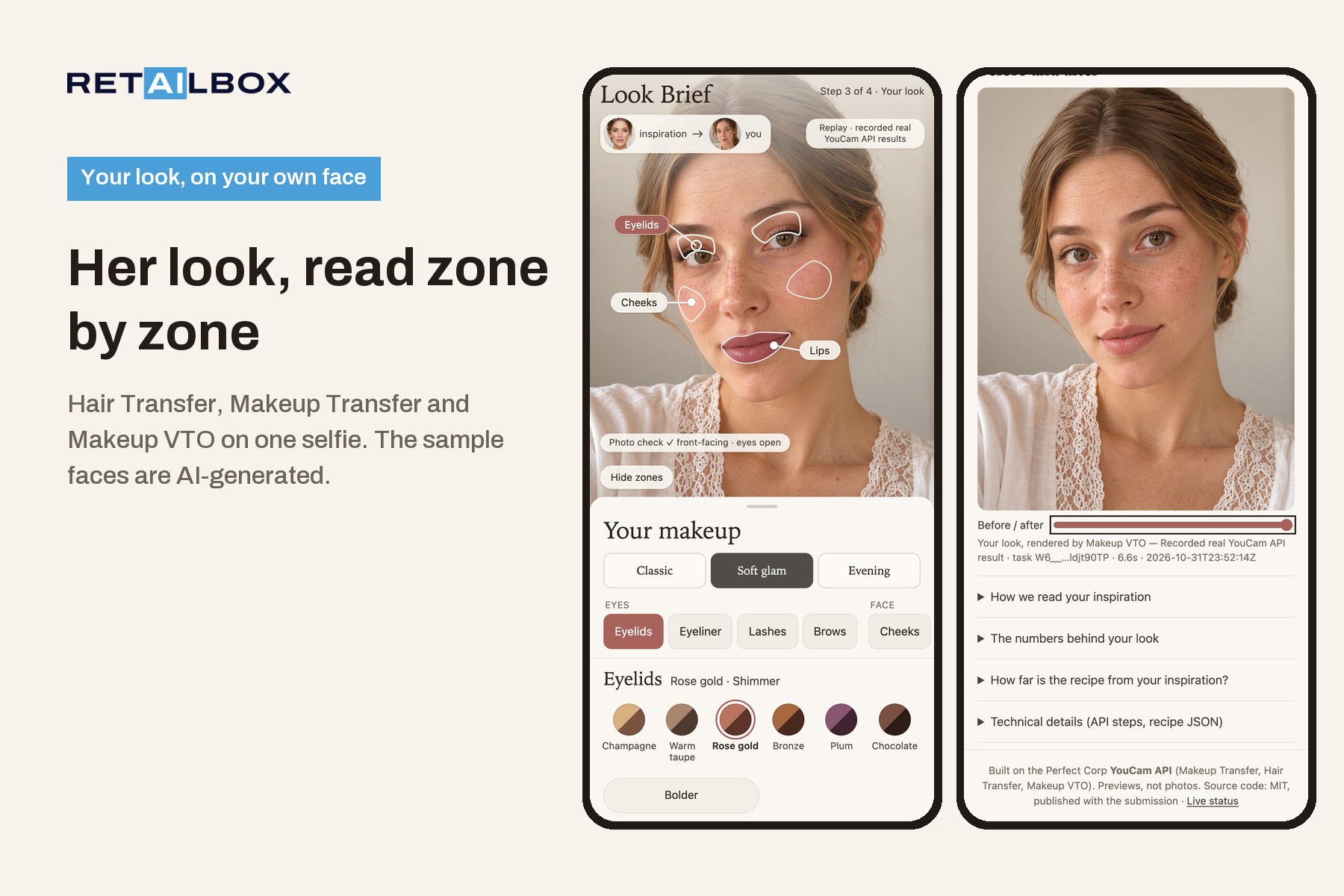
- YouCam AI Hair Transfer gives her the hairstyle from the inspiration photo, and YouCam AI Makeup Transfer puts the inspiration makeup on her own face.
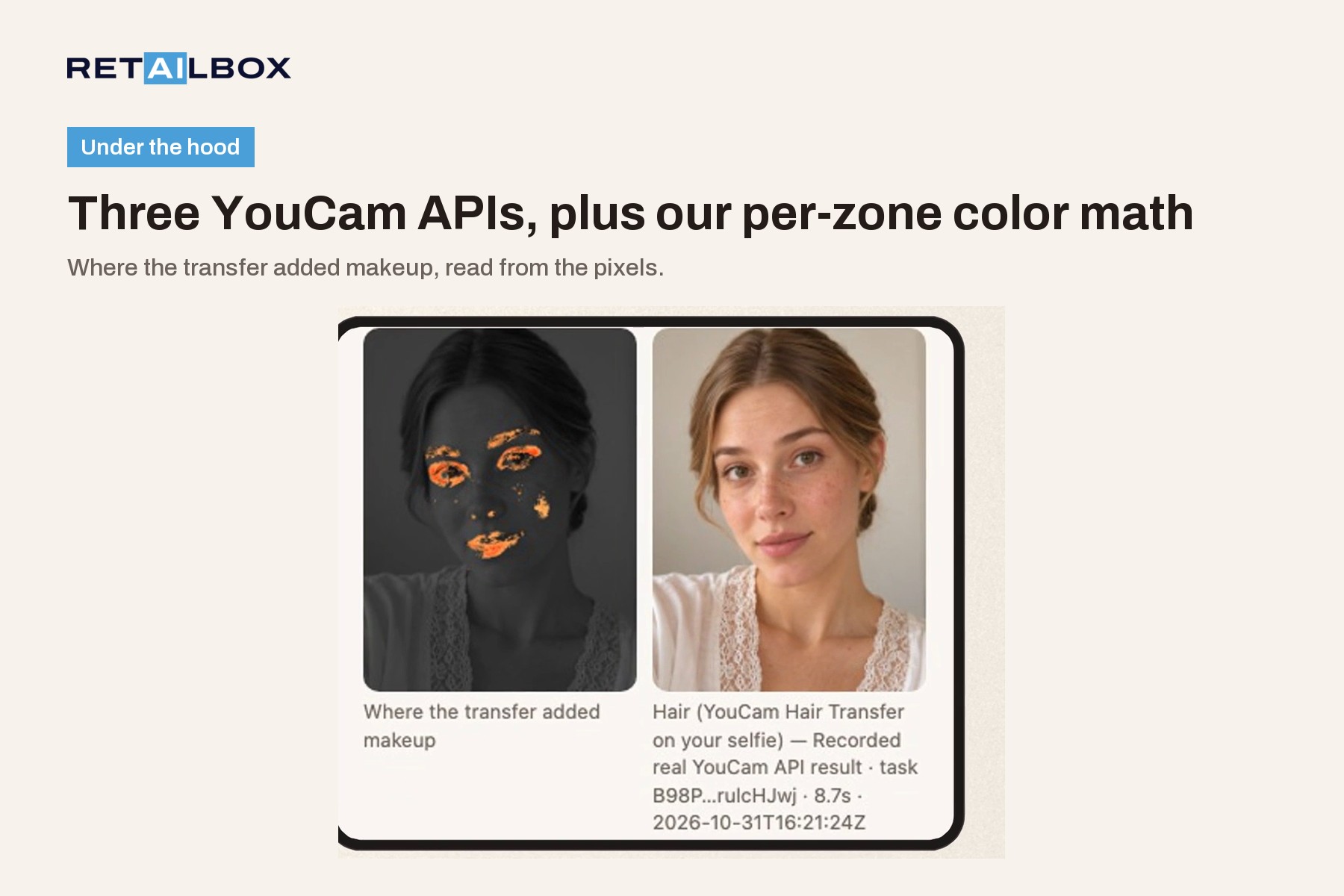
- Our code compares her bare face with that result and reads a zone map: lids, cheeks and lips, each with a color, a strength and how much skin it covers. In Live those colors pick the closest ready-made shades for the same three zones. The public samples are pinned to an approved look, so there the transfer is shown and measured but does not change the shades.
- YouCam AI Makeup VTO draws the look in up to nine zones: lids, liner, lashes, brows, cheeks, bronzer, highlighter, lips and lip liner. The highlighter is optional on lighter skin. It opens on Soft glam, and she can switch to Classic or Evening.
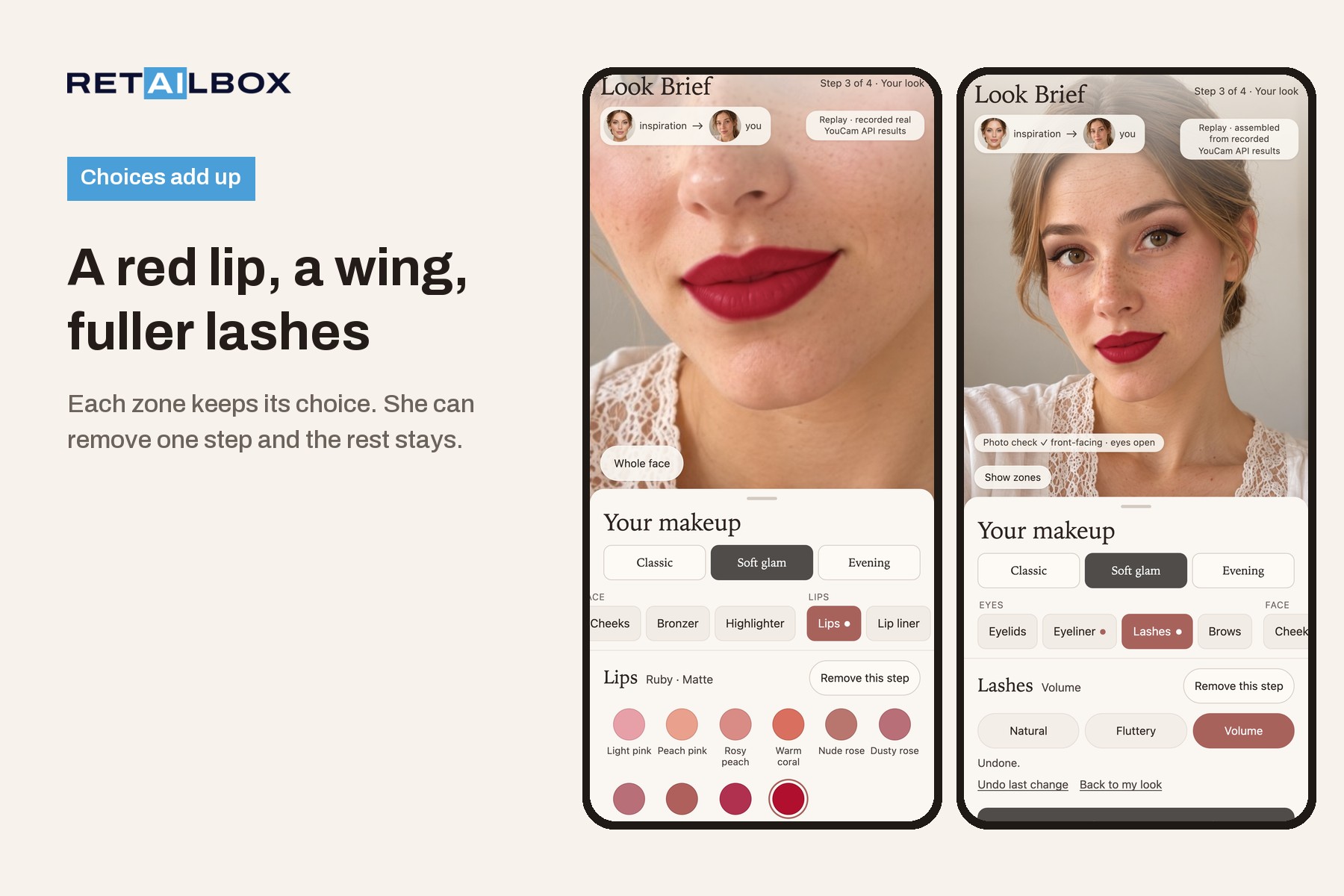
- She changes a zone with shade circles and named styles, and her choices add up: a red lip, then a winged liner on top, then fuller lashes. Each zone keeps its choice. "Remove this step" returns one zone to the look and leaves the others, and Undo goes back one step.
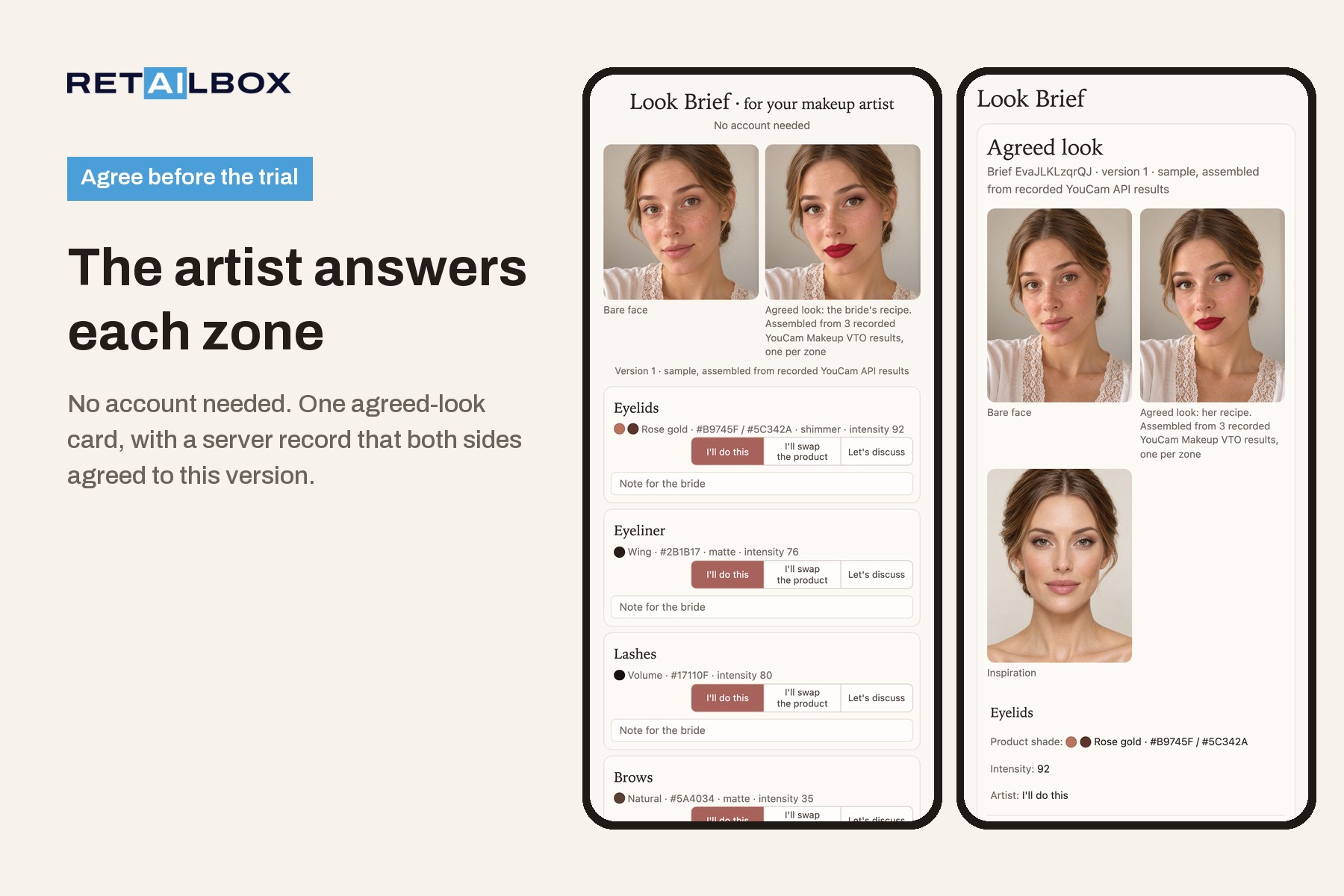
- Her makeup artist opens a link, with no account, and answers each zone: "I'll do this", "I'll swap the product" or "Let's discuss".
- The result is one agreed-look card: her photo, the look, the zone recipe as a list of shades to bring to the trial, and a record that both sides agreed to this exact version.
For retail, the zone recipe is a list of target shades (hex color and intensity per zone) that the artist has answered zone by zone. The bride can match those shades when she buys touch-up products for the day, and the trial is paid for a look both sides have already seen.
How we built it
- Python and FastAPI. Every YouCam call goes file upload, then task, then poll, with retries on 429, 5xx and network errors, a call log of every request (signed URLs redacted, no key) and a per-session ledger of the units each step cost.
- Order of steps in Live mode: Hair Transfer, then Makeup Transfer on her face with the new hair, then one foundation pass in her measured shade that is used only to read the zone map, then the Makeup VTO render of the look. Creating a look costs 6 units. Each zone change is one more Makeup VTO call with the whole recipe, for 1 unit, up to 12 units per session.
- Face zones come from MediaPipe Face Landmarker (Google, Apache-2.0): a 478-point mesh turned into polygons.
- The zone map is a per-pixel color difference in CIE Lab between her face without makeup and the transfer result (a pixel counts as changed above ΔE76 6), with median color, strength and coverage per zone. Shade gaps use CIEDE2000.
- The recipe goes to Makeup VTO with
skin_smooth: 0, so the render does not smooth her whole face, and concealer in her own shade sits under every look. - A button has to change the photo. We measure each recorded button inside its zone and keep it only if the 90th percentile of ΔE2000 reaches 2.5 (3.5 for brows). Softer and Bolder move along a ladder of shades, because the strength setting barely moves the picture: ±8 to 10 changed a zone by only ΔE2000 0.6 to 1.3.
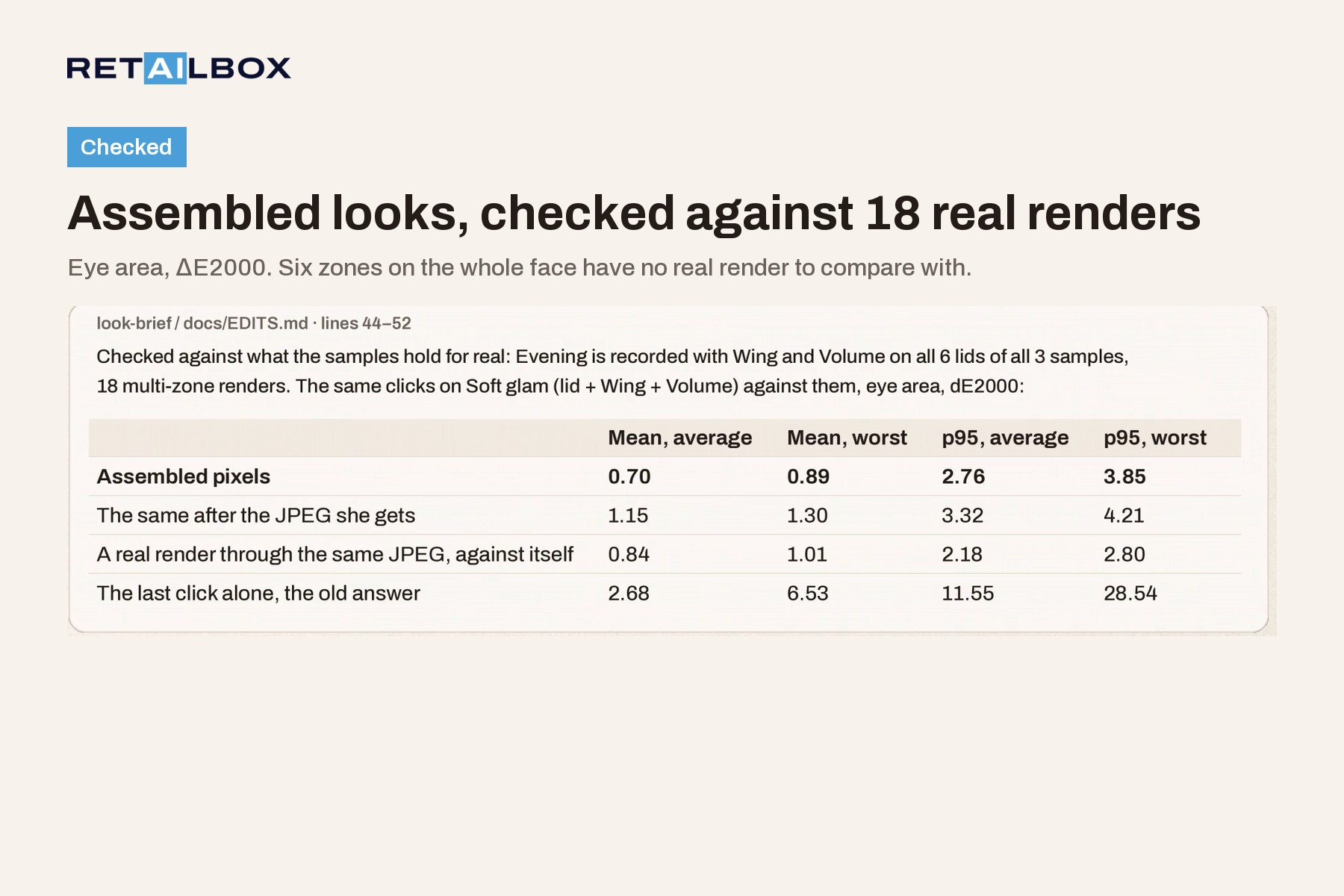
- Choices add up differently in Live and in the public samples. Live makes one real call with the whole recipe. The public samples hold what we recorded, so a recorded change shows that real render, and anything else is assembled on our server from recorded renders, one per zone. The photo, the brief and the card say so: "Assembled from N recorded YouCam Makeup VTO results, one per zone". We checked the assembly against 18 real multi-zone renders: in the eye area the image she gets is ΔE2000 1.15 from the real render on average, while a real render through the same JPEG is 0.84 from itself, and showing only her last click would be 2.68 away. Six zones on the whole face have no real render to compare with.
- The look is built from ready-made shades to suit her skin, so it differs from the transfer. We publish that gap zone by zone: the average is ΔE2000 5.2 (lids 3.55, cheeks 4.63, lips 7.41), and the script recomputes it with no API calls.
- The agreed-look card is signed by the server with Ed25519.
verify_card.pychecks the signature offline with the key embedded in the card and can compare that key with the one the server publishes (the demo makes a new key at every restart). It records that the bride's link and the artist's link both agreed to this exact brief version, and for an assembled look it lists every recorded render used. It is not a personal signature. - Judges get Replay by default: recorded real YouCam API results on labeled samples with fictional, AI-generated faces, marked "Replay · recorded real YouCam API results", with the original task IDs on a single change. On the Devpost forum the organizers said that a public build replaying a recorded real API response, with clearly labeled sample data, public source code and a demo video, is acceptable. Live mode is off on the public demo, which holds no API key. Run the repo with your own YouCam key to use it on your own photos: it has a unit budget, a per-session cap and a consent screen before a face is uploaded. We ran the final code through Live once against the real API, on a local server with an AI-generated demo face: Hair Transfer, Makeup Transfer, the foundation pass and the look render took 34.6 seconds and 6 units, then one lip change took 7.3 seconds and 1 unit, and above our pixel threshold only the lips changed.
- 730 automated tests (pytest).
Challenges we ran into
Makeup Transfer returns a result image with no makeup parameters, so we reverse-engineer the makeup layer by comparing pixels. Makeup VTO is not deterministic for eye shadow and lips: with the same recipe rendered twice, the gap to the transfer moved by up to ΔE2000 2.13 on eyelids and 1.28 on lips, while on blush it moved by 0.04. On a realistic face with freckles and some natural redness, the transfer laid blush on as red patches. Running hair first, then makeup, then one foundation pass cut the patchy area from 23% to about 4% of the cheeks, and we now read the zone map from that evened result.
We rebuilt the look from ready-made shades in nine zones so that it suits her skin. That is why the gap to the transfer on the three public samples is 5.2, on purpose.
The last wall came up on a phone. Nadya picked Chocolate lids, added a Wing, and the lids reset, because the samples held one recorded change at a time. Stacking recorded renders fixed that. Shimmer then gave us one more surprise: sparkles are random from render to render, and a lost sparkle first came out as a dark dot on the lid, so we now ignore a sparkle that only one render has.
Accomplishments that we're proud of
- In the recorded samples a button only stays if it changes the photo, and a click test measures that on the picture, on a phone, a desktop and a WebKit iPhone profile.
- Choices that add up across up to eight zones, with every assembled image labeled and the method checked against 18 real multi-zone renders in the eye area.
- A judge mode that plays real recorded API results without a key, and a live mode that checks a unit budget and the API balance before it starts a look or an edit, and a per-session cap before an edit.
- A signed agreement record whose signature anyone can check offline and match to the server's published key while that key is live.
What we learned
- Failed YouCam tasks cost nothing, and the error codes are specific enough to give each one a plain hint. We mirror the face checks among them (no face, face too small, head turned, eyes closed) in a local photo check that runs before any unit is spent.
- Makeup Transfer keeps the user's own skin tone: the Facial Color Tones Analyzer saw ΔE2000 0.74 between a bare selfie and the same selfie after the transfer. We dropped a "foundation mismatch" warning because we could not measure it honestly.
- Makeup VTO smooths the whole face unless you set
skin_smooth: 0yourself.
What it does not do
It does not judge her skin or pick a foundation product, and it does not replace the trial. The Skin line of the brief is concealer in her own measured shade, and the artist confirms or swaps it. No external brides or artists have used it yet.
What's next
Test it with real makeup artists and brides, and add a printable kit list per zone for the wedding day.
