-
-
Thumbnail
-
Live LCS Prediction!
-
Winrate over time graph (WIP)


Inspiration
Inspiration for this project comes from a number of ideas from different sources put together. The original concept of building a predictive model from LoL game data was taken from the AWS GameDay event at Worlds 2022.
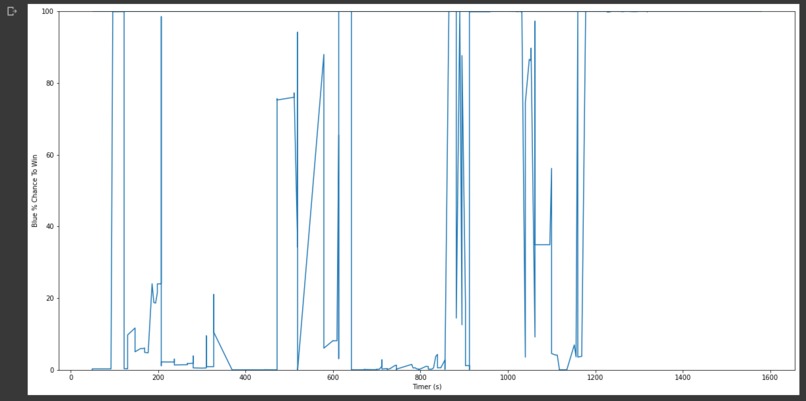
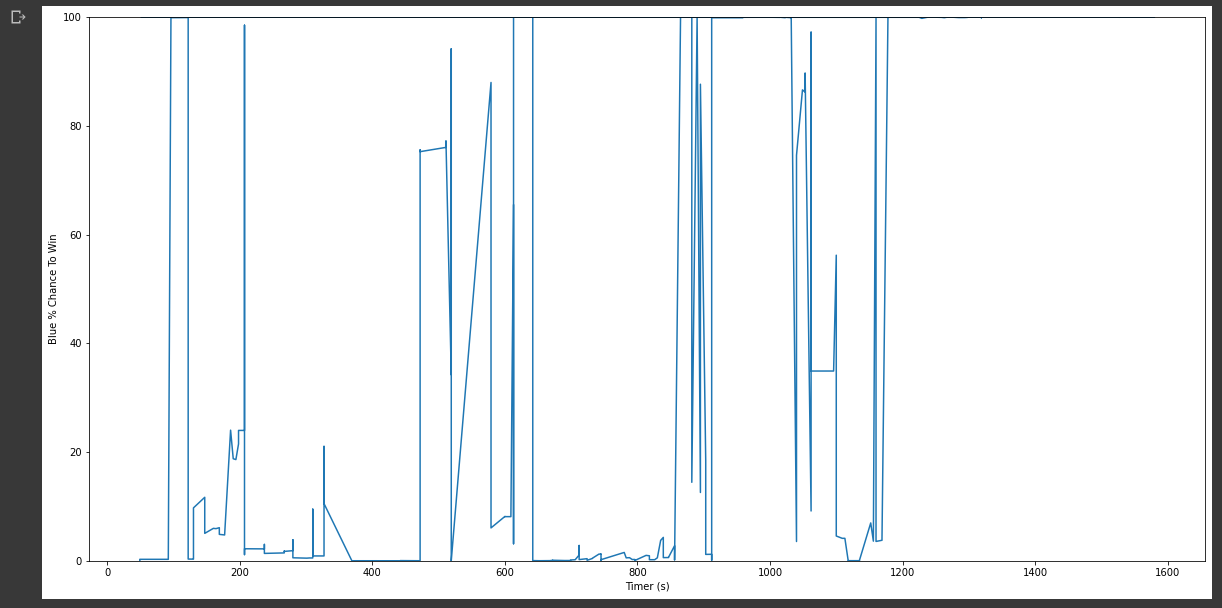
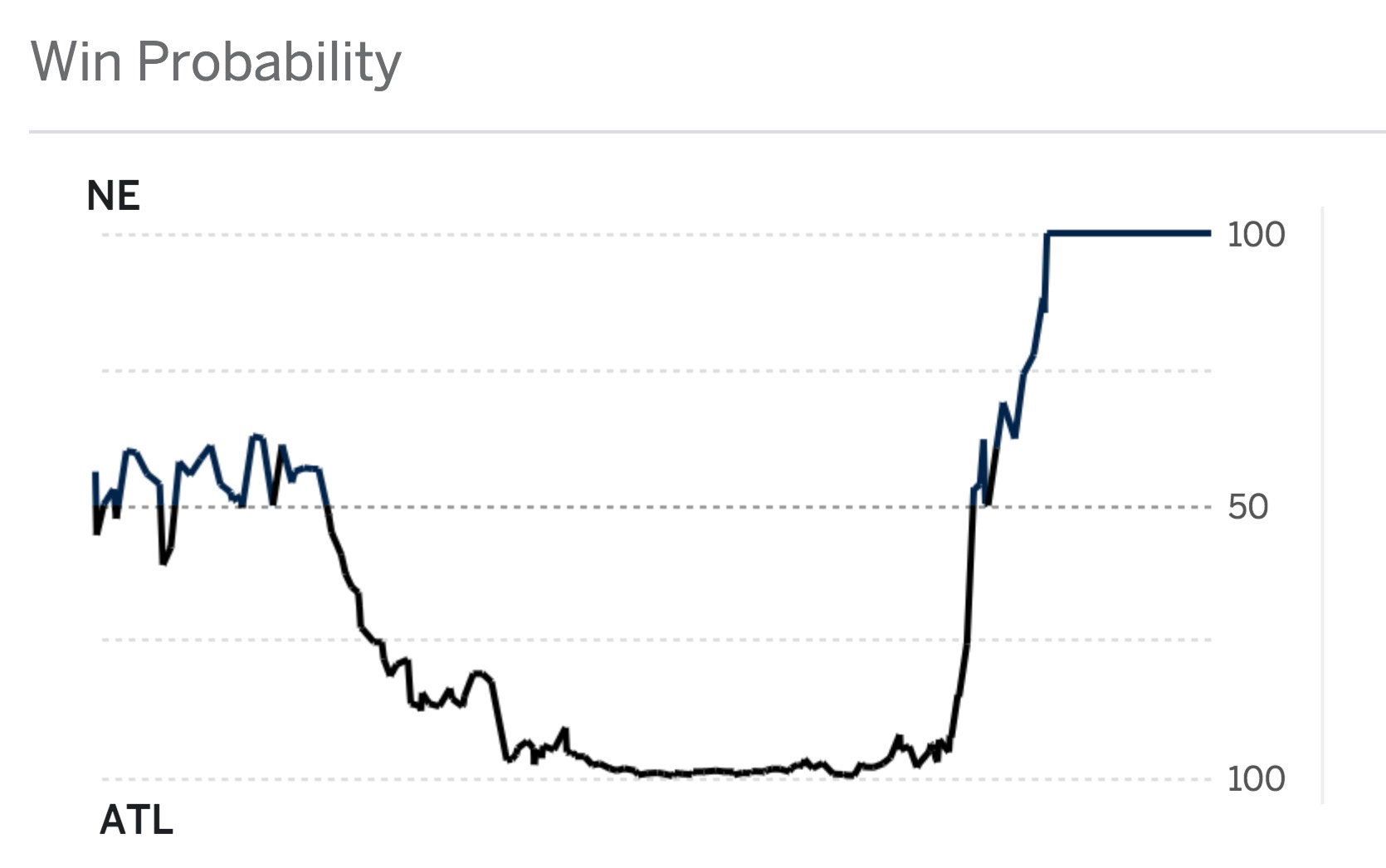
This concept was paired with the idea from tradition sports leagues winning probability sites such as MoneyPuck for NHL games, FiveThirtyEight for NFL games such as the 28-3 game.
Originally, the idea was to use as many of the Riot Match API features as possible in the binary classifier model but was changed when it was discovered Tournament Realm API access was not possible and non-development API access would take a number of days. This pivoted the project into an optical character recognition (OCR) project using Tesseract to "watch" the LCS games and give a live outcome prediction, which is where we are now.
What it does
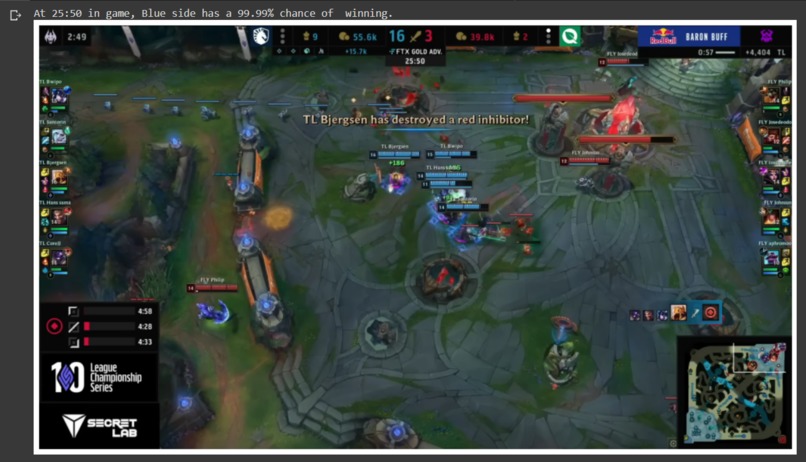
The LoLWatcher project aims to provide an as close to live as possible of the accurate winning probability for the team during live, professional games of League of Legends. This is done by using OCR to detect text on the image packages of the LCS broadcast. Due to some values such as individual player gold, vision score and champion being inconsistently shown, they are not included in the prediction. Instead, only individual player kills, deaths, assists, and minion kills are included as well as team metrics for objectives such as towers, dragons, and barons taken as a team.
How I built it
The process for building the model started with putting together a list of high level player usernames to be put together to create a list of puuids or Player Universally Unique Identifiers that can uniquely track player accounts within Riot Games' system. Due to the proximity of the global Free Agency Period, it is possible players will change names to remove old teams or add new teams to their in game usernames (IGN). Therefore, once 120 LPL and LCK pro's IGNs from the Korean server was established, this was soon converted to a list of puuids using Riot's Summoner v4 API.
The next step was to use the list of puuids to generate a list of unique match IDs. This was done by taking each puuid's last 100 games and eliminating any duplicate entries due to having multiple pro puuids in the same game. The list was then filtered for games over the 15 minute early surrender by only including games 16 minutes or over and also filtered for games that are in the Solo Ranked queue. This gives us a list of match IDs that can be used to scrape the Riot Match v5 API for match details.
After scraping the match ID list to get the relevant categories for player and team metrics, a model was created using a pipeline with sci-kit learn and Keras to create a quick model with over 6000 parameters to predict the positive and negative class. It was decided to make the blue team win case the positive class. The match data was split into a 70/30 train-test split. Hyperparameter tuning was done using GridSearchCV with 5-fold cross-validation.
The results of model evaluation can be found below.
| Predicted Negative | Predicted Positive | |
|---|---|---|
| Actual Negative | 1056 TN | 21 FP |
| Actual Positive | 12 FN | 976 TP |
- Precision: 0.9789
- Recall: 0.9879
- F1 Score: 0.9833
- Accuracy: 0.98
- Test Samples: 2065
Once the model was complete, the next task was to build the usecase for the model. It was decided to use the model to predict the outcomes of LCS games.
The first step of this process was to find the pixel locations of the text of the LCS graphics package for locations of team kills, towers and timer at the top and player k/d/a and cs at the bottom and any objective text such as barons, dragons, first towers, etc in the center of the screen.
These sets of locations are then fed to Tesseract to perform OCR and extract the text from the loaded openCV image. Once it was confirmed that that the relevant data could be extracted, a screenshot and tracking application was built around the OCR application so that it would take screenshots of the relevant monitor, ensure the screenshot is the proper resolution and extract the relevant text. Once the text was extracted and processed, it would be fed as an input to the trained model to provide an outcome.
Challenges I ran into
Some challenges encountered during the development process included lack of data sources. Although the match dataset only contains ~6800 matches, this data took over 9 hours to extract. It was difficult from the beginning to the end of the data scraping process to find relevant sources of data. A large number of the pro accounts had not played games recently and were MMR decayed ending up with lower ranks and therefore lower match quality and had to be excluded. Another subset of the pro players were not playing in the ranked solo queue and therefore a large number of their matches had to be excluded. Finally, as there are 2 major regions (China's LPL and Korea's LCK) that play on the Korean server, the number of players should be far larger than 120. However, many of the LPL players played on Chinese servers and therefore their data was unavailable.
Another challenge encountered during the process was API access. It would have taken several days to get proper Riot API access to build a full model with more features, which would not have been possible during the Hackathon time limits.
The final major challenge was assembling the final OCR application, as config settings had to be adjusted several times to prevent Tesseract from reporting text where there was no actual text. This can be tricky as the moving video feed from the live stream can be uncooperative and provide false data, such as when hovering over the video causes captions to show up interfering with the OCR process.
What I learned
This was a great learning experience for building quick models for binary classifiers on tabular data with Keras, as well as using Tesseract for OCR.
What's next for LoLWatcher
Areas where the project could be improved include finetuning OCR settings to get more accurate text results to reduce the amount of text parse errors.
Another area that could be improved is the manual work necessary. Automating the champ select using a CNN or a SNN for one-shot learning could be considered an improvement.
The final area that could use work is increasing dataset size, in both number of games and additional features. Number of games could be increased naturally by using more recent games, or by adding more puuids and adding other region's pro games. Additional features could be added by cleaning up OCR for features like rift heralds, inhibs, whether a team claimed the first objective, vision score, champ levels, and more. This would allow the model to be more robust and increase accuracy.
How to run LoLWatcher
LoLWatcher is offered in two versions:
- Colab: Fully online, free-to-use execution through Google Research. (Can be edited by making a copy)
- Local: Clone the Github repository and perform the setup steps to edit and run on your own machine. Execution speed may depend on local hardware.
Colab
If you are using the Colab notebook, simply open the link and connect to a runtime in the top right. You can then run cell by cell using the "play" button at the top left of each cell, or go to the "Runtime" tab and use the "Run all" options. The first two cells make take some time to run due to downloading a large number of assets, and may require a runtime restart. You can follow the execution at the bottom of the screen and check when the current cell has finished running.
The Colab notebook uses pre-recorded screenshots to simulate watching a live game on a monitor. The screenshots are taken from the 2022 Summer LCS Playoff Upper Bracket Quarterfinals between Team Liquid and FlyQuest in game 2 of the best-of-five series. They are taken at 4 second intervals which is roughly how long each screenshot and processing loop of the local notebook would take.
Because the screenshots are from a past broadcast, two versions of the main loop through the screenshots are offered. The first version manually steps through each iteration of the loop. As maintaining a consistent delay behind a live broadcast is not an issue with this version, a display of the screenshot can be shown below the prediction. You can use this to see exactly what the program is reading and how it is parsing the text on-screen.
The second way to run the main loop is a loop that will iterate through all of the screenshots as if running the notebook locally. This can be found under the Automatic Output section.
Locally
It is recommended to create a new python virtual environment and install the project dependencies with pip.
Create a new env:
virtualenv env
Activate the virtual environment:
.../env/bin/Scripts/activate
or
...\env\bin\Scripts\activate
Install dependencies with pip:
pip install -r requirements.txt
Finally, this notebook depends on Tesseract.
Installation instructions can be found here.
This local version of the notebook should be used with a rebroadcast or live game. Follow the steps in the notebook to configure the notebook, including path to Tesseract, monitor the game is being displayed on and setting the champs in the game. Unlike the Colab notebook, there is only one way to run this notebook and therefore any "Run all" option can be used.
Built With
- amazon-web-services
- colab
- jupyter
- keras
- matplotlib
- mss
- opencv
- pandas
- python
- riot-games
- s3
- scikit-learn
- tensorflow
- tesseract


Log in or sign up for Devpost to join the conversation.