-
-
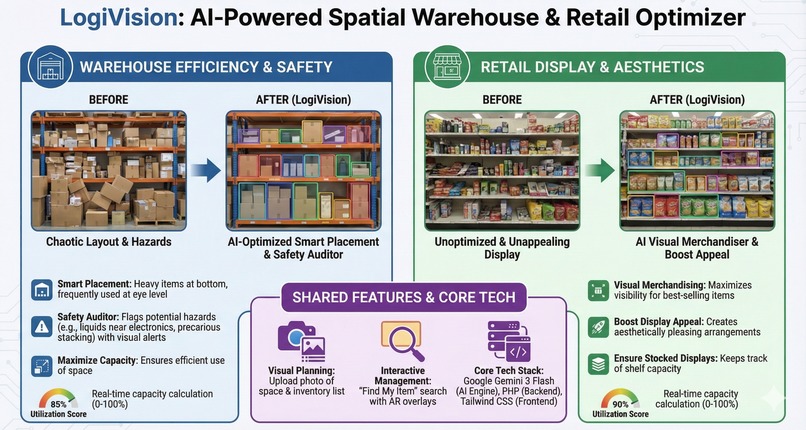
infographics
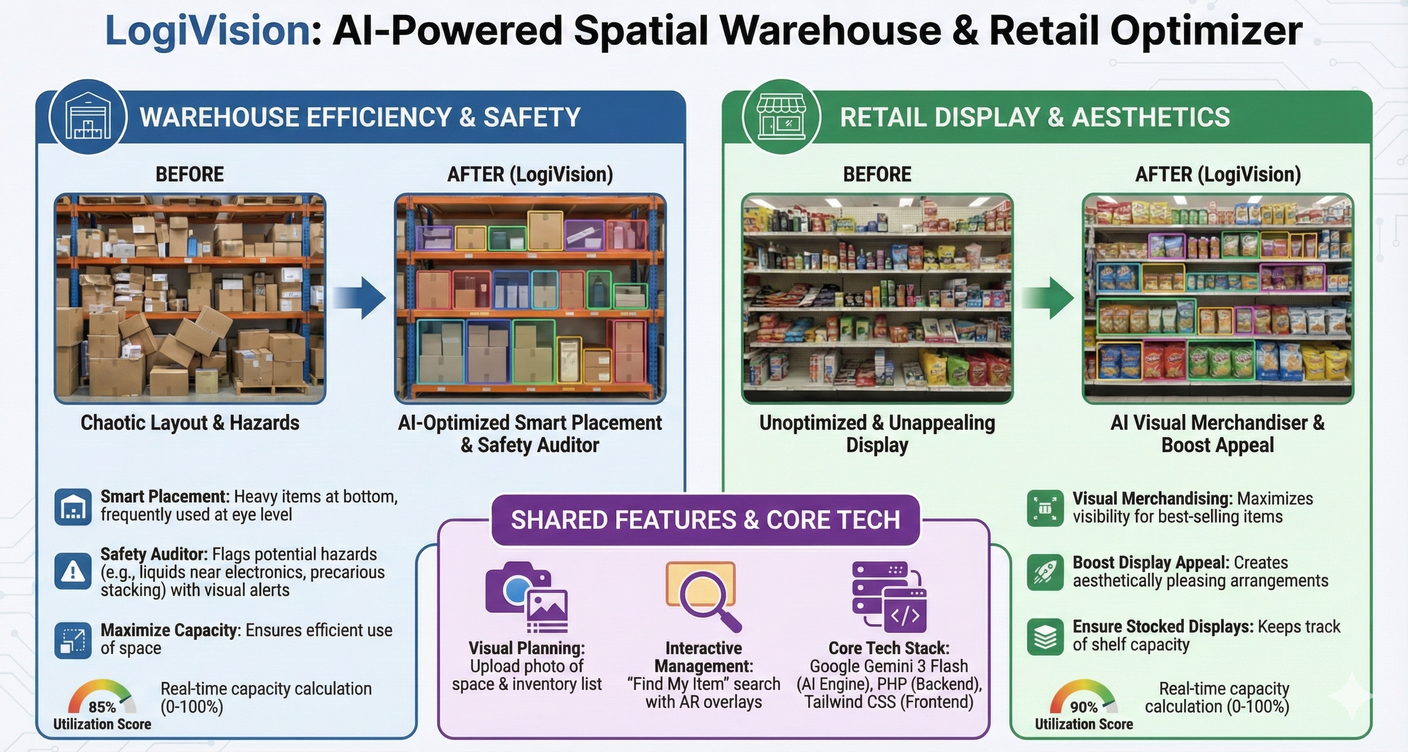
Inspiration
Small and Medium Enterprises (SMEs) often struggle with warehouse management. Without professional logistics managers, their storage spaces become chaotic, inefficient, and even dangerous. We noticed that many business owners rely on "gut feeling" to store items, leading to damaged goods (heavy items crushing light ones) and safety hazards (blocking exits or improper chemical storage).
We asked ourselves: "What if we could give every small business owner a professional AI Warehouse Manager that can 'see' their space and fix it instantly?" That was the spark for LogiVision.
What it does
LogiVision is an AI-powered spatial optimization tool that transforms a static photo of a storage space into an interactive, optimized logistics plan.
- Visual Planning: Users upload a photo of an empty shelf/room and a text list of inventory.
- Smart Placement: LogiVision analyzes the space and assigns items to specific locations using Visual Bounding Boxes. It enforces logic: heavy items at the bottom, fragile items in secure zones, and frequently used items at eye level.
- Safety Auditor: The AI automatically detects and flags potential hazards, such as liquids placed near electronics or precarious stacking, displaying visual warning alerts.
- Space Utilization: It calculates a real-time "Utilization Score" (0-100%) to tell the user how much capacity is left on the shelf.
- Interactive Management: Users can search for items ("Find My Item") which highlights the specific box on the image, and even generate printable QR labels for physical tagging.
How we built it
We built LogiVision as a modern web application using Laravel 10 for the robust backend and Tailwind CSS for a clean, responsive "SaaS-style" dashboard.
The core intelligence is powered by the Google Gemini 3 Flash Preview API.
- Prompt Engineering: We crafted a complex system instruction that forces Gemini to act as a spatial logic expert.
- Coordinate Mapping: The biggest technical breakthrough was getting Gemini to output normalized coordinates (0-1000 scale) for every item placement. We wrote a mathematical logic layer in Laravel/Blade that maps these AI coordinates into responsive CSS percentages (top, left, width, height).
- Visualization: We used these calculated values to draw interactive, color-coded overlays directly on top of the user's raw image, creating an Augmented Reality (AR) experience right in the browser.
Challenges we ran into
- Spatial Hallucination: Initially, the AI would suggest placing items in non-existent spaces (like floating in mid-air). We solved this by refining the prompt to strictly analyze the "empty voids" visible in the image first.
- Strict JSON Enforcement: Getting the AI to consistently output valid JSON with the exact [ymin, xmin, ymax, xmax] format was tricky. We utilized Gemini's structured output capabilities and robust error handling in PHP to ensure the frontend never breaks.
- Visual Overlap: When many small items were placed together, the bounding boxes would overlap. We solved this by adding Z-index interactions and "Find My Item" filtering to make the UI usable even with dense inventory.
Accomplishments that we're proud of
- The "Magic" Moment: Seeing the code successfully translate abstract AI numbers into perfectly placed visual boxes on a real photo for the first time was incredible.
- Safety Features: We are proud that our tool doesn't just "organize" but actively protects users by flagging safety hazards (Safety Auditor feature).
- The UI/UX: We managed to build a professional-looking dashboard with a "Find My Item" search feature and Utilization Progress Bars that feels like a polished commercial product, not just a hackathon prototype.
What we learned
- Multimodal is Powerful: We learned that Gemini 3 isn't just a text model; its ability to reason spatially about a 2D image is game-changing for logistics.
- Structured Creativity: We learned how to constrain a Generative AI model to output strict data structures (JSON/Coordinates) without losing its creative reasoning ability (knowing why a heavy item goes to the bottom).
- Full Stack Integration: We deepened our understanding of integrating AI APIs deeply into a Laravel workflow, moving beyond simple chatbots to functional visual applications.
What's next for LogiVision: AI-Powered Spatial Warehouse Optimizer
- Real-Time AR: Moving from static photo uploads to a live camera stream where users can see placement suggestions overlayed in real-time on their phone screen.
- 3D Volumetric Analysis: Upgrading the logic to understand depth (Z-axis) more accurately for deep shelving units.
- ERP Integration: Connecting LogiVision to existing inventory software so stock levels update automatically when items are visually "placed" on the shelf.
Global Impact
LogiVision is not just a tool for tidying up shelves; it represents a significant leap in how Artificial Intelligence can be applied to real-world, physical problems for the underserved market.
1. Democratizing Logistics Expertise
Historically, efficient warehouse management systems (WMS) and professional spatial planning were luxuries reserved for large enterprises with massive budgets. LogiVision democratizes this high-level expertise, giving millions of Micro, Small, and Medium Enterprises (MSMEs) globally access to a "Digital Logistics Manager." This levels the playing field, allowing small shop owners to compete with larger retailers by maximizing their limited storage space.
2. Elevating Workplace Safety Standards
Improper storage is a leading cause of workplace injuries in the logistics sector—from falling heavy objects to blocked emergency exits. By integrating an AI Safety Auditor, LogiVision proactively identifies and warns users of these invisible hazards before accidents happen. On a global scale, widespread adoption could significantly reduce occupational hazards in informal and semi-formal storage sectors.
3. Reducing Waste & Economic Loss
Inefficient storage often leads to "lost" inventory, where items are buried, forgotten, and eventually expire (especially in food and retail). By providing clear, visual, and accessible organization, LogiVision helps enforce inventory visibility. This directly contributes to reducing global material waste and economic loss due to damage or expiration.
4. Bridging the Digital Divide
LogiVision proves that powerful AI doesn't need complicated hardware or sensors. By using a standard smartphone camera and a simple photo, it bridges the digital divide, bringing advanced Computer Vision capabilities to users in developing regions who may not have access to expensive IoT infrastructure but have a mobile phone.
Architectural Diagram Overview
The diagram illustrates the high-level architecture of LogiVision, designed as a streamlined Monolithic application using PHP (Laravel) that interacts with Google's Cloud AI services. The workflow is divided into three main layers: the Client (Frontend), the Server (Backend), and External Services (AI).
1. Client / Frontend (User's Browser)
This layer represents the user interface where the interaction begins.
- User Actor: The warehouse manager or store owner who initiates the process by uploading a photo of their storage space and providing a text-based inventory list.
- Tech Stack: Built using Blade Templates for structure, Tailwind CSS for the modern UI, and Vanilla JavaScript for interactive elements.
- Action: When the user clicks "Analyze," the browser bundles the image (converted to Base64) and the text data into a secure POST Request sent to the backend.
2. Server / Backend (PHP/Laravel Monolith)
This is the "brain" of the application that orchestrates data flow and business logic.
- Laravel Controller: The core component that handles:
- Validation: Ensuring the uploaded file is a valid image and the inventory list is readable.
- Prompt Engineering: Constructing the complex system instruction that tells the AI exactly how to behave (e.g., "Heavy items go to the bottom").
- Coordinate Mapping: After receiving the AI's response, the controller mathematically maps the normalized AI coordinates (0-1000 scale) into CSS percentages (%) for responsive rendering on the frontend.
- Storage:
- Local Storage: Temporarily holds the uploaded images for processing.
- SQLite Database: Stores logs, session data, or historical analysis results.
3. External Services (Google Cloud AI)
The intelligence layer that performs the complex reasoning.
- Gemini 3 Flash API: The backend sends the constructed prompt and image to this API.
- Capabilities:
- Multimodal Spatial Reasoning: It "sees" the depth and layout of the room.
- Safety Audit: It identifies hazards (like liquids near electronics).
- Strict JSON Output: It returns structured data containing the bounding box coordinates (
[ymin, xmin, ymax, xmax]), reasoning, and safety alerts.
Data Flow Summary
- Request: Client sends Image + Inventory to Laravel.
- Processing: Laravel prepares the payload and sends a request to Gemini 3 Flash.
- Analysis: Gemini analyzes the visual data and returns a JSON response.
- Rendering: Laravel processes the JSON, calculates the overlay positions, and returns the final View to the client, displaying the Augmented Reality (AR) style boxes over the original image.

Log in or sign up for Devpost to join the conversation.