Inspiration
Honestly the inspiration to build this project comes from a personal itch and from the memes on social media, every time i open that chrome to research on something be it projects, travel or school research, i often find myself with multiple open tabs that i really need.
But when it's time to pivot, whether to plan a trip, review workouts, or research a new project, closing those hard-earned browser tabs feels risky because you lose your exact deep-link state. Closing them manually is tedious; keeping them open drains your RAM.
What it does
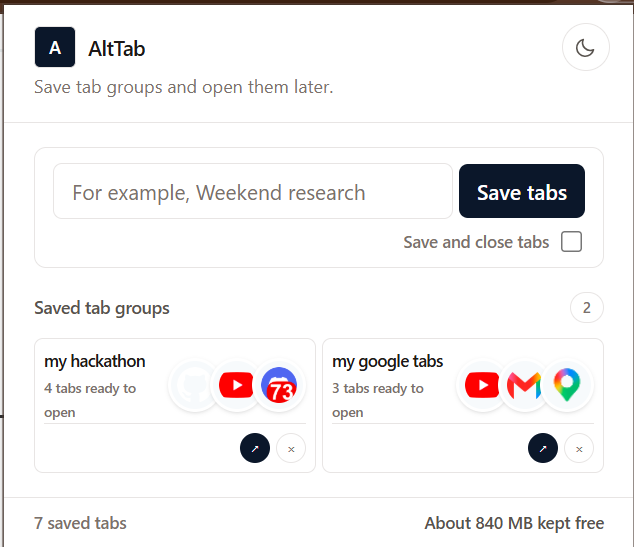
AltTab is a lightning-fast, privacy-first Chrome Extension that acts as an instant browser workspace manager. With just one click it saves all your active tabs in your browser window including URLs, titles, and site favicons, hybernating your system RAM and keeps your system running fast.
You can then re-launch your entire saved workspace in a clean, dedicated browser window with a single click allowing you to continue from where you left off.
It calculates estimated system memory (RAM) hibernated by archiving inactive tabs, keeping your workstation running fast.
How i built it
AltTab was built using a pure, high-performance web platform stack that leverages Chrome's Manifest V3 platform and standard Chrome Extension APIs:
- chrome.tabs to query, serialize, and read active tab states.
- chrome.windows to programmatically instantiate clean workspace environments.
- chrome.storage.local to securely persist user workspace profiles on disk.
I used Codex vs code extension and GPT 5.6 Terra to develop on this project. By defining a strict developer contract (AGENTS.md) and using Codex to vibe code types, custom React hooks (useWorkspaceManager), and UI components.
Challenges i ran into
I had never developed a chrome extension before so interacting with extension APIs like chrome.tabs.query and chrome.storage.local was a challenge. It required careful state synchronization within React's component lifecycle to avoid race conditions or unmounted state updates. Codex was able to set it up for me.
Accomplishments that i'm proud of
I built my first ever extension that instantly solves my problem.
What i learned
Deepened my understanding of Chrome Extension Manifest V3 APIs (chrome.tabs, chrome.windows, chrome.storage). I also got a chance to explore AI assisted development.
What's next for AltTab
Firstly i wan't to list it on the web store to make sure its available to everyone. Then may be add encrypted sync across devices via user-owned storage drivers.
Built With
- codex
- tailwindcss
- typescript
- vscode

Log in or sign up for Devpost to join the conversation.