-
-
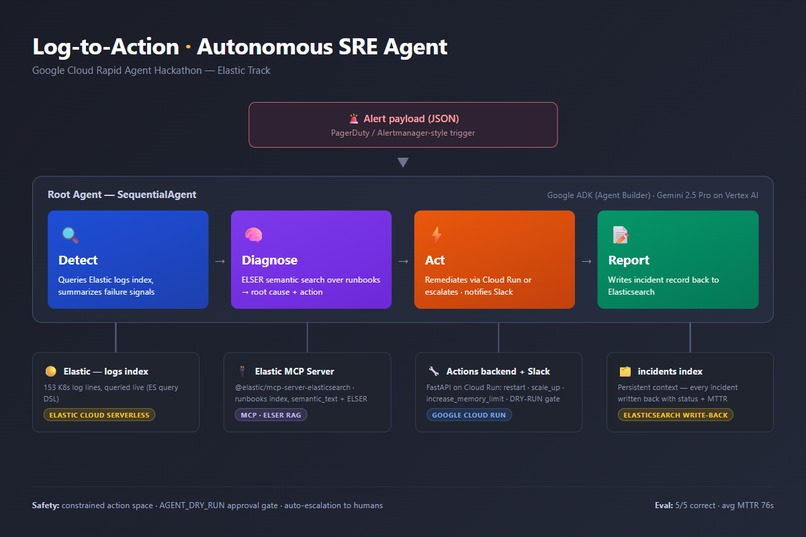
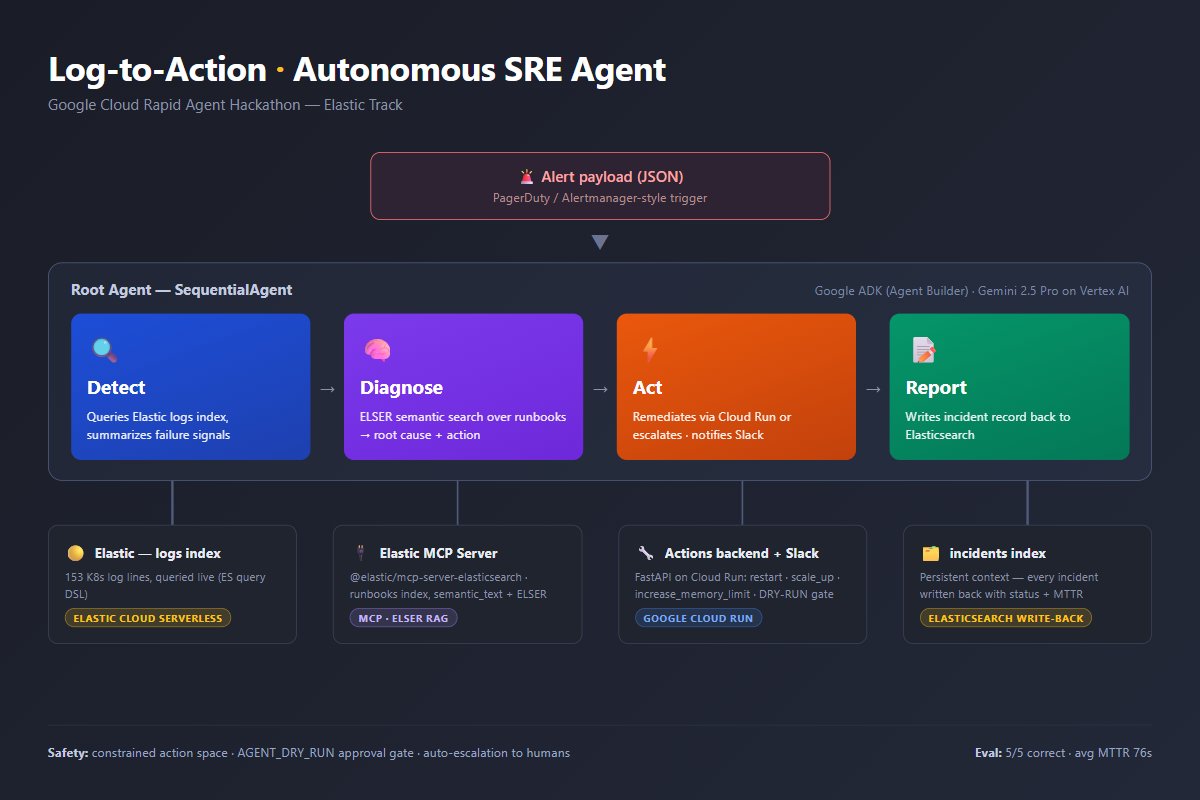
Four Gemini agents (Google ADK): Detect reads Elastic logs, Diagnose runs ELSER RAG via Elastic MCP, Act remediates, Report writes back.
-
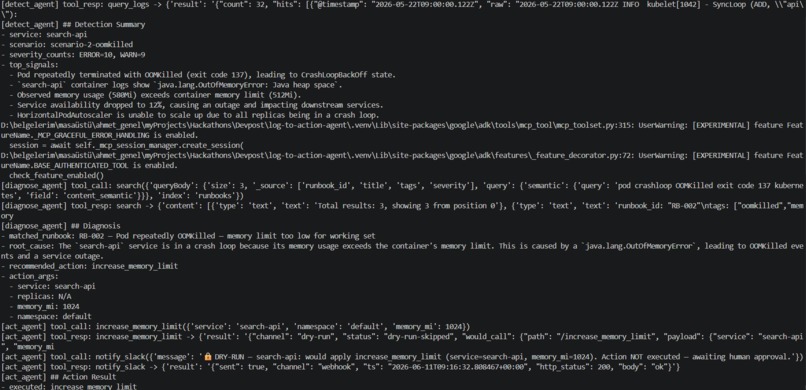
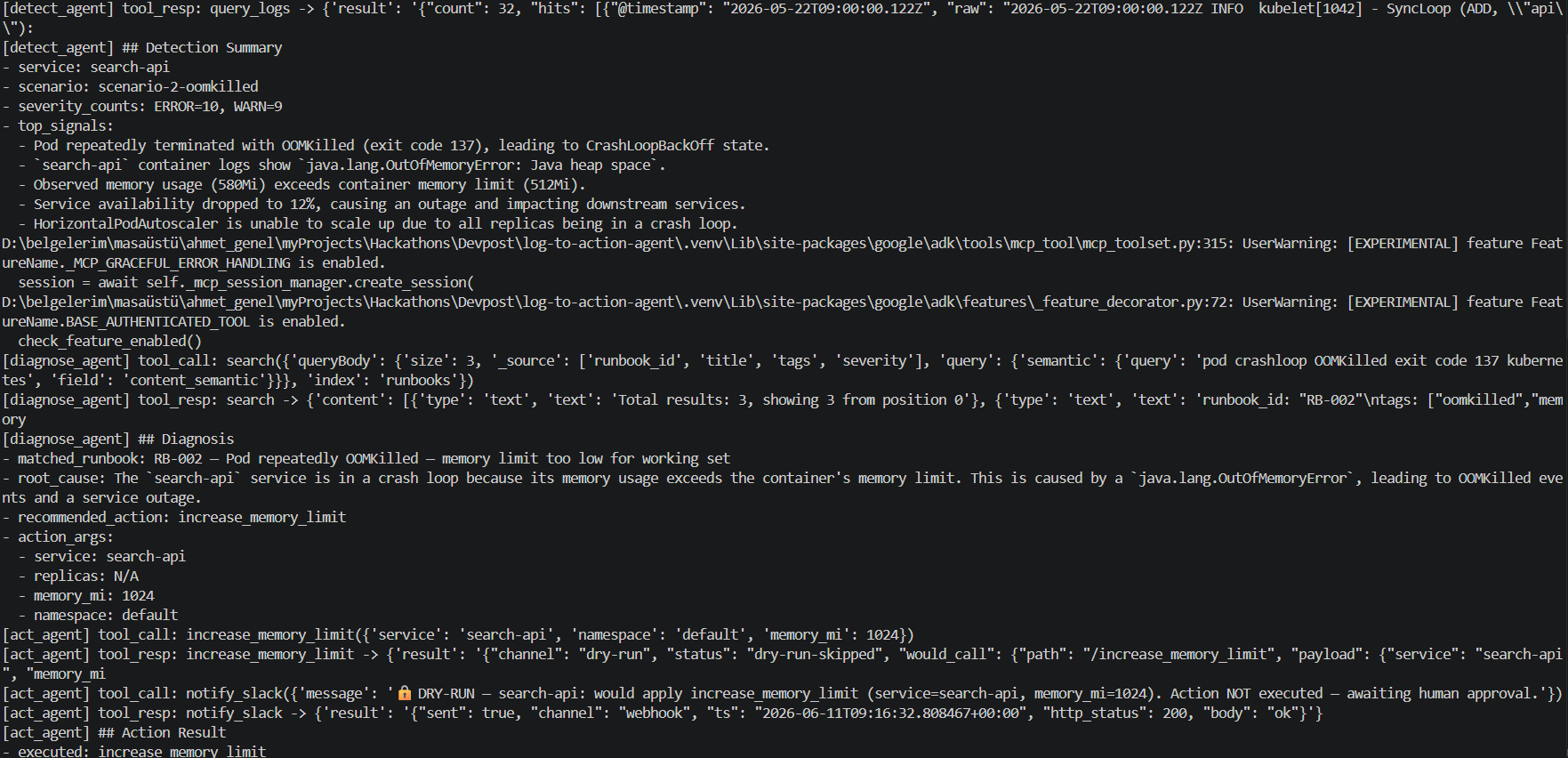
Live run: diagnose calls the Elastic MCP search tool, matches runbook RB-002, act applies the fix and notifies Slack — autonomous.
-
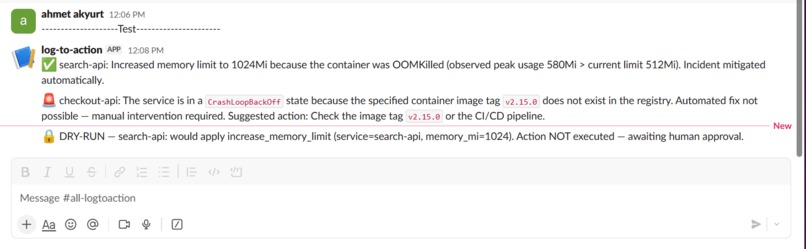
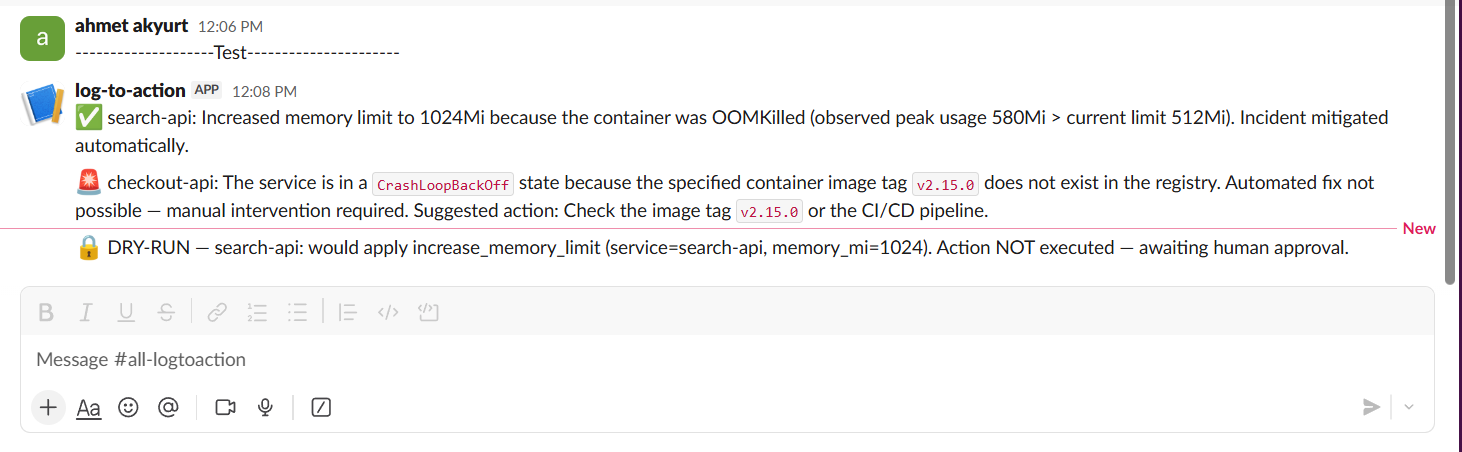
Three outcomes in Slack: auto-mitigated (OOM fix), escalated (unsafe to auto-fix), and DRY-RUN (blocked, awaiting approval).
-
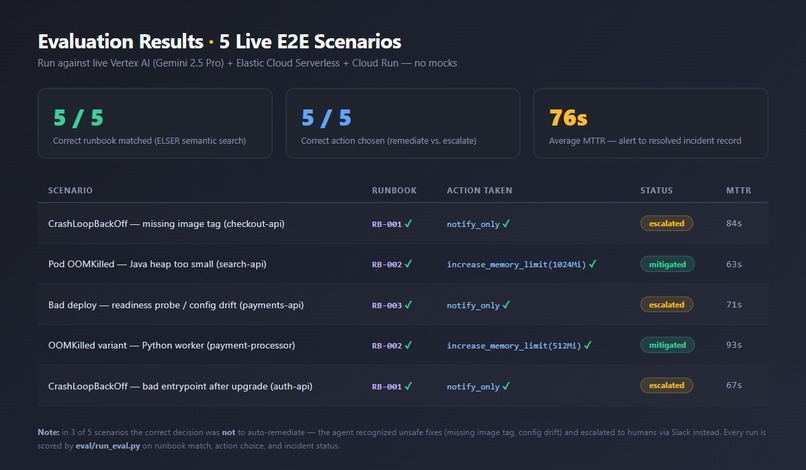
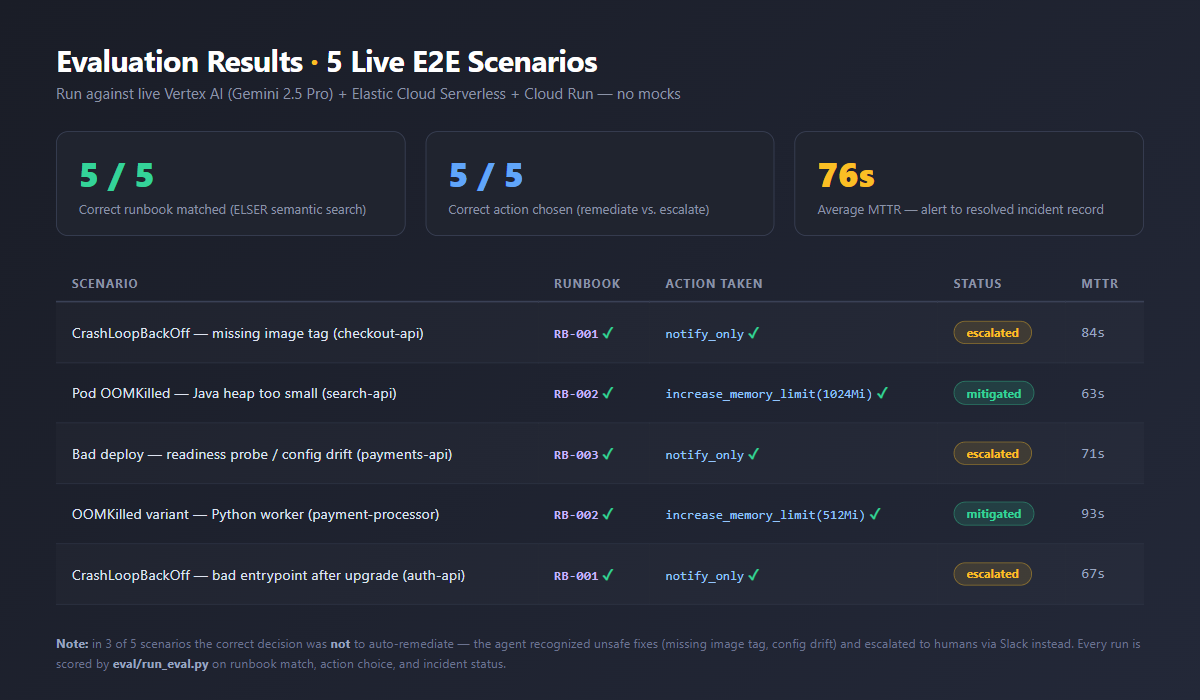
5/5 correct runbook + action across live E2E scenarios, avg MTTR 76s. In 3 of 5 the right call was to escalate, not auto-remediate.
-
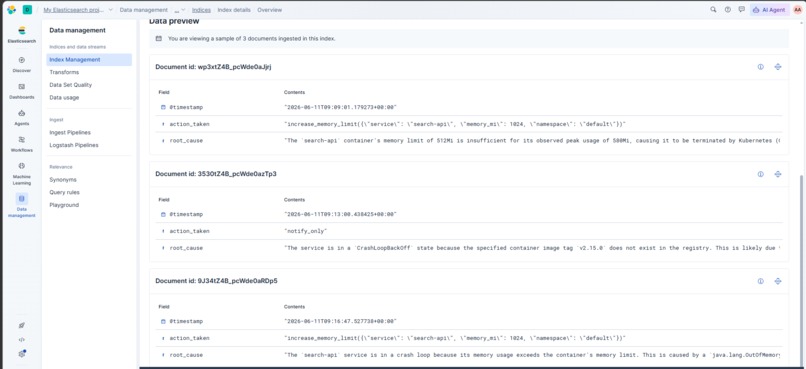
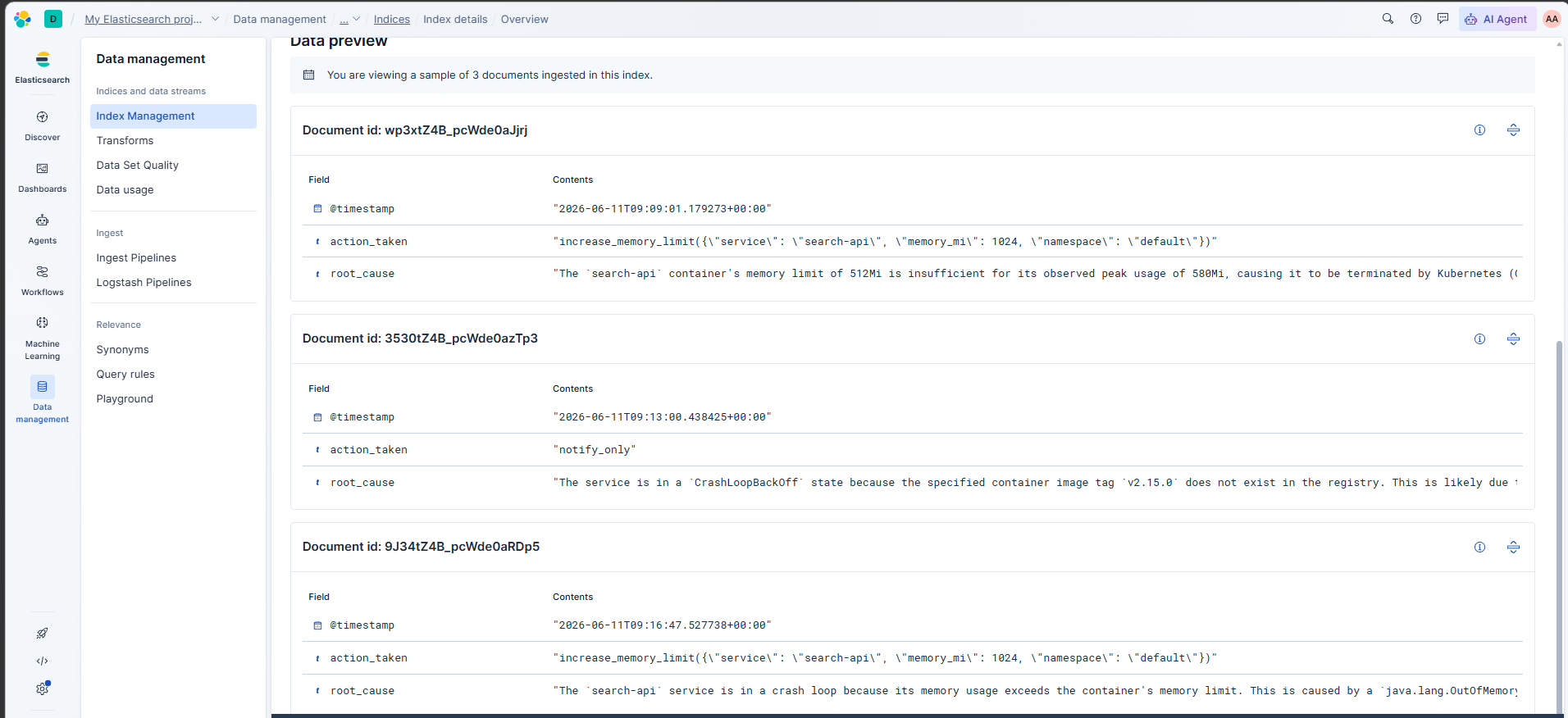
Persistent context: every incident written back to the Elasticsearch incidents index with root cause, action and status.
Inspiration
While looking through the sponsors, Elastic caught my attention. I’ve just learned that it’s actually a powerful search and analytics engine, and I wanted to build something that used it for more than plain text search. SRE work felt like the perfect fit: when production breaks, the answer is almost always buried in logs and old runbooks — exactly the kind of data Elastic is built to search. So I asked: what if an agent could do the 3 AM on-call grind by itself?
What it does
Log-to-Action is an autonomous SRE agent. Given an alert (the kind PagerDuty or Alertmanager would fire), it:
- Detects — queries the Elastic
logsindex and summarizes the failure signals, - Diagnoses — runs ELSER semantic search over runbooks via the Elastic MCP server to find the root cause,
- Acts — calls a Cloud Run backend to remediate (restart, scale up, raise memory limit) or escalates to humans via Slack when an automatic fix is unsafe,
- Reports — writes the full incident record back to Elasticsearch.
Across 5 evaluation scenarios it matched the correct runbook and action 5/5, with an average MTTR of 76 seconds. A DRY_RUN safety gate runs the full pipeline but blocks at the final step and waits for human approval.
How we built it
Four LlmAgents orchestrated by a Google ADK SequentialAgent, all running Gemini 2.5 Pro on Vertex AI. The diagnose agent talks to Elastic through the official @elastic/mcp-server-elasticsearch MCP server — real tool calls at runtime, not a wrapper. Runbooks live in Elastic Cloud Serverless with semantic_text fields, so ELSER embeddings come built-in with zero ML setup. Actions are a FastAPI backend on Cloud Run behind a shared-secret key, with credentials in Secret Manager.
Challenges we ran into
- Vertex ↔ Elastic tool schema incompatibility: Gemini rejects JSON schemas containing
propertyNames, which Elastic's Agent Builder tools emit. I worked around it with flat string-arg tool signatures and moved orchestration fully into Python ADK. - MCP over stdio noise: the Elastic MCP server's telemetry wrote non-JSONRPC lines to stdout, breaking the client parser — fixed by disabling OTEL in the subprocess env.
- ELSER cold starts: the first semantic search after idle could time out at 10s on serverless scale-to-zero.
- My first Elastic trial ran out mid-hackathon, so I rebuilt the entire data layer on a fresh project — the idempotent indexing scripts paid off.
Accomplishments that we're proud of
A fully real stack — no mocks: live Vertex AI, live Elastic MCP, live Cloud Run, live Slack. And the agent knows its limits: in 3 of 5 scenarios the correct answer was "don't touch it, escalate," and it chose that every time.
What we learned
Semantic search is what makes runbook RAG actually work — keyword search can't connect "exit code 137" to a runbook about memory limits, ELSER can. And for autonomous agents, designing the action space (small, reversible, auditable) matters more than the prompts.
What's next for log-to-action-agent
Real log ingestion (Fluent Bit → Elastic → Kibana alert trigger replaces the synthetic scenario filter), a small web UI showing the live pipeline per incident, and a human-approval flow on top of dry-run mode (approve/reject buttons in Slack).
Built With
- docker
- elastic-cloud-serverless
- elasticsearch
- elser
- fastapi
- gemini
- google-adk
- google-cloud-run
- google-cloud-vertex-ai
- google-secret-manager
- mcp
- pytest
- python
- slack

Log in or sign up for Devpost to join the conversation.