-
-
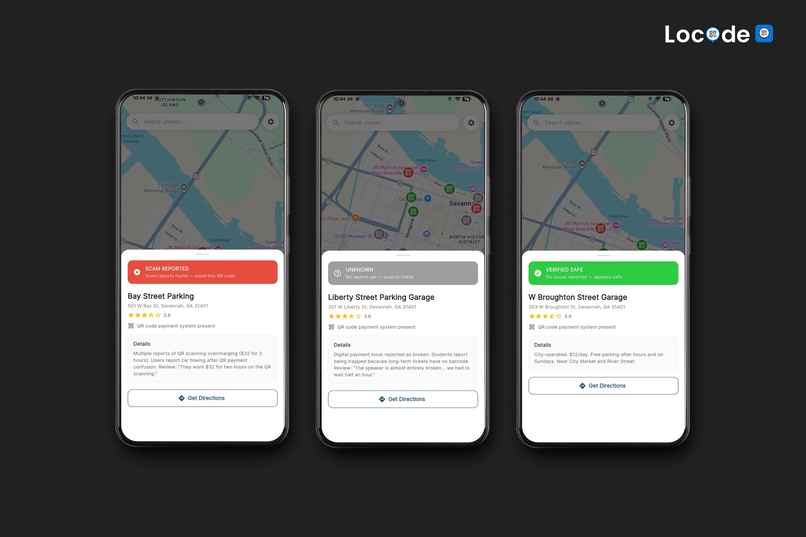
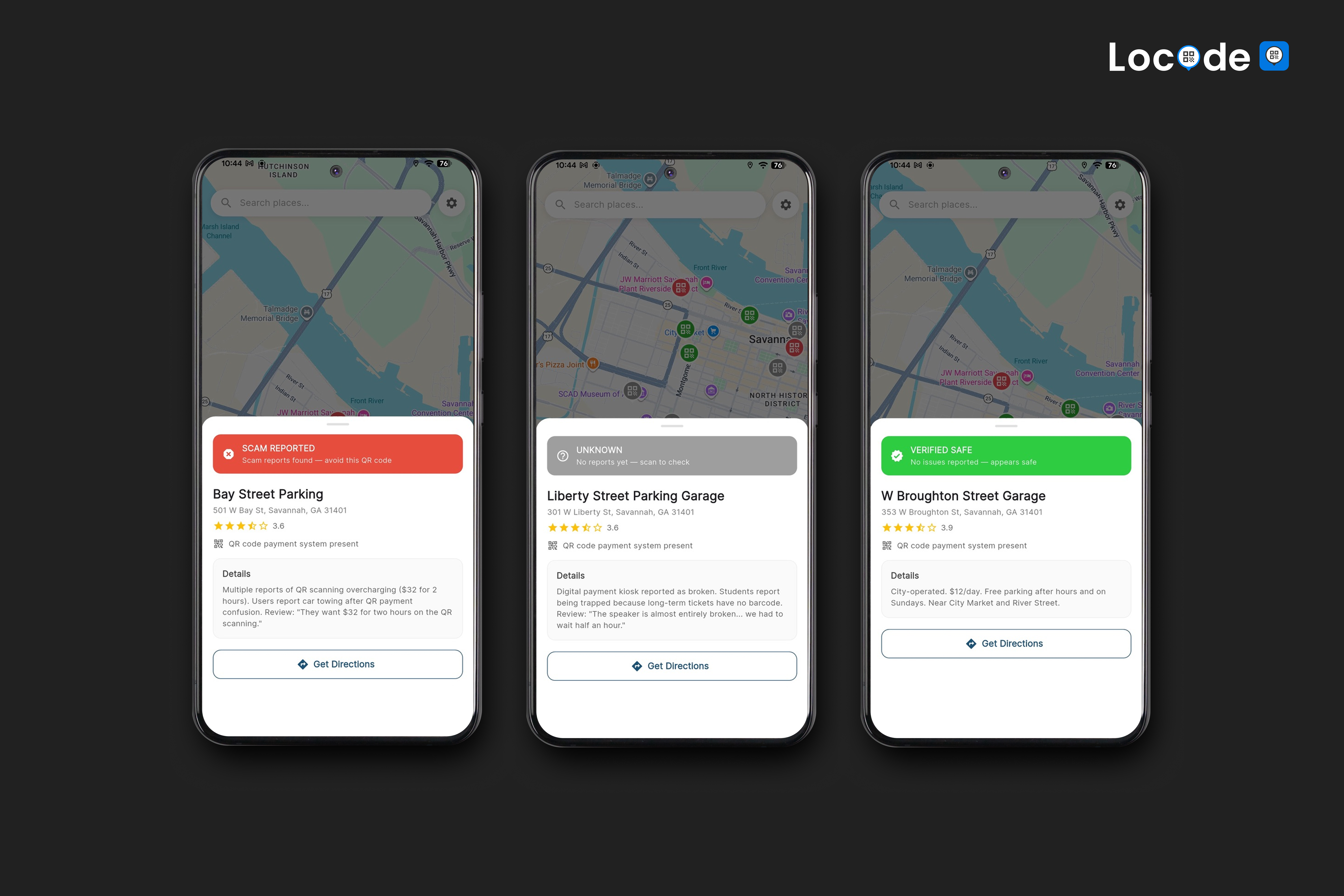
3 Categories
-
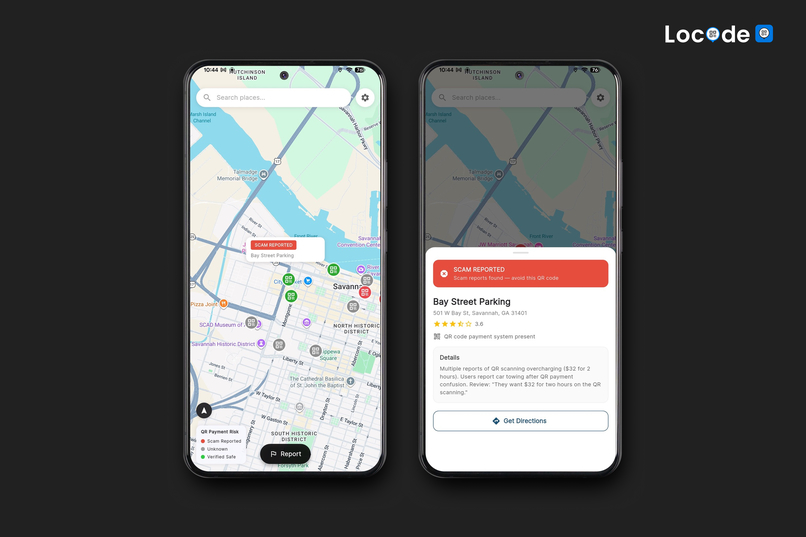
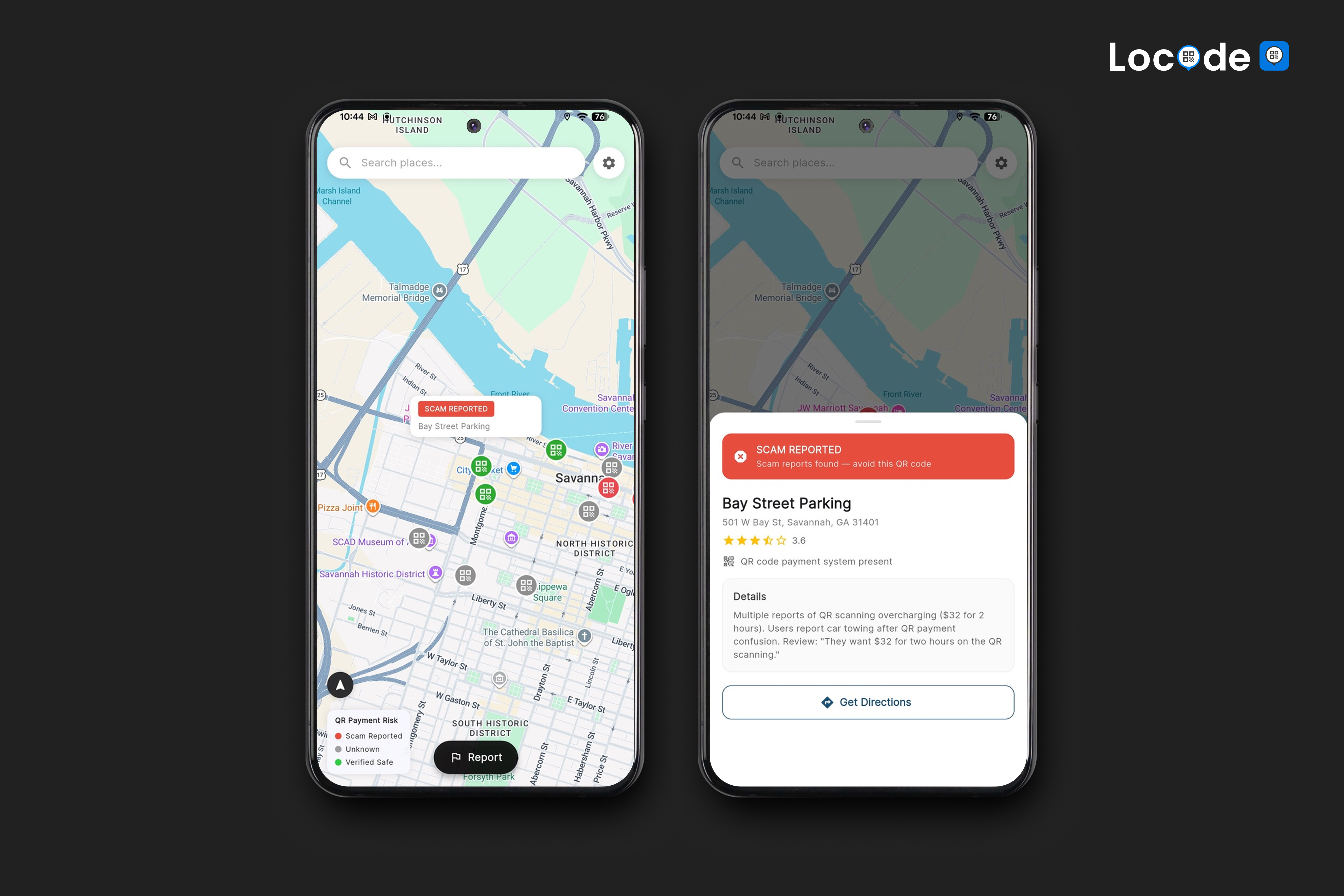
Scam Reported
Inspiration
We’ve all seen them: QR codes on parking meters, restaurant menus, and flyers taped to street lamps. But how do you know that parking meter sticker wasn't pasted over by a scammer five minutes ago?
This rising threat is called Quishing(QR Phishing). Scammers are moving offline, pasting fake codes on physical objects to steal credit card details or deepfake official documents. Browsers protect you from digital threats, but they have no context for the physical world.
We wanted to build a Local Community for QR Safety—a system where AI analysis meets community crowdsourcing to create a live defense layer for the physical web.
What it does
Locode is a mobile defense system that validates QR codes in real-time. It operates through four distinct user flows:
• AI-Powered Scanning When a user scans a code, Locode intercepts the URL before the browser opens. It pipes the payload through Gemini 3 and open-source threat APIs to analyze domain age, SSL status, and anomaly patterns.
• Instant Threat Blocking If the link matches a known scam in our database, Locode pushes a high-priority warning, preventing the user from loading the phishing site.
• Community Reporting If a code is "Unknown," the user can proceed with caution. If they discover a scam (e.g., a fake login page), they can report it instantly. Locode automatically captures the malicious URL from the clipboard—no manual copy-pasting required—and updates the community map.
• The Safety Map Users can view a geospatial map of their surroundings, featuring pins categorized by risk:
🔴 Red: Reported Scams
⚪ Grey: Unknown/Unverified
🟢 Green: Verified Safe
How we built it
We architected Locode as a low-latency security layer that sits between the physical scan and the digital browser.
1. The Autonomous Gemini Agent (The Brain)
Instead of a simple "one-shot" LLM call, we built a multi-step agentic loop using Gemini 3 Flash. We chose Flash for its balance of reasoning capability and sub-second latency.
•The Loop: When a URL is intercepted, we initialize a chat session with a system prompt defining two custom tools: resolve_redirects and deliver_verdict.
•Agentic Behavior: Gemini doesn't just guess; it acts. It autonomously calls resolve_redirects to unspool shortened links (e.g., bit.ly $\rightarrow$ malicious-site.com). It then recursively analyzes the final payload's structure, domain age, and SSL parameters.
• The Verdict: The agent delivers a final structured JSON payload containing a risk_score (0-100) and a human-readable summary, which we render on a blocking overlay.
2. The "Hybrid" Analysis Pipeline
To ensure instant feedback, we implemented a Race-Condition Architecture:
• Phase 1 (Local Heuristics): While waiting for the cloud, the app runs local Dart code to check for immediate red flags. We used Levenshtein Distance algorithms to detect homoglyph attacks (e.g., calculating the edit distance between paypa1.com and paypal.com)
• Phase 2 (Cloud Verification): The Gemini Agent returns the deep analysis ~2 seconds later, updating the UI from "Checking..." to "Safe/Danger".
3. Geospatial Backend with Supabase
We used Supabase with the PostGIS extension to handle location data.
• Heatmap Rendering: We store community reports as geospatial points. To render the heatmap efficiently, we use PostGIS queries (like ST_DWithin) to fetch only the relevant scam reports within the user's map viewport.
• Real-time Updates: We subscribe to Supabase Realtime channels, so if a user across the street reports a scam, it instantly pops up on everyone else's map without a refresh.
4. Google Places API (New) v1
We integrated the New Google Places API (v1) to ground our data in reality.
• We use the searchNearby and searchByText endpoints to fetch valid parking lot coordinates.
• By overlaying our "Scam Data" on top of these "Official Place Markers," we create a trusted map layer that warns users before they even park their car.
Challenges we ran into
• The "Agentic Loop" Timeout: Initially, Gemini would sometimes get stuck in a loop, endlessly analyzing redirects. We had to implement a strict iteration cap (max 3 turns) and an exponential backoff strategy to ensure the user wasn't left staring at a loading screen.
• Handling "Deep" Redirects: Scammers often use 4-5 layers of redirects to hide the final phishing URL. Standard HTTP requests in Flutter would sometimes time out or get blocked by bot detection. We had to build a robust resolve_redirects tool that mimics a real browser user agent to successfully trace the full chain.
• Map Jitter: When reloading parking markers on onCameraIdle, the map would sometimes "flicker" or re-fetch the same data. We implemented debouncing on the camera movement and cached Place IDs to smooth out the UX.
Accomplishments that we're proud of
• Zero-Copy Reporting: We built a background intent handler that captures the scanned URL context. When a user navigates to "Report," we auto-fill the malicious link. It feels magical and removes the friction of trying to copy-paste a dangerous URL.
• Design School Roots: We come from a Design School background. We aren't just writing code; we are crafting an experience. We used "Vibe Coding" techniques—leveraging AI tools to rapidly iterate on frontend aesthetics and logic simultaneously—to build a polished, user-centric interface that feels professional, not just functional.
What we learned
• LLMs as Agents, not Chatbots: We learned that Gemini 3 Flash is incredibly powerful when given tools. It didn't just tell us the URL was bad; it investigated the URL for us. This shift from "asking" to "tasking" was a major mental unlock for our engineering.
• The Importance of "Human-Readable" Security: A raw "Phishing Detected" error scares users. A Gemini-generated summary saying "This site pretends to be PayPal but uses a suspicious domain registered yesterday" educates them. We learned that explainability is a security feature.
• Geospatial Data is Hard: Managing latitude/longitude precision and clustering map markers taught us the value of robust backend tools like PostGIS over simple client-side filtering.
What's next for Locode
• Data Scaling: As our user base grows, we plan to optimize our Supabase architecture to handle massive concurrent read/write operations for city-wide data.
• Educational Integration: We want to integrate "Micro-Tips" into the feed, teaching users how to visually identify physical tampering on QR codes.
• Visual Analysis: Eventually, we aim to use computer vision to analyze the image of the QR sticker itself (e.g., detecting if a sticker is peeling or placed over another) for an added layer of physical security.
Built With
- android-methodchannels
- dart
- flutter
- flutter-bloc
- gemini
- gemini-2.5-flash-(autonomous-agent-with-function-calling)
- google-cloud
- google-maps-sdk
- google-places-api-v1
- hive-(nosql)
- kotlin
- supabase-(postgresql)

Log in or sign up for Devpost to join the conversation.