-
-
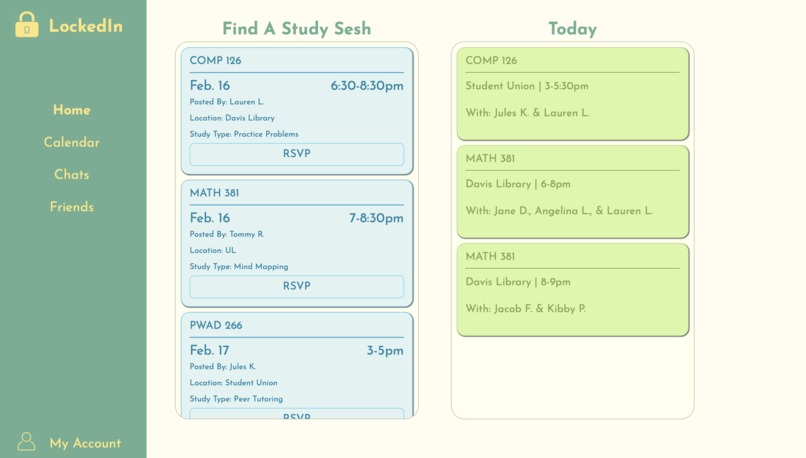
Home Page

Inspiration
We felt that it is normally encouraged to work with others when studying for an exam as it motivates active recall/learning which can be helpful in recognizing your strengths and weaknesses on an exam topic. However, we wanted to recognize that some students in group projects or group study sessions may struggle with unlocking the potential of group studying. Based on our experiences we learned that having different preferred study methods (mind mapping, teaching others what you know, practice problems), and mastery levels on an exam is what can make it difficult for a group study session to be effective. Therefore, this inspired us to create LockedIn, so that students can actively choose a study partner that works best with their learning styles and needs.
What it does
LockedIn serves as a platform for students on campus to be able to register which classes they are in. Doing so allows each student with a LockedIn account to be able to see other students registered for the same classes. The home page features a section where students can discover upcoming study sessions posted by classmates enrolled in the same course; these are study sessions that classmates are seeking study buddies for. Additionally, the homepage lists the study events/sessions that the student logged in currently is signed up for today. These study sessions that a student RSVPs for shows up in their respective calendar page on LockedIn. The calendar has a weekly and monthly view which allows students to view all the study sessions they have created and study sessions that they have joined. When pressing on an event, the student is able to see an event description detailing the time, subject, location and study buddies associated with that event. Additionally, within the calendar, students are able to create their own event/study session where they are able to not only specify the class, place and date that they are studying for, but also their mastery levels and preferred study methods for this event. Once posted, classmates are able to view this in the upcoming study sessions section in the home page, and join/RSVP if they would like to. We also have a chats section, so that students can easily reach out to one another through LockedIn in order to coordinate these study sessions. We wanted to recognize that sometimes students may not be good at keeping up with inboxes across different platforms, so the chats section allows classmates to view the phone numbers and school emails of their study buddies. A friends page also exists where students are able to view their study buddies/classmates that they have previously collaborated with. This can make it easier for students to find study buddies that they enjoyed working with previously and would like to reach out to again. Lastly, we have a way for users to view their account where they can add or delete courses that they are in as we wanted to recognize class changes.
How we built it
We began playing around with Figma in order to get a sense of what we as a group wanted LockedIn to look like. After getting a general idea, we each worked on separate pages of LockedIn. The group had experience in HTML, CSS and JavaScript, so those were the three main languages used within this website! Throughout the creation process, we felt that we may need some sort of database to keep track of user information, so we added a simple database through MySQL. We also used a little of Express.js for backend development. However, our team has limited knowledge on backend development, so these backend frameworks were not as developed throughout the hackathon.
Challenges we ran into
We all have different knowledge of git and GitHub, so we faced some challenges with linking our respective codes to the remote repository. There were a few issues with pushing, pulling and merging due to merge conflicts. However, we took advantage of the mentors as resources and worked with them to learn more about git and GitHub.
Accomplishments that we're proud of
I think we are proud of being able to create all of the main features that we had hoped to include in our project. We are also proud of our use of JavaScript and simple backend programming. Although we had limited knowledge on such languages, we were able to push ourselves to incorporate bits and pieces of JavaScript in order to make our website more interactive.
What we learned
The project made us think more deeply about what a student user specifically would be looking for in an application like ours. We learned more about the importance of considering user experience when programming an application, especially since this application will be used by students; we learned the importance of putting ourselves in the user's shoes in order to gauge the success of our project.
What's next for LockedIn
We hope to enhance our course and user database and make changes in order to help make our application more interactive. After doing so, we plan to release this application for the UNC campus to use!

Log in or sign up for Devpost to join the conversation.