
Inspiration
We wanted to build a study tool that students could actually trust with their data. Most AI-powered study assistants send everything you highlight or read to some company's servers. That didn't sit right with us. When Chrome started rolling out built-in AI APIs that run entirely on your device, we saw an opportunity to create something different - a study assistant that's genuinely private because it never sends your data anywhere.
The other inspiration was simplicity. Students shouldn't need to manage API keys, create accounts, or worry about subscription limits. If Chrome can run AI locally, why not make a tool that just works without all that overhead?
What it does
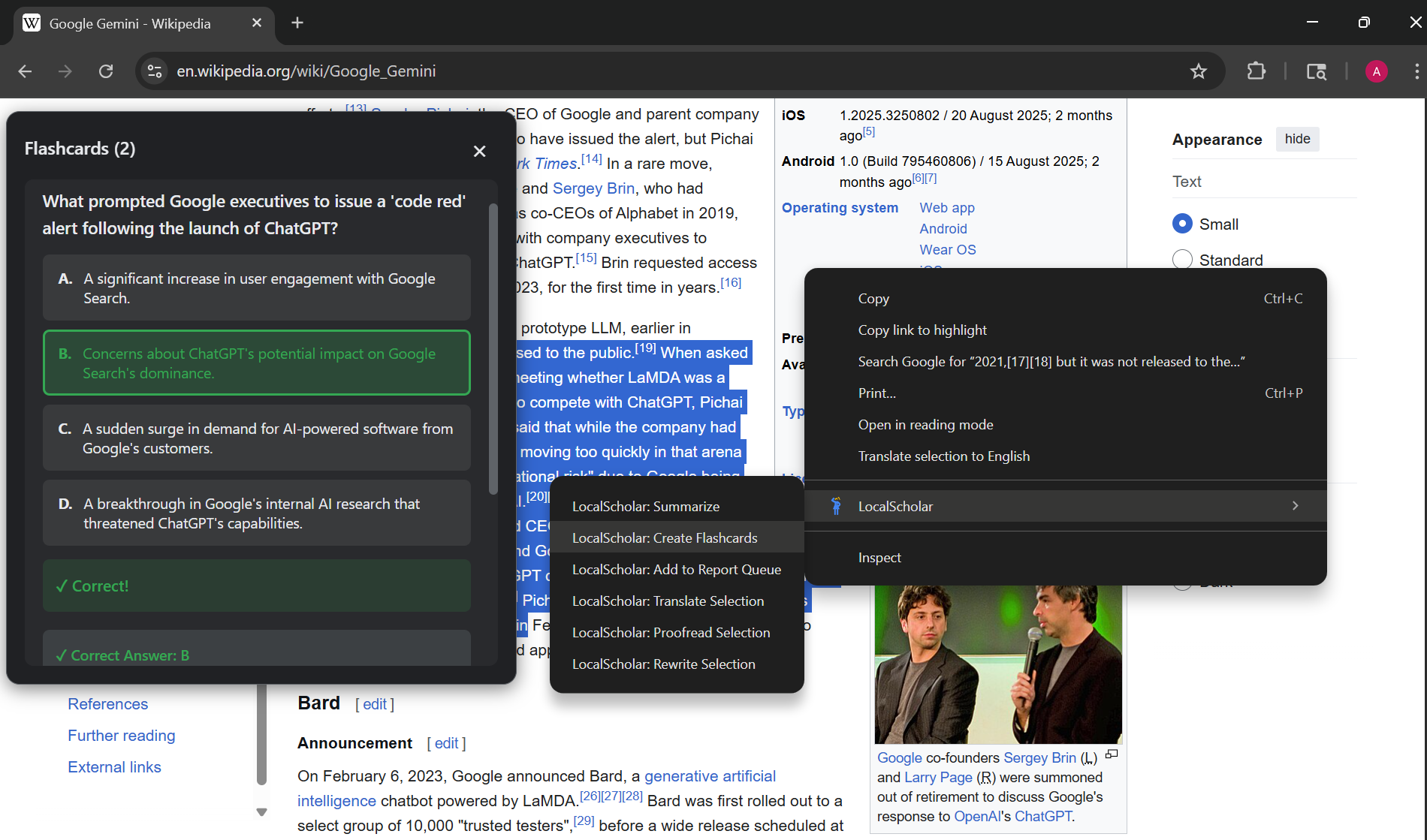
LocalScholar is a Chrome extension that helps you study smarter using AI that runs entirely on your computer. Right-click on any webpage to:
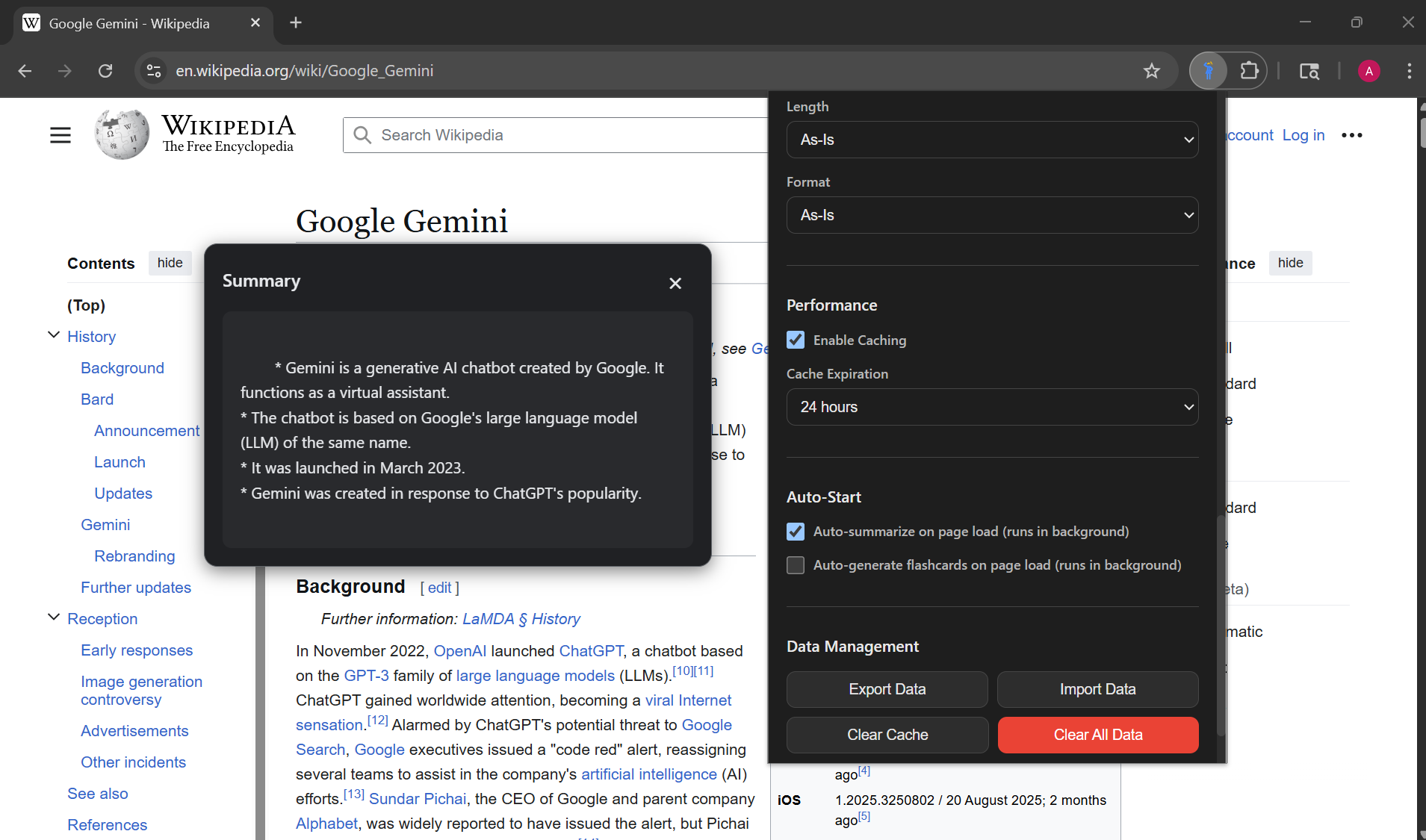
- Summarize articles or selected text in different styles (quick TL;DR, key points, headlines)
- Generate flashcards with multiple-choice questions to test yourself
- Build reports by collecting content from multiple pages and synthesizing them into one coherent document with citations
- Translate text into 10+ languages
- Proofread your writing for grammar and spelling mistakes
- Rewrite text with different tones (more formal, more casual) or lengths
Everything appears in draggable overlays or the popup, so you never leave the page you're studying. The extension saves your flashcard decks and reports locally, and you can customize settings like difficulty level, summary length, output language, and more.
The key difference: all the AI processing happens on your device using Chrome's Gemini Nano model. Nothing gets sent to external servers.
How we built it
We built this as a Chrome Manifest V3 extension using vanilla JavaScript - no fancy build tools or frameworks. The architecture has a few key parts:
Technology choices:
- Pure JavaScript ES modules (no React, no webpack, just clean modular code)
- Chrome's built-in AI APIs: Summarizer, Prompt (LanguageModel), Translator, Rewriter, and Proofreader
- Shadow DOM for the overlay UI to avoid messing with page styles
- Chrome Storage API for keeping everything local
How it works:
- When you right-click and choose an action, the content script extracts the text from the page
- For large content, we break it into chunks (around 10,000 characters each)
- Each chunk gets processed through the appropriate AI API
- Results stream back and display in a draggable overlay
- Everything gets cached based on URL + content hash to avoid reprocessing the same stuff
The tricky parts:
- Chrome's AI APIs can't run in service workers (background scripts), so all AI calls happen in content scripts or the popup
- We built a task management system to track multiple operations across different tabs and prevent duplicate work
- The flashcard overlay needed full keyboard navigation and accessibility support
- Report synthesis requires collecting content from multiple pages and then using custom prompts to merge everything coherently
We also integrated three newer APIs (Translator, Rewriter, Proofreader) that required origin trial enrollment, which expanded the extension's capabilities beyond just studying.
Challenges we ran into
1. Working with bleeding-edge APIs
The Chrome built-in AI APIs are still experimental. Some are in origin trials, documentation changes, and we had to figure out the correct global namespaces (LanguageModel, Summarizer, etc.) through trial and error since the docs weren't always clear.
2. Content extraction and chunking Web pages are messy. We had to build a smart content extractor that removes navigation, ads, scripts, and other junk while keeping the actual content. Then for long articles, we needed intelligent chunking that doesn't cut off mid-sentence and can handle multi-chunk summarization.
3. Service worker limitations We kept hitting errors trying to call AI APIs from the background service worker. It took time to realize these APIs only work in document contexts, so we had to restructure the architecture to route everything through content scripts or the popup.
4. Preventing duplicate work If you right-click and summarize the same page twice quickly, you don't want two identical tasks running. We built a content hashing system and task manager to detect duplicates and show the existing progress instead.
5. Making overlays work everywhere Creating overlays that work on any website without breaking the page's styling or functionality was harder than expected. Shadow DOM helped, but we still had to handle z-index wars, draggable positioning, and ensuring keyboard focus doesn't get trapped.
6. Hardware requirements The Gemini Nano model needs significant resources (22GB disk space, 4GB+ VRAM or 16GB+ RAM). We had to build clear detection and messaging so users know upfront if their device can run this.
Accomplishments that we're proud of
Privacy-first design that actually works. Everything runs locally. No compromises, no "just this one API call to our server." If Chrome's AI model is downloaded, you can use this offline.
Six features in one extension. We started with summaries and flashcards but managed to integrate translation, proofreading, and rewriting too. Each one feels cohesive rather than tacked on.
The report builder is genuinely useful. Being able to browse multiple sources, queue them up, and generate a synthesized report with proper citations - that's actually valuable for research papers.
Accessibility compliance. Full keyboard navigation, screen reader support, WCAG 2.1 AA compliance. We didn't treat this as an afterthought.
Clean architecture. No build step needed, small focused modules, extensive documentation. The codebase is maintainable and readable.
Smart caching system. By using URL + content hash as cache keys, we avoid reprocessing identical content while still catching updates when page content changes.
What we learned
Experimental APIs require patience. Working with Chrome's built-in AI taught us to handle uncertainty, read between the lines in sparse documentation, and build robust feature detection and fallbacks.
Vanilla JavaScript is underrated. We didn't need React or a complex build pipeline. ES modules and Shadow DOM gave us everything we needed. Sometimes simpler is better.
Content extraction is an art. Getting clean, meaningful text from arbitrary web pages is harder than it looks. Every site structures content differently, and you have to handle edge cases gracefully.
User experience matters more than features. We could have added 20 more features, but nailing the core experience - fast summaries, smooth overlays, clear progress indicators - is what makes the tool actually usable.
Documentation saves time. We created 14 comprehensive docs covering everything from architecture to AI prompts. When we needed to add new features, these docs made it much faster.
Privacy constraints breed creativity. Having to work entirely locally forced us to optimize performance, implement smart caching, and really think through the user flow. The constraints made the product better.
What's next for LocalScholar
Near-term improvements:
- Spaced repetition for flashcards - Actually help people remember what they studied, not just quiz them once
- PDF support - Study from academic papers and ebooks, not just web pages
- Better citation formats - APA, MLA, Chicago style for academic reports
- Side panel view - Keep LocalScholar open alongside your research without losing screen space
Bigger ideas:
- Custom AI prompts - Let users create their own templates for summaries or flashcards
- Export to Anki/Quizlet - Integrate with existing study workflows
- Collaboration features - Share flashcard decks and reports (while keeping the core privacy-first)
- Chrome Sync support - Sync your decks and settings across devices (still local-first, just synced)
- Batch processing - Queue up multiple pages to process at once
If the APIs expand:
- Audio transcription - Summarize lectures or YouTube videos when Chrome adds audio AI
- Visual analysis - Process diagrams and charts when vision models become available
The foundation is solid. Now it's about making LocalScholar even more useful for the people actually using it to study.
Note: This is a feature-complete v0.1.0 release. The extension works well for students and researchers who want a private, powerful AI study assistant without the cloud dependency.
Built With
- css
- extension
- gemini
- html
- javascript

Log in or sign up for Devpost to join the conversation.