-
-
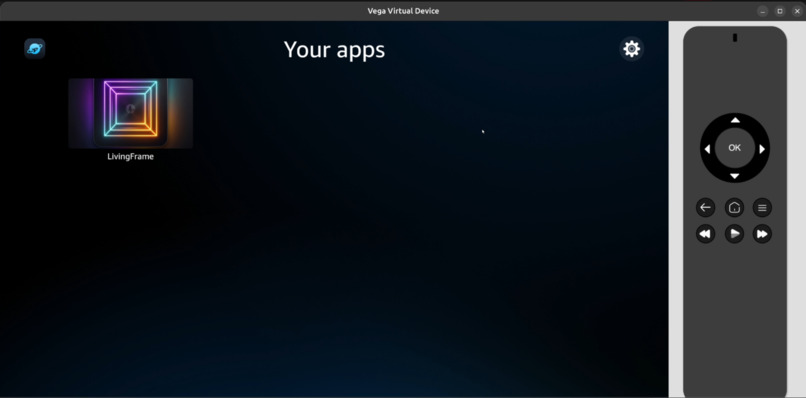
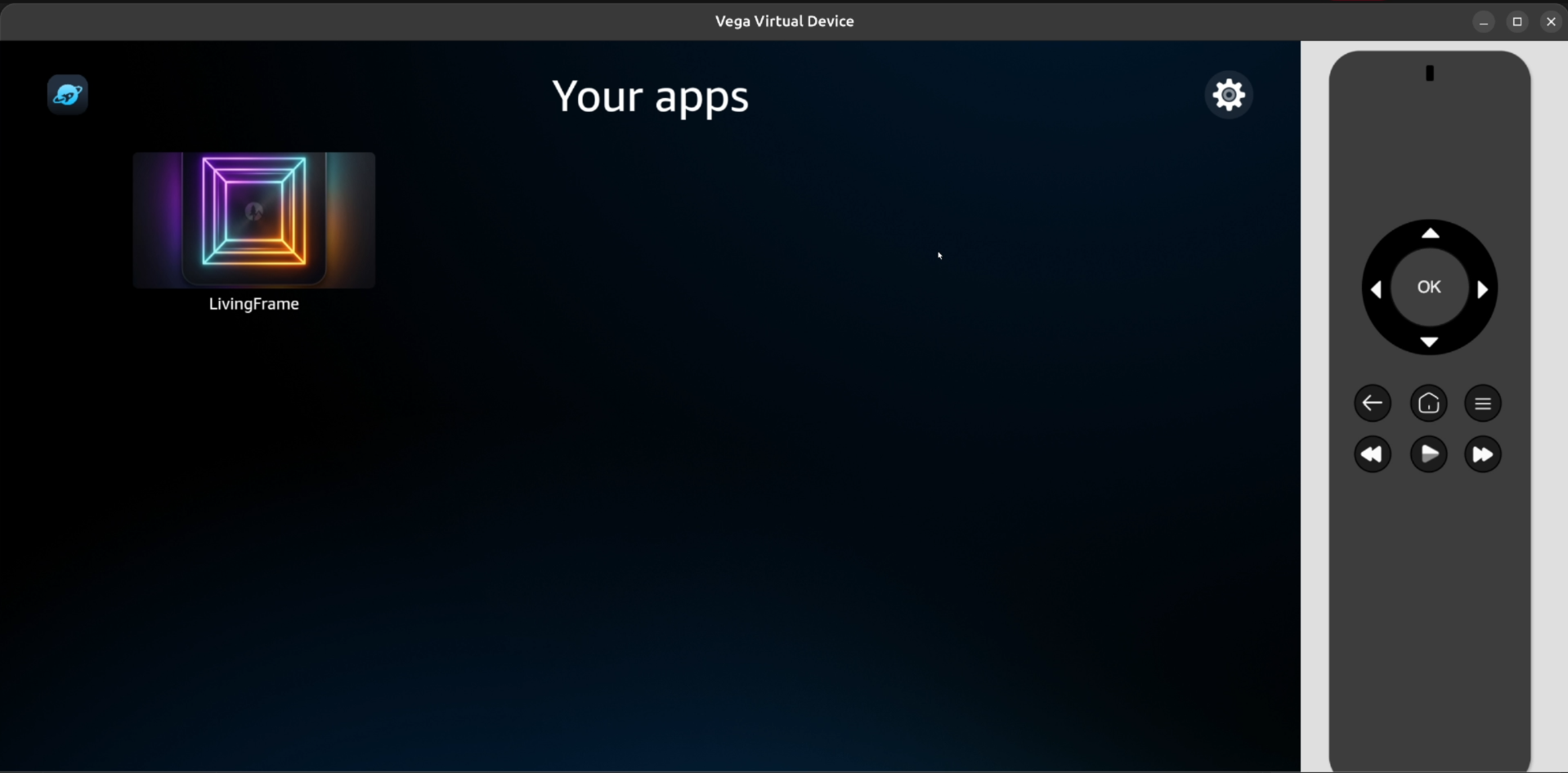
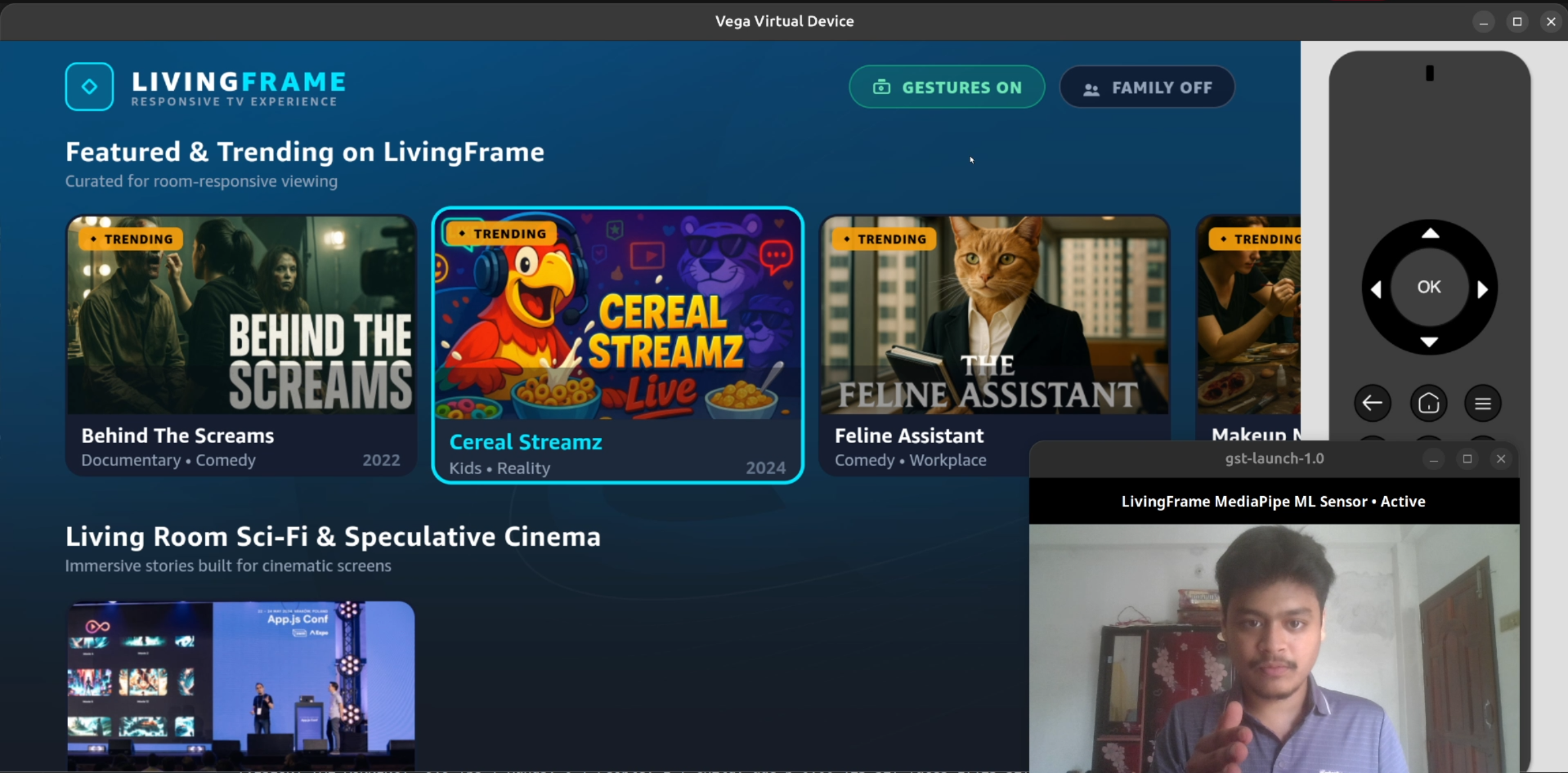
The Vega App
-
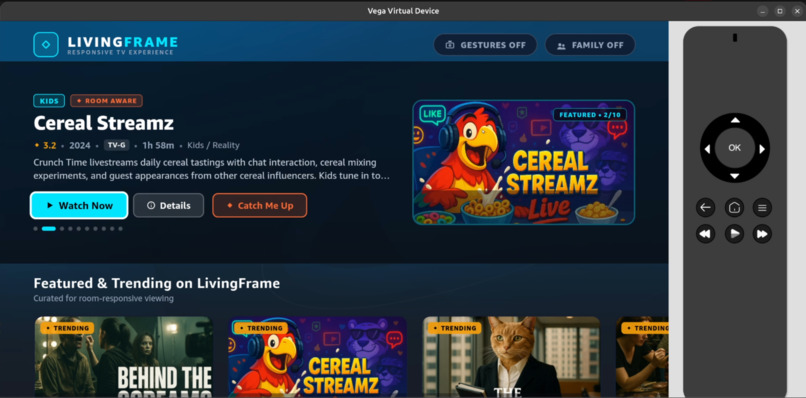
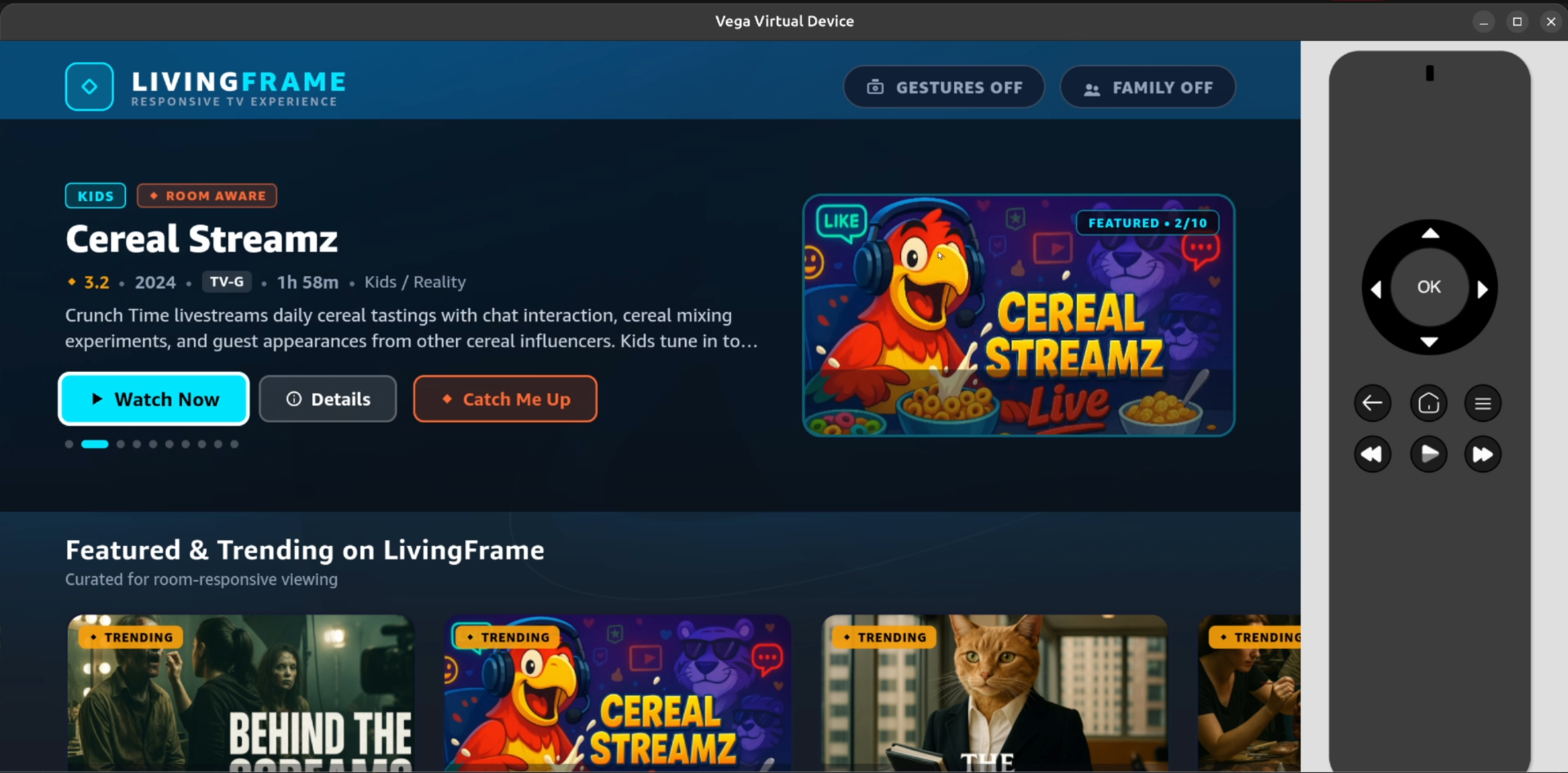
Landing Screen
-
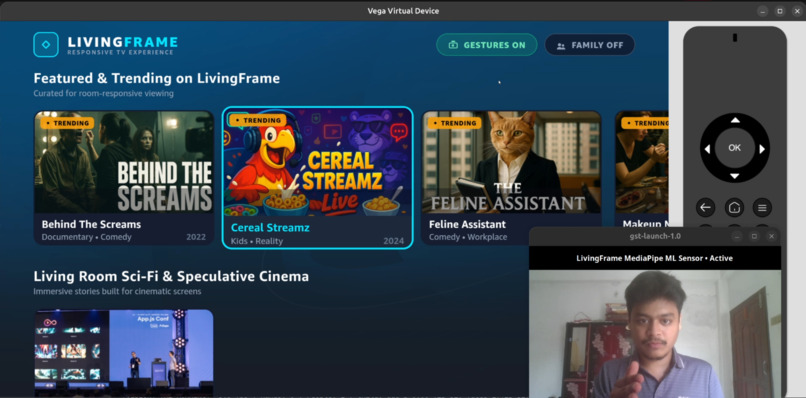
Hand control horizontal scrolling to select a title
-
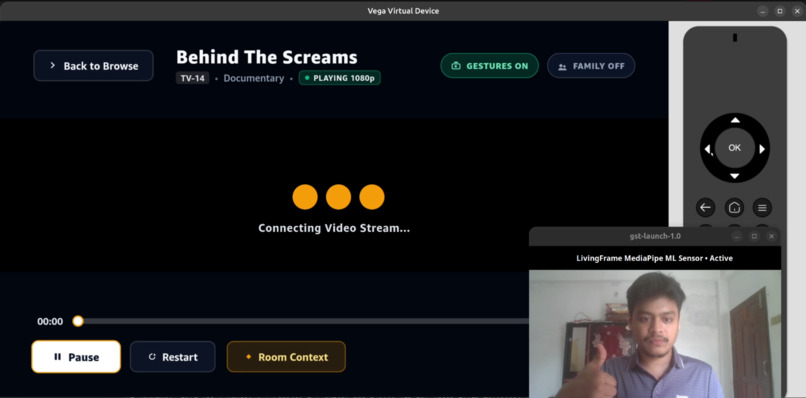
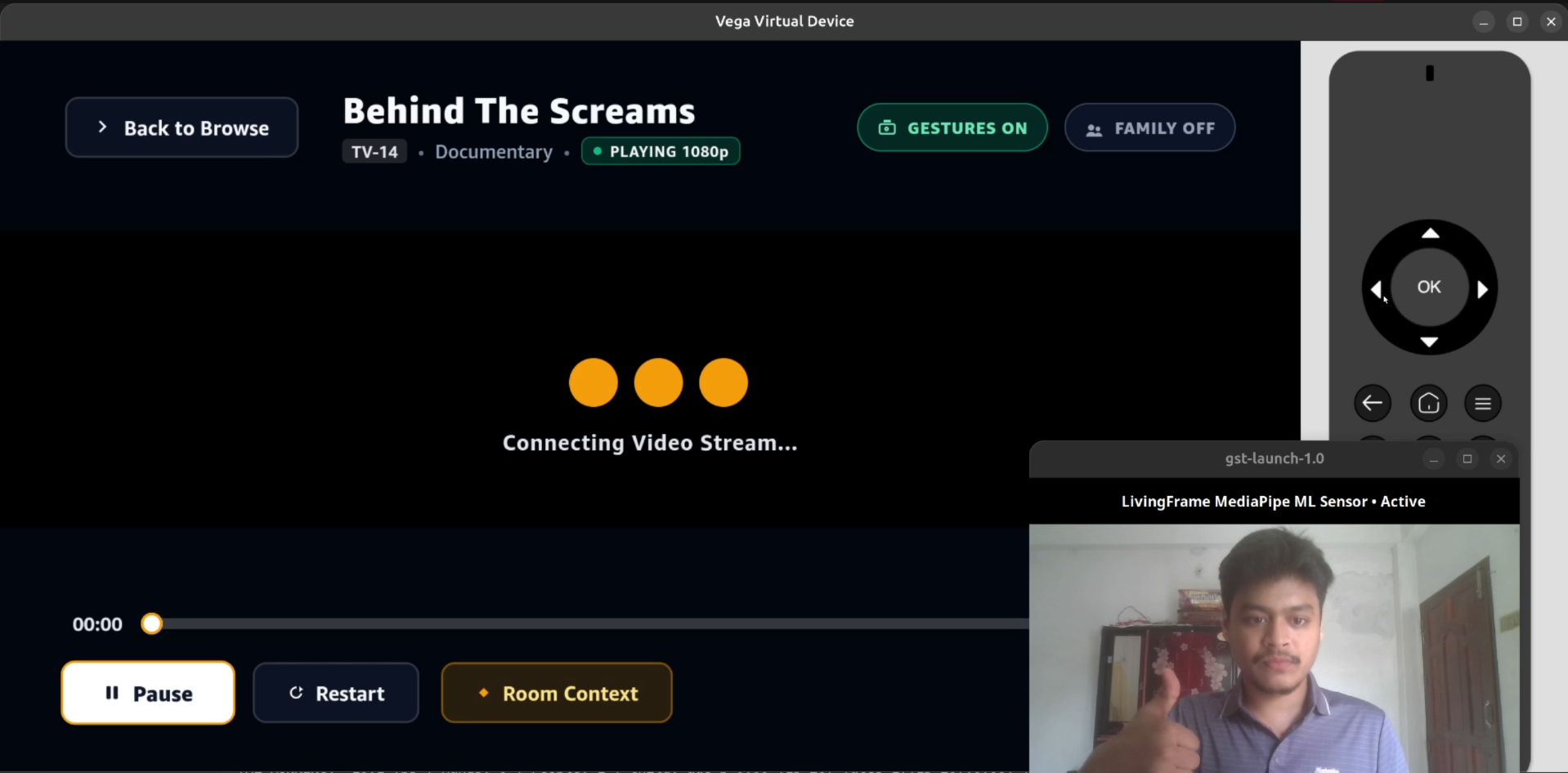
Thumbs up to play it
-
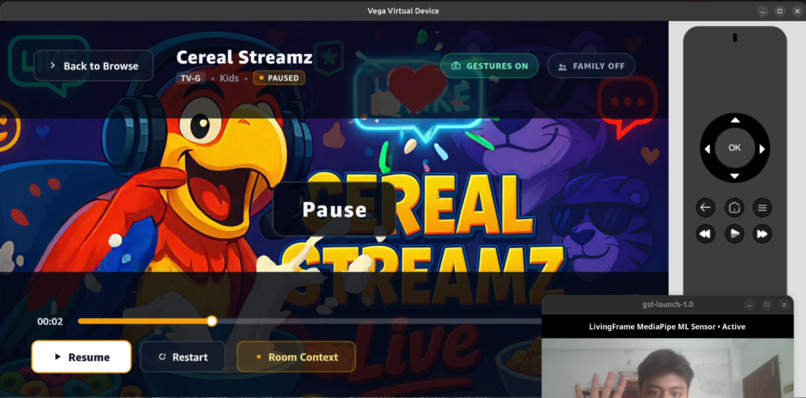
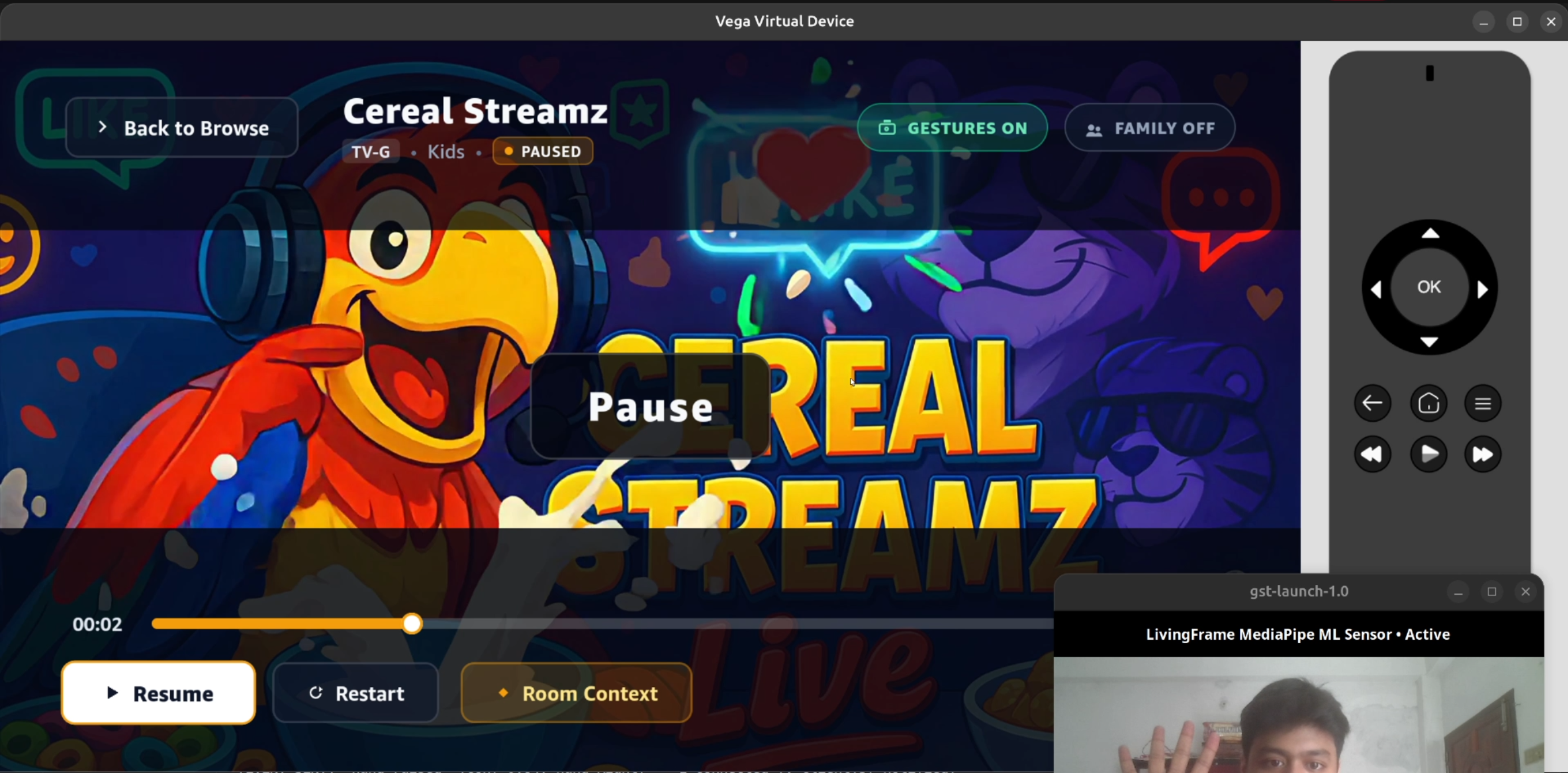
Hand raising to pause playback
-
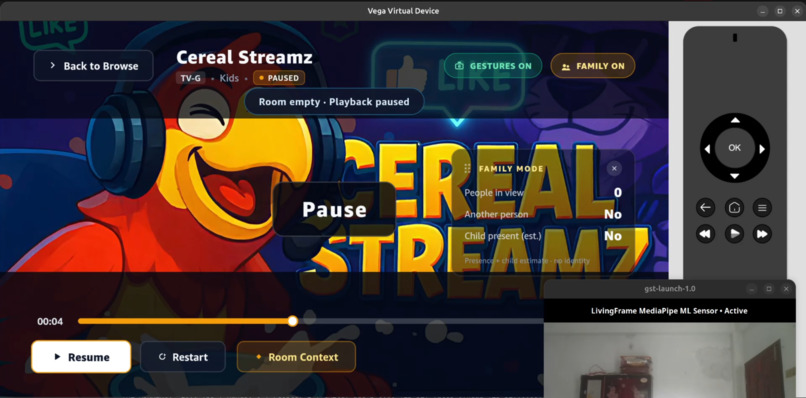
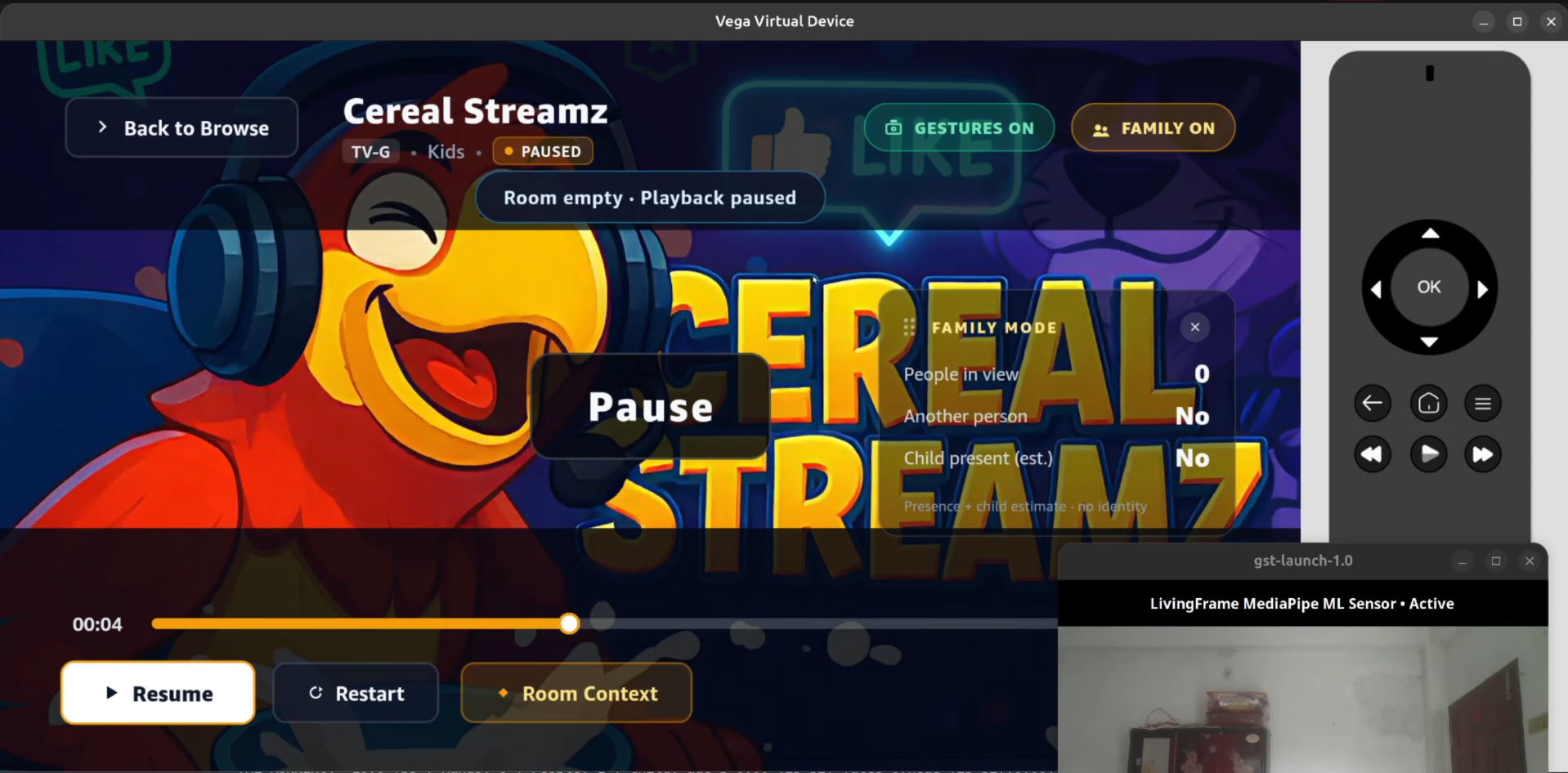
Leave screen and playback pause
-
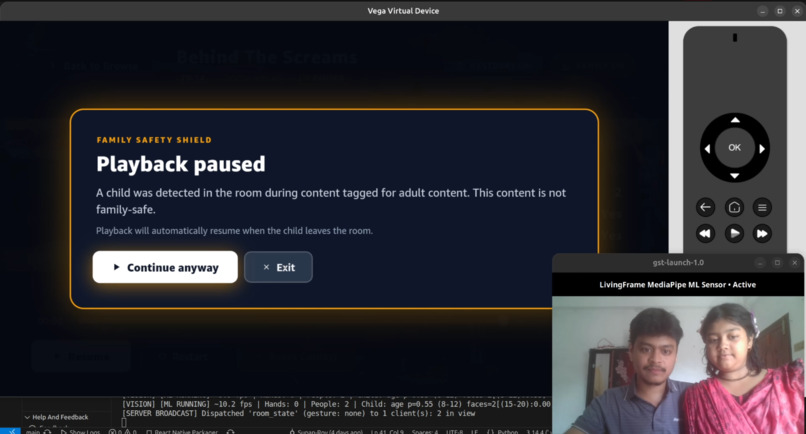
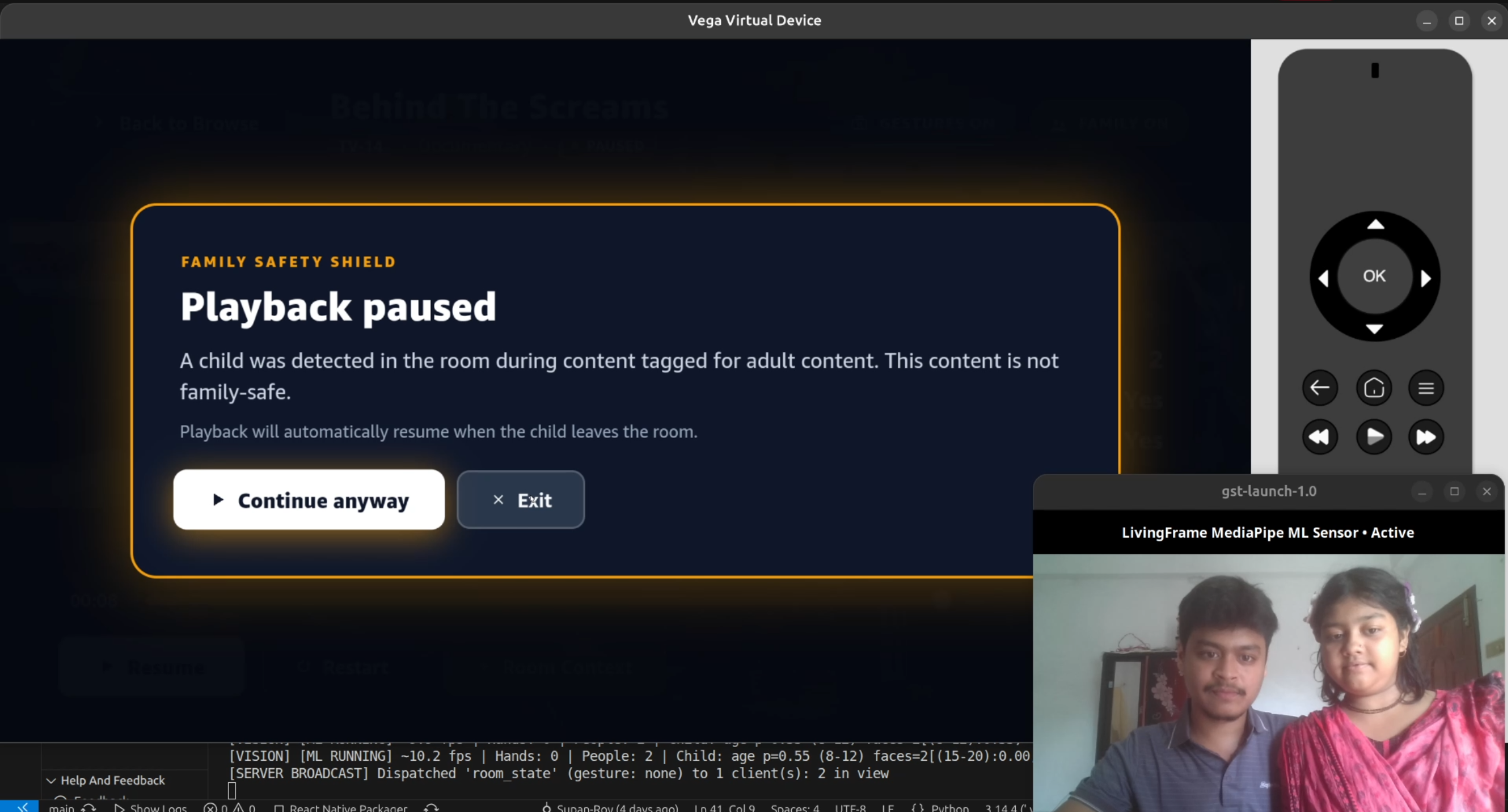
Child enters and explicit content pause
-
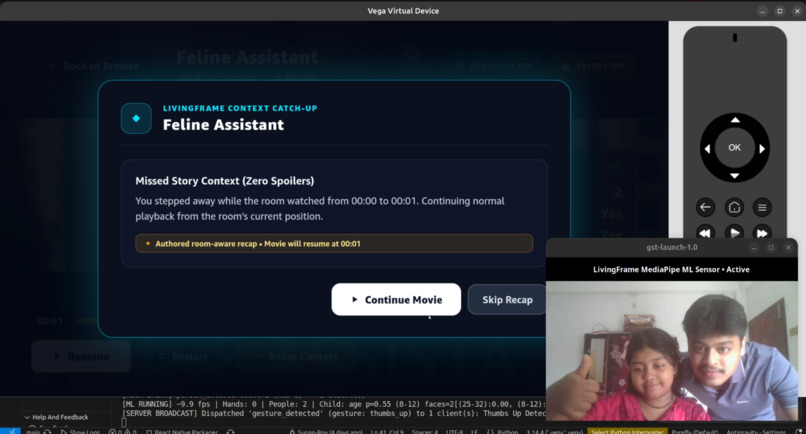
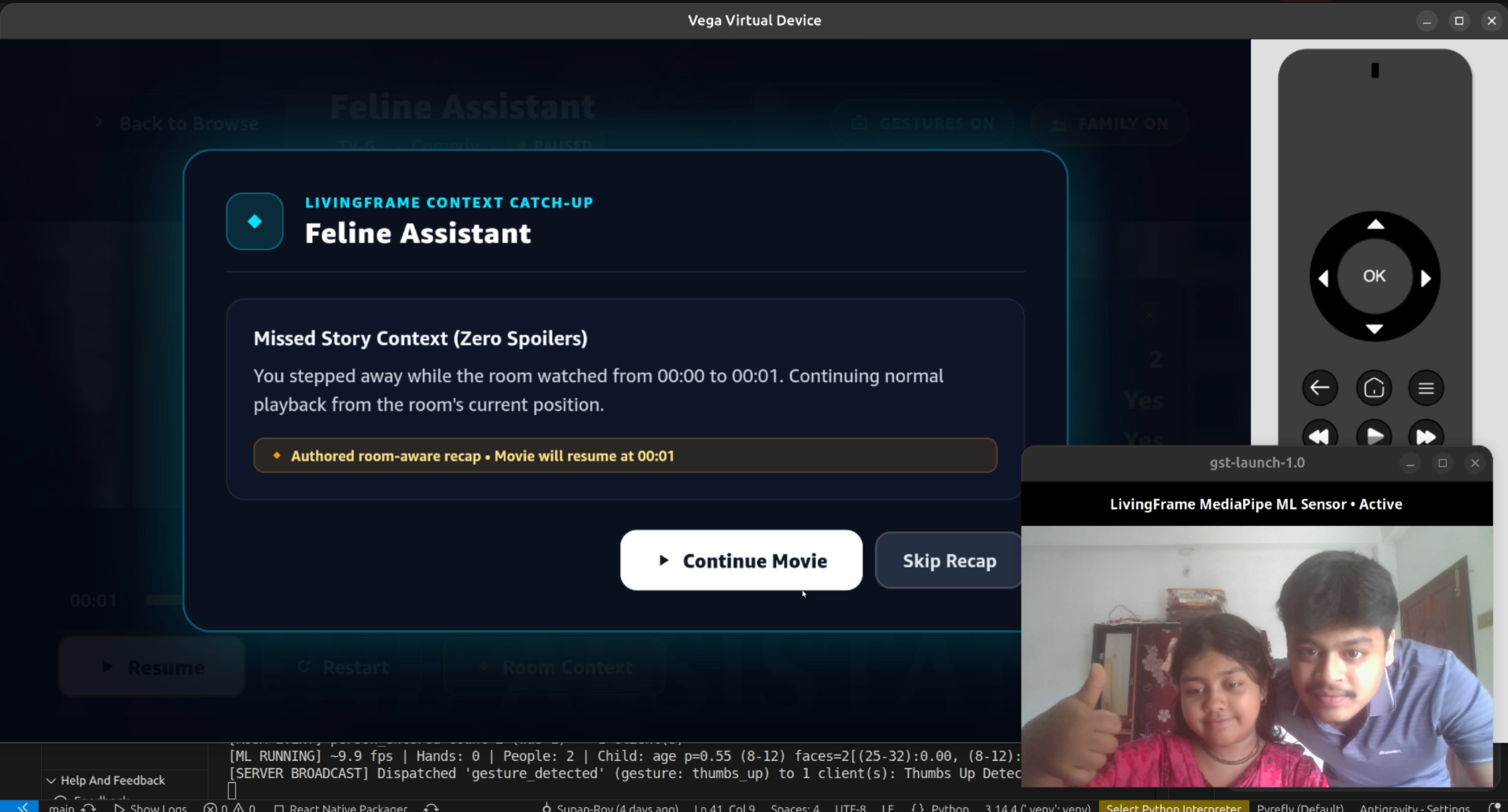
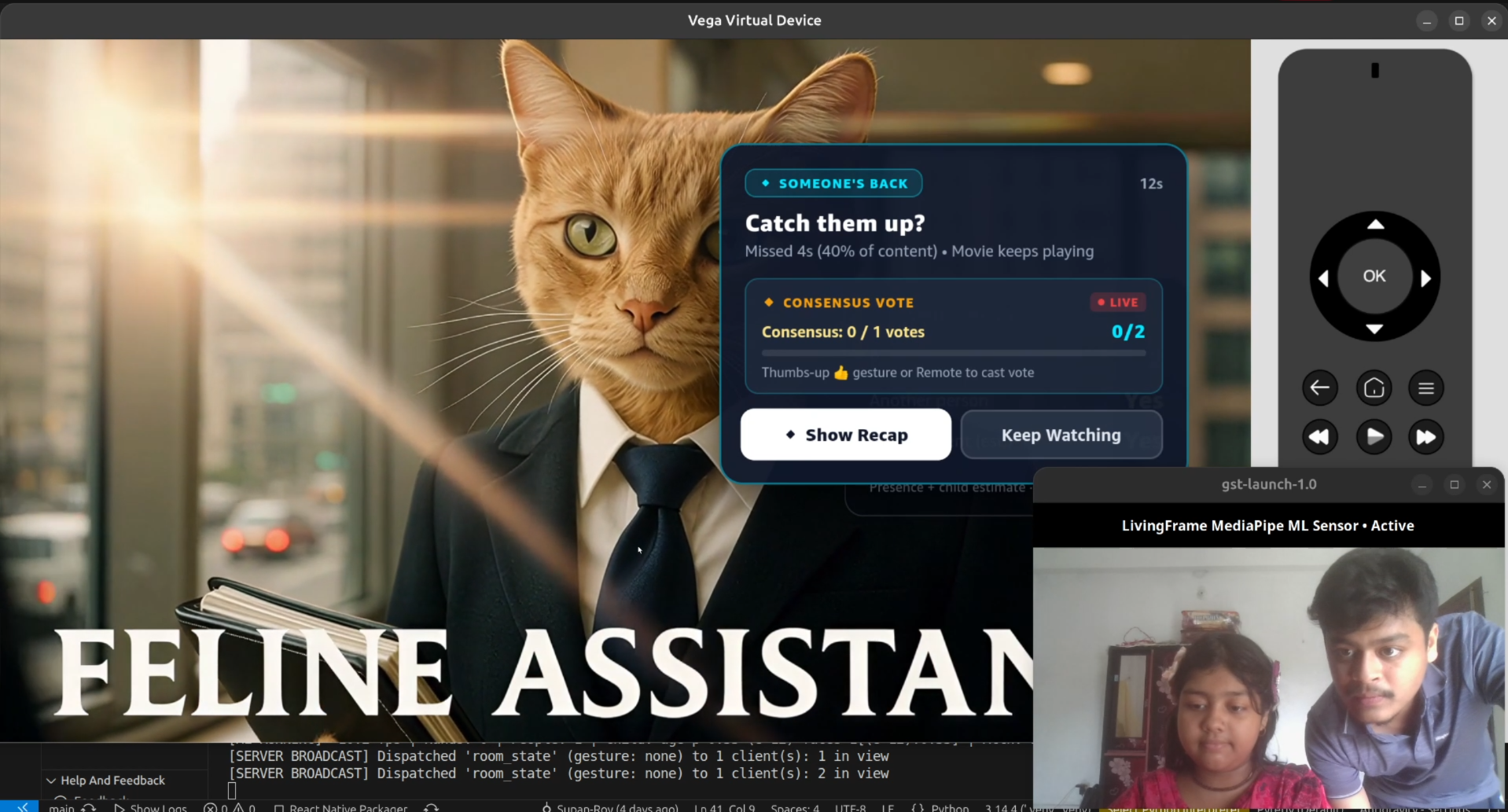
Another member returns screen and system suggests a recap
-
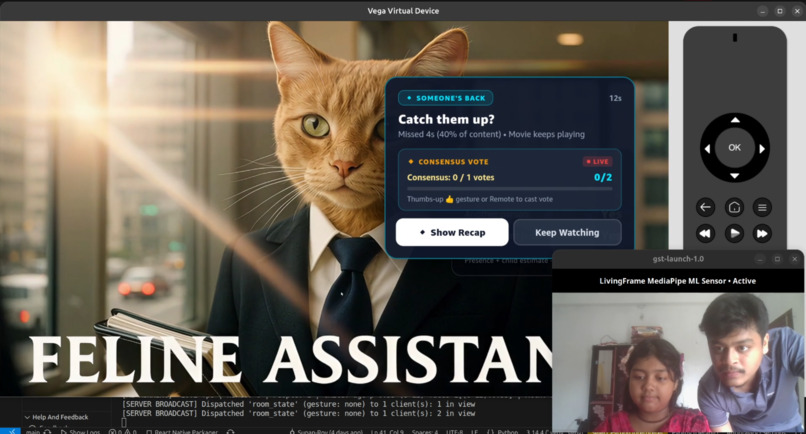
Family members vote to decide a recap or not
-
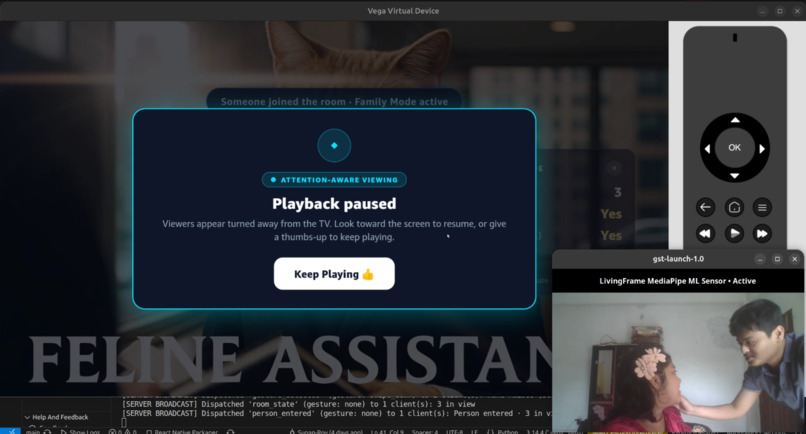
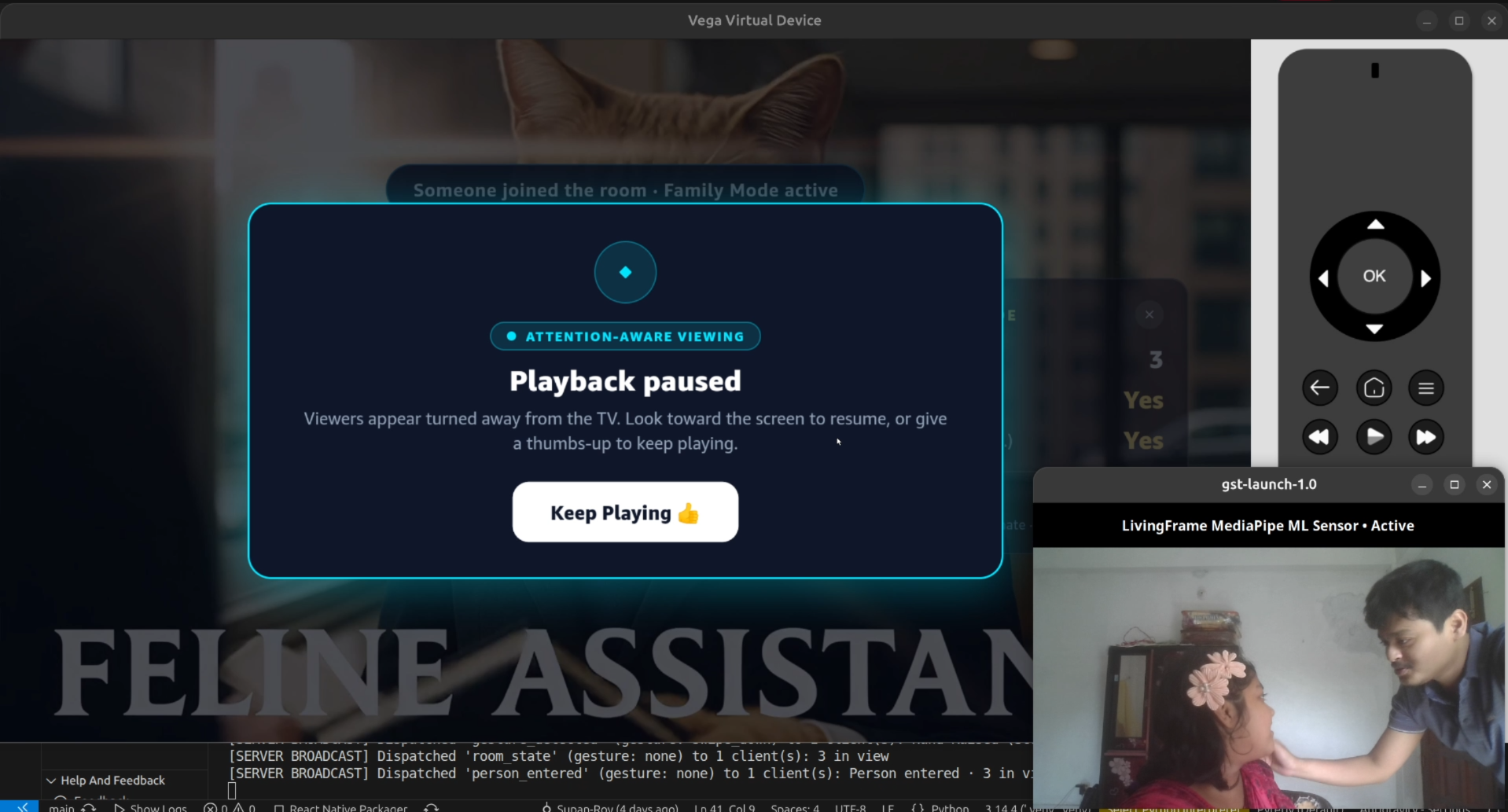
Viewers talking in between and playback pause
Inspiration
Picture a typical family movie night: dinner is on the table, hands are messy with buttered popcorn, and the lights are dimmed. Suddenly, the phone rings in the kitchen, someone gets up to grab drinks, a toddler wanders into the room just as a scary suspense scene begins, and the remote control has vanished into the dark abyss between the couch cushions. While televisions have evolved from bulky cathode-ray tubes into breathtaking, ultra-thin 4K HDR displays, the way we actually interact with them hasn’t evolved since the 1970s. The television remains a deaf, blind glass rectangle that demands you hunt for a piece of plastic every time life happens around it.
The traditional television experience has remained fundamentally broken in two major ways:
- The Physical Remote is a Relic of Friction: Remotes are constantly lost between couch cushions, covered in confusing clusters of identical rubber buttons that frustrate elderly family members, and impossible to use when snacking, cooking, or holding a baby.
- The "Smart" TV Lacks Situational Awareness: Modern TVs have no awareness of who is sitting in front of them. When you step into the kitchen to grab water, the TV continues blasting dialogue to an empty room. When young children run into the room, mature or frightening scenes continue playing without warning. And when a viewer steps away to take a phone call during a movie night with friends, returning means either disrupting everyone by asking "Wait, what just happened?" or sitting in the dark confused.
We envisioned LivingFrame: an ambient, room-aware smart entertainment platform built from the ground up for Amazon Fire TV powered by Vega OS. LivingFrame transforms the television from an unresponsive passive display into a perceptive, polite living room companion that understands physical presence, gaze attention, audience demographics, and natural hand gestures—all while enforcing a strict zero-cloud, privacy-preserving edge architecture.
What it does
LivingFrame introduces five core ambient entertainment capabilities:
1. Touchless 10-Foot Spatial Gestures
Viewers navigate the entire experience without ever picking up a remote:
- Catalog Browsing: Swipe horizontally or vertically through the air to browse the catalog.
- Instant Launch: Give a natural Thumbs-Up pose to select and play a title.
- Playback Control: Raise an open palm to Pause; raise it again to seamlessly Resume.
- Precise Scrubbing: Swipe Right to skip forward \( 5\text{s} \); swipe Left to rewind \( 5\text{s} \).
2. Autonomous Solo Room-Aware Playback
When watching alone:
- Empty-Room Detection: If you leave the couch (occupancy transitions \( 1 \to 0 \)), an intelligent grace period filter waits \( 2.5\text{s} \) to filter out transient occlusions (e.g., picking up a drink). If the room remains empty, playback automatically pauses and saves a high-precision
SoloPauseCheckpoint. - Instant Resume: The moment you walk back in (\( 0 \to 1 \)), playback instantly resumes from the exact second with a subtle room notice. No remote presses, no modals.
3. Ambient Family Mode & Kid Safety Shield
Using lightweight on-device demographic classification:
- When a child enters the room while an adult-rated or horror scene is playing (or selected), LivingFrame immediately halts the hardware video decoder, applies an ambient privacy mask, and presents a Parental Protection Advisory.
- Playback cannot be accidentally triggered until the young viewer departs or a parent explicitly authenticates.
4. Shared Group Viewing & Consensus Recap Voting
When multiple people watch together (\( N \ge 2 \)):
- Unbroken Playback on Departure: If one person steps away (\( N \to N-1 \)), playback continues uninterrupted for the remaining viewers while silently logging a
SharedDepartureCheckpoint. - Proportional Eligibility: When the departed person returns (\( N-1 \to N \)), if they missed meaningful story progression (\( P_{\text{missed}} \ge 0.05 \) or \( \Delta t \ge 15\text{s} \)), an unobtrusive banner appears: "SOMEONE'S BACK · Catch them up?"
- Democratic Consensus Voting: To avoid annoying the group, a recap is only shown if the room agrees:
$$ \text{RequiredVotes} = \left\lceil \frac{N}{2} \right\rceil $$
Viewers vote by flashing a natural thumbs-up gesture (live vote counter updates:
1/2,2/3). If consensus is reached, the contextual recap window launches with exact timestamps of what was missed; otherwise, it cleanly times out after \( 12\text{s} \) while the movie keeps playing.
5. Attention-Aware Viewing & Catch-Up Rewind
- LivingFrame monitors the collective gaze of the room using 3D head-orientation keypoints. If more than \( 70\% \) of viewers turn their heads away to have a conversation for \( \ge 5.0\text{s} \), playback gracefully pauses with an attention prompt card.
- When viewers face the screen again, playback automatically resumes and displays an optional 1-click Catch-Up Rewind banner for the exact duration of distraction missed.
How we built it
LivingFrame is architected around a decoupled edge-sensory mesh that guarantees a butter-smooth 60 FPS TV interface while performing real-time multi-model computer vision:
[ Hardware Camera ]
        │
        ▼
[ On-Device Sensory Pipeline (Python / MediaPipe / OpenCV DNN) ]
  ├── Gesture Recognizer (7 Poses + Velocity Vectors)
  ├── Pose Landmarker (33 3D Spatial Keypoints)
  ├── BlazeFace Detector + GoogLeNet Age Classifier
  └── Statistical Signal Filters (Mode Windowing + Hysteresis)
        │
        ▼ (Local WebSocket JSON Protocol / Port 8080)
[ Amazon Fire TV / Vega OS 1.2 Runtime (Kepler SDK) ]
  ├── RoomContext (Auto-reconnecting state client)
  ├── RoomPlaybackEngine (Deterministic Policy Arbiter)
  ├── KeplerVideoSurfaceView + VideoPlayer (W3C Media Engine)
  └── 10-Foot Focus-Guided UI (React Native for Kepler)
1. Vega OS & Kepler Application Layer
- Framework: React Native for Kepler (
@amazon-devices/react-native-keplerv4.0.0) targeting Amazon Vega OS 1.2 (tvprofile). - Native Video Engine: Hardware-accelerated decoding via
@amazon-devices/react-native-w3cmedia(v2.3.2) rendering directly to native compositor planes viaKeplerVideoSurfaceView. - Local Streaming Server: Built-in HTTP range streaming server supporting HTTP 206 Partial Content, serving official open-source sample video assets from Amazon's
vega-video-samplerepository with sub-50ms seek latency.
2. Multi-Model Edge Sensory Pipeline
Our sensory daemon (scripts/webcam_sensor.py) runs fully on-device on commodity x86/ARM CPUs without requiring cloud APIs:
| Model | Format / Checkpoint | File Size | Task & Domain | Execution Engine |
|---|---|---|---|---|
| MediaPipe Gesture Recognizer | gesture_recognizer.task |
~8.4 MB | 7 Hand gestures & trajectory velocity | MediaPipe Tasks Vision |
| MediaPipe Pose Landmarker | pose_landmarker_full.task |
~9.4 MB | 33 3D Spatial Landmarks (\( x, y, z \)) | MediaPipe Tasks Vision |
| MediaPipe BlazeFace | blaze_face_full_range.tflite |
~0.9 MB | Multi-scale face localization | TFLite Runtime |
| GoogLeNet / Adience Age Model | age_googlenet.onnx |
~43.5 MB | Demographic age estimation | OpenCV Deep Neural Network (cv2.dnn) |
3. Mathematical Foundations of Room Perception
A. 3D Attention & Head Yaw Ratio
Rather than running heavy iris-tracking models, we compute head rotation relative to the TV plane using 3D landmark geometry from the nose \( L_0(x_0, y_0, z_0) \) and ears \( L_7(x_7, y_7, z_7), L_8(x_8, y_8, z_8) \):
$$ x_{\mathrm{mid}} = \frac{x_7 + x_8}{2}, \quad \mathrm{Span}_{\mathrm{ears}} = |x_7 - x_8| $$
$$ \mathrm{YawRatio} = \frac{|x_0 - x_{\mathrm{mid}}|}{\frac{1}{2} \cdot \mathrm{Span}_{\mathrm{ears}}} $$
$$ \Delta z = z_0 - \frac{z_7 + z_8}{2} $$
- If \( \Delta z > +0.02 \) (nose positioned behind ear plane) or \( \mathrm{YawRatio} > 0.65 \) (head turned \( > 45^\circ \)), the viewer is classified as away.
- Collective inattention ratio: $$ R_{\mathrm{inattentive}} = \frac{N_{\mathrm{distracted}}}{N_{\mathrm{total}}} > 0.70 $$
B. Robust Demographic Classification with Dual Hysteresis
To prevent transient classification spikes from flashing the kid safety shield:
- Softmax confidence aggregation across child brackets: $$ P_{\mathrm{child}} = \sum_{b \in {\text{0-2}, \text{4-6}, \text{8-12}}} P(b) $$
- History window median filter across \( W = 7 \) frames: $$ \bar{P}_{\mathrm{child}} = \operatorname{median}({P_1, P_2, \dots, P_7}) $$
- Dual-threshold hysteresis barrier:
- Arming Threshold: \( \bar{P}_{\mathrm{child}} \ge 0.55 \) (requires 3 consecutive confirmations).
- Disarming Threshold: \( \bar{P}_{\mathrm{child}} \le 0.35 \).
C. Presence Stabilization
Raw person count is filtered through a 5-frame majority vote: $$ \mathrm{StableCount} = \operatorname{mode}({c_1, c_2, \dots, c_5}) $$ backed by a \( 1.5\text{s} \) post-transition cooldown to eliminate edge boundary jitter.
Challenges we ran into
Developing for a brand-new platform operating system (Vega OS) alongside real-time computer vision introduced complex edge-case hurdles:
1. Asynchronous Race Condition in Native Surface-to-Player Handoff
- Problem: In
@amazon-devices/react-native-w3cmedia, the native compositor surface creation (KeplerVideoSurfaceView) and JavaScript player initialization (player.initialize()) resolve asynchronously on separate threads. Ifplayer.load()executed before the compositor allocated the surface handle, the video decoded into an orphaned memory buffer—resulting in crystal-clear audio with a permanently black screen and zero error events. - Solution: We engineered a defensive multi-state rendezvous machine in
VideoPlayerView.tsx. Three synchronization refs (isInitializedRef,surfaceHandleRef,isLoadedRef) gate execution throughtryAttachAndLoad(), ensuring the player only loads media once both the native C++ decoder and the platform display surface have handshake-confirmed.
2. Remote Key Bleed During React 18 Modal Transitions
- Problem: When presenting contextual overlays (Recap banner, Attention card) over active video playback, Kepler's native focus engine takes several milliseconds to resolve
hasTVPreferredFocusinside the modal. In React 18, remote DPAD clicks during this transition frame bypassed the modal and bled into the background video player, accidentally scrubbing the movie. - Solution: We implemented an explicit synchronous event-interception barrier at the head of
useTVEventHandler, checking synchronous layout refs (isShowingRecap,isAttentionPaused,isProtectionBlocked) to strictly suppress media controls while overlays mount.
3. Subnet Routing in Vega Virtual Device Emulators
- Problem: The Fire TV app running in the QEMU-based Vega Virtual Device emulator failed to connect to
localhost:8080because the emulator sandbox mapslocalhostto its internal virtual interface. - Solution: We built a dynamic multi-tier host resolver in
RoomContext.tsxthat routes socket telemetry through the QEMU host loopback gateway (10.0.2.2:8080) with automated exponential backoff retry loops.
4. Demographic Boundary Noise
- Problem: Single-frame lighting shifts occasionally caused adult facial shadows to misclassify as child features for a single frame, causing jarring false-positive playback halts.
- Solution: We introduced the 7-frame median filter combined with asymmetrical dual hysteresis thresholds (0.55 arm / 0.35 disarm), completely eradicating false triggers while maintaining responsive detection when a child enters.
Accomplishments that we're proud of
- 100% Privacy-Preserving On-Device Architecture: No webcam frames, video streams, or facial embeddings ever touch a network cable or cloud server. All CV inferences execute strictly in local volatile RAM.
- Flawless 60 FPS Native Performance: By strictly separating sensory processing from the Kepler UI thread, the Fire TV application maintains a rock-solid 60 FPS with responsive 10-foot remote focus navigation and zero frame drops during video playback.
- Zero Guesswork Math & State Verification: We authored a comprehensive suite of automated unit tests across both Python and TypeScript, verifying presence stabilization, attention ratios, hysteresis boundaries, and playback policy state transitions under simulated network latency.
- Polite, Non-Intrusive UX: LivingFrame never feels like an annoying automated nanny. Solo viewers resume instantly without dialogs; group viewers vote democratically without stopping the film; and distracted viewers get a seamless catch-up rewind with thumbs-up overrides.
- Transparent Developer Documentation: We compiled 5 comprehensive technical documents (ARCHITECTURE.md, VISION_PIPELINE.md, PLAYBACK_INTELLIGENCE.md, API_REFERENCE.md, and FRICTION_LOG.md) to provide actionable insights for the Amazon Vega platform engineering team.
What we learned
- The Vega OS Platform Model: Gained deep technical mastery over Vega OS package topologies (
manifest.toml,.vpkgpackaging, CLI deployment viavega device install), the Kepler framework runtime, and hardware W3C media bindings. - 10-Foot Living Room Interaction Design: Designing for a shared TV screen requires fundamentally different principles than mobile or web apps. Controls must be legible from 10 feet away, overlays must never abruptly hijack playback without consent, and ambient adaptations must be predictable and graceful.
- Real-Time Edge Optimization: Running pose estimation, hand gesture recognition, and facial demographic classification simultaneously on CPU requires aggressive frame resizing, landmark ROI cropping, and efficient ring buffers to stay within a 33ms per-frame budget.
What's next for LivingFrame
- Native Vega Camera N-API Bindings: Port the edge sensor pipeline directly into a native C++ Vega OS background daemon using camera device APIs once hardware USB camera pass-through is released for consumer Fire TV devices.
- Ambient Acoustic Scene Intelligence: Complement computer vision with local audio classification to detect living room events—such as a doorbell ring, baby cry, or microwave timer—and gently lower audio volume or display a picture-in-picture notification.
- Cross-Device Fire TV Handoff: Enable seamless spatial migration across rooms. When you leave the living room TV and walk into the bedroom where another Fire TV device is active, LivingFrame detects your arrival and offers to resume your show with a single thumbs up.
- Local On-Device Generative Scene Summaries: Integrate lightweight on-device LLMs / SLMs to synthesize dynamic, natural-language plot recaps tailored to the exact minutes a returning viewer missed.
Built With
- ambient-computing
- computer-vision
- deep-learning
- edge-ai
- gesture-recognition
- http-206-streaming
- javascript
- kepler-sdk
- machine-learning
- mediapipe
- node.js
- onnx
- opencv
- privacy-first-architecture
- python
- react
- react-native
- tensorflow-lite
- typescript
- vega-os
- w3c-media-api
- websocket


Log in or sign up for Devpost to join the conversation.