-
-
Web Preview
Inspiration
NotebookLM is one of the most loved AI research tools around — but it is fundamentally text-first. You read, you type, you wait. For people who learn by talking, who think out loud, or who simply want to explore a research paper the same way they would discuss it with a colleague, the experience falls short.
The inspiration came from a simple question: what if NotebookLM could just listen?
Gemini Live API made that question answerable. Unlike every previous generation of AI voice interfaces, Gemini Live streams bidirectional audio with server-side voice activity detection, native interrupts, and real-time transcription — all in a single persistent WebSocket connection. That is not a chat API with a voice skin; it is a fundamentally different interface primitive. We wanted to build something that used it at full depth, not just as a novelty.
The goal was a voice-first document assistant where you load your sources — PDFs, docs, web pages — and then simply talk. No push-to-talk, no turn buttons, no waiting. Just a conversation, grounded in your material, that you can interrupt, redirect, and revisit across multiple sessions, exactly the way a real research conversation works.
What it does
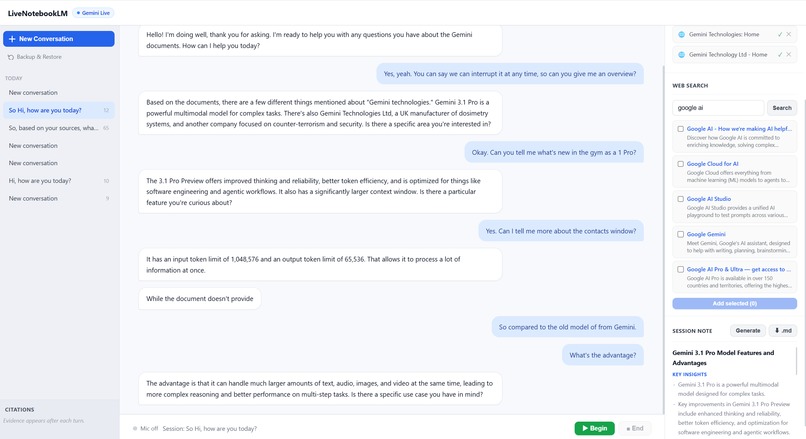
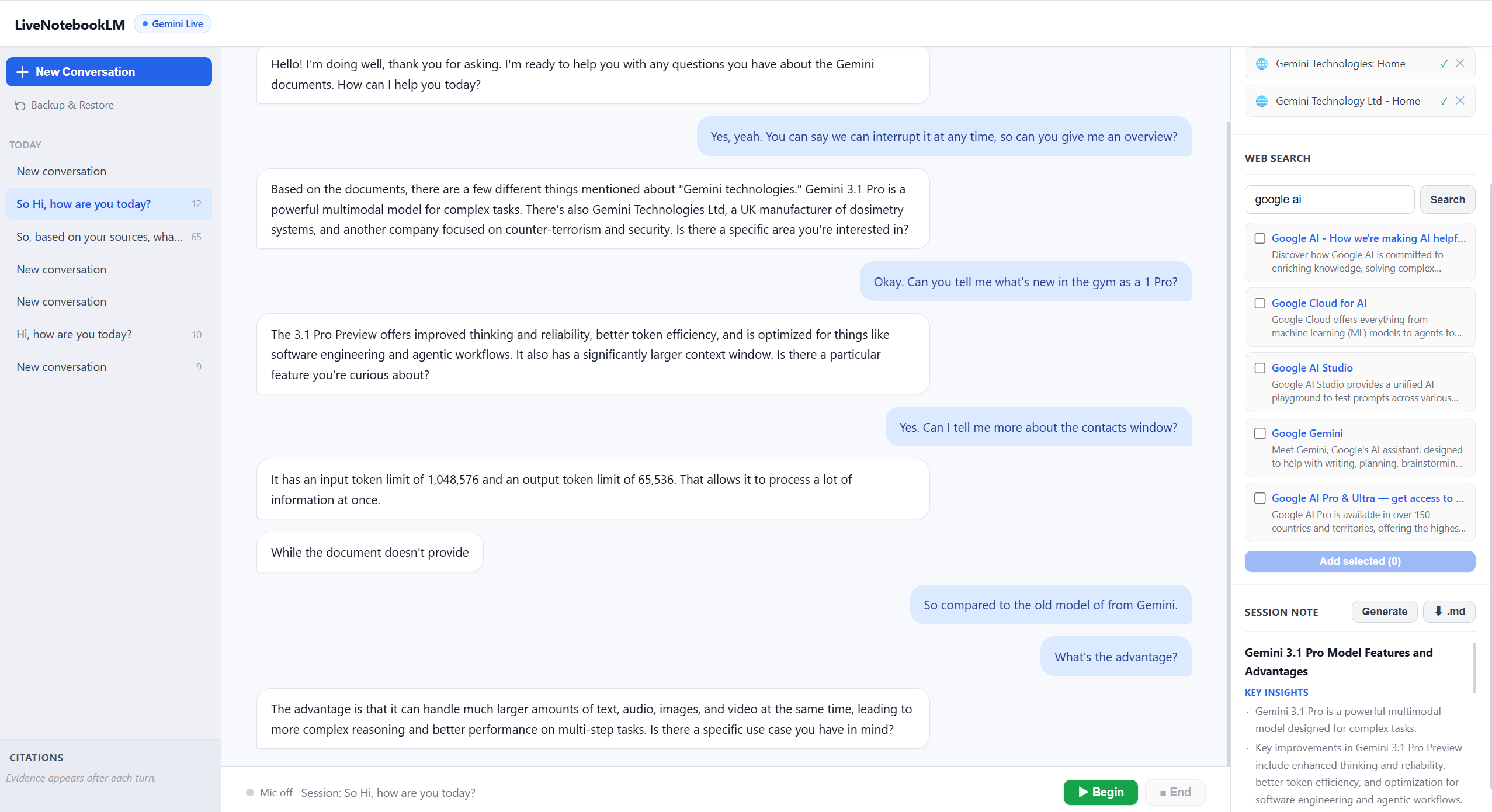
LiveNotebookLM is a real-time voice AI assistant for your documents. You upload files or add web sources, press one button to connect, and speak naturally. The assistant listens, answers, and cites its sources — all in real time.
Core capabilities:
- Continuous voice conversation — speak without pressing anything between turns. Server-side VAD handles speech detection automatically.
- Natural interrupts — start talking while the agent is mid-sentence and it stops immediately, picking up your new question.
- Live transcripts — your words and the agent's words appear on screen word by word as you speak, so you can read back the conversation.
- Document grounding (RAG) — upload PDFs or DOCX files. Every agent response is backed by retrieved chunks from your documents, with exact source names, page numbers, and snippets shown in the citations panel.
- Web sources — search the web directly from the interface and add any result as a conversation source with one click.
- Inline citations — after every agent turn the right panel updates to show exactly which document chunks were retrieved and used to form the answer.
- Session memory — a rolling
MemoryManagertracks recent turns, summarises older ones, and maintains open questions and key topics across the full session. - Session recap — generate a structured written summary of the entire conversation with one click.
- Multi-session sidebar — all your past sessions are listed by their auto-generated title (set from your first question). Switch between them instantly.
- Automatic data backup — every completed turn triggers a non-blocking backup of all session data to Google Cloud Storage. On cold start the container restores all sessions from GCS automatically.
- Backup & Restore UI — a dedicated
/restorepage lets any user manually back up or restore individual cloud sessions with one click.
How we built it
The stack is deliberately minimal in every layer except the AI integration itself.
Frontend — a single HTML/JS page with no framework. Audio capture runs inside an AudioWorklet on the browser's dedicated audio rendering thread, encoding PCM-16 at 16 kHz and transferring chunks to the main thread via zero-copy ArrayBuffer transfer. A single WebSocket carries all traffic in both directions: raw audio chunks up, and JSON events (transcripts, audio, citations, session state) back down.
Backend — FastAPI with Uvicorn on Python 3.11, deployed as a Docker container on Google Cloud Run. The core of the backend is a tight async loop in ws_handlers.py: it receives audio from the browser WebSocket, forwards it to Gemini Live via send_realtime_input(), and simultaneously runs a _receiver_loop that drains Gemini's event stream into an asyncio.Queue. A parallel task reads that queue and forwards each event to the browser, translating Gemini's internal event schema into a simple JSON protocol the frontend understands.
Gemini Live integration — gemini-live-2.5-flash-native-audio on Vertex AI, accessed via google-genai SDK's client.aio.live.connect(). Session setup injects a system instruction containing full document content (for small source sets) or RAG-retrieved context. Audio is streamed continuously; server VAD determines turn boundaries.
RAG pipeline — documents are chunked on upload, embedded with Vertex AI text-embedding-004 (3072-dimensional), and upserted into Pinecone (serverless, cosine metric, per-session namespace). After each turn_complete, the user's transcribed question is embedded and used to query Pinecone for the top-k most relevant chunks. Those chunks are sent to the frontend as citation evidence and used to enrich the next system instruction. If Pinecone is not configured, a local keyword fallback over raw chunk text takes over.
Web search — Google ADK's web_search_agent is used to find web sources on demand. Results are displayed in the right panel and can be added to the session's source library with one click.
Infrastructure — fully provisioned with Terraform: Cloud Run service, Artifact Registry repository, GCS bucket, IAM bindings for public access (allUsers → roles/run.invoker), and the service account with scoped roles. A single deploy.sh script orchestrates terraform apply (placeholder image) → Cloud Build (build and push image) → terraform apply (real image), making redeployment a one-command operation.
Challenges we ran into
Building on a streaming stateful protocol surfaces problems that simply do not exist in REST or chat AI integrations.
1. Two connection close codes with opposite causes. Gemini closes the session with code 1007 (invalid payload) if you send too many silent PCM frames. It closes with code 1006 (abnormal closure) if it receives no data at all for approximately three seconds. The naive fix for 1007 — stop sending audio during silence — immediately triggers 1006. The solution was a sparse keepalive: an energy gate (RMS threshold) skips silent chunks normally, but sends one real audio chunk every three seconds during sustained silence, keeping the connection alive without flooding it with silence.
2. Event ordering within a single Gemini server message.
Gemini sometimes delivers turn_complete and output_audio_transcription in the same server content object. The SDK exposes them in field-iteration order, which is not guaranteed to match semantic order. If turn_complete is emitted to the frontend before the final assistant_transcript, the bubble is finalised before the last words arrive — producing bubbles that show only a single word. The fix: always enqueue assistant_transcript before turn_complete in the backend event pipeline, regardless of how they arrive from Gemini.
3. RAG context injection racing with live audio.
The initial design injected retrieved document context back into Gemini after each turn_complete using send_client_content(). When the user speaks immediately after the agent finishes — or interrupts mid-response — the text injection and the live audio from send_realtime_input() arrive at Gemini simultaneously and compete for the same turn slot. Gemini silently drops the user's audio. The user has to repeat their question. The fix was to remove post-turn context injection entirely. Document context is now injected once via the system instruction at session start and refreshed only between full sessions.
4. Cumulative vs. incremental transcript semantics.
Gemini's input_transcription (user speech ASR) is cumulative — each event contains the full transcript of the turn so far and must replace the previous display. output_audio_transcription (agent speech) is incremental — each event is a new word or phrase that must be appended. Conflating these produced duplicated text ("Hello Hello there there…") in early builds. Splitting into two handlers with opposite update semantics resolved it.
5. AudioWorklet requirement for frame-accurate capture.
The browser's legacy ScriptProcessorNode runs on the main thread. Under heavy DOM updates — live transcript rendering, concurrent audio playback — it drops frames, producing gaps in the audio stream that confuse Gemini's VAD. Moving mic capture to an AudioWorklet runs it on the dedicated audio rendering thread with hardware-scheduled callbacks, eliminating drops entirely.
6. Stateless container and ephemeral filesystem. Cloud Run containers start fresh on every cold start. All session data written to the local filesystem is lost between deployments. Building the GCS backup system early — with a FastAPI lifespan hook that restores all missing sessions from GCS before the first request — was essential. Without it every deployment would silently erase all user data.
Accomplishments that we're proud of
A genuinely interruptible voice AI. Most "voice AI" demos require you to wait for the agent to finish. Interrupting mid-sentence and having the agent immediately stop and listen to the new question feels qualitatively different — more like talking to a person than querying a system.
Real citations during a live voice session. Grounding a real-time voice conversation in specific document chunks, surfacing exact page numbers and snippets in a live citations panel while the agent is still speaking, is technically non-trivial. The asynchronous fire-and-forget RAG pipeline that achieves this without blocking or racing the audio stream is something we are proud of.
A complete data durability story. From local-first storage, to non-blocking GCS backup after every turn, to cold-start auto-restore, to a user-facing restore UI — the system handles ephemeral infrastructure transparently. Users never lose a session, and the solution requires zero manual action from them.
One-command deployable infrastructure.
./deploy.sh your-project-idprovisions all cloud resources via Terraform and deploys the containerised application via Cloud Build in a single step. The system is fully reproducible and does not rely on any pre-existing manual configuration.Clean separation of concerns without over-engineering. The whole application is ~1,400 lines of JavaScript, ~2,000 lines of Python, and no framework dependencies beyond FastAPI. Every component does one thing. The frontend has no build step.
What we learned
Gemini Live is a stateful streaming protocol, not a request-response API. Everything from error handling to turn management to transcript display requires reasoning about ordered event streams, connection state, and async concurrency — none of which matters in a standard chat API integration.
The hardest bugs in real-time systems are race conditions between independently correct components. The RAG injection, the live audio stream, and Gemini's turn model were each individually correct. The bug only appeared at their intersection. Removing the injection point was a non-obvious architectural decision that required understanding all three systems simultaneously.
Silence is not absence — it is a signal that requires its own protocol. The keepalive strategy, the energy gate threshold, and the 3-second timeout all emerged from empirical testing rather than documentation. Gemini's behaviour at the silence boundary is not fully specified and had to be reverse-engineered from close codes.
Transcript accuracy depends on event semantics that are easy to misread. The cumulative-vs-incremental distinction between input_transcription and output_audio_transcription is documented but easy to overlook. Getting it wrong produces a bug (doubled text) that looks like a display logic error rather than an API semantics error, which made it harder to diagnose.
AudioWorklet is not optional for production voice applications. Frame drops from ScriptProcessorNode are imperceptible in isolation but cause real failures in a voice system where every missing frame can confuse VAD or corrupt the audio stream.
Ephemeral infrastructure requires durability to be designed in from the start, not bolted on. Adding GCS backup after building everything else would have required rewriting the session model. Building it as a first-class concern — with a well-defined backup path, a restore hook, and a user-facing restore page — was significantly easier and produced a better result.
What's next for LiveNotebookLM
Per-user authentication and isolated sessions — currently all sessions share a single container filesystem. Adding Google OAuth would let the restore page show only the current user's sessions and enable multi-user deployments without data leaking between users.
Streaming citations into the voice response — instead of surfacing citations only in the right panel after each turn, the agent could read source titles aloud ("according to page 12 of your paper…"), making the grounding audible as well as visible.
Smarter RAG with re-ranking — add a cross-encoder re-ranking step between Pinecone retrieval and context injection to improve precision on large document sets with many overlapping chunks.
Collaborative sessions — allow multiple users to join the same voice session simultaneously, each with their own mic, speaking with a shared agent over a shared document set. Useful for team research reviews and reading groups.
Mobile web support — the AudioWorklet pipeline and WebSocket protocol are already mobile-compatible. The UI needs responsive layout and touch-friendly controls for phone and tablet use.
Exportable session notes — export the session recap and citation list as a structured PDF or Markdown document, making it easy to turn a voice research session into a written artefact.
Expanded source types — support YouTube video transcripts, audio files, and direct URL scraping as source types alongside PDFs and web search snippets.
Built With
- adk
- fastapi
- gemini
- google-cloud
- pinecone
- python

Log in or sign up for Devpost to join the conversation.