-
-
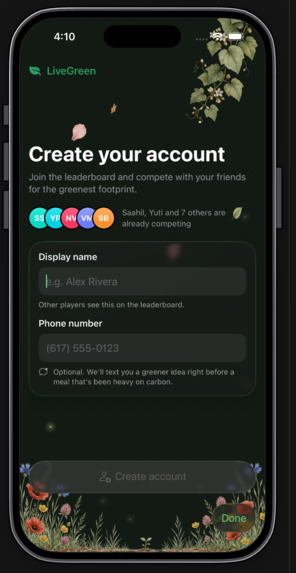
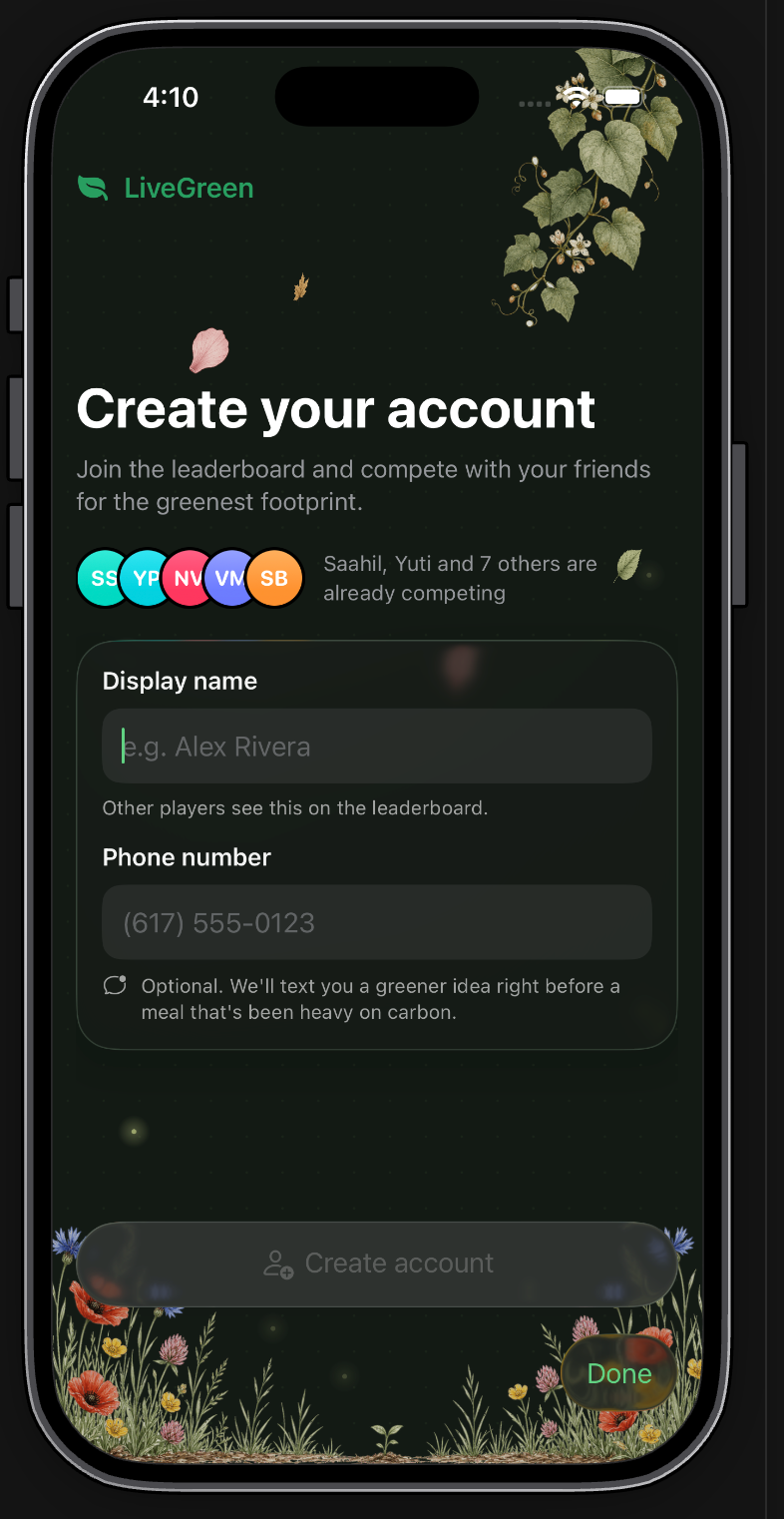
Create an account
-
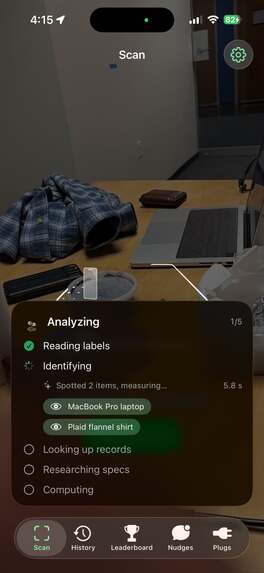
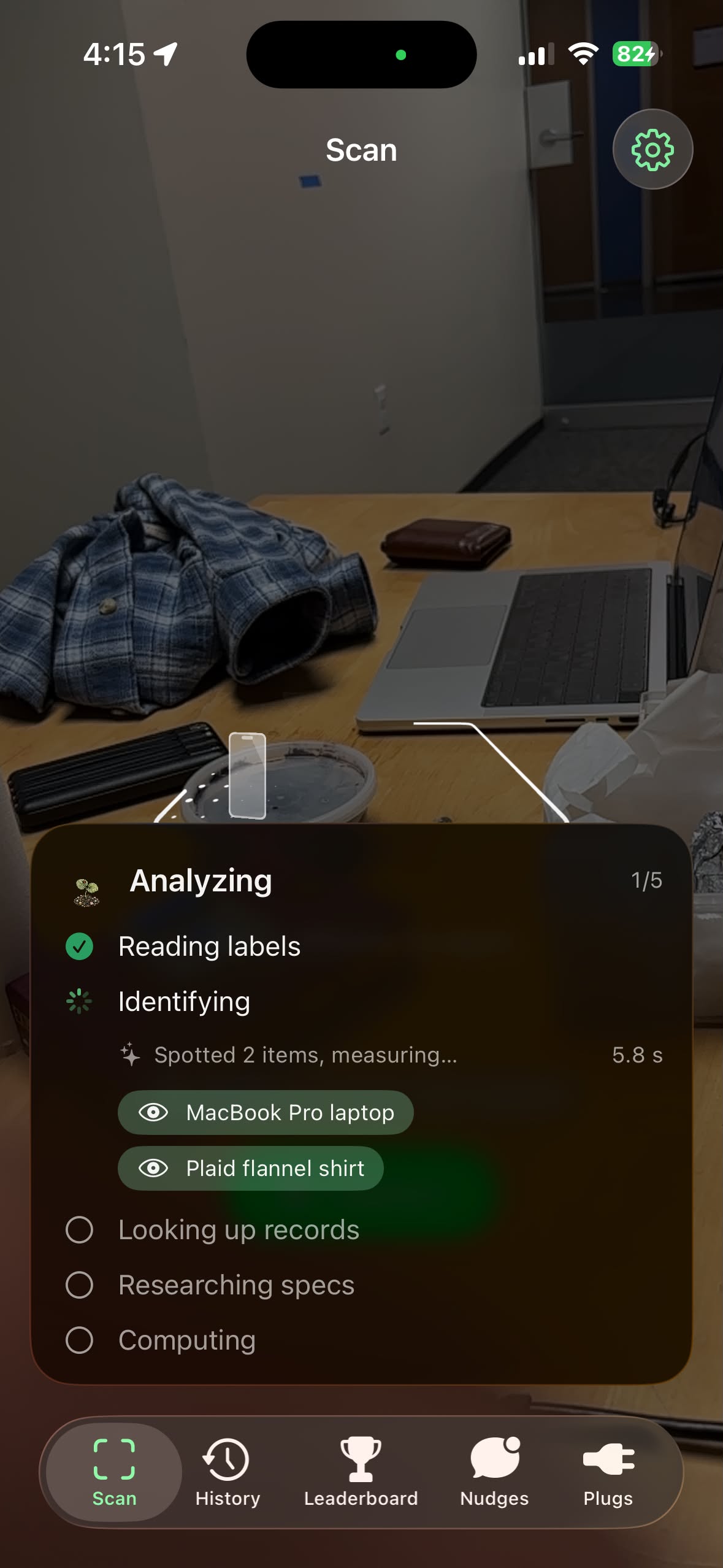
Scan your surroundings
-
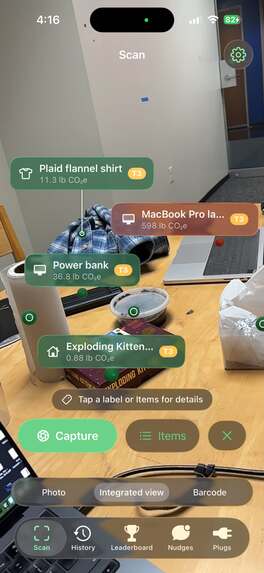
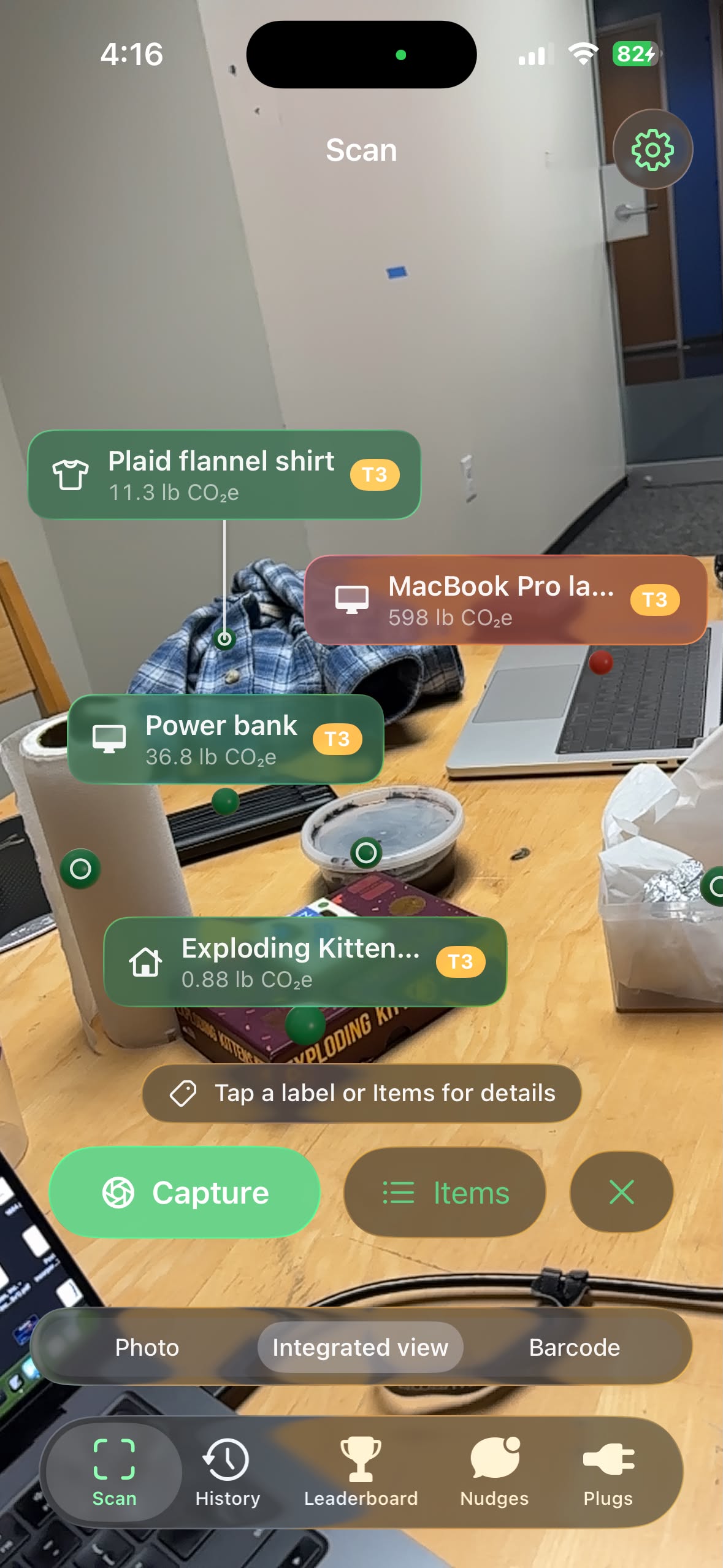
Identifies different objects in AR "integrated" view
-
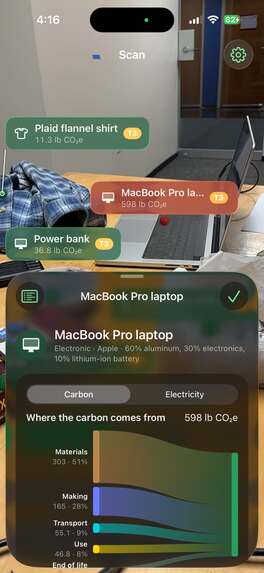
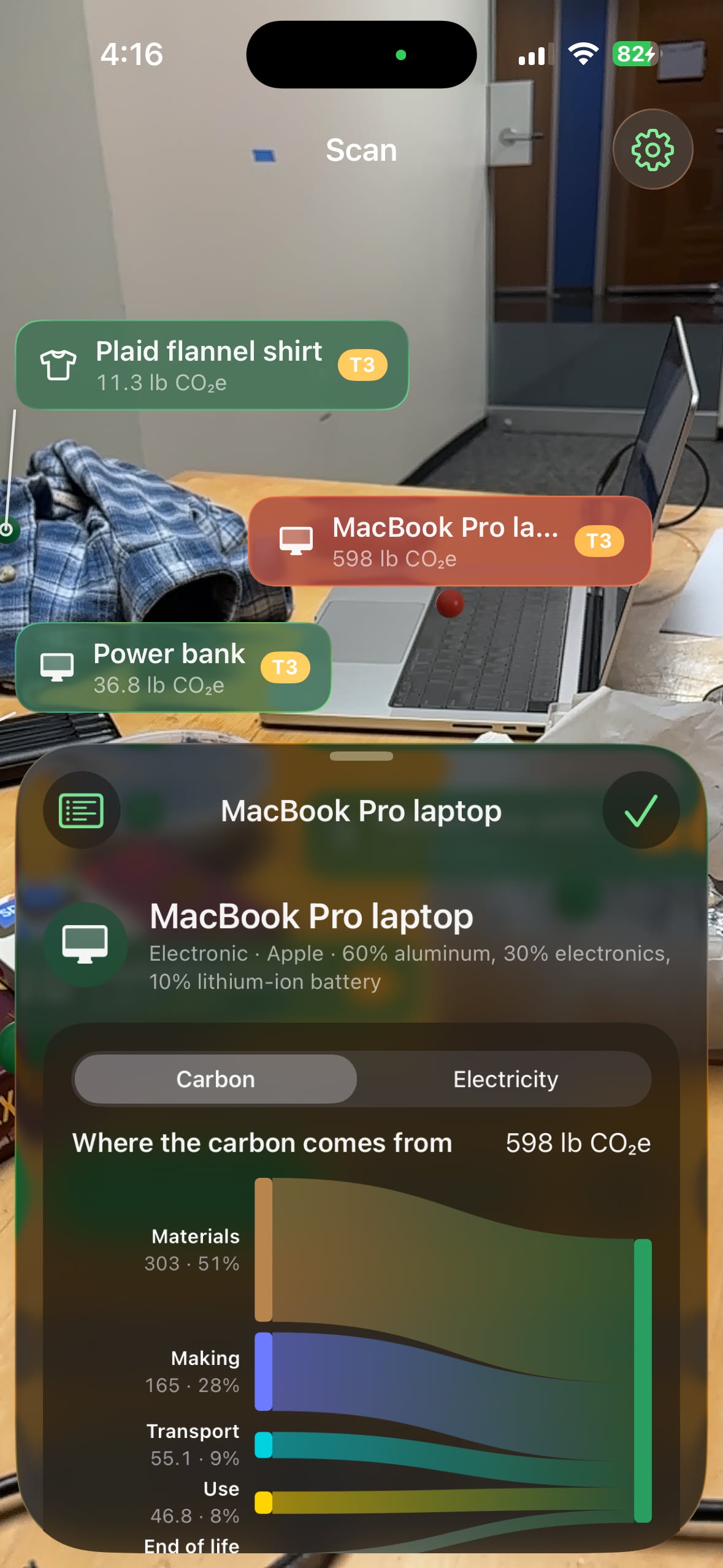
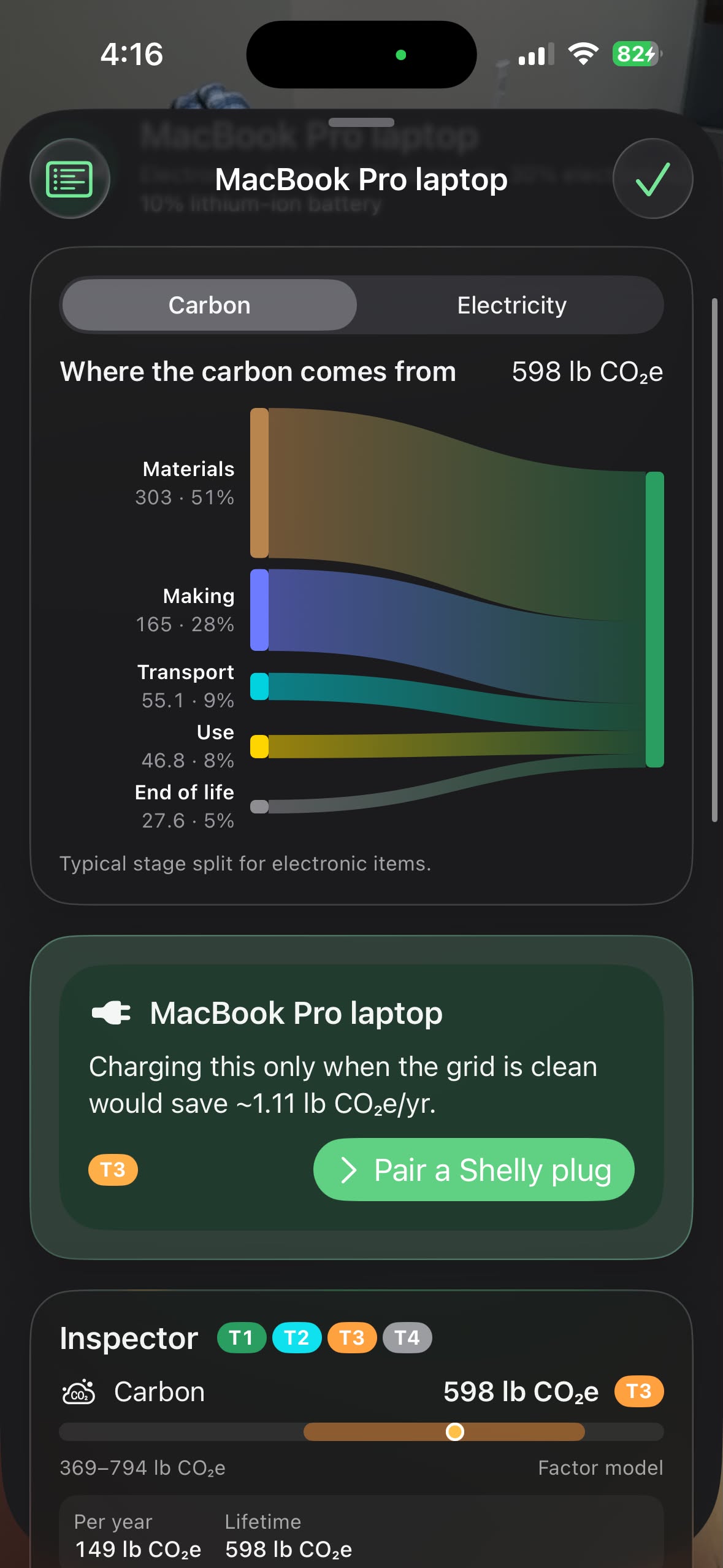
Click different items to see their environmental costs
-
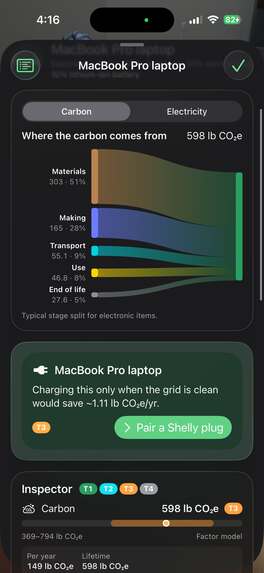
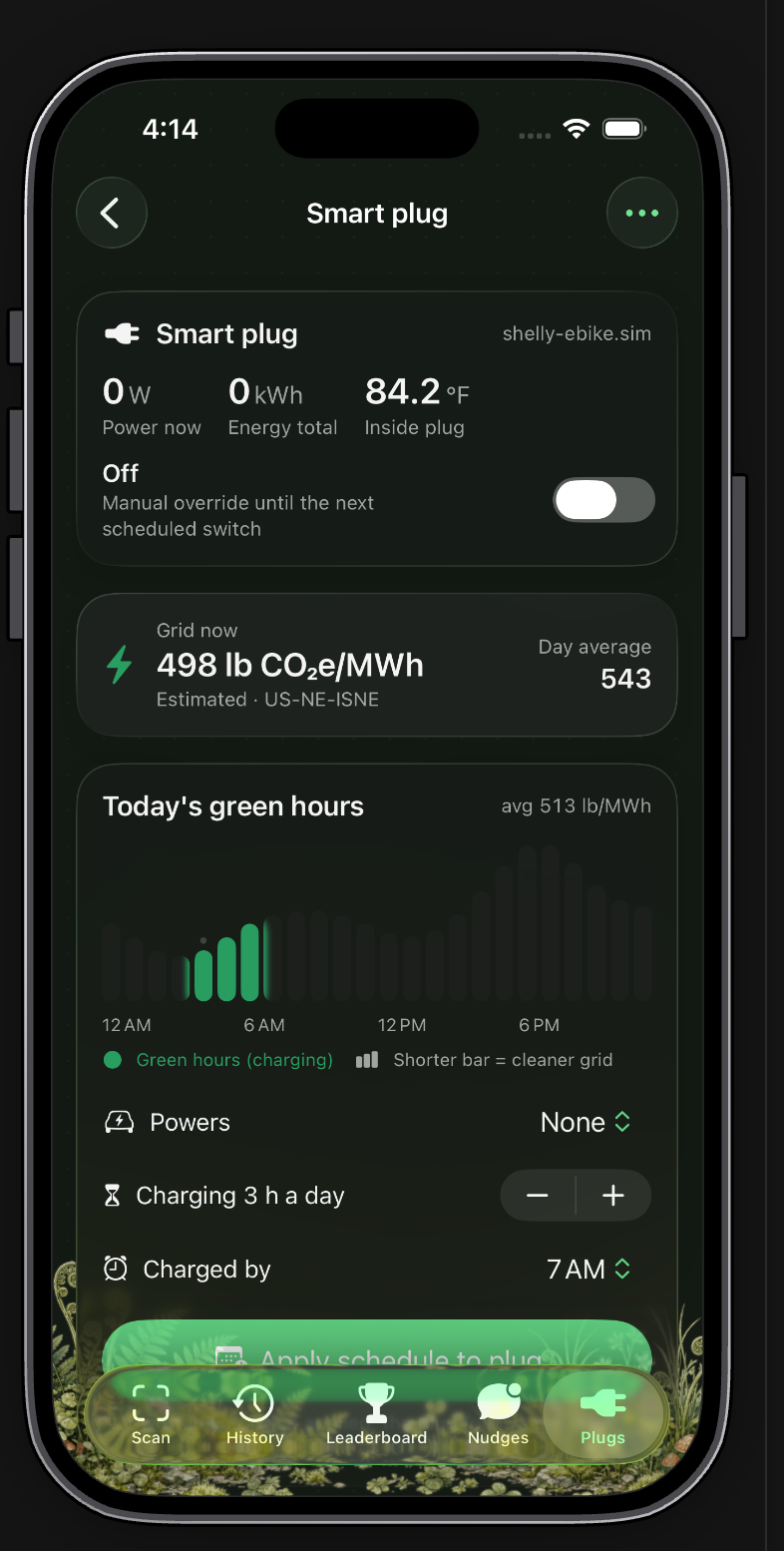
For a computer or similar device needing charging, see the option to connect smart plugs for smart charging
-
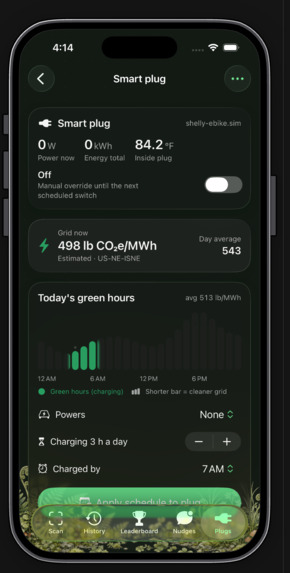
Smart-plug charging data plan
-
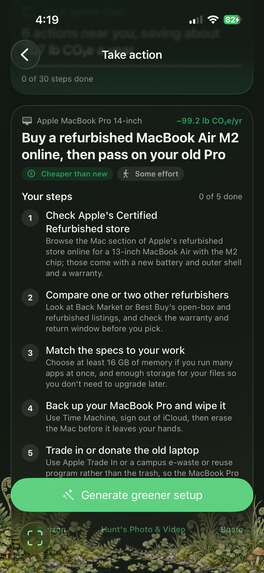
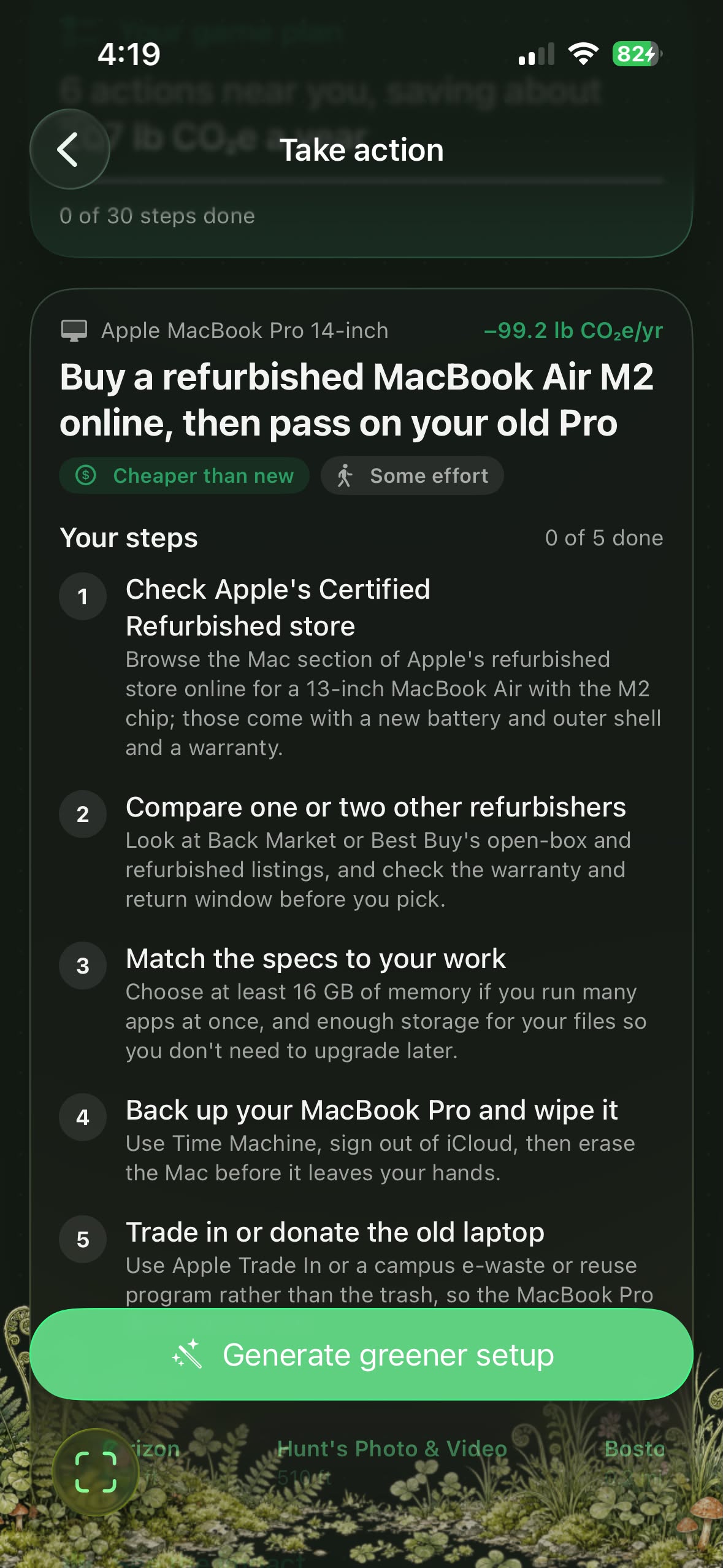
Receive specific plans for greener alternatives
-
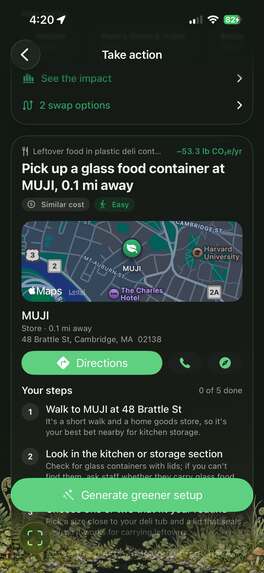
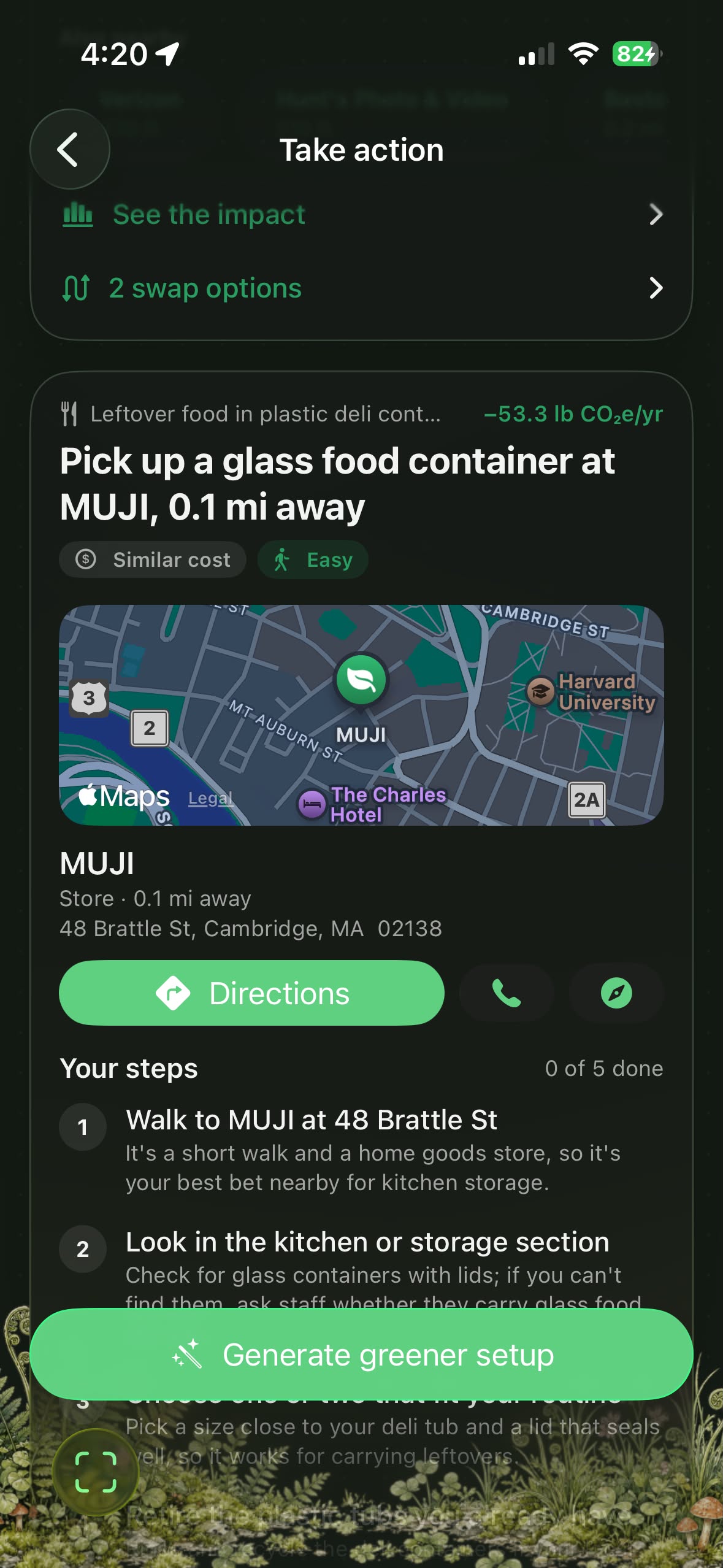
Receive location-specific advice for greener alternatives
Inspiration
Around 70% of people want to live more sustainably, and though environmental strategies focus on recycling help, people are underrating smaller choices that add up fast. These choices, such as leaving a plug in, or upgrading your phone every 3 years instead of 5, can feel small in the moment, but over the years, they compound to outweigh most of what people do to be green.
Part of the problem is that the information is scattered. The tools to enable individuals to make more environmentally-friendly choices are isolated by category, so there’s one app for groceries, an energy-manager for appliances, and a multitude of calculators using separate metrics. LiveGreen unifies all this noise into an all-in-one sustainability tracker where you can point your phone at anything, be it a meal, an appliance, a device, or a piece of clothing, and you can understand its environmental cost and potential alternatives.
What it does
Stage 1: Understanding your current state
LiveGreen is the one place anyone can point their phone at anything to get an answer about its environmental cost and how to make it more sustainable.
Pipeline: Understand your Current State -> Pull Data -> Visualize Impact -> See Greener Alternatives -> Enable User Action -> Enable User Motivation
A short, illustrated onboarding survey builds your starting profile. It asks where you live (by ZIP code, which sets your local power grid and regional averages), your household size, how many meat and dairy meals you eat each week, how you get around and how far, your home's type, size and heating, and how many new clothes you buy each year.
There are three ways to scan an item:
- Take a photo: best for a meal or a single item
- Scan a barcode: best for individual groceries or packaged products
- Use the Integrated view: best for device setups or larger spaces, with labels pinned to each real object in 3D
Stage 2: Pull data
For each item, LiveGreen looks for data in order of precision and labels every number based on where it came from.
| Tier | What it is | Source | Example |
|---|---|---|---|
| Tier 1 | Exact record | Open Food Facts, ENERGY STAR, published manufacturer carbon reports | Scanning a cereal box's barcode |
| Tier 2 | Cited spec sheet | Web research; a number is kept only if it links to the page it came from | A laptop's power use from its spec page |
| Tier 3 | Standard formula | Published research tables × the item's size and materials | A cotton T-shirt by weight |
| Tier 4 | Ballpark estimate | Based on similar products, shown with a wide range | Used only when nothing better exists |
When an item lands at Tier 4, LiveGreen asks you instead of guessing. It asks up to three quick multiple-choice questions, like "What's this made of?", and only when the answer would actually improve the numbers. You can always skip.
To promote education and transparency, every number shows its source. Tap any value to see its range, its tier and the link it came from.
Stage 3: Visualize impact
There are 12 metrics that can be shown for any item:
| Metric | Unit | What it means |
|---|---|---|
| Carbon | kg CO₂e | How much it heats the planet |
| Water | liters | Fresh water used to make it |
| Land | m² per year | Land needed to grow or produce it |
| Water pollution | g PO₄e | Fertilizer runoff that feeds algae blooms |
| Power while on | watts | Electricity it draws in use |
| Standby power | watts | Electricity it draws while "off" |
| Yearly electricity | kWh/year | Total electricity over a year |
| Lifespan | years | How long it typically lasts |
| Repairability | 0–10 | How easy it is to fix |
| Plastic | grams | Plastic in the item and its packaging |
| Recyclable | % | How much can realistically be recycled |
| Decomposition time | years | How long it lasts once thrown away |
LiveGreen only shows the metrics that apply to each kind of item:
| Category | Metrics shown |
|---|---|
| Food | Carbon, water, land, water pollution, plastic, recyclable, decomposition |
| Electronics | Carbon, power on, standby, yearly electricity, lifespan, repairability, plastic, recyclable |
| Clothing | Carbon, water, land, water pollution, lifespan, plastic, recyclable, decomposition |
| Packaging | Carbon, water, plastic, recyclable, decomposition |
| Household | Carbon, water, water pollution, lifespan, plastic, recyclable, decomposition |
| Personal care | Carbon, water, water pollution, plastic, recyclable, decomposition |
Everything is shown per year, so a laptop and a lunch can be compared fairly. A flow chart splits each item's footprint into production, shipping, use and disposal, so you can see where its impact really comes from.
Stage 4: See greener alternatives
For each item, LiveGreen suggests specific swaps and runs them through the same data steps, so the comparison is fair.
Green Score: a swap is only suggested if it's at least 2% greener on average across every measurement, and nothing gets more than 40% worse. Without this rule, a swap could cut carbon while quietly doubling water or plastic, just moving the harm somewhere else. The 40% limit leaves room for small, honest trade-offs, but rules out swaps that shift a real cost onto another part of the environment.
LiveGreen then edits your photo to show your setup with the swaps made, with a before/after slider. Climate change often feels distant and abstract, and research shows people are more concerned and more willing to act when it feels close and personal.
Stage 5: User takes action
Clean-energy charging. Pair a Shelly smart plug, and LiveGreen schedules chargers like e-bikes, laptops and scooters to run during the cleanest hours on your local grid. The schedule lives on the plug, so it keeps working with the app closed.
Text LiveGreen. Send a photo over iMessage through Photon 2.0 and get the breakdown and a greener swap back, no app needed.
Scanned purchases. Using Capital One's Nessie API, LiveGreen estimates the footprint of what you buy and flags the purchases most worth swapping.
Stage 6: Stay motivated
Using your onboarding survey, LiveGreen estimates your yearly footprint and updates it with every scan. A leaderboard ranks you on carbon, electricity, water and land against peers modeled on real averages for your region.
How we built it
LiveGreen is a native iPhone app built in Swift and SwiftUI on iOS 26, using Apple's Liquid Glass design. Scans are stored on the phone with SwiftData. The Integrated view uses ARKit to pin labels to real objects in 3D, and Apple's Vision framework reads barcodes, model numbers and wattage labels directly on the phone before anything is sent to the AI.
Claude (Sonnet 5.5) identifies the items in each photo, suggests greener swaps, and researches their environmental costs. This information comes from real data sources, tried in order: Open Food Facts and ENERGY STAR for exact records, published manufacturer carbon reports, cited spec sheets, and finally standard formulas built from published research tables. The application can also resort to asking the user for more information.
Grok's image-editing model creates the greener version of the Live grid data from the U.S. Energy Information Administration tells us when the local grid is cleanest, and the app writes charging schedules directly onto a Shelly smart plug over your home Wi-Fi. All of the math and data lookups live in a separate Swift package with its own automated tests, so we could change the app's screens quickly without breaking the numbers underneath.
Challenges we ran into
*Verifying numbers. * Language models often hallucinate, so we had to limit the AI to identifying items and building an order of actual data sources for specific numbers, ensuring we only present numbers linked to actual pages.
Finding universal unit. A sandwich and a laptop don't share a natural unit. We went through several approaches before landing on impact per year of normal use, with one-time costs kept separate so they aren't counted twice.
Loading period. Looking up spec sheets for multiple products in the integrated web can take 15 to 30 seconds. Instead of a blank loading screen, LiveGreen shows its progress in real time as it reads labels, identifies items and looks up records, and it parallelly prepares swaps in the background so they're ready by the time a user asks.
Testing. An app that works on any object can't be tested with a short checklist. We went outside and around the venue scanning random things, from snacks and water bottles to laptops, bikes and cars, to find bugs.
As the team came from very technically diverse backgrounds, they were able to use their combined experience to solve the above-mentioned technical bugs and improvements.
Accomplishments that we're proud of
Most sustainability apps stop at advice, but LiveGreen takes action on its own:
It gives specific, actionable plans. Every swap first has to pass the Green Score, so it's genuinely greener across the board and doesn't just move the harm somewhere else. Then LiveGreen turns the swap you pick into a short, concrete plan built around a real place near you: where to go, what to ask for, and what to do with the old item. Instead of "eat less beef," you get "Get a lentil burger at Clover Food Lab, 0.3 mi away."
A smart plug that handles charging on its own. Once a Shelly plug is paired, LiveGreen writes a charging schedule directly onto the plug, timed to the cleanest hours on your local grid. It keeps working even when your phone is closed or out of range, with no effort from you.
Noticing your unsustainable habits. LiveGreen looks for trends across your scans, like a lunch that keeps coming out high in carbon. When it spots one, it texts you over iMessage around the time you usually eat, suggesting a similar, more sustainable option nearby. If you're grabbing fast food for lunch every day, LiveGreen can point you to a similarly priced, greener spot before you've already ordered.
What we learned
This hackathon was our first time using Photon and ARKit. With Photon, we learned to build a messaging agent that people invite in with a single text, rather than one that messages them uninvited. With ARKit, we learned to pin labels to real objects in 3D, even when the AI takes a few seconds to respond and the phone has already moved.
We learned a lot about what collaboration looks like when working on the same app real-time. After every round of scanning real objects, we wrote down each problem as a numbered issue, grouped them by area (food, devices, swaps, units, the results screen), and gave each teammate their own area to fix on a separate branch. We also kept one shared notes file updated after every merge, recording what we changed and why, so anyone could pick up someone else's part at 3 AM without having to ask.
What's next for LiveGreen: the all-in-one sustainability tracker
To get a more constant visual stream, we would want to bring LiveGreen to smart glasses. Instead of pulling out your phone, LiveGreen would see what you see as you shop, cook or order, and quietly flag a greener option at the exact moment you're choosing. This way, the app moves from something you open to something that's simply there when it matters.
We also want the smart plug to grow into a full home energy assistant, running washers, dishwashers and car chargers during the cleanest hours on the grid, not just phone and laptop chargers.
Built With
- arkit
- asus
- claude
- cloudkit
- grok
- photon


Log in or sign up for Devpost to join the conversation.