-
-
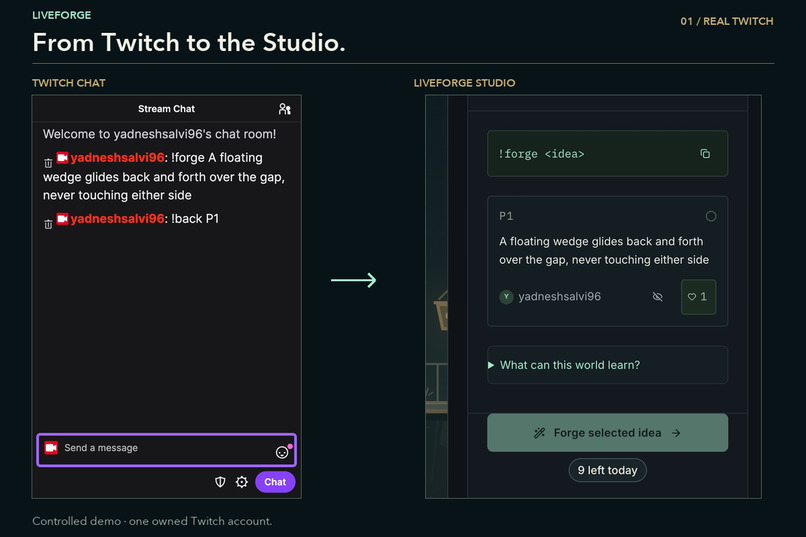
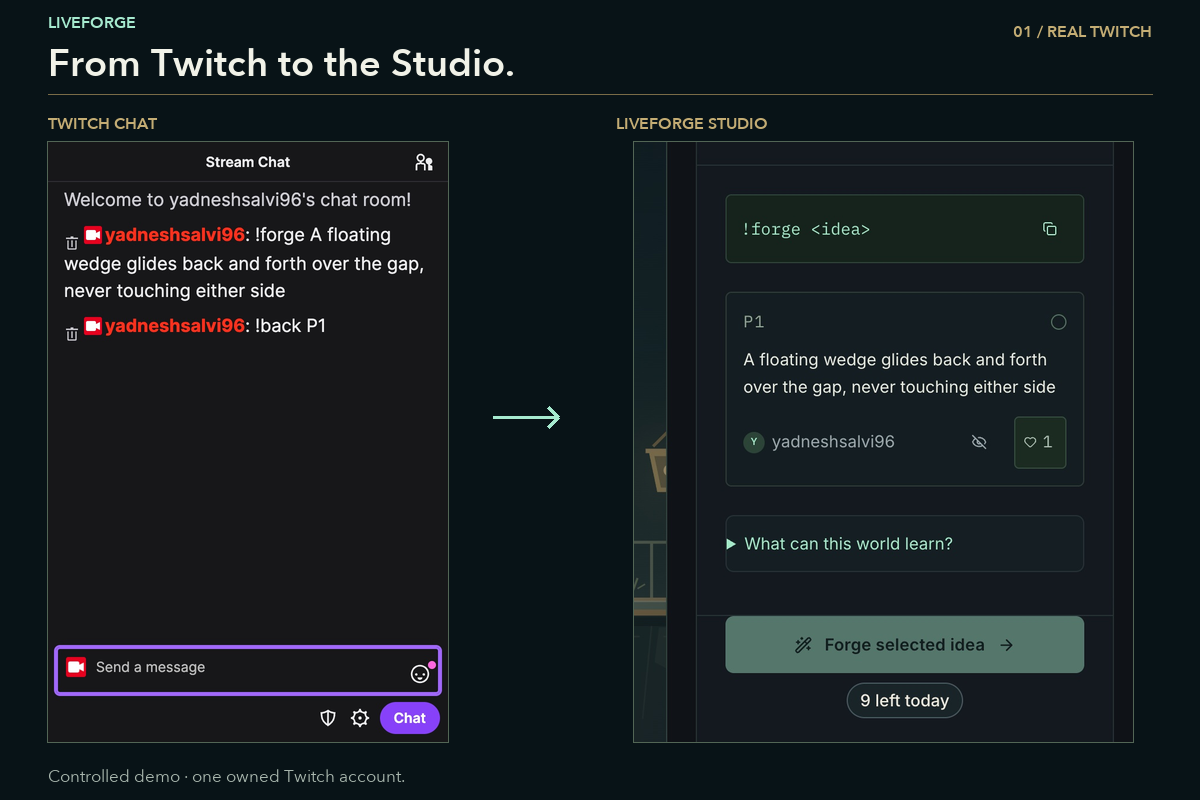
A real Twitch proposal and support command arrive beside the matching Studio card, with author credit and a support count.
-
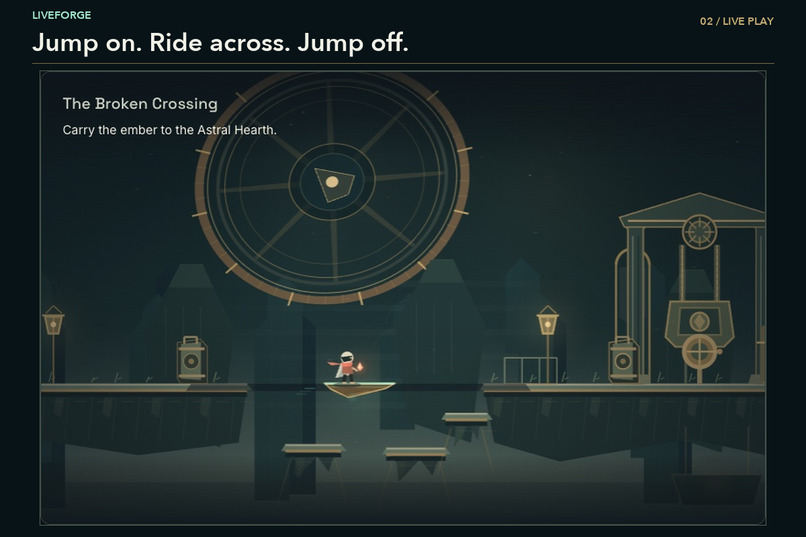
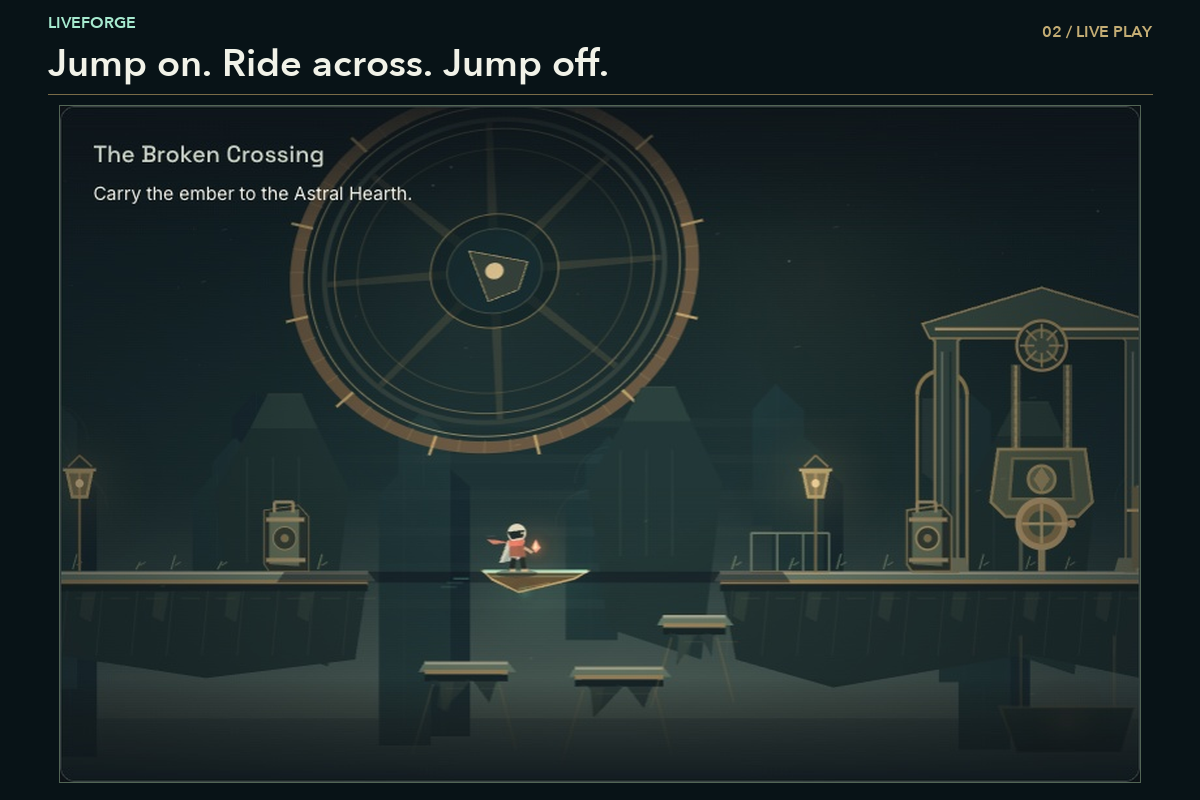
The approved rule creates a moving wedge. The player jumps on, rides across, then jumps off to the far ledge.
-
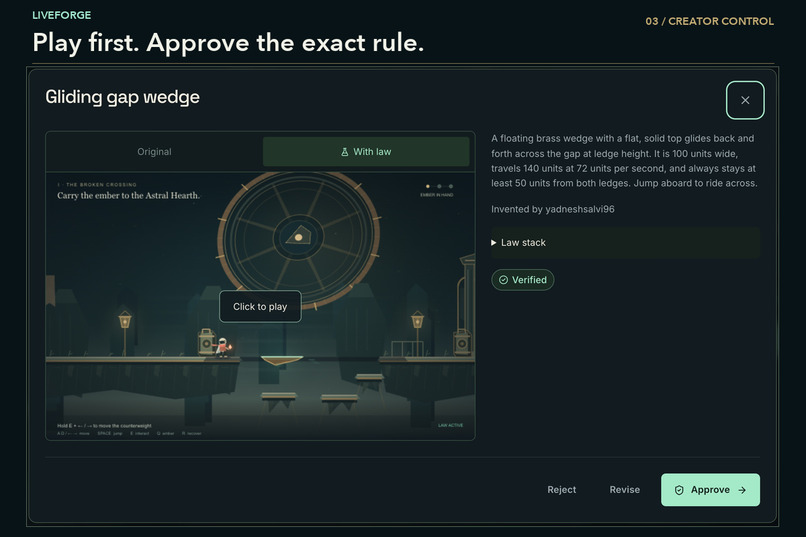
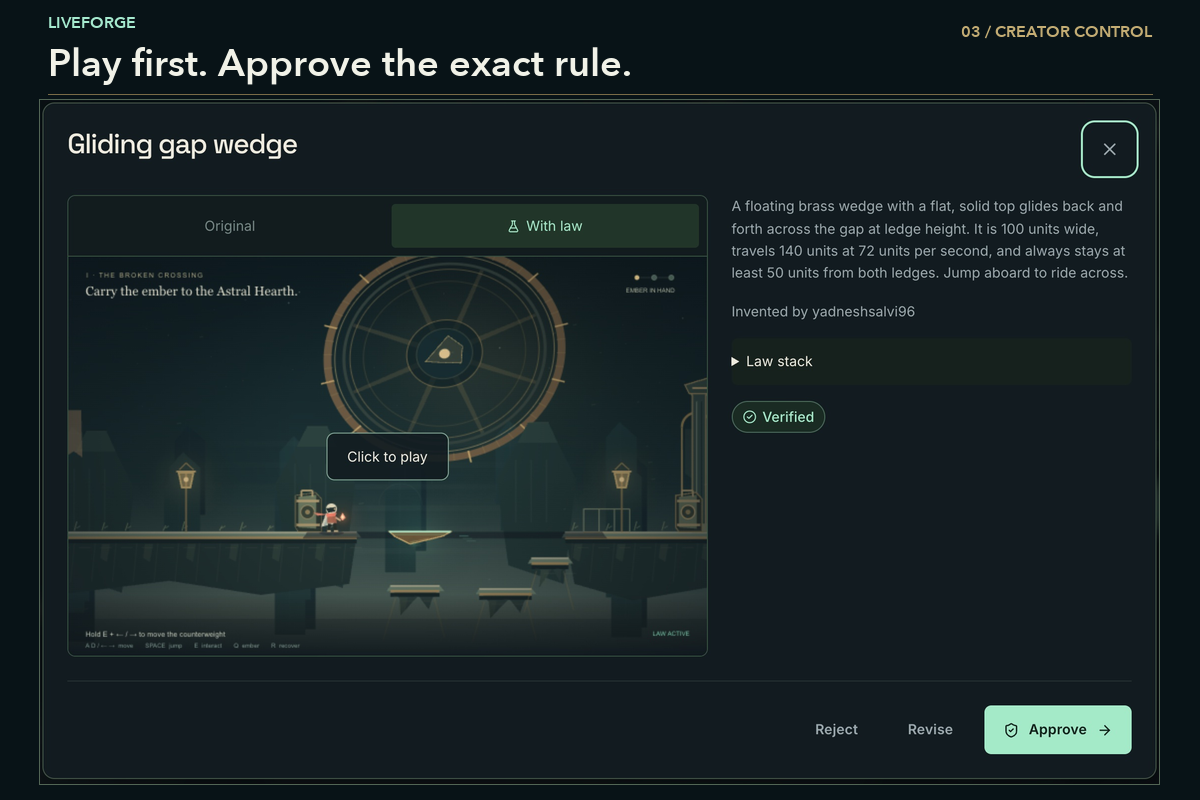
A playable Preview lets the streamer test the change before approving that exact source version.
-
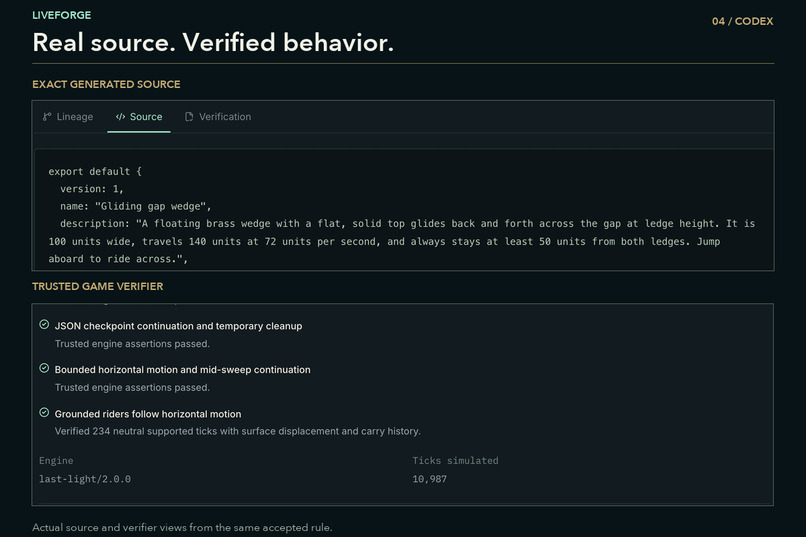
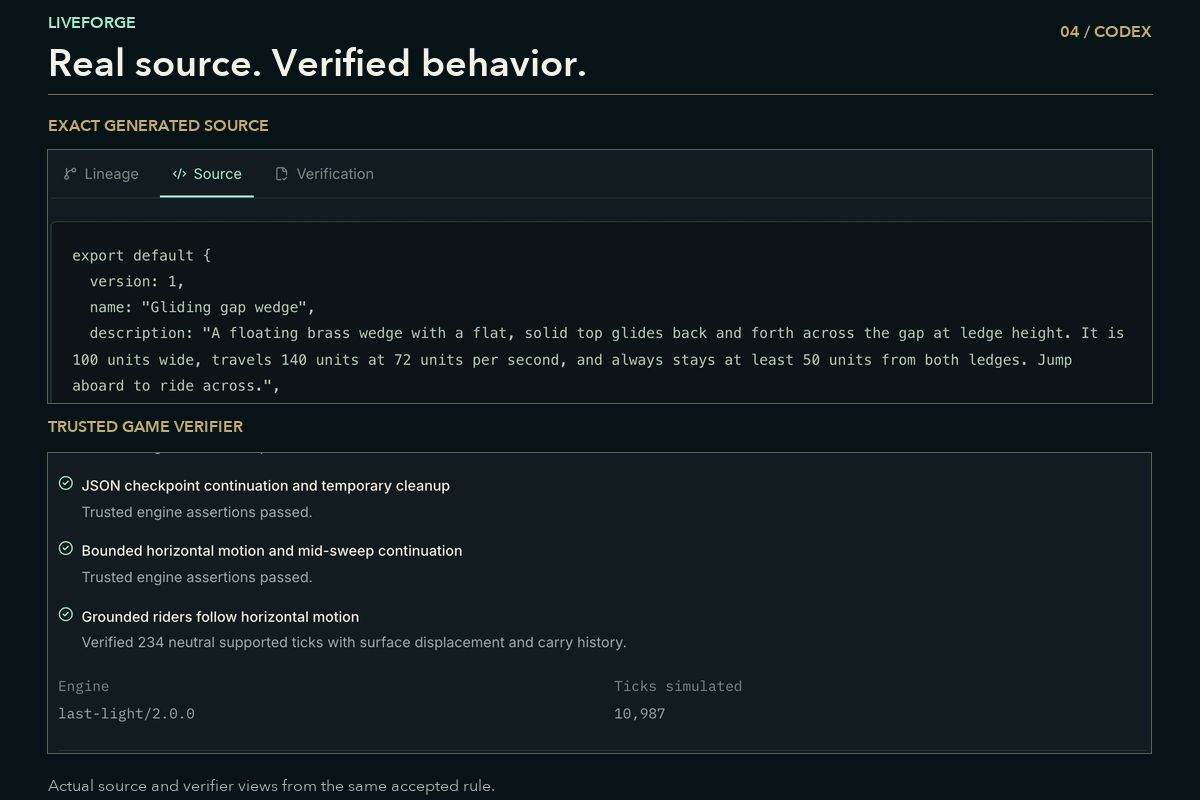
Codex writes the rule source. The trusted game verifier checks bounded motion, grounded riders and checkpoint recovery.
Inspiration
The moment I wanted to build was simple: a viewer watches the streamer pull off a difficult jump and gets to say, "I made that happen."
In LIVEFORGE, viewers invent mechanics for an adventure while it is being played. Codex turns their ideas into game rules. The streamer tries them, shapes them, and decides what enters the live world.
In the demo, the request is: "A floating wedge glides back and forth over the gap, never touching either side." That sentence travels from real Twitch chat into the Studio. After generation and a host-requested revision, the courier jumps aboard, rides the moving wedge, and leaps to the far ledge. The viewer's words have become something the player can stand on.
What it does
The game is The Last Light, an original adventure through an airborne foundry. You carry an ember across broken machinery to relight the Astral Hearth. There is a complete playable route before chat changes anything.
During a Twitch show:
- Viewers send
!forge <idea>to propose a mechanic and!back P1to support a proposal. - The streamer chooses an idea. Codex writes a rule using the game's supported physics, events, objects, and surfaces.
- After LIVEFORGE checks the candidate, the streamer opens a playable Preview while the live world pauses. The streamer can request a revision.
- The streamer approves that exact version and activates it while grounded, saving that moment as the activation checkpoint.
- Restore previous law brings back the previous rules and activation checkpoint when the show needs a reset.
Ideas can change gravity, grant an extra air jump, make an ember bounce, or create a temporary platform. Codex combines the game's building blocks into new rules. The engine has a general surface-motion capability; Codex chooses the wedge's placement, travel, and timing.
Up to three laws can run together after the combination is checked and reviewed. A private Law library saves approved source for reuse. Viewer credit stays attached to the idea and its law.
Built for a live audience
The streamer keeps control of selection, pacing, approval, and restoration. Moderators can hide or reject proposals, blocked terms can filter intake, and the host can close submissions. Chat replies are optional and off by default.
Deep charcoal, warm brass, and mint light carry the foundry's visual identity through the Studio. The world stays central, while proposal cards and clear progress states explain what is happening. A transparent browser overlay carries community ideas and laws into a stream layout; a separate projector provides a clean game view.
Viewers participate through familiar Twitch chat, without installing an extension or learning to code. I see this supporting community challenge nights and recurring adventures with rules that a channel can remember and reuse.
How I built it with Codex
I used Codex throughout implementation: the game engine, bounded rule compiler, Twitch integration, persistence, Studio interface, tests, and review fixes. I split the work between focused implementation threads and brought the pieces together through browser playtests and regression checks.
A quick press of E could disappear between simulation ticks. Codex helped add an input latch that holds the press until the game consumes it, plus a regression test proving the Counterweight Hall crank turns exactly once. A mechanic can be clever and still feel broken if a player's input disappears.
Next.js, React, and TypeScript power the Studio. The game runs in a Web Worker and renders with Canvas 2D. Twitch OAuth connects the host, EventSub delivers chat, and the Helix API handles optional replies. Vercel hosts the app; Neon Postgres stores shows, approvals, and checkpoints.
Inside the product, the official Codex SDK generates each candidate in an isolated Vercel Sandbox. It writes a structured description of a rule, which LIVEFORGE checks and interprets within fixed limits. The game never executes arbitrary generated JavaScript. Approval is tied to the exact rule and other active rules the streamer tested.
Challenges and what I learned
A moving platform has to carry the player, props, and a dropped ember consistently, and still restore correctly from a checkpoint. I made its position follow the simulation tick, so Preview and live play use the same movement and collision rules.
The wedge also taught me that passing checks is only part of the job. The first verified candidate left too little clearance and sat at the wrong height. I used Revise to ask for wider gaps and ledge-height placement. The final source remained Codex-generated. Playable review is how the streamer checks whether a technically valid rule makes a good moment.
What I am proud of
The full loop works in the deployed app: real chat, generated source, revision, playable preview, exact approval, live movement, and restoration. The demo shows Twitch and the Studio together so the connection is visible.
The final moving-surface release passed 513 tests across 41 files, type checking, formatting, and a production build. The public repository includes generated artifacts, recorded checks, development evidence, and setup instructions. Integration testing used two real accounts I control; independent community playtesting is next.
Try it
Live app · Public demo video · Open-source repository · Field guide
Open LIVEFORGE, enter Studio, choose Enter practice, then Load sample law. This loads a clearly labeled, previously Codex-generated shadow mechanic with no sign-in or API key. Open Preview, test it, approve it, activate it, and restore the previous law. Use A/D to move, Space to jump, E to interact, and Q to drop or pick up the ember. Touch controls are available on mobile.
For fresh ideas from real chat, create a New Twitch show, connect Twitch, and choose Listen to chat. Fresh generation requires Twitch authorization and available daily quota. The field guide explains the controls and show setup.
What's next
Next I want to run sessions with independent streamers, expand the rule language around the ideas they try, and build more adventures for a channel's creations to live in.
Built With
- html5
- neon
- next.js
- oauth2
- openai-codex
- postgresql
- react
- twitch
- twitch-eventsub
- typescript
- vercel
- vercel-sandbox
- web-workers

Log in or sign up for Devpost to join the conversation.