-
-
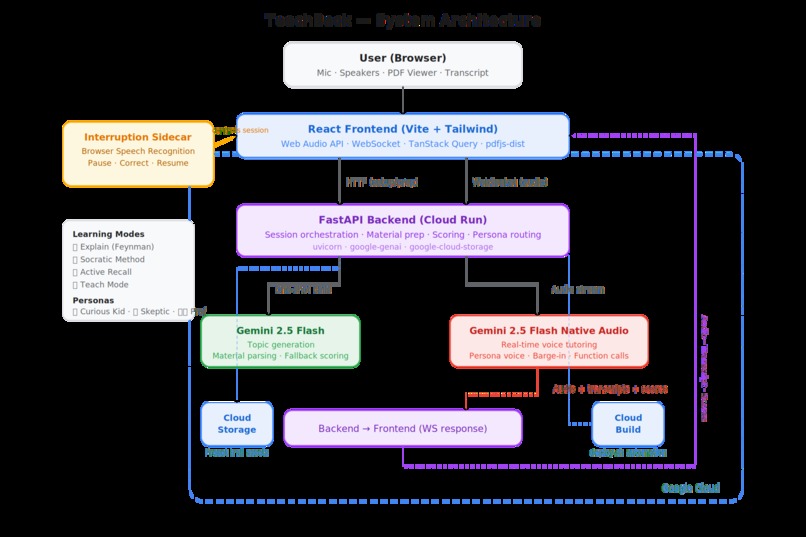
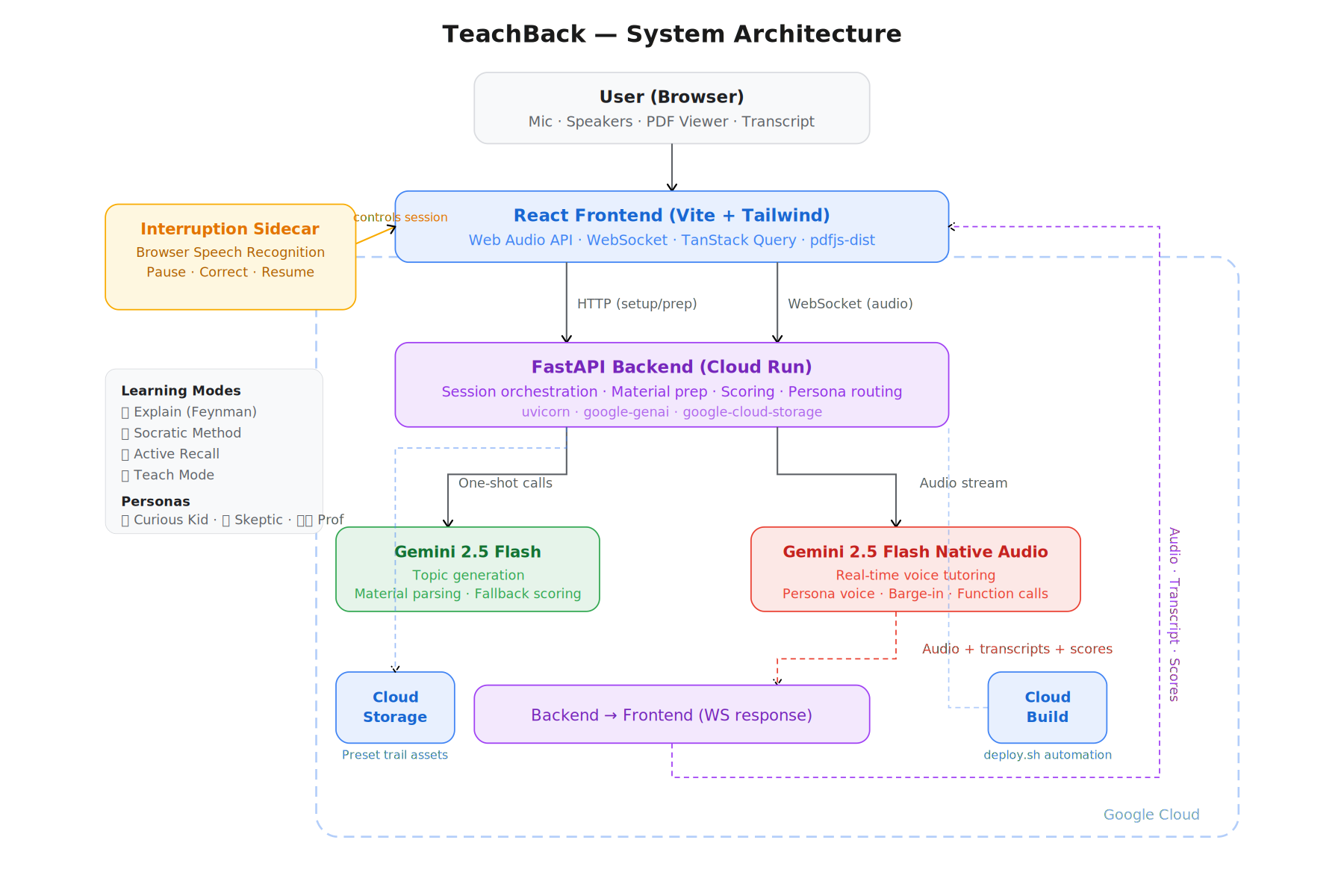
Architecture diagram TeachBack
Inspiration
I went into this hackathon planning to build a real-time language tutor. Preset scenarios, pronunciation scoring with Azure Speech, the whole thing. Then I found out Google had already shipped almost exactly that app as a starter resource for this challenge. I looked at whether pronunciation assessment alone could make mine feel different enough, and it couldn't.
At the same time I was building a separate study helper project on the side. Halfway through pivoting the language tutor, it clicked: the real-time voice architecture I'd already built was a perfect fit for something I actually cared about more. A learning companion that doesn't just talk at you, but makes you think, explain, and defend what you know. That's how TeachBack happened.
What it does
TeachBack lets a user choose a preset learning trail, select a learning mode and persona, and begin a live voice conversation with an AI tutor grounded in real study material.
Four learning modes, each mapped to a proven technique:
- Explain Mode uses the Feynman Technique. You explain, the AI finds gaps.
- Socratic Mode guides you to answers through questions. The AI never tells you directly.
- Recall Mode is conversational quizzing. Tests what you actually retained, not what you think you remember.
- Teach Mode flips it. The AI teaches from the source material, pausing to check if you're following.
Three personas, each with a distinct voice and conversational style so switching between them genuinely changes the feel of the session:
- Curious Kid asks "but why?" until you simplify.
- Skeptical Peer challenges claims and probes edge cases.
- Tough Professor demands precision and won't let you hand-wave.
Not every mode and persona combination works equally well yet. Explain plus Curious Kid is a natural fit because the constant "why?" questions are exactly what the Feynman technique calls for. Socratic plus Tough Professor works well because both push for rigour. But some pairings like Teach Mode with the Tough Professor create tension where the persona's demanding style fights against the mode's goal of patient instruction. With more time I'd like to sit down and properly tune how each persona complements each mode so that every combination genuinely enhances the learning experience rather than just being a different voice on the same prompt.
The booth includes an expandable material panel and an embedded PDF viewer so you can always see what the AI is working from. Sessions end with structured scoring across accuracy, completeness, clarity, and depth.
The feature I'm most excited about is the interruption sidecar. When you need clarification mid-lesson, the main session pauses, a focused correction window takes over, and the resolved context feeds back into the conversation so the lesson picks up where it left off. It's a prototype of something I think goes much further: multiple agents that can pop into a live session, interact with you and the main tutor, and hand control back. If I had more time I'd go deeper down that path.
How I built it
The frontend is React with Vite and Tailwind CSS. The browser captures mic audio via the Web Audio API and streams it over WebSocket to a Python FastAPI backend. The backend uses the Google GenAI SDK (google-genai) throughout, with real-time voice sessions running on gemini-2.5-flash-native-audio-preview-12-2025 through the Gemini Live API and both input and output transcription enabled.
End-of-session scoring uses Gemini function calling where the Live API calls a structured score_session tool that returns JSON scores rendered as a visual scorecard. For non-live tasks like topic generation, material preparation, and fallback scoring I use gemini-2.5-flash through one-shot calls.
Preset study trails are stored in Google Cloud Storage and synced into the app at runtime, with each trail containing normalized learning material and original source PDFs. The app is deployed on Google Cloud Run with deployments automated through Cloud Build via the included deploy.sh script.
The interruption sidecar uses the browser's Speech Recognition API to detect when the user wants to pause, processes the correction separately, and feeds resolved context back into the main Gemini session.
Background factual grounding
Rather than dumping an entire document into context, the system uses learning goals to drive targeted retrieval, pulling in relevant material as the conversation progresses instead of front-loading everything. A non-blocking background process periodically checks claims made during the session against both the source material and Gemini 2.5 Flash's base knowledge for factual accuracy. When something doesn't check out, the system triggers a tool call to flag it without interrupting the conversation. The user keeps talking. The grounding layer works silently underneath.
Challenges I faced
The hardest part was the real-time session lifecycle. Getting audio transport, browser mic handling, transcript stitching, turn completion, and multi-turn stability all working together without the session silently stalling took most of the build time.
Interruption and recovery was the other big one. It wasn't enough to just stop one voice and start another. The system had to preserve context, pause the main thread cleanly, collect clarification in a separate flow, and feed it back so the lesson could continue naturally. Getting that state handoff right was one of the most interesting problems in the project.
The app works in Chrome and Safari. Arc browser has an issue where the sidebar locks in place during sessions, so it's not supported.
What I learned
Building a real-time AI tutor is as much a systems problem as a model problem. Audio handling, turn management, transcript fidelity, and session state continuity matter just as much as model intelligence. Trust matters too — giving users access to both the prepared grounding material and the original source PDFs made the whole experience feel more credible because it showed the AI was working from inspectable material, not improvising.
The biggest takeaway is that interruption and correction aren't edge cases in education, they're core to how learning actually works. A useful tutor can't just talk linearly. It needs to pause, clarify, and resume without losing the thread. Building that pushed me toward a bigger idea: multiple specialised agents that activate on keywords or contextual triggers during a live session. One that summarises what's been covered so far. One that catches mistakes the main tutor missed. A custom sidecar where the user writes the prompt themselves. I think multi-agent conversational learning, where specialised agents drop in and out of a live session based on what's happening, is where this kind of product gets genuinely powerful.
What's next
The plan is to fold what I built here back into the full learning app I was already working on before this hackathon. TeachBack proved the real-time voice architecture works. Now it needs the long-term memory layer.
That means integrating the FSRS scheduling algorithm so the system knows not just what you studied but when you need to revisit it. It means building a user model that tracks learning goals, strengths, and weak areas over time so each session is shaped by everything that came before. And it means moving from preset trails to a system that adapts dynamically, where the tutor knows what to focus on because it's watched you learn across dozens of sessions, not just the current one.
TeachBack as it stands is a strong single-session experience. The next version becomes a learning system that gets better the more you use it.
Built With
- fastapi
- gemini-2.5-flash
- gemini-2.5-flash-native-audio
- gemini-live-api
- google-cloud
- google-cloud-build
- google-cloud-run
- google-genai-sdk
- javascript
- pdfjs-dist
- pypdf2
- python
- react
- speech-recognition-api
- sqlite
- tailwind-css
- tanstack-query
- uvicorn
- vite
- web-audio-api
- websocket

Log in or sign up for Devpost to join the conversation.