What it does
A phone's emergency alert says "Drop, Cover, Hold On". It doesn't say how far away the quake is, or where your cover is. Live Quake Globe puts both in your room.
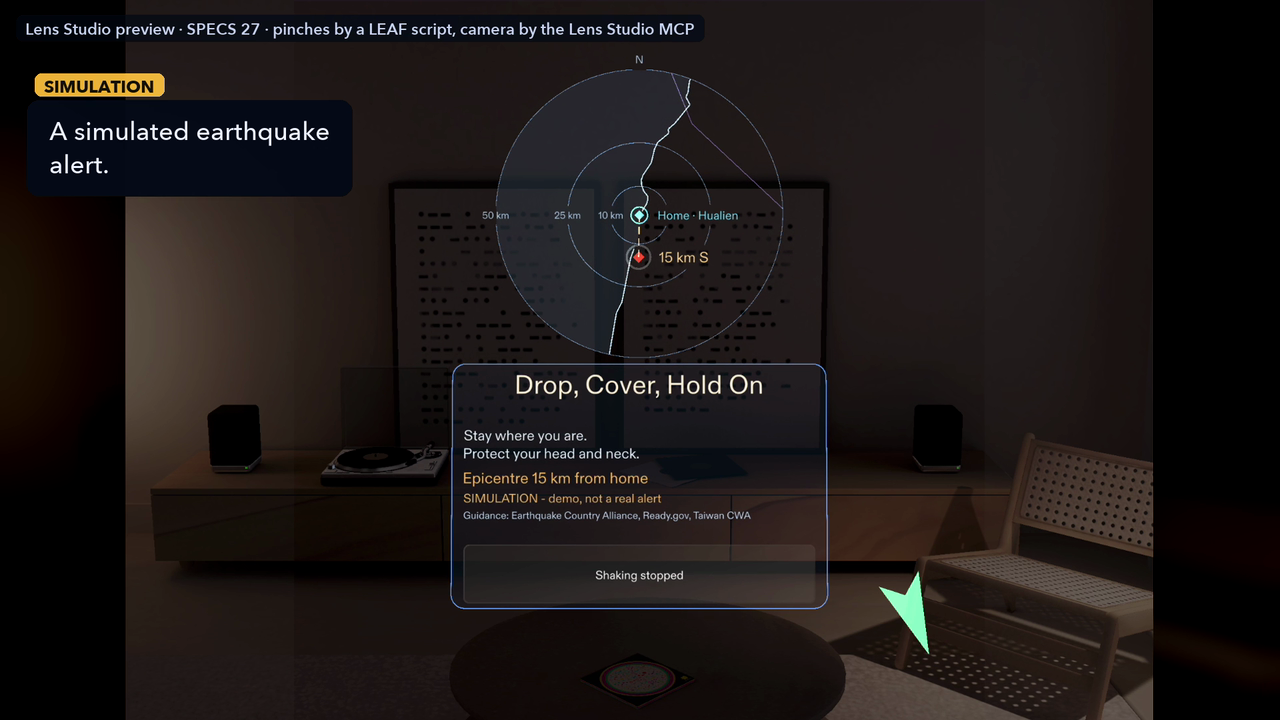
- The moment (a simulation in this build). Pinch "Phone alert received", the stand-in for a phone alert, to replay the M7.4 Hualien, Taiwan earthquake of April 3, 2024 from the USGS catalog. A chime plays and the card leads with Drop, Cover, Hold On and "Stay where you are". The dashboard steps aside, so the only button is "Shaking stopped". The globe turns to the epicentre and zooms into a map of your area: home at the centre, distance rings, and the epicentre at its true direction and distance ("15 km S"). On a 24 cm globe 15 km is less than 0.3 mm, so the map shows what the globe can't. If your cover spot is out of view, a small arrow at the edge of your view and a chime point to it.
- Before an alert. Pinch "Set cover spot", look where you would take cover, and pinch: under a sturdy table, as official guidance says first, or by an inside wall away from windows. A world-query hit test places the spot on that surface (in the preview, the simulated room's floor).
- After the shaking. Pinch "Shaking stopped" to see:
- USGS M7.4 (Taiwan CWA: ML 7.1);
- the depth (USGS), the local time and the place;
- the nearest plate boundary.
Then "Send to emergency contacts" (simulated), and "I'm safe", which zooms back out to the globe.
- Around it, a live globe. Every quake from the USGS real-time feeds sits at its true location and depth; depth is drawn three times deeper than true scale, and the legend says so. Plate boundaries have barbs on subduction zones, and continent, ocean and country names never overlap. "Strongest" tours the biggest quakes, and the view switches between 24 hours, 7 days and 30 days.
Who it's for
People in earthquake country, once glasses are everyday wear: Taiwan, Japan, and the more than 50 million people covered by the US West Coast's earthquake early warning system. I live in Taiwan. I may only need this a few times in my life, but I want it to be something you remember for the rest of your life after using it once.
Why it needs glasses
Phone alerts say "Drop, Cover, Hold On". Quake apps can show the epicentre and the expected shaking, but on a screen in your hand, at the moment official guidance says to protect your head and neck. Glasses share your view and leave your hands free: the cover spot is marked where it really is, and the quake appears in front of you once its location is known, with nothing to hold.
How I planned and built it
- Planned with the plan-lens skill pack. I answered its interview in Chinese; the brief in
lens/devpost/design-brief.mdis its English write-up, with the design notes added after each review. - Built by Claude Code through Snap's CLAD plugin and the Lens Studio MCP, in seventeen headless
passes (and one first try that was stopped). Each pass's prompt, report and CLAD skills are in
docs/clad-build/.- The alert overlay.
- (1b) Making every LEAF test pass: a start-up race in a test helper, and a hidden placement plane that blocked a button for a real pointer, which LEAF's DEBUG probes found.
- (1c) Finishing after a Lens Studio restart: the placement-plane fix compiled, the chime wired up, all five LEAF tests passing.
- (2) Map detail: the 1:50m coastline, PB2002 plate boundaries, labels, and the nearest boundary on the details card.
- (3) The two-stage alert from the design notes.
- (4) Readability, and the cover spot placed on real surfaces with World Query.
- (5) The off-view arrow, which had pointed away from the cover spot once the camera looked down.
- (6) The changes from the video review: the dashboard steps aside during the alert, the alert card moves under the globe, and the epicentre gets a distance label.
- (7) After a full-size check of the second cut: the off-view arrow becomes a notched dart, and map names keep clear of the epicentre's distance label.
- (8) After the committee's second review: map names step aside from the epicentre ring during the alert, the quake-details test pinches a quake on the globe and checks every field, and the cover-spot hint and the guidance line are easier to read.
- (9) The map of your area, which I asked for after watching the video: during the alert the globe zooms into a map around home. Lens Studio quit during its tests.
- (9b) Finishing after a Lens Studio restart: every test re-run, no code changed. A first try was stopped because Lens Studio had reopened on a blank project.
- (10) After an AI-assisted check of the first recording with the map: the land is faintly tinted, and the line from home to the epicentre is a warm dashed line.
- (11) The two LEAF scenarios that drive the demo video, written fresh from a shot list.
- (12) After the review of the narrated cut: the growing globe no longer hides letters of the alert card or the dashboard during the zoom, map labels keep clear of lines, and the coastline gives way to the dashed line. It stopped at a usage limit.
- (12b) Finishing pass 12's tests.
- (13) After the review of the final cut: each ring label sits on its own ring, all along one direction from home, and the cover-spot hint keeps clear of the globe and the dashboard while the view sweeps down to the floor.
- Tested with six LEAF scenarios: one for each done criterion, plus the home marker. All six pass, one by one and in a row. At DEBUG level LEAF also checks that a ray from the viewer reaches every button it presses: none is blocked.
- A shared core. The platform-independent TypeScript core covers feeds, geometry, labels, plate lookups and hazard profiles. It drives both the Lens and a three.js browser preview, and 109 unit tests check it against real USGS snapshots.
- Tested only in the Lens Studio preview. It has not yet run on Spectacles.
What changed after the reviews
After an AI-assisted review of the first build, I approved changing the alert to follow official guidance: drop, cover and hold on where you are. The first build's "walk to your safe spot" became:
- Drop, Cover, Hold On first;
- a cover spot within a step;
- nothing to tap while it shakes, and the details only after "Shaking stopped";
- a demo home in Hualien City (the real 2024 alert never reached Taipei, which still shook at intensity 5-);
- both magnitude scales;
- SIMULATION on every alert screen.
A four-member AI review of the first cut of the video then led to these changes:
- the dashboard steps aside during the alert;
- a bigger alert card under the globe;
- the epicentre's distance label;
- the cover-spot hint follows your line of sight;
- the official CWA magnitude, ML 7.1 (7.2 was the first figure).
A full-size check of the second cut then found that the off-view arrow, a wide triangle, read as pointing at the alert card, and that a country name ran through "15 km from home". The arrow is now a notched dart, and map names keep clear of the label. The committee's second review then moved the "Taiwan" name out from under the epicentre ring during the alert, and made the quake-details test pinch a quake on the globe, as the done criterion says, instead of pressing "Strongest".
Then I watched the video myself and asked why the alert shows the whole planet, when what matters in that moment is my own area. The agent pointed out that on a 24 cm globe 15 km is less than 0.3 mm, and proposed a map of my area; I approved it. During the alert the globe now zooms into that map, with distance rings and the epicentre at its true direction and distance, and zooms back out after "I'm safe". An AI-assisted check of the first recording with the map then tinted the land, so the coast reads at a glance, and made the line from home to the epicentre a warm dashed line.
A four-member AI review of the narrated cut then found that the growing globe hid letters of the alert card during the zoom in, and of the dashboard on the way out; the globe now stops short of both. The map's labels also moved clear of its lines, and the coastline now gives way to the dashed line, which in this demo runs right along the coast. The reviewers then passed the cut with two notes, and those were fixed too: each ring label now sits on its own ring, all along one direction from home, and the cover-spot hint keeps clear of the globe and the dashboard while you look down.
Pre-existing work (disclosure)
No code predates the submission period (Oct 15, 2026).
Written with Claude Code but outside the CLAD plugin:
- the first prototype, the live globe, built on Oct 19, 2026 with Claude Code and the Lens Studio MCP, before CLAD and the skill pack were installed;
- the shared
core/,data/andtools/; - the alert chime's sound file, generated by
tools/make_chime.py(CLAD wired it into the Lens).
The two LEAF scenarios that drive the demo video (demo_alert, demo_globe) were first written
outside CLAD too; for the final video CLAD rewrote both from a shot list (pass 11). In the video they
press the Lens's real buttons, and the Lens Studio MCP moves the preview camera.
Everything else the brief asked for in the Lens was built through CLAD.
Third-party material:
- USGS earthquake feeds (public domain)
- Natural Earth (public domain)
- PB2002 plate boundaries (Bird 2003; GeoJSON by Hugo Ahlenius, Nordpil and Peter Bird; ODC-By 1.0)
- Snap's Spectacles Interaction Kit, UI Kit and LEAF
- the video's narration: a synthetic voice made locally with Kokoro-82M (Apache-2.0)
Safety
This is not a warning system: it doesn't detect earthquakes or send messages, and the alert is
simulated. See docs/SAFETY.md.
What I learned
An earthquake app is more than a danger alert. Many aftershocks are too small to feel, but this Lens lets you see that the Earth is alive: its crust is changing all the time.
What's next
- Real alert input: the region from the phone alert at once, then the precise epicentre from official reports minutes later.
- More hazards wired to the same hazard profiles. The next one is air-raid shelters from Taiwan's open data.
- A Traditional Chinese mode.
How to try it
It runs in the Lens Studio preview; no Spectacles needed.
- Open
lens/QuakeGlobe.esprojin Lens Studio 5.22 or later. - Set the Preview device to SPECS 27 (needed for network access) and press play.
- Pinch "Set cover spot", look down at the floor and pinch.
- Pinch "Phone alert received", then "Shaking stopped", "Send to emergency contacts" and "I'm safe".
The live quakes load from the public USGS feed. The LEAF scenarios are in
lens/Assets/QuakeGlobe/Scripts/Tests/.
Built With
- clad
- leaf
- lens-studio
- lens-studio-mcp
- natural-earth
- node.js
- pb2002
- specs
- spectacles-interaction-kit
- spectacles-ui-kit
- three.js
- typescript
- usgs

Log in or sign up for Devpost to join the conversation.