-
-
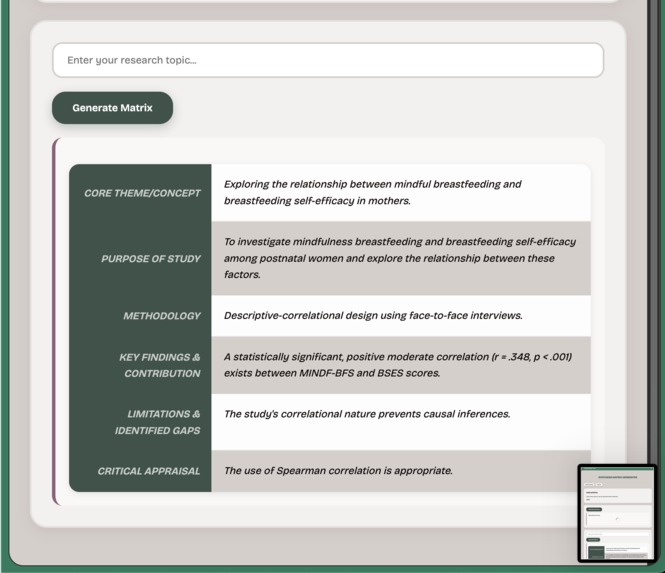
Matrix Example

Inspiration
The inspiration for this project comes from my own personal experience. While working on my dissertation this year, I found myself struggling to get through the sheer volume of heavy academic reading. This led me to experiment with AI as a tool to help digest and process information more efficiently.
This personal struggle highlighted a significant, real-world problem for many researchers: the inefficient and time-consuming nature of academic literature reviews. Researchers spend countless hours manually reading papers and synthesising information, a process prone to inconsistencies.
The goal was to build the tool I needed for myself, one that could streamline this workflow by using AI to automate the analysis and structured data extraction, helping researchers (like me) quickly identify core concepts, findings, and gaps.
What it does
The AI Synthesis Matrix Generator is a Manifest V3 Chrome Extension that functions as an academic research assistant within the browser's side panel.
- Analyses Papers: It detects academic papers (focusing on PDFs) in the active tab. It can parse text from direct PDF links or use the Semantic Scholar API to find an open-access PDF from a paper's DOI.
- Generates Summaries: It uses Chrome's built-in Summarizer API for concise summaries.
- Creates a Synthesis Matrix: Its core feature is using Chrome's built-in Prompt API with targeted prompts to automatically populate a structured synthesis matrix. This matrix includes critical fields for researchers, such as "Core Theme," "Methodology," "Key Findings," and "Identified Gaps".
- Gemini API Fallback: The Gemini Developer API is implemented as a backup for users who may not have the built-in APIs or who have hardware constraints. Personal API keys are securely saved using the chrome.storageAPI.
- Privacy-Focused: It prioritises using the built-in, client-side AI APIs to ensure the content of academic papers remains on the user's device whenever possible.
How I built it
The extension is built using Manifest V3 and a modular, event-driven architecture.
- Interface: A simple UI is provided in the Chrome Side Panel (sidepanel.html), which communicates with the service worker (background.bundle.js).
- State Management: The extension uses the chrome.storage API to securely store user settings like API keys and the chrome.tabs API to manage and associate data with specific academic papers open in different tabs.
- Content Parsing: When activated, the side panel script (sidepanel.js) signals the service worker. To get the paper's text, it first attempts to parse PDFs directly in the browser using PDF.js. If the source isn't a direct PDF, it uses the Chrome Scripting API to find a DOI on the page, which is then used to query the Semantic Scholar API for an open-access PDF URL.
- Hybrid AI Strategy: The extracted text is processed by a ModelFactory in the background. This factory prioritizes Chrome's built-in Summarizer API and Prompt API (LanguageModel) for fast, private, on-device processing.
- Fallback System: As a fallback, the factory can switch to the Google Gemini Developer API (via gemini-provider.js).
- Bundling: The final extension is bundled using Webpack to manage dependencies and package the service worker and side panel scripts.
Challenges I ran into
- Diverse Content Sources: Academic content isn't just on clean HTML pages; it's often locked in PDFs. A major challenge was building a robust system that could handle both direct PDF links and HTML pages (by finding a DOI and using the Semantic Scholar API to locate the PDF).
- PDF Text Extraction: Parsing text accurately from multi-column academic PDF layouts is notoriously difficult. Integrating and correctly using PDF.js to get clean, usable text for the AI models was a significant technical hurdle.
- Ensuring API Availability: Relying on the built-in AI is a core feature, but we couldn't guarantee every user would have it. Implementing the "Hybrid AI Strategy" with a ModelFactory that selects the best available provider (built-in vs. Gemini) added complexity but made the tool far more resilient.
- Handling Large Documents: The built-in, local AI models struggled to process the full text of long, dense academic papers all at once. This required implementing a "summary of summaries" approach for the Summarizer API and breaking the text into digestible chunks for the Prompt API. This is slower than a single remote AI call but necessary for the on-device models, and its performance is highly dependent on the user's hardware.
Accomplishments that I'm proud of
- A Working Hybrid AI Strategy: We are proud of the ModelFactory implementation. It intelligently prioritizes the privacy-focused, client-side AI but seamlessly falls back to the Gemini API if needed. This demonstrates a robust, user-centric approach to AI integration.
- Advanced PDF Content Extraction: Successfully integrating PDF.js (an external package) to parse text from complex academic PDFs was a major achievement. This, combined with the Semantic Scholar API, creates a powerful system for finding and processing papers.
- Solving a Real-World Problem: This project solves a specific, tedious problem I (and many other researchers) face, significantly improving a key part of the academic workflow.
What I learned
- Local vs. Remote AI: We learned that the local, built-in AI is often better at avoiding "hallucinations" and provides more consistent, factual extraction than remote models. However, it struggles with the speed and processing of very long documents, highlighting a clear trade-off.
- The Need for Fallbacks: A remote fallback (like the Gemini API) is essential. This is not just for users without capable hardware (I had to upgrade my hardware during development), but also for users who may simply prefer a faster response over the privacy of on-device processing.
- The Art of Prompt Engineering: AI is not a magic solution. We learned that prompts must be incredibly clear, specific, and precise, especially for academic tasks. AI doesn't inherently extract the correct information; it extracts what the prompt guides it to. Too much context, or the wrong language, can easily derail the extraction.
What's next for AI Synthesis Matrix Generator
- HTML Article Scraping: Expanding beyond PDFs to parse and analyze academic articles published as standard web pages.
- Matrix Editing: Allowing users to edit and refine the AI-generated text directly within the side panel.
- Export/Copy Functionality: Adding buttons to easily export the completed synthesis matrix (e.g., as CSV or copying to clipboard) to integrate into researchers' workflows.
- Advanced Prompt Experimentation: Continuously experimenting with new prompt structures and AI approaches (like different chunking strategies) to find the optimal balance between speed and accuracy for information extraction.
Built With
- css
- gemini-dev-api
- html
- javascript
- pdfjs
- prompt-api
- semantic-scholar-api
- session-storage
- summarizer-api
- tabs

Log in or sign up for Devpost to join the conversation.