-
-
Example Transcript
## Inspiration

“You’re cutting out.”

It’s something we hear all the time during online meetings. A microphone stops working, the audio glitches, and suddenly everyone is asking the speaker to repeat themselves—even though their face is still clearly visible.

That made us wonder: if we can still see someone speaking, could we recover some of the missing words from their lip movements?

That question became **LipLine**: a tool that explores how visual speech recognition can help keep a conversation going when audio fails.

## What it does

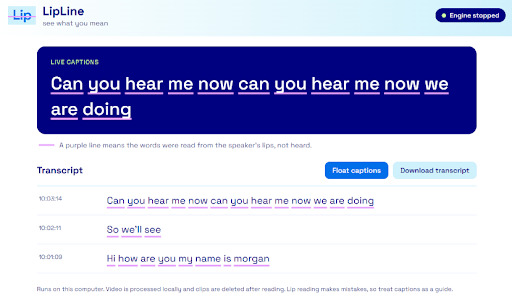
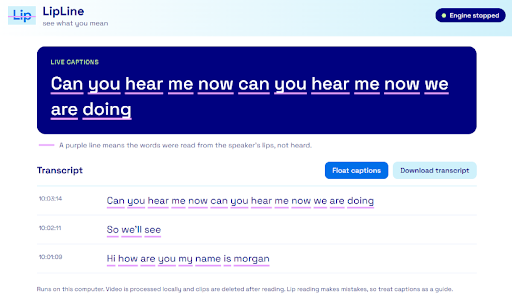
LipLine reads a speaker’s lips from live video and displays the predicted words as captions without needing audio.

The prototype supports camera input, uploaded videos, and meeting-window capture. It also includes an experimental browser extension designed to bring captions into virtual meetings, with transcript export available through the app.

## How we built it

We built the video-processing pipeline in **Python**, using **MediaPipe** for face processing, **NumPy** for working with image data, and **OpenCV** for video capture and processing. For speech recognition, we integrated a pretrained model from the open-source **Auto-AVSR** project.

For the frontend, we explored ideas through **Kiro** and **Lovable**, then implemented the final interface in **HTML, CSS, and JavaScript**. We also used **GitHub** and **VS Code** throughout development.

## Challenges we ran into

One of our biggest challenges was getting the model to work with live video. It could process uploaded, prerecorded videos, but it was too slow to keep up with a live conversation.

Accuracy was also inconsistent, and some predictions did not match what the speaker actually said. These limitations made generating reliable live captions more difficult than we initially expected.

## Accomplishments that we're proud of

One accomplishment we’re proud of is getting the model to work with live video. Initially, it could only process uploaded recordings, but we adapted the pipeline to capture and process video during a live session and display captions as the person speaks.

Although speed and accuracy still need improvement, getting the live version working was a major step toward our original goal.

## What we learned

We learned how much work sits between a research model and a tool people can comfortably use. Installation, clear instructions, useful error messages, and honest feedback about predictions all matter.

We also learned that successful recognition on one sample is only a starting point. Testing across speakers, devices, and real meeting conditions is essential.

## What's next for LipLine

Our next steps are to test the extension in real meetings, measure caption accuracy and delay across different speakers, and improve how we divide continuous speech into segments.

We also want to simplify installation, make uncertain predictions easier to identify, and explore automatic activation when meeting audio drops out.

Longer term, we would like to investigate support for additional languages.


Log in or sign up for Devpost to join the conversation.