-
-
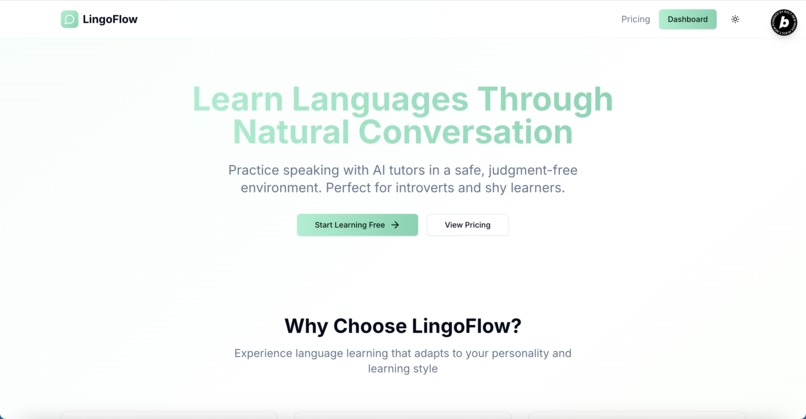
LingoFlow Home page screenshot

Inspiration
The inspiration for this project comes from my personal experience. As a shy/introverted English learner who used to live in Taiwan, it's typically inherently difficult to find someone with whom I can practice English. Even after moving to the U.S, I often struggle to find someone whom I can talk to and practice English in school due to a hard time making friends. As speaking is an important part of the language learning process, someone without much speaking practice can often find themself speaking in an unfluent way, or they may want to avoid talking (at least this is the case for me). This project is my solution to attempt to address these kinds of situations, which can benefit those language learners who have no or few one they can practice the language with, specifically for shy and introverted learners.
About & What it does
LingoFlow is an AI-powered, real-time conversational language learning app designed to help introverts and shy learners practice speaking comfortably and confidently. The app provides a safe, non-judgmental, real-time chat experience powered by Tavus.io, with different AI personas and tailored practice scenarios for an enhanced conversational experience. Users interact with customizable AI personas through different scenarios or open-ended conversations, like chatting with a bilingual friend who understands your background, personality, goals, and learning needs.
Features and Functionality
Basic Functionality
- User account login/registration
- Light and dark theme support
- User profile for further customization and personalized AI conversation
- Name, age, gender, background info, profession and occupation, interests and hobbies
- Learning goals, native language, conversation preferences, and currently learning languages
- Update account email, password, and save Tavus API key locally
Primary Features
- Avatars: shows a list of user and system Tavus replicas associated with the provided API key, allowing users to view, rename, and delete any replica owned by them.
- Scenarios: a place for the user to create, edit, and delete their scenarios (scenarios are AI contexts to add topic-specific background information to a conversation). The user can see a list of community scenarios created by other users.
- Persona Library: allows users to create an AI's persona, which defines its knowledge and expertise, speaking tone, etc, and share them by setting them public. These personas can't be used directly in a face-to-face conversation, but the prompt can be copied and used when creating a Tavus persona.
- Tavus Personas: This feature shows a list of personas (both user-created and provided by Tavus) associated with the provided Tavus API key, allowing users to view, rename, and delete any personas owned by them.
- Real-time face-to-face chat with selected avatar, scenario, and persona.
- Real-time transcript during conversation
- Context awareness AI that knows about you (if you provide information in the profile settings)
- Continue from past conversations
- End-of-conversation transcript overview
- Conversation history: Each conversation that the user had with the AI will be saved, allowing the user to review or practice the transcript, or continue with past conversations.
Applicable Challenges
My project met the following challenge requirement:
- Conversational AI Video Challenge
- Deploy Challenge
- Startup Challenge
How I built it
The process that I use to build my project can be split into the following stages:
- Planning: I begin building this project by starting with a project requirement document (PRD) with the help of ChatGPT to clearly outline my ideas, the main features and functionality of my app, a styling guide, and technical requirements.
- Start building: I started and created the project with the bolt.new website, where I use it to develop the majority of my app. I first begin by creating the landing page of my app, followed by the login/registration page, and then each feature of my app.
- Minor improvements and bug fixes: Later in my development stage, I decided to move some parts of the development process to a local IDE, specifically Visual Studio Code, with GitHub Copilot.
Per the project rules below,
- "The initial structure and main development must begin in Bolt.new."
- "Tools like Figma, ChatGPT, and other AI/code assistants may be used for idea development, design, prototyping, or generating isolated code snippets."
- "Use of other platforms is permitted only in areas where Bolt is currently less suited—this should be kept minimal and clearly documented."
I believe the use of tools like VSCode and GitHub Copilot is permitted. The reason that I decided to use VSCode and GitHub Copilot is the following:
- As my token consumption rate increases during development, every edit costs me around 0.3 million tokens, and I want to precisely control what files the AI will use or reference in every edit, so a simple edit won't cost that many tokens.
- There are some logical bugs that Bolt cannot be resolved even after multiple attempts.
- Asking for a precise code refactor or optimization on a particular file is still rather a difficult task to perform in Bolt.
Besides the usage and scope defined above, the entire app and the majority of the features are significantly started to be developed on the Bolt platform.
Challenges I ran into
The major challenges I encounter when developing this app are integrating real-time, face-to-face conversation with Tavus into my app. This is a challenge for me because:
- I am not sure whether Bolt or Claude 4.0 Sonnet would know what "Tavus.io" is and understand how to integrate it into my app. I'm afraid that the AI would have hallucinations and generate code that can break my app entirely and cause me a lot of tokens to fix.
- I saw this Github repository by Tavus as a good starting point to create such a conversational app, and I want to use the core logic without creating it from scratch.
The solution that I have is to provide everything that the AI needs to know about what Tavus is and how to integrate it into my app, along with the core logic code from the Tavus Vibe coding demo repo. To do that, I utilized Perplexity to search for information on the Tavus docs and create an integration and reference guide (1 markdown file), and then use Github Copilot to condense the entire core logic of the Tavus demo repo code into 4 TSX files. After that, I upload these 5 files (because Bolt only allows a maximum of 5 uploads) to Bolt to ask it to develop the face-to-face conversational feature. Luckily, the feature was developed properly and is working successfully in one shot, only with minor improvements and a refactor needed.
Accomplishments that we're proud of
The accomplishments that I am proud of are the app itself. It demonstrates to me, as a student, a developer, a vibe coder, and even a future entrepreneur, what can be achieved with the help of AI.
What we learned
I learned that while vibe coding is very convenient and fast in terms of starting a complex app from scratch, it doesn't completely replace the need for programming knowledge and software development best practices (such as code refactoring and optimization). In addition, I learned that to develop a large, complex application using Vibe coding, extensive planning, careful and thoughtful prompting, and clear guidance to the AI are still needed to improve the quality of the result and reduce hard-to-fix issues later on.
What's next for LingoFlow
After the competition, I plan to
- Continue developing and improving this application
- Add more features and functionality (such as integrating it with ElevenLab's conversational agent, which I plan to do, but don't have the time to implement it during the competition due to a family trip)
- Maybe consider open-sourcing it, or create a startup around this idea
Built With
- bolt.new
- dailyjs
- javascript
- netlify
- react
- shadcn/ui
- supabase
- tailwindcss
- tavus.io
- typescript
- vite

Log in or sign up for Devpost to join the conversation.