-
-
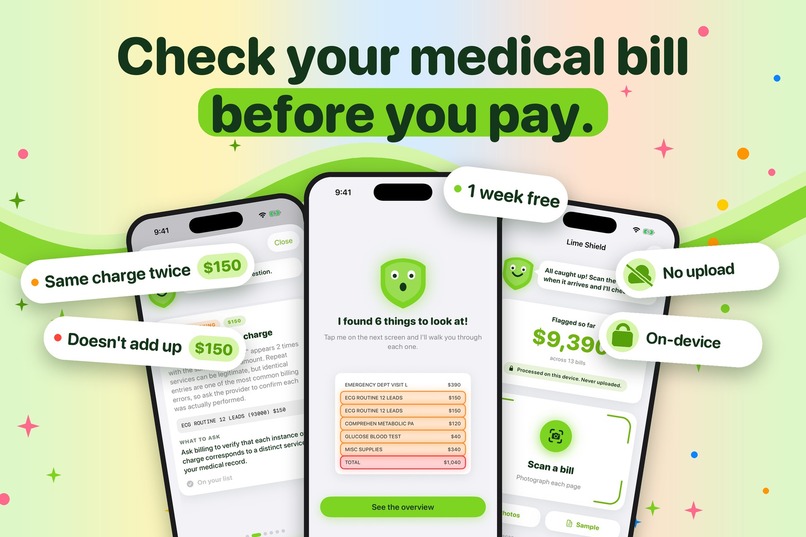
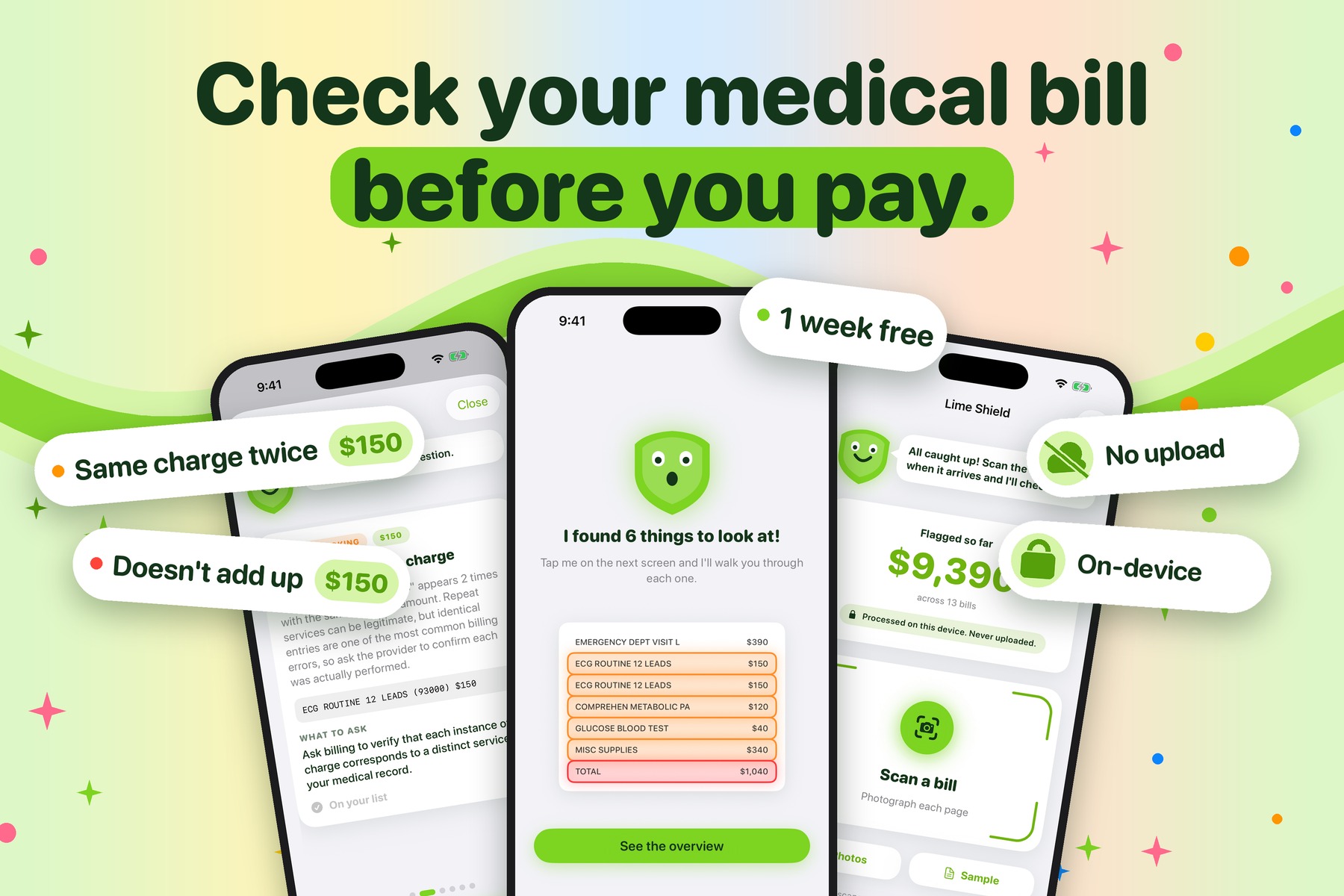
Lime Shield checks a medical bill before you pay: snap a photo, see which charges are worth asking about. Nothing is uploaded.
-
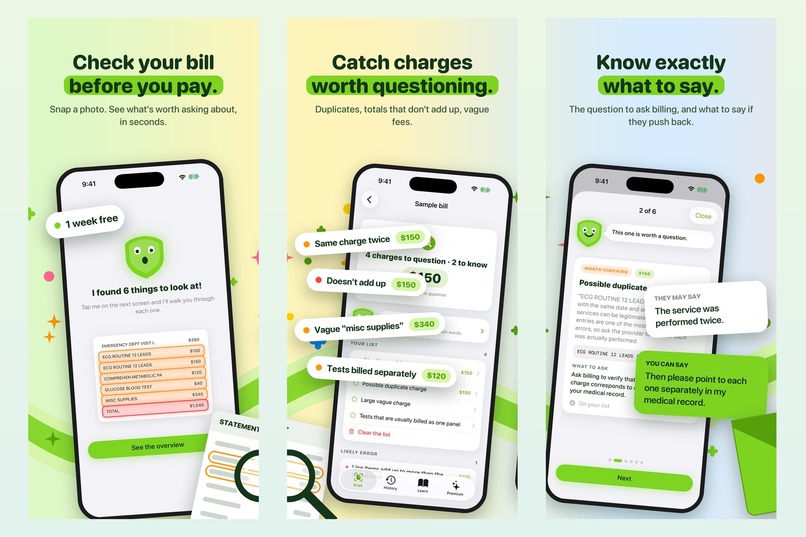
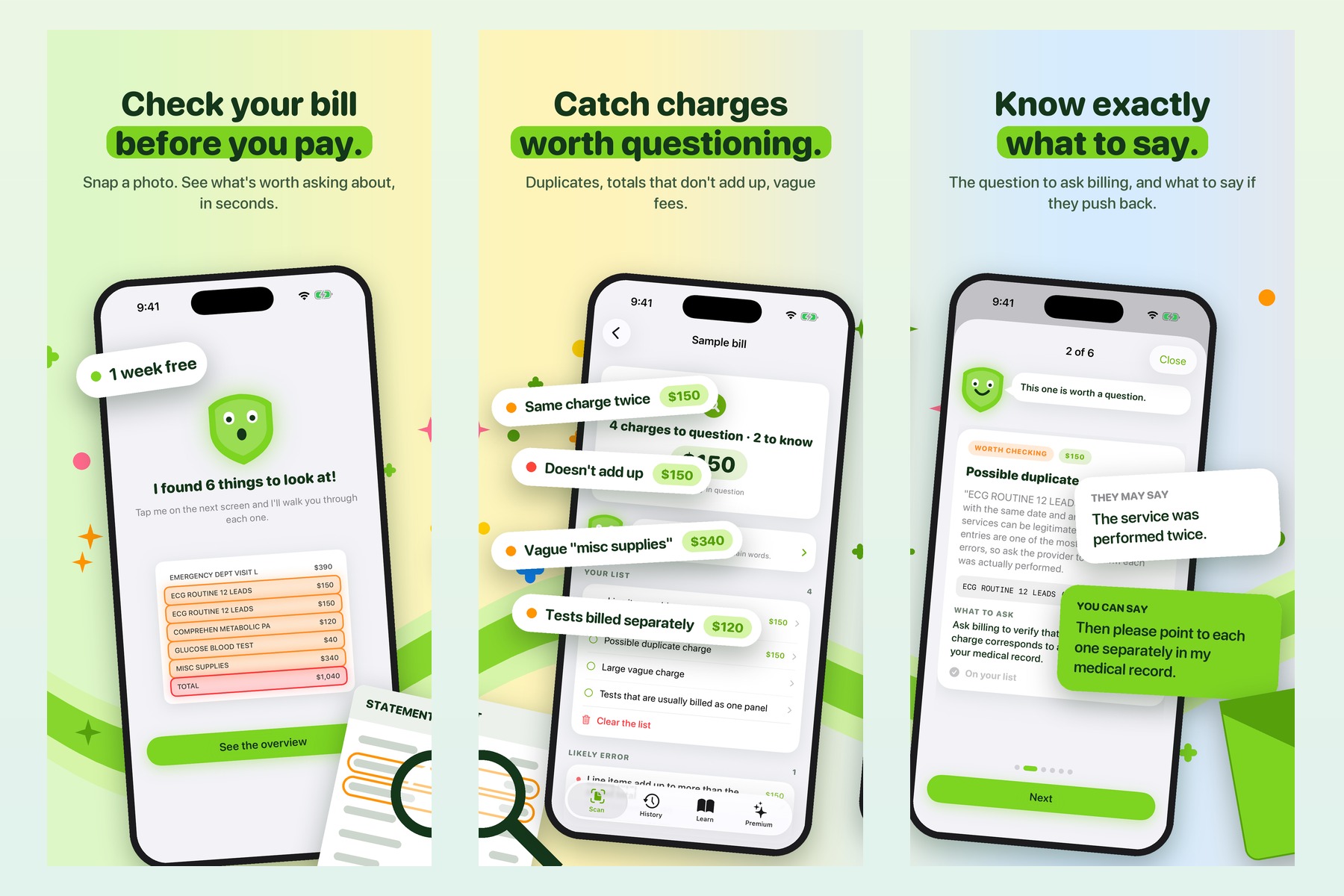
Scan, findings, and what to say: duplicates, totals that don't add up and vague fees, each with the exact words to use with billing.
-
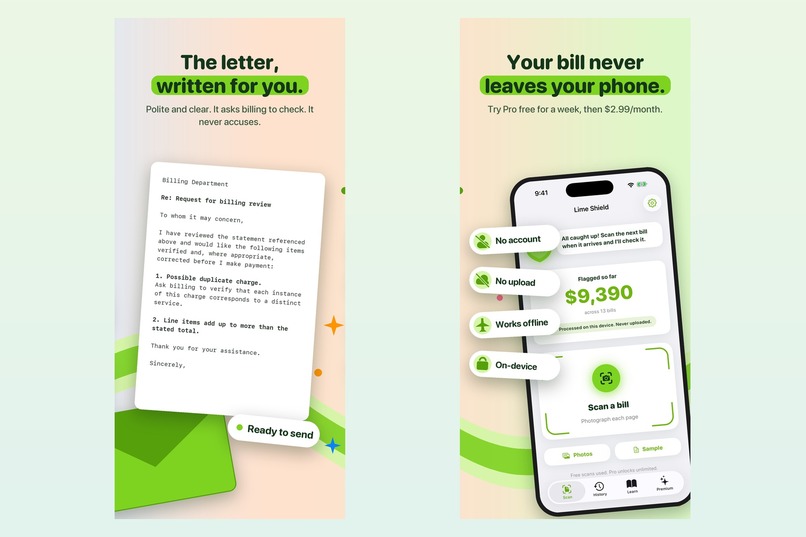
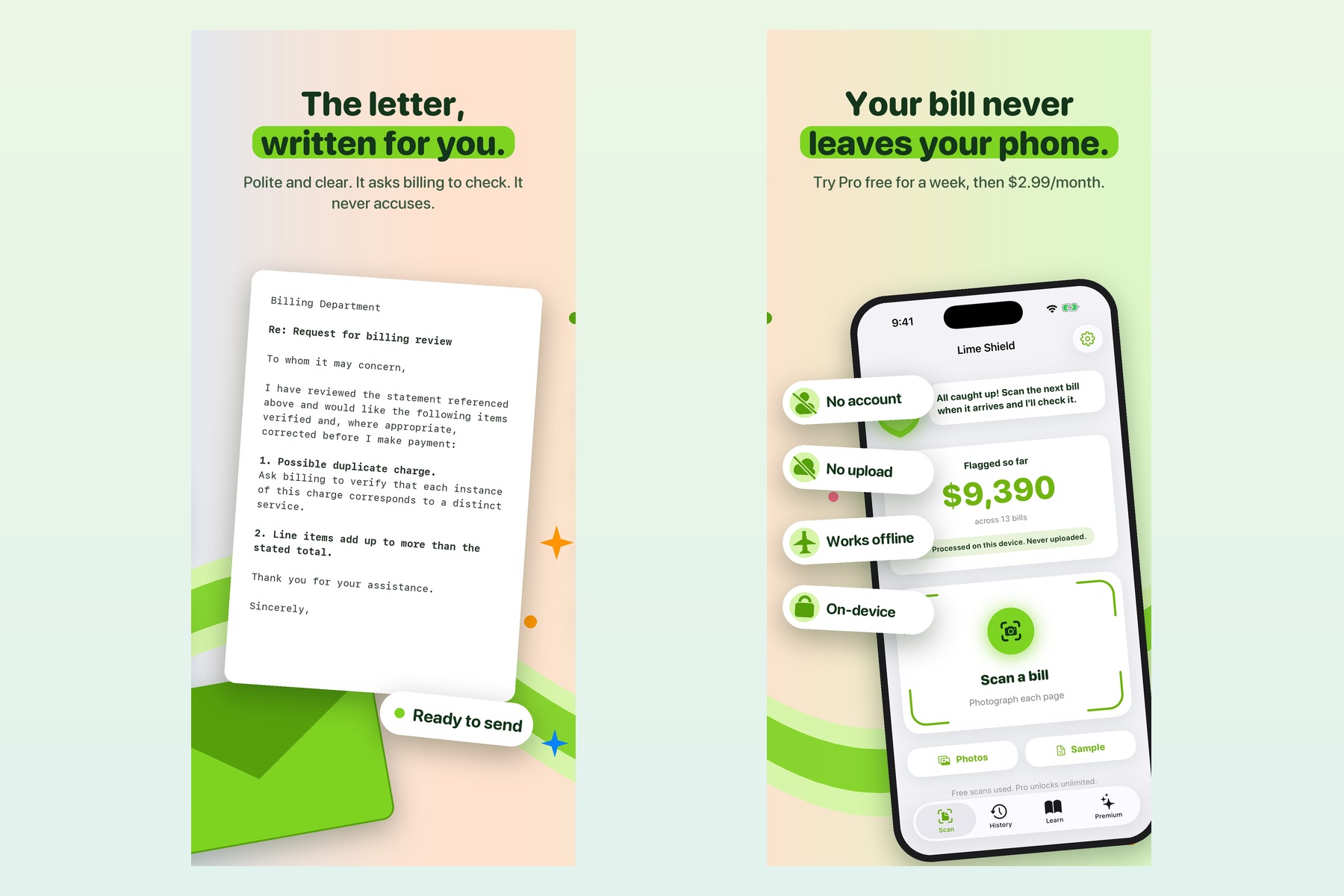
A polite letter written for you, which asks billing to check and never accuses. No account, no upload, and it works offline.
-
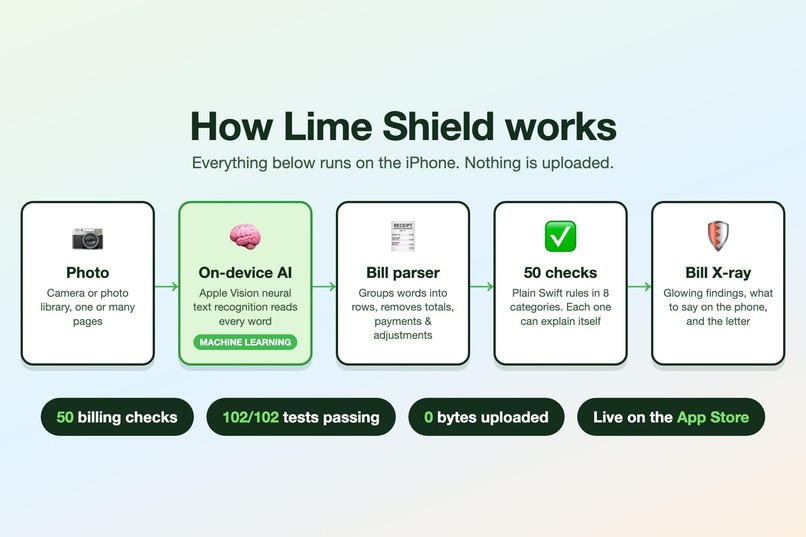
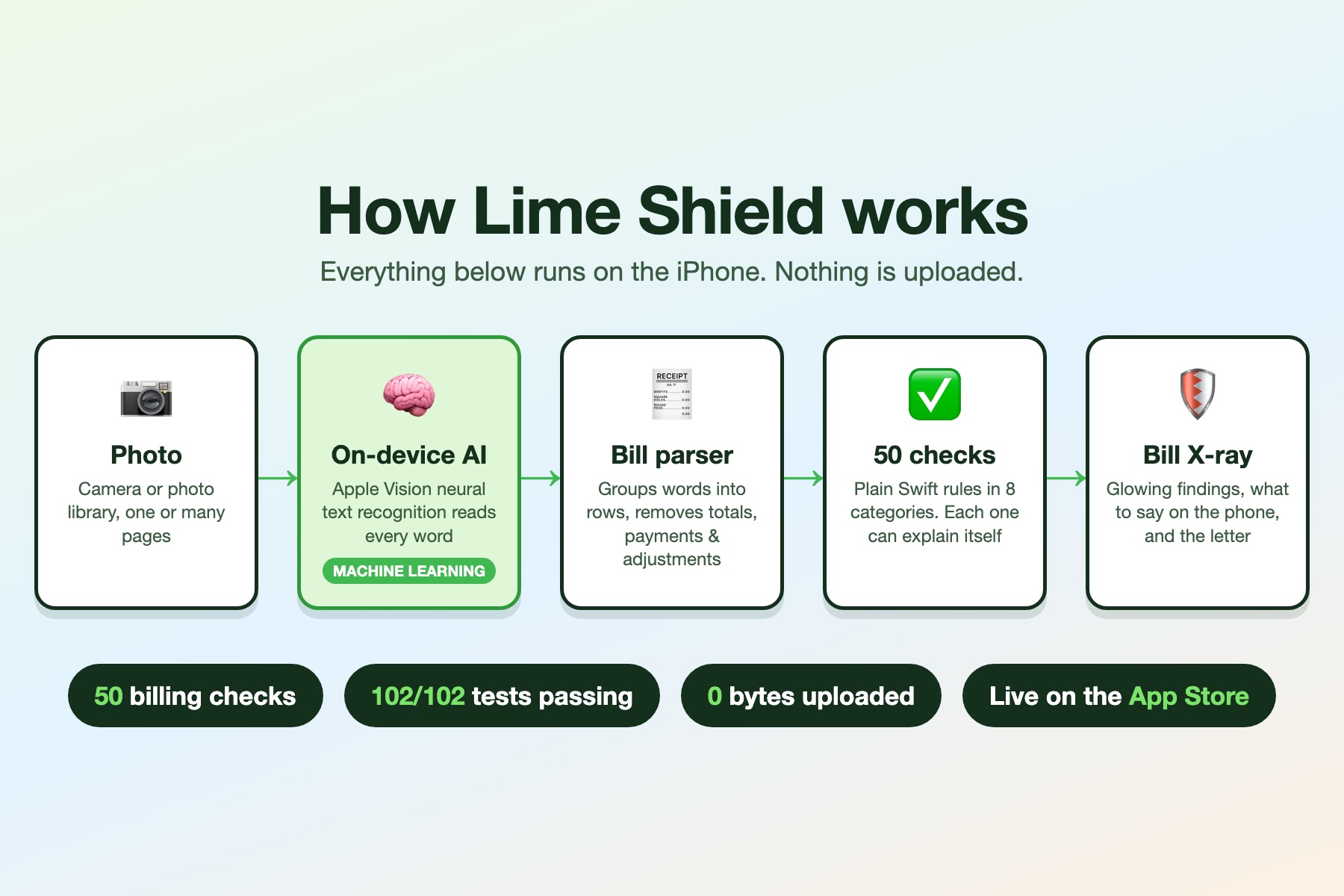
How it works: on-device AI (Apple Vision) reads the bill, a parser builds the rows, and 50 Swift rules explain every finding.
Inspiration
It started with videos. I kept seeing people online holding up a hospital bill and explaining, sometimes in tears, how one visit had turned into thousands of dollars they didn't have. A lot of them said the same thing: they didn't understand the bill, and they didn't know they were allowed to question it.
So I started researching, and the numbers were worse than the videos:
- About 20 million U.S. adults owe more than \$250 in medical debt, and Americans owe at least \$220 billion in total (KFF, 2024).
- 45% of insured working-age adults got a bill in the past year for care they thought their insurance should have covered (Commonwealth Fund, 2024).
- Of the people who didn't challenge a bill they thought was wrong, 54% weren't sure they had the right to.
- In 2021, medical bills were 58% of all debts in collections on credit reports (CFPB).
Then I tried reading real hospital bills myself. They're walls of codes, abbreviations and totals that don't obviously add up. Some just say "Supplies: \$4,000." You can ask for an itemized bill that lists every charge, but most people don't know that. One Florida patient did: he found a charge for 5,400 needles, and once it was fixed his bill went from \$772,000 to \$34,000.
The people hurt most are the ones who can't absorb a surprise charge, and they're also the least likely to have someone to ask. Billing advocates exist, but the people who need one most can't afford to hire one.
I also noticed that every tool that reads your bill wants you to upload it first. A medical bill carries your name, your account number, your dates of care and your diagnosis codes. So I set one rule before writing any code: if the app can't work without uploading a bill, it shouldn't exist.
What it does
Lime Shield is an iPhone app, live on the App Store, that turns a confusing medical bill into a short list of things worth asking about, and then helps you ask. Here's what happens, step by step.
1. Scan the bill
Tap Scan a bill and photograph each page with the document camera, or import photos you already have. Multi-page bills are read as one bill. If you don't have a bill handy, the Sample bill on the home screen runs the whole flow on a realistic emergency-room statement.
Before analyzing anything, the app works out what kind of document it's looking at, because analyzing the wrong document gives wrong answers:
- An insurer's Explanation of Benefits (EOB): the app stops and explains that an EOB isn't a bill and shouldn't be paid, then tells you to wait for the provider's bill.
- An estimate: it says so, instead of treating estimated prices as charges.
- More than one bill in the same scan: it asks you to scan them separately so totals don't get mixed.
- An itemized statement: analyzed normally, since that's exactly what you want to check.
None of these use up one of your free scans.
If the camera misreads something, Edit bill lets you fix any description, billing code, date, quantity or amount, or add and delete charges. The checks re-run instantly on the corrected bill.
2. The Bill X-ray
After every scan, the app redraws the bill from what it read, line by line. A scan beam sweeps down the page, and each line behind a finding lights up: orange for things worth checking, and red only for a math error, since that's the one finding the app is allowed to call an error. Then Shield Buddy, a small animated shield character (it blinks, and it respects the iPhone's Reduce Motion setting), says how many things it found and opens the results.
3. Fifty checks in three levels
The app runs 50 checks. Each finding goes into one of three levels, and the wording of each level is deliberate.
Likely error: math only. This is the only level allowed to use the word "error", because arithmetic is the only thing the app can prove from the bill alone:
- The line items add up to more than the stated total.
- The statement's charges, payments and adjustments don't add up to the balance.
- Quantity × unit price doesn't match the line amount.
- The amount due is larger than all the charges combined.
On the built-in sample bill, the items add up to \$1,190 but the total says \$1,040, so $1190 - 1040 = 150$ dollars are unaccounted for.
Worth checking: often a mistake, sometimes legitimate. These are always phrased as questions. Some examples:
- Duplicates: the same charge twice on the same day, the same service at two different prices, the same charge repeated across several dates, a blood draw billed more than once in a day, two visit charges on the same day, more than one facility fee.
- Impossible or odd entries: a daily charge with an impossible quantity, charges dated after you were discharged, services dated after the statement itself.
- Pricing: charges far above typical rates for that billing code, over-the-counter medicine at hospital prices, a video visit billed at a high rate, the highest-intensity visit code.
- Things usually included elsewhere: basic supplies billed separately, personal items like tissues, an oxygen reading billed on top of the visit, lab tests normally billed as one panel billed one by one, a facility fee on a normal office visit.
- Vague or extra fees: large charges with no detail, interest or admin fees, missed-appointment fees, after-hours fees.
Know your rights: not a mistake, but something you should know. For example:
- The bill isn't itemized, so you can ask for one.
- You may be eligible for financial assistance: nonprofit hospitals must have a written policy for free or discounted care, and you usually have at least 240 days from the first bill to apply.
- The bill mentions out-of-network care or looks like a surprise bill covered by the No Surprises Act.
- The bill was sent to collections, arrived long after the care, or shows observation status instead of an admission.
- You're paying yourself with no discount shown, or there's no insurance payment on the bill at all.
- The account is in credit, which means you may be owed a refund.
4. Every finding explained
Tap any finding and you get:
- The exact line on your bill it came from.
- Why it was flagged, in plain language.
- How much money is involved.
- What to ask the billing office, word for word.
- "They may say / You can say": the common replies billing departments give, with a calm answer to each. For a duplicate: "The service was performed twice." → "Then please point to each one separately in my medical record."
Add to my list turns a finding into a to-do. You can later mark it Done or Not an issue. The home screen shows Next up, the highest-value item you still need to raise, and a running total of everything flagged across your real bills. When that total grows, it counts up with a little confetti.
5. The letter, written for you
The app picks the right letter for the bill and fills in the date, account number and your name. You can copy, print, email or share it.
- Review request: lists every flagged charge as a numbered item, says what to verify for each, and asks the provider to check and correct the bill before you pay.
- Itemized bill request: for summary bills. It asks for every charge with its date and billing code, and asks the provider to pause collection activity while you review it.
- Refund request: when the account shows a credit, it asks for the money back "if this is correct."
Every letter asks the provider to check. None of them accuses anyone.
6. History, Learn and Settings
- History keeps every past scan on the phone. Each time you open it, old bills are re-checked with the latest rules, so a finding that a later version withdrew disappears instead of hanging around forever.
- Learn explains in plain English how medical bills work, what an itemized bill is, the three levels, and every one of the 50 checks.
- Settings has 7 accent colors that recolor the whole app, light and dark mode, text size, a scan-details view that shows exactly what the camera read, and a button that deletes everything.
7. Private by design
No account, no server, no upload, no analytics. The bill never leaves the phone, and the app works exactly the same in airplane mode, which is the easiest way to prove it. Even the free-tier counter is stored only on the device.
Free: 2 full scans and 2 letters, with the complete analysis. Pro: \$2.99 a month (1-week free trial) for unlimited scans and letters.
How I built it
Reading the bill. Apple's Vision framework runs a machine-learning text-recognition model on the iPhone. Vision returns individual words with positions, not rows, so the first job is putting the bill back together: my OCRService groups words into lines by their vertical position (Vision measures from the bottom-left corner, which caused some early confusion), and VisionKit handles the document camera.
Understanding the bill. BillParser turns those rows into a structured bill: charges, dates, billing codes, quantities, payments, adjustments and totals. It's the most carefully written file in the project. It finds and removes summary and total rows first, matches words like "payment" or "adjustment" only as whole words and only in the description before the first amount, and flags rows with more than one money column as ambiguous.
Checking the bill. The rules engine is 50 checks written in plain Swift, split across four files. I chose rules over a chatbot on purpose. A chatbot can describe a problem that isn't on your bill. A rule can only point at a line that is. Someone about to call a hospital needs to say exactly what's wrong and why, not "an app told me so."
Explaining and acting. Each check carries its own plain-language explanation, the question to ask and the likely pushback. A separate letter generator builds the review, itemized-request and refund letters from the findings.
The interface. SwiftUI for iOS 17, with an animated Bill X-ray and Shield Buddy drawn entirely in code, so no bill photo has to be stored to replay them.
Business. RevenueCat runs the subscription. The free tier gets the full analysis, not a cut-down version, because an app for people who can't absorb a surprise bill shouldn't hide the answer behind a paywall.
Challenges I ran into
The hardest part wasn't building the checks. It was finding out they were wrong.
Once the app worked, I stopped adding features and tried to break it. I tested it on real hospital statements published online and on bills I built specifically to trick the parser. The math check, the one check allowed to say "error", was wrong 4 times out of 5. It even accused a correct hospital statement of not adding up.
Every failure had a specific cause:
- The amount reader cut off numbers without commas, so 1284.00 became 284.00.
- "Unpaid" matched the word "paid", so a real charge was treated as a payment.
- A "Coinsurance" column heading cancelled the charge next to it.
- Total rows were counted as charges, so the bill looked like it charged everything twice.
I rewrote the parser and built a test suite that compiles the app's real code and runs bills with known answers. It now has 102 test bills, and all 102 pass. Every one of the 50 checks has a bill that triggers it, and writing those bills exposed one check that could never have fired at all. Six bill images also run end to end through Vision and the whole app, and all six give the expected results. Every new bug gets a new test bill, so it can't come back.
The testing found a second kind of problem too. The app told people to ask for an itemized bill, then refused to analyze the itemization when it arrived, because it mistook it for an insurer's EOB. It was telling people to do the right thing and then punishing them for it. I split the two document types so EOBs still stop and itemizations get checked.
All of this changed how the app thinks. If a bill's numbers are unclear, the checks that depend on the total stay silent. A rule that stays quiet beats a rule that accuses an honest hospital. Someone who walks into a billing office quoting a false error from my app is worse off than someone who never opened it.
Shipping was its own challenge. My first submission was rejected by App Review: the reviewer saw "The product is not available for purchase" on the paywall. I checked every part of the setup, resubmitted with an explanation, and version 1.0 went live on the App Store on September 30.
Accomplishments I'm proud of
- It's real and live on the App Store. I shipped version 1.0 in September and 1.0.1 (Shield Buddy, Bill X-ray, refund letters, 4 new checks) in October.
- The privacy claim is literal: there's no server to trust.
- The app is willing to say nothing when it isn't sure. Most of the work went into making it quiet.
- I went back to where this started. I now make short animated videos that teach one bill tip each, like how to read the quantity column on an itemized bill. One of them passed 33,000 views on Instagram. The videos that got me started showed people struggling; mine try to show them what to do.
What I learned
- Test against material you didn't choose. Every serious bug came from real bills, not my own examples.
- Fixing a bug and proving it's fixed are two different jobs. The test suite caught regressions I introduced while fixing other bugs.
- In healthcare, being wrong costs a real person something. Restraint is a feature, and the words matter as much as the code: "worth asking about" and "error" lead to very different phone calls.
- People already have protections they never hear about: itemized bills, financial assistance, the No Surprises Act. Explaining them clearly is as important as any algorithm.
- Shipping is a skill of its own: App Review, subscriptions, privacy policies, and support pages all had to work before anyone could use the app.
What's next
- Cited reference prices, so price comparisons show their source instead of a broad range.
- Reading compact hospital dates like "030126" without mistaking reference numbers for dates.
- Measuring real outcomes: how often a flagged charge, when someone asks about it, actually gets corrected.
- Reaching more people through the tip videos, so people learn what to ask even if they never download anything.
Try it
- App Store: https://apps.apple.com/us/app/lime-shield/id6811397021
- Judges' free month of Pro (no auto-renew, no charge): open this link on an iPhone, https://apps.apple.com/redeem?ctx=offercodes&id=6811397021&code=LIMESHIELDJUDGE, then open Lime Shield. If Pro doesn't show right away, tap Restore purchases on the Premium tab.
- No code needed for the Sample bill on the home screen. Without the code, 2 real scans and 2 letters are also free.
Sources: KFF, "The Burden of Medical Debt in the United States" (2024); Commonwealth Fund survey of 7,873 U.S. adults (Aug 2024); CFPB (Mar 2022); WFTV (Nov 2012); IRS §501(r); 26 CFR 1.501(r)-1(b)(3); CMS No Surprises Act.
Built With
- ios
- keychain
- machine-learning
- ocr
- python
- revenuecat
- swift
- swiftui
- vision
- visionkit
- xcode
