-
-
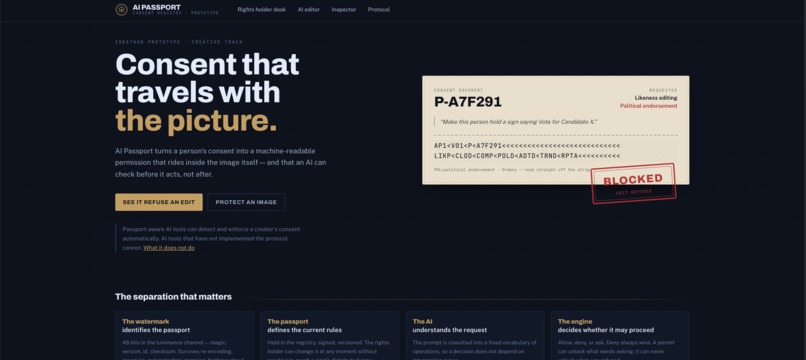
Home Page
-
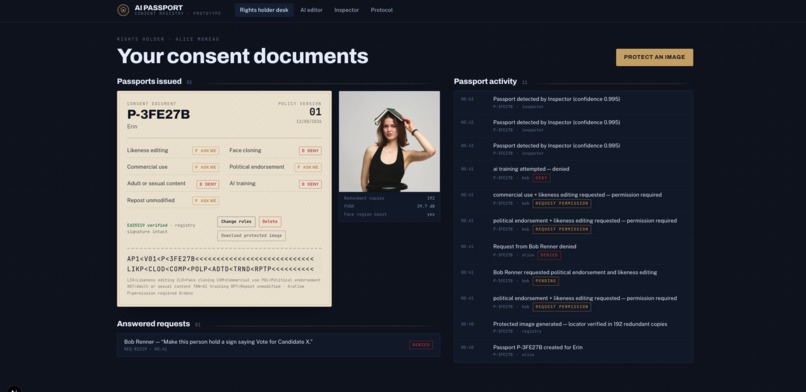
Rights holder Desk
-
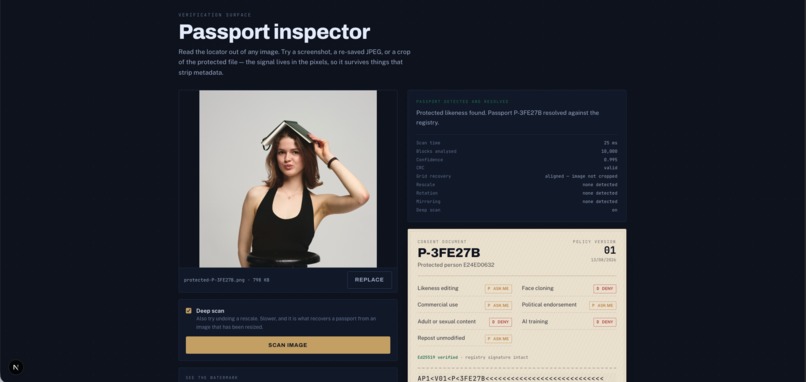
Inspector
-
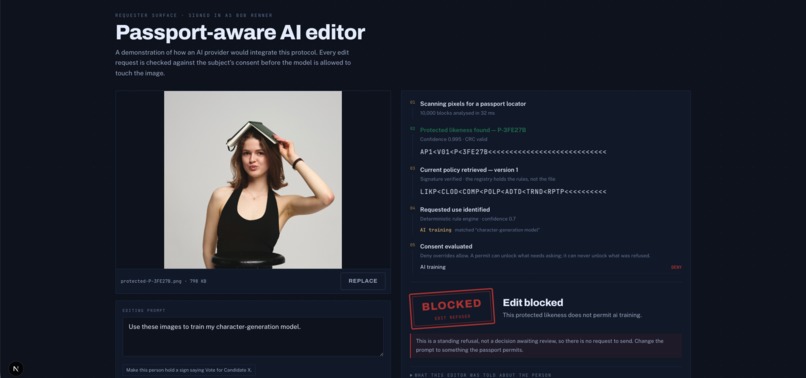
AI editor
The problem I kept coming back to
If someone takes a photo of you and feeds it to an image model, you have no say in what happens next. You usually find out afterwards, if you find out at all.
Most of the solutions I had seen were aimed at the wrong end of the pipeline.
Detection tools can tell you an image was probably faked after it has already been generated and circulated. Provenance standards such as C2PA can tell you where a file came from, what happened to it and whether it has been altered.
Both are useful, but neither answers the question the person in the photograph actually has:
What is this allowed to be used for, and who decided?
That is not really a forensics problem.
It is a permissions problem.
So I built the permissions layer.
How it works
There are three main pieces, and the separation between them is important.
The image carries an ID, and nothing else
The image contains a small identifier hidden directly inside its pixels.
The payload is 48 bits and contains a magic marker, format version, Passport ID and checksum.
For example:
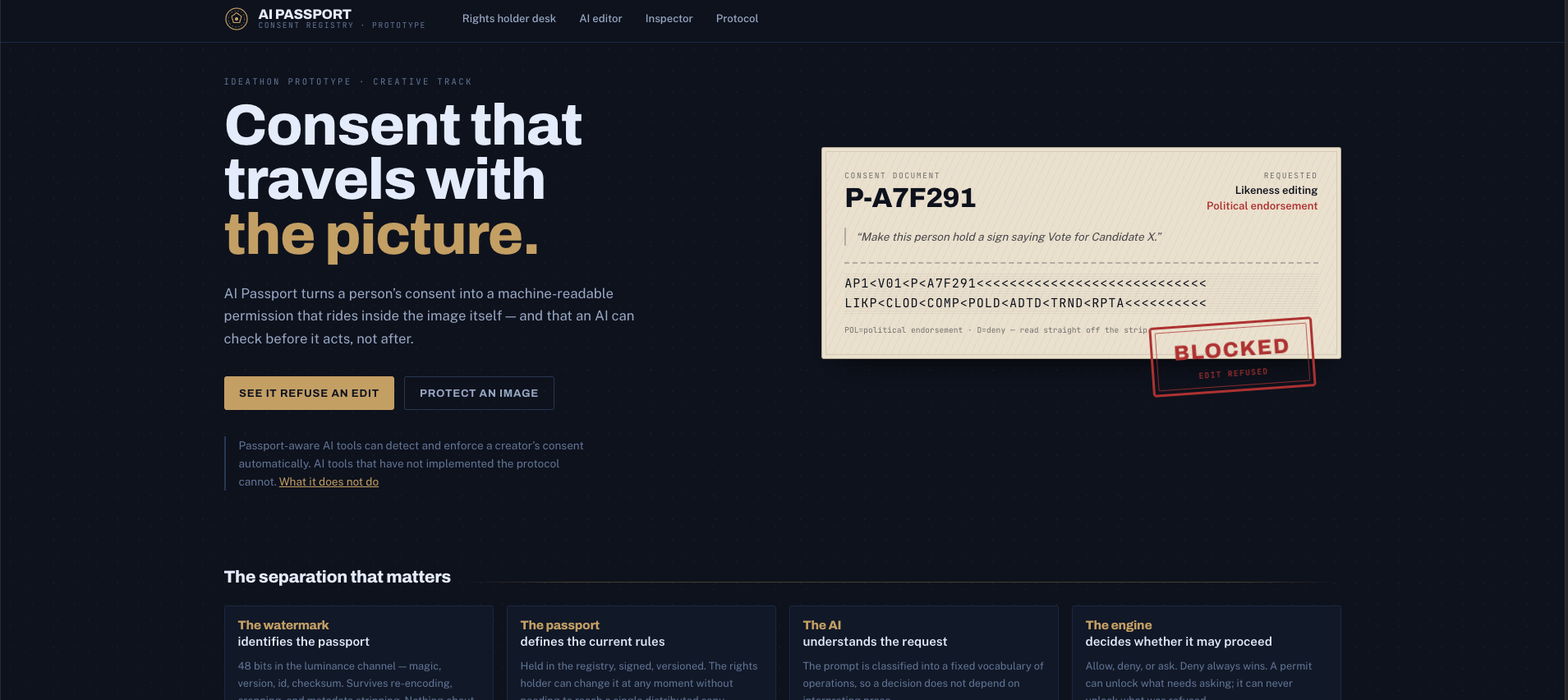
AP1 | P-A7F291 | crc
The image does not contain the person's full consent policy, identity information or contact information.
It only contains enough information for a compatible system to discover the Passport.
The registry holds the rules
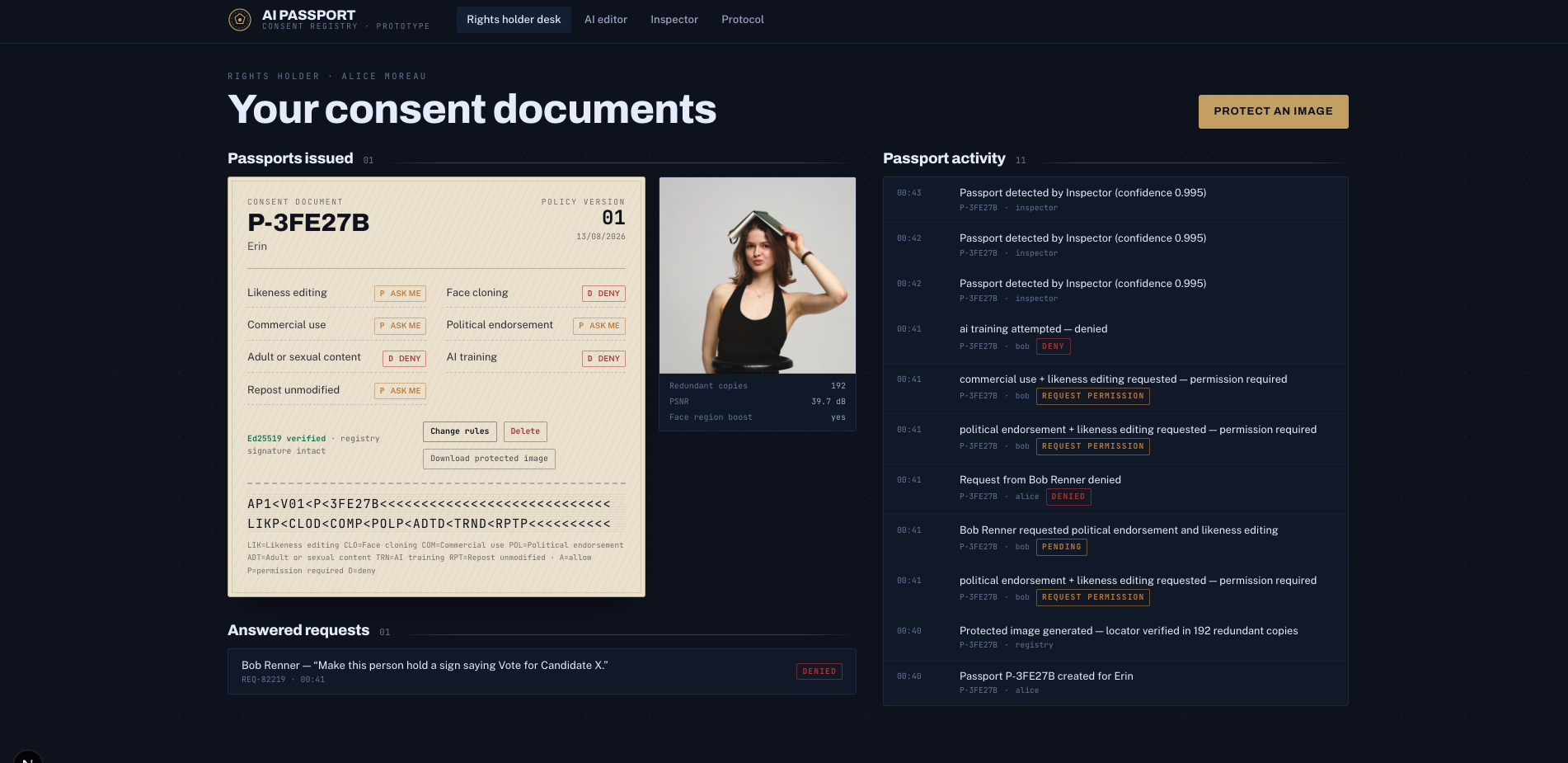
The Passport registry stores the current permissions associated with that Passport.
For the prototype, I defined seven operations:
- Likeness editing
- Face cloning
- Commercial use
- Political endorsement
- Adult content
- AI training
- Plain reposting
Each operation can have one of three states:
- Allow
- Deny
- Ask me
This gives the person in the image control over what different systems are allowed to do with their likeness.
The AI checks before it acts
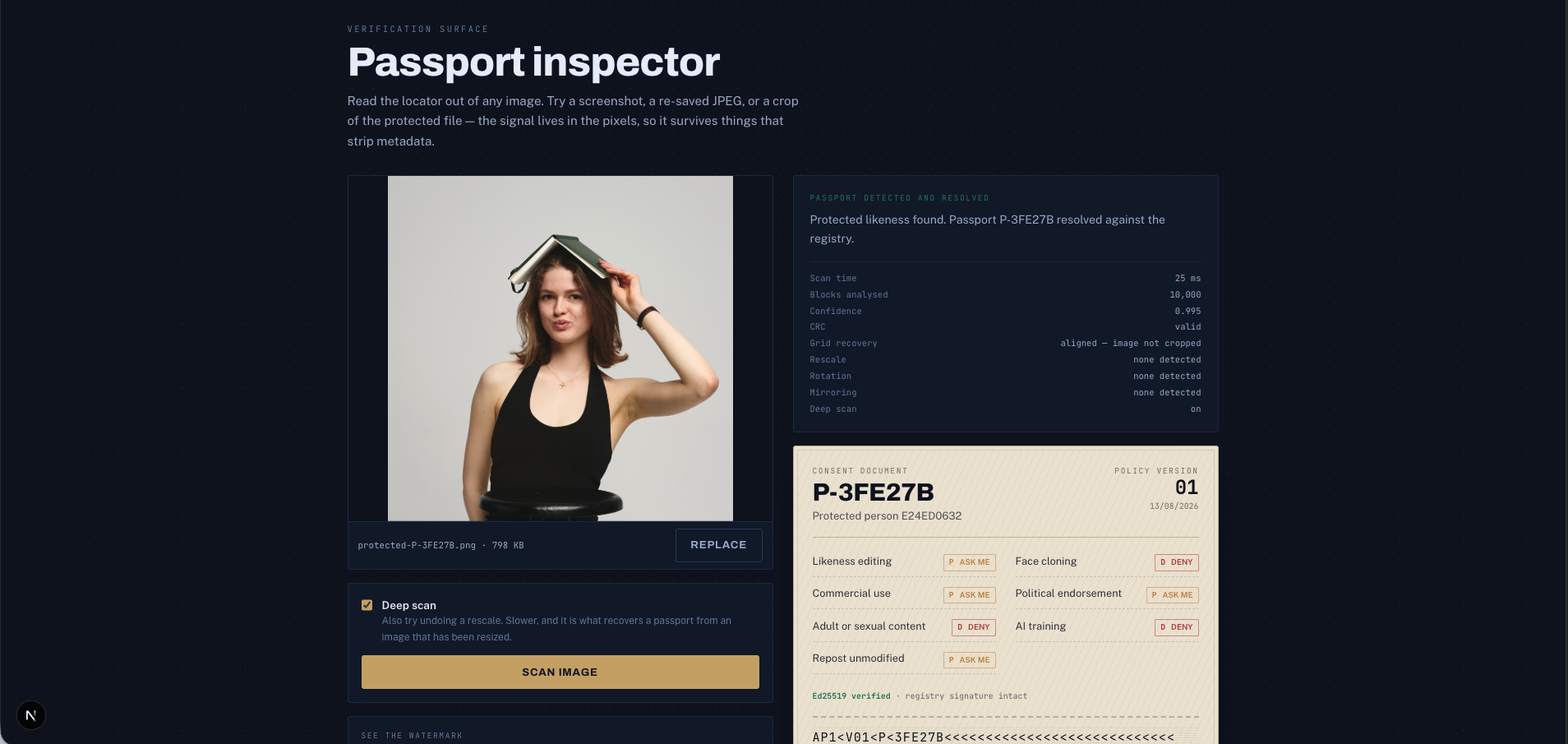
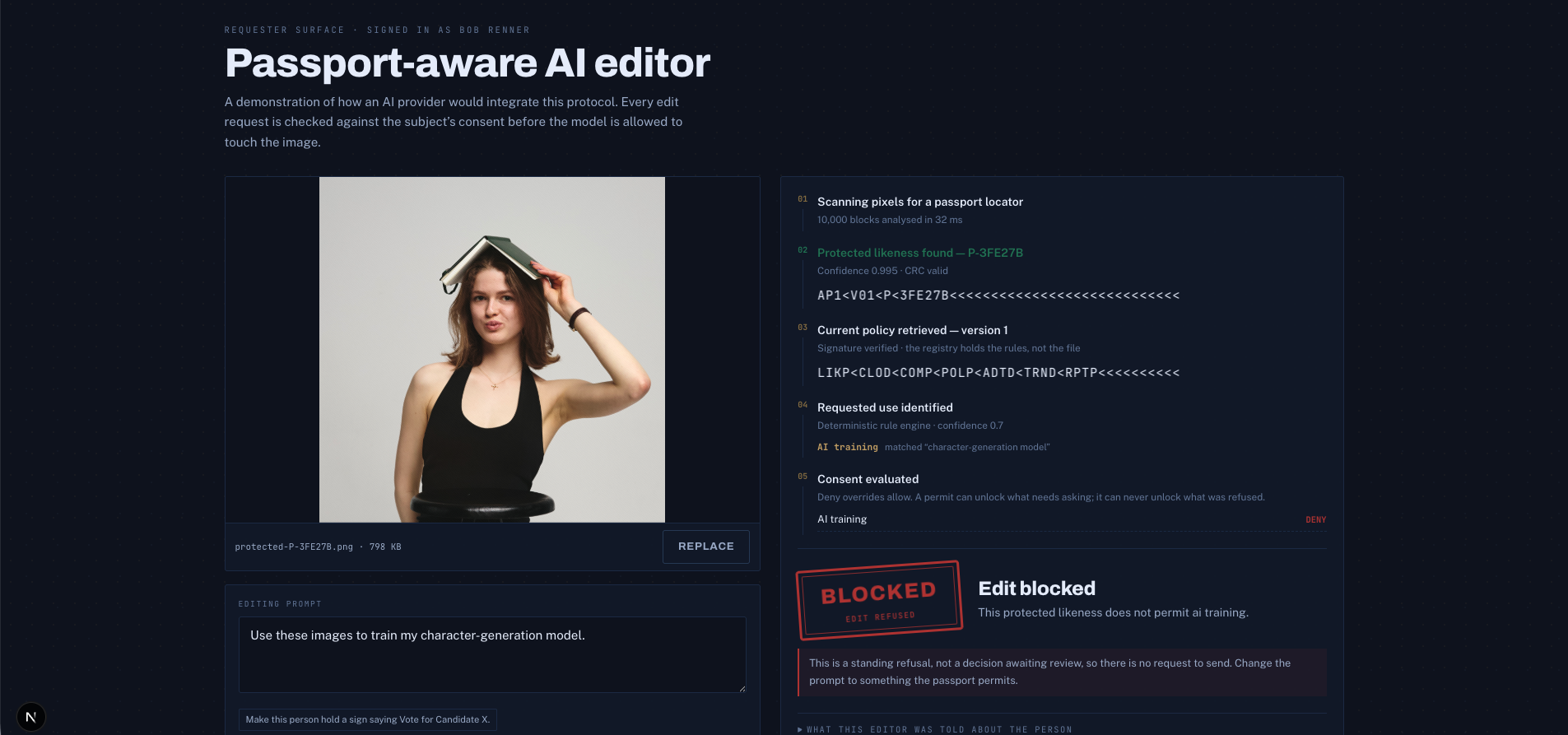
A Passport-aware AI system first scans the image for a Passport.
If one is detected, the system retrieves the current policy and analyses what the user's prompt is actually asking for.
For example, a prompt such as:
Make this person hold a sign supporting Candidate X.
might be classified as both likeness editing and political endorsement.
The system then compares those requested operations with the person's policy before generation begins.
The result is one of three outcomes:
- Allowed
- Denied
- Permission required
The AI only continues if the policy allows the requested operation or the requester has a valid permit.
Why the rules are not stored inside the image
This is one of the decisions I would defend the hardest.
People change their minds.
Photographs do not come with a recall button.
If I embedded the entire permission policy inside the image, changing a rule would mean somehow finding and rewriting every copy of that photograph that had ever left the person's hands.
That is impossible.
Instead, the image contains only a Passport identifier.
The actual permissions are retrieved when the image is used.
This means somebody can change a rule today and an old copy of the photograph can receive the new answer tomorrow without being downloaded again or re-watermarked.
In the prototype, I can change a Passport rule and immediately re-check an image that was downloaded earlier.
The pixels stay exactly the same.
The answer changes because the Passport policy changed.
That is the point.
The watermark
I wanted the Passport identifier to live in the visual content rather than normal image metadata.
Metadata is fragile. It can disappear when an image is uploaded, recompressed, screenshotted, exported or processed by another platform.
The prototype therefore embeds the identifier directly into the image pixels.
Each 8x8 block of the image carries one bit.
The bit is represented using the sign of the difference between two mid-frequency DCT coefficients.
In an untouched photograph, that difference is normally close to zero. The encoder moves it decisively in one direction or the other depending on whether it needs to represent a 0 or a 1.
The Passport is therefore present in the visual signal itself rather than being attached as an extra text field.
Using two frequency bands
Originally, I encoded the watermark into one DCT frequency band.
That worked well until I started testing aggressive JPEG compression.
Higher-frequency information gets damaged quickly during compression, so I changed the encoder to write the signal into two frequency bands.
If JPEG compression destroys the higher-frequency band, that band contributes effectively no confidence to the final vote instead of producing misleading noise.
The lower band can then carry most of the recovery.
This cost roughly 1.5 dB of image quality, but improved JPEG survival from around quality 70 down to quality 50.
That was a trade-off I was willing to make.
Redundancy
The 48-bit Passport payload is not written once.
It is tiled across the image roughly 250 times.
That redundancy gives the decoder two useful properties.
First, losing part of the image only removes some votes. It does not necessarily remove the Passport.
Second, cropping does not completely destroy the payload structure.
Because the message is only 48 bits long, there are 48 possible tile alignments. The decoder can test those possible positions and use the checksum and signal agreement to determine whether it has actually recovered a Passport.
For a 1000 × 750 test image, I measured approximately:
- 40 dB PSNR
- 1.7 mean pixel-level change out of 255
Visually, the watermark is extremely difficult to notice.
But it is genuinely present in the pixels.
What it currently survives
I deliberately tested the watermark against common transformations rather than only showing an untouched image.
The current prototype survives:
- JPEG compression down to approximately quality 50
- WebP conversion
- PNG round trips
- Complete metadata stripping
- Cropping
- Tight crops around the protected face
- 90-degree rotation
- 180-degree rotation
- 270-degree rotation
- Horizontal mirroring
- Hand tilts of roughly 7 degrees
- Translucent overlays up to around 85% opacity
- Large opaque stickers covering as much as 80% of the image
- Greyscale conversion
- Contrast adjustments
- Saturation changes
- Hue changes
There are also transformations that defeat it.
Heavy blur can destroy the signal.
Large amounts of noise can destroy it.
A noise overlay above roughly 50% becomes problematic.
Most importantly, generative reconstruction can destroy the watermark completely because the model may create entirely new pixels rather than modifying the original ones.
That limitation is important.
It is also one of the reasons the system is designed around checking permission before the AI edit happens, rather than trying to recover consent information after the image has already been regenerated.
Proving that the marker is really in the pixels
I did not want the demo to quietly depend on some metadata field without making that obvious.
So I added a test that strips an image down to a raw RGB pixel array.
The resulting file is roughly 3.1 MB of raw pixel values with no image metadata, headers or auxiliary chunks available to hide anything in.
The Passport still decodes.
That gives a simple demonstration that the identifier is genuinely carried by the image signal.
The bug that nearly shipped
Originally, I listed rotation as one of the watermark's limitations.
Then I actually tested it.
I found that the signal survived a rotate-and-unrotate operation surprisingly well. The decoder simply was not searching for it.
So I added rotation recovery.
The decoder now searches eight major orientations covering right-angle rotations and mirroring, followed by a finer tilt search.
It worked.
And it quietly broke one of the most important guarantees in the system.
Random noise started returning valid Passport IDs.
Some tilted images also produced completely unrelated Passport IDs.
That is a catastrophic failure for a consent system.
A false Passport does not merely mean that detection failed. It could cause an AI system to retrieve the consent policy belonging to an entirely unrelated person.
I eventually traced the problem back to probability.
The Passport originally relied on a magic marker and CRC-8, giving roughly 16 bits of validation.
That means a random candidate has approximately a one in 65,536 chance of appearing valid.
My original decoder tested around 3,000 possible candidates.
Adding the much larger rotation search pushed that number above 145,000 candidates.
At that point, getting a random checksum-valid result is no longer particularly surprising.
It becomes expected.
The fix
I realised that a real watermark has another property that a random checksum collision does not.
Agreement.
A genuine Passport is repeated across hundreds or thousands of blocks.
When the decoder finds the real signal, those observations agree extremely strongly.
In my tests, genuine detections reached around 99% agreement.
Random checksum collisions sit around 51%, essentially a coin flip, because there is no actual repeated signal underneath them.
The decoder now requires both conditions:
- The candidate must pass structural validation and checksum verification.
- The underlying repeated watermark observations must show sufficient agreement.
Random noise with every search option enabled now correctly returns no Passport.
I only found this because I had written an adversarial test that deliberately sends random noise through the complete decoder.
Without that test, I could easily have shipped a system that occasionally invented Passport IDs and confidently demonstrated it as working.
That was probably the most important bug I found.
Other things that broke
The watermark was not the only part of the prototype where testing exposed problems.
Signature verification broke after policy edits
Every Passport policy is signed.
When a policy changed, I signed the new version using that version's timestamp.
The verification code, however, reconstructed the signed document using the Passport's original creation timestamp.
Those were different bytes.
As a result, the first policy edit made the Passport permanently appear as if somebody had tampered with it.
The signing and verification logic now reconstruct exactly the same canonical document.
The machine-readable strip changed from AP1 to AP3
At one point I accidentally linked the watermark format identifier to the Passport policy version.
So after the policy was updated several times, the embedded marker could become something like:
AP3
That makes no sense.
The watermark format and the Passport policy version are two completely different things.
The format magic is now fixed.
Only the actual policy version changes.
The seed script silently changed Passport IDs
The demo expected a specific Passport:
P-A7F291
If that identifier already existed, the seed script silently generated a new one.
That creates the kind of demo bug where the presentation says one Passport ID and the application suddenly displays another.
The seed process now refuses loudly instead of silently replacing identifiers.
The classifier had gaps
The prompt classifier worked perfectly on the prompts I had written while building it.
That turned out not to mean much.
Once I started typing requests I had not designed around, problems appeared.
For example:
For our campaign.
was being interpreted as political endorsement when the user actually meant a marketing campaign.
Another request:
Stick her head on a bodybuilder.
failed to trigger the face-cloning category.
I found four similar problems simply by deliberately trying phrases I had not used while developing the classifier.
Those tests changed the classifier significantly.
Decisions I would defend
There are a few policy decisions in the prototype that are intentional rather than accidental implementation details.
Deny always wins
Imagine the Passport says:
- Outfit editing — Allow
- Political endorsement — Deny
Then the request is:
Change the outfit so they look like they are endorsing Candidate X.
The request contains both an allowed operation and a denied operation.
The result is Denied.
A forbidden operation cannot be hidden inside a larger allowed request.
A hard deny gets no permission-request button
If somebody has explicitly set:
Political endorsement — Deny
the interface does not respond with:
Would you like to ask anyway?
That would turn a stated boundary into an invitation to negotiate.
A hard deny is treated as a hard deny.
The request option is only available for permissions that the holder deliberately marked as Ask me.
Silence is not consent
If the policy does not contain a rule for an operation, the system does not assume permission.
It fails closed.
For a consent system, I think that is the safer default.
Approval does not change the Passport
Suppose a Passport says:
Commercial use — Ask me
and the creator approves one company's request.
The Passport does not suddenly become:
Commercial use — Allow
Instead, the system issues a separate Permit.
That permit can specify:
- Who received permission
- Which Passport it applies to
- Which operations are permitted
- The purpose
- When permission was issued
- When it expires
- Whether it is still active
This keeps the person's default policy separate from individual exceptions.
Permits are checked every time
A permit is not checked once and then forgotten.
The AI system verifies its status before every protected action.
That is what makes revocation meaningful.
If a creator revokes permission, the next request should fail even if the requester still has the old permit document.
The Generate button does not exist until permission passes
The editor does not simply disable the Generate button.
It does not render it until the authorization check succeeds.
More importantly, this is not only a frontend restriction.
The generation endpoint performs the authorization check again on the server.
If someone bypasses the interface and directly calls the endpoint without authorization, the server returns a 403.
A client-side restriction is a convenience.
The server is the enforcement point.
The AI receives as little information as possible
The AI does not need to know who the person is in the real world.
It receives only what is necessary for the decision:
- A pseudonymous Passport reference
- Relevant permissions
- Verification state
- Valid permit information if one exists
It does not receive:
- Legal name
- Home address
- Contact information
- Government ID
- Other private photographs
The editor explicitly shows what information has been withheld.
A system designed to protect someone's likeness should not require unnecessarily identifying them every time their consent is checked.
The prompt classifier
I deliberately made the intent classifier hybrid rather than relying entirely on a language model.
The deterministic rules run first.
An optional language model can run afterwards to identify operations the rules may have missed.
The language model is allowed to add operations.
It is never allowed to remove one detected by the deterministic system.
That asymmetry is intentional.
Consider:
Make this person endorse Candidate X.
If the deterministic classifier detects political endorsement and an AI classifier somehow fails to detect it, allowing the model to remove that classification could silently unblock an explicitly forbidden operation.
That is not an acceptable failure mode for a consent decision.
The less exciting deterministic classifier therefore has the final say.
It also means the complete demo works without any network connection or API key.
Requesting permission
Not every restriction needs to be permanent.
A Passport owner can mark an operation as:
Ask me
When a requester attempts that operation, the AI pauses instead of generating the edit.
The requester can send a permission request to the Passport holder.
The holder can see:
- What operation was requested
- What prompt triggered it
- Who is requesting access
- What the permission would cover
- How long it should last
If approved, the system creates a signed permit specifically for that requester and purpose.
The requester can then continue the previously blocked edit.
If the permit expires or is revoked, future attempts are blocked again.
This is important because consent is not always simply yes or no.
Sometimes the correct answer is:
Yes, but only for this person, for this purpose and for this amount of time.
What can be done to track protected media?
The same Passport identifier could eventually serve another purpose beyond preventing unauthorized AI operations.
It can also become a discovery signal.
The current prototype checks an image when someone intentionally submits it to a Passport-aware system.
A future version could also look for protected media appearing elsewhere on the publicly accessible web.
I call this Passport Discovery.
Public web discovery
A crawler could inspect publicly accessible webpages and images.
When it encounters an image, it could run the same Passport decoder used by the AI editor.
If a Passport is detected, the system could record where it appeared.
A sighting might include:
- Passport ID
- Public URL
- Time detected
- Detection confidence
- How the image appears to be used
- Whether that use agrees with the current Passport policy
For example, the owner of P-A7F291 could receive a sighting showing that their protected image appeared on a public website.
The system might classify the surrounding use as commercial advertising while the Passport says:
Commercial use — Ask me
If no valid commercial permit exists, that sighting could be marked as a potential unauthorized use.
The important word is potential.
Detection and contextual classification are not automatically proof of a legal violation.
Why this is useful
The Passport would then help at two different stages.
Before an AI operation, it helps answer:
Is this AI allowed to perform this action?
After protected media appears publicly, Passport Discovery can help answer:
Where has this Passport been observed, and does the observed use appear consistent with the owner's policy?
That gives creators both preventive control and visibility.
The crawler is only one discovery source
I would not want Passport Discovery to depend entirely on running one giant web crawler.
A crawler is only one possible source of sightings.
Platforms that support the Passport standard could report sightings directly.
For example, a social platform could detect a Passport when an image is uploaded and notify the Passport service that the protected media appeared there.
Passport-aware AI tools could also create sightings when they encounter protected material.
Search engines, content-management systems and other participating services could eventually do the same.
The creator's dashboard could combine those observations into one place.
What discovery cannot promise
The Passport is not a GPS tracker embedded inside an image.
The watermark cannot phone home by itself.
Something has to encounter the image and run the decoder.
A crawler therefore cannot discover:
- Private messages
- Encrypted conversations
- Offline copies
- Private accounts it cannot access
- Closed platforms that do not participate
- Websites that prevent the crawler from accessing the image
- Images where the watermark has been successfully removed
So I would never describe Passport Discovery as:
See everywhere your image exists.
The accurate claim is narrower:
Passport Discovery can help identify where protected media is observed across the publicly accessible web and participating platforms.
That distinction matters.
What I learned
Test the thing you are most confident about
Almost every serious bug I found came from testing something I had already written down as true.
Rotation was originally sitting in my limitations list.
I assumed the watermark could not survive it.
Then I tested it and discovered that the signal was still there.
That discovery improved the system, but adding the new search also introduced the worst false-positive bug in the project.
The lesson was simple.
A claim written confidently in documentation is not evidence.
Widening a search also widens the false-positive problem
Adding more orientations sounded like an obvious improvement.
The decoder could find the Passport in more situations.
But every additional candidate being tested increased the probability that random data would eventually satisfy the validation conditions by accident.
Nothing warned me about that automatically.
The probability was sitting in the design the entire time.
I simply had not done the arithmetic.
Honesty is part of the safety model
The prototype includes its limitations inside the product.
I think that is especially important for a consent system.
If I claim that a watermark is impossible to remove when it is not, people may make decisions based on protection that does not actually exist.
That is more dangerous than clearly explaining the boundary.
I would rather say:
A determined attacker can remove this.
than make somebody believe their image is protected everywhere when it is not.
What this does not do
This project does not make Gemini, ChatGPT, Adobe or any existing AI system automatically obey a Passport.
Those tools would first need to implement the Passport decoder and policy-checking protocol.
The prototype is a reference implementation demonstrating how that integration could work.
The watermark is also not indestructible.
Someone who understands the scheme can intentionally damage or remove it.
Generative reconstruction can eliminate it completely.
Revocation only reaches systems that can connect to the Passport registry.
The Passport also does not currently prove the real-world identity of the person creating it.
It proves that a Passport exists, that its policy is signed and that a protected entity has been associated with it.
Identity verification would be a separate problem.
The claim I am comfortable making is therefore deliberately narrow:
Passport-aware AI tools can detect and enforce a creator's consent automatically. Tools that have not implemented the protocol cannot.
Passport Discovery follows the same principle.
It can report protected media that participating systems or public crawlers actually observe.
It cannot claim to find every copy of an image everywhere.
Numbers
The current project contains 120 automated checks:
- 50 unit tests
- 47 API end-to-end tests
- 23 tests that drive a real Chrome browser through the demo
The browser tests include the complete live permission workflow, including an approval causing the requester interface to unlock.
There are no required external services.
The repository contains its own:
- Watermark codec
- Face detector
- Policy engine
- Intent classifier
- Signing system
No API key is required to run the prototype.
The test images are generated rather than bundled with the repository.
For a project built around consent, shipping a stranger's face as a permanent test fixture felt like the wrong place to start.
The idea in one sentence
AI Passport turns a person's consent into a machine-readable permission that can travel with their media, be checked before an AI acts, change after the file has already been shared, and potentially help discover protected media when it appears across participating platforms and the public web.
Built With
- anthropic-claude
- computer-vision
- consent
- cryptography
- dct
- digital-signatures
- ed25519
- face-detection
- image-processing
- next
- nextjs
- node.js
- opencv
- privacy
- puppeteer
- react
- rest-api
- sharp
- signal-processing
- sqlite
- steganography
- tailwindcss
- typescript
- viola-jones
- watermarking

Log in or sign up for Devpost to join the conversation.