-
-
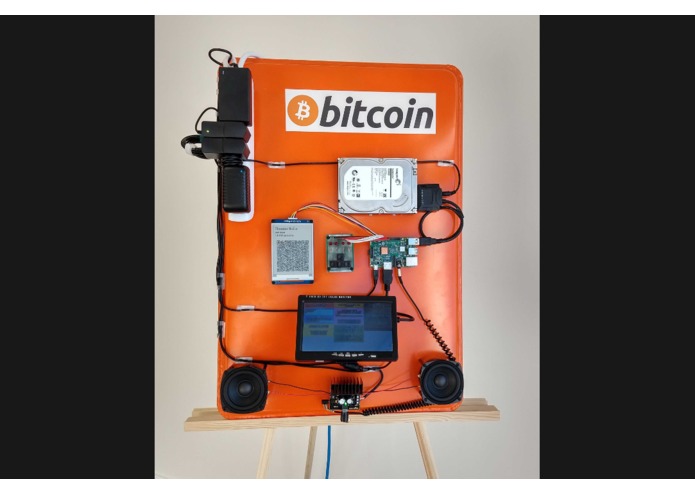
The hardware and software on display.
-

Screen display panel with system, bitcoind and c-lightning stats


Inspiration
We wanted to find a solution to help overcome the frustration of trying to explain exactly what Bitcoin is to a wide range of people. The ideas behind Bitcoin are abstract, there's a lot to explain, and little can be left out when trying to arrive at an accurate picture of the technology.
After spending years working at this through many conversations and presentations as stewards of our local Bitcoin Meetup group in Edmonton, AB, Canada, we decided to try out a more tangible approach by creating a full working example of what Bitcoin and the Lightning Network is and does.
The result was the bright orange, stat-displaying, song-playing, block-announcing piece of hardware pictured above and our repository of MIT-licensed source code free for all to look at and use.
What it does
The Jukebox does a number of things, most obviously it plays music, but critically it's built to show the entire process of a payment system built on Bitcoin and complete the loop of demonstrating how a user can pay for the service of this device playing a song. The main features are:
- Visual display of mounted hardware components
- Full running Bitcoin Node (
bitcoind) - Lightning Network Node (
c-lightning) - Real-time system and node stats display
- Audio announcement of new block discovery
- Jukebox with payment function via e-Ink QR Code (LN bolt11 Invoice)
At the heart of it is a Raspberry Pi 3. For peripherals, it has a hard drive, an LCD screen and speakers as well as an e-ink display and push buttons for jukebox payment and controls.
The Raspberry Pi runs our custom software which interfaces with bitcoind, c-lightning and the peripherals. It collects system stats from the underlying OS as well as the nodes.
The LCD screen displays real-time stats in organized, colorful ncurses output (via the urwid framework). It listens for new block arrivals, which it announces via the speakers, charming all in the vicinity with its robotic voice (provided by espeak).
The jukebox application is built by interfacing with c-lightning via the pylightning Python package. Users can press the button interface to cycle through the song selection, which displays an invoice QR code on the e-ink screen. Paying the invoice triggers the selected song to be played (or adds it to the song queue if a song is already playing). The satoshis which are transferred to (and now owned by!) the Raspberry Pi are added to the stats output on the LCD screen.
How we built it
The goal was to physically present in as much detail as possible the full workings of the project. This meant exposing all the components in an easy-to-follow layout such that an observer can trace the wire connections from one part to the next.
The hardware is mounted on a large aluminum cookie tray that has been spray-painted orange, highlighted by a Bitcoin symbol and name sticker (a bumper sticker to compensate for underdeveloped painting skills).
The software is written in Python 3 utilizing the Twisted framework for the event loop and managing the many queries and peripheral interactions. Much of it is done in parallel and expressed as thread worker functions. The screen output is written to be lightweight and not require the system resources of running a full GUI environment on the Pi's operating system, which is why we chose the urwid framework.
The jukebox functionality interfaces with pylightning and obtains invoices via c-lightning, detect when they have been paid, manage the song queue and launch a thread of the music player application.
The GPIO interfacing for the buttons and the e-ink display also required some custom software. In particular, the code had to be written to render a QR code to this specific model of the display via it's UART interface. No existing open source code that did what we needed was available.
Challenges we ran into
Being primarily software developers, starting off with a pile of small, loose hardware was a humbling experience. Parts being slow to arrive and assembling stuff in a nice manner consumed a lot of time. Using a solder iron was also something we had to learn on the fly.
The QR code rendering on the e-ink was harder than anticipated and became it's own open-source sub-project we packaged up separately in another repository for people to utilize for similar projects in the future.
Making a nice-looking stat output on the console terminal was also harder to build than imagined. The specifics of urwid and the underlying ncurses as well as the variety of terminal console quirks relating to colors, fonts, compatibility, fallbacks etc. had a learning curve to get around.
The application pattern of querying the c-lightning daemon for sets and subsets of paid, unpaid, or expired LN invoices, comparing that to the application state and reacting accordingly was also a challenge to express in code for the first time, however this exercise has already been useful in informing other application development efforts.
Accomplishments that we're proud of
- Building a self-contained unit that is the full security model of Bitcoin, that operates at scale on low-cost hardware. Also, being an economic node, it demonstrates the possibilities for standalone vending-machine-like devices that can be built with this technology.
- Motivating several people to install Lightning Network wallets on their phone and started a small Lightning Network economy among our local meetup group.
- Being able to demo this unit to over a 100 people in a face-to-face context. Showing people how the Lightning Network operates for the first time is a great experience.
What we learned
*A lot about the API/RPC calls of both networks' daemons. Also, managing the channel state of the Lightning Network and working past some initial misconceptions.
- Twisted is a powerful framework for this type of application development. Writing code in this mindset has prepared us for other applications of this type.
- Through working with QR codes, we came to appreciate the new user interface possibilities of such codes and the bolt11 invoice requests.
What's next for our Lightning Network Hardware Jukebox
- This project needs some bugfixes and some better configuration of the underlying system to make it easy to start up upon system boot.
- A requested feature is to make the console output with the node stats more portable onto other hardware, such that wall-hanging all-in-one x86 computers could have the same cool screen output when running nodes.
- We would also like to configure the networking to only connect to the Bitcoin and Lightning P2P network via Tor and also add Tor network information to the screen output.
- We desire some more advanced block mempool stats are desired to better highlight the fee pressure and transaction optimization being seen.
License
The description of this project is made available to the public under the Creative Commons Attribution-NoDerivatives 4.0 International (CC BY-ND 4.0)
The source code is MIT-licensed as described in the repository.
Built With
- python-c-lightning-urwid-twisted
- raspberry-pi


Log in or sign up for Devpost to join the conversation.