-
-
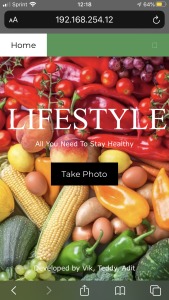
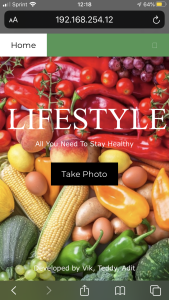
Home page
-
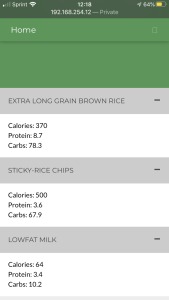
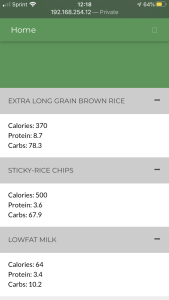
Details for scanned food
-
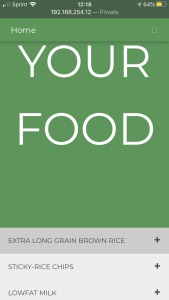
List of food you have scanned
-
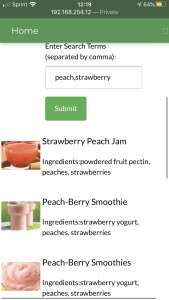
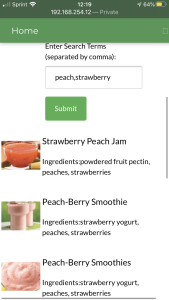
Find recipes that includes ingredients

Inspiration
Typical American diets exceed the recommended intake levels or limits in four categories: total calories intake; refined grains; sodium; and saturated fat. Although it is important to maintain a healthy lifestyle, it can seem challenging at times. We wanted to create a web application that can help with that. A web application that tells the user all the important nutritional details, common allergens, and healthy recipes pertaining to a certain food item. We present to you LIFESTYLE. With ease and accessibility, any person that has a stable internet connection can use this web application to lead a healthy, long and safe life.
What it does
The best way to understand how LIFESTYLE works is by imagining. Close your eyes and imagine the following. You are at the grocery store trying to find a certain food item. But before you put the food item in your cart you want to check its nutritional facts. You quickly take your phone out and open the LIFESTYLE web app. You scan the bar code on the food item only to realize the food item contains an ingredient that you are very allergic to. Moreover, the product contains very high levels of sodium which is the last thing you want because of your high blood pressure. With the use of the web app you have prevented yourself from purchasing and eating something that can harm your health. As you continue shopping, you start scanning the barcode of every food item that enter your cart. When you are waiting in the checkout line, you go to the recipe section and type in the ingredients you want to cook with. Through this, you find a very delicious looking recipe and incorporates most of the item you just bought.
How I built it
We broke our team into a frontend and a backend. The role of the frontend was to create a website that works on a desktop and on mobile. The frontend developer designed the website, and developed a way to access the camera of the phone and moving the value of the barcode to the backend. The frontend also had to create different tabs within the site, each with different capabilities. This included a lot of just reading documentation, watching YouTube videos, and making the website as attractive as possible. The job of the backend developer was to integrate three separate APIs. The code had to make sure the barcode was received from camera, and extract the UPC code from the image. The UPC code is then used to find the product in the food database, gathering nutritional info for the item and other useful info. Lastly, the backend had to incorporate recipe searching based on a list of included ingredients.
Challenges I ran into
The largest challenge we ran into was making the website compatible on the PC and the phone. Since it would be easier to use the website with a phone, we geared the website to look better on the phone. But somewhere along the way the PC version of the website started to look horrendous. This was the groups first time making an website that was cross compatible. Another challenge was the fact that only UPC-A barcodes can be read, as EAN-13 was not supported by the API.
Accomplishments that I'm proud of
Accomplishments that we are proud of is that it was the frontends first time being the frontend. The frontend was able to learn a lot about CSS and HTML and cannot wait to use there skills on the next hackathon. The back end was in a level of its own, not only did the backend code the backend, the backend offered the frontend hints/advice/documentation, and taught the frontend how certain components of the backend work. The front end was able to learn from the backend.
What I learned
The team learned to work cooperatively under a time crunch, effectively splitting up the work among each member. The team is a group of college friends who never had the opportunity to work with each other to bring a product to life. Over the course of the experience, there were many periods of laughter, periods of stress, and many instances of one on one bonding, that allowed our friendship and love of computer science to flourish even more.
What's next for LIFESTYLE
What is next for LIFESTYLE is further enhancing the users experience on both PC and phone. We might include a shopping list aspect and a sign-in aspect. With these advancement on the web application users can sign in to LIFESTYLE. With the sign-in feature, the data for the user can be permanently associated with the user rather than the app only temporarily storing the item. The shopping list will allow the user to have a shopping list within the LIFESTYLE web application. As the user is shopping they can tap off of the item on there shopping list. Lets say that on your shopping list you have Gatorade,. Before you actually grab the a Gatorade, you would tap on "Gatorade" within the app which will automatically open up the camera so you can scan the barcode.
Built With
- api
- css
- database
- food-database-api
- github
- html5
- javascript
- nutritional-database-api
- parsing
- recipt-search-api
- social-good


Log in or sign up for Devpost to join the conversation.