-
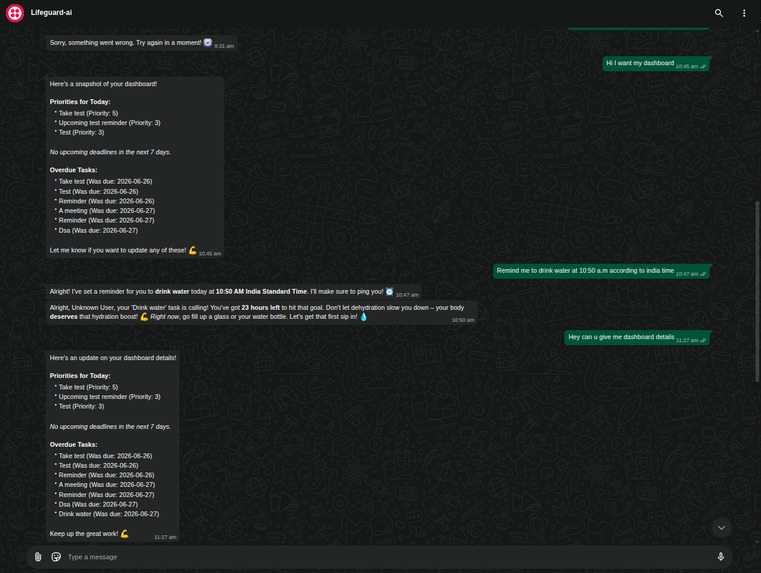
The AI sets exam reminders, creates tasks, and sends proactive motivational nudges — all through natural WhatsApp conversation.
-
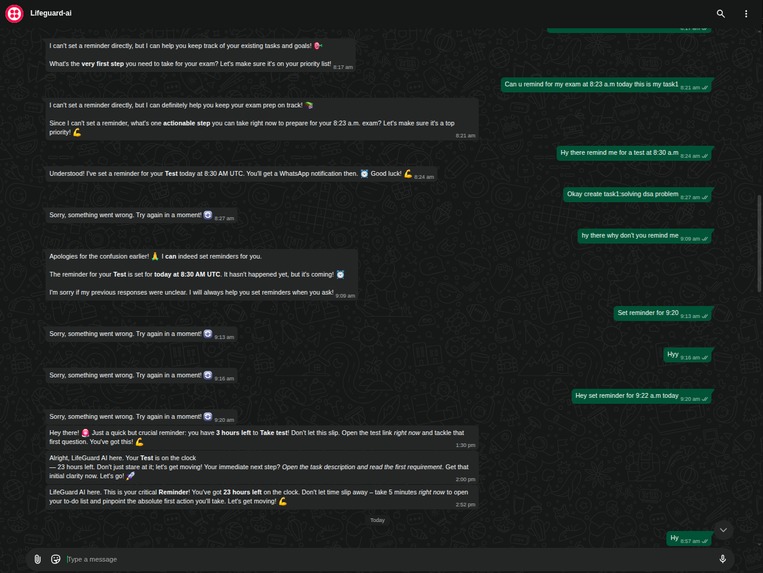
LifeGuard AI in action — task priorities, overdue alerts, and a smart water reminder, all managed through a simple WhatsApp conversation.
Inspiration
As a student, I kept downloading productivity apps — Todoist, Notion, Google Tasks — and abandoning them within a week. The friction of opening a separate app, navigating menus, and manually tracking tasks felt like a chore on top of my actual work.
Then I noticed something: I never ignore a WhatsApp notification. When that green bubble pops up, I check it instinctively. That's when it clicked — what if my accountability partner lived inside WhatsApp? No new app to download, no new habit to build. Just text your tasks like you'd text a friend.
What it does
LifeGuard AI is a WhatsApp-native AI accountability partner. You interact with it entirely through chat:
- 💬 "Remind me to submit my assignment at 5 PM" → Creates the task + schedules a WhatsApp reminder
- 📊 "How am I doing?" → Returns a formatted productivity stats card
- ✅ "Mark my grocery task as done" → Finds and updates the task
- 🔁 "Remind me to drink water every 1 hour" → Sets a recurring reminder with 10-second precision
The bot also proactively reaches out:
- 🌅 Daily Morning Briefing at 8 AM — your priorities, overdue items, and a motivational nudge
- ⏰ Overdue Alerts every 6 hours — detects late tasks and sends automated WhatsApp alerts
- 🔔 Smart Reminders — AI-generated, personalized nudges that mention the task, time remaining, and suggest a specific next action
There's also a web dashboard (React) for users who want a visual overview of their week, goals, and subscription status.
How I built it
The backend is built with Python + FastAPI, using SQLAlchemy (async) for PostgreSQL and APScheduler for the three automated jobs (reminders every 10s, morning briefing daily, overdue nudges every 6h).
The AI layer uses Google Gemini 2.5 Flash with function calling — the agent has 15+ tools declared as Gemini function declarations, and it autonomously decides which to call based on the user's message.
The architecture follows two modern AI protocols:
- MCP (Model Context Protocol): All database operations are exposed as MCP tools. The Chat Agent never touches raw SQL — it calls tools through the MCP protocol layer.
- A2A (Agent-to-Agent Protocol): Each agent publishes an Agent Card at
/.well-known/agent.json. The Chat Agent delegates reminder generation to the Reminder Agent via structured A2A task endpoints.
WhatsApp integration uses Twilio's WhatsApp Business API with webhook-based message processing. The frontend is React + TypeScript + Vite with Tailwind CSS, Recharts for charts, and Framer Motion for animations.
Deployed on Railway (backend + PostgreSQL) and Vercel (frontend).
Challenges I ran into
Twilio number formatting — Spent hours debugging why messages weren't sending. Turned out the
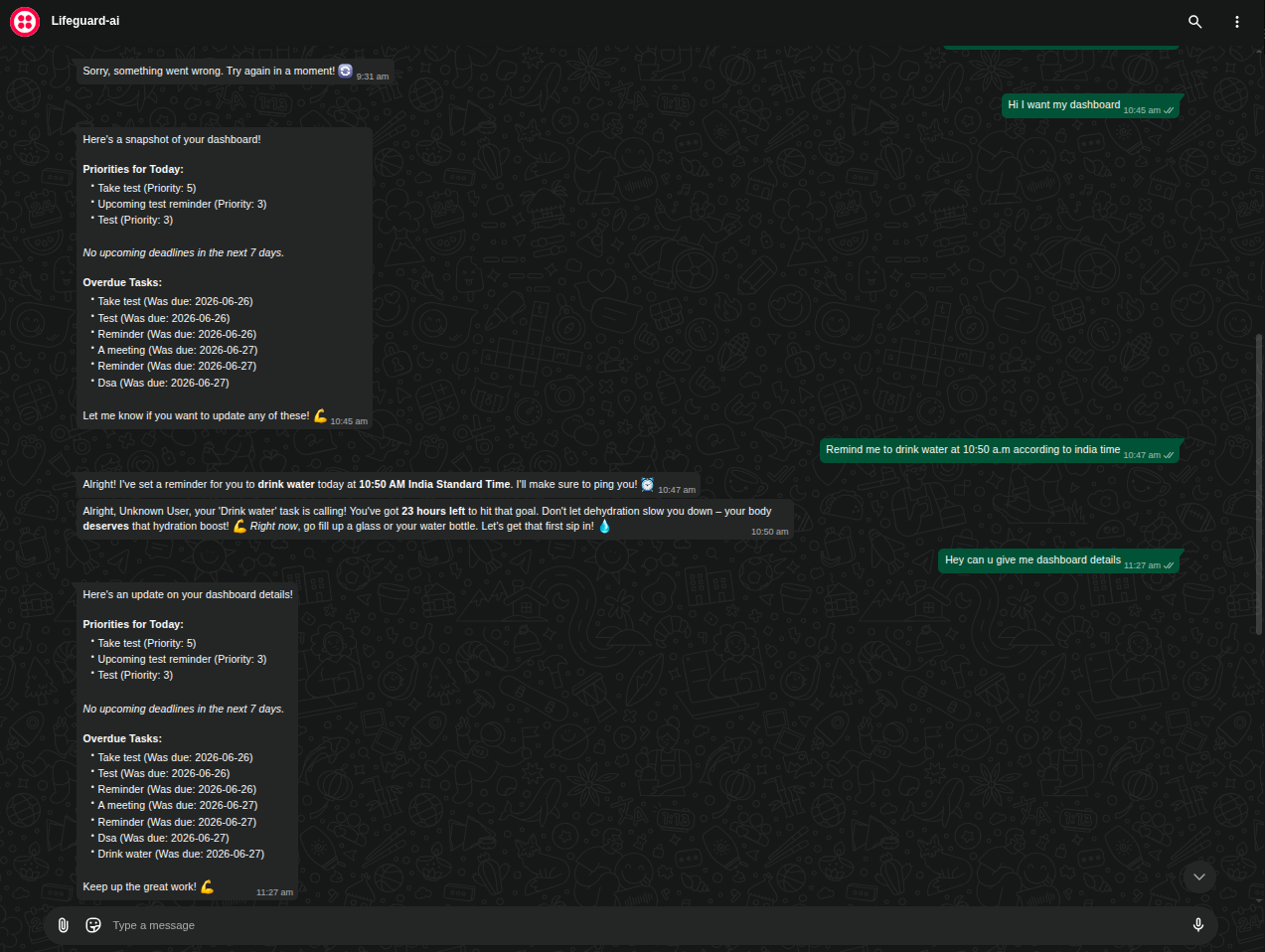
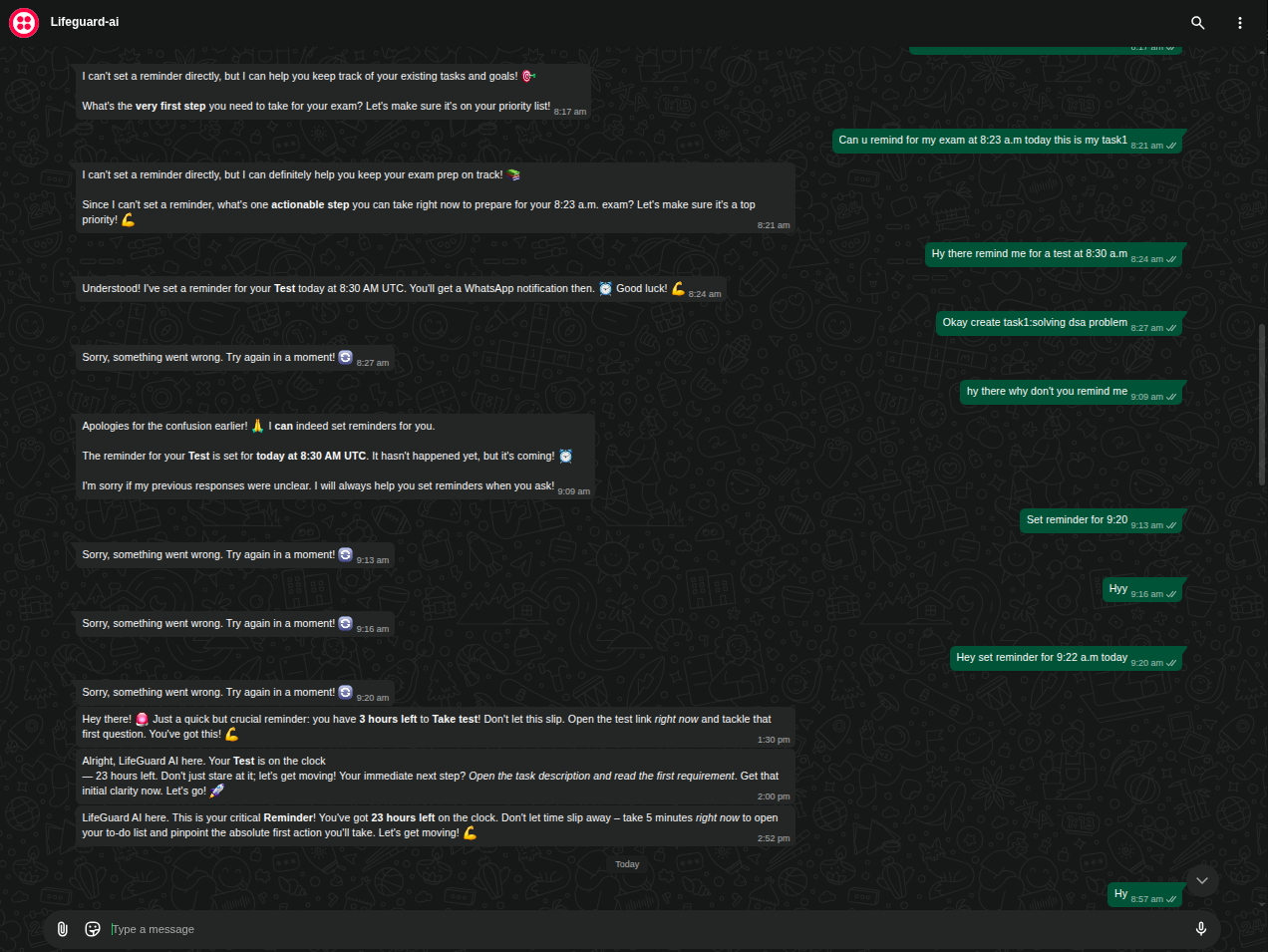
whatsapp:+prefix was missing a+sign. One character.Gemini ignoring tool calls — Initially, the agent would sometimes say "I can't set reminders" instead of calling the
create_task_with_remindertool. Fixed this by making the system prompt extremely explicit: "You MUST call this tool. Never say you cannot."Reminder bypass bug — The original flow ran messages through a commitment extractor first, which bypassed the Chat Agent for anything detected as a "task." This meant "remind me at 8:30 AM" never reached the agent's reminder tool. Fixed by routing ALL messages through the Chat Agent directly.
Recurring reminder spam — Had to implement a minimum 1-hour interval and advance-until-future logic to prevent the scheduler from firing hundreds of queued-up reminders at once.
Accomplishments that I'm proud of
- It actually works end-to-end. I can text the bot on WhatsApp right now and get a real reminder at the exact time I asked for.
- The MCP + A2A architecture. Using cutting-edge AI protocols in a hackathon project — not because I had to, but because it's the right way to build multi-agent systems.
- Zero-friction UX. My friends who tested it said "this is the first productivity tool I didn't abandon."
What I learned
- How to implement the Model Context Protocol for clean agent-to-database communication
- How to use Gemini function calling with multi-turn tool loops (call tool → get result → call another tool → respond)
- How APScheduler works with async Python for real-time job scheduling
- That WhatsApp's psychological urgency is a legitimate UX advantage, not just a gimmick
What's next for LifeGuard AI
- Voice Note Processing — Transcribe WhatsApp voice notes into tasks using Whisper API
- Team Collaboration — Shared accountability groups where friends track each other's progress
- Payment Integration — Stripe/Razorpay webhooks to auto-activate Premium tier
- Dedicated Task/Goal Views — Full standalone pages in the dashboard for power users
⚠️ A Note on the Live Demo
This project is deployed entirely on free-tier infrastructure (Railway free plan, Twilio sandbox, Vercel hobby tier). Because of this, you may encounter occasional issues:
- Railway cold starts — The backend may take 10-15 seconds to wake up on the first request if it has been idle
- Twilio sandbox limitations — WhatsApp messaging only works with pre-registered numbers on the sandbox. In production, a Twilio paid number would remove this restriction
- Database connection limits — Free-tier PostgreSQL has connection caps that may cause intermittent timeouts under load
These are infrastructure constraints, not code issues. The full codebase is functional and production-ready — it just needs paid hosting to run at full capacity. The architecture, AI agent logic, MCP/A2A protocols, scheduler system, and WhatsApp integration all work as designed when the services are available.
If the live demo is unresponsive, please refer to the demo video and screenshots for a complete walkthrough of the working system.
Built With
- a2a-(agent-to-agent-protocol)
- apscheduler
- docker
- fastapi
- framer-motion
- google-gemini-2.5-flash
- mcp-(model-context-protocol)
- postgresql
- pydantic
- python
- railway
- react
- recharts
- sqlalchemy
- tailwind-css
- twilio-whatsapp-api
- typescript
- vercel
- vite


Log in or sign up for Devpost to join the conversation.