🌟 Project Story — LifeGrid 🩺 About the Project
LifeGrid was born from a simple but emotional observation: In emergencies, people don’t die because help is unavailable— they die because help is uncoordinated.
Traffic, panic, wrong hospitals, slow routing… All these “small” delays become life-threatening in minutes. This project is my attempt to answer one question:
How can we turn those chaotic minutes into a smooth, guided, life-saving chain?
LifeGrid is a complete emergency simulation platform that imagines how cities should respond when every second counts. It connects ambulances, hospitals, traffic systems, and bystanders into one intelligent flow—beautifully visualized, fully animated, and built for judges to experience the problem firsthand.
💡 What Inspired Me
A few years ago, I witnessed a road accident where the ambulance arrived too late. Not because it was far away— but because traffic didn’t clear, the nearest hospital wasn’t specialized, and bystanders panicked with no guidance.
That moment stayed with me.
It made me realize: If technology can order a cab in 10 seconds, why can’t we summon an ambulance with the same intelligence? That emotional trigger became the seed for LifeGrid.
🛠️ How I Built the Project
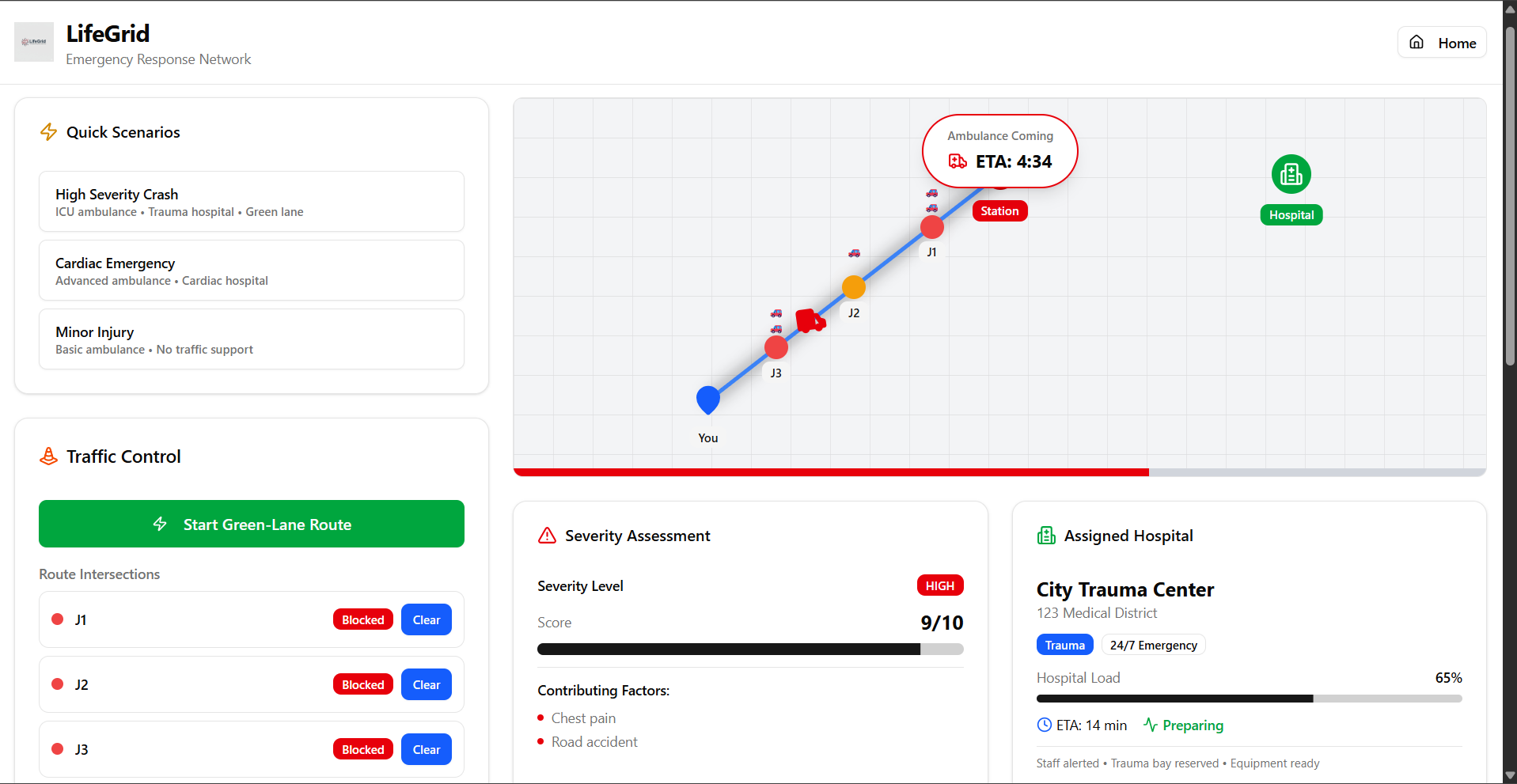
I wanted judges to feel the emergency flow, not just read about it. So I built LifeGrid as a complete interactive demo:
A clean, modern UI
A live map with a smooth 60-second ambulance animation
Traffic control buttons that simulate green-lane clearing
A specialized hospital matcher
A rule-based doctor chat using 80 health parameters
A guided Ask AI Companion for calm, safe instructions
A dynamic medical assessment card
An end-to-end summary of the entire emergency
Every component works together to show one thing:
How a city could respond if everything worked together perfectly.
🔥 Key Features Demonstrated ✔ Fastest-ETA Ambulance Dispatch
Not the nearest— the fastest, based on traffic simulation.
✔ Live Map + Animation
A realistic ambulance travels on a route with ETA countdown.
✔ Traffic Control Simulation
Buttons trigger red→amber→green animations, police alerts, and green-lane mode.
✔ Hospital Specialization System
The right hospital (trauma, cardiac, burns, pediatric) is selected automatically.
✔ Doctor Chat (Rule-Based, 80 Parameters)
A simulated doctor gives safe, calm guidance using structured scenario rules.
✔ Ask AI Companion
A second chatbot that summarizes symptoms, explains steps, and supports the user.
✔ Medical Assessment Score
Severity, confidence %, recommended safe actions, escalation warnings.
✔ Arrival Summary Report
Shows full timeline: symptoms → ambulance → traffic → hospital → doctor chat.
📘 What I Learned
Building LifeGrid taught me:
How real emergency chains work in cities
Why every second matters in trauma care
How to build smooth UI flows and animations
The power of simple rule-based logic (instead of real AI)
How complex systems—ambulances, police, hospitals—depend on communication
That design and clarity matter more than complexity in demos
I learned that technology isn’t truly life-saving unless it’s easy, fast, and human-friendly.
⚙️ Challenges I Faced 🔸 Simulating realism without real APIs
Every doctor response, ambulance route, and traffic update had to be hand-scripted.
🔸 Balancing emotion and logic
It must feel real enough to create impact, but safe enough to not act like medical advice.
🔸 Designing an entire city workflow
Ambulance → Traffic → Hospital → Doctor → Summary Integrating all this visually was a challenge.
🔸 Building 80-parameter rule logic
Creating meaningful responses without true AI required careful planning.
🔸 Ensuring it runs as a clean front-end demo
No backend, no complexity—just smooth experience.
❤️ The Heart of LifeGrid
LifeGrid is not just a tech demo. It’s a reminder that in emergencies:
A few seconds can decide a lifetime. If technology can save even those seconds, it can save lives.
LifeGrid shows how a city can be smarter, faster, and more human— if everything works together.

Log in or sign up for Devpost to join the conversation.