
Inspiration
Our inspiration was family members who were unable to be helped when they were in dire situations of aid, and first responders response time was too long for them to thoroughly benefit. More specifically, my grandpa has been undergoing heart surgery, and after his treatment he was sent home. However, a couple of days soon after, he found himself suddenyl unable to breathe, and the only thing my grandma could do was call emergency services and try to comfort him. Our's apps goal is to be able to mitigate the chances of situations like this being fatal.
What it does
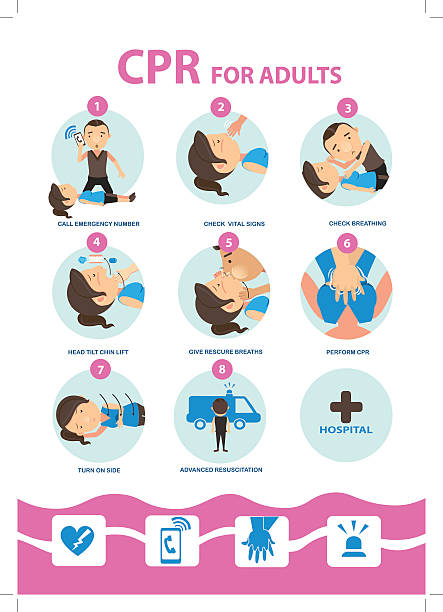
It takes an input picture of a person undergoing physical trauma like a heart attack, bullet wound, etc... and provides the user with an animated infographic on what to do to help the person maximize their chances at surviving when first responders arrive.
How we built it
We built it using a HTML/CSS/Javascript front end, and a python backend which puts the photo input into gemini's api, which then diagnoses the issue, comes up with a solution, and open ais api follows creating the animated infographic while using reference images as a small dataset already provided.
Challenges we ran into
We ran into numerous probems as we were relatively new to APIs. We had to learn how to use endpoints for gemini and open ai, how to use servers such as uvicorn to connect our front end and back end, and overall how to format numerous parts of our syntax.
Accomplishments that we're proud of
We are proud of the fact that our frontend was able to work and be connected to our backend which functioned to some extent.
What we learned
We learned how to access, prompt, and use APIs through python backends, and how to connect frontends and backends together to create a functioning app. We also discovered the significance of arbitrary things such as file and folder names, as well as how to create cool geometric animations through HTML. Additionally we learned about using Flask and the advantages of doing so.
What's next for Life Saver
Although we were able to connect our front end and backend, as well as have a functioning UI, our backend code didn't end up plugging in the input photo to any apis, so we weren;t able to come up with a diagnosis of what the person in the photo was experiencing, or a way to help them. We hope to continue working on the app until we can get it to fully function as intended.
Built With
- cloudapi
- css
- html
- javascript
- openaiapi
- python

Log in or sign up for Devpost to join the conversation.