Inspiration
A lot of the code I work with today is written by AI. It runs and it passes the tests. It is still hard to change: functions grow long, files collect unrelated responsibilities, and the next AI session needs more context to make a safe edit.
I refactor this code with my own method:
- Take the most characteristic keywords of each file.
- Check whether those keywords belong to the area of the app where the file lives.
- If they do not, the file mixes responsibilities. I refactor it with an AI assistant, one file at a time.
The method works, but it is manual. The Life After Code theme asks what happens after the code is written. So I tested how far this refactoring process can be automated with GitLab pipelines and the GitLab Duo Agent Platform.
What it does
Liepa refactoring keeps code healthy after it is written. It has three parts:
liepa scan: a Python scanner. It runs standard refactoring checks (long functions, deep nesting, cyclomatic complexity, duplicated function bodies) and gives every file an AI-readiness score from 0 to 100.- A refactor flow (
flows/refactor.yml): a GitLab Duo agent flow. It scans the project, picks the lowest-scoring file and acts on that one file. - A control dial (
.refactor-agent.yml): it sets how much control is handed to the agent.
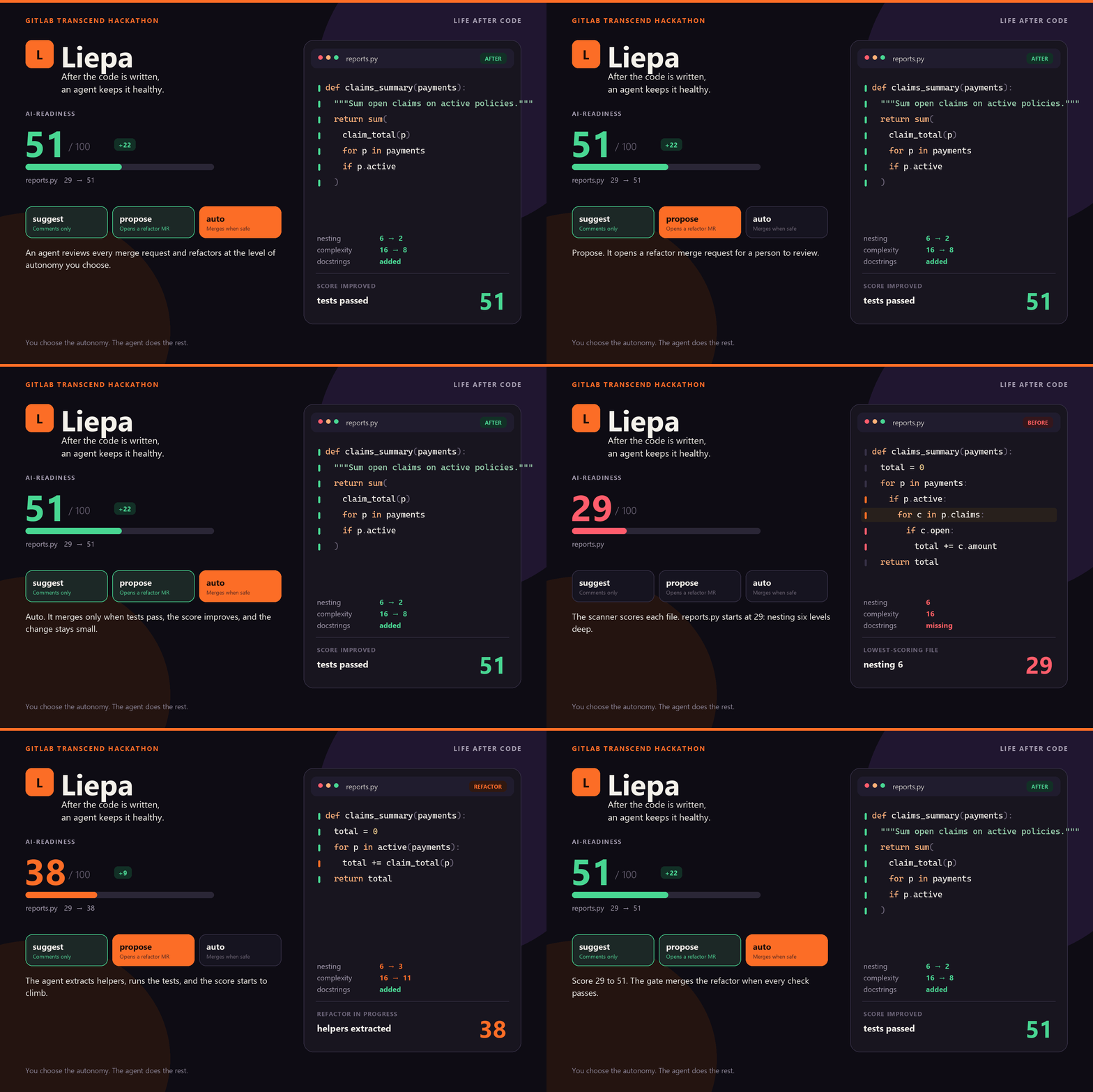
| Mode | What happens |
|---|---|
suggest |
the agent posts one refactoring suggestion on the merge request |
propose |
the agent refactors the file, runs the tests and opens a merge request for a human to review |
auto |
the agent opens the merge request, and a deterministic CI gate merges it when every limit holds |
The AI-readiness score
The score starts at 100. Seven checks subtract penalties, and the maximum penalties total 100:
$$S = 100 - \sum_{i=1}^{7} p_i$$
The checks are context size, function length, nesting, complexity, docstrings, import fan-out and keyword_areas. The last one is my manual method turned into code. It takes the 7 most frequent words from the names in a file. For each word it finds the home area: the directory where the word is relatively most frequent across the project. The penalty grows with the share of keywords that live somewhere else:
$$p_{\text{areas}} = 10 \cdot \frac{k_{\text{off-area}}}{k}$$
The reason is written out for the developer or the agent, for example: top keywords span 2 areas: score (src/liepa/checks), comment (src/liepa); consider splitting the file.
How I built it
- Python standard library only. The scanner uses
ast,keywordandcollections. It has no runtime dependencies, so it also has its own small parser for the YAML subset of the config file. - GitLab Duo Agent Platform for the build itself. Developer agent sessions built features from issues: the config reader, auto mode, the
keyword_areascheck and the demo app. Duo Code Review reviewed the merge requests. Duo Chat wrote the merge request comment job. Every session is linked in the README. - A custom flow with instructions for each mode, run from the Duo CLI.
- GitLab CI/CD for the rest:
lint,unit_tests,refactor_scan, a job that posts the report as a merge request comment, andrefactor_auto_merge, the auto mode gate. - A messy demo app,
liepa-imin: a toy insurance back office. Itsreports.pyis far too big: a 92-line function, complexity 20, 6 levels of nesting, 17 imports.
The demo ran all three modes on that file:
suggestposted one comment (!19).proposeopened a merge request, and a person reviewed and merged it (!20).autoopened a merge request, the gate checked the limits, and GitLab merged it with no human review (!23).
The file went from a score of 29 to 51.
The auto-merge gate
In auto mode the LLM never decides about a merge. A deterministic job (src/liepa/auto.py) checks five conditions:
- Only refactorable Python files changed: no tests, CI files, config or flows.
- Every changed file scores strictly higher than before.
- The change is under 200 added plus deleted lines.
- The pipeline is green. GitLab merges only when it succeeds.
- The merge request head is the exact commit that was scored.
The gate and its limits come from the target branch, not from the merge request. A refactor branch cannot loosen the rules that judge it.
Challenges I ran into
- Duo Code Review found a hole in my own design. The first auto mode trusted the merge request's own config and code, so a refactor could edit the limits that judged it. The fix: run the gate from a worktree of the target branch.
- GitLab SAST found an SSRF issue (
bandit.B310) in the comment job. Duo Chat added a URL scheme check and a test. - Triggers need a human. A flow trigger fires only on a person's action. A CI job, a bot or another flow cannot start it. GitLab staff confirmed this in the hackathon Discord. Every demo run was started by hand from the Duo CLI.
- The first auto merge request pipeline was rejected. The gate job needed jobs that only existed in branch pipelines. I moved lint, tests and scan into merge request pipelines.
- Environment details. The GitLab-hosted sandbox cannot reach PyPI. The first flow version used shell syntax that failed on Windows. CRLF line endings broke the golden-file tests.
- The score can be gamed. Docstrings and split functions raise the score without always improving the design. The size limit and the one-file-per-run rule reduce this. They do not remove it.
What I learned
- Separate the agent from the decision. The agent is good at writing a refactor. A small deterministic gate is better at deciding whether it may merge.
- The trust boundary matters more than the prompt. The mode is enforced by instructions. The merge is enforced by code from a branch the agent cannot change.
- Small steps keep a human in control. One file per run keeps every change reviewable, even in auto mode.
keyword_areasneeds structure. On a project with two directories it is a weak signal. It gets stronger with more areas and more files.- Record the evidence. Linking every agent session, job and merge request shows clearly what ran and what is still untested.
What's next
- Publish the flow and add a trigger, so assigning a reviewer starts it without the CLI.
- Run the auto mode dry run and a refused case on a real merge request.
- Give the bot token its own least-privilege identity and test auto mode with required approvals.
- Keep running the flow until
reports.pyreaches the minimum score of 60.
How do you keep AI-generated code maintainable after it is merged?
Built With
- duo-cli
- gitlab
- gitlab-ci/cd
- gitlab-duo-agent-platform
- python

Log in or sign up for Devpost to join the conversation.