Try it out: https://lexie-frontend-264729289350.us-central1.run.app
Pitch Deck: https://pitch.com/v/lexie-presentation-7pbvx5
Inspiration
The Problem: The Justice Gap is Getting Worse
Here's what most people don't realize about the legal industry: it's fundamentally unequal.
Large defense firms (representing corporations and insurance) have it easy. They don't build cases - they just poke holes in them. Wait for the injured person to present evidence, then attack it. And they're doing it with unlimited budgets, teams of paralegals, and cutting-edge AI tools.
Small plaintiff firms (representing everyday injured people) have to BUILD EVERYTHING from scratch. Prove what happened. Prove who's responsible. Calculate every dollar of damages. All with minimal staff and tight budgets.
Currently most AI legal tech focuses on defense firms - that's where the money is. More importantly, it's easier to build: AI excels at analyzing documents, cross-referencing facts, and pointing out inconsistencies - exactly what defense firms need to poke holes in cases. So while big firms get AI-enabled document review and case analysis, small plaintiff firms are still drowning in manual work. The playing field isn't just uneven - it's getting worse.
The Discovery Bottleneck:
Small plaintiff firms face a crushing bottleneck in case intake and discovery:
- Client intake: 90-minute interviews, can only handle 2-3 per day
- Document review: 40-60 hours per case reviewing medical records, incident reports, employment files
- Case valuation: 8-12 hours calculating damages, often inconsistently
The costs: $2,350 in pre-settlement work per case, forcing firms to reject 90% of potential clients. Only cases with $100K+ settlement potential are financially viable.
The statistics tell the story:
- ~39.5 million injuries requiring medical treatment occur annually in the US
- Only ~400,000 personal injury lawsuits are actually filed (just 1% of injuries)
- The other 99% either handle claims themselves (receiving 3.5x lower settlements on average) or get nothing at all
- Small plaintiff firms turn away 90% of cases that contact them due to resource constraints
This isn't a pipeline problem - it's a justice gap.
The Solution: Lexie
Lexie uses Google's Gemini Live API, Vertex AI RAG, and multi-agent orchestration to automate legal discovery for small plaintiff firms.
What it does:
- Voice intake (15-25 min) - Natural conversation using Gemini Live API
- Evidence analysis - Instant RAG-based document extraction + Vision AI for photos
- Damages calculation - Code execution for zero-error settlement math
- Case packets - Litigation-ready summaries auto-generated
The impact:
- Massive reduction in intake time
- Elimination of manual document review
- Increased case capacity without hiring more staff
- Significant cost savings per case
What it does
Lexie is an AI-enabled legal intake assistant that transforms the personal injury case intake process through real-time voice conversations and intelligent document analysis.
Core Capabilities
1. Empathetic Voice Conversations
- Conducts natural, human-like intake conversations using Gemini Live API
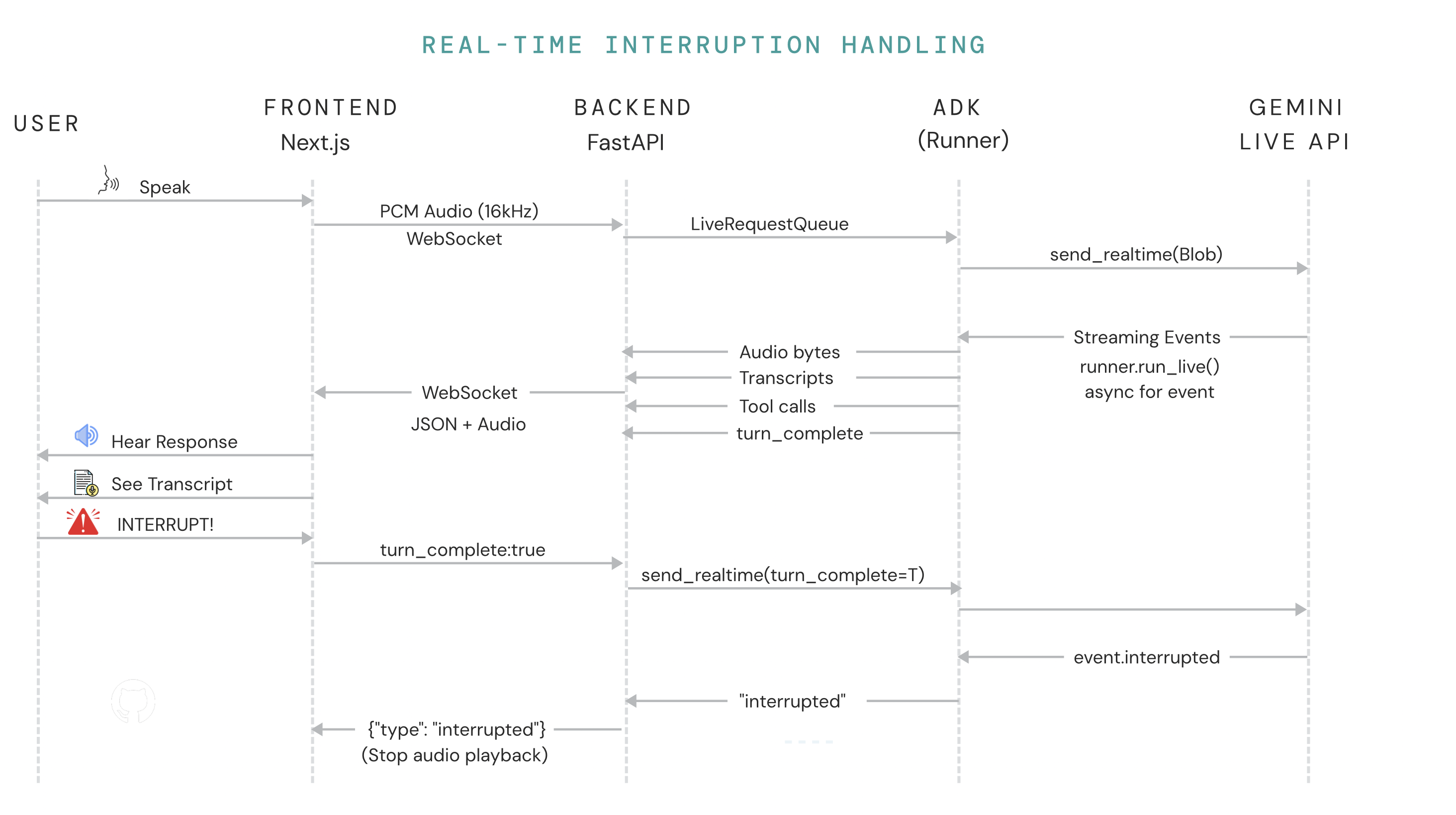
- Supports real-time voice streaming with interruption handling
- Adapts to different case types (workplace injuries, car accidents, slip-and-fall, medical malpractice, product liability)
- Asks intelligent follow-up questions to gather complete case information
2. Intelligent Document Collection & Analysis
- Dynamically generates evidence checklists based on case type (e.g., construction fall requires OSHA reports, safety training records, scaffold photos)
- Shows interactive upload cards during conversation for seamless document submission
- Instantly extracts facts from uploaded documents using Vertex AI RAG
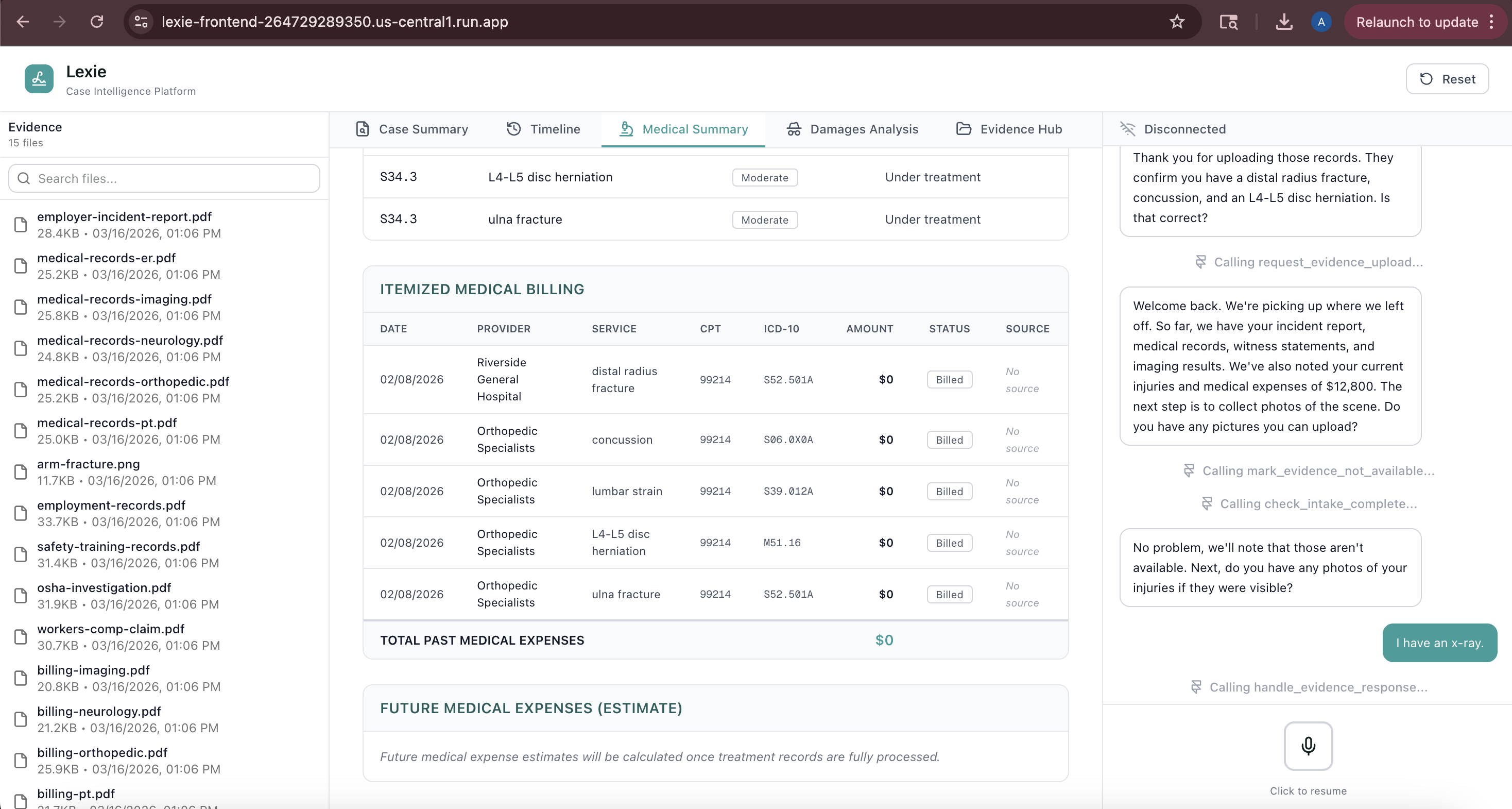
- Medical records → injuries, diagnoses, treatment timelines
- Incident reports → dates, locations, witness names, safety violations
- Medical bills → expenses, provider information
- Photos → scene analysis, safety hazard identification using Vision AI
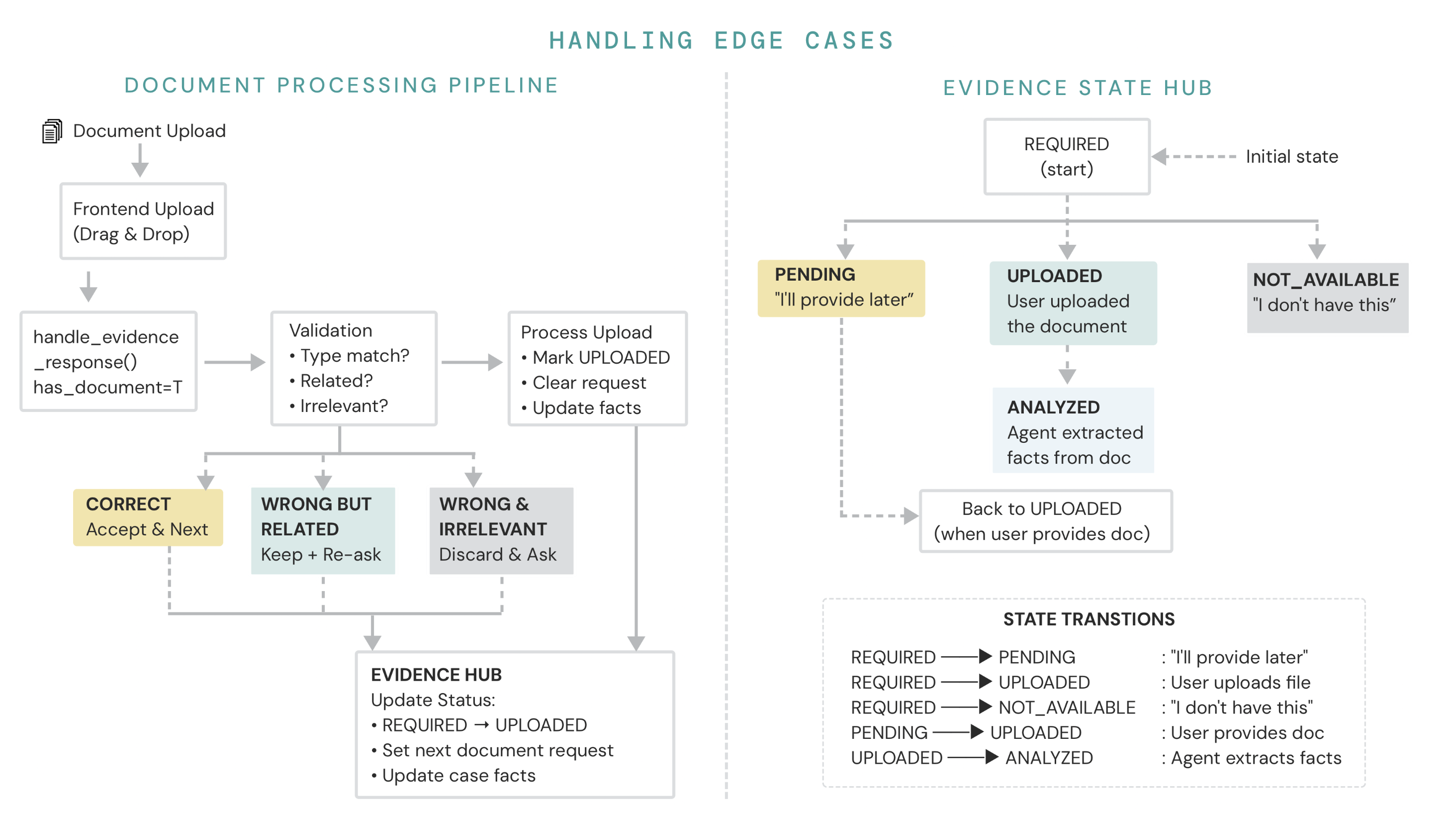
- Validates uploaded documents match what was requested
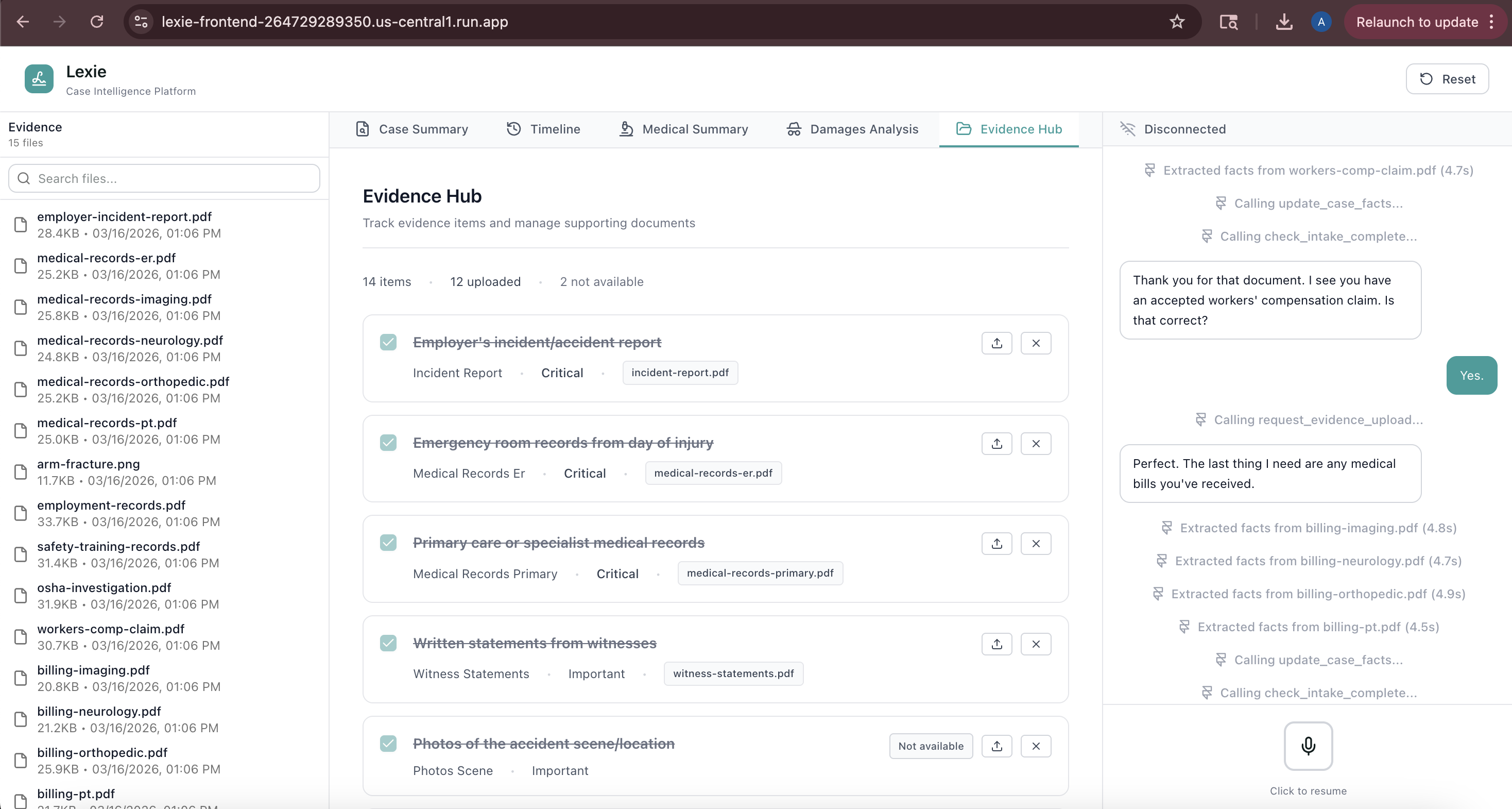
- Tracks evidence status: uploaded, pending, not available
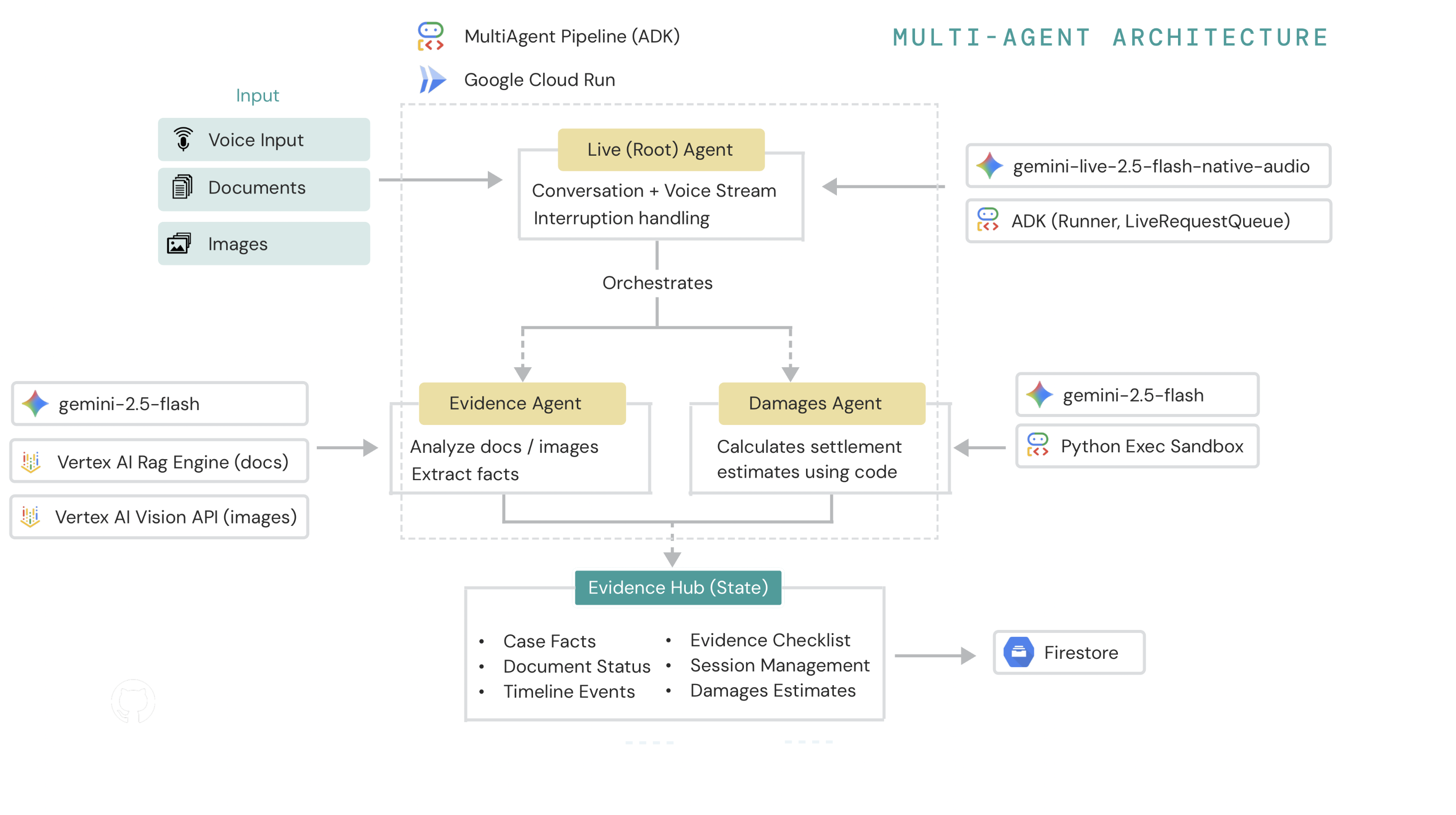
3. Multi-Agent Orchestration
- Root Agent (Lexie): Conducts the conversation and coordinates the workflow
- Evidence Agent: Analyzes documents using RAG to extract structured facts
- Damages Agent: Calculates settlement estimates using code execution for accurate math
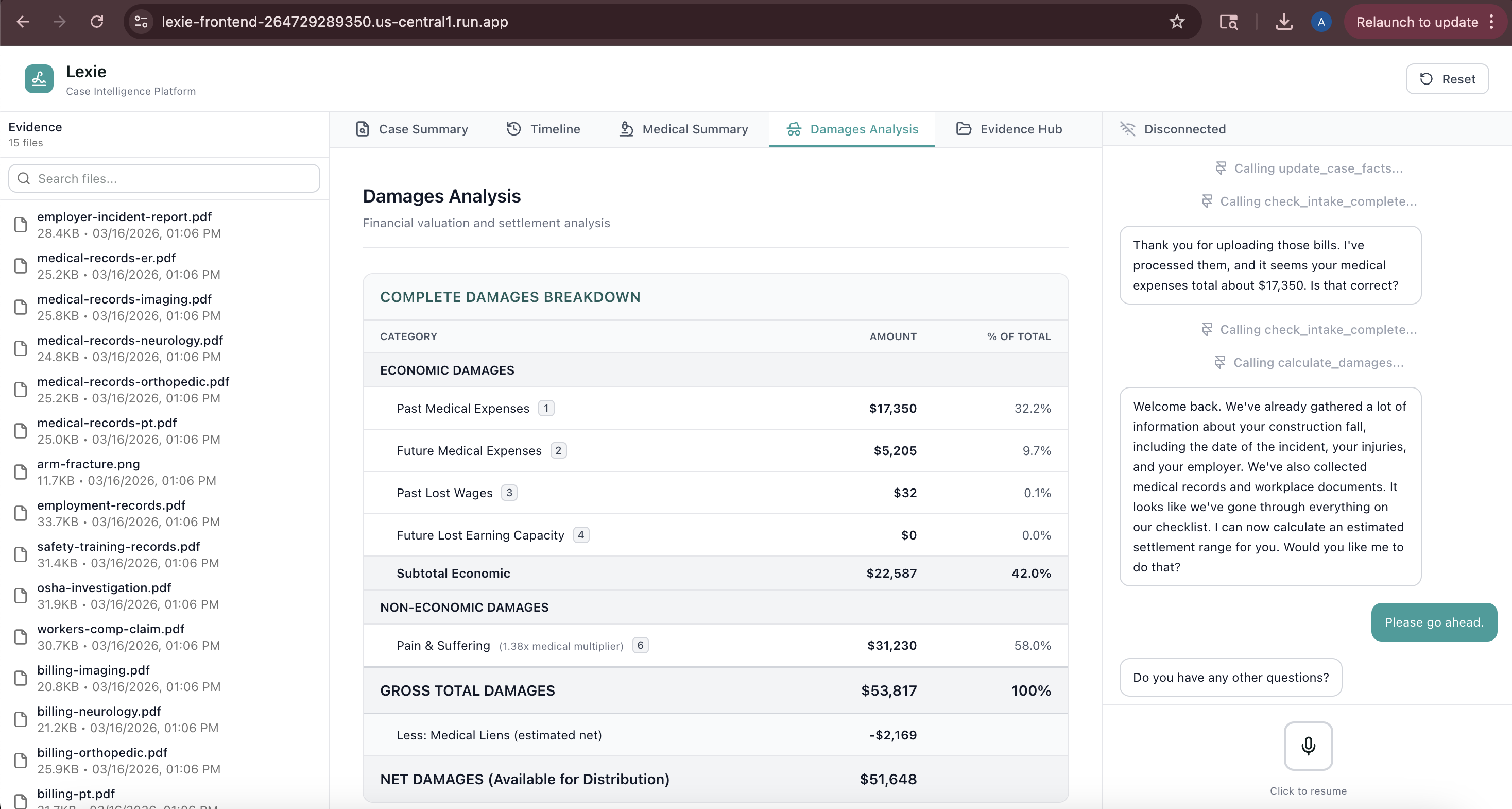
4. Live Data Visualization
- Case Summary: Real-time case facts as they're gathered (plaintiff info, incident details, injuries)
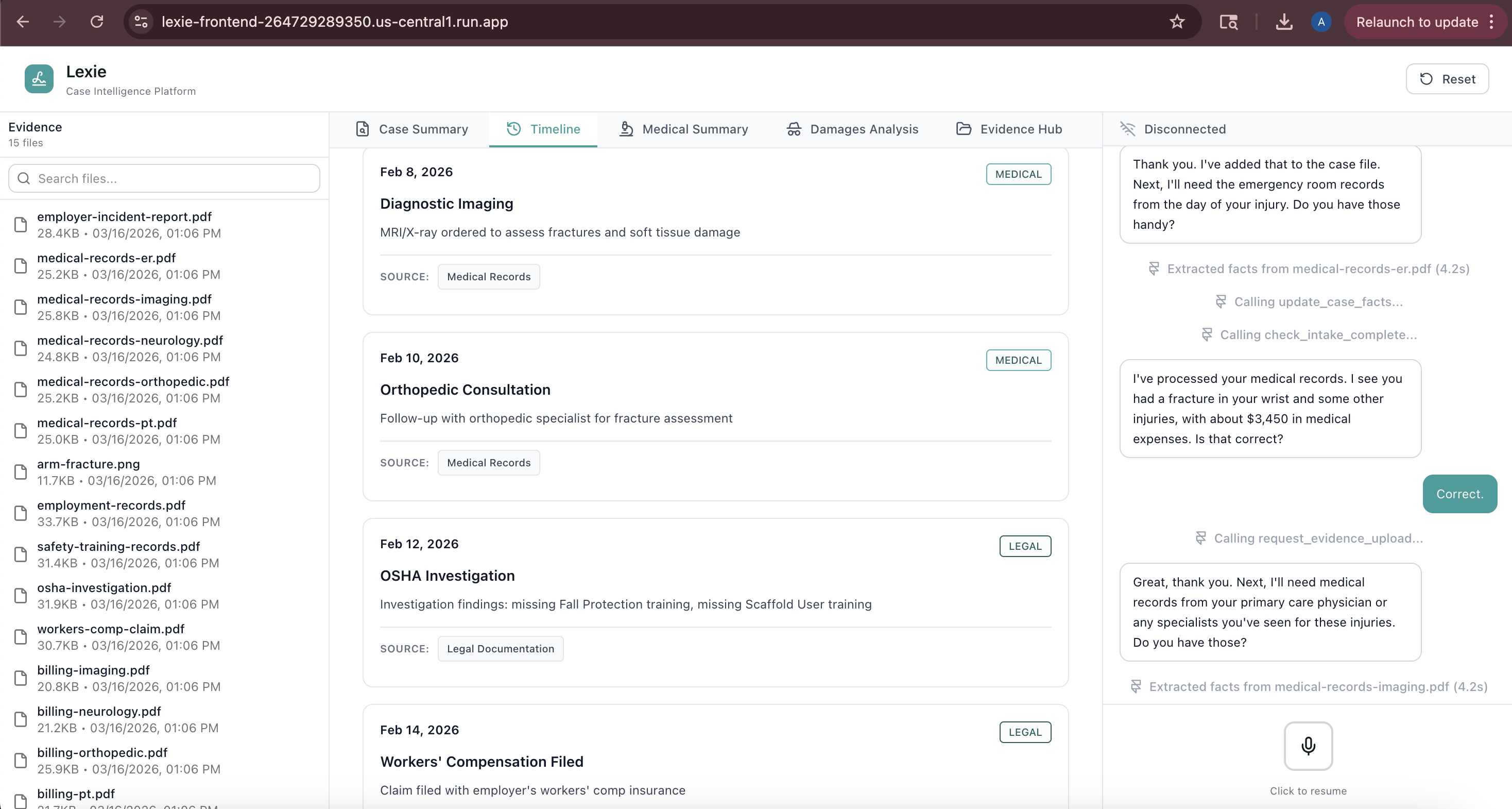
- Timeline: Chronological events with source document tracking
- Medical Records: Provider visits, diagnoses, expenses with provenance
- Evidence Hub: Visual checklist showing what's collected, pending, or missing
- Damages Calculator: Settlement estimates with economic/non-economic breakdown
- All data updates progressively as the conversation flows - no page refreshes needed
5. Accurate Damages Calculation
- Uses custom sandbox code execution for reliable arithmetic
- Applies severity-based multipliers (1.5x for minor injuries up to 5x+ for catastrophic)
- Calculates economic damages (medical expenses, lost wages, future costs)
- Estimates non-economic damages (pain & suffering using multiplier method)
- Provides settlement ranges accounting for negotiation variance
How I built it
Architecture
Multi-Agent System powered by Google ADK (Agent Development Kit):
┌─────────────────┐
│   Root Agent    │ ← Conducts conversation, orchestrates workflow
│    (Lexie)      │
└────────┬────────┘
         │
         ├─────────► Evidence Agent (RAG + Vision)
         │           - Analyzes documents via Vertex AI RAG
         │           - Extracts structured facts
         │           - Validates image evidence with Vision API
         │
         └─────────► Damages Agent (Code Execution)
                     - Calculates settlement estimates
                     - Uses sandboxed Python execution
                     - Applies injury severity multipliers
Backend Stack
Framework: FastAPI (Python 3.12)
- WebSocket endpoints for real-time voice streaming
/api/v1/gemini-live/{client_id}- Gemini Live voice sessions/api/v1/intake/{client_id}- Text-based intake with live updates
Google AI Platform:
Gemini Live API (
gemini-live-2.5-flash-native-audio)- Bidirectional audio streaming (16kHz input, 24kHz output)
- Real-time speech recognition and synthesis
- Interruption-aware turn management
Vertex AI RAG Engine (europe-west4)
- Corpus-based document storage and retrieval
- Semantic search with similarity scoring
- Grounded generation for factual extraction
Gemini Vision (via
gemini-2.5-flash)- Photo analysis for accident scenes
- Injury documentation assessment
- Safety violation detection
Agent Development Kit (ADK):
Agentclasses for defining specialized agentsAgentToolfor sub-agent orchestrationInMemorySessionServicefor conversation stateRunnerfor executing agent workflows
Google ADK Component Architecture
Component Responsibilities
| Component | Purpose | Key Methods/Properties |
|---|---|---|
| Runner | Manages agent lifecycle and execution | run_async() - Execute agent with messagestream_live() - Start live streaming• Orchestrates tool calls • Routes events to agents |
| RunConfig | Configuration for live streaming | response_modalities - ["AUDIO"] for voice onlyspeech_config - Voice ("Puck"), language ("en-US")input_audio_transcription - Enable user transcriptsoutput_audio_transcription - Enable agent transcripts• Built-in VAD and interruption handling |
| InMemorySessionService | Session state and conversation history | create_session() - New conversationget_session() - Retrieve existing sessionsave_turn() - Persist messages• Multi-user support |
| LiveRequestQueue | Send messages to Gemini Live API | send_realtime(Blob) - Audio bytes (PCM)send_content(Content) - Text messagessend_realtime(turn=True) - End of user turnclose() - End session |
| Agent | Define specialized AI agents | name - "Lexie Live Agent"model - "gemini-2.5-flash"instructions - 500+ line prompttools - List of function tools• Built-in function calling, context management |
| AgentTool | Sub-agent orchestration | Wrap sub-agents as tools:AgentTool(agent=evidence_agent)• Root agent calls sub-agent • Results flow back to Root |
Event Flow Diagram
┌──────────┐                    ┌─────────────┐                    ┌──────────────┐
│  Client  │                    │ ADK Runner  │                    │ Gemini Live  │
│ (Browser)│                    │  + Agent    │                    │     API      │
└─────┬────┘                    └──────┬──────┘                    └──────┬───────┘
      │                                │                                  │
      │  Microphone audio (16kHz)      │                                  │
      ├──────────────────────────────► │                                  │
      │  Blob(audio/pcm)               │  Forward audio stream            │
      │                                ├─────────────────────────────────►│
      │                                │                                  │
      │                                │         Process speech           │
      │                                │         Call agent tools         │
      │                                │         Generate response        │
      │                                │                                  │
      │                                │◄─────────────────────────────────┤
      │                                │  Audio response (24kHz)          │
      │◄───────────────────────────────┤  + Transcript                    │
      │  event.audio                   │  + Tool call results             │
      │  event.server_content          │                                  │
      │                                │                                  │
      │  User interrupts               │                                  │
      ├──────────────────────────────► │                                  │
      │                                ├─────────────────────────────────►│
      │◄───────────────────────────────┤  event.interrupted               │
      │  Clear audio queue             │                                  │
      │                                │                                  │
Core Services:
Evidence Hub (
evidence_hub.py)- Central state management for case data
- Tracks evidence checklist with status tracking
- Stores structured case facts (CaseFacts dataclass)
RAG Service (
rag_service.py)- Manages Vertex AI RAG corpus
- Uploads documents for analysis
- Retrieves relevant chunks for queries
- Provides grounded generation tool for agents
Gemini Live Service (
gemini_live_service.py)- Handles WebSocket connections for voice streaming
- Manages audio processing (PCM conversion, buffering)
- Coordinates message routing between client and Gemini Live API
Document Processor (
document_processor.py)- Base64 decoding of uploaded files
- Instant extraction using Vision API for images
- Fact extraction from PDFs and documents
- Deduplication and validation
Agent Implementations:
1. Live Agent (live_agent.py) - 1156 lines, 17 tools
The root conversational agent that conducts voice intake and orchestrates sub-agents.
| Tool | Purpose |
|---|---|
initialize_case() |
Start new case and create evidence checklist based on case type |
update_case_facts() |
Save gathered information incrementally (plaintiff info, injuries, etc.) |
get_case_facts() |
Retrieve current case facts from Evidence Hub |
get_case_summary() |
Generate complete case summary for attorney review |
get_evidence_checklist() |
Get current checklist status (uploaded, pending, required) |
request_evidence_upload() |
Ask user for specific document (triggers UI upload card) |
mark_evidence_pending() |
Mark evidence as "will provide later" |
mark_evidence_not_available() |
Mark evidence as "don't have" |
validate_uploaded_document() |
Check if uploaded file matches requested evidence type |
process_validated_upload() |
Process uploaded document (trigger Evidence Agent analysis) |
handle_evidence_response() |
Handle user response to document request (upload/later/don't have) |
check_intake_complete() |
Determine if enough information gathered to end intake |
calculate_damages() |
Call Damages Agent to calculate settlement estimates |
get_multiplier_guidance() |
Get pain & suffering multiplier guidance from Damages Agent |
execute_python_code() |
Execute code for calculations (delegated to Damages Agent) |
2. Evidence Agent (evidence_agent.py) - 5 tools
Specialized agent for document analysis using RAG and Vision AI.
| Tool | Purpose |
|---|---|
search_evidence() |
Search RAG corpus for relevant information using semantic search |
get_document_summary() |
Get AI-generated summary of specific uploaded document |
list_evidence_files() |
List all documents currently in RAG corpus |
analyze_case_evidence() |
Analyze specific aspect (injuries, liability, damages, witnesses, safety violations) |
analyze_image() |
Analyze photos using Gemini Vision (accident scenes, injuries, X-rays) |
3. Damages Agent (damages_agent.py) - 4 tools
Specialized agent for mathematically accurate settlement calculations.
| Tool | Purpose |
|---|---|
execute_python_code() |
Run sandboxed Python code for zero-error arithmetic |
get_case_damages_data() |
Retrieve damages-related facts from Evidence Hub (medical expenses, lost wages, injuries) |
save_damages_calculation() |
Save calculated damages to Evidence Hub for frontend display |
get_multiplier_guidance() |
Get pain & suffering multiplier based on injury severity (1.5x-5x) |
Data Flow
Voice Intake Flow:
User speaks
  → Browser captures audio (MediaStream API)
  → Convert to 16kHz PCM Int16
  → WebSocket send to backend
  → Backend forwards to Gemini Live API
  → Gemini processes speech, generates response
  → Backend receives response (text + audio)
  → Send transcript to frontend
  → Send audio chunks to frontend
  → Frontend plays audio, displays transcript
  → User can interrupt at any time
Document Upload & Analysis Flow:
User uploads document
  → Frontend converts to base64
  → WebSocket send with doc_type metadata
  → Backend receives, decodes file
  → Upload to Vertex AI RAG corpus (if PDF/doc)
  → Trigger Evidence Agent analysis
  → Evidence Agent uses RAG retrieval + Vision (if image)
  → Extract facts (dates, names, amounts, diagnoses)
  → Save facts to Evidence Hub
  → Send live_update to frontend with extracted data
  → Frontend updates relevant views (timeline, medical, damages)
  → Root Agent confirms findings with user verbally
Challenges I ran into
1. Voice Streaming Interruption Logic
Problem: When users interrupted Lexie mid-sentence, old audio would continue playing, creating confusing overlaps.
Solution: Implemented a multi-layered interruption system:
interruptedRefflag set immediately when user speaks- Clear audio queue to prevent buffered chunks from playing
- Stop current playback source and close AudioContext
- Finalize agent's live turn and reset state
- Use turn counting to ignore stale transcript updates
2. Document Card Synchronization
Problem: Upload cards would appear and disappear at wrong times, or not appear at all. The backend would call request_evidence_upload() but the frontend wouldn't show the card.
Solution:
- Backend explicitly sets
currentDocumentRequestin evidence hub - Include
currentDocumentRequestin everylive_updatemessage - Frontend maintains separate
liveDocumentRequeststate - Debug panel to track card state changes in real-time
- Handle three states: pending (show card), uploaded (hide card), later/don't-have (hide card)
3. Audio Input During Document Processing
Problem: Users would speak or make noise while agent was analyzing a document, causing premature interruptions or confusing the conversation flow.
Solution:
- Introduced
processingDocRefflag set when document uploads - Pause microphone audio streaming during processing (similar to
waitingForDocRef) - Grace period after
turn_complete(1.5s) before accepting new audio - Clear visual indication (microphone icon changes to pause) when waiting
4. RAG-Based Document Extraction Performance
Problem: Initial approach uploaded documents to corpus but required separate retrieval queries, adding latency. Users expected instant results.
Solution:
- Base64 encode documents client-side for immediate transmission
- Use Vision API for instant image analysis (no corpus upload needed)
- Parallel processing: upload to corpus AND extract facts simultaneously
- Cache extraction results with document hash for deduplication
- Stream extraction results as they arrive (don't wait for full analysis)
Accomplishments that I'm proud of
1. Natural Multi-Modal Interaction
I successfully combined voice conversations with real-time document uploads in a way that feels natural. Users can say "I have the incident report" and upload it while Lexie continues the conversation - or say "I'll upload it later" and move on. The interruption handling makes it feel like talking to a real person.
2. Multi-Agent Orchestration
Building a three-agent system (Root, Evidence, Damages) that cooperates seamlessly was challenging. The agents communicate through the Evidence Hub and work together without explicit prompting. When a document uploads, Evidence Agent analyzes it automatically, then Root Agent reviews findings with the user - all coordinated through ADK's AgentTool system.
3. Real-Time RAG with Document Provenance
My Vertex AI RAG integration doesn't just extract facts - it tracks source provenance. Every fact knows which document it came from:
- Timeline events link to source documents
- Medical records reference the specific file that contained them
- Users can click a fact to highlight the source document in the file explorer
This creates transparency and trustworthiness critical for legal applications.
4. Beautiful, Responsive UI that "Sees", "Hears", and "Speaks"
The frontend auto-organizes as data arrives:
- Tabs auto-open when relevant data appears
- Auto-switch to damages tab when settlement calculated (significant event)
- Live update animations highlight new information
- Color-coded status indicators (green=uploaded, yellow=pending, gray=not available)
- No page refreshes - everything updates progressively
What I learned
About Google AI Platform
I've worked on many projects using the Google ecosystem, but this competition introduced me to tools I didn't know existed. Previously, I tried building real-time voice agents manually - it required custom WebSocket servers, speech-to-text pipelines, text-to-speech synthesis, and complex state management. With Google ADK's Runner, I had a working live voice agent in under 15 minutes. The abstraction is incredible - it handles all the bidirectional streaming, turn management, and tool orchestration out of the box.
For RAG, I used to build custom pipelines: Document AI for extraction → manual chunking → ElasticSearch for indexing → custom retrieval logic. When I discovered Vertex AI RAG Engine during this competition, it simplified everything into a single managed service with built-in semantic search and grounded generation. The time savings let me focus on the actual legal workflow rather than infrastructure.
About Voice-Based UX
I learned that interruption handling is surprisingly complex - you need robust turn management to avoid overlapping speech, the audio queue must be cleared immediately on interrupt, and grace periods (I use 1.5s) prevent false interrupts from ambient noise. Progressive disclosure works well: don't overwhelm users with all tabs at once, auto-open tabs as relevant data appears, and auto-switch on significant events like damages calculation. Document upload during conversation is powerful but requires pausing audio capture while the document is being processed - otherwise users speaking during analysis creates confusing interruptions.
About Legal Tech Requirements
Coming into this with zero legal tech experience, I had to learn quite a lot. I watched countless YouTube videos on the deposition process, discovery procedures, and how personal injury law firms actually work. I also reached out to friends working in legal - paralegals, attorneys, legal assistants - to understand their pain points.
From these conversations, I learned that accuracy is absolutely non-negotiable in legal tech. Every extracted fact needs user confirmation, and I track provenance (which document each fact came from) because attorneys need to verify sources. Evidence tracking needs to be comprehensive with different checklists for different case types (construction fall evidence ≠ car accident evidence). Additionally, priority levels (critical/important/helpful) guide users on what's most important, and status tracking gives attorneys a quick overview of case readiness.
What makes Lexie unique is not just technicality - I invested significant time ensuring it integrates seamlessly into real legal workflows, which makes the platform a truly novel solution that addresses both the technical and practical challenges facing plaintiff law firms.
What's next for Lexie
- Multi-Party Support: multi-plaintiff mass tort handling, OCR for handwritten documents
- Full Case Lifecycle: Liability analysis agent, deposition preparation assistant, demand letter generation, settlement negotiation tools
- Attorney & Client Portals: Attorney dashboard with case queue management and analytics, plaintiff self-service portal for case tracking
- Predictive Intelligence: Case outcome prediction, settlement value estimation, comparative verdict research from historical data
- Enterprise Ready: HIPAA compliance, case management system integrations (Clio, MyCase), white-label deployment, custom evidence checklists per firm
Built With
- fastapi
- firestore
- gemini-live-api
- google-adk
- google-cloud-run
- next.js
- vertex-ai-rag
- vertex-ai-vision-api


Log in or sign up for Devpost to join the conversation.