-
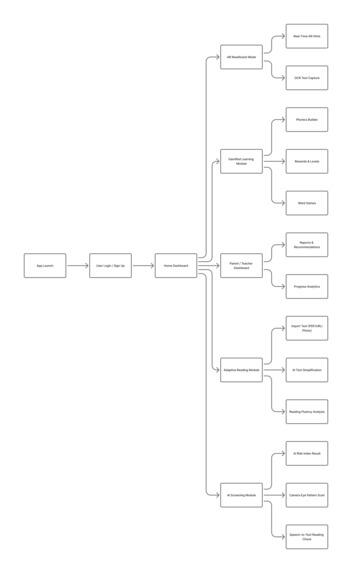
Flow
-
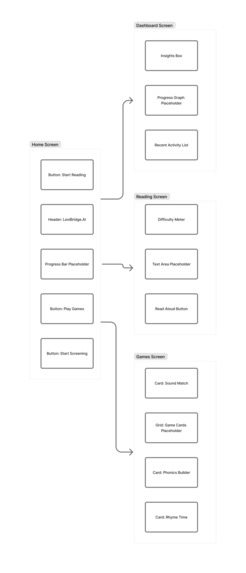
Wireframe Mockup
-
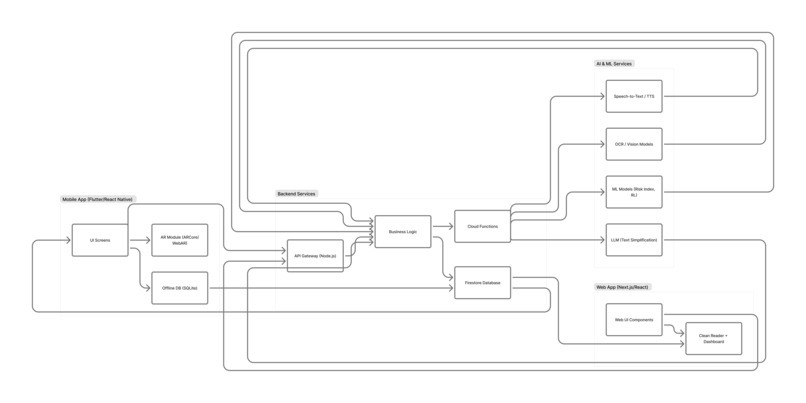
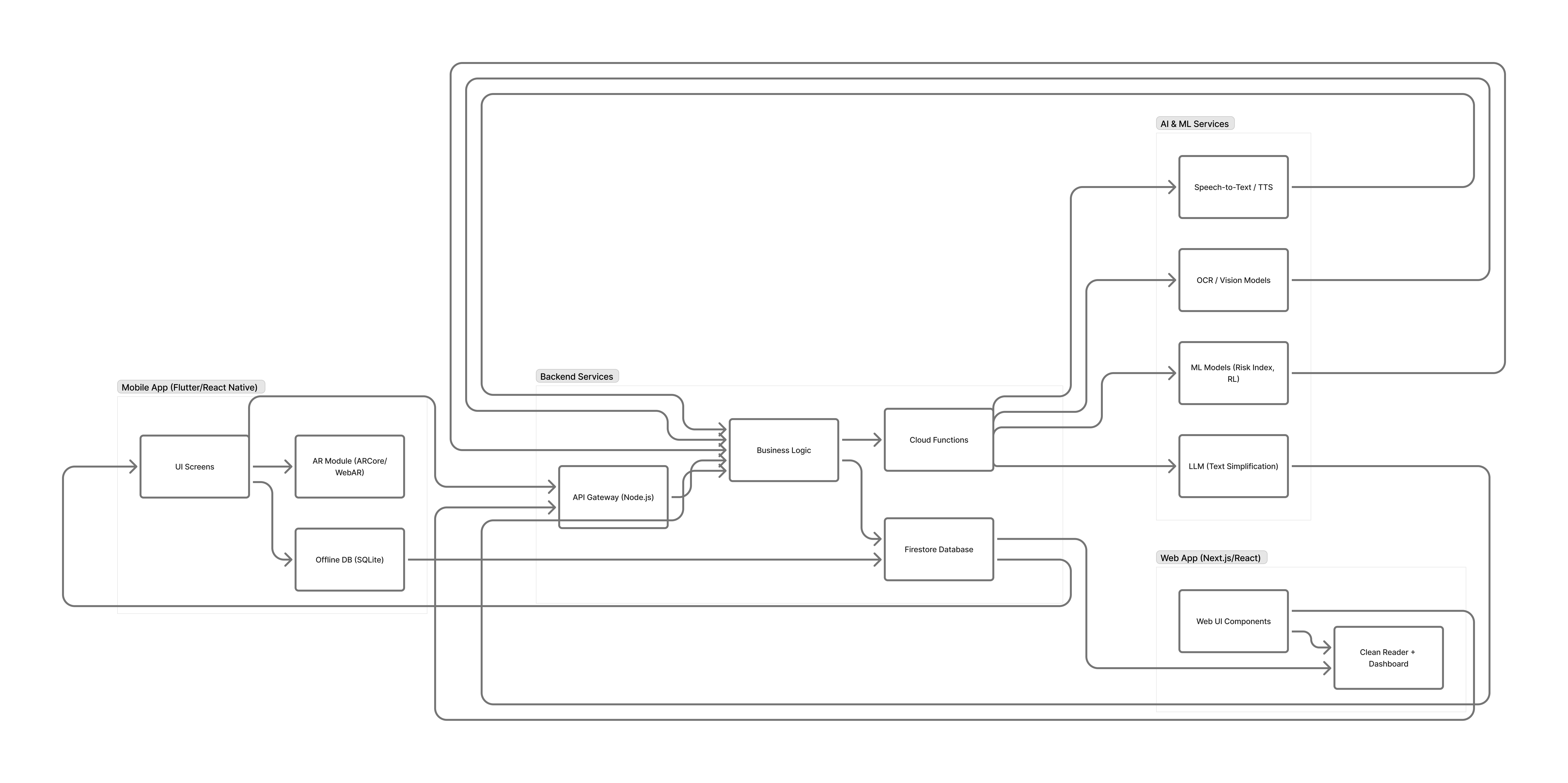
Architecture

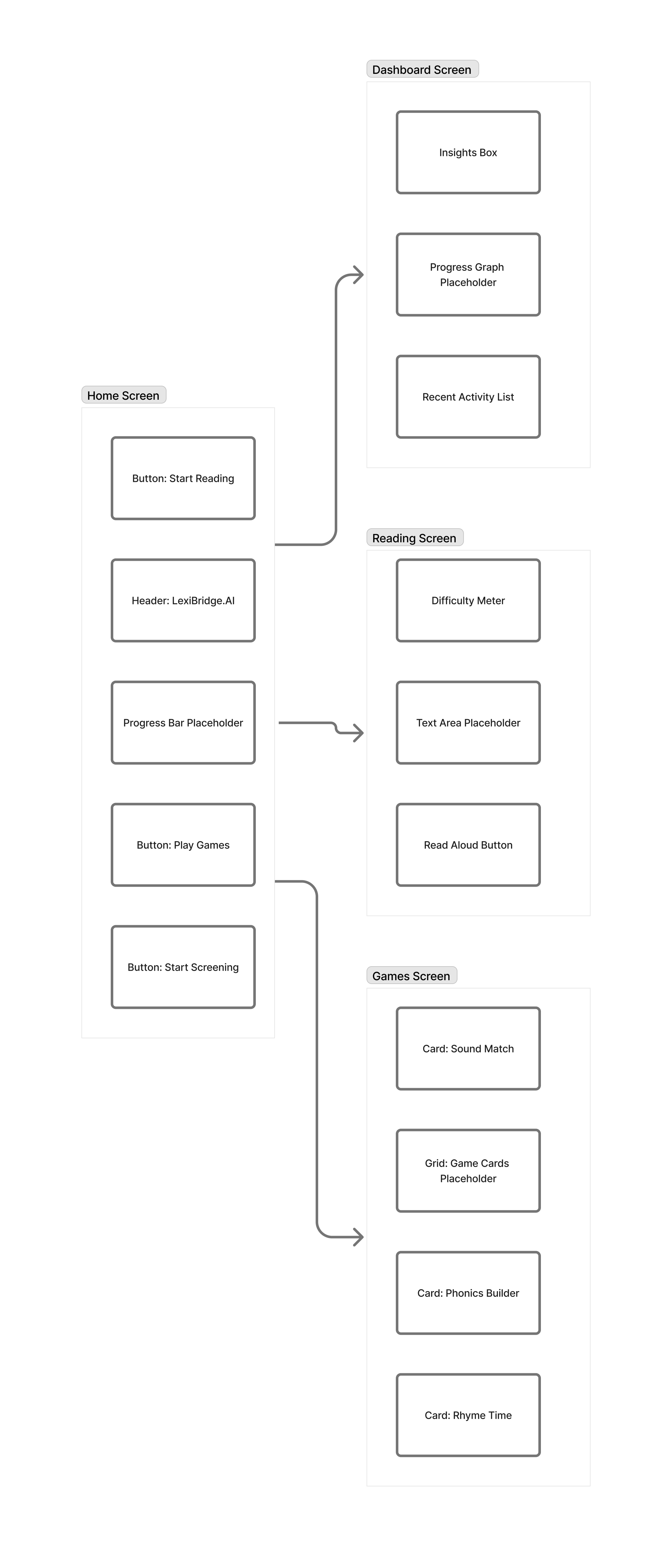
Inspiration
Dyslexia affects over 700 million learners globally, yet support systems remain fragmented. Some tools help with reading, others with phonics, a few with assessments—but none provide a unified, end-to-end journey for a child who struggles with reading.
After building two separate prototypes—LexiBridge (web-based reader) and DysLex Helper (gamified mobile learning)—I realized both solved different parts of the same problem.
The insight was simple:
“What if a complete AI ecosystem existed where a child could learn, play, read, practice, track progress, and get early screening—all in one place?”
LexiBridge.AI was inspired by:
- children who feel discouraged while reading
- parents who struggle to identify early signs
- teachers who need deeper insights
- the belief that every child deserves to read with confidence
What it does
LexiBridge.AI is an AI-powered dyslexia support ecosystem that brings together multiple assistive tools:
1. AI Early Screening
- Camera-based eye-pattern tracking
- Speech-to-text reading mismatch detection
- Error pattern profiling using ML
- AI-generated Dyslexia Risk Index
2. Adaptive Reading Assistance
- Real-time text simplification
- AI narration
- Syllable breakdown & phonetic cues
- Fluency and accuracy analytics
3. Gamified Literacy Learning
- Phonics builder
- Rhyme matching
- Sound identification
- XP, streaks, badges, rewards
- Difficulty adjusts based on AI
4. AR ReadAssist Mode
- OCR-based real-time text capture
- Live simplified overlay
- Pronunciation hints
- Highlight path guidance
5. Parent/Teacher Dashboard
- Reading progress graphs
- Error-pattern heatmaps
- Consistency tracking
- Weekly AI recommendations
6. Offline Support
- Games
- Local reading modules
- On-device AI inference
How we built it
LexiBridge.AI combines features from both earlier projects into a single unified architecture.
Tech Stack
Frontend: Next.js, React, Tailwind, shadcn, Flutter
Backend: Firebase, Firestore, Cloud Functions, Node.js
AI/ML:
- Gemini (text simplification)
- Google STT/TTS
- OCR (Vision API / MLKit)
- Error-pattern clustering ML
AR: ARCore + WebAR
Offline: SQLite + IndexedDB
Analytics: Firebase Analytics
System Architecture Summary
- Mobile/Web apps → API gateway
- Gateway → AI Services (LLM, OCR, STT, TTS)
- Gateway → Firestore Database
- ML models → Risk Index, reinforcement learning for adaptive difficulty
- Offline-first modules → Sync when connected
Design Process
Created using Figma + FigJam:
- User flow diagram
- Wireframe mockups
- Architecture diagram
Challenges we ran into
1. Merging two very different app concepts
Combining a web reader with a gamified mobile app required rethinking navigation, structure, and data flow.
2. Designing child-friendly yet adult-usable UI
The interface had to work for:
- children (simple, colorful)
- parents (informational)
- teachers (data-heavy)
- specialists (detailed analytics)
3. Building accurate low-latency AI screening
Eye-pattern estimation, speech mismatch detection, and error profiling were complex and required experimentation.
4. Implementing offline-first design
Ensuring stable sync logic between local storage and Firestore was challenging.
5. Accessibility requirements
Text-to-speech, spacing, contrast modes, and dyslexia-friendly fonts had to work across devices.
Accomplishments that we're proud of
- Developed an end-to-end AI ecosystem for dyslexia support
- Built AI screening with speech mismatch + pattern analysis
- Designed gamified learning proven to boost literacy engagement
- Created AR overlays for reading real books
- Achieved offline compatibility for underserved regions
- Built clean Figma wireframes, flows, and architecture
But most importantly:
It helps dyslexic learners build confidence — one word at a time.
What we learned
1. Empathy-first AI design
Assistive technology must adapt to the user, not vice versa.
2. Multi-modal AI dramatically enhances learning
Vision + Speech + Language models = powerful literacy support.
3. Gamification increases retention
Kids learn better when learning feels like play.
4. Accessibility isn't optional
Small changes—contrast, spacing, narration—make major differences.
5. Real-world testing is essential
Iterating with real children/parents revealed insights no spec sheet can capture.
What's next for LexiBridge.AI — AI-Powered Dyslexia Support Ecosystem
1. Launching pilot programs
Partnering with schools, NGOs, and learning centers.
2. Adding more AI assistance
- Emotion-aware reading coach
- Personalized reading path
- Conversational AI tutor
3. Expanding educator dashboards
Full classroom analytics for teachers.
4. Multi-language support
Hindi, Spanish, Arabic, French, more.
5. Launching mobile app on Android & iOS
With enhanced offline-first features.
6. Scaling globally
Bringing affordable, AI-powered dyslexia support to every learner.

Log in or sign up for Devpost to join the conversation.