
Inspiration
As a Taiwanese student turned engineer living in Germany, I’ve learned many things — how to bike in the snow, how to survive on Aldi frozen pizza, and most importantly… how terrifying German mail can be.
It’s no secret that the German government loves writing on paper. Every few days, I get another mysterious envelope — is it a bill? A complaint? Or the Hausverwaltung announcing yet another rent increase? Every time, I have to read German very carefully, and when I forget to act in time, I kick myself later for losing that one important letter in a mountain of paper.
That’s when I started wondering — do other people feel the same? Students abroad, immigrants, digital nomads, refugees — anyone living in a country where they don’t fully speak the official language?
That’s why I built LetterOn — an AI-powered assistant that helps you digitize, understand, and act on your mail without the panic. It turns every intimidating envelope into something simple, clear, and even a little satisfying. No more paper anxiety.
=================================
LetterON, Make your post letter ON the Cloud, and you can handle it effortlessly later on.
=================================
What it does
LetterOn is an intelligent letter management application that digitizes your physical mail and makes it effortless to handle. Here’s what it does:
- Upload & Digitize: Users simply take photos of a letter and upload them through the app. LetterOn uses Google's Gemini model to perform Optical Character Recognition (OCR) and accurately transcribe the text from the images.
- AI-Powered Analysis: Once the text is extracted, Gemini analyzes the content to:
- Categorize: Automatically identifies the letter's type (e.g., Utility, Bank, Tax, Government).
- Summarize: Provides a concise, easy-to-read summary of the letter's key points. Suggest Actions: Generates a clear, direct suggestion for the next step, such as "Pay €120 before November 15, 2025."
- Extract Key Info: Pulls out crucial details like the sender's name and contact information, deadlines, and important dates.
- Organize & Manage: All uploaded letters are stored in a centralized, searchable dashboard. Users can:
- Filter letters by category, date, starred status, or whether a reminder is set.
- Add personal notes to any letter.
- Mark important letters with a star.
- Set reminders for action deadlines, which can be easily added to Google Calendar.
- Translate: For users dealing with foreign languages, LetterOn offers a built-in translation feature. With a single click, the AI-generated summary, suggestions, and even the full original text can be translated into several major languages.
- Ask AI: If a user has specific questions about a letter ("What is the customer ID mentioned?"), they can open a contextual chat window. The AI assistant, powered by Gemini, will answer questions based on the full content of that specific letter.
How we built it
Everything is done with the wonderful Google AI Studio with proper prompt and iteration, and finally deployed
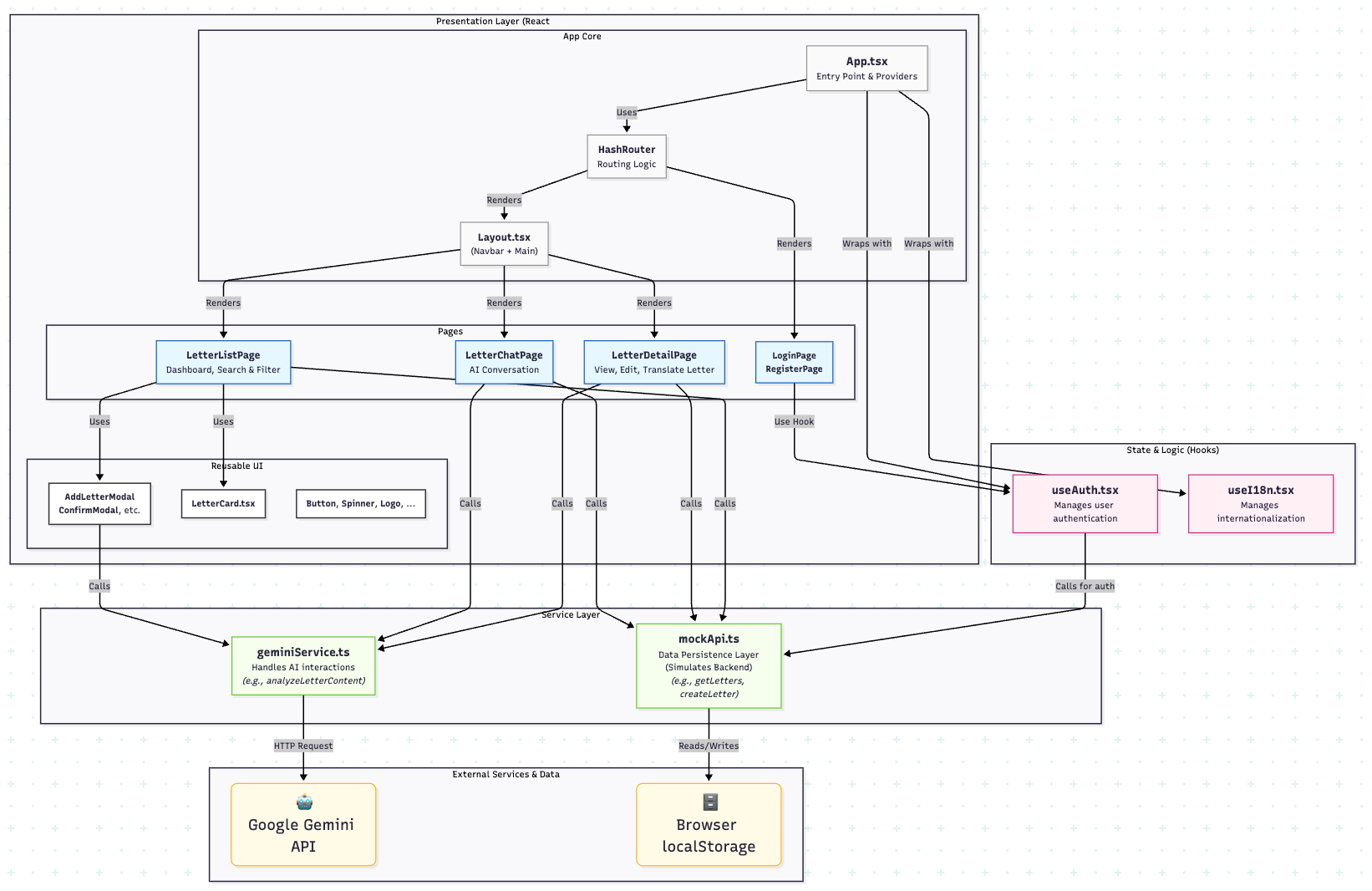
LetterOn is a modern single-page application built with a focus on a clean user experience and powerful AI integration.
- Frontend Framework: We used React with TypeScript for a robust, type-safe, and component-based architecture.
- AI Engine: The core intelligence is driven by the Google Gemini API. We specifically leverage the gemini-2.5-flash model for its powerful multimodal capabilities (processing images and text) and its ability to return structured JSON output. This is crucial for reliably extracting data into our application's data model.
- Backend (Mocked): To facilitate rapid development, the application currently uses a mock backend built on top of the browser's localStorage. This simulates a real API for user management, letter storage, and chat history, allowing the frontend to be fully functional.
Challenges we ran into
- Consistent Data Extraction: Getting an LLM to reliably extract data from unstructured text in a consistent format is a major challenge. We overcame this by designing a very specific prompt and providing Gemini with a strict JSON schema, which forces the model's output into a predictable structure we can easily work with.
- Complex UI State Management: The letter list page features multiple interdependent filters (search, category, dates, checkboxes). Managing this state while keeping the UI fast and responsive required careful implementation using React's useState and useMemo hooks to prevent unnecessary re-renders.
- Creating a Seamless UX for AI Processes: AI analysis isn't instantaneous. We had to carefully design the user flow for adding a new letter, providing clear feedback with loading spinners and status messages (Analyzing..., Success!, Error!) to create a smooth and reassuring user experience.
Accomplishments that we're proud of
- A Truly Useful AI Application: We successfully built a tool that solves a real-world problem. Turning a messy pile of paper into organized, actionable digital information is a powerful demonstration of Gemini's capabilities. And kill the nightmare for whoever does not speak the local language.
- The Contextual AI Chat: The "Ask AI" feature is a significant accomplishment. It goes beyond simple data extraction by providing a conversational interface that empowers users to dive deeper into the content of their letters in an intuitive way.
- A Polished and Intuitive UI: We are proud of the clean, modern, and highly functional user interface. Features like the advanced filter panel, interactive letter cards, and multi-language support contribute to a professional and user-friendly experience.
What we learned
- The Power of Structured Output: Forcing an LLM to respond with a specific JSON schema is a game-changer for building reliable applications. It eliminates the need for fragile text parsing and provides a stable contract between the AI and the frontend.
- Prompt Engineering is Key: The quality of the AI's output is directly tied to the quality of the prompt. We learned to be extremely specific in our instructions to the model, guiding it on its persona (an expert administrative assistant) and the exact format of the desired output.
- Bridging Physical and Digital Worlds: This project was a fantastic exercise in using multimodal AI to interact with the physical world. It highlighted how AI can serve as a powerful interface between analog data (a piece of paper) and structured digital systems.
What's next for LetterOn
- Full Backend Implementation: Replace the mock localStorage API with a secure, scalable backend using a cloud database and serverless functions for handling user accounts, data persistence, and secure image storage.
- Deeper Integrations: Allow users to connect LetterOn to other services. For example, automatically creating calendar events for deadlines in Google Calendar or adding payment tasks to apps like Microsoft To Do.
- Native Mobile Apps: Develop native iOS and Android apps to provide a more streamlined experience for capturing photos of letters directly from a user's phone.
- Proactive Notifications: Implement a system to send push notifications or email reminders to users about upcoming deadlines, ensuring they never miss an important action.
- Expanding Document Support: Extend the AI's capabilities to analyze and manage other types of documents, such as receipts for expense tracking, invoices, or contracts.
Built With
- ai-studio
- cloud-run
- google-gemini-api
- localstorage
- react
- typescript

Log in or sign up for Devpost to join the conversation.