Mack helps the elderly and those with accessibility challenges by turning confusing websites into simple ones, and talks you through them.
Inspiration
AI products have been built for all kinds of audiences, from business owners and students to kids with AI tutors. But one group feels left out: the elderly. Doctor's appointments, prescription refills and insurance claims have all moved online, yet most websites are built for people who already know how to use websites. I (Alex) realized this after moving to Michigan for university. I used to be the go-to IT support for my grandfather, who only speaks Chinese, whenever a website or app was too complex for him. Now that I'm a 10-hour drive away, I can't help him like I used to, and we realized this problem isn't unique to me. AI can help seniors use modern technology without relying on their children or others all the time.
Mack does that job.
What it does
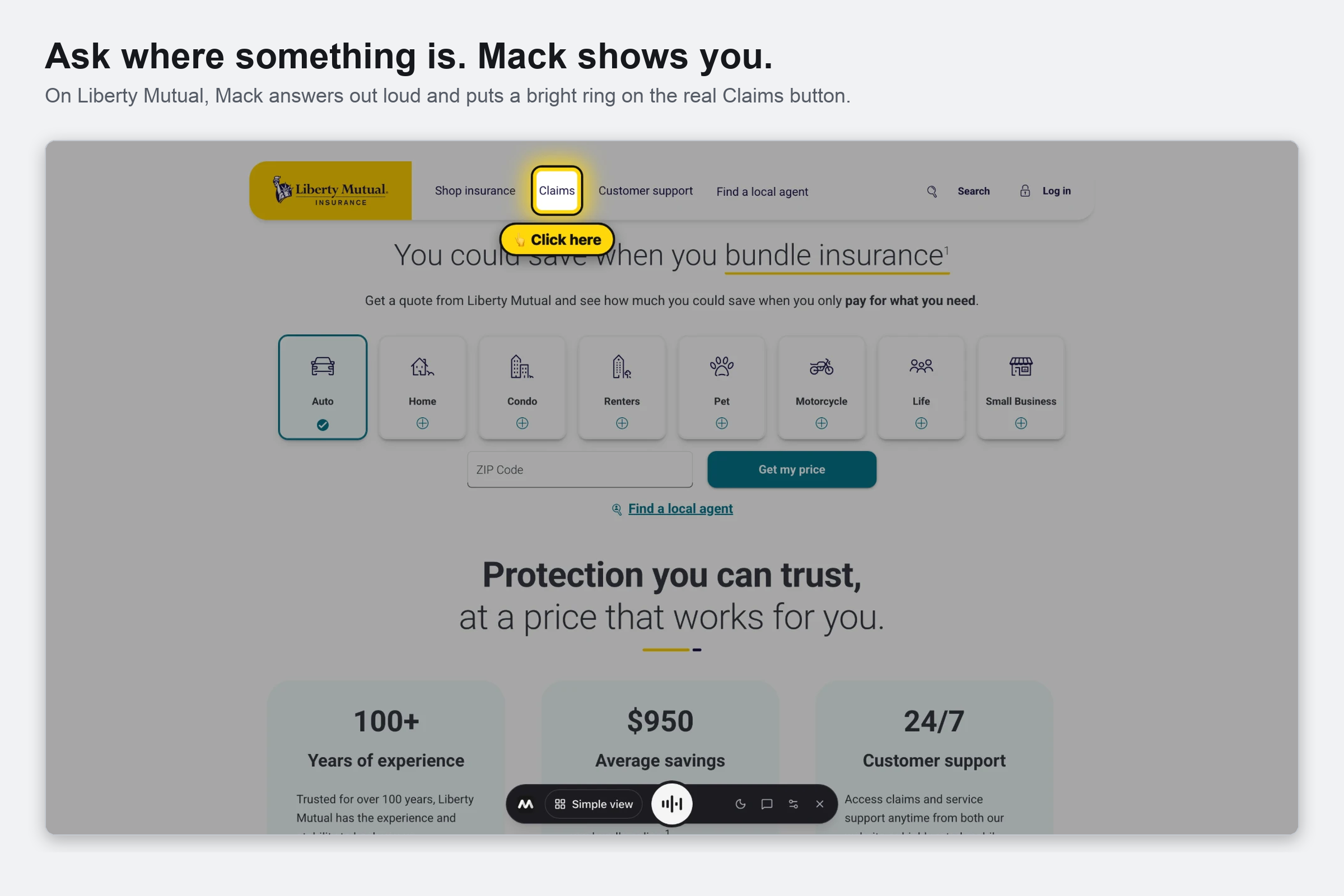
- Answers questions about any webpage out loud, then highlights the exact button you need and dims everything else.
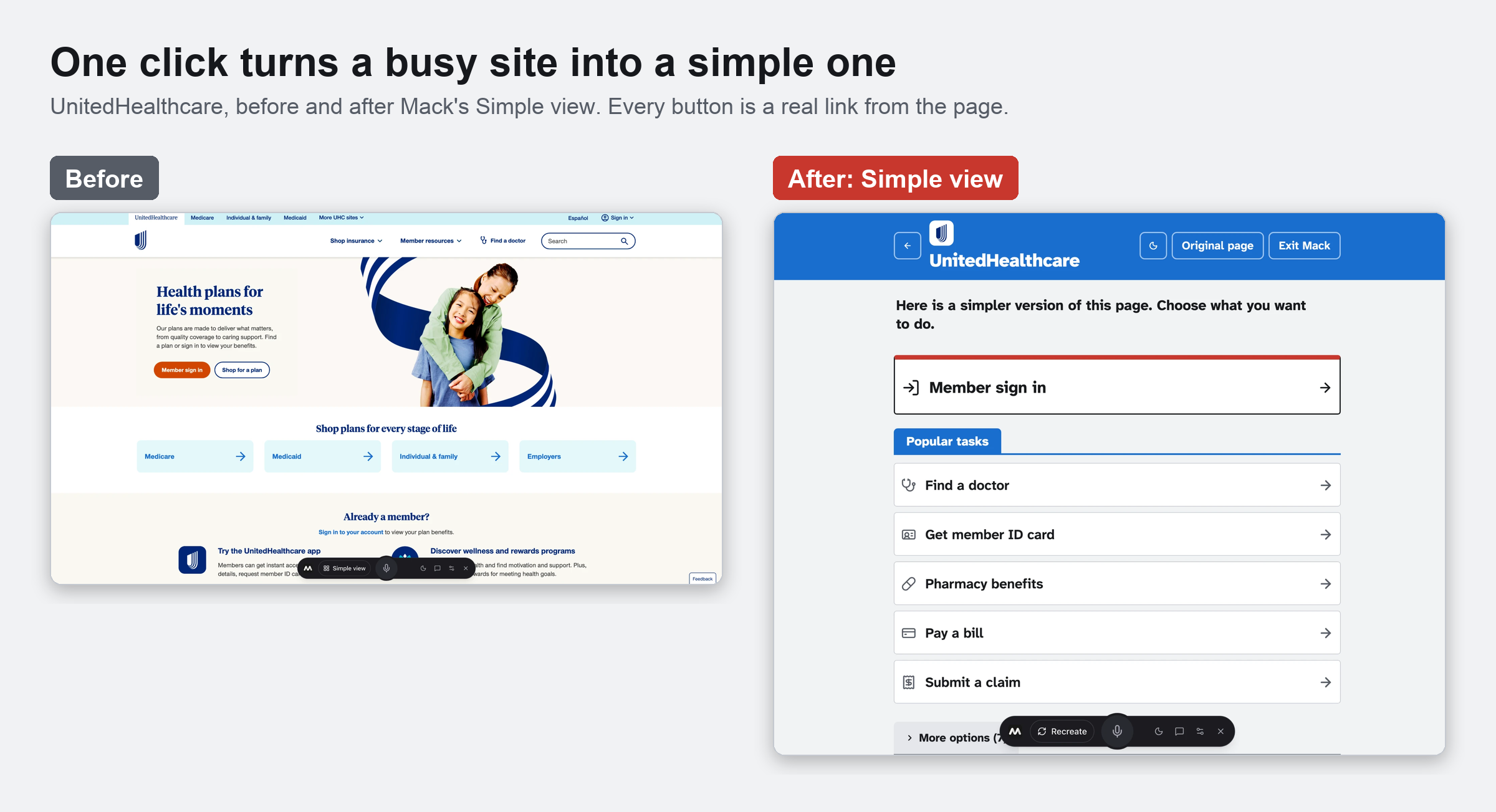
- Redesigns the page into a few large, clearly labeled buttons with one click, keeping the site's own logo, colors and real links.
- Does tasks for you step by step, like finding a doctor or searching a store, and tells you what it did after each one.
- Keeps the original page and guides you through it when simplifying would hide what you need, like forms, checkouts and search tools.
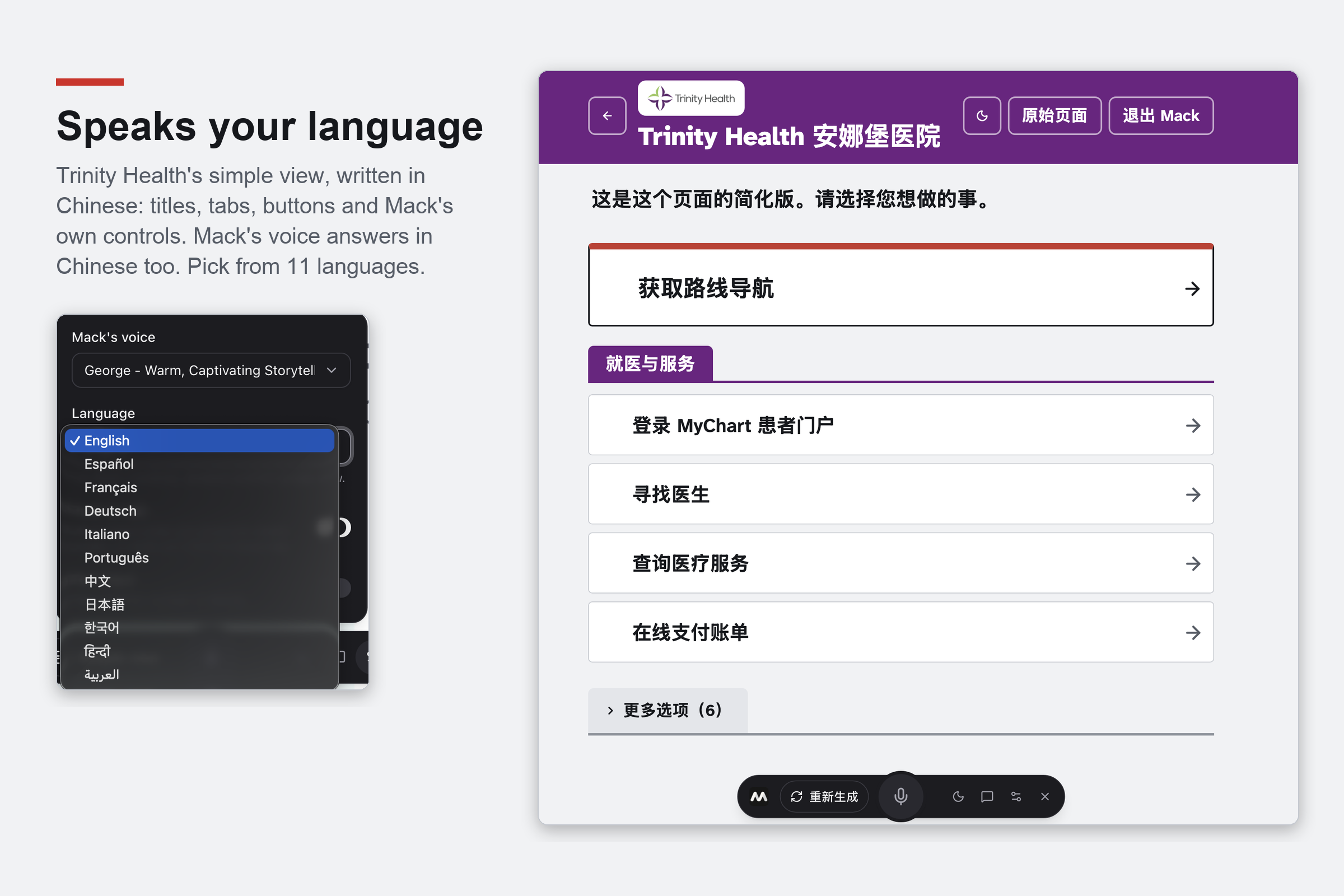
- Speaks 11 languages, including Chinese, so no one has to struggle through a site in their second language.
- Never pays, buys, deletes, signs in or types passwords for you. It goes as far as that step, highlights it, and lets you decide.
How we built it
Mack is a Manifest V3 Chrome extension written in TypeScript with React, Vite, Tailwind and shadcn/ui. There's no backend: everything runs inside the extension, and the only outside calls are to Gemini and ElevenLabs. We split the work into four roles (voice, guidance, UI and platform) connected by one shared, Zod-validated contract.
Reading the page
- A content script collects the page's real links, buttons, fields and text, including links hidden in dropdown menus, but never what you've typed.
- Mack's bar, highlights and simple view render inside a shadow root in the browser's top layer, so a site's styles can't break them.
Simple view
- Gemini 3.8 Flash returns the new screen as structured JSON, never HTML or code.
- The model can't invent anything: every button must reference a real action from the page, and we re-check it against the live page before showing it and again before clicking it.
- Gemini also decides whether to simplify at all, and designs are cached for ten minutes so going back is instant.
Voice
- |> An offscreen document owns the microphone, since service workers can't record or play audio
- |> Gemini 3.5 Flash turns speech into text
- |> Gemini 3.8 Flash sees the page and a screenshot, then answers, highlights, or takes one step: click, type, scroll or go back
- |> The background worker runs the step, waits for the page to settle, and loops until the task is done
- |> ElevenLabs speaks the reply in a calm, natural voice
Interface
- One big "next step" card, everything else filed behind tabs, 20px minimum text and WCAG 2.2 AA contrast.
- Atkinson Hyperlegible, a font designed by the Braille Institute for low vision, plus light and dark mode and right-to-left Arabic.
Challenges we ran into
- Speed. For a some users, a slow screen feels broken. Setting Gemini's thinking level to low cut a simple-view request from 6.0 s to 3.4 s, about 43% faster, and benchmarking every model available to us cut speech-to-text from 1.3 s to 0.8 s.
- Knowing when not to simplify. Our first version turned a hospital's "Find a Doctor" page into three menu links and hid every doctor. Mack can now discern between whether or not to use the simple UI or keep the original.
- Busy pages. Some sites constantly change in the background, which at first made Mack redesign itself in a loop. We learned to tell real page changes apart from background churn.
Accomplishments that we're proud of
- Mack works on real websites, not a demo site we built. Every button does the real thing on the real page.
- You can go from "I'm lost on this page" to the right button just by speaking, in your own language, with no setup.
- Mack completes multi-step tasks while narrating them, and reliably stops before anything involving money or passwords.
- The simple view keeps each site's own logo and colors, so it feels like a friendlier version of a site you know rather than a strange new app.
What we learned
- Designing for accessibility in mind means removing unnecessary choices, not adding more and more unnecessary features
- Trust matters as much as convenience. Older users are told not to click anything unfamiliar, so Mack has to be transparent and refuse to touch payments or passwords.
- An AI that can only point at things that really exist is far more trustworthy than one that can do anything.
What's next for Mack
Next, we want to move our API keys to a secure server so anyone can install Mack from the Chrome Web Store without setup
Built With
- ai
- css3
- elevenlabs-api
- gemini-api
- html5
- javascript
- react
- typescript
- vite


Log in or sign up for Devpost to join the conversation.