-
-
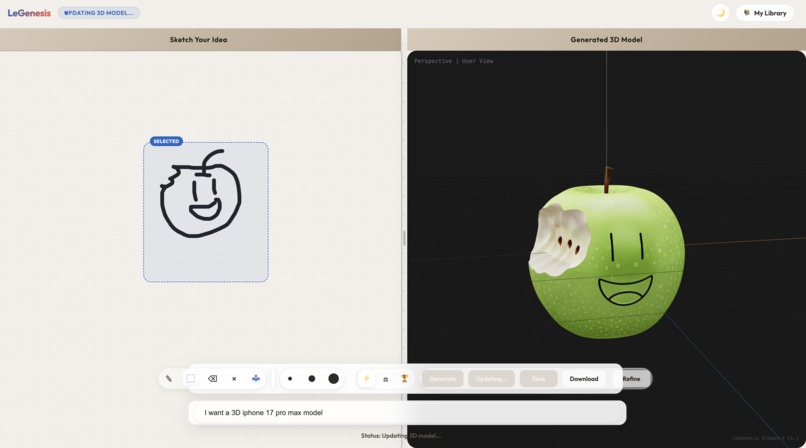
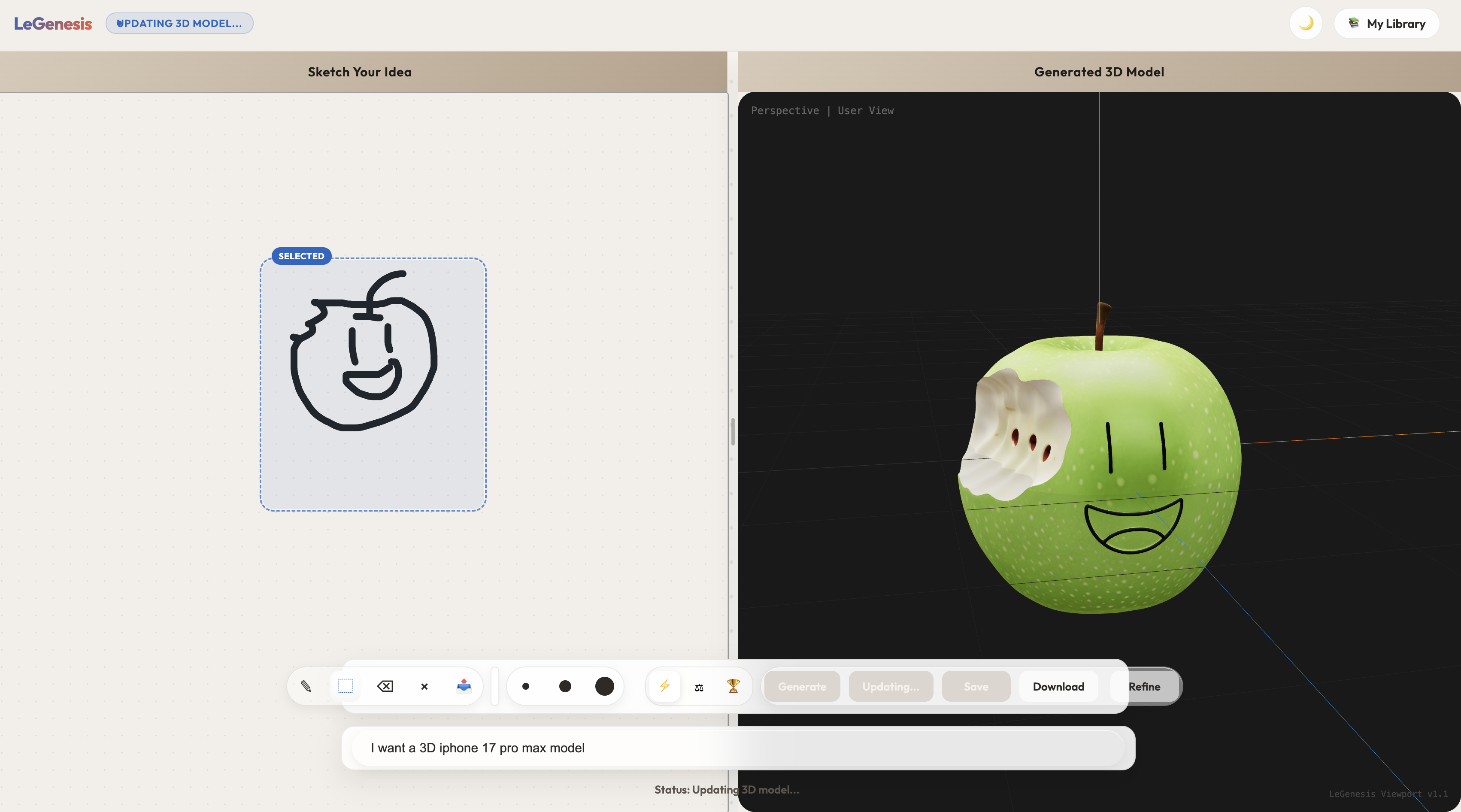
A user sketches an apple on the left, and LeGenesis generates an interactive 3D apple model on the right.
Inspiration
LeGenesis was inspired by how hard it still is for beginners to turn an idea into a 3D asset. Creating 3D models usually requires specialized tools, technical skills, and a lot of time. We wanted to make that process more accessible by letting users start with something simple: a text prompt and a rough sketch.
Our goal was to build a workflow where anyone can go from concept to editable 3D model in a much more intuitive way.
What it does
LeGenesis is an AI-powered 3D generation tool that transforms a user's prompt and sketch into a 3D model preview.
Users can:
- describe an object with text
- draw or upload a rough sketch
- generate a 3D model from that input
- refine the result through additional edits
- preview the model in the browser
- save generated models to a library
This makes early-stage 3D prototyping faster for students, creators, and developers who want to visualize ideas without starting from scratch in traditional 3D software.
How we built it
This project has a three-level service layer:
Our frontend UI layer is built with React and Vite, and we use React Three Fiber to render and preview 3D models directly in the browser. The interface includes a sketch canvas, prompt input, generation controls, and a model viewer.
On the Backend, we used FastAPI to handle uploads, generation requests, model saving, and retrieval. We used Supabase for storage and database support, and integrated Meshy AI for converting concept images into 3D assets.
Lastly, we use a Fetch.ai uAgents planner service as our orchestrator. The agent’s role is to plan the inference, not the generation or execution. It classifies asset types, selects routes, and determines view requirements and constraints. It is a crucial part of the pipeline, as sometimes we only want to make microadjustments to an already-made model. The agent will realize this and will provide extra context to our inference models to speed them up.
Here's our agent if you want to check it out! @legenesis | (https://agentverse.ai/agents/details/agent1q2p2vmk7ptm9vtk5cp7tsut4cytp4n8wxtp46pxya9r2s84jr8gy5m6ajkq/profile
The overall flow is:
- the user enters a prompt and sketch
- the sketch is uploaded
- the backend creates a generation plan
- the image/3D pipeline runs
- the generated
.glbmodel is returned to the frontend for preview and saving
Challenges we ran into
One of our biggest challenges was connecting multiple services into a smooth end-to-end workflow. Generating 3D assets from sketches requires coordinating uploads, AI generation, storage, and frontend rendering.
We also had to deal with:
- inconsistent outputs from generation models
- handling long-running generation requests
- making the UI responsive while waiting for results
- storing and retrieving generated assets cleanly
- keeping the editing loop fast enough to feel interactive
Another challenge was aligning the frontend flow with the backend APIs as the project evolved during the hackathon.
Accomplishments that we're proud of
We're proud that we built a working pipeline that goes from idea to sketch to 3D preview in one experience.
Some highlights:
- building a usable sketch-to-3D workflow
- rendering generated models directly in the browser
- supporting iterative edits instead of one-shot generation
- integrating real backend services instead of only creating a static prototype
- designing a project that lowers the barrier to 3D content creation
What we learned
We learned a lot about building AI-powered creative tools, especially how important the user workflow is when combining multiple generation systems.
We also learned:
- how to structure a FastAPI backend for AI generation tasks
- how to use React Three Fiber for 3D model visualization
- how to manage asset uploads and storage with Supabase
- how to design around latency and failure cases in AI pipelines
- how to collaborate quickly on product, backend, and frontend during a hackathon
What's next for LeGenesis
Next, we want to improve generation quality, make edits more controllable, and support more advanced 3D workflows.
Future directions include:
- better model refinement and versioning
- more reliable sketch understanding
- support for exporting into game engine or design workflows
- stronger collaboration and sharing features
- a more polished production-ready deployment
Built With
- fastapi
- fetch.ai
- javascript
- meshy-ai
- postgresql
- python
- react
- react-three-fiber
- supabase
- vite


Log in or sign up for Devpost to join the conversation.