Inspiration
Legal professionals often spend hours moving between PDF readers, OCR tools, file folders, search utilities, and export workflows just to prepare one case bundle. For small firms and legal operations teams, this creates friction, duplicated work, and risk: source documents can be accidentally modified, scanned files are hard to search, and preparing numbered or stamped bundles often depends on expensive general-purpose PDF suites.
LegalFlowPDF was inspired by that everyday legal document workflow. The goal is not to clone Acrobat, but to build a focused, local-first desktop workspace for lawyers, paralegals, and legal teams who need to organize, review, search, annotate, and export case documents with confidence.
What it does
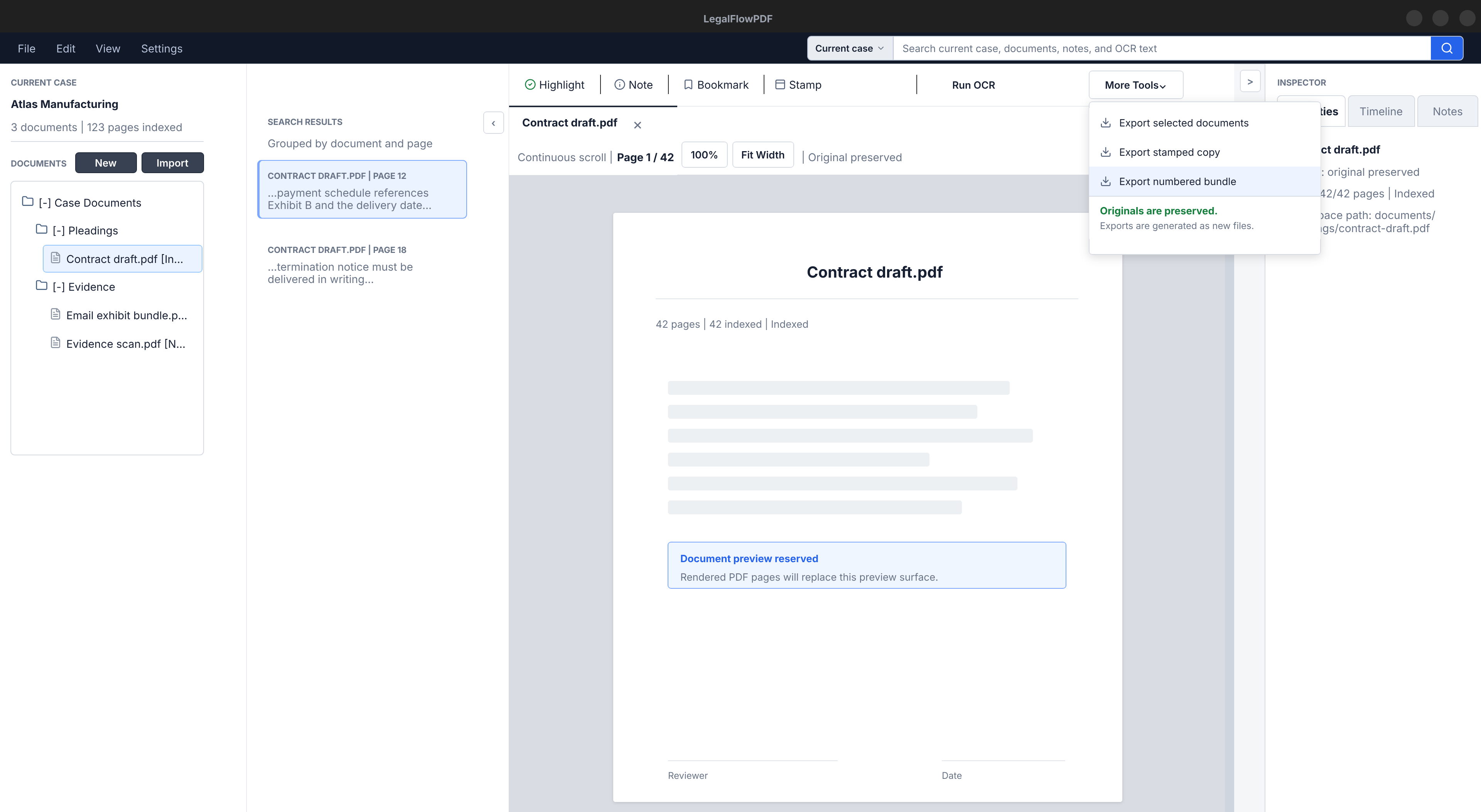
LegalFlowPDF is a native Qt desktop application for legal PDF workflows. It helps users create local case workspaces, import PDFs, read documents in a focused tabbed interface, run OCR on scanned pages, search across an entire case, add review metadata such as highlights, notes, bookmarks, and stamps, and export clean legal bundles.
Key capabilities include:
- Local case workspace and document import
- PDF viewing with navigation, zoom, and multi-document workflow
- OCR-backed page text extraction using Tesseract
- Case-wide full-text search with page-level results
- Internal annotations, bookmarks, stamps, and review marks
- Export with burned-in overlays while preserving original PDFs
- Page rotate/delete operations applied at export time
- Merge, split, legal page numbering, bundle export, and bulk export
- A case-wide review dashboard for annotations and bookmarks
The project is local-first by design. Source documents are copied into the case workspace, originals are preserved, and generated outputs are explicit exports.
How we built it
LegalFlowPDF is built as a native desktop application using Qt 6 Widgets, C++20, and CMake. The interface uses a professional desktop layout: a compact command bar, a case/document navigator, a central tabbed PDF workspace, search/results panels, and an inspector for review metadata.
The architecture separates the app into clear layers:
src/ui/handles Qt widgets, windows, dialogs, and presentation state.src/app/coordinates workflows such as import, OCR, search, annotations, and export.src/core/pdf/wraps PDF rendering and PDF writing behavior.src/core/ocr/integrates Tesseract OCR.src/core/storage/manages SQLite metadata, migrations, repositories, and FTS search.src/core/files/manages local workspace folders, safe file copying, cache paths, and export paths.
PDFium is used for PDF loading and rendering, qpdf powers export and PDF writing workflows, Tesseract handles OCR, and SQLite with FTS5 stores case metadata and searchable page text.
We also used AI assistance throughout the build process to plan features, refine the architecture, generate implementation specs, review edge cases, and accelerate development while keeping the project aligned with a clear native desktop product direction.
Challenges we ran into
One major challenge was keeping the project focused. PDF tools can easily grow into a huge Acrobat-style feature set, so we had to repeatedly narrow the scope around legal workflow value: case organization, search, review, numbering, stamping, and export.
Another challenge was preserving original documents. Legal workflows require trust, so the application avoids mutating source PDFs. Features such as annotations, page operations, stamps, and numbering are stored internally first and only applied when the user creates an export.
Performance was also important. Legal documents can be large, scanned, and hundreds of pages long. We had to keep long-running work such as OCR, indexing, thumbnail generation, and batch exports off the UI thread so the desktop app remains responsive.
PDF export was especially complex because multiple operations need to compose correctly. For example, overlays, rotate/delete operations, document merging, and legal page numbering all need to happen in a predictable order without damaging the original files.
Accomplishments that we're proud of
We are proud that LegalFlowPDF has grown from a concept into a structured native desktop application with a real legal workflow foundation.
The project now has a local case workspace, SQLite-backed metadata, PDF rendering, OCR, full-text search, annotations, bookmarks, stamps, export, merge/split, legal page numbering, bundle export, bulk export, and a review dashboard. These features work together around the same principle: help legal teams produce reliable document outputs while preserving the integrity of source documents.
We are also proud of the architecture. The UI does not directly call PDFium, Tesseract, qpdf, or SQLite. Instead, the app uses service and core layers so features can be tested, extended, and maintained more safely.
What we learned
We learned that legal document software is less about flashy editing tools and more about reliability, traceability, and workflow fit. Small details matter: where files are stored, whether originals are mutated, how search results link back to exact pages, and whether exported documents reflect review work accurately.
We also learned how important it is to design for long reading sessions. A legal PDF workspace should feel calm, dense, and professional rather than decorative. The UI needs to keep the document central while still making navigation, search, annotations, and export tools easy to reach.
On the technical side, we learned a lot about coordinating PDF rendering, OCR, search indexing, internal overlay metadata, and final PDF export into one consistent pipeline.
What's next for LegalFlowPDF
Next, we want to move LegalFlowPDF closer to a polished demo and production-ready legal workflow tool.
Planned next steps include:
- Completing Windows 11 packaging and real-device QA
- Improving manual verification for the main UI workflows
- Expanding filing-readiness features such as redaction, metadata scrubbing, printing, exhibit indexes, audit trails, and archival PDF/A export
- Exploring e-signature placement and digital signing workflows
- Improving onboarding for legal teams and collecting feedback from real users
- Continuing to refine performance for large case folders and long scanned documents
Longer term, LegalFlowPDF can become a complete local-first legal document workspace: fast enough for daily review, careful enough for legal output, and focused enough that legal teams do not need to stitch together several separate tools for one case bundle.

Log in or sign up for Devpost to join the conversation.