-
-
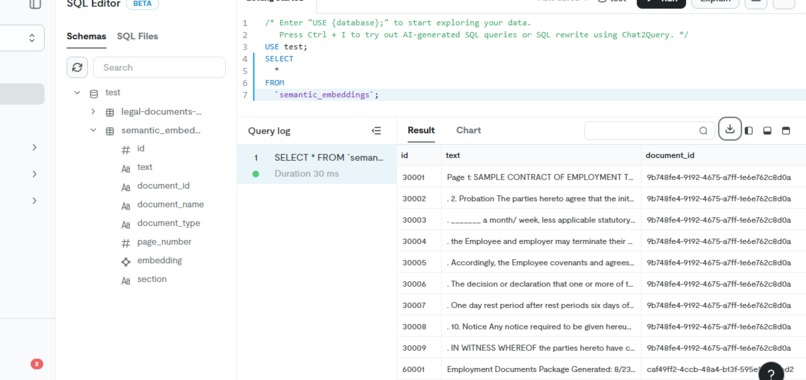
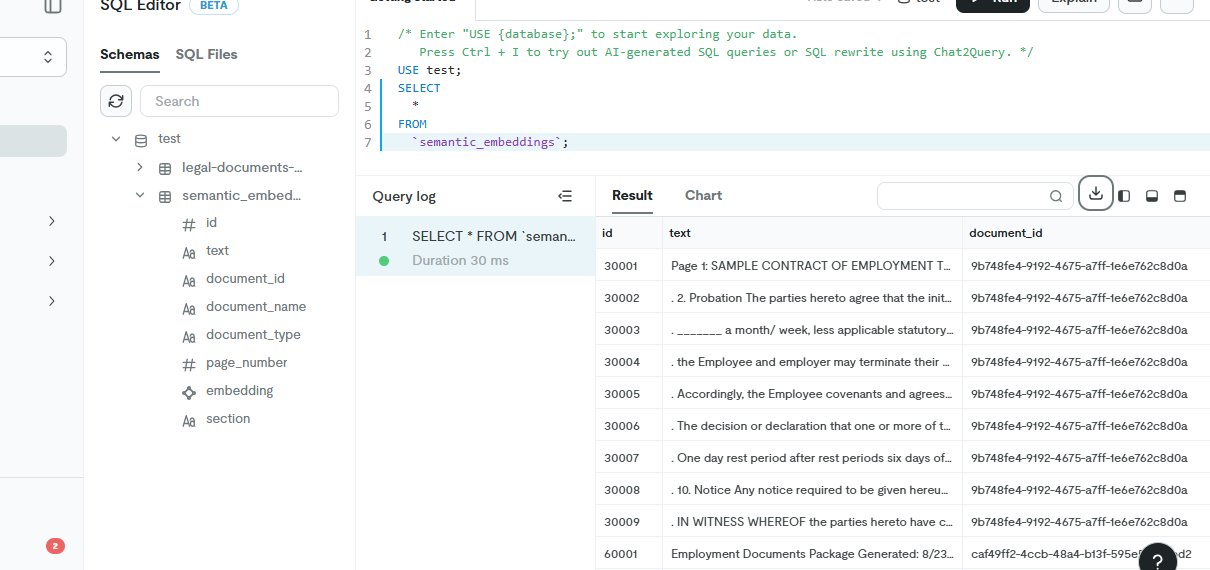
data store in the database
-
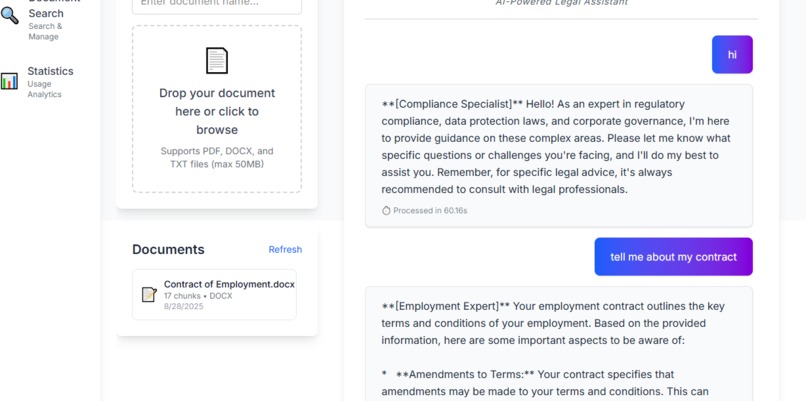
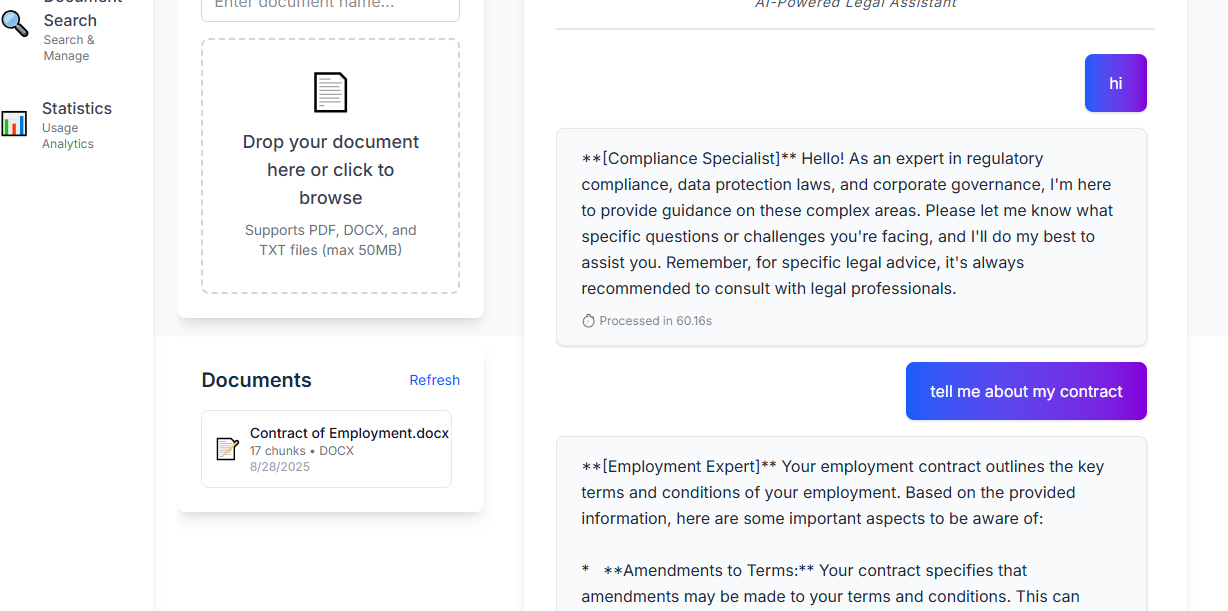
chat wi the agent
-
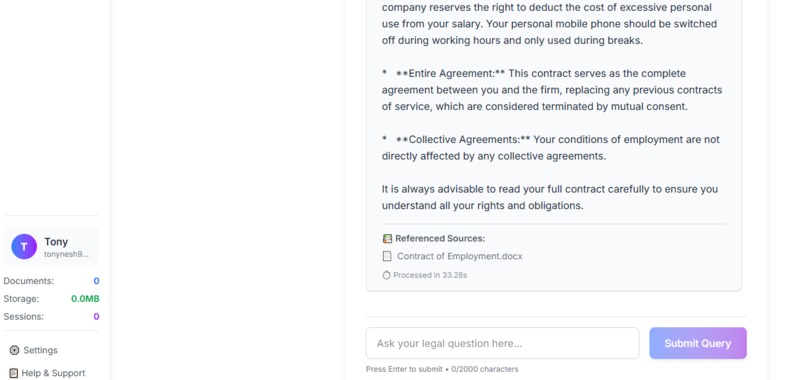
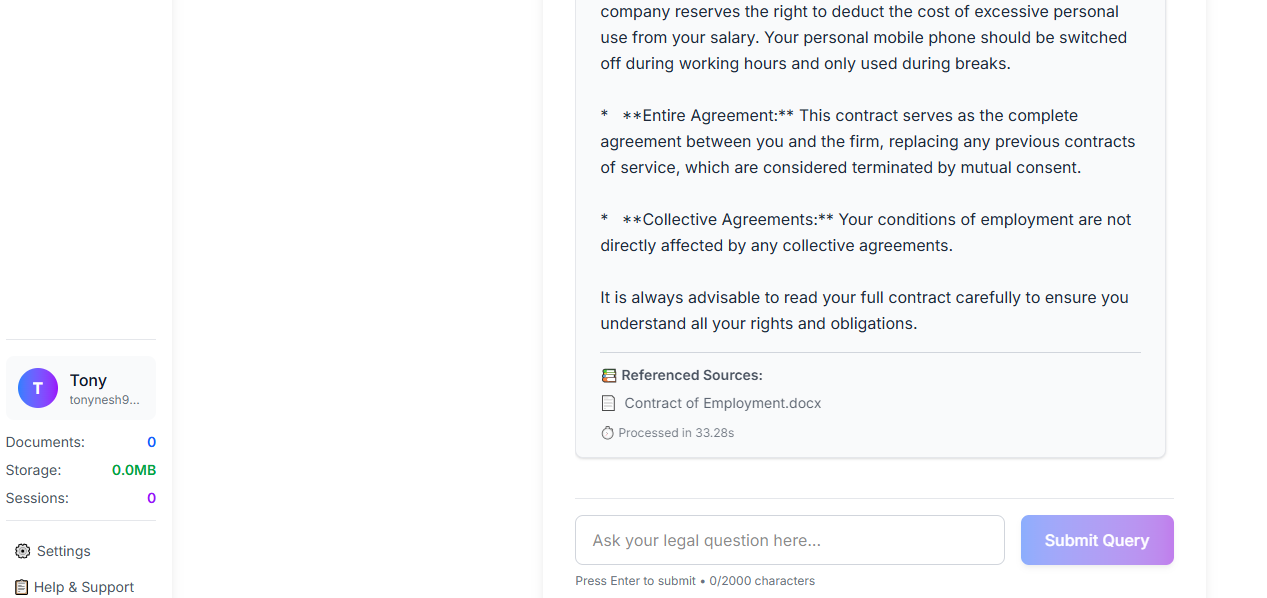
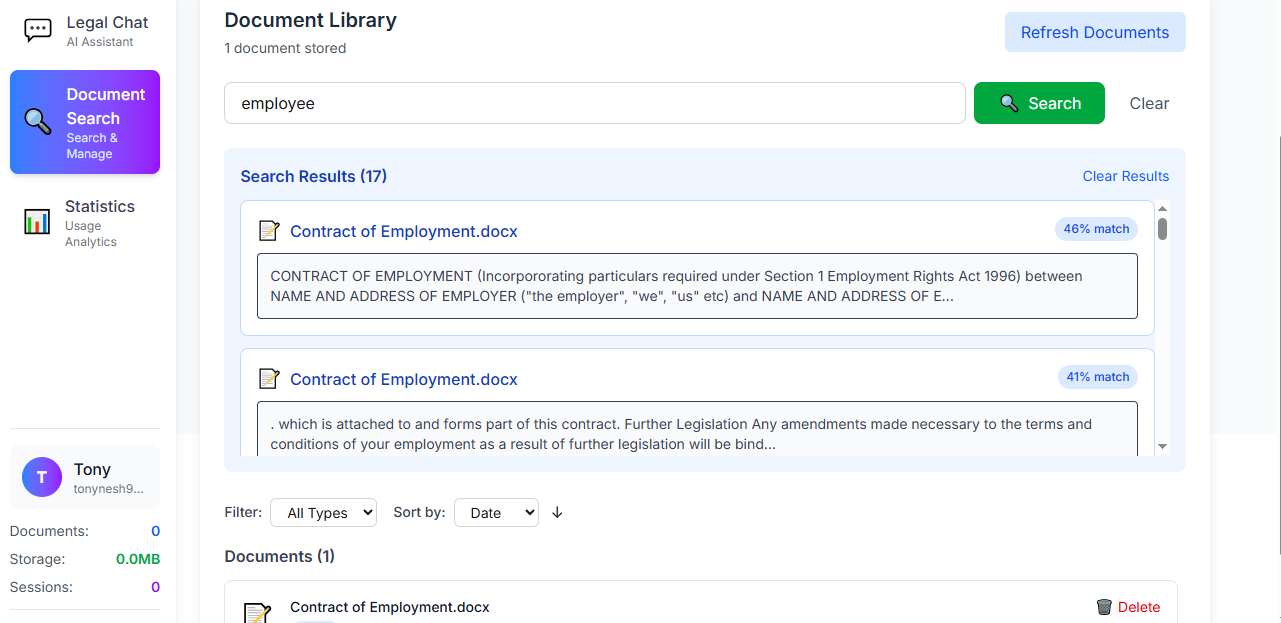
reference sources from uploaded documents
-
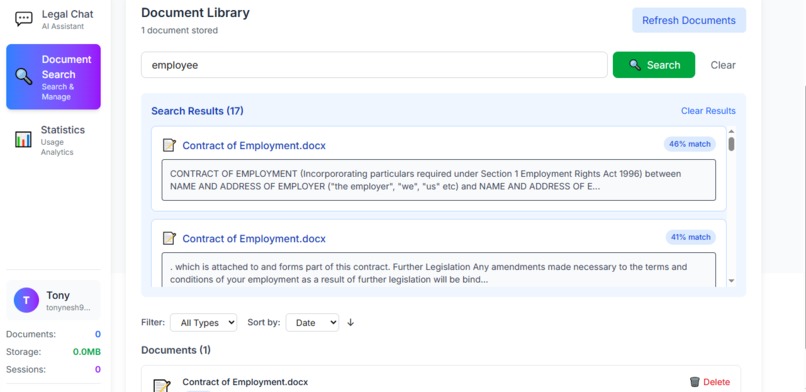
vector search
-
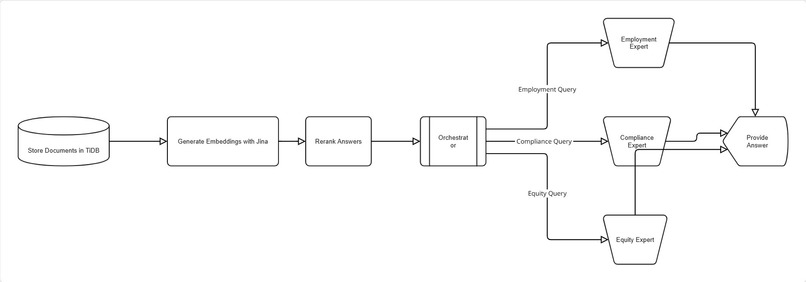
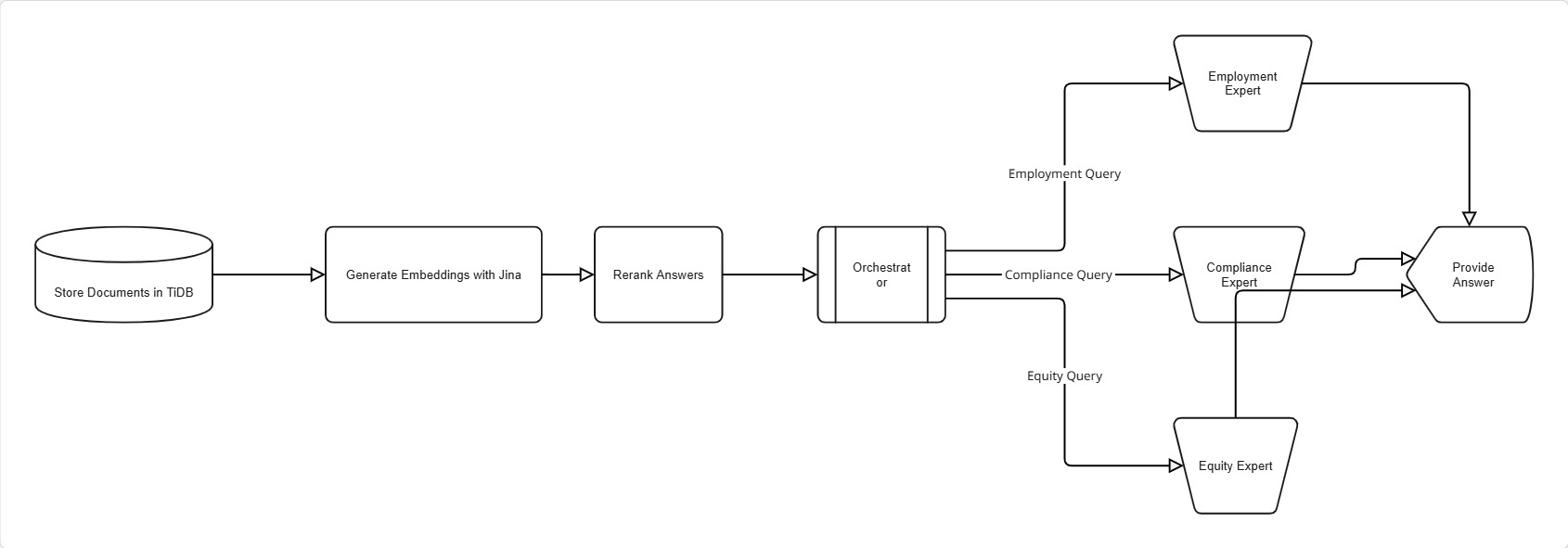
flow diagram
LegalAI: Specialized Document Analysis
Inspiration
The legal industry is buried in dense, complex documents. Manual review is incredibly time-consuming, expensive, and susceptible to human error, often leading to missed critical details and significant risk. We were inspired to leverage cutting-edge AI to solve this fundamental problem. Our goal was to move beyond simple keyword search and create a team of specialized digital legal experts that could understand, analyze, and extract insights from legal text with the precision of a human specialist—but at the speed and scale of a machine.
What it does
LegalAI is an intelligent platform that provides deep, multi-faceted analysis of legal documents. A user simply uploads a document (e.g., an employment contract, a compliance report, a shareholder agreement). The system then:
- Classifies the document to understand its primary nature.
- Routes it to a team of specialized AI agents, each an expert in a specific domain:
- The Employment Expert analyzes contracts for clauses on non-competes, termination, benefits, and obligations.
- The Compliance Specialist identifies regulatory requirements, potential breaches, and risk areas.
- The Equity Management Expert focuses on cap tables, vesting schedules, and stock option terms.
- Answers Questions: Users can ask complex, natural language questions about the document ("What is the notice period for termination?"), and the relevant agent provides precise answers sourced directly from the text.

How we built it
We built LegalAI on a modern, robust, and scalable tech stack:
Backend & AI Core: Python serves as our foundation, handling the core logic and AI orchestration.
RAG (Retrieval-Augmented Generation): We implemented a RAG pipeline using PyTiDB to seamlessly integrate our AI models with the database. This allows our agents to ground their responses in the actual document content, ensuring accuracy and eliminating hallucinations.
Vector Database: TiDB serves as our high-performance hybrid transactional and analytical processing (HTAP) database. We leverage its capabilities to store and instantly retrieve document chunks, embeddings, and metadata for the RAG process.
TiDB Vector Database Integration
The system uses TiDB as a distributed SQL database with vector search capabilities for storing and retrieving document chunks.
Database Schema
class UserDocumentChunk(TableModel):
    __tablename__ = "user_semantic_embeddings"

    id: int = Field(default=None, primary_key=True)
    user_id: str = Field(index=True)  # User isolation
    session_id: Optional[str] = Field(default=None, index=True)  # Session tracking
    text: str = Field(sa_column=Column(TEXT))
    document_id: str = Field(index=True)
    document_name: str = Field(sa_column=Column(TEXT))
    document_type: str = Field(default="text")
    page_number: Optional[int] = Field(default=None)
    embedding: List[float] = self.embedding_fn.VectorField(source_field="text")
    section: Optional[str] = Field(sa_column=Column(TEXT), default=None)
    created_at: str = Field(default_factory=lambda: datetime.utcnow().isoformat())
    file_size: Optional[int] = Field(default=None)
    chunk_index: Optional[int] = Field(default=None)
Connection Setup
def init_clients():
    """Initialize TiDB client and embedding function."""
    # Initialize TiDB client
    tidb_client = TiDBClient.connect(
        host=os.getenv("TIDB_HOST"),
        port=int(os.getenv("TIDB_PORT", 4000)),
        username=os.getenv("TIDB_USERNAME"),
        password=os.getenv("TIDB_PASSWORD"),
        database=os.getenv("TIDB_DATABASE"),
        ensure_db=True,
    )

    # Initialize embedding function (Jina or OpenAI)
    if embedding_provider == "jina":
        embedding_fn = EmbeddingFunction(
            model_name="jina_ai/jina-embeddings-v4",
            api_key=os.getenv("JINA_API_KEY"),
            timeout=30
        )

    return tidb_client, embedding_fn
Document Chunk Processing
Documents are processed into searchable chunks with metadata preservation:
def add_document_from_text(self, user_id: str, text: str, document_name: str,
                          session_id: Optional[str] = None):
    """Add a text document to the store with user isolation."""

    # Clean and normalize text
    cleaned_text = self._clean_text(text)

    # Split into chunks
    splitter = RecursiveCharacterTextSplitter(
        separators=["\n\n", "\n", ". ", " "],
        chunk_size=1000,
        chunk_overlap=100,
    )
    chunks = splitter.split_text(cleaned_text)

    # Create document chunk objects with embeddings
    documents = []
    for i, chunk in enumerate(chunks):
        doc_chunk = self.DocumentChunk(
            user_id=user_id,
            session_id=session_id,
            text=cleaned_chunk,
            document_id=document_id,
            document_name=cleaned_document_name,
            section=self._identify_section(cleaned_chunk),
            chunk_index=i,
        )
        documents.append(doc_chunk)

    # Insert with automatic embedding generation
    return self._insert_documents(documents)
Hybrid Search Implementation
The system implements hybrid search combining vector similarity with metadata filtering:
def search(self, user_id: str, query: str, limit: int = 3,
          session_id: Optional[str] = None):
    """Search with user isolation and hybrid filtering."""

    # Vector similarity search
    search_query = self.table.search(query, search_type="hybrid").limit(limit)

    # Add user isolation filters
    filters = {"user_id": {"$eq": user_id}}
    if session_id:
        filters["session_id"] = {"$eq": session_id}

    search_query = search_query.filter(filters)

    # Apply reranking if available
    if self.reranker:
        search_query = search_query.rerank(self.reranker, "text")

    return search_query.to_list()
Read about pytidb Hybrid Search
- Multi-Agent System: We developed a sophisticated multi-agent framework where each agent (Employment, Compliance, Equity) is a specialized module powered by large language models (LLMs).
AI Agent Routing System
The system uses specialized AI agents for different legal domains:
class AgentName(str, Enum):
    EMPLOYMENT = "Employment Expert"
    COMPLIANCE = "Compliance Specialist"
    EQUITY = "Equity Management Expert"

def process_query(self, user_id: str, query: str, session_id: Optional[str] = None):
    """Route query to appropriate agent with user context."""

    # Route query to appropriate agent
    routing_decision = self._route_query(query)

    # Get user-specific context
    relevant_context = self.get_user_relevant_context(user_id, query, session_id)

    # Process with specialized agent
    agent_handlers = {
        AgentName.EMPLOYMENT: self._handle_employment_query,
        AgentName.COMPLIANCE: self._handle_compliance_query,
        AgentName.EQUITY: self._handle_equity_query
    }

    return agent_handlers[routing_decision.agent_name](user_id, query, session_id)
- Frontend: A responsive and modern web application built with Next.js and styled with Tailwind CSS, providing an intuitive interface for uploading documents and interacting with the AI agents.
Challenges we ran into
- Agent Specialization: Designing prompts and fine-tuning strategies to ensure each agent stayed strictly within its domain expertise was a significant challenge. Preventing one agent from "hallucinating" answers outside its specialty required careful architectural design.
- RAG Optimization: Achieving high accuracy with Retrieval-Augmented Generation was difficult. We faced challenges in optimally chunking complex legal documents (which often have tables and cross-references) and tuning the retrieval to find the most relevant context for the LLM.
- TiDB Integration: While powerful, effectively leveraging TiDB's HTAP capabilities for both traditional data and vector similarity searches required a deep dive into its query optimization and indexing strategies.
- Document Complexity: Legal documents have a unique structure and language. Teaching our models to understand legal jargon, defined terms, and complex clause dependencies was a major hurdle.
Accomplishments that we're proud of
- Creating a True Multi-Agent System: Successfully building a working system where specialized AI agents collaborate on a single document is our biggest achievement.
- High Accuracy & Reduced Hallucination: Our RAG-on-TiDB implementation drastically reduced incorrect AI-generated information, providing users with reliable, sourced answers.
- Performance: Achieving sub-second response times for querying complex documents, thanks to the powerful combination of our efficient code and TiDB's scalability.
- Intuitive UI: Delivering a complex AI capability through a clean, simple, and user-friendly Next.js frontend that hides the underlying complexity.
What we learned
- The Power of Specialized Agents: A team of narrow, deep experts vastly outperforms a single, generalized model for complex analytical tasks.
- Data is Key for RAG: The performance of a RAG system is 90% dependent on how you chunk, index, and retrieve your data. The model is important, but the data pipeline is critical.
- Legal Domain Nuance: We gained deep insight into the specific pain points and terminology of legal document review, which was essential for building a useful tool.
- Hybrid Database Strength: Using TiDB as a unified platform for both operational data and vector search simplified our architecture and improved performance.
What's next for LegalAI
- Expanding the Legal Team: Adding more specialized agents for domains like M&A, Real Estate, Intellectual Property, and Litigation.
- Cross-Document Analysis: Enabling the agents to compare clauses and identify inconsistencies across multiple documents.
- Automated Summary Reports: Generating comprehensive, multi-section analysis reports with a single click.
- Workflow Integration: Building integrations with popular legal software platforms (like Clio or LexisNexis) to fit seamlessly into existing lawyer workflows.
- Proactive Risk Scoring: Having the agents not just answer questions but also proactively assign a risk score to documents and highlight the top potential issues automatically.

Log in or sign up for Devpost to join the conversation.