-
-
-
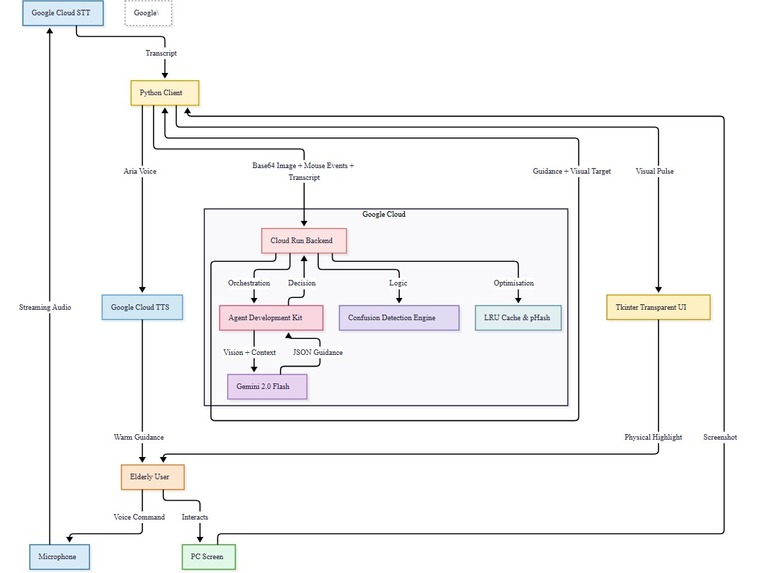
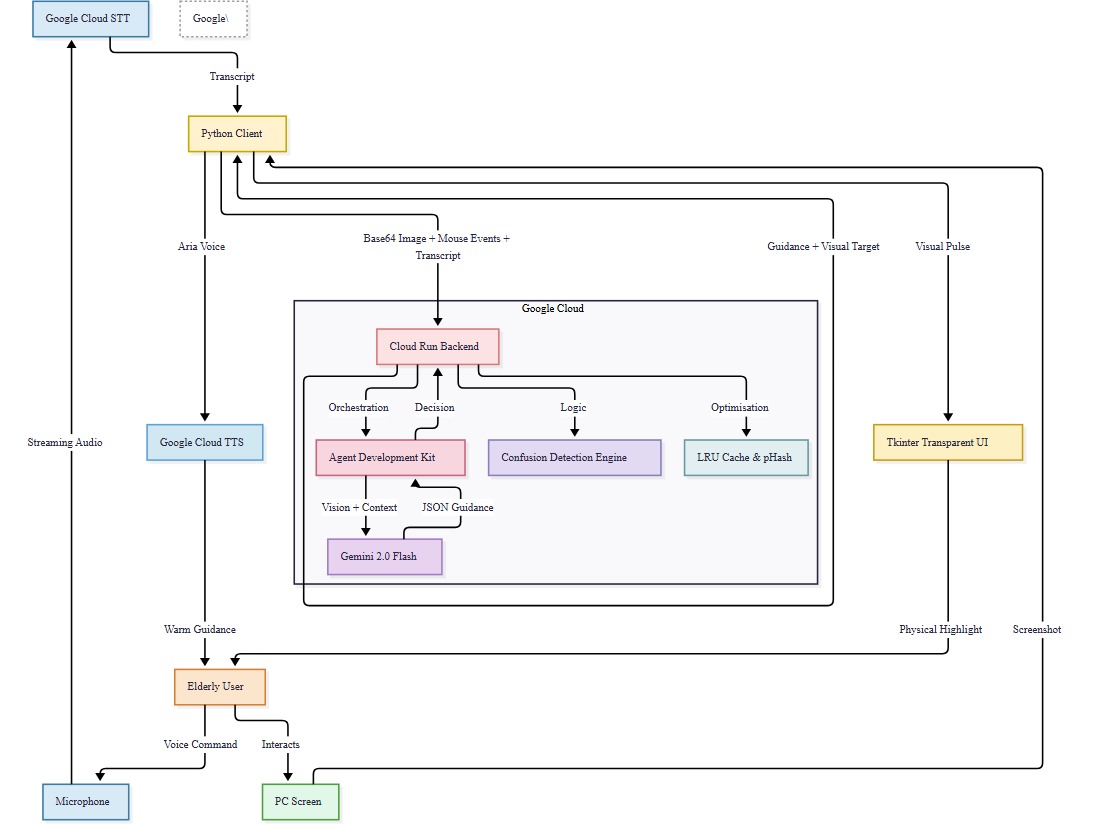
Architecture Design for LegacyBridge-Aria
LegacyBridge: An AI Companion for the Ones Who Taught Us Everything
Inspiration
It started with a phone call from a grandmother.
She had just gotten a new laptop — a gift from the family — and she was completely lost. She kept clicking the wrong things, closing windows by accident, and getting more frustrated by the minute. Forty minutes on the phone trying to describe where buttons were, what colors to look for, what to tap next — and even then, she gave up.
That moment stayed with us. Here was a woman who raised a family, managed a household, lived a full and capable life and a simple laptop screen had made her feel helpless. And we thought: this shouldn't be this hard.
Hundreds of millions of elderly people worldwide are being left behind by technology that was never designed for them. No one should have to feel lost on a screen. That's what inspired LegacyBridge.
What it does
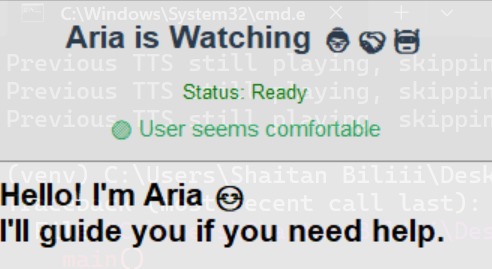
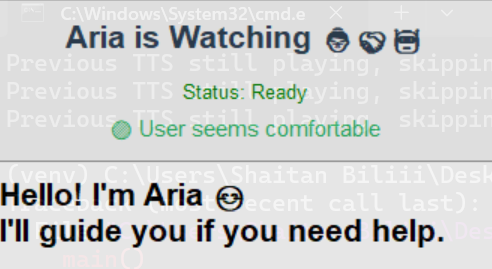
LegacyBridge is an always-on AI assistant called Aria, built specifically for elderly users who struggle to navigate computers. Aria watches the screen - purely through vision, no DOM access, no OS integrations - takes screenshots every few seconds, and sends them to a backend powered by Google Gemini 2.0 Flash.
Gemini analyzes what's on screen, understands the context, and returns natural, human-sounding guidance like:
"Tap the blue button just below the photo to continue."
That guidance is then spoken aloud, so the user doesn't even have to read it. No technical jargon. No pop-up menus. Just a calm, patient voice walking them through it - like having a grandchild sitting beside them, always.
How we built it
Our stack was built for speed, reliability, and real-world deployment.
- Client side: Python with
tkinterfor the lightweight UI,pyautoguifor screenshot capture, andpyttsx3+ Google Cloud TTS for voice output. - Backend: A FastAPI server that receives screenshots, forwards them to Gemini, and returns guidance text.
- AI: Google Gemini 2.0 Flash via the
google-genaiSDK - fast, multimodal, and remarkably good at understanding real-world screens. - Cloud: Deployed on Google Cloud Run, containerized and pushed through Container Registry, under the project
legacybridge-hackathon. - Infrastructure: We used Terraform to provision and manage the Cloud Run service in
us-central1, keeping our setup clean and reproducible. - Auth: Google Service Account with
credentials.jsonandGOOGLE_APPLICATION_CREDENTIALSfor secure API access.
The vision-only approach was a deliberate design choice. We wanted Aria to work on any screen, any application, without needing special integrations. Just eyes. Just understanding.
Challenges we ran into
Cloud Auth in Containers
Getting GOOGLE_APPLICATION_CREDENTIALS to work correctly inside a Docker container on Cloud Run was surprisingly painful. Service account permissions, secret injection, environment variable scoping - it took several failed deployments before everything finally clicked.
Latency Tuning How often do you take a screenshot? Too fast and you burn through quota; too slow and the guidance feels out of sync with what the user is seeing. The average lag a user experiences is:
$$\text{Average Lag} = \frac{\Delta t}{2} + t_{\text{inference}}$$
Where $\Delta t$ is the screenshot interval and $t_{\text{inference}}$ is Gemini's response time. Finding the right $\Delta t$ was a real balancing act between responsiveness and cost.
Prompt Engineering for a Human Voice Gemini is powerful, but getting it to speak like Aria short, warm, spatially precise took serious iteration. Generic responses like "click the button" weren't good enough. We needed "tap the large green button near the top-right corner of your screen." Every word had to feel reassuring, not robotic.
Accomplishments that we're proud of
We're proud that Aria actually works end to end, in the cloud, in real time. A screenshot taken on a local machine travels to a containerized FastAPI backend on Cloud Run, gets analyzed by Gemini, and comes back as a spoken sentence in just a few seconds. That full loop, built and deployed during a hackathon, felt like a real achievement.
We're also proud of Aria's voice. The technical pipeline was one thing but building a personality that feels patient, warm, and trustworthy for users who may already feel anxious around technology was the harder and more meaningful challenge. We think we got her right.
What we learned
We learned that designing for someone is completely different from designing for a use case. Elderly users don't want features they want confidence. That shift in thinking changed every decision we made, from how fast Aria speaks to which words she uses.
On the technical side, we came away with deep hands-on experience in deploying containerized Python services to Cloud Run, managing cloud infrastructure with Terraform, and pushing Gemini's multimodal capabilities to reason about real, messy, unpredictable UI screens. We also learned that prompt design is just as critical an engineering discipline as any other part of the stack.
What's next for LegacyBridge-Aria
The problem LegacyBridge solves is real and it isn't going away. We want to expand Aria's capabilities smarter context memory so she can learn a particular user's habits over time, multilingual voice support to reach elderly users across language barriers, and a mobile version so the same guidance can carry over to phones and tablets.
Ultimately, we want Aria to be a genuine companion not just a navigator. Someone who notices when a user seems stuck before they even ask for help.
We started with a phone call we'll never forget. We hope Aria means fewer of those calls ever need to happen.
Built with care, Google Cloud, and a lot of love for the generation that deserves better.
Built With
- docker
- fastapi
- google-cloud
- pyautogui
- python
- pyttsx3
- terraform
- tkinter

Log in or sign up for Devpost to join the conversation.