-
-
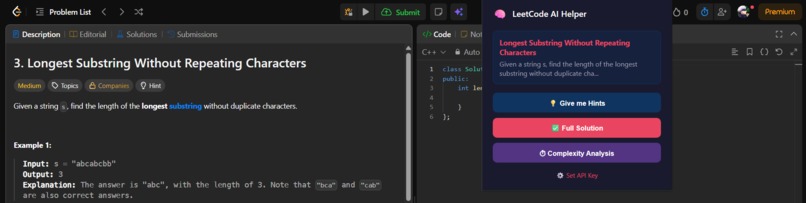
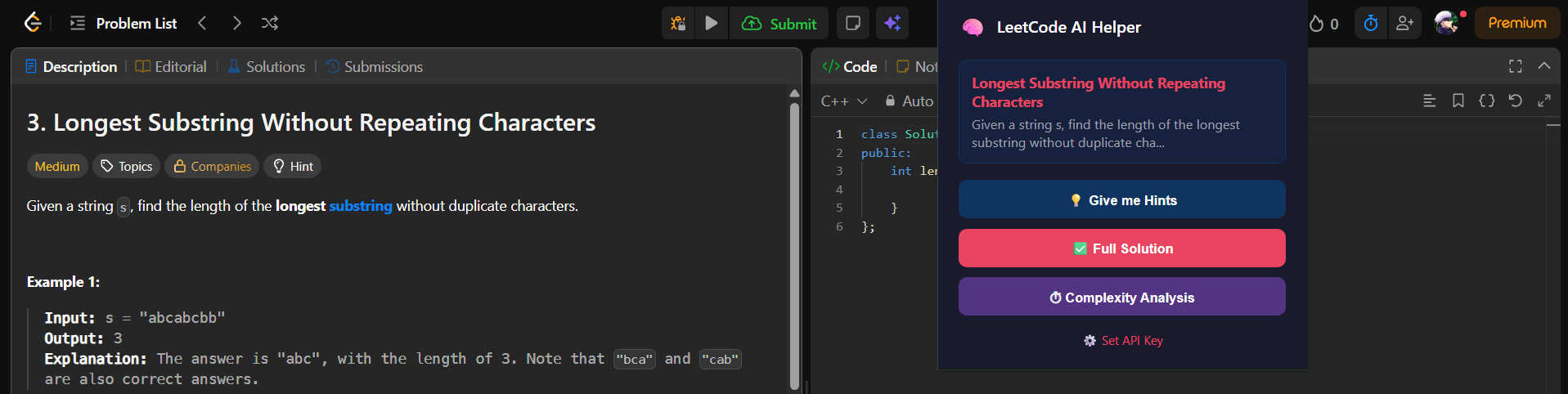
Detection of the currently present leetcode problem
-
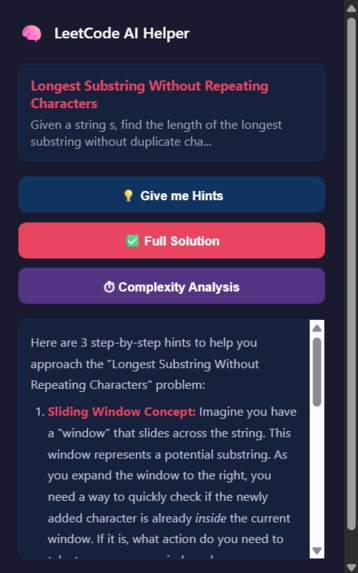
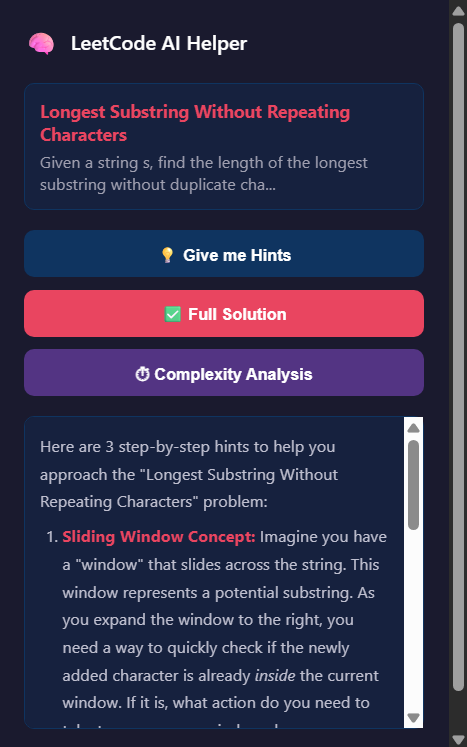
Hints option
-
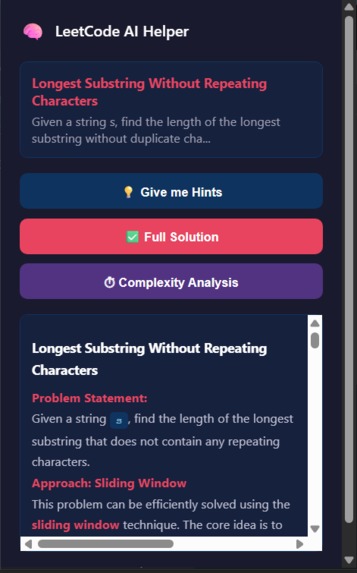
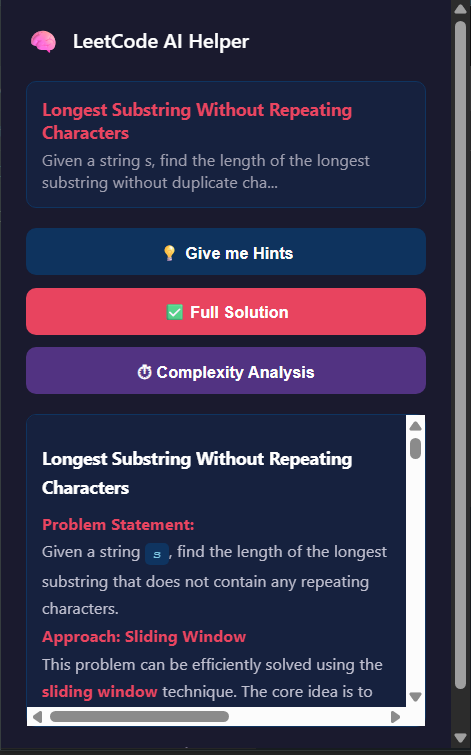
Solution option
-
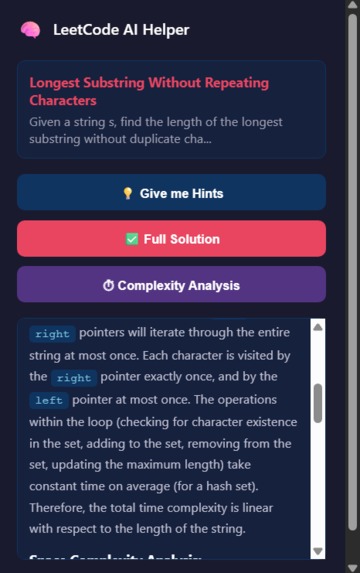
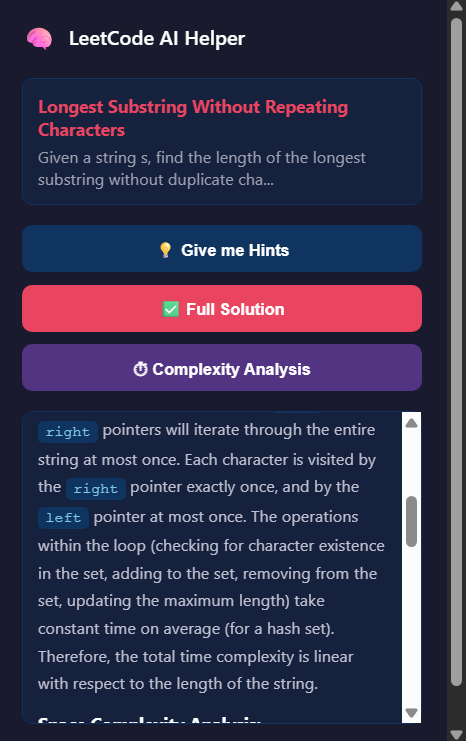
Complexity analysis option
Inspiration
While solving LeetCode problems, I often found myself switching between LeetCode, search engines, and AI tools whenever I got stuck. The problem wasn't finding an answer — it was getting just enough guidance to understand the problem without immediately seeing the solution.
This inspired me to build LeetCode Helper, an AI-powered Chrome extension that brings useful assistance directly into the LeetCode workflow.
What it does
LeetCode Helper automatically detects the problem currently open on LeetCode and uses Google's Gemini API to provide different levels of assistance:
- 💡 Step-by-step Hints — Provides progressive hints that guide users toward the solution without immediately revealing it.
- ✅ Full C++ Solution — Generates a complete C++ solution with an explanation of the approach.
- ⏱️ Complexity Analysis — Explains the time and space complexity of the solution.
- 📝 Markdown Rendering — Formats AI responses with readable headings, lists, and code blocks.
The goal is to help users learn and solve problems, rather than simply copy an answer.
How we built it
We built the project as a Chrome Extension using Manifest V3 with JavaScript, HTML, and CSS.
The extension extracts the problem title and description directly from the active LeetCode page. The extracted information is then sent to a background service worker, which constructs the appropriate prompt and communicates with the Google Gemini API.
The overall workflow is:
User opens a LeetCode problem
            ↓
Extension detects the active problem
            ↓
Problem title + description extracted from DOM
            ↓
Request sent to background service worker
            ↓
Prompt sent to Gemini API
            ↓
AI-generated response
            ↓
Markdown rendered using marked.js
            ↓
Response displayed in the extension popup
We used:
- JavaScript (ES6+) for the extension logic
- Chrome Extension Manifest V3 for browser integration
- Gemini API for AI-powered assistance
- marked.js for Markdown rendering
- HTML & CSS for the popup interface
Challenges we ran into
One of the biggest challenges was extracting the correct problem information from LeetCode's dynamically generated webpage. We had to work with the DOM and identify reliable selectors for the problem title and description.
Another challenge was designing prompts for different modes of assistance. A hint should encourage the user to think rather than reveal the solution, while the full-solution mode needs to provide correct code along with a useful explanation.
We also had to understand how different parts of a Chrome extension communicate with each other, including popup scripts, background service workers, injected scripts, permissions, and message passing.
Handling asynchronous communication with the Gemini API and displaying the returned Markdown response correctly were additional challenges.
Accomplishments that we're proud of
We're proud of building a fully functional AI-powered Chrome extension from scratch and integrating it directly into the LeetCode workflow.
Instead of requiring users to copy and paste problems into an AI chatbot, the extension automatically detects the active problem and provides assistance with a single click.
We are especially proud of the progressive hint system, because it focuses on helping users understand and solve problems instead of immediately giving them the answer.
We also successfully integrated multiple components — Chrome APIs, DOM extraction, a background service worker, Gemini API calls, and Markdown rendering — into one working application.
What we learned
This project taught us that building an AI application is about much more than simply calling an API.
We learned how to:
- Build and structure a Manifest V3 Chrome extension
- Extract information from dynamically generated webpages
- Communicate between popup scripts and background service workers
- Work with external AI APIs and asynchronous requests
- Design prompts for different AI behaviors
- Render AI-generated Markdown and code
- Handle browser permissions and extension storage
Most importantly, we learned how context and prompt design directly affect the usefulness of an AI-powered application.
What's next for LeetCode Helper
We want to make LeetCode Helper more useful as a long-term learning companion.
Some features we plan to explore include:
- 🧠 Adaptive hints based on the user's current approach
- 💬 Interactive follow-up conversations about the problem
- 🐛 Code debugging and error explanation
- 📊 Personalized progress tracking
- 🎯 Difficulty-aware assistance
- 🔍 Code complexity and optimization suggestions
- 🌐 Support for additional coding platforms
Our long-term goal is to turn LeetCode Helper from a simple AI assistant into a personal coding mentor that helps users develop problem-solving skills instead of just providing solutions.
Built With
- chrome
- css
- gemini
- google-gemini-api
- html
- javascript
- manifest-v3
- marked.js

Log in or sign up for Devpost to join the conversation.