-
-
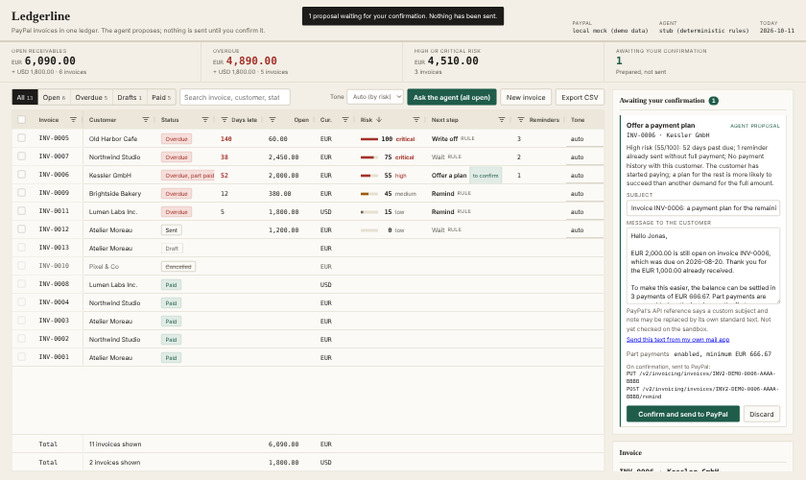
The ledger, a proposal waiting for confirmation, and the journal (local demo)
What to remember
- Problem: freelancers chase late PayPal invoices from memory. Ledgerline ranks every unpaid invoice by risk, with reasons, and proposes a next step and a message.
- PayPal APIs: the Invoicing v2 API is the only data source and the only way to act: list, read, create, update, send, remind, record payment, cancel, delete.
- Role of the AI model: it picks one allowed action and drafts the message. It cannot call PayPal. Code checks its answer, and a human confirms every write.
- What is new: the confirmation is bound to a hash of the exact payload you saw, and before any write Ledgerline re-reads the invoice from PayPal and refuses if its status or amount due changed.
AI disclosure
The idea, the code, the video and all texts of this submission were produced by Claude, an AI model made by Anthropic; no human reviewed the code line by line. The submitter set up the accounts and was present for the sandbox run. Demo data is invented. The video is a screen capture with English subtitles and no voice.
Inspiration
Small businesses invoice through PayPal, then chase late payments from memory. PayPal's list does not say which unpaid invoice is most at risk, what to do next, or what to write. Two mistakes cost the most: chasing a customer who has just paid, and quoting a fee nobody agreed to. Ledgerline rereads PayPal before every send and refuses any amount absent from the invoice, so neither reaches the customer.
What it does
Ledgerline loads every PayPal invoice into one grid. For each unpaid invoice it shows:
- A risk score with plain-word reasons.
- A next step: remind, wait, payment plan or write-off, limited to what suits that invoice.
- A drafted message in a tone you choose.
"Ask the agent" fills a queue of proposals. Each shows the reason, an editable message and the exact PayPal call it will make. You confirm or discard. The row, totals and journal then update. Every step goes into a hash-chained journal.
PayPal may replace a custom reminder text with its standard one. So each reminder or payment-plan proposal also has a link that opens your reviewed text, addressed to the customer, in your own mail app.
How we built it
- Server: TypeScript on Node 22; Invoicing v2 client on plain
fetch, OAuth2, retries on reads only. - Front end: AG Grid Community 34.3.1 (MIT) and plain DOM.
- The gate: every write needs a
Confirmationthat only the gate can mint, when the caller sendsconfirm: truewith the hash of the payload shown. It re-reads the invoice and refuses if status or balance changed. - Risk rules: deterministic code, independent of any model.
How we use the PayPal platform
Without the Invoicing v2 API there is no ledger and nothing to do. Status and balance are PayPal's, read back after every action.
Calls used: POST /v1/oauth2/token; GET /v2/invoicing/invoices and GET .../{id}; POST /v2/invoicing/invoices with generate-next-invoice-number; PUT .../{id}; POST .../{id}/send, /remind, /cancel, /payments; DELETE .../{id} for drafts.
The client was compared with PayPal's OpenAPI description (version 2.6) on 11 October 2026: a document, not a run.
Run on the PayPal sandbox on 3 November 2026, all with success: token, list, read, create, update by PUT, send, remind, payment plan, partial and full payment, cancel. One call failed at first: generate-next-invoice-number answers 415 without a JSON body; we now send an empty one. An unknown invoice ID returns PayPal's 404 error body, which the app shows as is.
How we use AI
For one invoice at a time, the model receives the facts (amounts, dates, history, rule-based score, allowed actions), weighs them, picks one allowed action, explains why in one sentence and writes the message in the tone set for that line. Code then checks the answer:
- It cannot act: its answer only becomes a queued proposal.
- It cannot invent an amount: every money amount must belong to the invoice or its plan, and any other number must be an invoice fact. "A late fee of 50" is thrown out and the rule-based draft is used, with a warning.
- It cannot read free text from invoices, nor pick a forbidden step.
The offline demo (npm run demo) uses a deterministic stub so it runs without a key. With a real model, customer names, dates and amounts go to its provider.
Proposals shown in the sandbox shots of the video come from a real model (the local demo shot uses the stub, as its header says): Claude (claude-sonnet-5-5) through the Anthropic Messages API. The video shows this run's journal entries, each recorded with source anthropic:claude-sonnet-5-5. In the first real run, on three invoices, the code guard rejected no proposal.
How we use AG Grid
The grid is the screen, not a table beside a chat box. It opens sorted by risk and uses filters, in-place cell editing, custom renderers, selection limited to open invoices, pinned per-currency totals, tooltips, CSV export and getRowId updates, so a confirmed action changes one row.
Sponsor tool: AG Grid Community 34.3.1, the main screen of the app.
Challenges we ran into
- A write a model can reach is a risk. Solved in code structure: no write runs without a gate-minted
Confirmation. - Money is easy to get wrong. Three-decimal, exponent, mixed-currency and zero-decimal (JPY, HUF, TWD) amounts are refused, not rounded.
- Reminder text may not reach the customer. PayPal's OpenAPI says
subjectandnote"will not be honored". The queue warns beside each message and offers to open the text in your own mail application.
Accomplishments that we're proud of
- The agent has no path to PayPal.
- The model's output is checked by code, and the score does not depend on it.
- A self-review that found and fixed DNS rebinding on the local API and amounts truncated instead of refused, each with a test.
What we learned
Put the safety rule in the structure of the code, not in the prompt. Read the API description before building on it.
What is and is not verified
Verified (submitter's machine, 11 October 2026): npm test runs 105 passing tests against a local stand-in for PayPal and a stub in place of a model. npm run check:ui drives the real page in Chromium: a confirmed reminder updates the row and journal, with a clean console.
Verified on the PayPal sandbox, 3 November 2026: five invoices created for a sandbox buyer, edited (a past due date is accepted), sent, reminded, put on a payment plan, paid in part then in full, and one cancelled; the local refusal to cancel a partly paid invoice and a 404 error. All 15 UNVERIFIED-SANDBOX marks are resolved; npm test runs 105 passing tests. The buyer received PayPal's standard reminder, not our text; this submission does not claim PayPal delivers the agent's wording (the queue offers a mailto link instead).
Not verified: cases rarer than those above are checked only against the local stand-in and the tests (README, "What is and is not verified").
What's next for Ledgerline
- Deliver the reviewed wording through PayPal itself if the API ever honours it; today it goes through the seller's own mail application.
- Keep proposals across restarts; anchor the journal outside the file.
Try it out
No PayPal account or key needed; Node 22 or later: npm install, then npm run demo (http://127.0.0.1:4310). It runs a local PayPal stand-in with invented invoices and a rule-based stub.
Links
- Code (MIT): https://github.com/jcherius2/ledgerline
- Video: https://youtu.be/jWpU2qNEyHc
Built With
- ag-grid
- anthropic
- claude
- css
- html
- node.js
- paypal
- typescript
