Inspiration
Small sellers who get paid through PayPal do their bookkeeping in five places: the activity list, invoices, the Resolution Center, a fee spreadsheet and their inbox. The costly part is the money nobody chases. In Intuit QuickBooks' 2025 survey of 2,487 US small businesses, 56% were owed money on unpaid invoices, $17.5K on average, and 47% had invoices more than 30 days overdue (source). Meanwhile a dispute deadline slips by, and a double charge sits unnoticed until it becomes a chargeback.
An AI agent is the obvious fix, and an obvious risk: it can state a number that isn't true, and it can refund or send something you didn't mean. Agentic commerce makes the question sharper: how much should an agent be allowed to do with a merchant's money, and how does the merchant stay in charge? We wanted to build the version a careful seller would actually trust with their PayPal account.
What it does
LedgerLens is a two-panel app. On the left, the margin: what needs you today, your questions, the agent's answers and the actions it prepares. On the right, the ledger: the PayPal data behind every answer, in grids and charts.
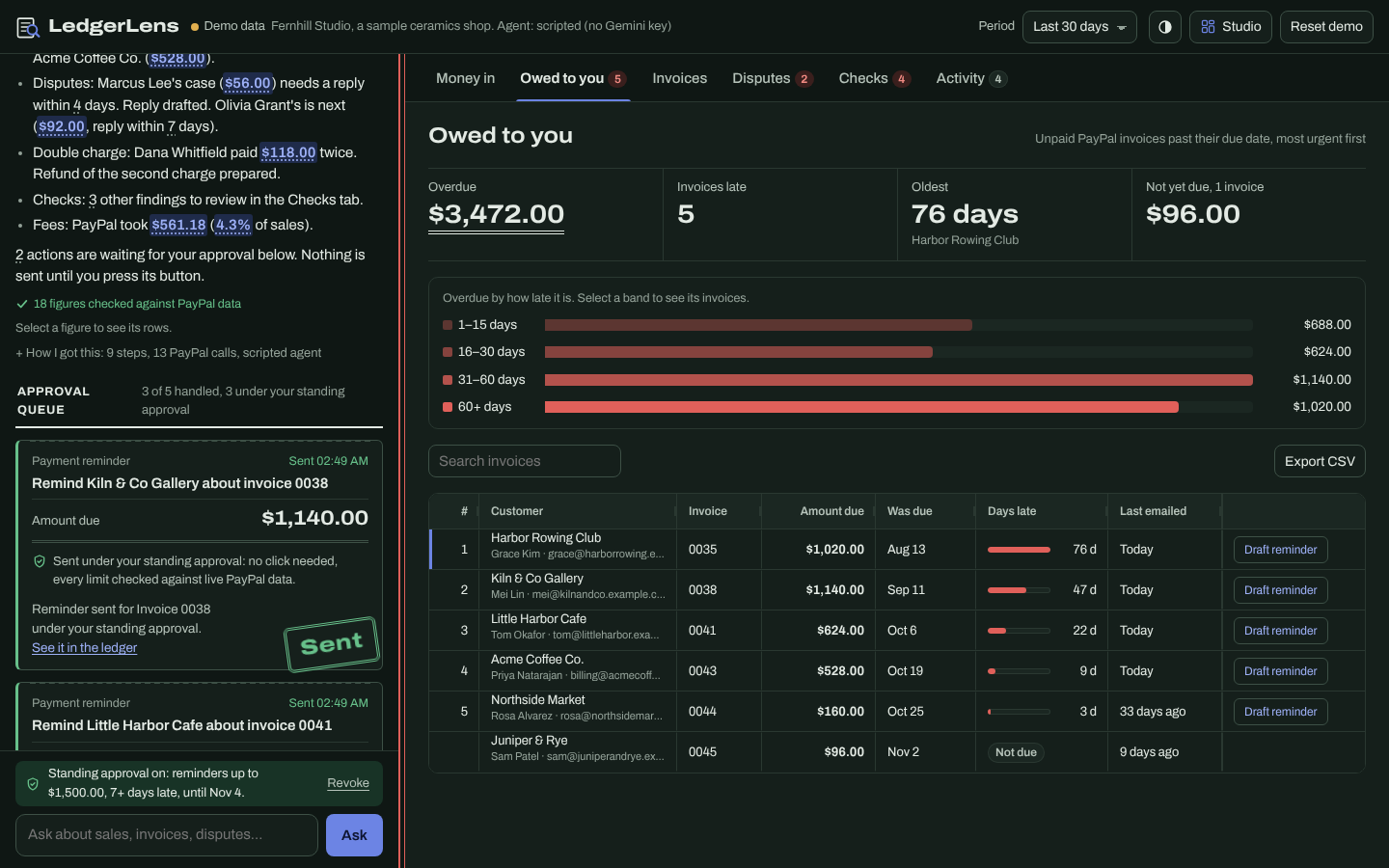
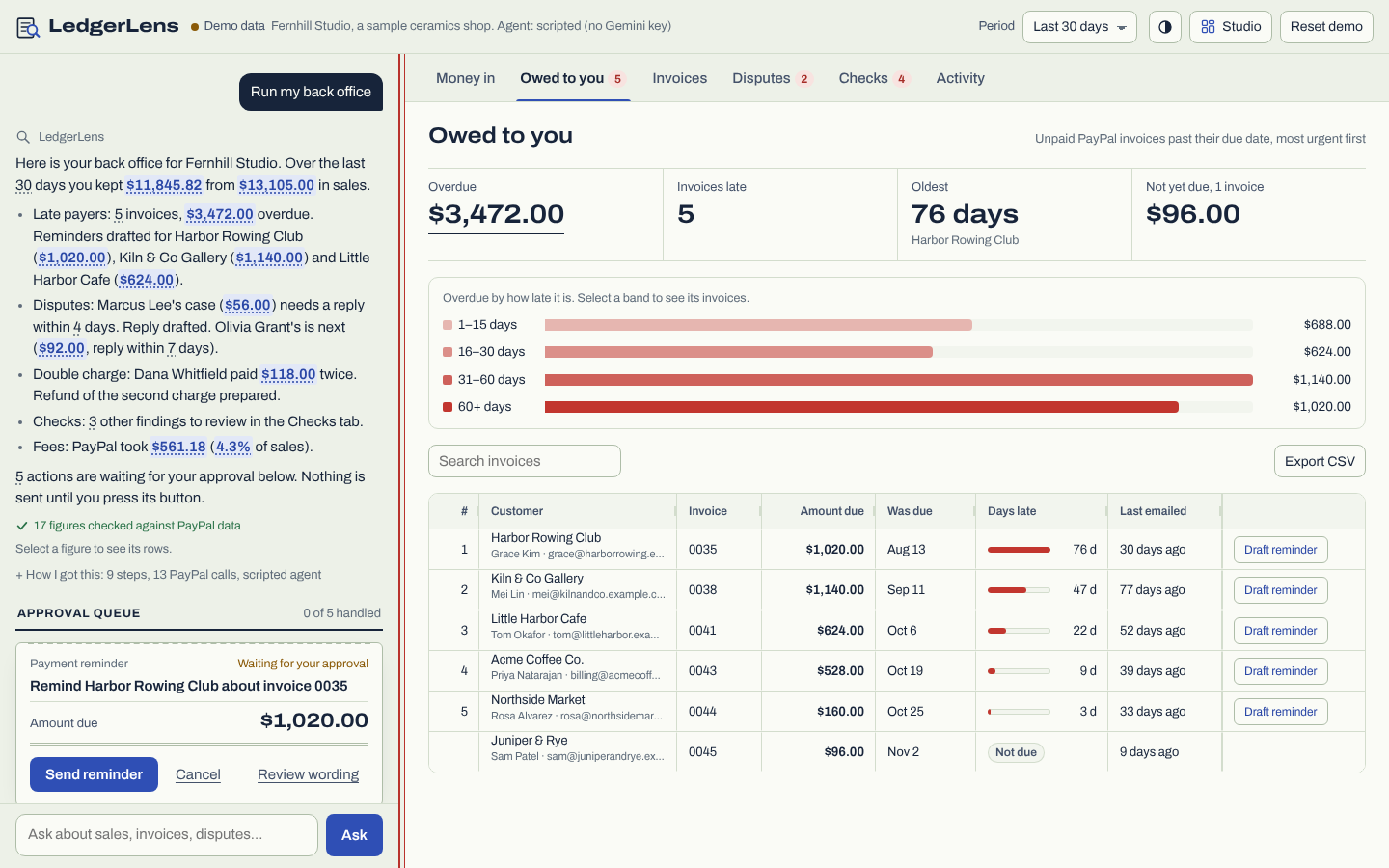
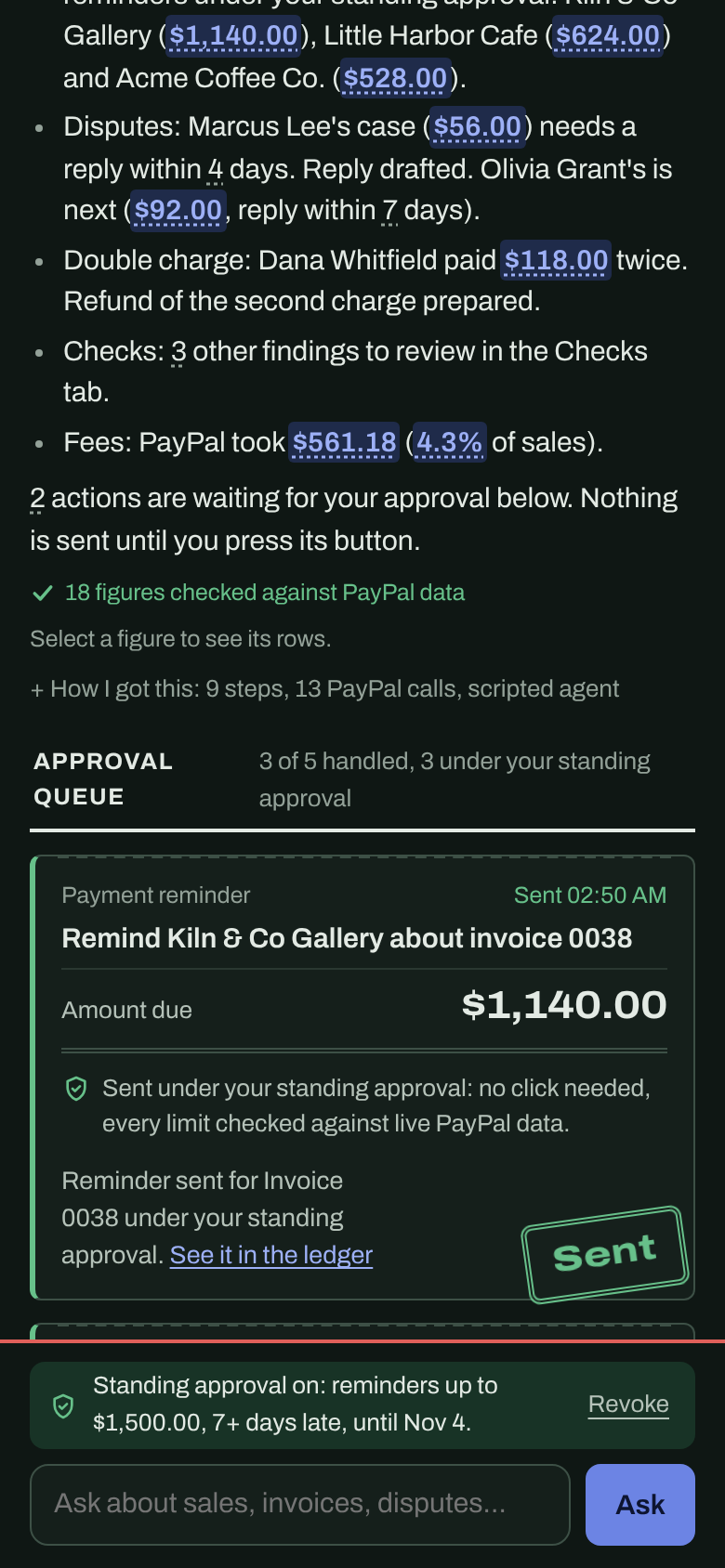
- What needs you today. The first screen shows the seller's own money at stake: $3,472.00 overdue across 5 invoices (the oldest 76 days late), $148.00 in 2 disputes waiting on a reply (the next deadline in 4 days), a $118.00 possible double charge, and the share of sales that went to PayPal fees. Every line opens the rows behind it.
- Run my back office. One click and the agent works through the whole account: Transaction Search, overdue invoices, disputes, anomaly checks. It drafts reminders for the most urgent late payers, a calm reply to the dispute with the nearest deadline, and the refund of the duplicate charge, and lines them up in an approval queue. Nothing is sent until the seller presses each button.
- Standing approvals. After approving a reminder, the seller can let LedgerLens chase late payers on its own, inside limits they sign: invoices up to $1,500, at least 7 days late, not emailed in the last 7 days, at most 5 per run, for 7 days. The next run sends those reminders by itself, and every limit is checked against live PayPal data at that moment. Refunds, accepting a claim, new invoices and replies to buyers can never be delegated: money never moves without a click.
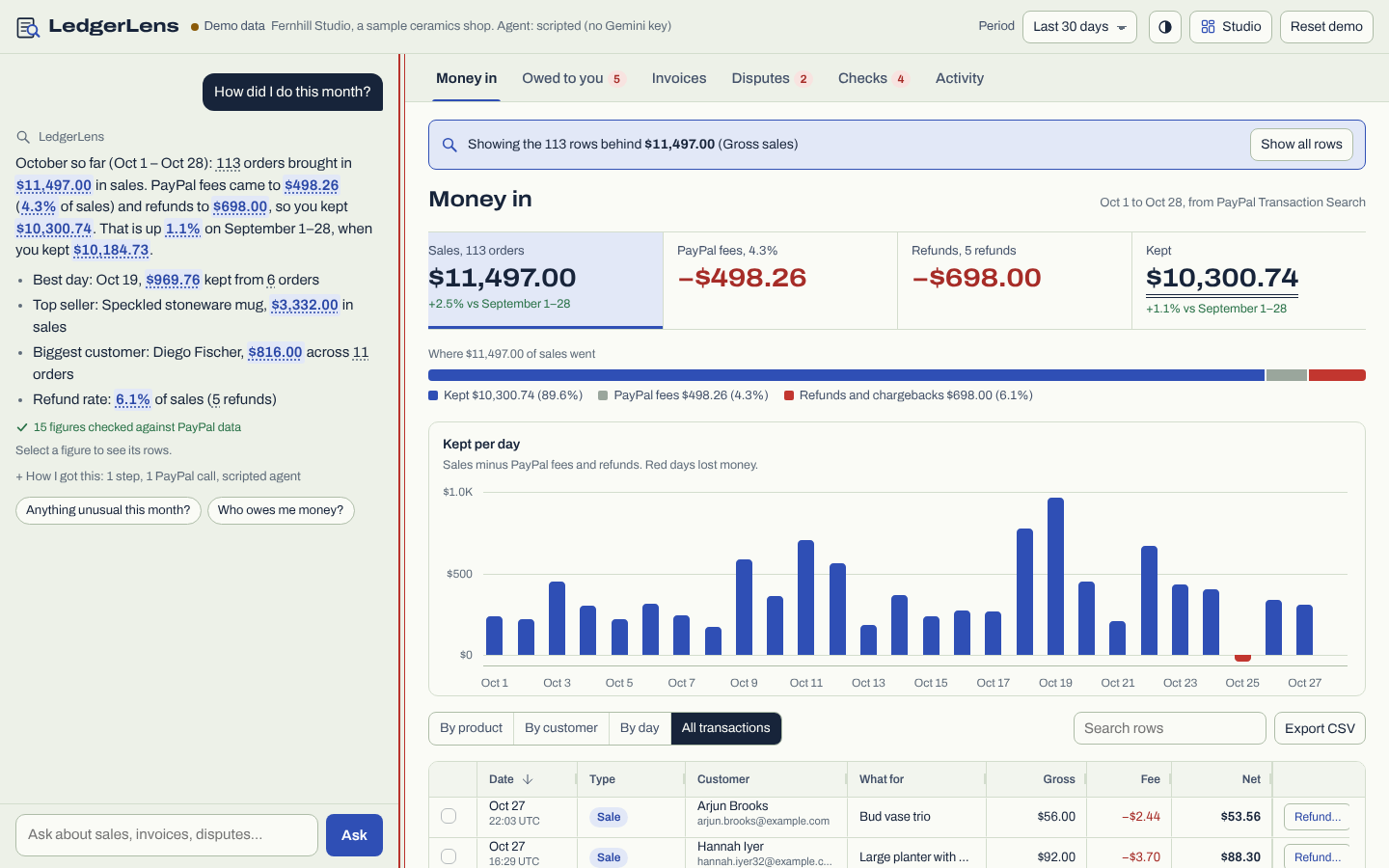
- Every figure has a receipt. Each number in an answer is a button that narrows the grid to the exact rows behind it. A grounding check rejects any answer that states a number the PayPal data didn't return.
- Five single tasks in plain words. "How did I do this month?" (sales, fees, refunds, what you kept, against last month). "Who owes me money?" (ranked overdue invoices, a drafted reminder). "Invoice Acme $480 for 6 hours of consulting, due in 14 days" (finds the customer and their email in past invoices, splits 6 hours at $80, sets the due date). "Triage my disputes" (what each buyer claims, days left, what evidence to gather, a drafted reply). "Anything unusual?" (duplicate charges, outsized refunds, fee spikes, chargebacks).
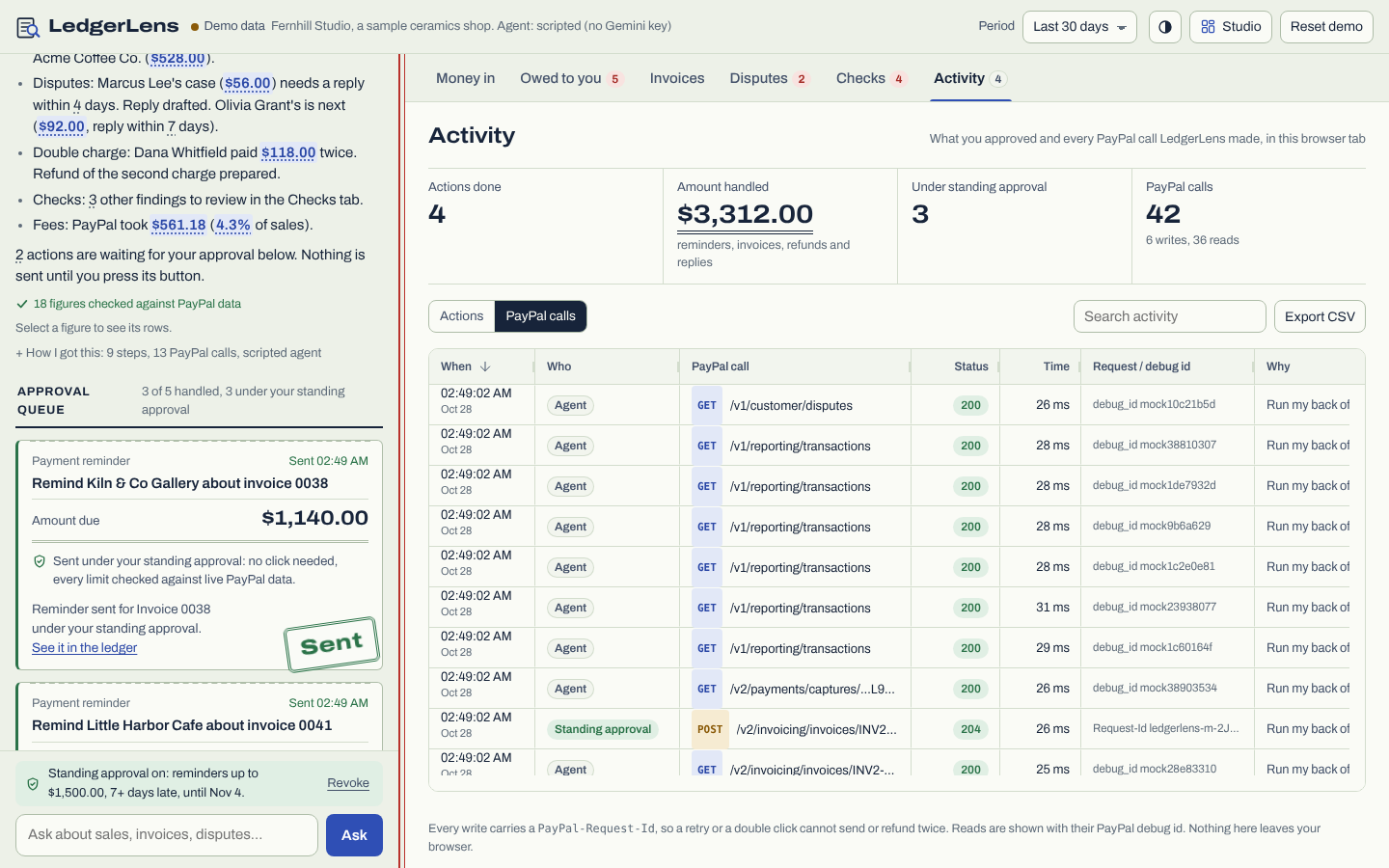
- Activity. An audit trail of every approval, cancellation and standing-approval action, and every PayPal HTTP call with its status and
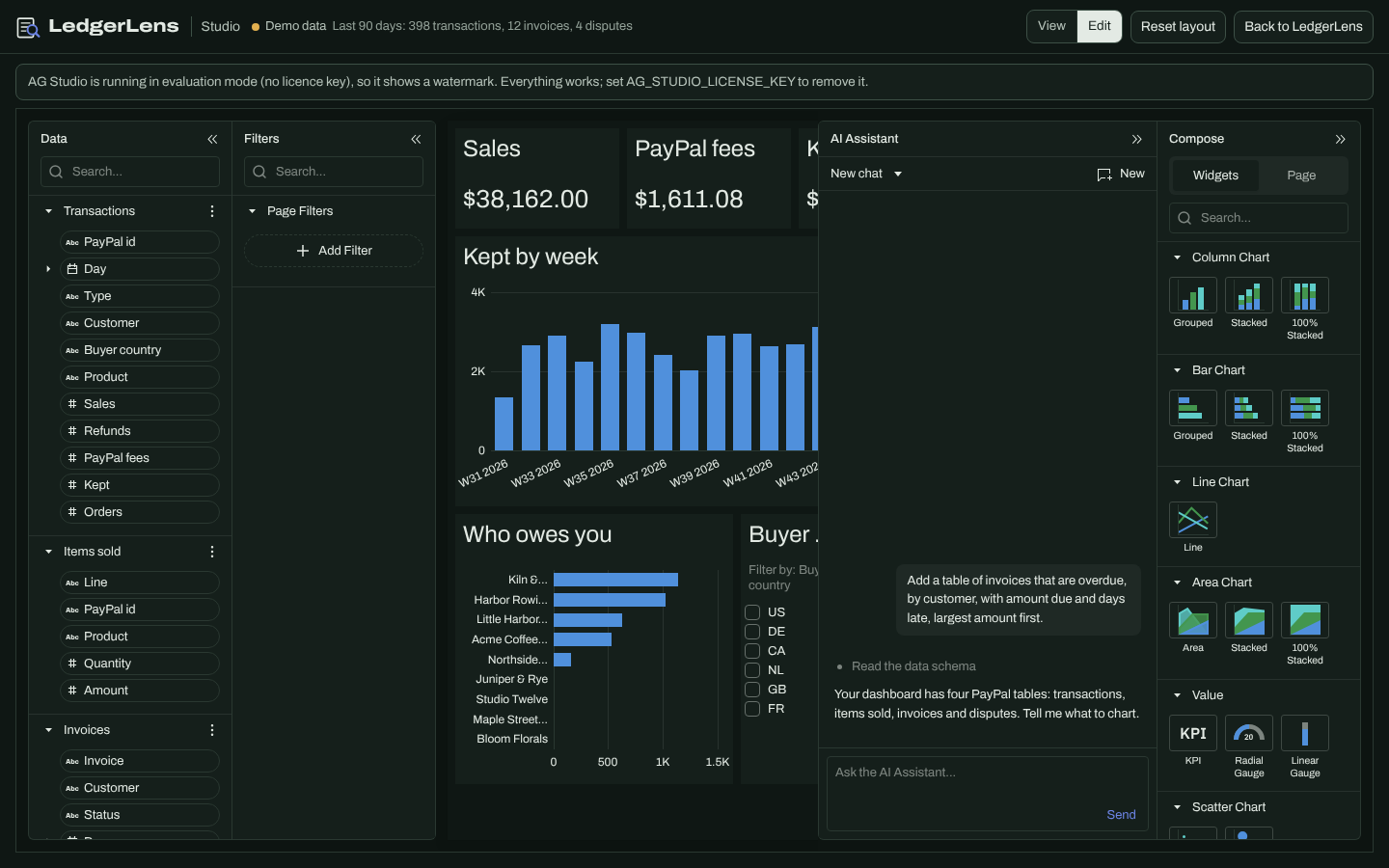
PayPal-Request-Id, with an "amount handled" total and CSV export. - Studio. A self-serve dashboard of the same PayPal data in AG Studio, where AG Studio's own AI agents (running on Gemini through LedgerLens) build widgets from a sentence.
- Other agents welcome, on the same terms. LedgerLens is an MCP server: Claude, ChatGPT, Cursor or an agent built on PayPal's Agent Toolkit can read the grounded figures and draft actions, and each draft comes back as a link that opens the voucher in LedgerLens for the seller to approve.
It works on a phone and in dark mode, and it runs for anyone: no keys gives a demo shop and a scripted agent; sandbox keys give live sandbox data (with a one-click switch back to the demo shop); a Gemini key turns on the model.
How we built it
- PayPal REST APIs, server-side, in the sandbox. OAuth2 client credentials; Transaction Search (31-day windows, paged); Invoicing v2 (search, list, get, create, send, remind); Disputes (list with
next_page_token, details, send-message, accept-claim,disputed_transaction_idto check for an open case); Payments v2 (get capture, refund withPayPal-Request-Id); Orders v2 for seeding. The client caches tokens, shares one token request between concurrent calls, refreshes on a 401, retries reads on 429 and 5xx withRetry-After, retries writes only with a request id, maps errors to plain fixes, and reports every request (with PayPal's debug id) to the activity log. - A Gemini agent with tools. Function calling over the REST API: 9 read tools and 5 proposal tools. Proposal tools never call PayPal; they check the action against live data and return a proposal signed with an HMAC over every path, amount, id and recipient. The model never sees the token. The back-office sweep is a playbook: four reads in one turn, then the proposals.
- Standing approvals. A mandate is HMAC-signed by the server over its kind, limits, data mode and dates, kept in the seller's browser and verified on every request. Inside the reminder tool, a covering mandate runs the signed steps with
PayPal-Request-Id: ledgerlens-m-<mandate>-<invoice>, so the same reminder can't go out twice under one mandate. Only payment reminders are delegable, and never on a live account. - Grounding. Tools register every number they return with a pointer to its rows; each amount, percentage and count in an answer must match one, allowing only display rounding. One rewrite request, then a template answer written from the tool results. Matched numbers become the receipts.
- MCP server. Streamable HTTP with JSON responses (protocol 2025-11-25, 2025-06-18, 2025-03-26), zero dependencies:
run_back_officeplus the 14 agent tools; drafts return signedapprove_urls; open on demo data, bearer-protected with real keys, Origin-checked. - AG Grid, AG Charts and AG Studio. AG Grid Community with a custom ledger theme (Theming API bound to our CSS variables), custom cell components, an external-filter "lens" for receipts, a full-width drill-down row per transaction kept in place through sorting, an activity grid, pinned totals and CSV export; AG Charts for money kept per day. AG Studio 3.0 on its own page with four related PayPal tables, a starting report, cross-filtering, and the Studio Agent Framework: AG's five agents running on Gemini through our own
AgLlmAdapter, which forwards each turn to a server endpoint that translates it to Gemini (tool schemas, tool choice, thought signatures) and back. - Demo data that behaves like PayPal. A mock PayPal API built from PayPal's published OpenAPI specs (same field names, status codes, validation errors, idempotency) with six months of activity for a ceramics shop. Each browser keeps a journal of its demo writes, so state survives serverless instances and visitors don't see each other's changes.
- A setup page for non-developers that checks the PayPal connection with a fix for each problem and fills a sandbox with orders, refunds and invoices in small, resumable, idempotent steps.
- Plain Node.js 20 on Vercel, zero runtime dependencies, NDJSON streaming of each step and PayPal call, a strict Content-Security-Policy, per-IP rate limits.
Challenges we ran into
- Letting an agent near money safely, and then letting it do more. The usual pattern is "the model calls a tool and the tool acts". We split every write into propose and approve, signed so only the message text can be edited. Delegation then needed its own design: limits that are checked against live data at the moment of acting, a request id per mandate and invoice so a replay can't double-send, and a hard line that money-moving actions are never delegable.
- Stopping invented numbers without stopping useful answers. A naive check flags dates and invoice numbers; a loose one lets computed totals through. Counts the model naturally says ("3 actions are waiting") had to come from tool results too, so the tools return them.
- API limits. Transaction Search accepts 31 days per request and can take three hours to show new activity; sellers can't open disputes through the API; some Invoicing responses are a link instead of the invoice. Each shaped the client, the seeding and the setup notes.
- A demo that works for every judge. Serverless instances don't share memory, so demo actions (including those sent under a standing approval) travel with the browser as a journal.
- Two agent worlds in one product. AG Studio's agents speak an OpenAI-Responses-like protocol and Gemini 3 needs its thought signatures back on every function call in a turn; the adapter carries them on the tool-call items Studio keeps in its run history.
Accomplishments that we're proud of
- The arc from supervised to delegated: the same reminder is first approved by hand, then sent by the agent inside signed limits, while the refund next to it still waits for a click.
- Receipts on every figure, and the start screen's lines too.
- 119 automated tests and an end-to-end browser run with 299 checks (the sweep, the queue, a standing approval, the activity log, every single flow, the drill-down, the setup page, an MCP approval link and the Studio page with an agent turn) at desktop and phone size, in light and dark.
- It runs for anyone, with zero runtime dependencies.
What we learned
- Grounding works best when it is structural: the tools, not the model, decide which numbers exist, and the UI shows where each one came from.
- Trust in an agent is a dial, not a switch. "Approve each action", "approve a class of actions within limits" and "never delegate this" are three different product decisions, and the UI has to make each one visible.
- PayPal's OpenAPI specs are detailed enough to build a faithful mock, which made the whole app testable without touching a live account.
What's next
- Run the sweep on a schedule and send a morning digest with the approval queue.
- More delegable actions with their own limits (for example, adding shipment tracking to a payment), still never refunds.
- Dispute evidence upload through
provide-evidence. - Read tools through PayPal's remote MCP server as an alternative transport, and Store Sync once it is open to sandbox apps.
- Multi-currency summaries and the seller's own time zone.
AI tools used
- Google Gemini (
gemini-3.5-flash-liteby default) runs the agent at runtime: it reads the question, picks the PayPal and analytics tools, plans the back-office sweep, and writes answers and draft messages. It cannot compute figures (a grounding check rejects any number no tool returned) and cannot execute writes, except payment reminders inside a standing approval the seller signed. On the Studio page, Gemini drives AG Studio's built-in agents to build dashboard widgets. - Claude (an AI coding assistant) helped write the code, tests and documentation.
Testing instructions for judges
- Hosted demo: https://ledgerlens-two.vercel.app. It opens on Demo shop: Fernhill Studio, a sample ceramics shop with six months of activity, where everything, including approving reminders, invoices and refunds, runs against a built-in copy of the PayPal API. Reset demo starts over. Press PayPal sandbox in the top bar to see the same app on a real PayPal sandbox account (orders and invoices created through the REST APIs).
- Two minutes: press Run my back office; approve the first reminder; choose Let LedgerLens send reminders like this on its own… and sign; press Run my back office now and watch three reminders go out on their own while the refund waits; open Activity. Then select any blue figure to see its rows, and open Studio in the top bar.
- Single flows: "How did I do this month?", "Who owes me money?", "Invoice Acme $480 for 6 hours of consulting, due in 14 days", "Triage my disputes", "Anything unusual this month?".
- MCP:
POST https://ledgerlens-two.vercel.app/api/mcp?source=demowith JSON-RPC (tools/list, thentools/callwithrun_back_office); open any returnedapprove_url. - Run it yourself: Node.js 20+,
npm start(no install step), http://localhost:3000.npm testruns the test suite. - With your own sandbox: follow "Set up without a terminal" in the README (sandbox app keys plus
ADMIN_SECRETin Vercel, then Check connection and Fill sandbox on/admin.html). AddGEMINI_API_KEYfor the model and the Studio assistant.
Built With
- ag-charts
- ag-grid
- ag-studio
- gemini
- javascript
- model-context-protocol
- node.js
- paypal-rest-api
- paypal-sandbox
- vercel

Log in or sign up for Devpost to join the conversation.