💡 Inspiration
Across South Asia, over 12 million small retail shops still rely on handwritten paper ledgers — locally called "khata" or "bahi khata" — to track customer credit (udhaar) and daily sales. These shopkeepers are the backbone of local economies: the corner grocery store, the neighborhood tailor, the small hardware shop.
The problem is real and painful:
- Lost revenue — Pages get torn, ink fades, and amounts are miscalculated. A shopkeeper in Lahore told me he estimates losing ₨5,000–10,000 every month to forgotten debts.
- No visibility — Without a clear picture of who owes what, shopkeepers can't prioritize collections or understand their cash flow.
- Social friction — Following up on unpaid credit is culturally awkward. Shopkeepers often avoid it entirely rather than risk damaging a customer relationship.
- Digital divide — Existing accounting apps assume literacy in English, familiarity with software interfaces, and willingness to type every transaction. Most shopkeepers won't do that — they're busy running a shop.
LedgerLens was born from a simple insight: don't force shopkeepers to change how they work. Let them keep writing in their familiar notebooks. Just make that handwritten data digitally useful — automatically.
🔍 What LedgerLens Does
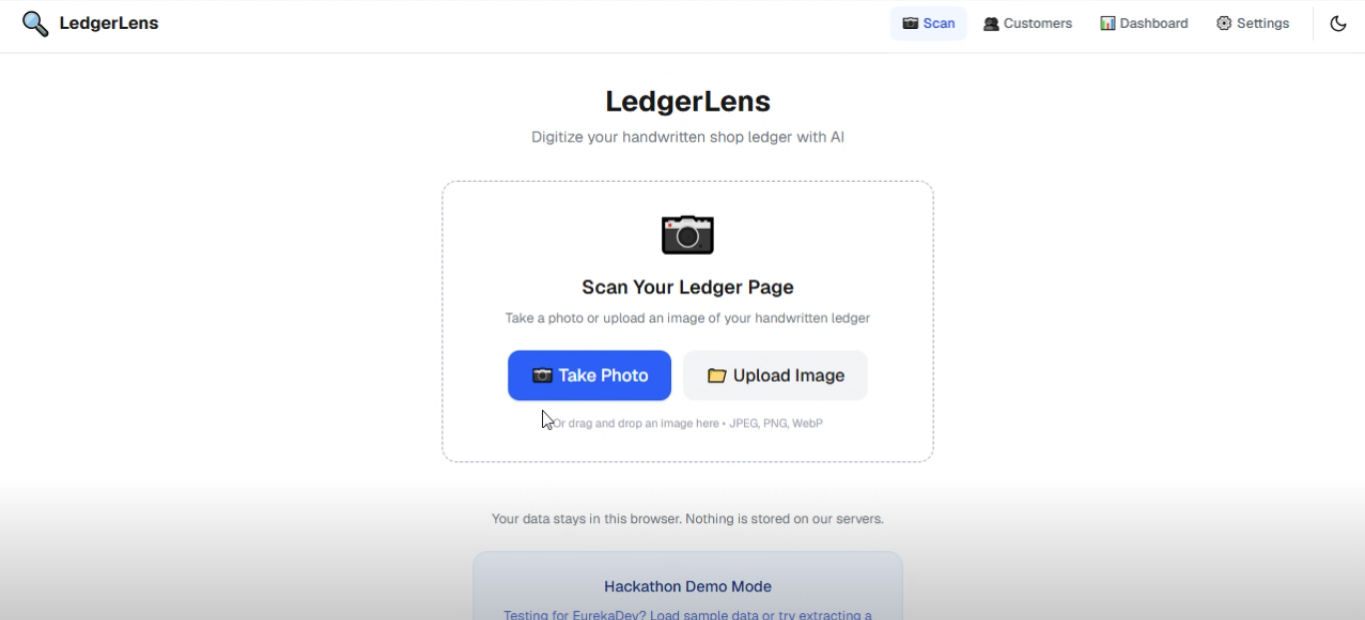
LedgerLens is a web application that transforms handwritten shop ledger pages into structured, searchable digital records using AI-powered handwriting recognition. The entire workflow takes under 30 seconds:
1. 📷 Scan
The shopkeeper photographs a ledger page using their phone's camera or uploads an existing image. The app automatically resizes and compresses the image client-side (to ≤1600px JPEG at 80% quality) before sending it to the server — this keeps the app fast even on slow mobile networks and stays within deployment platform limits.
2. 🤖 AI Extraction
The image is sent to a server-side API route where Google's Gemini vision model reads the handwriting. The AI is specifically prompted to:
- Handle mixed scripts — English, Urdu, Hindi, and Roman Urdu/Hinglish on the same page
- Recognize Eastern Arabic numerals (۱۲۳) and Devanagari numerals (१२३) alongside standard digits
- Understand South Asian accounting terminology — words like udhaar (credit), jama (deposit), baqaya (balance due), wapas (returned), and lena hai (to collect)
- Intelligently infer whether each line is a credit given or a payment received based on contextual cues
- Assign a confidence score (0–1) to every extracted entry, honestly flagging uncertain readings rather than guessing
- Return structured JSON validated against a strict Zod schema
3. ✏️ Review & Correct
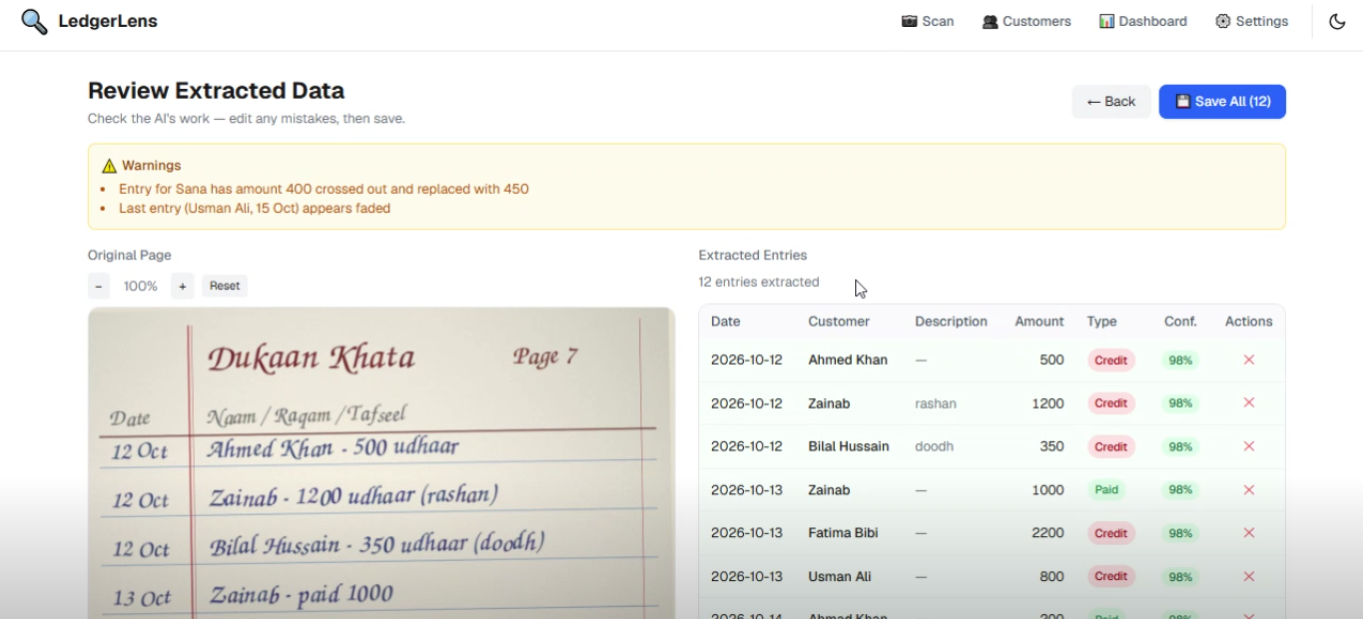
The user sees the original ledger image side-by-side with an editable table of extracted data. Key design decisions:
- Low-confidence cells are highlighted in amber so the shopkeeper knows exactly where to double-check
- Every cell is click-to-edit with full keyboard support (Enter/Tab to save, Escape to cancel)
- The credit/payment direction can be toggled with a single tap
- An "Approve All" button lets the user quickly confirm when the AI got everything right
- The raw AI text is shown in a collapsible section for transparency
4. 👥 Smart Customer Matching
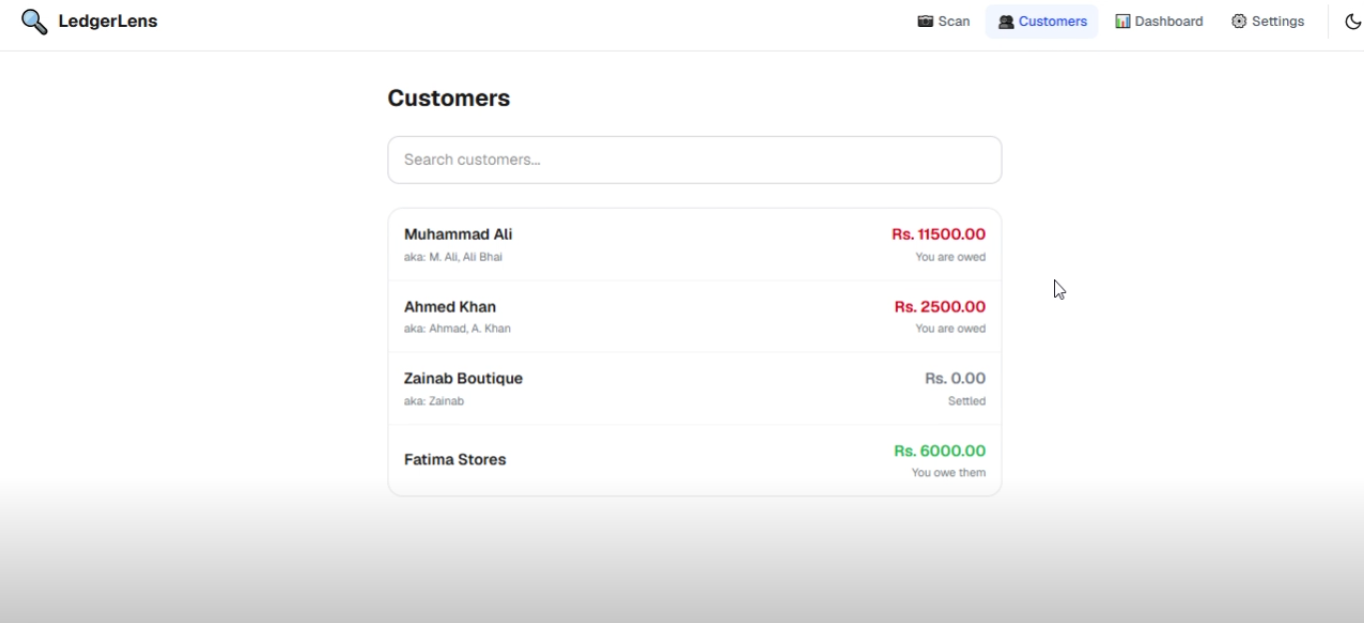
When entries are saved, LedgerLens uses Fuse.js fuzzy matching to automatically link names to existing customers — even when the shopkeeper writes the same person's name differently each time (e.g., "Ahmed Khan", "Ahmad", "A. Khan"). The system uses a three-tier approach:
- High confidence match → automatically linked, spelling variant saved as an alias
- Ambiguous match → a dialog asks the user: "Is this the same customer?" with an option to save the alternate spelling
- No match → a new customer is created automatically
5. 📊 Business Dashboard
A real-time dashboard gives shopkeepers insights they've never had before:
- Total Outstanding — the total amount currently owed by all customers
- Collected This Month — payments received in the current month
- Entries Needing Review — a count of uncertain AI extractions that still need human verification
- Top 5 Debtors — ranked list of customers with the highest unpaid balances
- Weekly Credit vs. Payments Chart — a Recharts bar chart visualizing cash flow trends over the last 6 weeks
6. 💬 Payment Reminders
For any customer with an outstanding balance, the shopkeeper can generate a polite, culturally appropriate payment reminder in:
- English — "Hope you're doing well. Just a polite reminder that your pending balance is Rs. 2,500..."
- Urdu — "السلام علیکم، آپ کے کھاتے میں 2500 روپے بقایا ہیں..."
- Hindi — "नमस्ते, आपके खाते में ₹2500 बकाया हैं..."
The message is pre-filled with the customer's name and exact balance. One tap opens it directly in WhatsApp via a wa.me deep link, or the shopkeeper can copy it to send through any messaging app.
7. 📥 Data Export
All data can be exported as:
- Excel (.xlsx) — a workbook with two sheets: "Customers & Balances" and "All Transactions"
- CSV — a flat transaction file for spreadsheet analysis
This ensures shopkeepers always have a backup and can share records with an accountant if needed.
🔒 Privacy-First Architecture
This is a core design principle, not an afterthought.
All customer data — names, phone numbers, balances, and transaction history — is stored exclusively in the user's browser using IndexedDB. There is no cloud database, no user accounts, no server-side storage of any kind.
The only data that leaves the device is the ledger page image, which is sent to the Gemini API for text extraction. The image is processed in memory on the server and is never logged, stored, or cached.
This matters because:
- Shopkeepers handle sensitive financial data about their customers and community
- Many shopkeepers are not comfortable trusting cloud services with this information
- In regions with unreliable internet, a local-first app remains fully functional for viewing, editing, and exporting data — the network is only needed for the initial AI scan
🏗️ Technical Architecture
┌─────────────────────────────────────────────────────┐
│                    Client (Browser)                  │
│                                                     │
│  Camera/Upload → Resize (≤1600px JPEG 0.8)          │
│       ↓                                             │
│  POST /api/extract (base64 image)                   │
│       ↓                                             │
│  Review Screen ← Editable Table + Image Viewer      │
│       ↓                                             │
│  Fuse.js Name Matching → Merge Dialog               │
│       ↓                                             │
│  IndexedDB (Dexie.js) ← All persistent storage      │
│       ↓                                             │
│  Dashboard / Customers / Reminders / Export          │
└─────────────────────────────────────────────────────┘
                        ↕
┌─────────────────────────────────────────────────────┐
│              Server (Next.js API Route)              │
│                                                     │
│  IP Rate Limiting → Image Validation                │
│       ↓                                             │
│  Gemini Vision API (structured JSON output)          │
│       ↓                                             │
│  Zod Schema Validation (retry once on failure)       │
│       ↓                                             │
│  Post-processing: normalize amounts, parse dates,    │
│  flag low-confidence, arithmetic check               │
└─────────────────────────────────────────────────────┘
Tech Stack
| Layer | Technology | Why |
|---|---|---|
| Framework | Next.js 16 (App Router) | Server-side API routes + React client in one codebase |
| Language | TypeScript (strict mode) | Type safety across the full stack, zero any |
| Styling | Tailwind CSS | Mobile-first, responsive, dark mode with class strategy |
| AI | Google Gemini API (@google/genai) |
Best-in-class vision model for handwriting, structured JSON output |
| Local Storage | Dexie.js (IndexedDB) | Typed, reactive wrapper for browser-native storage |
| Validation | Zod | Runtime schema validation for AI output and form data |
| Charts | Recharts | Declarative React charting library |
| Search | Fuse.js | Lightweight fuzzy search for customer name matching |
| Export | SheetJS (xlsx) | Generate Excel and CSV files client-side |
| Testing | Vitest | Fast unit testing with 88 tests across 7 test suites |
| Deployment | Vercel | Zero-config Next.js hosting with edge functions |
AI Provider Abstraction
The AI call is wrapped behind a LedgerExtractor interface in lib/ai/extractor.ts. This means swapping Gemini for another vision model (GPT-4o, Claude, etc.) requires changing only one file — no other code is affected.
🧗 Challenges I Faced
Mixed-Script Handwriting Recognition
A single ledger page can contain English, Urdu (right-to-left script), Hindi (Devanagari), and Roman Urdu all mixed together. Numbers might appear as standard digits (123), Eastern Arabic (۱۲۳), or Devanagari (१२३). Engineering a system prompt that reliably handles all of these — and correctly infers meaning from cultural context — took extensive iteration and testing.
Fuzzy Customer Name Matching
Shopkeepers write the same customer's name differently almost every time. "Muhammad Ali" on Monday becomes "M. Ali" on Tuesday and "Ali Bhai" on Friday. Setting the right Fuse.js thresholds so the system auto-links when it's confident, asks the user when it's uncertain, and creates a new customer when the name is truly different — this required careful tuning and real-world testing.
Client-Side Image Processing
Images from phone cameras can be 4000+ pixels and several megabytes. Sending that directly would hit Vercel's 4.5MB request body limit and make the upload painfully slow on mobile networks. Building a client-side resize pipeline (canvas-based, max 1600px, JPEG at 80% quality) that preserves text legibility while dramatically reducing file size was a key technical challenge.
Local-First with Computed Data
Building a dashboard with real-time aggregations (total outstanding, monthly collections, weekly charts) entirely from IndexedDB — with no backend queries — required careful data modeling. Dexie's useLiveQuery hook made this possible by automatically re-rendering components when the underlying data changes.
Handling AI Uncertainty Honestly
It would be easy to hide the AI's uncertainty and show clean results. Instead, I made the deliberate choice to surface confidence scores, highlight uncertain cells, and show the raw AI output. This builds trust with the user and makes the system more reliable in practice — a shopkeeper who catches one mistake will trust the tool for the other 50 correct entries.
📚 What I Learned
- Structured AI output is a game-changer. Using Gemini's
responseSchemawith Zod validation to get guaranteed-shape JSON from a vision model eliminated an entire class of parsing bugs. - Provider abstraction pays off immediately. Wrapping the AI behind an interface meant I could test the entire pipeline with mock data before ever calling the real API.
- Privacy-by-design is a competitive advantage, not a limitation. When your users handle sensitive financial data about their community, "we never see your data" is the strongest feature you can offer.
- South Asian accounting has real complexity. Handling multiple scripts, numeral systems, cultural terms, and right-to-left text taught me more about internationalization than any textbook.
- Fuzzy matching is an art, not a science. The thresholds that feel right depend heavily on the domain — names in Urdu/Hindi have very different similarity patterns than English names.
🔮 What's Next
- Offline PWA mode — Cache the app shell so it works without internet after the first load (only the AI scan needs connectivity)
- Multi-device sync — Encrypted peer-to-peer replication so a shopkeeper can access records from their phone and a shared shop tablet
- Voice input — Let shopkeepers dictate entries in Urdu/Hindi for times when they can't write
- Printed invoice OCR — Extend the AI to handle printed supplier invoices alongside handwritten pages
- SMS reminders — For customers who don't use WhatsApp
📊 Evaluation & Testing
The project includes 88 unit tests across 7 test suites covering:
- Balance calculation (7 tests)
- Amount normalization including Eastern Arabic/Devanagari numerals (24 tests)
- Date parsing across multiple formats (19 tests)
- Zod schema validation (10 tests)
- AI post-processing pipeline (12 tests)
- Customer name fuzzy matching (9 tests)
- Reminder message generation and WhatsApp link formatting (7 tests)
An automated evaluation script (npm run eval) benchmarks the AI extractor against hand-labeled ground-truth data and outputs a field-level accuracy report to docs/EVALUATION.md.
Built With
- api
- css
- dexie.js
- fuse.js
- gemini
- indexeddb
- next.js
- recharts
- sheetjs
- tailwind
- typescript
- vitest
- zod


Log in or sign up for Devpost to join the conversation.