-
-
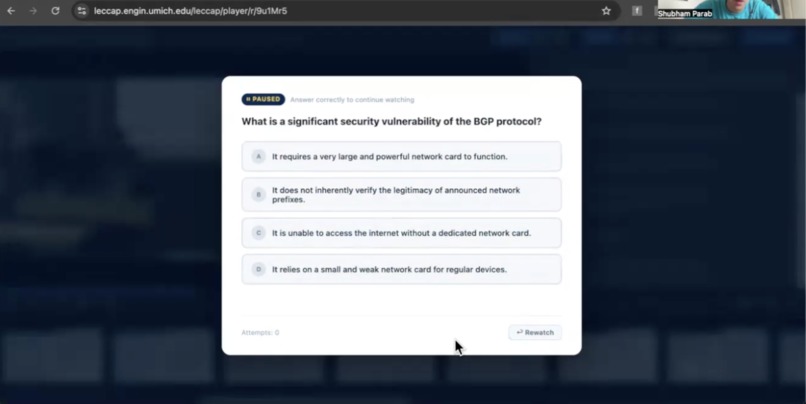
Question posed between concepts
Inspiration
Many, many students opt for watching lectures online as opposed to attending them in person for a number of good reasons, including flexibility and convenience. But over 95% say they check digital devices while doing so, and 57% say maintaining interest is harder online, and it's easy to see why. Mobile devices are at close reach, and the atmosphere doesn't out the pressure of an academic setting.
What it does
LecturePuzzle is a chrome extension that works directly within Lecture Capture (UMich EECS lecture recording software) to ask the viewer questions that keep them engaged, when it matters. But it’s not just a video to quiz generator.
How we built it
We considered two important things to make this product unique and suited for college lecture viewers. The first is context. You can't just generate a question after each slide, it must have context about when a concept starts, ends, and transitions. We break the video transcript into chunks before and after the viewer's current position and perform similarity testing to understand when a concept transition occurs. By doing so, we are both able to pose questions exactly when one concept transitions to the next, while increasing specificity of the question by focusing on a particular concept. The second is user metrics. When a user watches a lecture, there's a myriad of data that can determine user attention, including time in video, slide age, and tab focus. We leverage this to pose questions when user attention is expected to be low, boosting engagement.
On the technical side, the extension inspects the LecCap DOM to extract transcript content, then breaks it into chunks and performs Jaccard similarity analysis to predict concept changes (built in JavaScript). User metrics are also calculated using JS (as is everything since this is a chrome extension), using a standardized weighted sum of the metrics, with the highest weight being given to tab focus, then to slide age and video time. When a question is to be posed, the most recently segmented concept is sent to Gemini with a detailed prompt. When the question and answers are received, an overlay is injected into the LecCap page, and the user cannot escape this (without reloading the page). A rewatch option is offered, which moves the video back 25 seconds and poses the exact same question at the time it was originally posed.
Challenges we ran into
Originally, we planned to harvest slide data, by first extracting the slide canvas from the DOM and then performing OCR on it, however, this appears to be difficult as it's hard to 1) extract the canvas without security protections kicking in (basically don't taint the canvas) and 2) determine when exactly a slide should be rescanned, as annotations can throw off our methods. Ultimately, we opted for transcript scanning, as even though it does not offer the same depth as slide images would, slide images are generally explained by the instructor, and the instructor may add content not on the slides that is relevant.
Accomplishments that we're proud of
It works well, asking specific, relevant questions, and the concept segmentation is freakishly good. In addition, it's very easy to set up, and user interactions are minimal and seamless.
What's next for LecturePuzzle
We aim to supplement transcript content with slide content, directly integrating with Canvas LMS to fetch additional context, and improving topic detection.

Log in or sign up for Devpost to join the conversation.